

What is Dray?
Dray is a free, open-source macOS application for running several coding-agent sessions at once. It has no model of its own: it starts the agent CLIs you already installed and signed in to (Claude Code, Codex, pi, fx and Grok Build) and draws their work in a native chat window. Each session can run in its own git worktree, and sits beside a diff view, a pull request panel, an issue panel and a Chromium browser. The project is built and maintained by Yogesh under the monorepo-labs GitHub organization, and is sponsored through Guillermo Rauch's OSS Grants programme.
The Mac app is distributed as a single universal DMG for Apple silicon and Intel Macs running macOS 11 or later, signed and notarized by Apple, from drayhq.com and the GitHub releases page. The repository publishes two release lines: vX.Y.Z tags for the desktop app and cli-vX.Y.Z tags for the dray command-line tool, which ships as tarballs with SHA256 files for macOS and Linux on x86_64 and arm64. The same CLI installer turns a Linux machine into a Dray server that the Mac app drives over SSH. There is no Windows build, no Linux desktop app, no browser client and no phone app.
The current desktop release is 0.29.17, published November 3, 2026, alongside CLI 0.13.10. It bundles the dray CLI inside the app and keeps ~/.local/bin/dray in sync on every launch, adds forking for fx sessions and disables fast mode for Opus 4.8, where Claude Code retired it. Version 0.28.0 moved sessions into a background server so agents keep working after the window closes, and added remote Linux servers. Version 0.29.1 introduced Dray Island, a composer that floats over every app, and 0.29.15 let agents reach sessions on other machines with dray --machine. The first stable release, 0.1.0, shipped on August 14, 2026, and the changelog has about a hundred entries since then, betas included.
The desktop app is a Tauri application with a React 19 and Vite frontend and a Rust backend. The CLI is a separate Rust binary that talks to the running app over a Unix socket at ~/.dray/dray.sock, with wire types shared through a dray-proto crate. The embedded browser uses Chromium through CEF, downloaded after first launch rather than bundled. Local dictation runs on transcribe.cpp with GGUF speech models fetched from Hugging Face. The project is licensed under Apache-2.0, and third-party notices, including four MIT-licensed colour themes and CC-BY-4.0 speech models, are listed in the repository.
Dray does not install agents, store agent logins or proxy model traffic: each agent CLI keeps its own credentials and talks to its own provider, so usage is billed through your existing subscription or API key. Transcripts, settings and browser profiles live in ~/.dray. Anonymous usage analytics are on by default and can only be disabled with an environment variable, which the privacy page documents event by event.
Dray screenshots
Explore the interface. Open a screenshot to view it at full size.
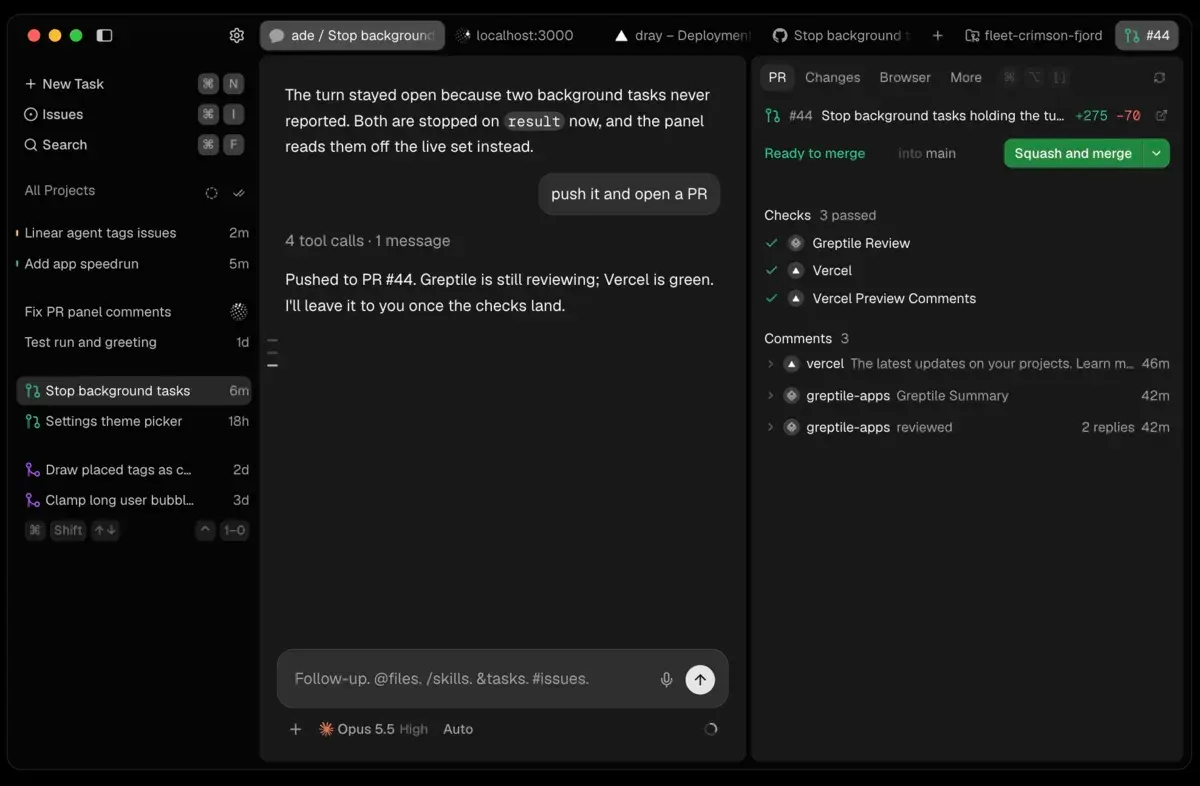
Official product screenshot from drayhq.com: a session that pushed PR #44, with checks and review comments in the right panel.
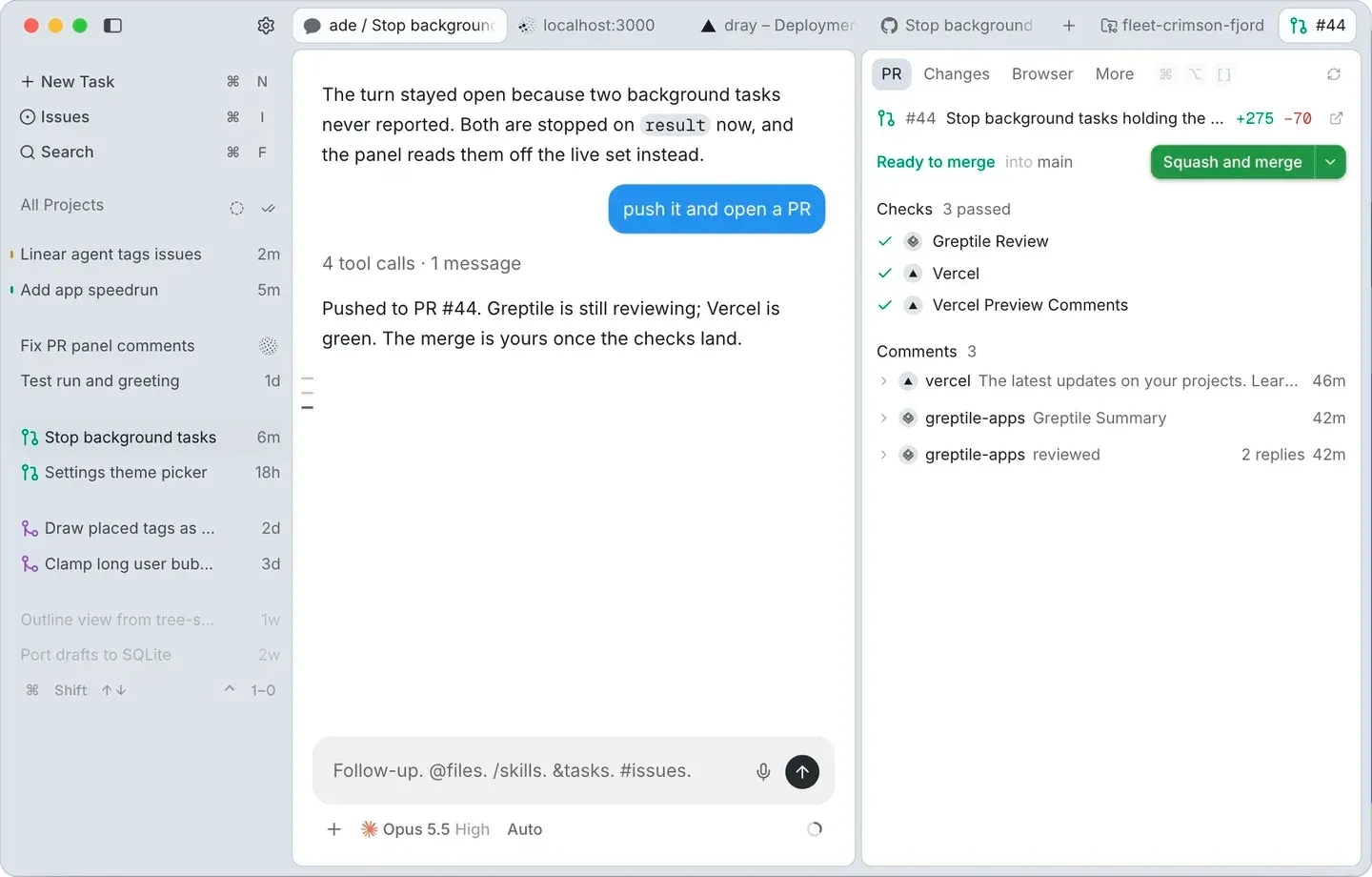
Light-mode version of the same official screenshot, showing the composer's model, effort and permission controls.
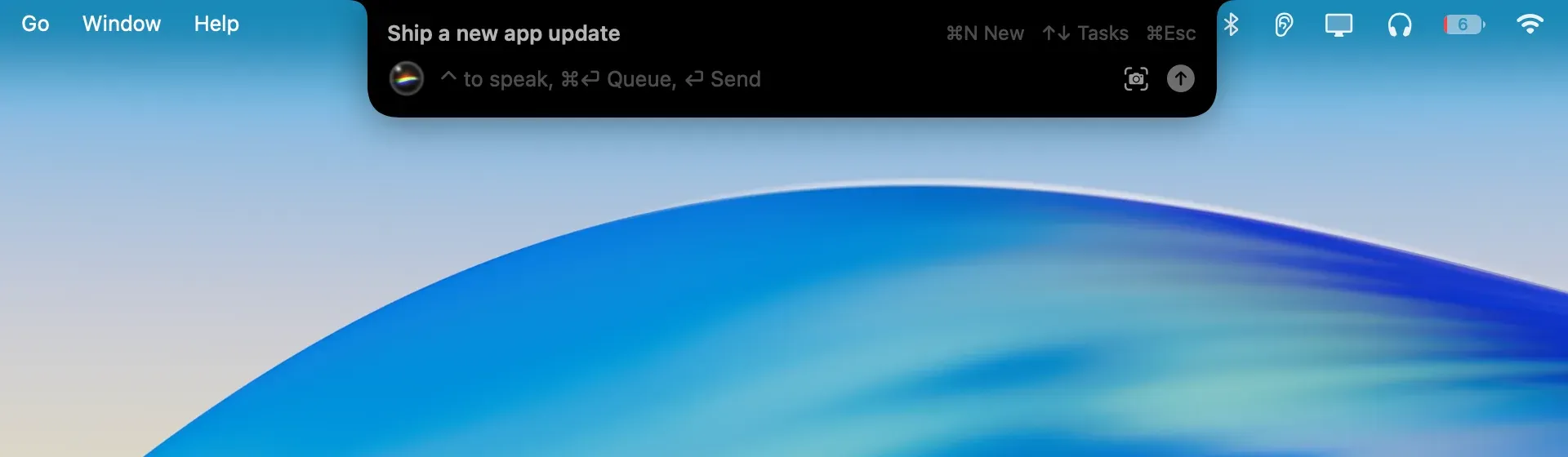
Dray Island, introduced in 0.29.1: a composer over every app, from the official changelog.
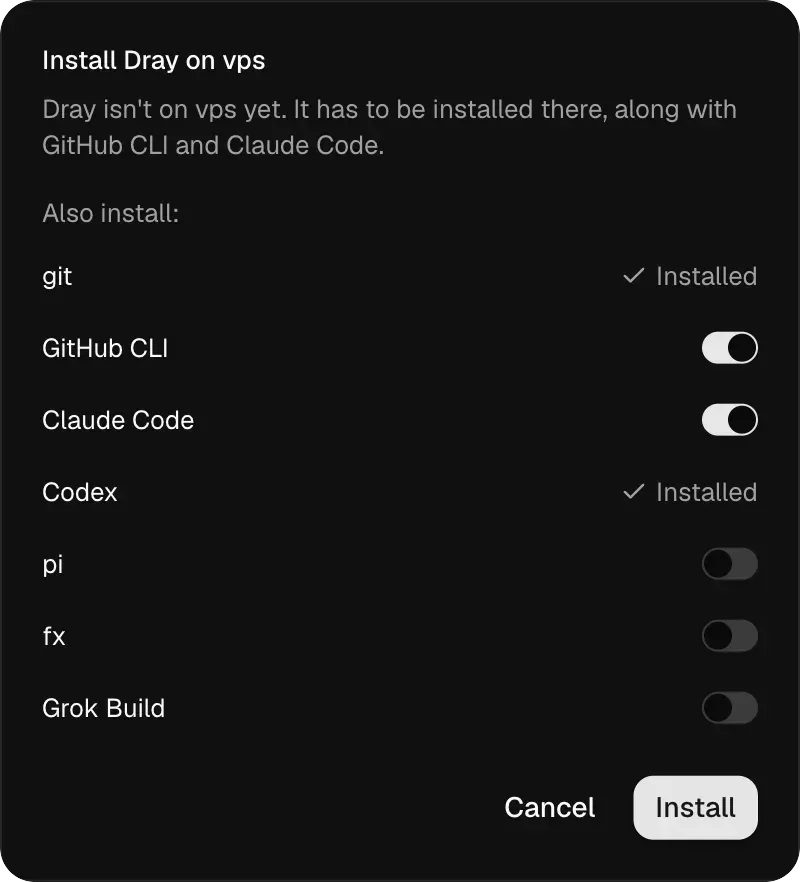
Server setup dialog from the official Connect a server guide, choosing what to install on a Linux machine.
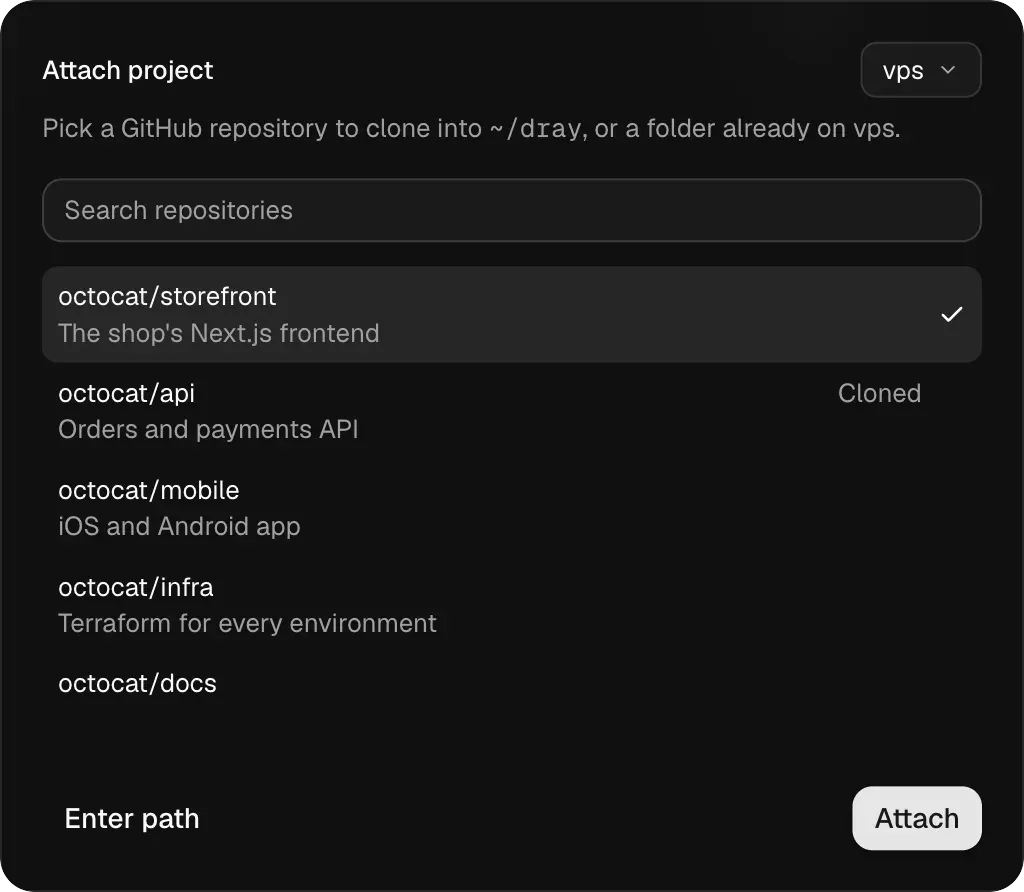
Attach project dialog from the official docs, with example octocat repositories read through gh on the server.
Source: official Dray project page.
Key capabilities
- Download Dray for macOS One universal DMG (
Dray_universal.dmg, about 65 MB) covers Apple silicon and Intel Macs on macOS 11 or later. Drag Dray into Applications; the app is signed and notarized. Chromium for the built-in browser is not in the download: Dray fetches the CEF framework, a few hundred megabytes, in the background a few seconds after the first window opens. - Install the dray CLI or a Linux server On a Mac the app now ships the CLI and copies it to
~/.local/binon each launch. Elsewhere,curl -fsSL https://www.drayhq.com/install.sh | shinstallsdrayanddray-serveinto~/.local/bin.DRAY_CHANNEL,DRAY_VERSIONandDRAY_INSTALL_DIRpick the channel, an exact tag or the target folder. CLI binaries cover macOS and Linux on x86_64 and arm64. - Five agent CLIs in one window Each session runs one of Claude Code, Codex, pi, fx or Grok Build, chosen in the composer's model picker. Dray reads model lists from Codex, pi, fx and Grok Build, so new models appear without a Dray update. Support differs per agent: images in prompts, forking, fast mode and mid-turn changes are listed in the agent comparison table. Dray never runs an agent installer; it offers the vendor's own command to copy.
- Parallel sessions that survive quitting Every conversation is a session in the sidebar, grouped by stage: needs you, unread, idle, open PRs, running checks and merged. Since 0.28.0 sessions run in a background server that macOS starts at login, so closing the window leaves agents working. Quit completely stops the server and every session. A Claude Code turn stopped by a usage limit can send
continuea minute after the reset. - One git worktree per session With the Worktree switch on, Dray creates
<project>/.claude/worktrees/<name>on a branchworktree-<name>, starting from the remote's default branch. Claude Code fetches first; the other agents start from the last fetchedorigin/main. Deleting a worktree warns about uncommitted files and commits on no other branch, and Dray only deletes worktrees under that folder. - Composer controls and permission cards Model, effort, fast mode and permission mode sit under the prompt, and some agents accept changes during a turn. Prompts take
@file mentions,/commands and skills,#issue tags, images and files. Permission and question cards appear in the transcript with the agent's own options, such as Allow once, Always allow or Deny, and a waiting session gets a yellow mark, a notification and a Dock badge. - Diff, files and handoff buttons The right panel shows Changes, Files, PR, Browser and More tabs for the session's checkout. A row behind the composer holds Commit, Create PR and Run server prompts, and Settings then Composer lets you rename them, change their prompts or add your own. Chat, Diff, Files, browser pages and open files share one draggable tab row in the title bar.
- Pull request panel through gh The PR tab shows readiness, checks, review comments and the merge action for the session's branch, read through the GitHub CLI rather than a stored token. Without
ghinstalled and signed in, the tab shows the install command instead. GitHub Enterprise hosts are not recognized as GitHub remotes. - Linear and GitHub issues The Issues page lists issues from Linear, connected with a personal API key saved in
~/.dray/credentials.jsonwith 0600 permissions, or from GitHub throughgh. Dray changes only status and priority. Typing#in a prompt inserts an issue tag with its title; the agent fetches more through its own tools. Setup is in the issues guide. - Orchestration with the dray CLI An agent can run
dray session newto start child sessions, each with its own worktree and sidebar row, anddray session sendto message them. Children inherit the caller's agent, model, effort and permission mode. A crew column beside the transcript shows them and their permission cards. Nesting stops at two levels, and sessions cannot read each other's transcripts. - Second-model review
--base <session-id>starts a new session on its own checkout of another session's branch, for example a hidden Codex session reviewing Claude Code's commits. Only committed work is visible to the reviewer, and it works on its ownworktree-<name>branch so it cannot commit onto yours.--basealso accepts a branch, tag or commit. - Per-session Chromium browser Each session has its own browser profile with cookies and history, drawn beside the chat.
dray browserlets agents open pages, take accessibility snapshots with element refs, click, fill forms, read console errors, take screenshots at 1440x900 by default and record videos. It only opens http and https pages and only reaches the calling session's tabs. - Public links for dev servers The Browser tab lists the session's running dev servers, and Get public link publishes one through OpenTunnel; agents can do the same with
dray share start <port>. Links have no password and no expiry of their own, and last until stopped or until the session is settled or deleted. Only the session's own dev servers can be shared. - Linux servers over SSH Settings then Servers accepts an SSH line such as
ssh root@203.0.113.7; the app uses the Mac's ownsshand stores no password or key. Dray can install itself there with the chosen agents, git, the GitHub CLI, ffmpeg and a browser, and runs as a systemd user service. Linux on x86_64 and arm64 is supported, as described in the server guide. - Remote access between Macs Remote access exposes a Mac's background server at a stable
wss://address through OpenTunnel, with a token kept in~/.dray/serve-token. The encrypted connection ends on the Mac, so the relay cannot read traffic. The token grants full access to sessions and code, there are no read-only or per-project tokens, and it works only while the Mac is awake. - Dray Island and local dictation Dray Island, added in 0.29.1, is a composer that floats over every app: tap Control to open it, tap again to dictate, and use it to read a session, reply or answer cards. Dictation runs on the Mac with a model you download once, such as Parakeet Unified EN 0.6B (731 MB) or Canary 180M Flash (218 MB). Audio is not sent anywhere.
- Updates and channels The app checks for updates at launch and every six hours, downloads in the background and waits for running turns before Restart to update. Stable and beta channels are available in Settings, and leaving beta does not downgrade. Remote servers update from the app on their own channel and restart once their agents finish.
- Local data and environment variables Transcripts are JSONL files in
~/.dray/sessions, readable only by your user.DRAY_HOMEmoves the data folder, andDRAY_NO_ANALYTICSturns analytics off. Deleting a session removes its transcript, attachments, browser profile and worktree, but not the agent's own transcript in folders such as~/.claudeor~/.codex. There is no export; backup means copying~/.dray.
Where Dray fits
Running several agent tasks on one repository
Attach a project from the composer, either a GitHub repository listed through gh and cloned into ~/dray, or a local folder. Turn on Worktree for every session that will touch files, so two agents never edit the same checkout. Each new worktree starts from the remote's default branch, not your current branch, so uncommitted local work is not included. Before deleting a finished worktree, read the warning for uncommitted files and unpushed commits; a squash-merged branch can still be reported as unpushed. The worktree guide lists the folder and branch naming rules.
Fanning out a batch of issues
Connect Linear or GitHub on the Issues page, then ask one agent to start a session per issue. The agent runs dray session new once per item, and each child gets its own worktree and inherits the parent's permission mode. Set the parent's permission mode before fanning out, because there is no flag to change it for children and each will stop at its first permission card. Children cannot read each other's transcripts, so ask them to send a summary back. The orchestration guide covers the two-level nesting limit.
Reviewing one agent's work with another model
Commit the work first, then ask for a review in plain words or run dray session new --hidden --harness codex --base <session-id>. The reviewer gets its own checkout of the branch and sends findings back with dray session send. Hidden sessions appear only in the crew column. Check that each message is worth a turn, because every message starts a turn in the receiving session and consumes that agent's usage.
Checking a web change in the session browser
Let the agent start the dev server, then open it from the Browser tab or have the agent run dray browser open http://localhost:3000, take a snapshot and click through the flow. Screenshots must be saved inside the session's checkout if you pass a path. To show the result to someone else, create a public link and stop it when done, since anyone with the link can open it and there is no password. Settling or deleting the session removes its browser profile and cookies.
Moving agents onto a Linux server
Add the server with an SSH key, confirm the host key fingerprint, and let Dray install itself plus the agents you need. Each agent and gh need their own login on the server, done from the sign-in dialog. If the service stops after logout, enable linger with sudo loginctl enable-linger <user>. A server added by address and token instead of SSH relies on dray server tunnel on; treat that token like a password. The remote access reference explains server channels and updates.
Keeping a Mac rollout predictable
Decide whether the team stays on stable or beta, and pin the CLI on servers with DRAY_VERSION when needed. If the app and CLI speak different protocol versions, the app refuses commands and names which side is behind. Set DRAY_NO_ANALYTICS in the launch environment where usage reporting is not acceptable, because Settings has no switch. Back up ~/.dray if transcripts matter, since there is no export.
Install
curl -fsSL https://www.drayhq.com/install.sh | shReviews of Dray
Be the first to share your experience with Dray.
Write a review
Loading review form…
Alternatives to Dray
 OrcaOrca is an MIT-licensed Electron app from Stably AI for running many coding agents at once, each in its own Git worktree. It adds chat and terminal views, diff review, a CLI, SSH and self-hosted servers, plus iOS and Android companion apps.EEmdashEmdash is an open-source desktop app that runs coding agents in parallel, each task in its own Git worktree, locally or over SSH, with diff review and PRs.
 PaseoPaseo is an Apache-2.0 agentic development environment. A local daemon runs the agent CLIs you already use, each task in its own Git worktree, with editor, terminals, diffs and a browser, and clients for macOS, Windows, Linux, iOS, Android, web and CLI.