
What is OpenComputer?
OpenComputer is a hosted platform for building, deploying and running AI agents in the cloud. Its repository describes it as a way to build, steer and deploy serverless agents as code: an OpenComputer project contains one or more agents written as TypeScript functions, and the platform runs them in its managed cloud. The website at opencomputer.dev also presents @Computer, a cloud coding agent that runs Claude Code or Codex for a team, is mentioned in Slack threads and can be called from code through the API. The source code is published in the diggerhq/opencomputer repository on GitHub under the Apache License 2.0.
The Serverless Agents product follows a reactive model. The default export of agent.ts is a synchronous function that reads the current input, selects a model, tools, MCP servers, skills and memory through hooks such as useModel() and useTool(), and returns instructions. OpenComputer supplies the managed harness that renders the function, calls the model, validates and executes tool requests, streams output and records a durable session. The documentation states that there is no local agent server: agent code runs in OpenComputer's managed development cloud, and each agent has a sandbox where commands and tools run.
Distribution is through npm packages and the hosted service at app.opencomputer.dev. The repository contains the @opencomputer/cli command-line tool (version 0.7.23 in the repository), the @opencomputer/agent authoring package (0.9.1), the @opencomputer/react hooks (0.4.0) and the @opencomputer/sdk TypeScript client (3.0.0), as well as the dashboard, Cloudflare Workers services and the computer package behind the Slack coding agent. The SDK README states that version 3.0.0 removed the sandbox client because the earlier OpenComputer sandbox platform is shut down; the Python package opencomputer-sdk 1.2.0 is marked deprecated as its final release.
The latest GitHub release is v0.6.0.50, published on November 9, 2026, with binaries of the legacy Go oc CLI for macOS and Linux on amd64 and arm64. Its notes list a computer per organization with Slack-first onboarding, deployment regions and an outbound egress allowlist set in opencomputer.toml, fixed egress IPs, deploys from a GitHub branch with pull request previews, Linear agent connections, dashboard dark mode, work-minute billing plans and a CVE swarm security workflow. The repository is published under the diggerhq GitHub organization.
A self-hosting document in the repository describes running the earlier sandbox runtime in an own Azure or AWS account: a control plane plus bare-metal worker machines that run Linux VMs with QEMU/KVM, backed by PostgreSQL, Redis and S3-compatible storage. The document calls this an operator path rather than a one-command product. Similar listings on iThub include Omnara, Kortix CompanyOS and the sandbox service Sandbox0.
OpenComputer screenshots
Explore the interface. Open a screenshot to view it at full size.
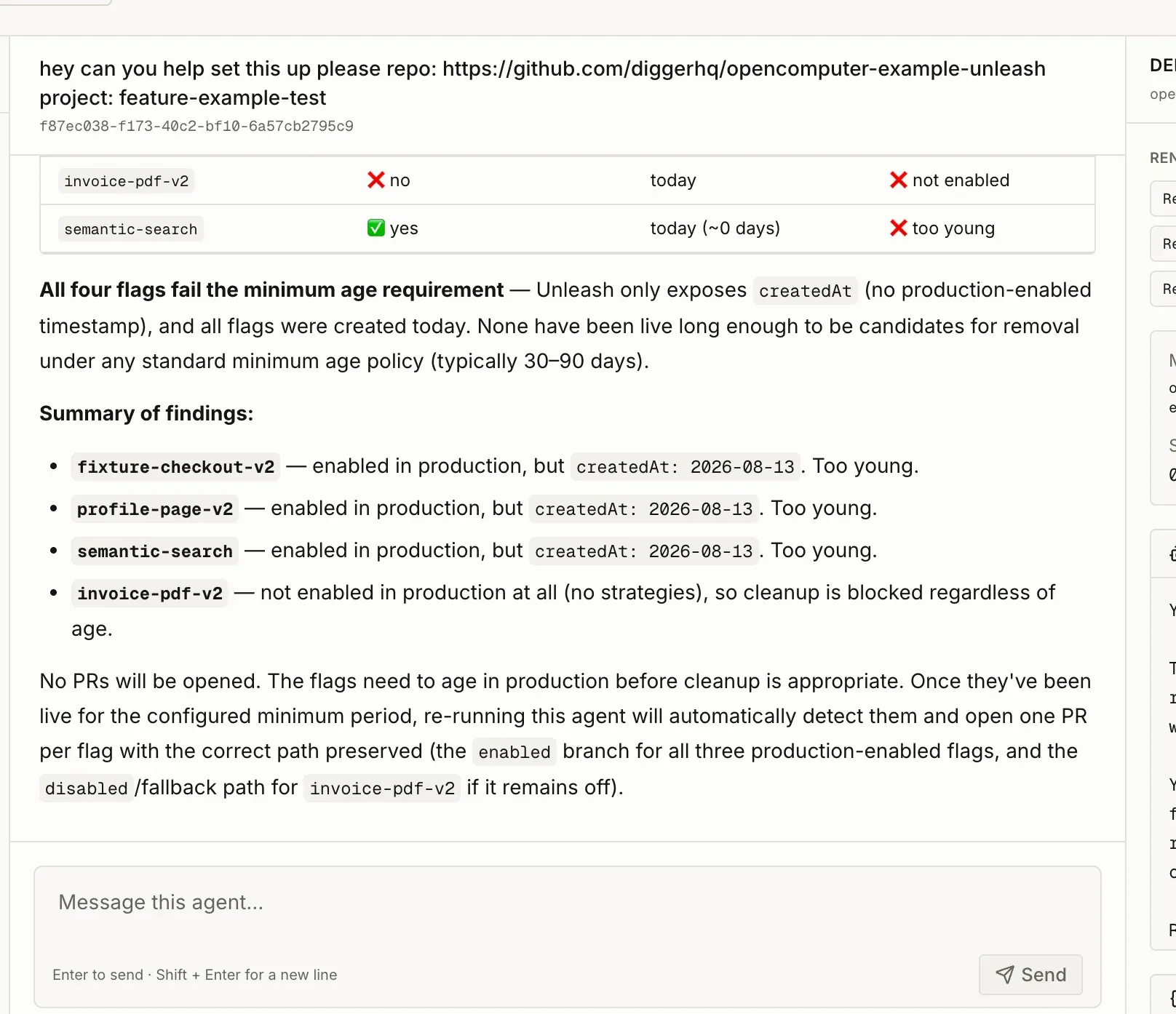
Session view from the OpenComputer documentation: a feature flag hygiene agent reports which flags are too young to remove, above the message box.
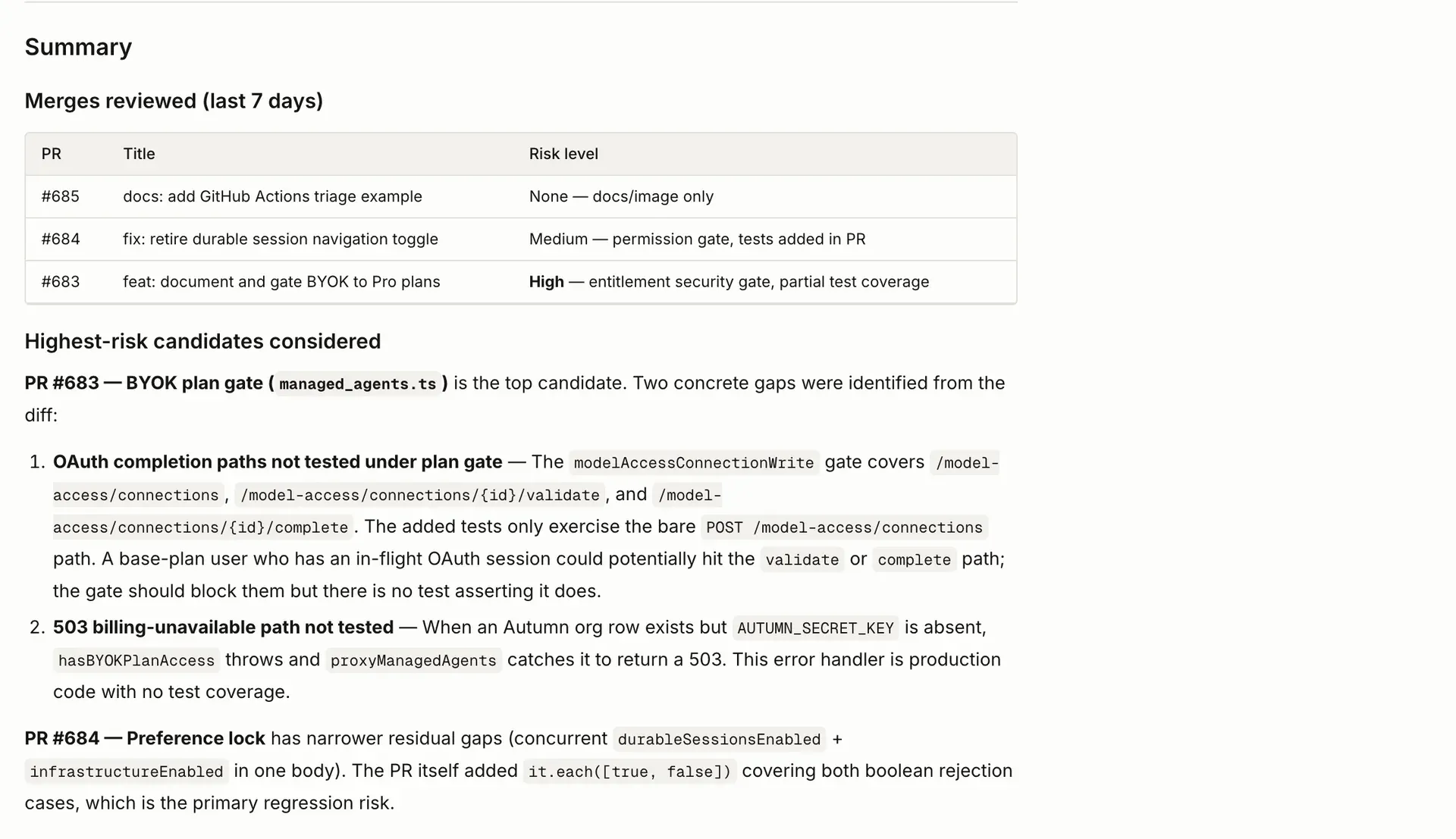
Dry-run output of the test coverage example agent from the OpenComputer docs, listing reviewed merges, risk levels and untested paths.

Slack post from the GitHub Actions triage example agent, summarizing why a CI workflow run failed and linking to the run.
Source: official OpenComputer project page.
Key capabilities
- Agents defined as TypeScript functions Each agent lives under
opencomputer/agents/<name>/agent.ts. The exported function is rendered before each model step and returns instructions; hooks attach the model and capabilities for that render. The mental model page states that the function must stay synchronous and free of side effects, because it can render more than once in a turn. - CLI project scaffolding
npx @opencomputer/cli init my-agentcreates a hello-world project withopencomputer/project.tsand one agent.opencomputer loginandopencomputer linkbind the directory to a cloud project. Other commands includewhoami,agents,session,run,logsanddoctor, a local static scan run before every deploy. - Watched development deploys
opencomputer deploy --watchsyncs source changes to the cloud while files are edited, and the CLI prints the dashboard URL. The CLI targetshttps://app.opencomputer.devby default;--api-urlorOPENCOMPUTER_API_URLselect another service. The quickstart walks through the first project. - Immutable deployments and aliases Every deploy creates an immutable deployment of one agent. New projects have a single
defaultenvironment; legacy projects have Development and Production, with--alias productionadvancing Production. Sessions stay pinned to the deployment they started on, as described in Deployments and environments. - Durable sessions and turns A session stores the conversation and runtime events across turns, so clients can disconnect and resume from the event log. Sessions accept labels and an
externalReferencefor lookup, and lists are paged at up to 100 rows. An agent can end a turn with a question through theasktool; replies are sent as turns that name the question. - Models through useModel
useModel("provider/model")selects the model for the next step, and the choice can change per render. A string model identifier is routed through OpenRouter, and provider credentials are not added to agent code. Organizations on Pro or Max can connect a Codex account for eligible OpenAI models through bring your own model account. - Tools, MCP servers and skills Code-defined tools are declared with
defineTool()and a JSON schema; a tool can usepreviewandapplyto wait for a person's approval. Remote MCP servers are attached withuseMcpServer()and must use HTTPS. Skills are directories with aSKILL.mdfile under the agent that hold reusable procedures. - Secrets and constrained outbound requests Secrets are write-only values used by connections declared with
defineConnection(), which fixes the origin, methods, path prefix and the header where the secret is injected. The secrets page states that plaintext values are not included in source bundles, prompts, manifests, runtime environment variables, logs or API responses. - Sandbox egress allowlist and regions By default an agent's sandbox can reach any internet address. An
[egress]table inopencomputer.tomlrestricts every sandbox process to listed domains, wildcards, IPs and CIDR ranges, per the outbound network docs. Aregionvalue such asus,eu,uk,jporauplaces the sandbox in that region; without it, the sandbox usually runs in the United States. - Memory and project database Memory resources declared with
defineMemory()store project-scoped documents that agents read at render and save through memory tools, and that owners can edit and export. Each project environment also has one durable SQL database shared by its agents and sessions, defined by ordered SQL migrations underopencomputer/database/migrations. - Schedules and webhooks Schedules are TypeScript files under an agent's
schedules/directory with a cron expression, timezone, target environments and an overlap policy, as shown in Schedules. Agent webhooks are authenticated URLs created in the dashboard or CLI that start a fresh session; tokens are shown once and can be rotated. - GitHub, Slack and Linear connections A managed GitHub App connection gives an agent's sandbox a short-lived installation token with declared permissions for Git,
ghand GitHub APIs. A Slack connection creates a Slack app per project environment, so a mention starts a session for that thread. Linear connections let people delegate issues to an agent and read its replies in the issue thread. - Management API and TypeScript client The management API at
app.opencomputer.dev/api/managed-agentscreates sessions, sends turns and lists events with anx-api-keyheader.@opencomputer/sdk/agentsmirrors it with sessions, turns, events, projects, agents and deployments, and has no Node dependency so it runs in Cloudflare Workers, Vercel, Deno and Node. - React hooks for applications
@opencomputer/reactprovidesuseAgent(), which replays a session's history, streams new turns and reports memory events. Applications attach it to sessions created on their own server, which proxies the events, turns and interrupt routes so the API key stays out of the browser. - Dashboard, playground and logs The dashboard project view exposes a debug playground, deployments, sessions, schedules, webhooks, memory, database, secrets and connections. The debug inspector shows deployment and session IDs, rendered instructions, the selected model, available tools, tool errors and files written under
/workspace.opencomputer logs --follow --jsonstreams indexed runtime and egress logs. - @Computer coding agent in Slack The website describes @Computer as Claude Code and Codex running in OpenComputer's cloud: it is mentioned in a Slack thread, streams replies, shows the files it opens and commands it runs, and delivers changes as branches and pull requests. Teams can bring a Claude Pro or Max or ChatGPT Plus or Pro subscription, an API key, or use OpenComputer's model tokens at API prices.
- Published plans The pricing section on opencomputer.dev lists a free 3-day trial with 600 work minutes and $10 of model tokens, Pro at $20 per month with 2,000 work minutes, Max at $200 per month with 25,000 work minutes, and custom Enterprise pricing above 60,000 minutes. Extra minutes cost $0.01 from prepaid credits. A work minute is metered by the second while the agent works; idle time is not counted, and Serverless Agents draw on the same minutes.
- Source code and license The repository at github.com/diggerhq/opencomputer is licensed under Apache-2.0; the Python SDK and the TypeScript SDK packages declare MIT. The
computerpackage NOTICE states that it runs Claude Code through the Claude Agent SDK, which is installed from npm, not included, and used under Anthropic's terms.
Where OpenComputer fits
Deploying a reactive agent from a repository
A developer runs npx @opencomputer/cli init, links the directory to a cloud project and starts opencomputer deploy --watch. Edits to the agent function, tools and connections sync to the development cloud, where the agent can be tested from the dashboard playground or with opencomputer session. A versioned deployment is then published, and existing sessions keep the code they started with.
Calling an agent from a product
A server creates a session for a deployed agent, for example flag-cleaner@production, with POST /sessions, then sends work with POST /sessions/{id}/turns. Idempotency keys make retries safe, and the durable event log lets the client resume after a lost response. The React integration guide covers attaching a browser interface through the application's own server.
Scheduled repository maintenance
The documentation includes a feature flag hygiene example that runs on a weekday cron schedule, inspects flags and opens pull requests to remove stale ones. Other published examples cover pull request review, test coverage, a Slack coder and a go-to-market research agent. A managed GitHub App connection supplies the repository token with the permissions declared in code.
Agents that answer in Slack or Linear
A deployed agent gets its own Slack app from the project's Connections tab; mentions and direct messages start a session per thread, and follow-ups continue it. Linear connections make an agent a delegate for issues, with tool calls and replies posted in the issue thread. Development and Production use separate apps and credentials.
Restricting where an agent runs and what it reaches
Per agent, opencomputer.toml can set a region for the sandbox and session state, an [egress] allowlist that applies to every process in the sandbox, and fixed egress IPs. The regions page notes that the first session in a new region pulls the sandbox image and can take a few minutes to start.
Team coding requests through @Computer
On the hosted service, an organization installs the Slack app, connects GitHub repositories and chooses a model source. Team members mention @Computer in a thread with a task; the agent works in a workspace with the repository and posts progress, screenshots, preview links and a pull request in the thread, and anyone in the thread can add direction.
Install
npx @opencomputer/cli init my-agentReviews of OpenComputer
Be the first to share your experience with OpenComputer.
Write a review
Loading review form…
Alternatives to OpenComputer
 OmnaraOmnara is an Apache 2.0 platform for running AI agents as a service: a Go control plane with a REST API, TypeScript SDK and CLI, durable state in Postgres, approvals, MCP tools and machines from sandboxes or your own hosts. Self-host it or use Omnara Cloud.
 Kortix CompanyOSSource-available platform for running AI agents across a company: event-triggered agents, 3,000+ connectors, per-session cloud computers, approvals and audit, from Kortix Cloud or a self-hosted Docker Compose stack.
 Sandbox0Sandbox0 Cloud gives each AI agent an isolated cloud computer whose whole writable root filesystem persists across pause and resume. Usage-based billing; the runtime is closed source, with open-source CLI and SDKs.