

What is Autonomous Company?
Autonomous Company is an open-source framework that runs AI coding agents in a continuous loop on a local machine. The repository describes it as an AI company framework for continuous autonomous work, and its GitHub description calls it an autonomous company working around the clock on your own PC. In practice it is a set of shell and Python scripts, prompts and role definitions: each cycle calls Claude Code or Codex CLI, which reads a company charter and a shared work summary, assembles a team of role agents for the current task, carries out research, coding or other work, and updates the summary before the next cycle starts.
The project is published on GitHub by the account MaxMiksa. It was formerly called Auto-Company, and the README credits nicepkg/auto-company as the initial macOS edition. Version 1.0.0 was released in March 2026. The current release, v3.0.0 of October 13, 2026, renames the product, repository, packages, configuration and state directories, environment variables and service registrations to Autonomous Company. Existing installations must run a one-time migration before starting v3; it keeps configuration, product identities, records and human constraints, and leaves queues paused and services disabled. v2.2.0, released the same day, refined the dashboard work journals, navigation, motion and mobile layouts and ships prebuilt dashboard assets so the service runs without Node.js.
There is no packaged installer: the framework is used from a clone of the repository with make targets on macOS and Linux/WSL and PowerShell scripts on Windows. The README documents macOS and Windows 10/11 with WSL2 (Ubuntu), and the repository description names Windows, Linux and macOS. Since October 2026 the project isolation guide requires every model cycle to run inside a Linux namespace boundary built with bubblewrap 0.9 or newer and libseccomp, on Linux or on Windows through WSL2; it states that native Windows and macOS execution are refused and that there is no option to disable isolation.
The framework does not include a model. It needs Claude Code or Codex CLI installed and authenticated, plus available model quota; the README notes that each cycle consumes quota and costs money. Optional Cursor and OpenAI-compatible adapters are described in the engine adapter guide, which currently refuses Cursor because its isolated packaging and authentication are not verified. The README labels the project experimental, says stability is not guaranteed and states that deployment, publishing and marketing depend on the tools and authorization available.
The framework is distributed under the MIT License; bundled third-party components keep their own licenses. Other projects in the directory that coordinate teams of AI agents include Paperclip, CrewAI and Kortix CompanyOS, and one of its two default engines is listed as Codex CLI.
Autonomous Company screenshots
Explore the interface. Open a screenshot to view it at full size.
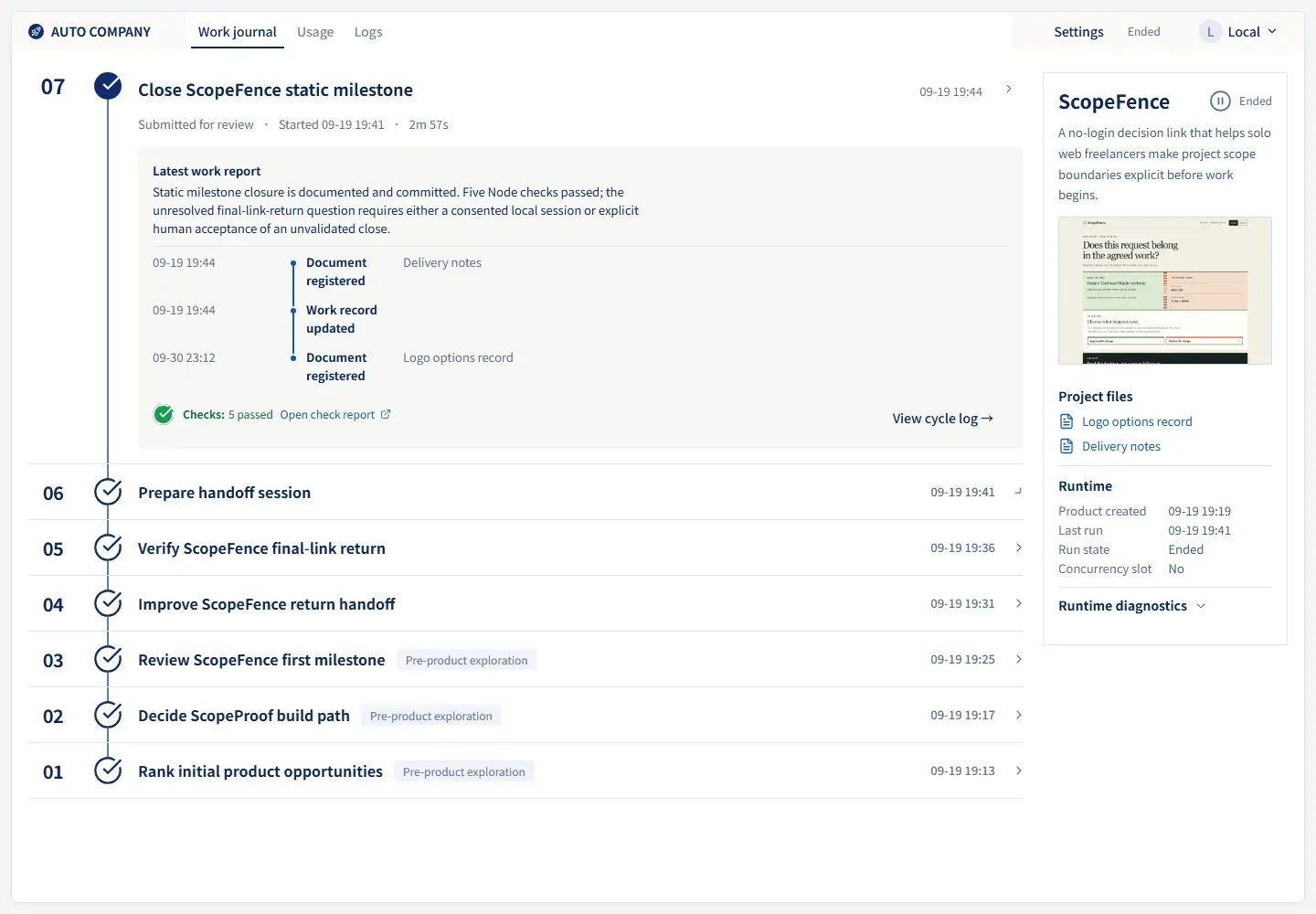
Product Center work journal for the ScopeFence example: numbered cycles, latest work report, registered documents and runtime panel. Official interface demo built from recorded work, with sample values for unavailable runtime fields.
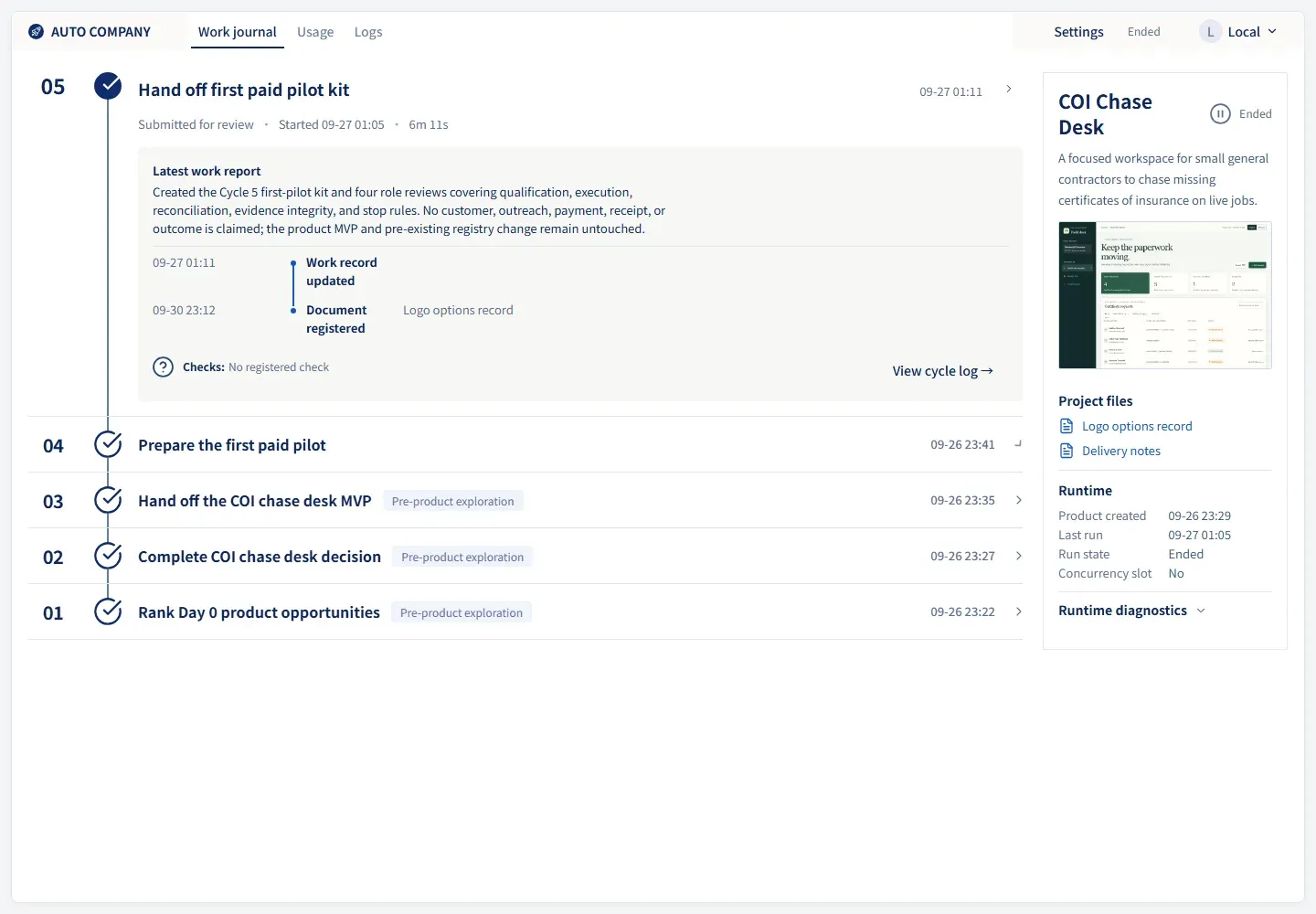
Work journal for the COI Chase Desk example product, from the official showcase captures.
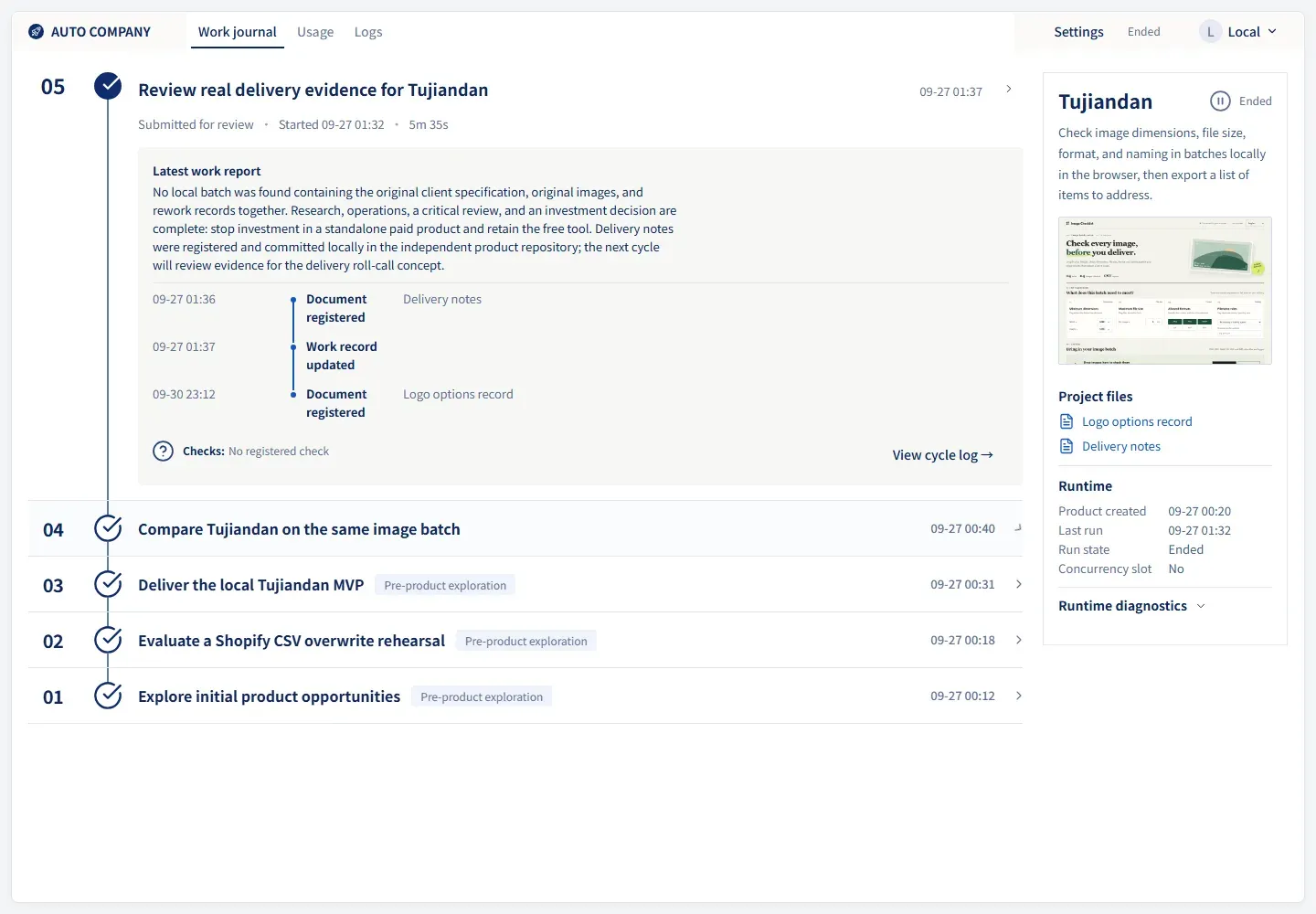
Work journal for the Tujiandan image checklist example, from the official showcase captures.
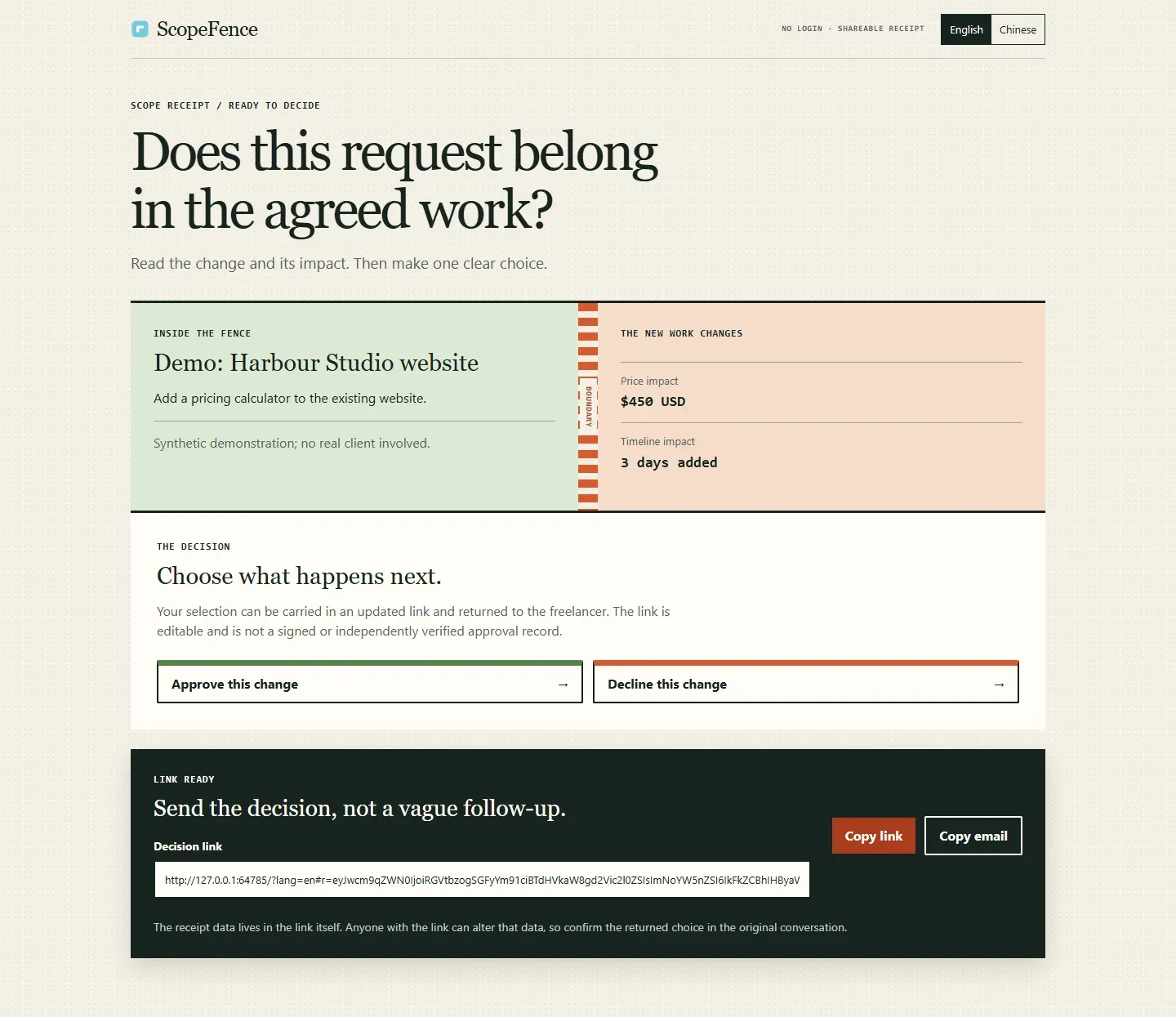
ScopeFence, an example product built in Autonomous Company runs, with a synthetic demonstration client.
Key capabilities
- Continuous agent loop A loop script (
scripts/core/auto-loop.sh) starts one independent CLI call per cycle, waits between cycles and handles failures. The default interval is 30 seconds and the default cycle timeout is 1800 seconds, both set through environment variables. A cycle readsPROMPT.mdand the shared summary, does its work, writes the summary back and exits. - Shared work summary
memories/consensus.mdcarries a natural-language summary between cycles, with a Next Action section and a Human Overrides section for standing constraints. Product files, repositories, configuration, identity records, logs and usage data persist separately. The README states the summary is not the full runtime state. - 14 role definitions The
.claude/agents/folder defines 14 roles in five layers: strategy (CEO, CTO, an inversion critic), product (product, UI and interaction design), engineering (full-stack, QA, DevOps/SRE), business (marketing, operations, sales, CFO) and a research analyst. Each role prompt is modeled on the published methods of a named industry figure. The team skill suggests picking 2 to 5 roles per task; the README notes these are not 14 permanent workers. - Skill library More than 30 skills in
.claude/skills/cover tasks such as deep research, browser automation, scraping, financial modeling, SEO, security code review, UX audits and frontend polish. Skills are written in English, while user-facing output follows the product language. Agents load them on demand during a cycle. - Claude Code and Codex CLI engines Claude Code is the default engine and Codex CLI is selected with
ENGINE=codex. There is no automatic fallback between engines: startup fails if the selected CLI is missing. Inside isolation, Claude needs a native Linux binary with its credentials record or an API key environment variable, and Codex native binaries or the official Linux npm package are supported, according to the isolation guide. - Optional adapters An OpenAI-compatible adapter needs explicit opt-in, an endpoint and a model; it accepts HTTPS and loopback HTTP, restricts file tools to the project directory and allows shell commands only through an allowlist unless arbitrary shell is enabled. Host-local or private model servers are currently unavailable under isolation. A Cursor adapter exists but is currently refused.
- Project isolation Every model cycle, interactive team, product check and screenshot worker runs in a Linux namespace sandbox using bubblewrap and libseccomp. The engine sees a
/workspacewith the framework files, the selected product and its documents; the host root, home directory, Windows drives, Docker socket and host processes are not mounted. Scoped engine credentials remain readable by the model, which the documentation describes as a host and project boundary, not a credential vault. - Permission modes Claude permission modes accepted by the adapter are acceptEdits, auto, bypassPermissions, default, dontAsk and plan, and Codex sandbox mode can be set with
CODEX_SANDBOX_MODE. The repository's.claude/settings.jsonsets bypassPermissions as default mode. The README warns that default engine settings allow broad local actions without routine approval prompts and that prompt rules alone do not provide isolation. - Behavioral guardrails
CLAUDE.mdtells agents not to delete GitHub repositories or Cloudflare projects, not to delete system directories such as~/.ssh/, not to leak credentials into public repositories, not to force-push to main or master and to create new projects underprojects/. The README states these rules are not a general command-denial mechanism. Product code changes and external side effects are not rolled back automatically. - Product Center dashboard A local web app at
http://127.0.0.1:8810/centercatalogs connected product runs with work journals, usage, logs, runtime status and controls. Imported runs start read-only, and viewing never starts a model. Work runs only after an explicit request, with up to four projects in parallel by default, an adjustable or unlimited limit, batch creation and saved templates, as described in the Product Center guide. - Usage ledger and budgets Each finished cycle appends a JSON record with engine, model, tokens and cost to
logs/usage.jsonl; unknown values are stored as null, never as zero. Daily or weekly warning and hard limits in USD or tokens can be set in.auto-loop.env. A hard limit lets the current cycle finish and then pauses the loop until an explicit resume, per the usage governance guide. - Failure handling A circuit breaker cools down after consecutive errors (default threshold 5), the loop sleeps on HTTP 429 rate limits, and the work summary is rolled back after failed cycles. Interrupted cycles are recorded with unknown usage and recovered at the next start. A per-cycle process supervisor handles timeouts and cleanup of child processes.
- Six suggested workflows The charter describes role chains for new product evaluation, feature development, product launch, pricing and monetization, weekly review and opportunity discovery. The default prompt suggests brainstorming in the first cycle, a go or no-go validation in the second and building from the third. The README states these are prompt guidance, not an enforced state machine, and do not guarantee a finished or deployed product.
- Daemon mode On macOS the daemon uses launchd, and on Windows the loop runs under
systemd --userinside WSL, controlled from PowerShell. Commands cover start, status, live logs, last cycle output, cycle summaries, pause and resume. In daemon modemake stopalone can trigger a restart, somake pauseis the documented way to keep it stopped. On macOS,make start-awakeuses caffeinate to prevent system sleep. - Requirements The README lists Claude Code or Codex CLI, Python 3.10 or newer, Git, Node.js for npm-installed CLIs and make, with jq recommended and gh and wrangler optional. Windows users also need Python on Windows for the PowerShell dashboard entry and WSL2 with Ubuntu and systemd. Model execution additionally requires bubblewrap, unprivileged namespaces and libseccomp.
- Languages Interface and new-work languages are set separately in the Product Center settings, with English and Chinese (zh-CN) supported. An existing product keeps its starting language across cycles and restarts. Documentation is available in both languages.
- Example products The example catalog contains 22 runnable public snapshots of products created with the framework, such as ScopeFence, COI Chase Desk and an image checklist tool. Each lists startup steps, limits and provenance, and the catalog states that synthetic demos and completed cycles do not establish customer adoption or revenue.
Where Autonomous Company fits
Running an unattended product exploration loop
After cloning the repository, make start runs the loop in the foreground with Claude Code, and ENGINE=codex make start uses Codex CLI. The README describes starting in the foreground first and then moving to daemon mode with make install or the Windows start-win.ps1 script. Following the default prompt, early cycles rank product ideas and validate one before agents create a repository under projects/ and build it.
Steering the agents between cycles
To change direction, the run is stopped or paused, then the Next Action entry in memories/consensus.md is edited, or a lasting constraint is added under Human Overrides, before resuming. The README notes that editing during a cycle can conflict with the model's own updates. Agents may record unresolved P1 blockers but cannot add entries marked as resolved.
Following work in the Product Center
make center or center-win.ps1 opens the local Product Center, which shows each product's numbered work journal with work reports, registered documents, checks, runtime state, usage and logs. Existing run directories can be imported read-only for review. New work, continuations and batches start only after an explicit request.
Running several products in parallel
The center's queue runs up to four projects at once by default, and the limit can be raised or set to unlimited. Batches can mix models, reasoning levels and project counts and be saved as templates. On Windows the execution domain is a chosen WSL distribution and user; engines and authentication must already exist there.
Capping model spend
Warning and hard limits for USD or tokens per day or week are set in .auto-loop.env, and reports are available through make usage-day, make usage-week and a JSON summary command. When a hard limit is reached the next cycle is blocked until make resume. The troubleshooting guide covers common operational errors.
Reviews of Autonomous Company
Be the first to share your experience with Autonomous Company.
Write a review
Loading review form…
Alternatives to Autonomous Company
 CrewAICrewAI is an MIT-licensed open-source Python framework for orchestrating multi-agent AI workflows; CrewAI Enterprise adds a hosted runtime with a free Basic tier and custom-priced governance features.
 Kortix CompanyOSSource-available platform for running AI agents across a company: event-triggered agents, 3,000+ connectors, per-session cloud computers, approvals and audit, from Kortix Cloud or a self-hosted Docker Compose stack.