

What is VPS Audit?
VPS Audit (repository and script name vps-audit) is a single-file Bash script that audits the security configuration and resource usage of a Linux server and grades each check as PASS, WARN or FAIL. It is built and maintained by Nuver Labs, which publishes it on GitHub and describes it on the VPS Audit project page. The project page lists 18 graded checks grouped into SSH and access, network exposure, patching, intrusion signals and resource health, plus an ungraded system snapshot. The script prints results to the terminal in color and writes the same results, with a recommendation for each failed check, to a timestamped text report.
There are no packages, installers or containers. The documented method is to download vps-audit.sh from the main branch with curl -O or wget, make it executable and run it with sudo. Nuver Labs describes the script as dependency-free: it calls tools that a stock Debian or Ubuntu server already ships, such as systemd, ss or netstat, grep, awk and ufw. The project page states that there is no agent left running after the audit, no account and no sign-up.
The latest release is v0.2.0, published on August 10, 2026, a few hours after v0.1.0, the first tagged release of a repository created in December 2024. Version 0.2.0 adds a Fail2ban SSH jail port alignment check. Its release notes explain the case it targets: Fail2ban's [sshd] jail inherits port = ssh (port 22), so when sshd listens on another port the generated firewall rule blocks port 22 and the bans have no effect, while fail2ban-client status still reports them. The notes describe a host on port 2022 that logged roughly 114,000 brute force attempts in a month with 209 reported bans that blocked nothing. The release also adds the FAIL2BAN_CONFIG_DIR variable and sets the version string to 0.2.0. The v0.1.0 notes list the full check set and credit eleven outside contributors.
The script is written for the Debian family. The README states that it is designed for Debian and Ubuntu based systems, and the v0.1.0 notes add that the update check assumes apt, package detection assumes dpkg, and the sudo logging check reads /etc/sudoers only, not sudoers.d. The project page says other distributions mostly work but some checks will not find what they look for. Root or sudo access is required because sshd_config, the auth log, firewall state and the SUID sweep are privileged reads.
The README and the project page both state limits of scope: the script finds common misconfigurations, it is not a penetration test, and it is not a replacement for a professional security audit. VPS Audit is released under the MIT License. Nuver Labs, which signs the website as Nuver Labs LLC, builds and runs infrastructure for clients; the project page offers a booked call to discuss a report and points to GitHub issues for problems with the tool itself. No paid edition of the script is published. Similar listings on iThub cover other ground: Nuclei is a template-driven vulnerability scanner, and Beszel and Netdata provide continuous server monitoring.
VPS Audit screenshots
Explore the interface. Open a screenshot to view it at full size.
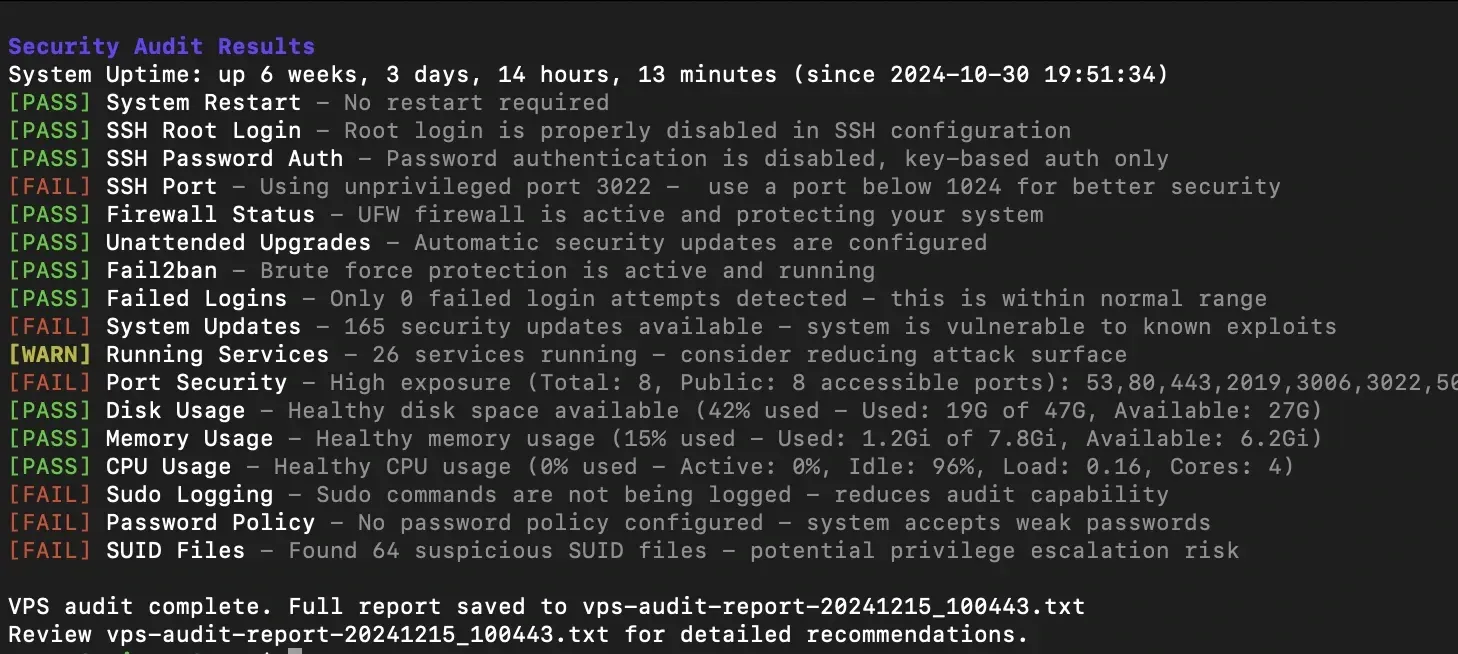
README screenshot of a full run: 17 graded results, then the path of the saved vps-audit-report file.
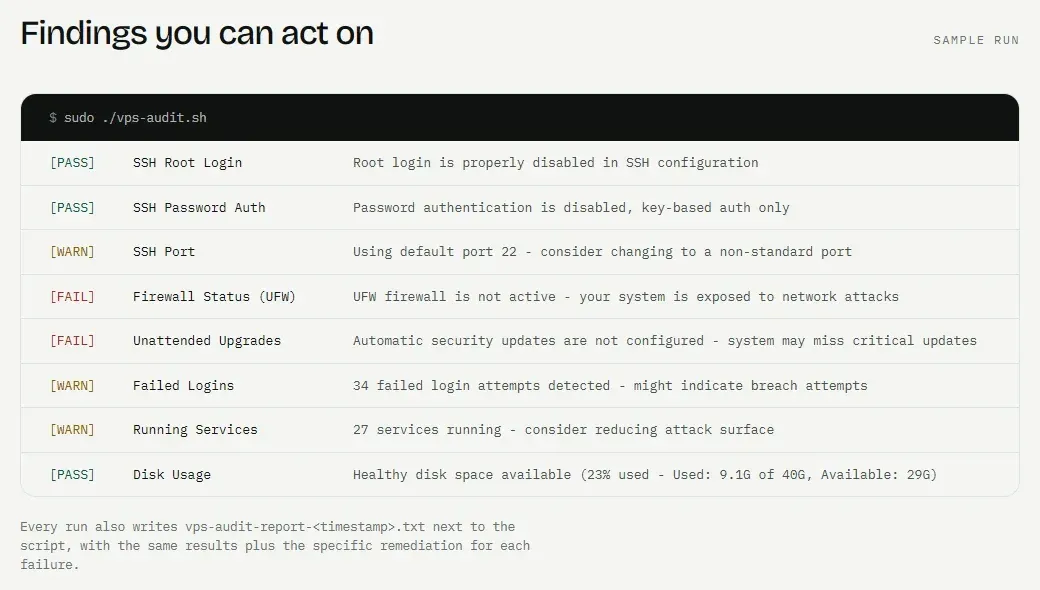
Sample run on the official project page, with the note that each run also writes a timestamped report with remediation for each failure.
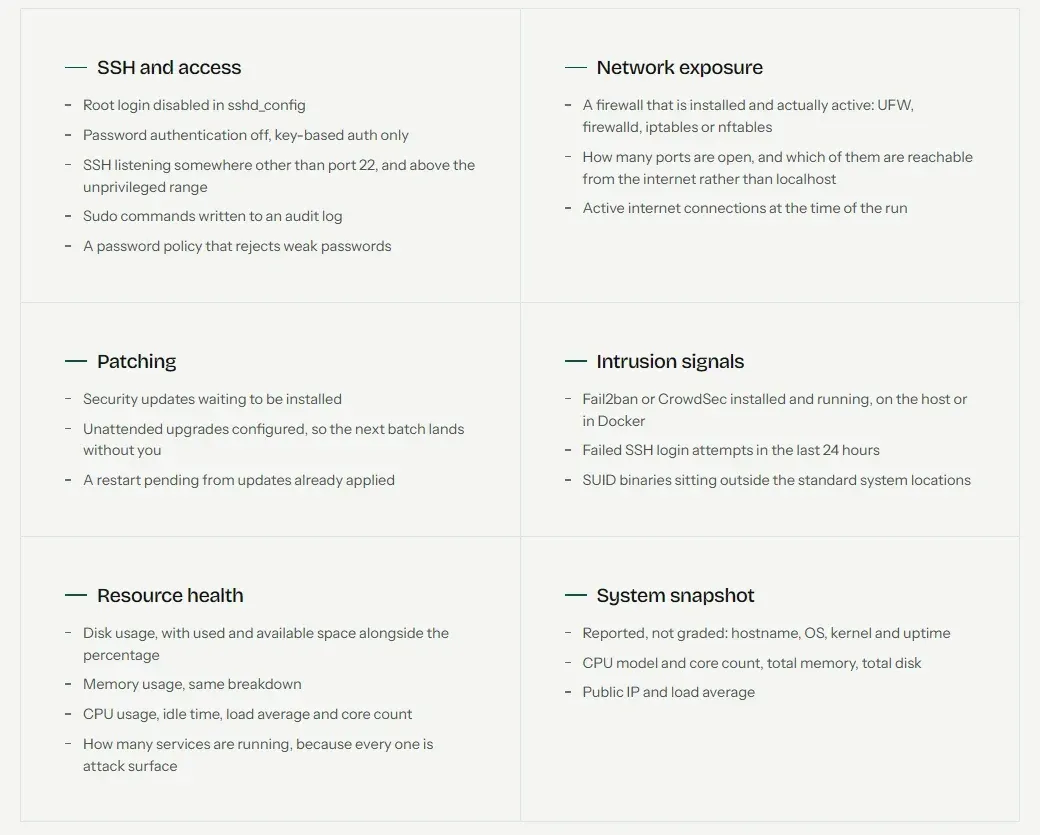
The six groups of checks listed on the official project page; the system snapshot is reported without a grade.
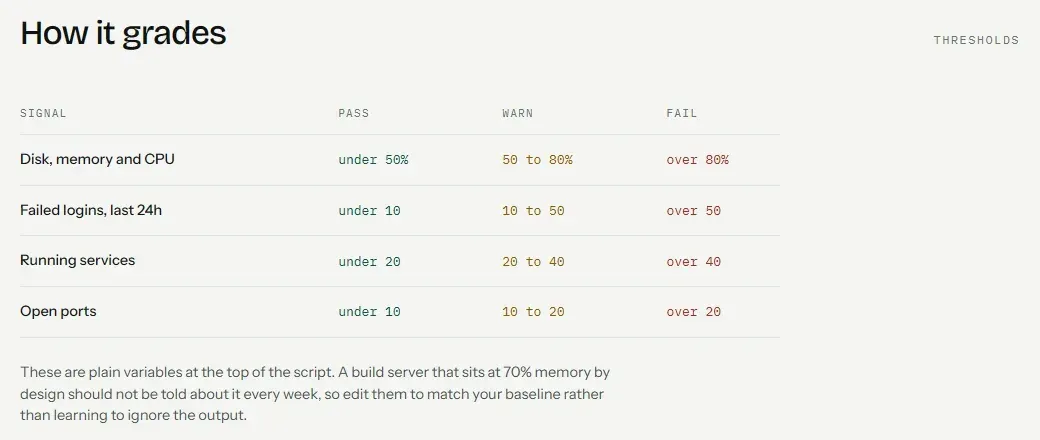
Default PASS, WARN and FAIL thresholds from the official project page; they are variables at the top of the script.
Source: official VPS Audit project page.
Key capabilities
- Download and run on a Linux server The README documents downloading
vps-audit.shwithwgetorcurl -Ofrom the raw file on the main branch, runningchmod +x vps-audit.shand starting it withsudo ./vps-audit.sh. The project page combines the three steps into one command line. There is no package repository, installer or Docker image; the script is a single file under the MIT License. - Requirements The README lists an Ubuntu or Debian based system, root access or sudo privileges, and basic tools that are usually preinstalled:
ufw,systemd,netstatorss,grepandawk. The update check relies onapt-getand package detection ondpkg. Other distributions are not a documented target. - SSH root login and password authentication The script reads
/etc/ssh/sshd_configand the files pulled in by itsIncludedirectives, then reports whether root login is disabled and whether password authentication is off in favor of key-based authentication. Each result is printed as PASS, WARN or FAIL with a one-line explanation. The config path is theSSH_CONFIG_FILEvariable. - SSH port This check reports whether SSH uses the default port 22 and whether a non-default port sits in the privileged range below 1024. In the README screenshot, a server on port 3022 receives a FAIL with the message to use a port below 1024, and the documented console example shows a WARN for the default port 22.
- Firewall status The firewall check covers UFW, firewalld, iptables and nftables and reports whether a firewall is installed and active. The project page sample shows
Firewall Status (UFW)failing when UFW is not active. - Intrusion prevention: Fail2ban or CrowdSec The script looks for Fail2ban or CrowdSec as installed packages with an active systemd service, and also for containers of either tool when Docker is running. The v0.1.0 release notes describe this as support for containerized installs.
- Fail2ban SSH jail port alignment Added in v0.2.0. The check resolves the effective SSH port from
sshd -T, falling back to the config file, and compares it with the port of the[sshd]jail. It follows Fail2ban's file precedence (jail.conf,jail.d/*.conf,jail.local,jail.d/*.local), resolves service names, comma lists and ranges, and treats anallportsbanaction as covering every port. A disabled[sshd]jail is reported as WARN; a mismatch is a FAIL that names the setting to change. - Failed login attempts Failed SSH logins over the last 24 hours are counted from
/var/log/auth.log, or from journald on Debian 11 and newer. The defaults are WARN from 10 attempts and FAIL above 50, set byLOGINS_WARNandLOGINS_FAIL. - Patching and restarts The patching group reports pending updates from a simulated
apt-getupgrade, whether theunattended-upgradespackage is installed (reported as automatic security updates being configured), and whether/var/run/reboot-requiredshows a pending restart. The README screenshot shows a FAIL for 165 available security updates. - Running services and open ports The script counts running services (WARN from 20, FAIL above 40) and listening ports found with
netstatorss(WARN from 10, FAIL above 20). The port check separates ports reachable from outside from those bound to localhost and lists the public ones. If neither tool is present, the port check reports that scanning failed. - Sudo logging and password policy Sudo logging passes when
/etc/sudoerscontains aDefaultslogfile entry;sudoers.dis not read. The password policy check readsminlenfrom/etc/security/pwquality.confand passes when it is at least 12, thePASSWORD_MINLENdefault; a missing policy is a FAIL. - SUID files outside standard locations A filesystem-wide search lists files with the SUID bit, excludes standard system paths such as
/usr/bin,/usr/sbinand/usr/liband known binaries such assudo,passwdandping, and reports the remaining count as a WARN to verify. - Resource usage Disk, memory and CPU are graded against
RESOURCE_WARN(50 percent) andRESOURCE_FAIL(80 percent). Disk and memory results include used and available space; the CPU line includes idle time, load average and core count. Active internet connections are also reported. - System snapshot Hostname, OS, kernel, uptime, CPU model and cores, total memory, total disk, load average and public IP are reported without a grade. In v0.2.0 the public IP is obtained with a request to
api.ipify.org, an outside service; the other values are read locally. - Report file Every run writes
vps-audit-report-[TIMESTAMP].txtwith all check results, recommendations for failed checks, resource statistics, a system information summary and the audit timestamp. The directory isDEFAULT_REPORT_DIR(the current directory by default). WithENABLE_CHOWN=truethe report is assigned to the user who invoked sudo instead of root. The README documents each output variable. - Configuration variables Thresholds, report settings and file paths (
OS_RELEASE_FILE,AUTH_LOG_FILE,SUDOERS_FILE,PASSWORD_QUALITY_CONF,FAIL2BAN_CONFIG_DIRand others) are plain variables in the Configuration block at the top of vps-audit.sh. The README describes them as fully controlling the script's behavior, file paths and scoring limits; there is no separate config file or set of command line options.
Where VPS Audit fits
First audit of a new Debian or Ubuntu VPS
The workflow on the project page is a single command that downloads the script, makes it executable and runs it with sudo on the server. The terminal shows each graded check as it runs, followed by the path of the report file. The sample run on that page shows a mix of results, such as SSH root login passing, the default SSH port producing a WARN, and UFW not being active producing a FAIL.
Reviewing SSH access settings
Four results describe SSH: root login, password authentication, the listening port and, since v0.2.0, the Fail2ban jail port. Because the script also reads files included from sshd_config and uses sshd -T for the effective port, overrides placed in included files are part of the result. Each FAIL line in the report carries the project's recommended change.
Checking that Fail2ban covers a custom SSH port
The port alignment check described in the v0.2.0 release notes targets servers that moved SSH away from port 22 while the Fail2ban [sshd] jail still targets port = ssh. The failing output names the SSH port, the jail port and two fixes: setting the port in /etc/fail2ban/jail.local or using an nftables allports banaction. The config directory can be changed with FAIL2BAN_CONFIG_DIR.
Repeated audits and keeping reports
Each run creates a new timestamped report, so successive runs leave a series of files in the report directory. The README best-practice list mentions running the audit regularly, for example weekly, reviewing the report, and handling FAIL results before WARN results. With ENABLE_CHOWN the report files belong to the invoking user rather than root. The project does not document a scheduler, exit codes or machine-readable output.
Adjusting thresholds to a server's baseline
The grading bands for resources, services, failed logins, open ports and password length are variables at the top of the script. The project page gives the example of a build server that runs at 70 percent memory by design, for which the resource thresholds can be raised so the result reflects that baseline. File path variables cover systems where the auth log, sudoers file or pwquality configuration sit elsewhere.
Recording resource health with the security results
The same run reports disk, memory and CPU usage with used and available amounts, load average, active connections and the number of running services. The ungraded system snapshot adds hostname, OS, kernel, uptime and hardware totals, and the report file keeps these values next to the security results for that date.
Install
curl -O https://raw.githubusercontent.com/nuver-labs/vps-audit/main/vps-audit.sh && chmod +x vps-audit.sh && sudo ./vps-audit.shReviews of VPS Audit
Be the first to share your experience with VPS Audit.
Write a review
Loading review form…
Alternatives to VPS Audit
 NucleiNuclei is an MIT-licensed command-line vulnerability scanner from ProjectDiscovery. YAML templates describe each check across HTTP, DNS, network, SSL, headless, file, JavaScript and code protocols, for CI pipelines and bulk scans.BBeszelBeszel is an open-source, self-hosted server monitoring platform with a web dashboard, per-system agents, historical metrics, Docker and Podman statistics, and configurable alerts.
 NetdataNetdata is an open-source infrastructure monitoring platform that collects per-second metrics, runs alerts and detects anomalies with machine learning.