

What is Onlook?
Onlook is a visual editor for code. It lets a designer or developer change the user interface of a React and Tailwind CSS project on a canvas, with each change written back to the source files, and it adds an AI chat that can read and edit the same code. The repository describes itself as an open-source, visual-first code editor and as an alternative to prompt-to-app tools such as Bolt.new, Lovable and V0. The official documentation calls it a "Cursor for Designers".
The repository history matters for reading this profile. Onlook started as an Electron desktop app, then moved to a web application built with Next.js, tRPC, Supabase, Drizzle and the AI SDK, with CodeSandbox containers running the user's project. The migration note explains the reason: downloads, local environment setup and support effort. The README now says this repository is the open-source visual editor that started Onlook, and that the hosted product for AI-native designers is in early access through a waitlist. The website separately offers a free macOS download for Apple Silicon and Intel, macOS 13 or later, where the project stays on the machine and the AI provider is your own subscription.
The newest GitHub release is v0.2.32, published July 17, 2025, with installers for macOS, Windows and Linux that belong to the earlier desktop line. Development on the main branch has continued since, and the latest commit seen on November 7, 2026 dates from July 2026 and enforces project-membership authorization across the tRPC routers. Treat the release tag as a historical build, not as the web app in the repository. The license is Apache 2.0.
The README lists what works and what does not: creating Next.js apps, a Figma-style editor, layers, pages, brand assets, branching, checkpoints, a real-time code editor, deployment with shareable links and custom domains, and real-time editing between team members. Comments, drag-and-drop component panels, MCP support in projects and non-Next.js or non-Tailwind projects are listed as not done.
Onlook screenshots
Explore the interface. Open a screenshot to view it at full size.
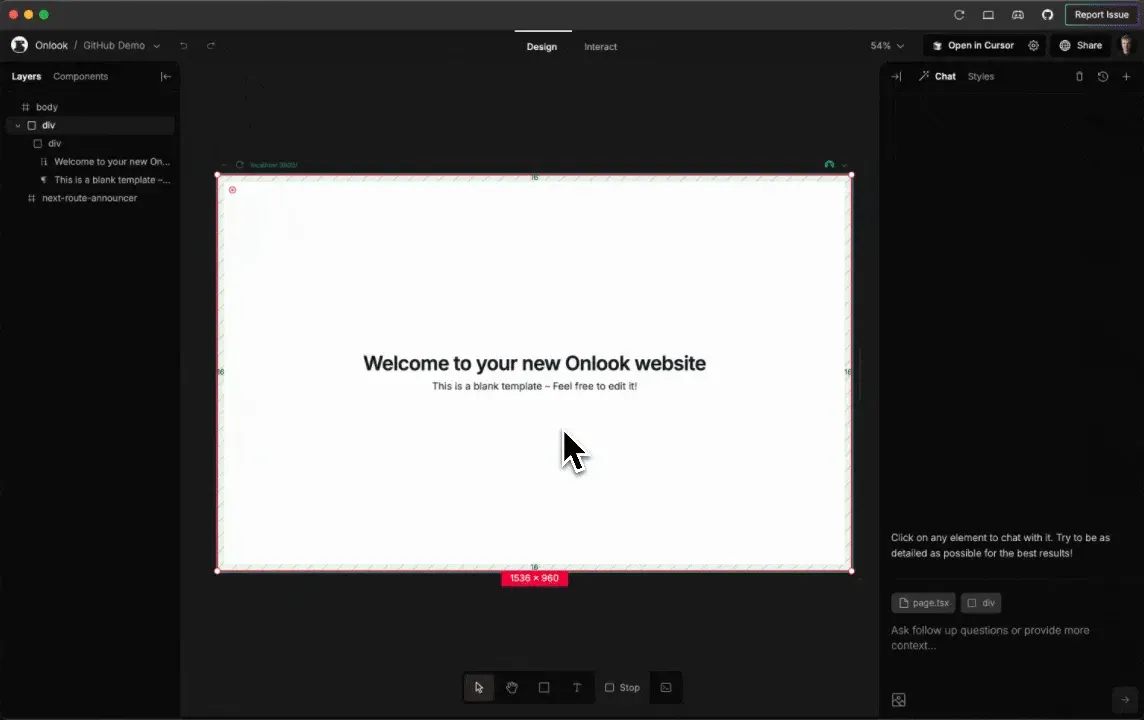
Official README screenshot of the Onlook editor: layers on the left, the running page in a frame on the canvas and the chat on the right.
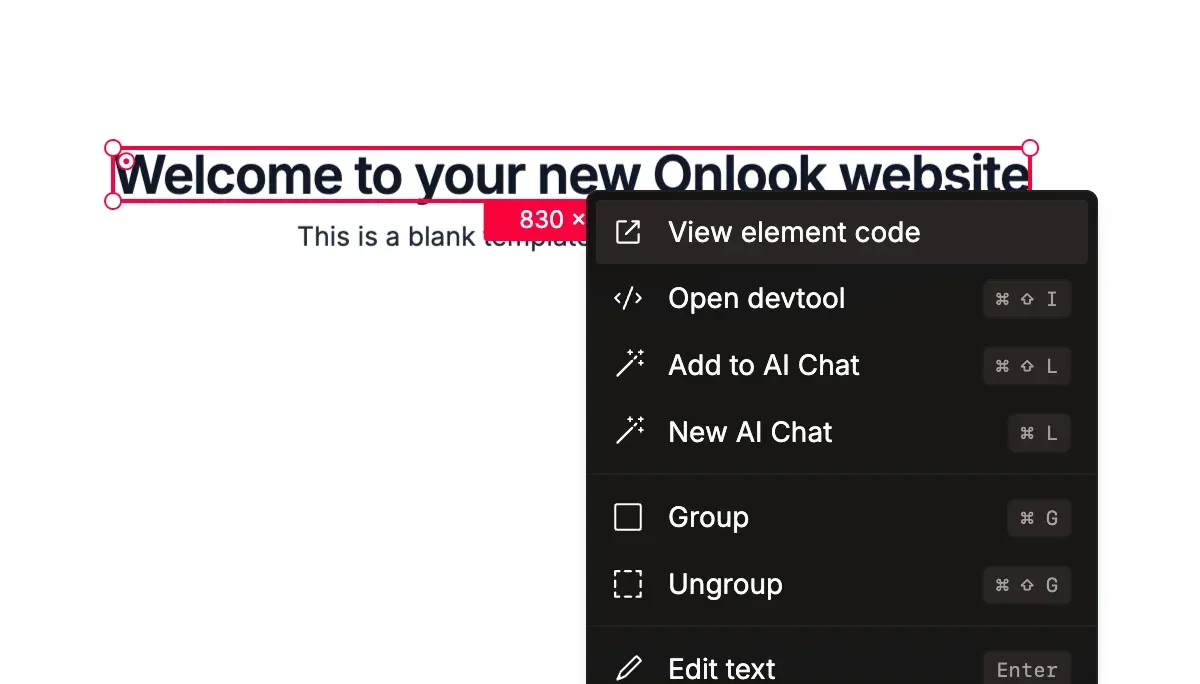
Official README screenshot of the right-click menu on an element, with options to view its code, open devtools and add it to the AI chat.
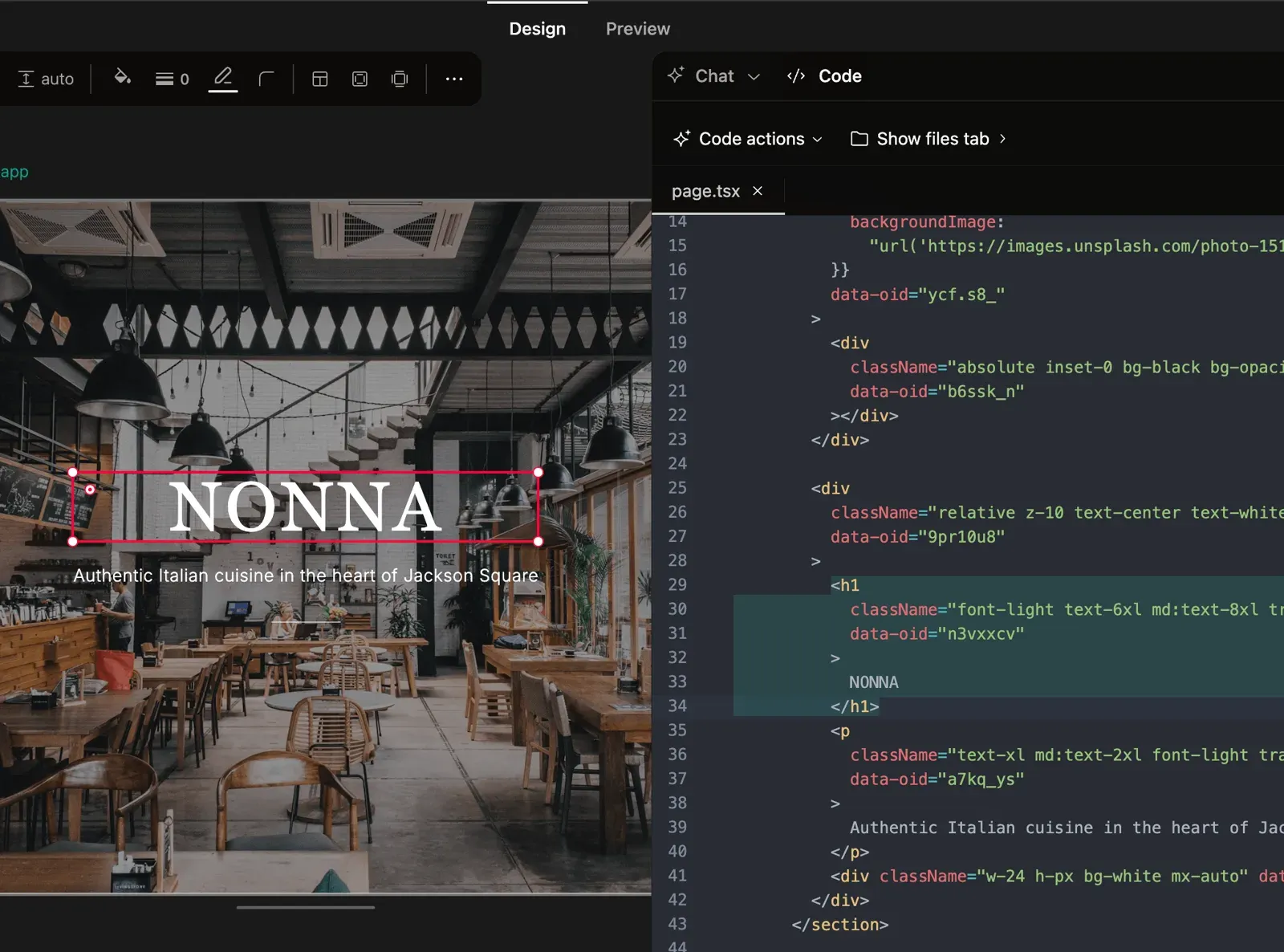
Official README screenshot of the canvas beside the code editor, with the selected heading and its className highlighted.
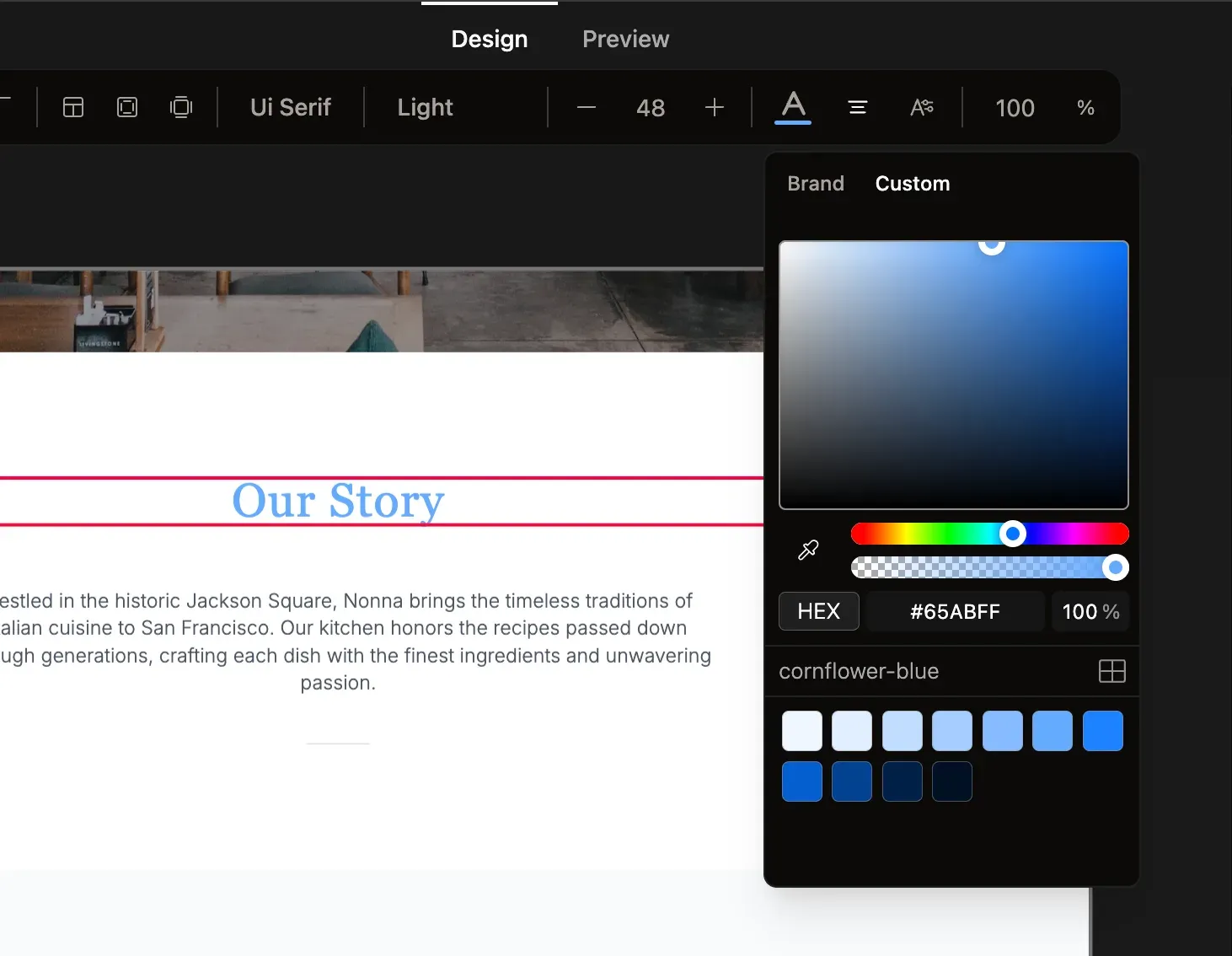
Official README screenshot of the styling toolbar and the brand and custom color picker.
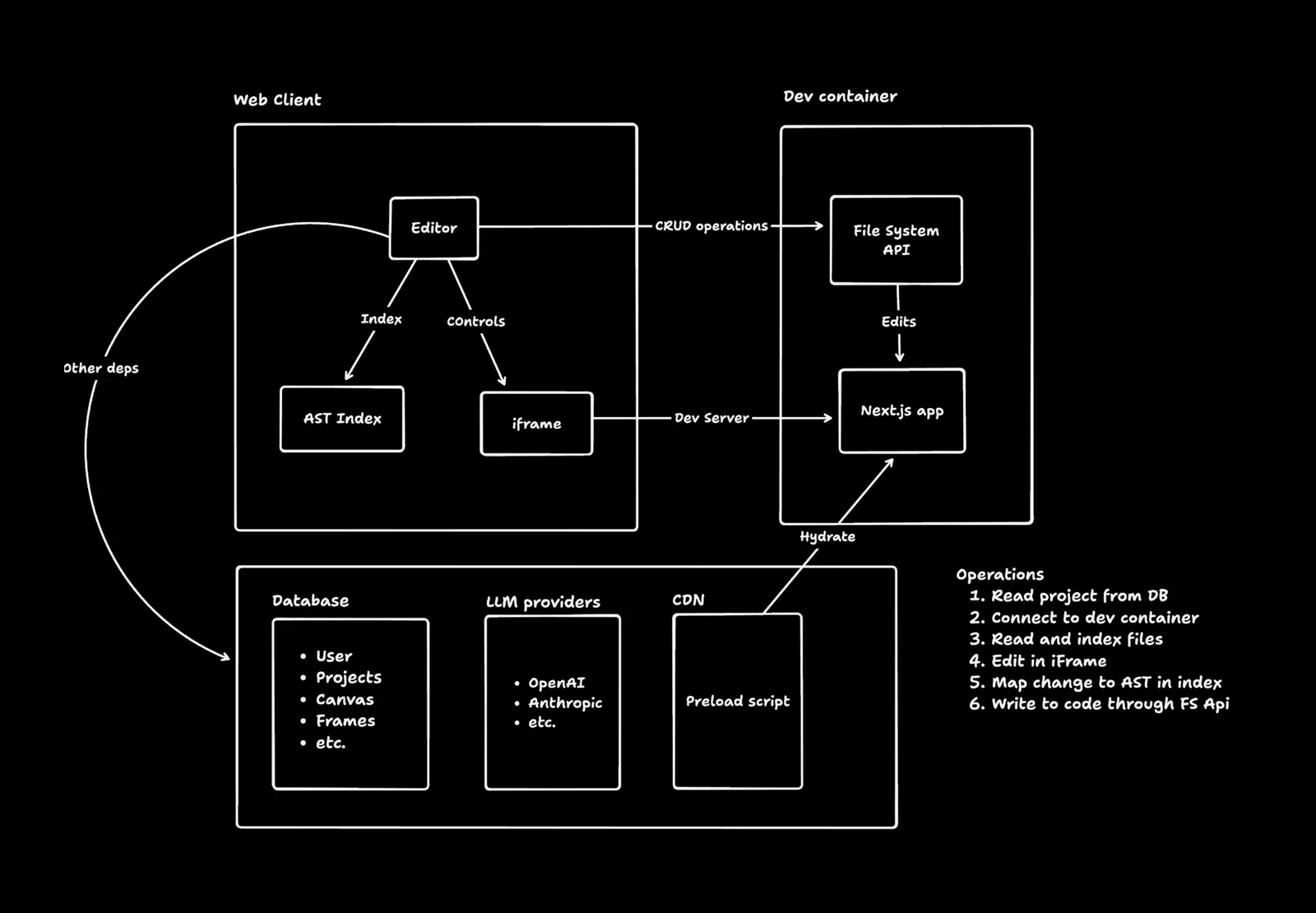
Official architecture diagram from the README showing the web client, the dev container, the database, LLM providers and the instrumentation script.
Source: official Onlook project page.
Key capabilities
- Visual editing of real code Elements in the preview are mapped to their location in the source, and changes made on the canvas are applied to the code. Right-clicking an element opens its exact location in code. The editor works on Next.js and Tailwind CSS projects, according to the README.
- Figma-style canvas The canvas supports selecting, panning and zooming, inserting a div with the R shortcut, drawing text and dragging elements within their parent containers. Frames show the running application, so the app must be started for them to be live.
- Style panel for Tailwind A toolbar adjusts typography, color, sizing and layout and writes Tailwind classes. The screenshots show a color picker with brand and custom colors. It is aimed at editing utility classes, so design tokens that live elsewhere may need a manual step.
- Layers and components A layers tree lists the DOM structure of the open page, and a components tab detects React components. The README notes that component detection previously lived in the desktop app. A drag-and-drop components panel is not finished.
- AI chat with code access The chat can create or edit a project, and you can attach an element to a message. It uses the AI SDK with OpenRouter as the model provider, and a fast-apply provider (Morph or Relace) to merge edits. Queueing several messages is supported, while image references and MCP use are listed as not yet done.
- Code editor beside the design A built-in code editor previews source next to the page, so a visual change can be checked as a diff of className strings. The newer documentation says the code panel appears only after it is enabled in experimental settings.
- Create from text, image or template A new Next.js app can be started from a prompt, from an image or from a prebuilt template. Existing Next.js and Tailwind projects can also be imported. Other frameworks and styling systems are listed as future work.
- Branching Branches let you try a design variation without touching the main version, and checkpoints let you save and restore a state. The website describes exploring and merging variations on the canvas.
- Pages and brand assets The editor can create and navigate pages, manage images and keep brand assets and tokens. Check how colors and fonts end up in your Tailwind config before treating them as the single source of truth.
- Hosting and sharing Apps can be deployed with a shareable link and a custom domain, using the Freestyle hosting service named in the README tech stack. Production deployments of your own app remain your responsibility to review.
- Real-time team editing Real-time editing is marked as available in the README, and commenting is not. The migration note gives collaboration and cross-device access as reasons for the web architecture.
- Sandboxed dev containers The web version loads project code into a CodeSandbox container, serves it, and shows it in an iframe, then indexes the code and instruments it so that elements map to source. The architecture diagram in the README summarizes that flow. See the architecture documentation.
- Local development setup Running locally needs Bun, Docker for the Supabase backend and Node v20.16.0 or later, plus API keys for CodeSandbox, OpenRouter and a fast-apply provider. The steps are in the running locally guide.
- Docker Compose self-hosting The documented Docker Compose route targets small teams and testing: 4 or more CPU cores, 8 GB or more of RAM (16 GB recommended), 50 GB of disk, and Docker 20.10 or later with Compose 2.0 or later. It builds the Next.js web application on port 3000 and expects Supabase services on the host. See the Docker Compose guide.
- Other self-hosting options The docs also describe a single-machine standalone build, a cloud deployment for larger teams and an admin dashboard. Plan to operate Supabase, secrets and the AI provider keys yourself.
- macOS app from the website The website lists a free download for Apple Silicon and Intel Macs on macOS 13 or later, with about 1 GB of disk space. Windows and Linux are shown as waitlist only. It works with an AI subscription you already have, and the site names Next.js, React, Vite, Storybook and shadcn/ui as supported project types.
Where Onlook fits
Visual polish on an existing Next.js app
Import the project, open a page in a frame and adjust spacing, type and color on the canvas, then read the resulting code diff. Check that classes follow your Tailwind conventions and that components shared across pages were not changed unintentionally. Commit the result through your normal review process, and keep the before and after screenshots with the pull request so reviewers see the intent as well as the diff.
Prototyping a page from a prompt or image
Start a new project from text or a reference image, then refine with the chat and the canvas. Treat the first output as a draft: inspect the generated components, accessibility attributes and images before keeping it.
Letting designers edit the codebase
Designers can change copy, layout and styles directly instead of handing over mockups. Use branches so changes stay isolated, and agree with engineers on who reviews and merges. Confirm which files the editor is allowed to write to.
Running a private instance
Follow the self-hosting guides to run the web client with your own Supabase project, OpenRouter key and CodeSandbox token. Decide where project code and prompts may be stored, and test the sign-in and project membership rules, since the repository history includes security fixes for authorization and redirects.
Using the macOS app with your own AI account
The website's download keeps the project on the local machine, and the install page says only the request sent to your AI provider leaves it. Verify that statement against the privacy policy and your provider's retention terms before opening client code in it.
Contributing to the editor
The monorepo uses Bun workspaces for the web client, the admin app and shared packages. Start from the contributor guide, run the database seed to get test users, and open issues with the bug template for defects. Contributors should also read the repository's AGENTS.md and CONTRIBUTING.md files before sending changes.
Reviews of Onlook
Be the first to share your experience with Onlook.
Write a review
Loading review form…
Alternatives to Onlook
 DyadFree, open-source desktop app builder for macOS, Windows and Linux. You describe an app in chat, Dyad writes JavaScript code into a local Git repository, previews it, versions every edit and publishes through GitHub, Vercel or Cloudflare.
 WebstudioWebstudio is an AGPL-licensed visual builder for websites from Webstudio, Inc. It exposes every CSS property, binds data from any HTTP or GraphQL API, lets AI agents edit projects through MCP, and publishes to Cloudflare or exports sites for self-hosting.PPenpotPenpot is an open-source, browser-based design and prototyping platform with real-time collaboration, design systems and code inspection, hosted or self-hosted.