

What is alphai-tui?
alphai-tui is an open-source stock dashboard that runs inside a terminal. One screen combines live quotes and candlestick charts with the reasons a price may have moved: scored news articles with a per-ticker AI analysis, SEC Form 4 insider filings, a structured read of the latest earnings filing and a calendar of US macro releases and confirmed report dates. It is written by Mikhail Makeev, the founder of AlphAI, a financial news service operated by ARDOR 0608 OOD in Bulgaria. The client is free under the MIT license; the news, insider, earnings and calendar views read the AlphAI API and need an AlphAI key, which is available on a free plan without a card.
The project is distributed as a single binary. The GitHub releases page carries archives with SHA256 files for macOS on Apple Silicon and Intel, Linux on x64 and ARM64, and Windows x64, plus shell and PowerShell installers. Homebrew (macOS and Linux) uses the makeev/tap tap, Arch Linux users install alphai-tui-bin from the AUR, and a signed apt repository serves amd64 and arm64 packages for Ubuntu 22.04 and Debian 12 or newer. With a Rust 1.89 or newer toolchain, cargo install alphai-tui builds it from crates.io. The product page at alphai.io/tui summarizes the same install routes.
Development moves quickly. The first published version, 0.5.0, dates from July 10, 2026, and GitHub releases with prebuilt binaries start at 0.7.0. Version 0.39.0, released on November 7, 2026, lets named color presets paint their own background and body text across every view and adds a [theme] background override. Version 0.38.0 put the alert key in every footer, 0.37.0 added session-only price alerts with a terminal bell, 0.36.0 added mouse support and 0.34.0 added a ticker search across the watchlist. The changelog lists every version.
The application uses Rust 2024 edition with ratatui for rendering, crossterm for terminal input, tokio for background tasks and reqwest with rustls for HTTPS. Price sources implement one DataSource trait and register in a single registry file, so the command-line help, settings rows and key storage derive from that entry. Background tasks push events into the application state over a channel, views are stateless renderers, and every AlphAI request-budget guard lives in one module. CI runs tests, clippy and formatting checks on Linux, macOS and Windows.
The scope is deliberately narrow. alphai-tui is a market data viewer: its documentation describes quotes, charts, filings and news, not order entry or brokerage. It has no options chain, keeps a single average price per holding rather than tax lots, and never converts currencies, so a mixed-currency portfolio total is labelled as such. The license section states that the output is not investment advice and that third-party data can be delayed or wrong.
alphai-tui screenshots
Explore the interface. Open a screenshot to view it at full size.
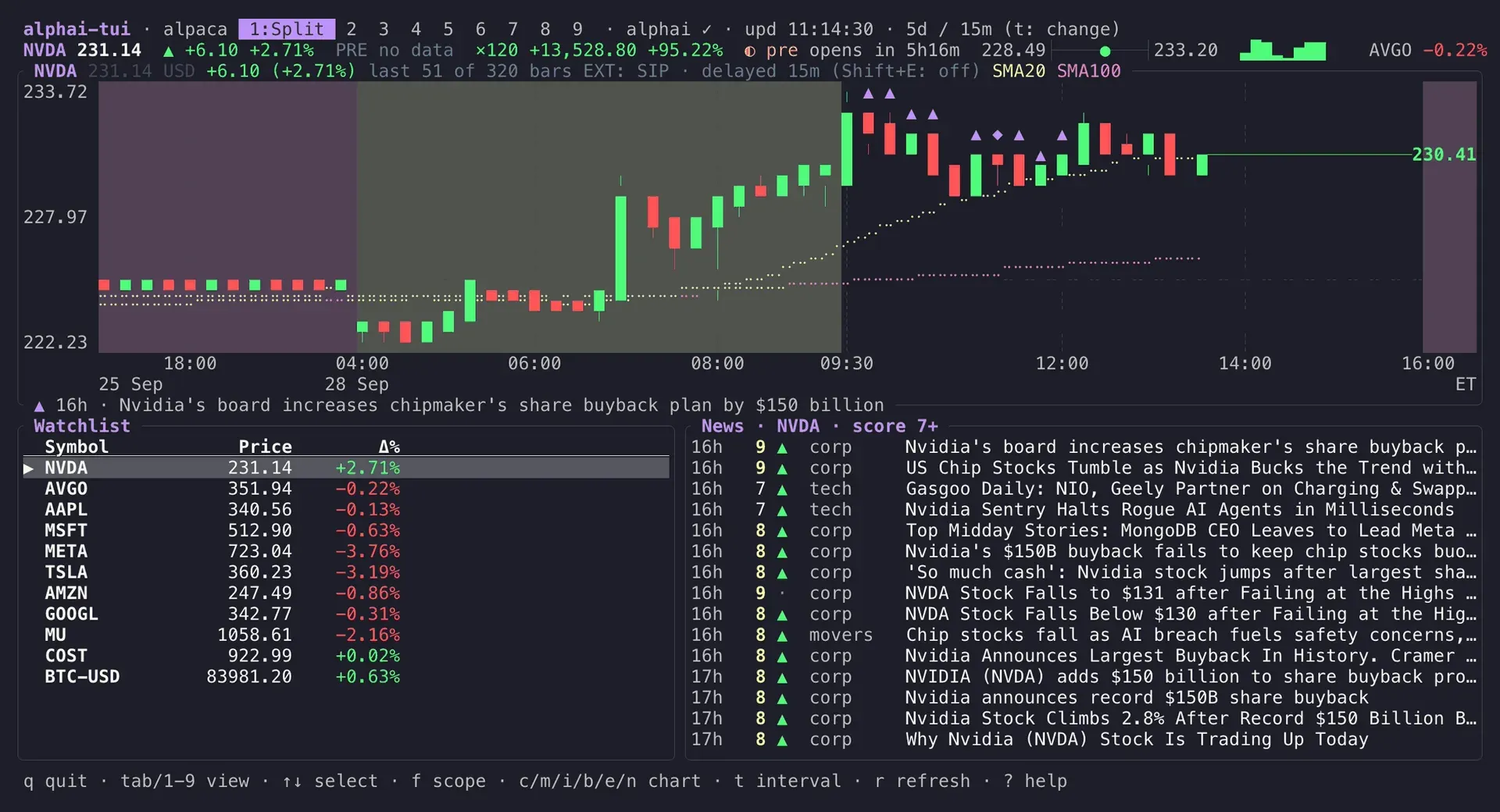
The default Split view: an NVDA 15-minute candlestick chart with moving averages and news marks above the watchlist and the scored news feed.
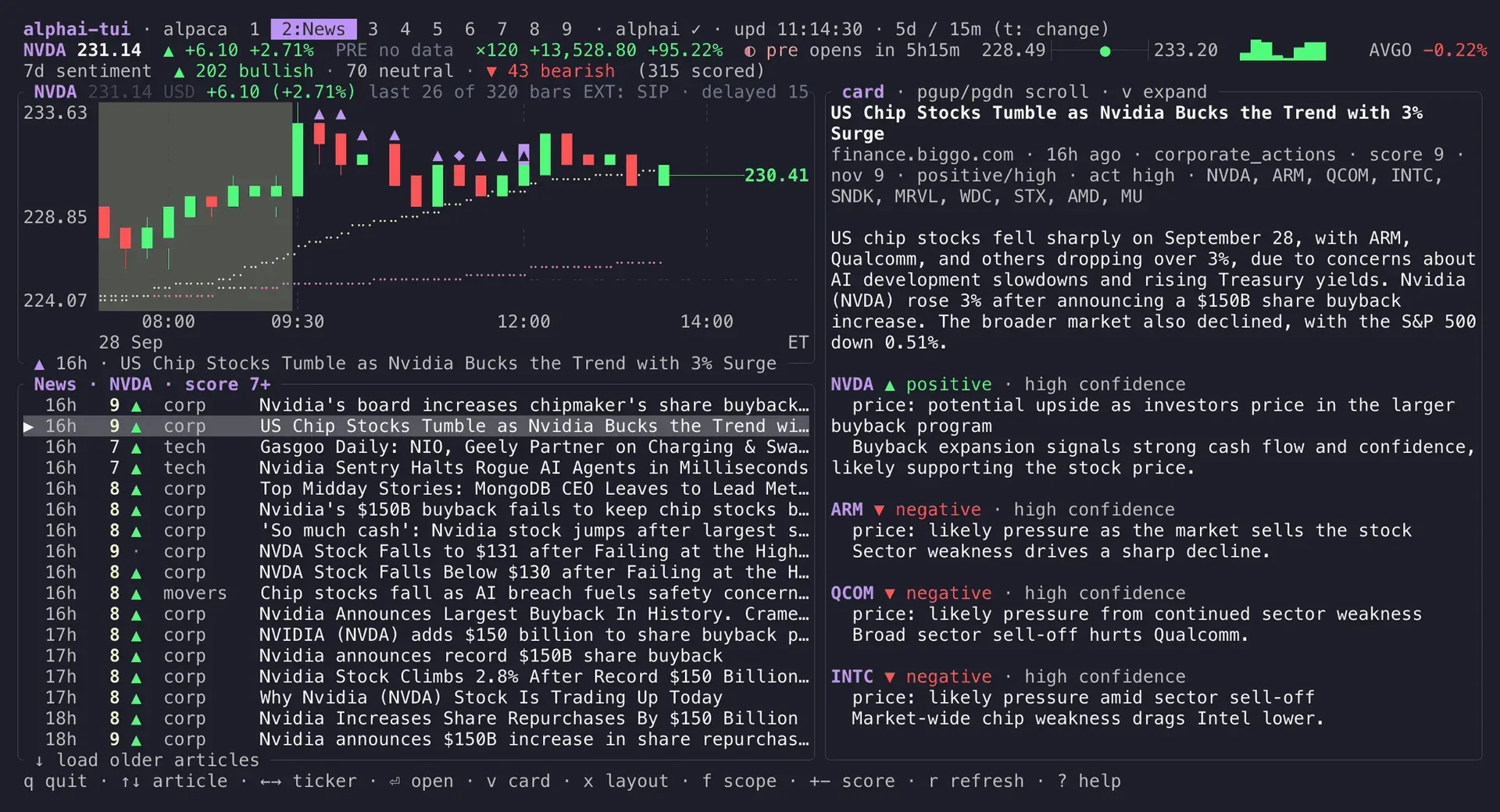
The News view: a seven-day sentiment rollup, the chart above the scored article list and the AI analysis card for the selected story.
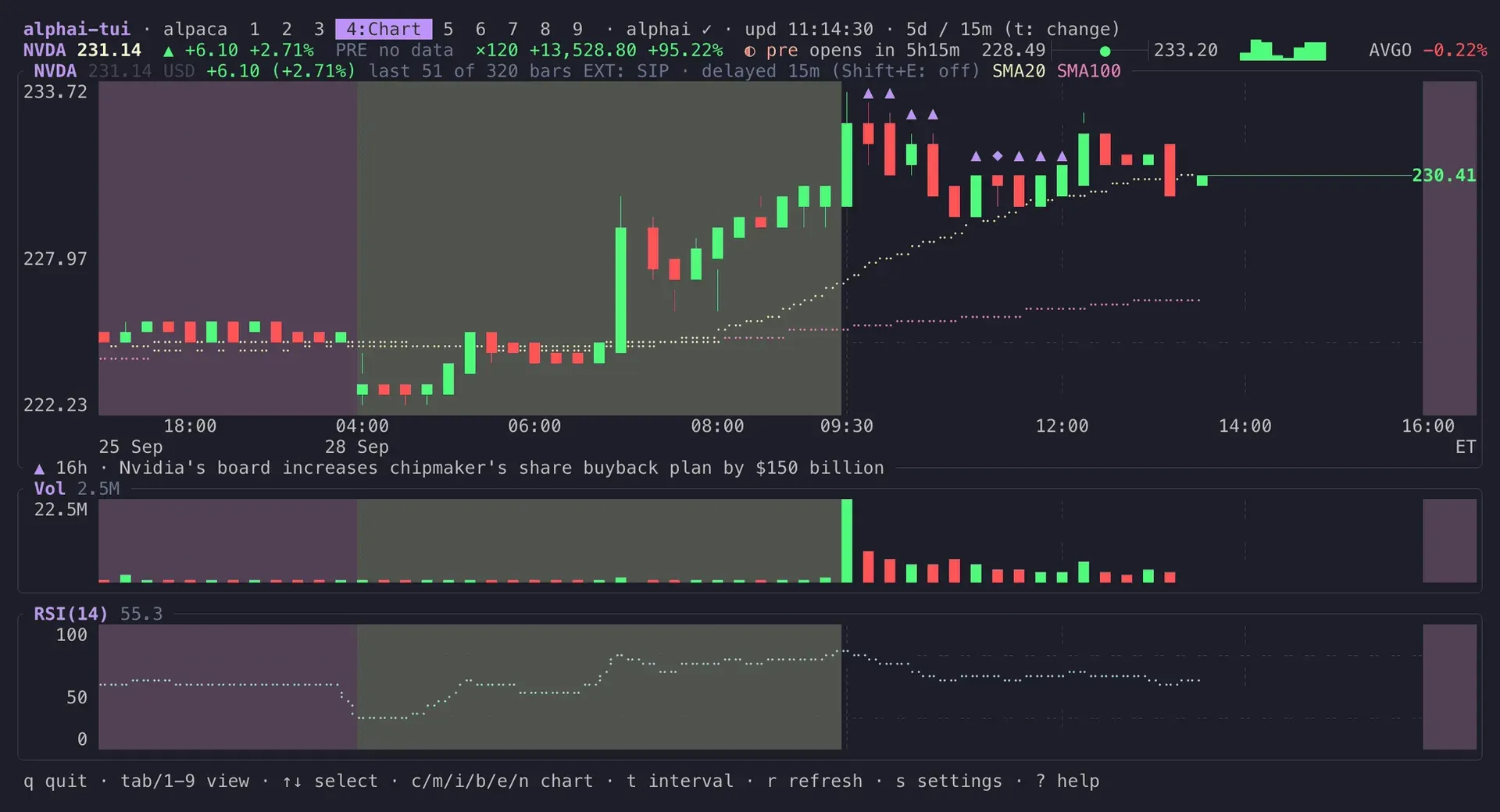
The Chart view: candles across pre-market, regular and after-hours sessions with moving averages, news marks, volume and RSI.
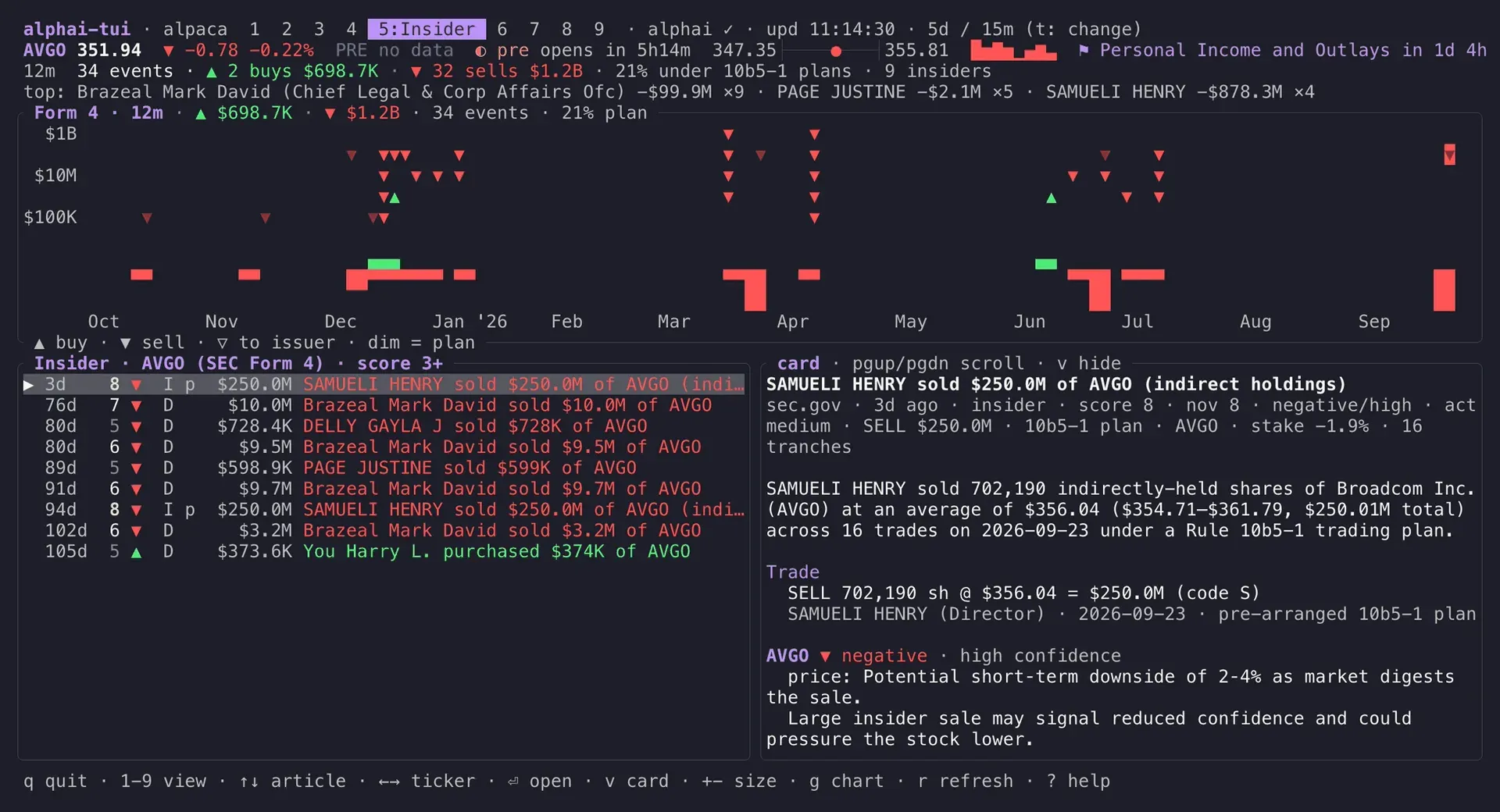
The Insider view: a 12-month Form 4 rollup and trades chart for AVGO, the filing ledger and the selected filing's card.
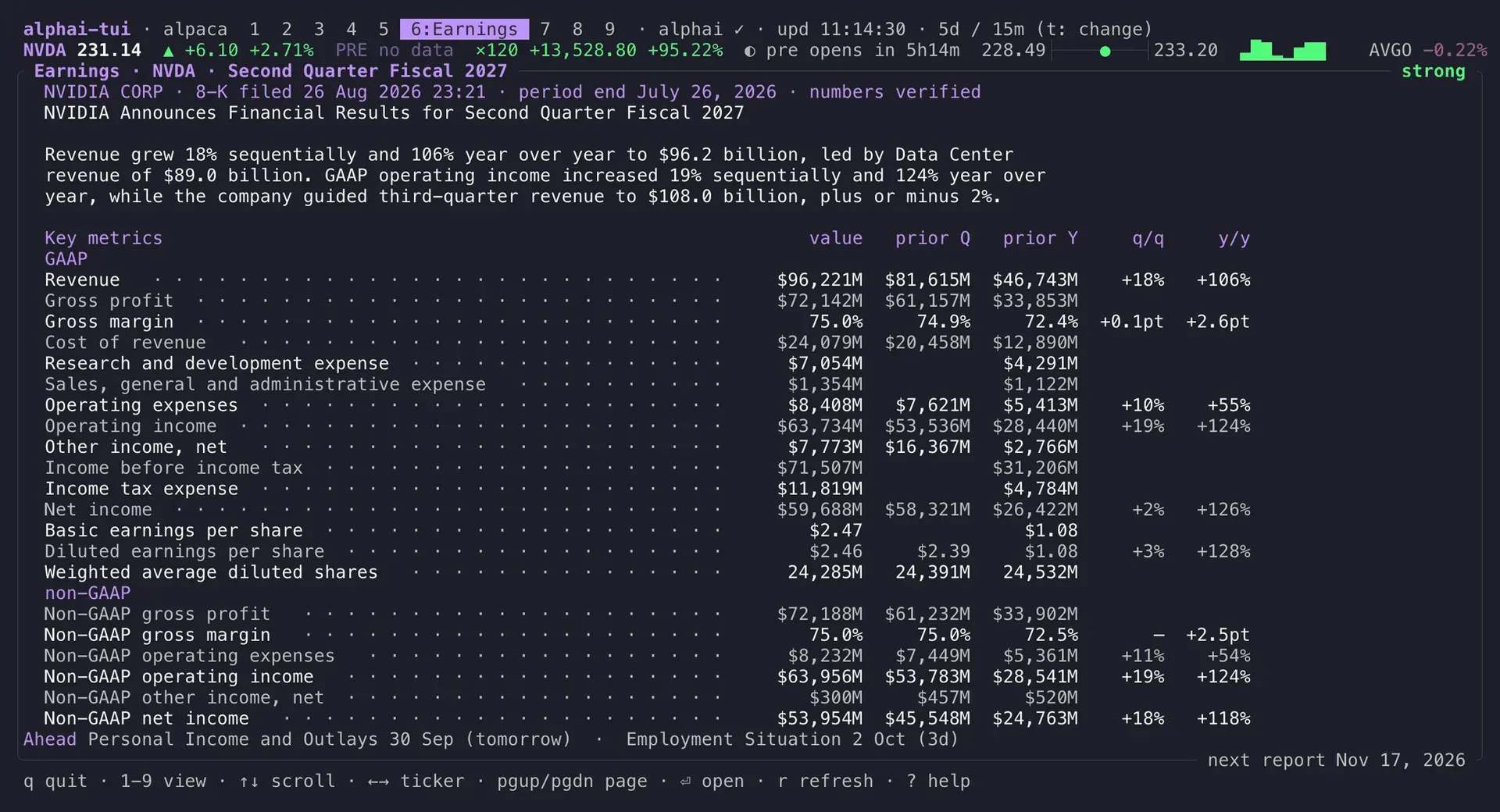
The Earnings view: the structured read of an 8-K filing with value, prior quarter, prior year and both changes for each metric.
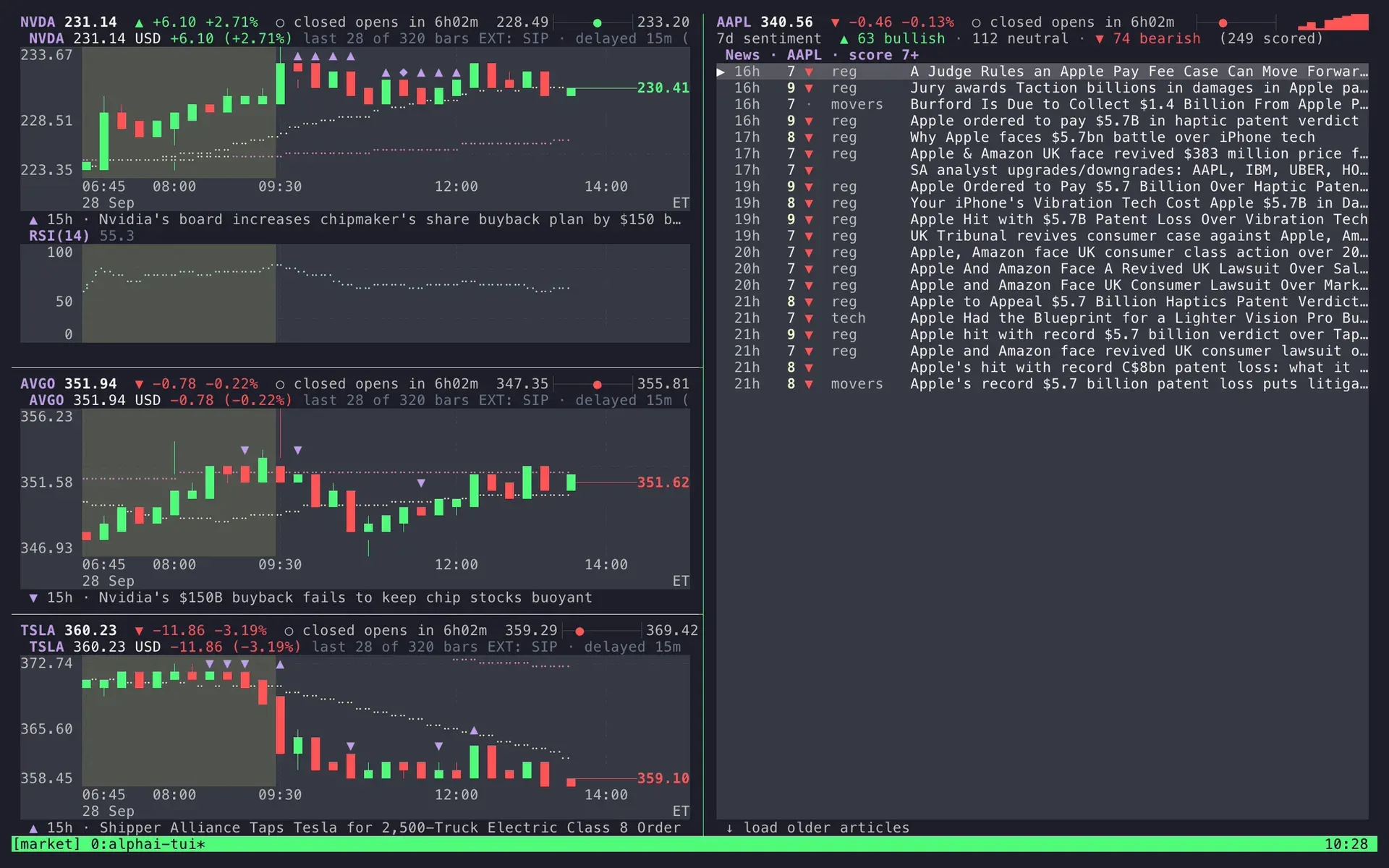
A tmux workspace with three bare chart panes and a full-height scored news feed for another ticker.
Source: official alphai-tui project page.
Key capabilities
- Install on macOS Run brew install makeev/tap/alphai-tui, or use the shell installer from the latest release. Prebuilt archives exist for Apple Silicon (aarch64) and Intel (x86_64) Macs, each with a SHA256 file. A Rust 1.89 or newer toolchain can also build it with cargo install alphai-tui.
- Install on Linux Debian 12 and Ubuntu 22.04 or newer can add the signed apt repository and install alphai-tui on amd64 or arm64; single .deb files are linked from the repository landing page. Arch Linux users install alphai-tui-bin from the AUR, Homebrew on Linux works with the same tap, and x-cmd picks whichever of these methods the system already has. Generic x64 and ARM64 glibc archives are on the releases page.
- Install on Windows A PowerShell one-liner downloads the x64 MSVC build from the latest GitHub release; a ZIP archive with a SHA256 file is also published. The configuration file lives under %APPDATA%. Windows ARM64 has no separate build in the release assets.
- Nine views on number keys Split, News, Table, Chart, Insider, Earnings, Summary, Portfolio and Calendar sit on the keys 1 to 9 or Tab. A quote rail under the tabs carries the selected ticker's price, daily change, extended-hours print, market session countdown, day range and sparkline into every view. Parts of the rail drop out one by one as the terminal narrows, and terminals under 12 rows give the row back to the view.
- Candlestick chart with indicators Candles are drawn at half-block resolution with a previous-close line, two moving averages (20 and 100 periods by default, simple or exponential), a volume panel and an RSI(14) panel. Pre-market and after-hours sessions get their own background shading for US stocks, and half-day closes are handled. When the plot is too narrow, the newest bars that fit are drawn and the title counts the rest instead of merging bars.
- Four price sources with failover Yahoo works without a key and includes extended hours, the 52-week range and volume. Finnhub, Alpaca and Tiingo need their own keys and each has documented limits, for example Finnhub's free tier at 60 requests per minute without candle history and Tiingo's free plan at 50 requests an hour. If every ticker fails for 45 seconds, the app switches to another source that has credentials, says so in the footer and never switches back on its own.
- Extended-hours source selection Because the IEX feed used by free Alpaca and Tiingo plans barely trades outside regular hours, the pre-market and after-hours price has its own setting. The default auto mode borrows Alpaca's consolidated SIP feed, 15 minutes delayed, when Alpaca keys exist, with Yahoo as backup. Borrowed prints are labelled with their feed and age, and regular-session prices always stay with the main source.
- Scored news feed with AI analysis The News view lists AlphAI articles with a 1 to 10 relevance score, one of fourteen categories and a sentiment mark. The card shows the expected price impact, confidence, novelty, actionability, context and a contrarian view for the selected ticker. Score and category filters run on the server, reprints collapse into one row with an outlet count, and the scope cycles between one ticker, the whole market and a 48-hour trending top ten.
- News marks on the price chart Articles the app already holds for a ticker appear on the candles they were published in, as up, down or neutral marks whose brightness follows the relevance score. In the wider News layout the selected story is highlighted on the chart above the list. The marks reuse cached data and cost no extra API request.
- SEC Form 4 insider view A 12-month rollup shows buys against sells, dollar volumes, the share traded under 10b5-1 plans and the most active insiders. Each event is plotted on a log dollar scale over weekly buy and sell bars, and the filing list works as a ledger with date, side, value, owner and plan flag. The window cycles between 3 months, 12 months and off.
- Earnings filing reads The Earnings view prints AlphAI's structured read of a company's own 8-K item 2.02 or foreign 6-K filing: verdict, metric table with prior quarter, prior year and both changes, segments, outlook and concerns. The project states that figures are checked against the filing text and printed as filed. A company without a read shows its next confirmed report date when one exists.
- Macro and earnings calendar The Calendar view lists US macro releases and confirmed watchlist report dates for the past seven days and the next 45. Estimated, postponed and cancelled events stay labelled, and a company without a confirmed date simply has no row. It is an agenda without actual, forecast or previous macro figures, and company dates are checked one at a time at least four seconds apart.
- Watchlist, search and portfolio The a and d keys add or remove tickers and write the change to the config immediately; / searches the watchlist by symbol or loaded company name. The Portfolio view shows quantity, average price, value, day move and profit or loss per holding, with fractional and negative quantities allowed. There are no tax lots and no currency conversion.
- Session price alerts Since 0.37.0, A sets one upward or downward level per ticker, such as >= 150. A crossing shows a banner and sends one terminal bell, using price updates the app already receives. Alerts last for the running session only, cached prices cannot arm them, and a crossing that reverses between two polls can be missed.
- Scriptable output -once prints quotes to stdout and exits, --json prints one object per symbol with price, change, ranges, volume and an optional position block, and --earnings TICKER prints the latest earnings read. Failed symbols still get a row with an error field, and warnings go to stderr so stdout stays valid JSON. Each run costs one request per symbol on Yahoo, so status bars should poll about once a minute.
- Themes, keybindings and mouse Nine color presets include Catppuccin, Dracula, Gruvbox and Nord variants, and every color slot can be overridden in a [theme] table. Any action can be rebound in [keybindings], and the help overlay lists the keys currently bound. Mouse clicks and the wheel work in every view, and M hands the mouse back to the terminal for text selection.
- tmux and agent workspaces -bare drops the header and footer for multiplexer panes, and borders can be replaced by tinted panels. Several instances share one config file through a lock file, but they also share one AlphAI key's request budget. The README describes running a coding agent in the next pane connected to the AlphAI MCP server, which serves the same news and insider data.
- Request budget and cache News and insider responses are cached for five minutes by default (alphai_ttl_secs, 30 to 86,400 seconds), earnings reads for an hour, and further pages load only on request. The last good quotes and candles are written to a local quotes.json cache at most once a minute, shown on the next start with a cached label and ignored after a week. A two-second poll floor is fixed.
Where alphai-tui fits
Watching a watchlist during the trading day
Start with alphai-tui followed by ticker symbols, then save the list from the settings screen so a bare alphai-tui reopens it. Use the Split view for chart, watchlist and news together and the Summary grid for the shape of every session at once. Check which source the header names and whether the rail marks the quote as delayed or cached, because free IEX feeds and borrowed SIP prints have different timing. The data sources section lists the latency and limits of each provider.
Explaining a price move
Select the ticker, open the Chart view with news marks on, and compare the marked candles with the articles in the News view. Read the analysis card for the selected ticker's impact, confidence and contrarian view, then open the source article with Enter. The analysis is generated by AlphAI's automated pipeline and labelled as AI output; confirm material claims against the linked source before acting on them.
Reviewing insider activity and earnings
Open the Insider view to see a year of Form 4 events, how much was traded under 10b5-1 plans and which insiders were most active, then raise the size filter with + to hide small trades. Switch to the Earnings view for the latest structured read and the next confirmed report date. Check the filing date in the card header, since a quarter's read appears only after the company has filed and AlphAI has processed it.
Feeding a status bar or a cron job
Use alphai-tui --json with a short symbol list and parse the output with jq. Every row carries the fetch time, failed symbols return an error field, and the exit code is 0 either way, so the script has to check for errors itself. Keep the interval at about a minute on Yahoo, which blocks bursts by IP address for tens of minutes, or switch to a keyed source with -s.
Building a tmux trading desk
Start one instance per pane with --bare and switch each pane to its own view, for example three charts beside one full-height news feed. Set things up once, because the last pane to save settings wins, and count how many panes read AlphAI data on a free key limited to 100 requests a day. The tmux workspace guide gives a ready layout.
Adding a price source or a view
Contributors implement the DataSource trait in a new module and append one entry to the source registry; settings rows, key storage and environment overrides follow from it. A new view implements the View trait as a stateless renderer and declares which shared capabilities it uses, so it never fetches data itself. Run cargo test, which includes TestBackend rendering tests, plus clippy and rustfmt as CI does.
Install
brew install makeev/tap/alphai-tuiReviews of alphai-tui
Be the first to share your experience with alphai-tui.
Write a review
Loading review form…