

What is Homebrew?
Homebrew is a free, open-source package manager that installs command-line tools and applications on macOS, Linux and Windows Subsystem for Linux (WSL). Its command is brew, and its packages come in two kinds: formulae, which build command-line tools, libraries and services from upstream source code, and casks, which install upstream pre-built binaries such as applications, fonts and plugins. The official package repositories are homebrew/core for formulae and homebrew/cask for casks; other repositories are called taps. Pre-compiled formula builds are called bottles. The project homepage is brew.sh and the manual lives at docs.brew.sh.
Homebrew does not install files outside its prefix. Each package goes into its own keg inside the Cellar, and its files are then symlinked into the prefix: /opt/homebrew on Apple Silicon, /home/linuxbrew/.linuxbrew on Linux and WSL, and /usr/local on Intel Macs. Formulae in homebrew/core require human review before they are accepted, changed or updated, and they must be open-source software under a licence compatible with the Debian Free Software Guidelines. Since Homebrew 4.0.0 (February 2023), Homebrew-maintained taps are delivered as JSON downloads from its API instead of local Git clones.
The project was originally created by Max Howell; the BSD 2-Clause licence of Homebrew/brew carries the notice "Copyright (c) 2009-present, Homebrew contributors". Code is under that licence and documentation is under Creative Commons Attribution 4.0. Homebrew describes itself as a non-profit project run entirely by volunteers, fiscally hosted by the Open Source Collective and funded through GitHub Sponsors, Open Collective and Patreon. The governance document defines Maintainers, Lead Maintainers, a Security Team, an Ops Team and an elected Project Leader who serves a two-year term; a Deputy Project Leader role is scheduled to be filled at the 2027 Annual General Meeting.
Releases of Homebrew/brew are published as GitHub release tags, and users receive them through brew update or automatic updates. Patch releases from 7.0.10 to 7.0.13 (October 19 to November 9, 2026) were published about once a week; Homebrew refuses to create a major or minor release less than one month after the previous one. The latest release at the time of writing is 7.0.13 (November 9, 2026), which ships a Homebrew.pkg installer asset. The Homebrew 7.0.0 announcement (September 13, 2026) lists faster installations and upgrades, stronger sandboxing, a native macOS app called BrewUI, the built-in brew vulns command with a Homebrew advisory database, the end of macOS 10.15 support and Intel Macs moving to Tier 3. Homebrew 6.0.0 (June 2026) introduced tap trust and a smaller default JSON API, and 5.0.0 (November 2025) added concurrent downloads by default and official Linux ARM64 support.
Supported platforms are defined in Support Tiers. On macOS, Tier 1 requires official Apple Silicon hardware running a macOS version in Homebrew CI coverage (as of September 2026: Golden Gate 27, Tahoe 26 and Sequoia 15), the default or a compatible prefix, bottles rather than source builds, and internal storage. All Intel Mac configurations are Tier 3; Homebrew has stopped building new Intel bottles and plans to remove the ability to run on Intel Macs in or after September 2027. macOS Catalina 10.15 and older do not run Homebrew. On Linux, Tier 1 means Ubuntu within its standard support window or a Homebrew-provided Docker image, glibc 2.39 or newer, kernel 3.2 or newer, and ARM64 or x86_64 with SSSE3. 32-bit x86 is not supported, ARM32 and WSL 1 are Tier 3, and FreeBSD is unsupported.
Homebrew screenshots
Explore the interface. Open a screenshot to view it at full size.
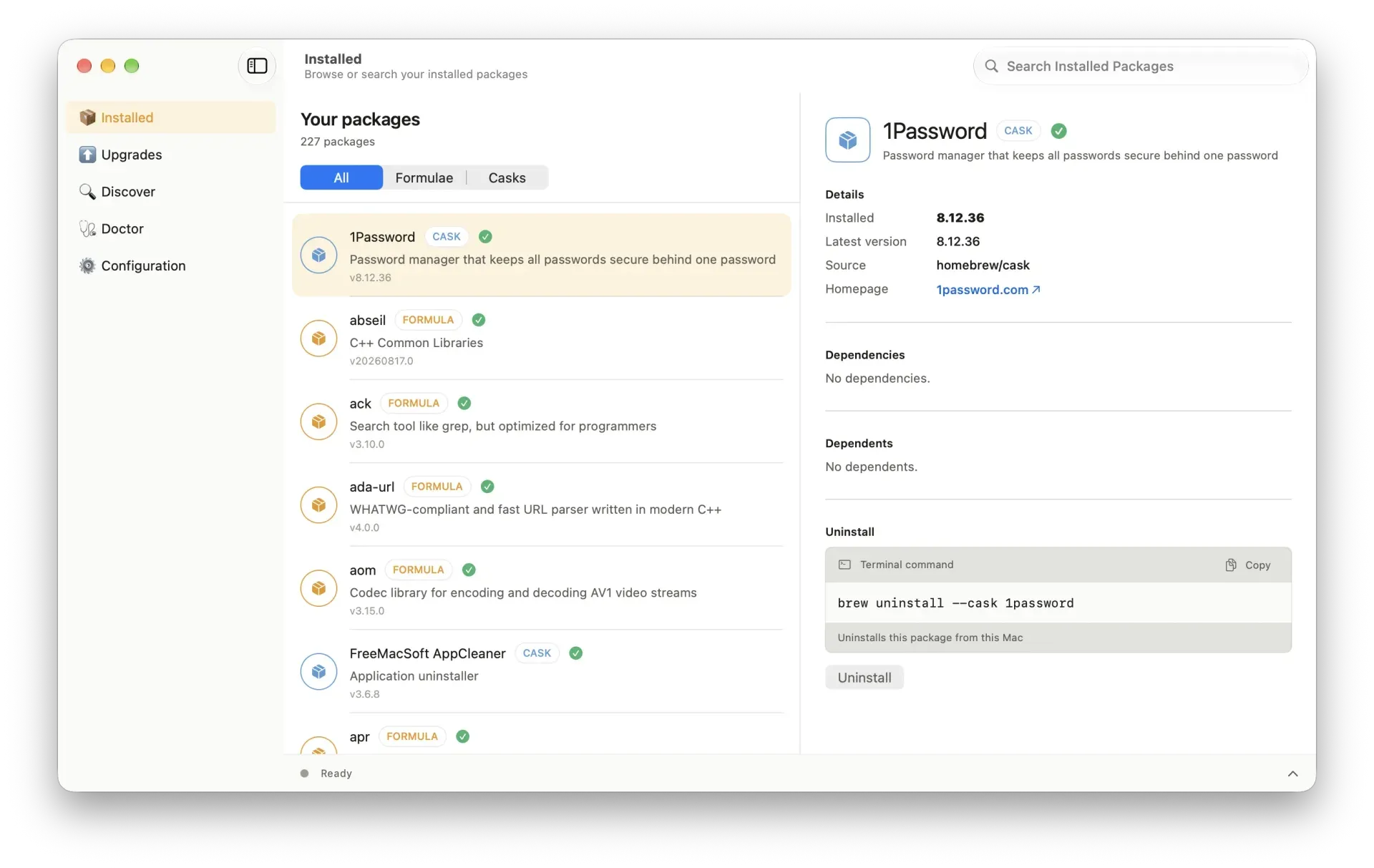
BrewUI, the official macOS app released with Homebrew 7.0.0, showing installed packages and the matching brew command.
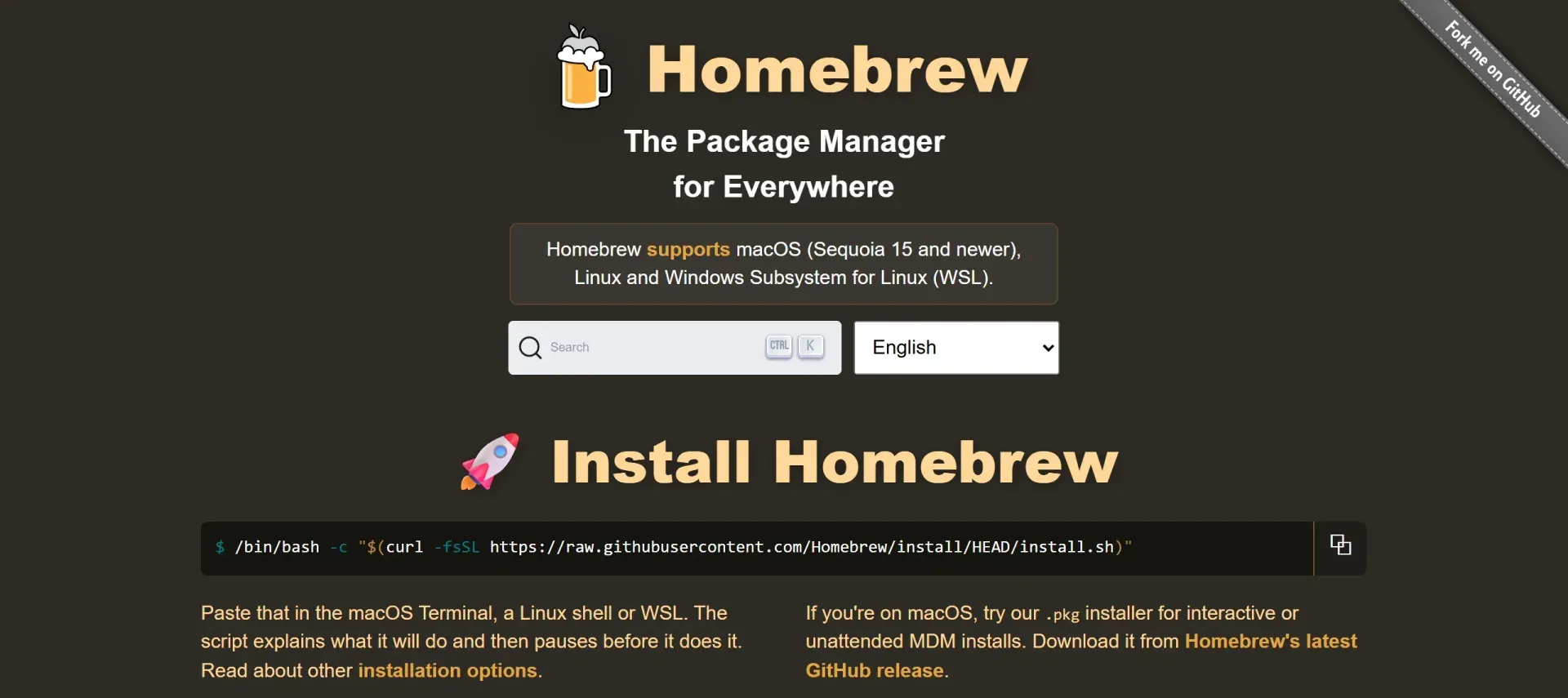
brew.sh homepage with the supported platforms and the official install one-liner (captured November 10, 2026).
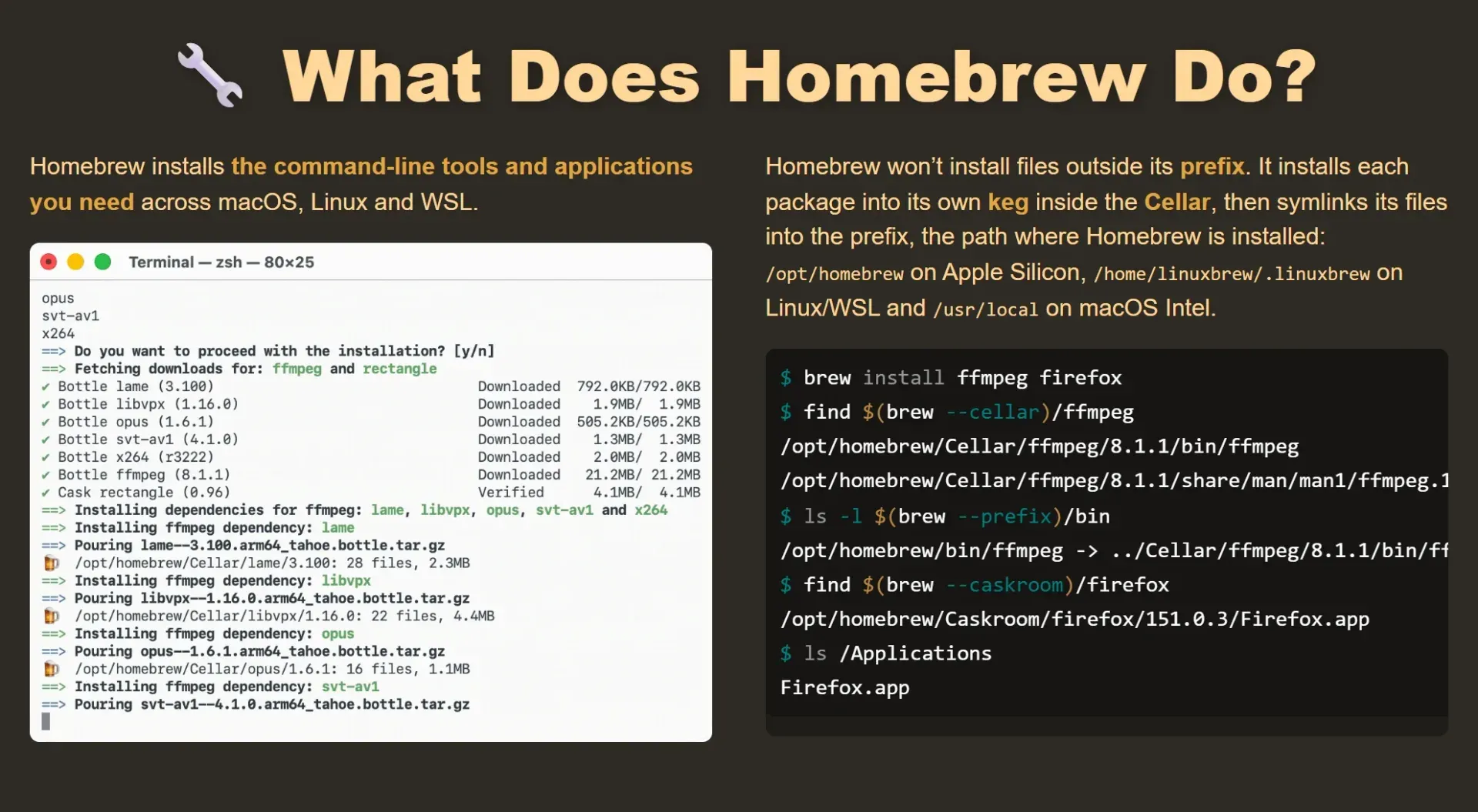
brew.sh section showing bottle downloads for ffmpeg and where formulae and casks are placed under /opt/homebrew.
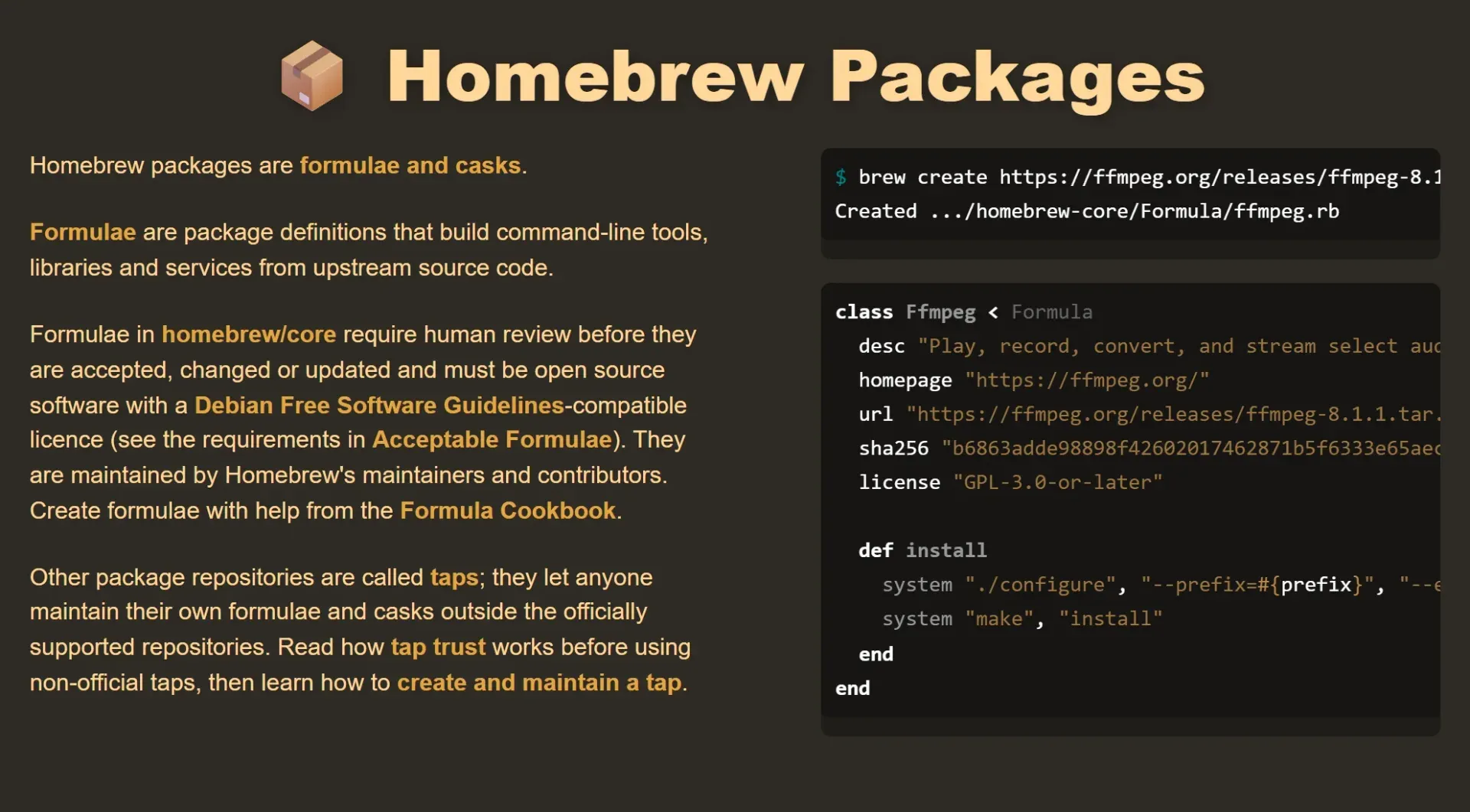
brew.sh section on formulae and taps with an example formula generated by brew create.
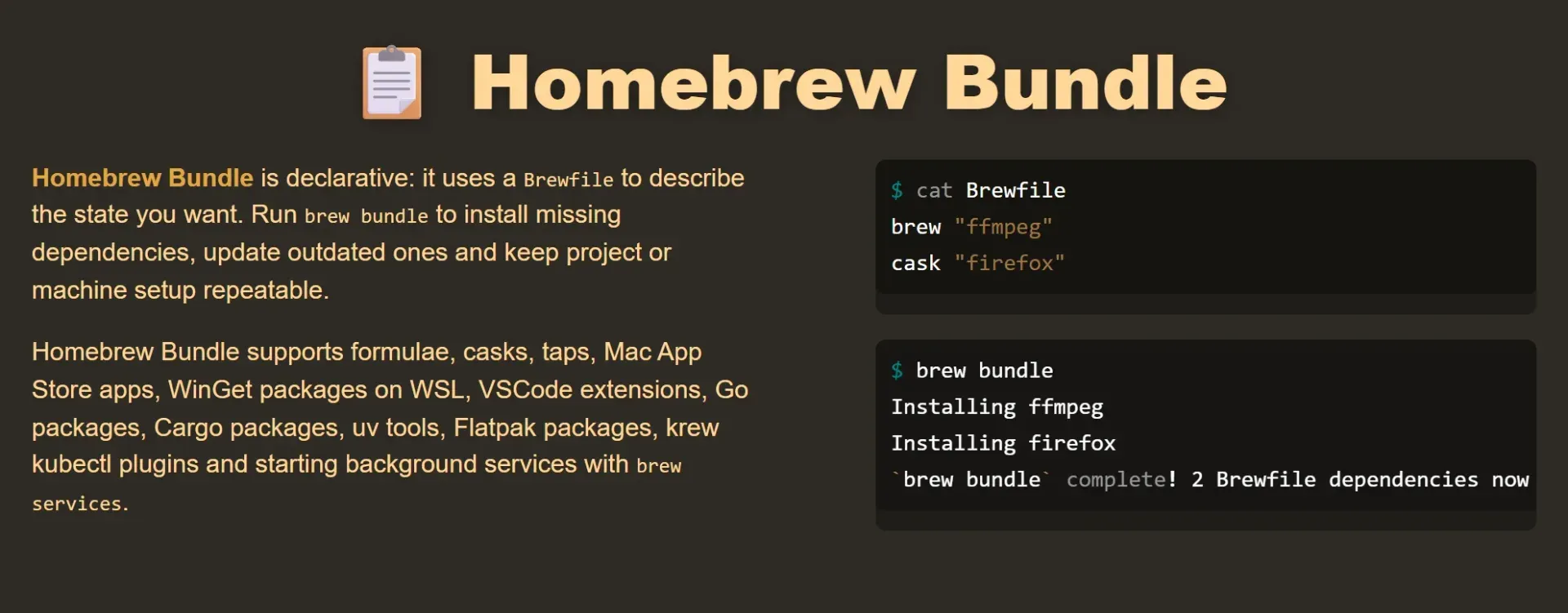
brew.sh section on Homebrew Bundle: a two-line Brewfile and the brew bundle run that installs it.
Source: official Homebrew project page.
Key capabilities
- Shell installer The official install command on brew.sh is
/bin/bash -c "$(curl -fsSL https://raw.githubusercontent.com/Homebrew/install/HEAD/install.sh)", to be pasted into the macOS Terminal, a Linux shell or WSL. The script explains what it will do and pauses for confirmation before it starts. It requires Bash at/bin/bash; zsh, fish, tcsh and csh do not work for this one-liner. PrependingNONINTERACTIVE=1runs it without prompts for automation. - macOS .pkg installer A
Homebrew.pkginstaller is attached to the latest Homebrew/brew GitHub release. It supports only Apple Silicon and installs to/opt/homebrew. It is intended for interactive or unattended MDM installs, and an alternate install user can be set through a root-owned/var/tmp/.homebrew_pkg_user.plistfile, as described in the installation guide. - macOS requirements The installation guide lists an Apple Silicon CPU (64-bit Intel is Tier 3), macOS Sequoia 15 or newer on officially supported hardware, and Bash for installation. Xcode or the Command Line Tools for Xcode are needed only to build formulae from source; on Apple Silicon, bottles and casks install without developer tools, while Intel Macs also need them for bottles.
- Linux and WSL 2 On Linux the installer uses
/home/linuxbrew/.linuxbrew, which allows most bottles to be used. Homebrew uses no host libraries except glibc and gcc when they are new enough, and installs its own glibc and gcc on older distributions. The Linux page lists build prerequisites per distribution, for examplebuild-essential procps curl file giton Debian or Ubuntu. - Formulae and homebrew/core Formulae are Ruby package definitions with fields such as
desc,homepage,url,sha256andlicenseplus aninstallmethod.brew creategenerates a starting formula from a source archive URL, and the Formula Cookbook documents the format. Formulae in homebrew/core are reviewed by maintainers before being accepted or changed. - Casks and homebrew/cask Casks install pre-built applications, fonts and plugins, for example
brew install --cask firefox, which places the app into/Applicationsvia the Caskroom. Some casks auto-update outside Homebrew;brew upgrade --greedyincludes them in upgrades. Release 7.0.13 requireszapstanzas in all official casks. - Bottles (binary packages) When a formula defines a bottle for the current system,
brew installdownloads and pours it instead of compiling. Bottles for homebrew/core are built by BrewTestBot when a pull request passes CI on each supported platform, and are uploaded to GitHub Packages. Bottles are skipped when building from source is requested, when install options are passed or when the bottle cellar does not match the prefix. - Taps and tap trust
brew tap user/repocloneshttps://github.com/user/homebrew-repo; a two-argument form accepts any Git URL. Code in a tap runs with the user's privileges. Since 6.0.0, tapping does not grant whole-tap trust: installing a fully qualified name such asuser/repo/formulatrusts that item, andbrew trustmanages other trust levels. Packages from taps outside the Homebrew organisation are unsupported by default. - Homebrew Bundle and Brewfile
brew bundlereads a declarativeBrewfileand installs missing dependencies and updates outdated ones. Supported entries include formulae, casks, taps, Mac App Store apps, WinGet packages on WSL, VS Code extensions, Go and Cargo packages, uv tools, Flatpak packages, krew kubectl plugins and services. Release 7.0.13 adds apin: trueBrewfile option. - Background services
brew servicesmanages background services through launchctl on macOS and systemctl on Linux. In 7.0.0, persistent overrides can be placed in$HOMEBREW_USER_CONFIG_HOME/services/<formula>.envso local settings survive package upgrades. - Vulnerability checks and SBOMs Since 7.0.0,
brew vulnschecks installed formulae against OSV.dev and Homebrew's own advisory database, with filters such as--severity=high,--depsand--brewfile. Advisory records are published in OSV format under CC0. Homebrew also writes software bills of materials and verifies bottle attestations, including for supported third-party tap bottles. - Sandboxing Formula and cask operations are sandboxed. On macOS, 7.0.0 blocks sandboxed reads of the home directory by default. On Linux, 7.0.0 replaced the Bubblewrap sandbox from 6.0.0 with Landlock; kernels without Landlock keep working without Linux sandboxing, and
brew doctorreports this as an advisory. - BrewUI macOS app BrewUI is Homebrew's official graphical interface, released with 7.0.0.
brew install homebrew-appinstalls it on macOS Tahoe 26 or later. It offers package browsing, search, installed-version details, upgrades and a doctor view, and it shows the underlyingbrewcommand for each operation. - Maintenance commands
brew updaterefreshes Homebrew and package metadata,brew upgradeupgrades outdated unpinned packages,brew pinholds a package at its version,brew autoremoveremoves formulae installed only as dependencies that are no longer needed, andbrew cleanupremoves old versions.brew doctorreports configuration problems and offers--jsonoutput since 7.0.0. - JSON API and package index formulae.brew.sh lists every formula and cask with versions, dependencies and analytics. Its JSON API serves full metadata files such as
https://formulae.brew.sh/api/formula.jsonandcask.json, matching the output ofbrew info --json. - Anonymous analytics with opt-out Homebrew collects aggregate, anonymous usage analytics in InfluxDB and shows a notice before analytics are enabled. Events can include package and public tap names, install options, CPU architecture, OS name or major version, Homebrew version and whether the default prefix is used; the payload has no user identifier or IP-address field, and events are kept for 365 days. Opt out with
brew analytics offorexport HOMEBREW_NO_ANALYTICS=1, and check withbrew analytics state, as documented on the Analytics page. - Built-in MCP server Since 4.6.0,
brew mcp-serverstarts a Model Context Protocol server that exposes Homebrew operations to MCP clients. Release 7.0.13 hardened its schemas and argument handling. - Non-admin and managed installs Homebrew can run for a non-admin account and avoids sudo for formula installation after the initial setup;
HOMEBREW_NO_SUDO=1disables its sudo calls explicitly.brew as-brew-userand, on macOS,brew as-console-userrun commands as the owning or logged-in account for MDM, Munki and Jamf workflows. Homebrew states it provides no security guarantees when users with write access to the prefix are untrusted.
Where Homebrew fits
Installing developer tools on a Mac
After running the install script, the installer prints the shell configuration to add, typically eval "$(/opt/homebrew/bin/brew shellenv)" in ~/.zshrc or ~/.bashrc; Homebrew does not work until that step is done. A command such as brew install ffmpeg then pours bottles for the formula and its dependencies into the Cellar and links them into /opt/homebrew/bin. brew --cellar, brew --prefix and brew --caskroom show where files were placed.
Installing desktop applications with casks
brew install --cask downloads an application, font or plugin from its upstream vendor and installs it, for example into /Applications. brew upgrade updates casks that do not update themselves, and brew upgrade --greedy also covers auto-updating ones. Casks requiring sudo for vendor installers are rejected when HOMEBREW_NO_SUDO=1 is set; --appdir selects a writable destination for compatible app casks.
Reproducing a machine or project setup
A Brewfile lists formulae, casks, taps and other package types, and brew bundle installs what is missing on another machine. brew deps --brewfile shows the dependencies a Brewfile will bring in before installing, and pinned entries keep a package at its version. The Brew Bundle documentation covers the full syntax.
Using Homebrew on Linux, WSL and in CI
On Linux and WSL 2, Homebrew installs to /home/linuxbrew/.linuxbrew and provides software not packaged by the host distribution, or newer versions than an older distribution ships. For CI, Homebrew publishes the Docker image ghcr.io/homebrew/brew (the older ubuntu22.04 image was removed in 7.0.0), and unattended installs use NONINTERACTIVE=1. Related listings: Docker for the container runtime and GitHub, which hosts the repositories and bottle packages.
Publishing internal or third-party software through a tap
brew tap-new user/repo creates a tap repository with GitHub Actions workflows for testing and publishing bottles, and brew create --tap adds a formula to it. Users install items by their fully qualified name, which trusts that single item. The Taps documentation explains naming rules, duplicate names and trust; homebrew/core dependencies cannot be replaced by formulae from other taps.
Auditing installed packages for vulnerabilities
brew vulns scans installed formulae against OSV.dev and Homebrew's advisory database and reports skipped untrusted-tap packages. Flags such as --fix-available, --fix-type and --list-skipped narrow the report, and --brewfile limits it to a Brewfile. Homebrew publishes advisory findings in the formula API and a downloadable advisory index, and Homebrew's 2023 security audit by Trail of Bits is summarised on the Homebrew blog.
Install
/bin/bash -c "$(curl -fsSL https://raw.githubusercontent.com/Homebrew/install/HEAD/install.sh)"Reviews of Homebrew
Be the first to share your experience with Homebrew.
Write a review
Loading review form…
Related to Homebrew
 HelmHelm is the Apache-2.0 package manager for Kubernetes: charts define, install and upgrade applications, with releases that can be rolled back.
 DockerDocker makes Docker Engine (open source), Docker Desktop for macOS, Windows and Linux, the Docker Hub registry, Docker Scout, Hardened Images, Build Cloud and Model Runner. Desktop is free for small businesses and personal use; larger organizations need a paid plan.
 GitHubGitHub, by GitHub, Inc., hosts Git repositories with pull requests, issues and Projects, Actions CI/CD, Codespaces, Copilot and security scanning. Plans: Free, Team at $4 and Enterprise at $21 per user per month, plus self-hosted Enterprise Server.