

What is derust?
derust is a free, open-source disk cleaning application for macOS, published by the GitHub user Kencho5 in the Kencho5/DeRust repository. The README describes it as an alternative to CleanMyMac written in Rust, and the author states that it was built for personal use to replace a paid cleaner and then shared publicly. The application has four views: Overview, System Junk, Disk Explorer and Applications. Every removal goes to the macOS Trash rather than deleting files permanently, and every item offers Reveal in Finder.
The first release, derust 0.1.0, was published on November 4, 2026. The latest release, derust 0.1.1 of November 5, 2026, updates the empty scan states. Both releases ship a single DMG asset named derust-0.1.0-macos.dmg. The release notes describe it as a universal build for Apple silicon and Intel Macs. The app is not notarized, so the notes document a one-time xattr command that removes the quarantine flag before macOS will open it.
The scanner uses the macOS getattrlistbulk call and runs in parallel on the performance cores. The README states that a full disk of about 2.3 million files is scanned in around 10 seconds on an M4 Pro, and that the release binary is about 7.5 MB. According to Cargo.toml, the project uses the Rust 2024 edition, the iced 0.14 GUI toolkit, rayon for parallel work, the trash crate for moving files to the Trash and objc2 bindings for AppKit. The bundled Info.plist sets macOS 11.0 as the minimum system version.
The README includes an AI usage section. It states that the user interface design was taken from the author's startup and made with a designer, that the scanning and categorization code was copied from an older project by the author and reviewed manually, with removal changed to use the Trash, and that the iced UI implementation was written with AI and is the only part the author has not fully reviewed.
derust is licensed under the MIT License. The bundled Space Grotesk font is covered by the SIL Open Font License. The README asks users to grant Full Disk Access in System Settings for complete scan results. The project has no website, account system or paid tier. Similar Mac cleaning tools listed on iThub include Mole and BleachBit.
derust screenshots
Explore the interface. Open a screenshot to view it at full size.
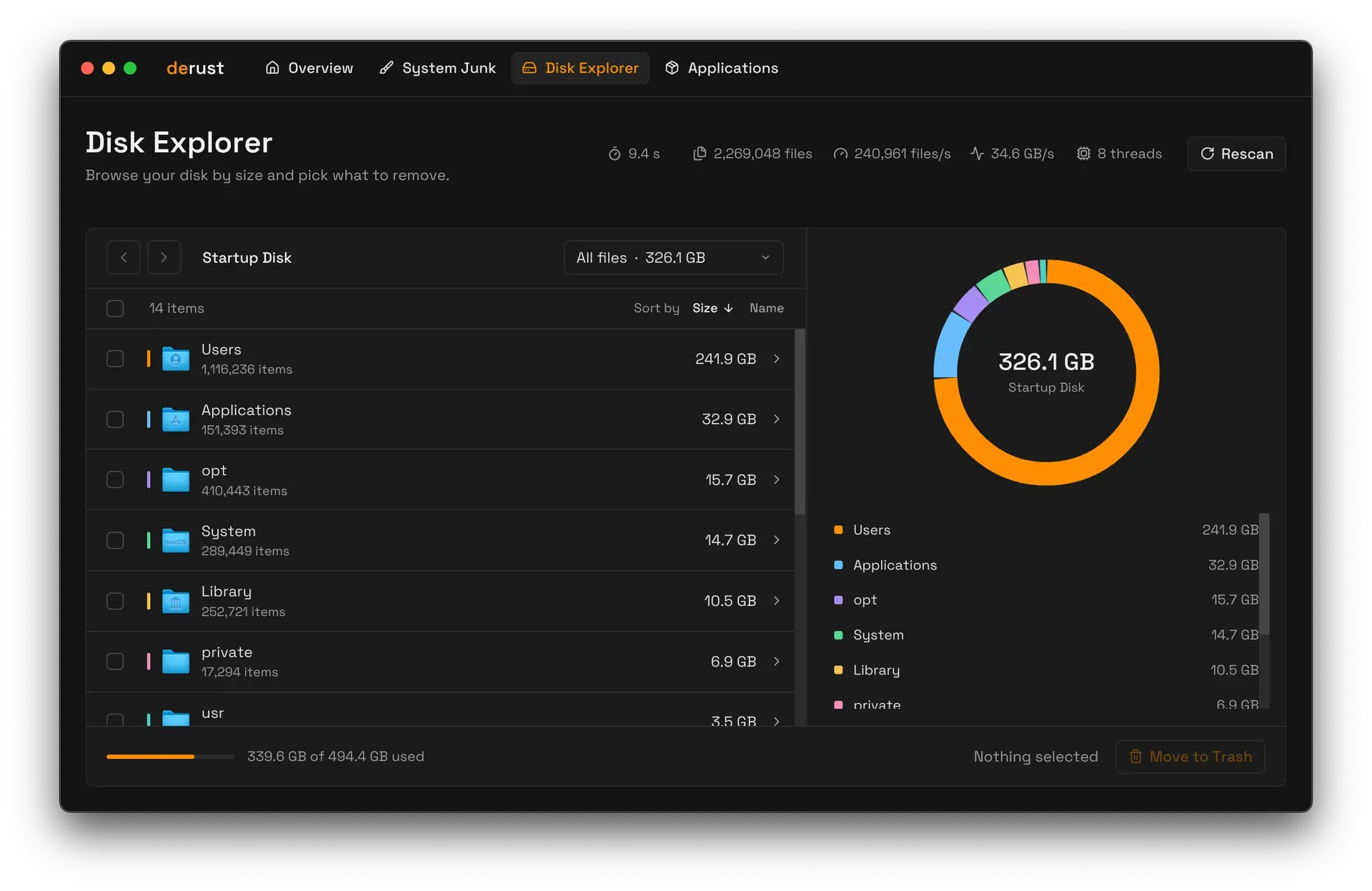
Disk Explorer view from the derust README, showing folders by size, scan statistics and a Move to Trash button.
Source: official derust project page.
Key capabilities
- Download for macOS The latest release page provides a DMG. Open it and drag derust to Applications. The release notes describe the app as a universal build for Apple silicon and Intel Macs. The bundle declares macOS 11.0 as its minimum system version.
- Quarantine step for an unnotarized app The app is not notarized yet, so macOS blocks it on first launch. The release notes give the command
xattr -dr com.apple.quarantine /Applications/derust.appto run once after installation. The bundle script signs the app with an ad hoc signature only. - Overview The Overview tab summarizes what takes up space on the Mac: a chart splits used capacity into Junk, Apps, Other and Available, with the percentage of the disk that is full. A Scan everything button starts all scans at once and a Stop all button cancels them, and each section shows its own status, such as the number of apps and their total size.
- System Junk: user and system caches User caches are collected from
~/Library/Cachesand from the cache folders inside sandboxed app containers. System caches come from/Library/Caches. The in-app description notes that apps rebuild cache data when needed and that some system caches belong to macOS and may need an administrator to remove. - System Junk: user and system logs User logs are read from
~/Library/Logsand app containers; system logs from/Library/Logsand/var/log. The app labels these as diagnostic logs written by apps, background services and macOS. Some system logs may need an administrator to remove. - System Junk: developer files The Developer Junk category covers Xcode DerivedData build products, iOS DeviceSupport files and CoreSimulator caches under
~/Library/Developer. The in-app text states that Xcode recreates them. Items are grouped by subfolder in the list. - System Junk: broken login items Derust reads the property lists in
~/Library/LaunchAgentsand flags launch agents whose Program or ProgramArguments point to apps or tools that no longer exist. Only user-level launch agents in that folder are checked, according to the junk scanner source. - System Junk: iOS device backups Local iPhone and iPad backups in
~/Library/Application Support/MobileSync/Backupappear as their own category. The in-app description says to remove them only when backups are kept in iCloud or elsewhere. - Per-item selection The 0.1.0 release notes state that System Junk supports per-item selection. Each category can be expanded so individual folders are kept or removed, and every item has Reveal in Finder.
- Disk Explorer Disk Explorer scans the whole startup disk and lists folders by size, with item counts, back and forward navigation, sorting by size or name and a size chart. The header shows scan time, file count, files per second, throughput and thread count. Selected files and folders are moved to the Trash.
- Applications uninstaller The Applications view lists apps from
/Applicationsand~/Applications, skipping bundles whose identifier starts withcom.apple.. Removing an app also collects leftovers that match its bundle identifier, such as caches, containers, HTTP storage, WebKit data, preferences, saved application state, Application Support and logs, plus matching Group Containers. - Trash instead of permanent deletion All three removal paths move files to the macOS Trash. The README states that nothing is lost by accident, since items can be restored from the Trash until it is emptied.
- Fast parallel scanning Scans use
getattrlistbulkto read directory entries in bulk and run on the performance cores in parallel. The README cites about 10 seconds for roughly 2.3 million files on an M4 Pro. - Full Disk Access The README and release notes ask users to grant Full Disk Access under System Settings, Privacy and Security, for complete results. Without it, protected locations are not included in the scan.
- Build from source
cargo build --releaseproduces the binary attarget/release/derust. The bundle script builds aarch64 and x86_64 targets, merges them withlipointo a universalderust.app, generates the icon set and produces a DMG and a ZIP. - Small native binary The release profile uses fat LTO, a single codegen unit, panic abort and stripped symbols. The README gives the release binary size as about 7.5 MB.
- MIT license The source is MIT-licensed. The Space Grotesk font files in
assets/fontscarry the SIL Open Font License.
Where derust fits
Clearing caches and logs on a Mac
The System Junk view scans user and system caches, including the caches of sandboxed apps in their containers, along with user logs, system logs and /var/log. Each category shows its location and a short explanation, and its items can be selected individually. The selection is moved to the Trash. Some entries under /Library are owned by macOS and may need an administrator, as the app's own descriptions state.
Reclaiming space from Xcode
For developers, the Developer Junk category groups Xcode DerivedData, iOS DeviceSupport folders and CoreSimulator caches from ~/Library/Developer. The app states that Xcode recreates these files. Each group is listed by subfolder so particular projects or device support versions can be selected.
Finding what fills the disk
Disk Explorer scans the startup disk and lists top-level folders such as Users, Applications, System and Library by size, with item counts and a chart. Folders can be opened to drill down, sorted by size or name, and selected for removal to the Trash. The footer shows used and total disk capacity.
Uninstalling apps with their leftovers
The Applications view lists third-party apps from the system and user Applications folders. Removing an app also gathers the files that match its bundle identifier in the user Library, including caches, containers, preferences, saved state, Application Support, logs, HTTP storage, WebKit data and Group Containers. Apple apps with a com.apple. identifier are not listed.
Cleaning up broken launch agents and old device backups
derust checks launch agent property lists in ~/Library/LaunchAgents and lists those that point to executables no longer on disk. It also lists local iPhone and iPad backups in the MobileSync folder. The app's own description advises removing backups only when another backup exists, such as iCloud.
Building a universal app from source
Developers can build the binary with Cargo, or run ./scripts/bundle.sh to produce a universal app bundle for Apple silicon and Intel, an ad hoc signature, a DMG and a ZIP. The script needs the Xcode command-line tools for lipo, sips, iconutil, codesign and hdiutil. Source and issues are on GitHub.
Reviews of derust
Be the first to share your experience with derust.
Write a review
Loading review form…
Alternatives to derust
 MoleMole is a free GPL-3.0 command-line toolkit (mo) for cleaning caches, removing apps with their leftovers, purging build artifacts, exploring disk usage and watching live system status on macOS, with separate Windows and early Linux CLIs.BBleachBitBleachBit is a GPLv3 cleaner that removes files to free disk space and maintain privacy, with a preview step and a command line interface.Ddisktreedisktree visualizes local and SSH-accessible disk usage as an interactive treemap. It supports reviewed local removal and exports remote selections as lists, prompts or cleanup scripts.