
What is Recordly?
Recordly is a desktop application for recording and editing screen captures for walkthroughs, software demos and product videos. It captures an entire display or an application window, with microphone and system audio options that depend on the operating system. Prebuilt installers and source-build instructions are available, and the application is free and open source under AGPL 3.0.
Its editor combines trims, speed changes, annotations and additional audio with presentation controls such as cursor smoothing, automatic zoom suggestions, styled backgrounds and webcam overlays. Projects can be saved as .recordly files that retain source media paths and editor state. Finished compositions export as MP4 or GIF, while a community extension marketplace provides additional styling and editing capabilities.
Recordly screenshots
Explore the interface. Open a screenshot to view it at full size.
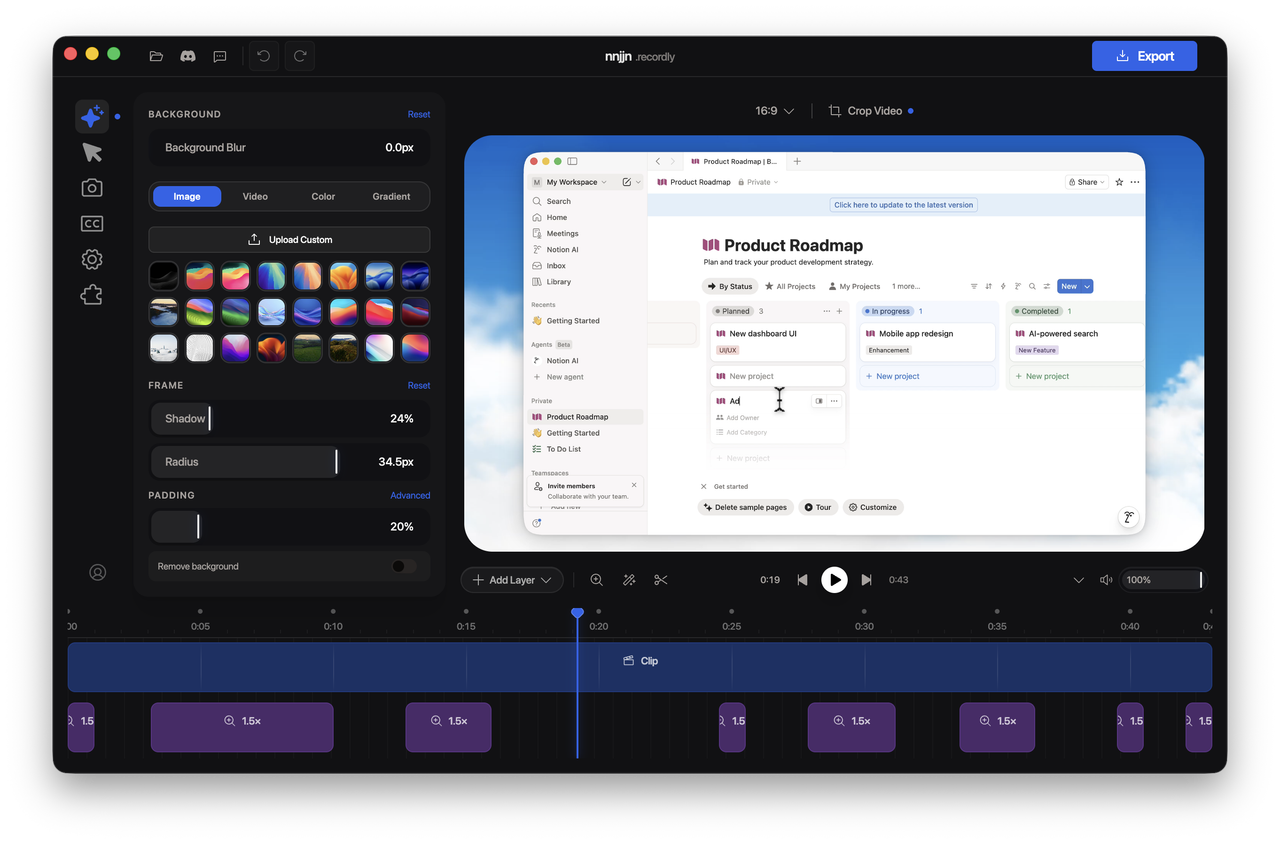
Source: official Recordly project page.
Key capabilities
- Screen capture Records a display or application window, with microphone and platform-dependent system audio capture.
- Timeline editing Supports trimming, speed regions, cropping, annotations, additional audio and saved project state.
- Cursor and zoom controls Provides cursor smoothing, motion effects, manual zoom regions and activity-based zoom suggestions.
- Presentation styling Adds backgrounds, gradients, padding, shadows and configurable webcam bubble overlays.
- Video export Exports MP4 and GIF with controls for quality, output dimensions and format-specific settings.
- Extensions Supports community extensions for cursor sounds, device frames, wallpapers, render hooks and settings panels.
Where Recordly fits
Recordly fits workflows that turn recorded software interactions into product demonstrations, instructional walkthroughs or explanatory clips. Recording opens directly into the editor, where the author can emphasize interface activity and add annotations before exporting a video or looping GIF.
Before deployment, teams should test capture, audio and export on their target operating systems. Linux does not currently support hiding the real cursor, so enabling the styled cursor overlay can produce duplicate cursors; system audio usually requires PipeWire. Native capture on Windows works best on supported builds, and macOS audio capture requires the documented ScreenCaptureKit workflow. Saved projects reference source media paths, which should be considered when moving or retaining project files.
Install
yay -S recordly-binReviews of Recordly
Be the first to share your experience with Recordly.
Write a review
Loading review form…
Alternatives to Recordly
 CapCap is an open-source screen recorder for macOS, Windows and Linux that shares a link when you stop or opens a local editor for polished videos.
 CaptureFlowCaptureFlow is an open-source screen recorder that gives you a share link as soon as you stop recording and can be self-hosted on Cloudflare or Docker.
 OBS StudioOBS Studio captures screens, windows, games, cameras and audio, composes them into scenes, then records the result or streams it over RTMP or WHIP. It runs on Windows, macOS and Linux under GPL-2.0-or-later, with plugins, scripting and WebSocket control.