

What is Paperless-ngx?
Paperless-ngx is a self-hosted document management system that turns scanned paper and digital files into a searchable archive. It runs as a web application on your own server: a Django and Python backend, an Angular frontend, a Celery task processor and a Redis-compatible broker. The project is community-supported and is the official successor to the original Paperless and Paperless-ng projects. Maintenance is shared by volunteer teams on GitHub rather than by a company, and the code is published under GPL-3.0. A public demo instance is available; its content is reset frequently and should never hold confidential material.
The installation guide recommends Docker Compose. An interactive install script generates a Compose setup, or you can download one of the templates from the docker/compose directory, one per database backend: PostgreSQL (recommended for new installations), MariaDB or SQLite. Variants with -tika in the file name add Apache Tika and Gotenberg for Office documents and email files. Images are pulled from the GitHub Container Registry at ghcr.io/paperless-ngx/paperless-ngx, with Docker Hub as an alternative. A bare-metal install is documented for advanced setups and needs Python 3.11 to 3.14, a Valkey or Redis broker and the system packages for OCR and PDF handling. Running on a Raspberry Pi is documented, with tuning advice for lower-powered hardware.
The latest release is Paperless-ngx 3.4.2, published November 3, 2026. It is a maintenance release that fixes mobile layout issues, keeps saved view names on save and close, and makes index initialization wait for Tesseract language installation. Version 3.4.0 (October 29) added custom fields in workflow title templates, relative-date custom field queries, PDF thumbnails generated with poppler utilities and Markdown in the AI chat. Version 3.3.0 stores and searches barcode contents, 3.2.0 centralized share link management, and 3.1.0 introduced the Apply AI Suggestions workflow action, selective remote OCR and merging documents as versions.
The 3.x line began with 3.0.0 on July 22, 2026, a major release with breaking changes. Search moved from Whoosh to the tantivy engine, documents gained file-level versions, share links can be bundled into ZIP downloads, and two opt-in features arrived: Paperless AI (LLM suggestions, document chat and similar-document retrieval) and remote OCR through Microsoft Azure Document Intelligence. The v3 migration guide lists the required steps: upgrades start from 2.20.15, PAPERLESS_SECRET_KEY must now be set explicitly, the database engine must be declared, legacy document encryption was removed and duplicates are accepted by default instead of rejected.
Out of scope: Paperless-ngx is not a hosted service, has no official mobile app (mobile clients are third-party projects listed on the community wiki) and does not encrypt stored documents. The project states that it should never be run on an untrusted host because files are kept in clear text, and it describes a local server with backups as the safest deployment.
Paperless-ngx screenshots
Explore the interface. Open a screenshot to view it at full size.
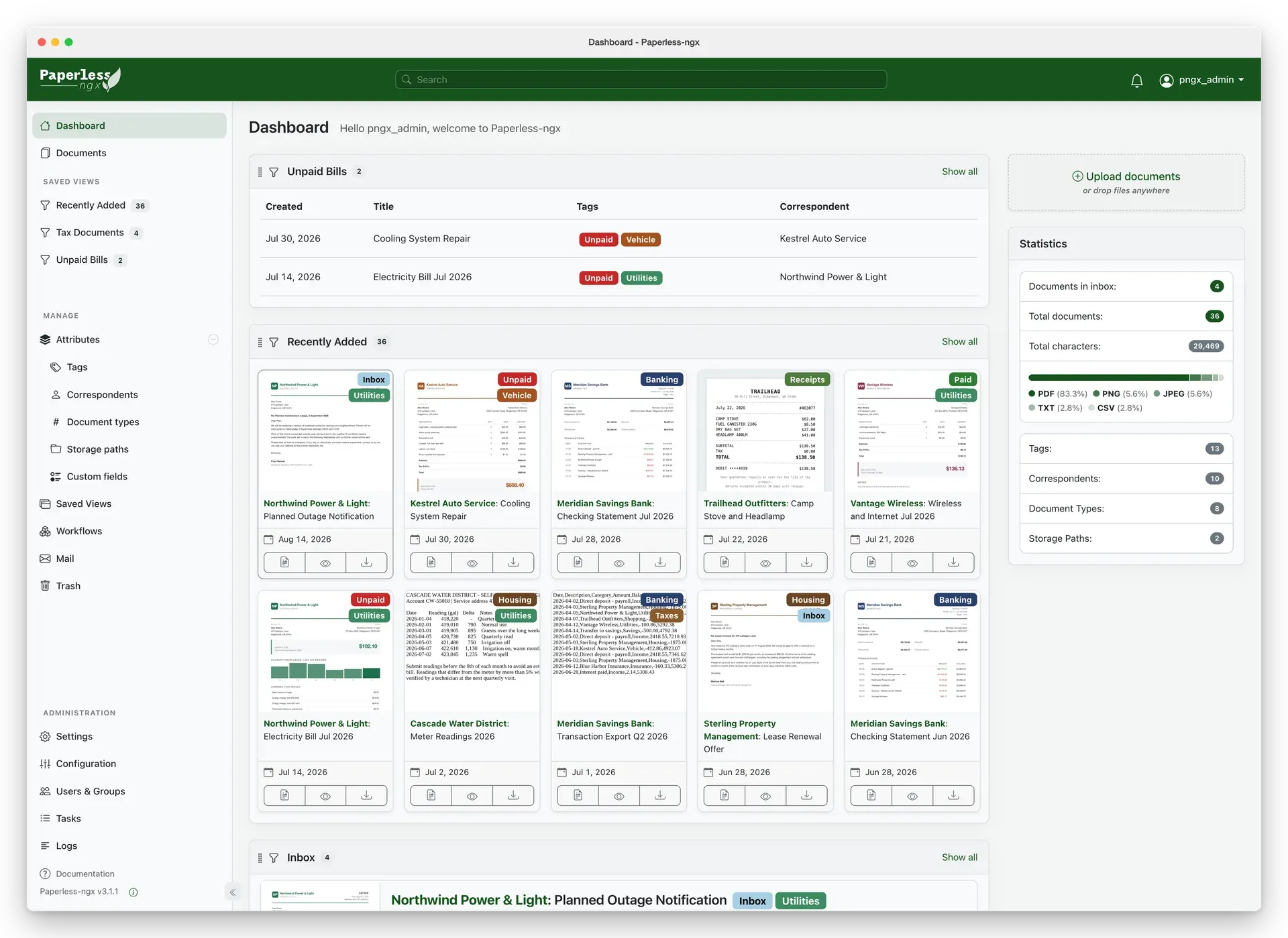
Dashboard showing saved views as widgets, an upload area and statistics on document counts and file types. Official screenshot from the project documentation, captured on version 3.1.1 with sample data.
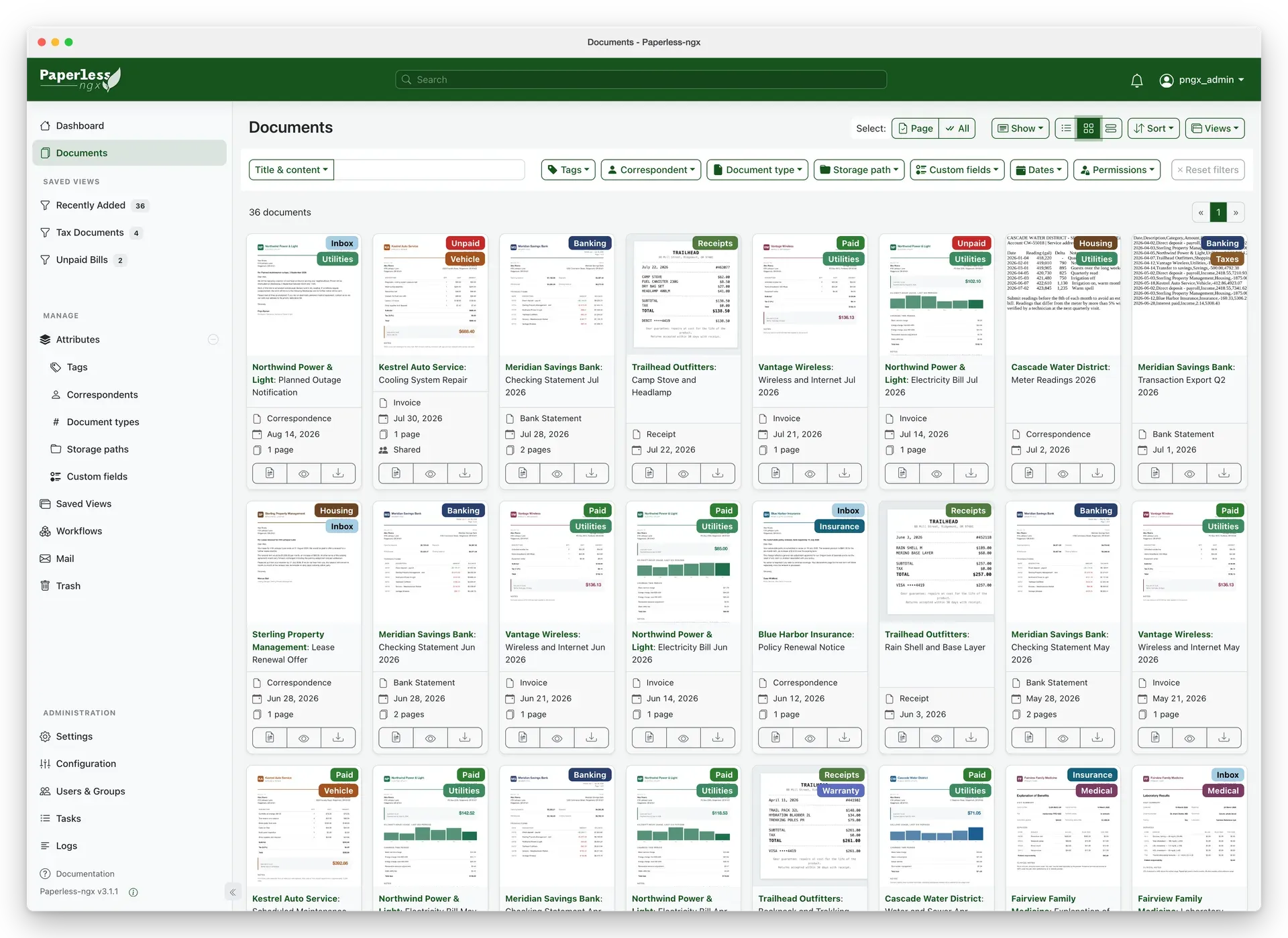
Document list with thumbnails, colored tags and the filter bar for tags, correspondents, types, storage paths, custom fields, dates and permissions. Official documentation screenshot.
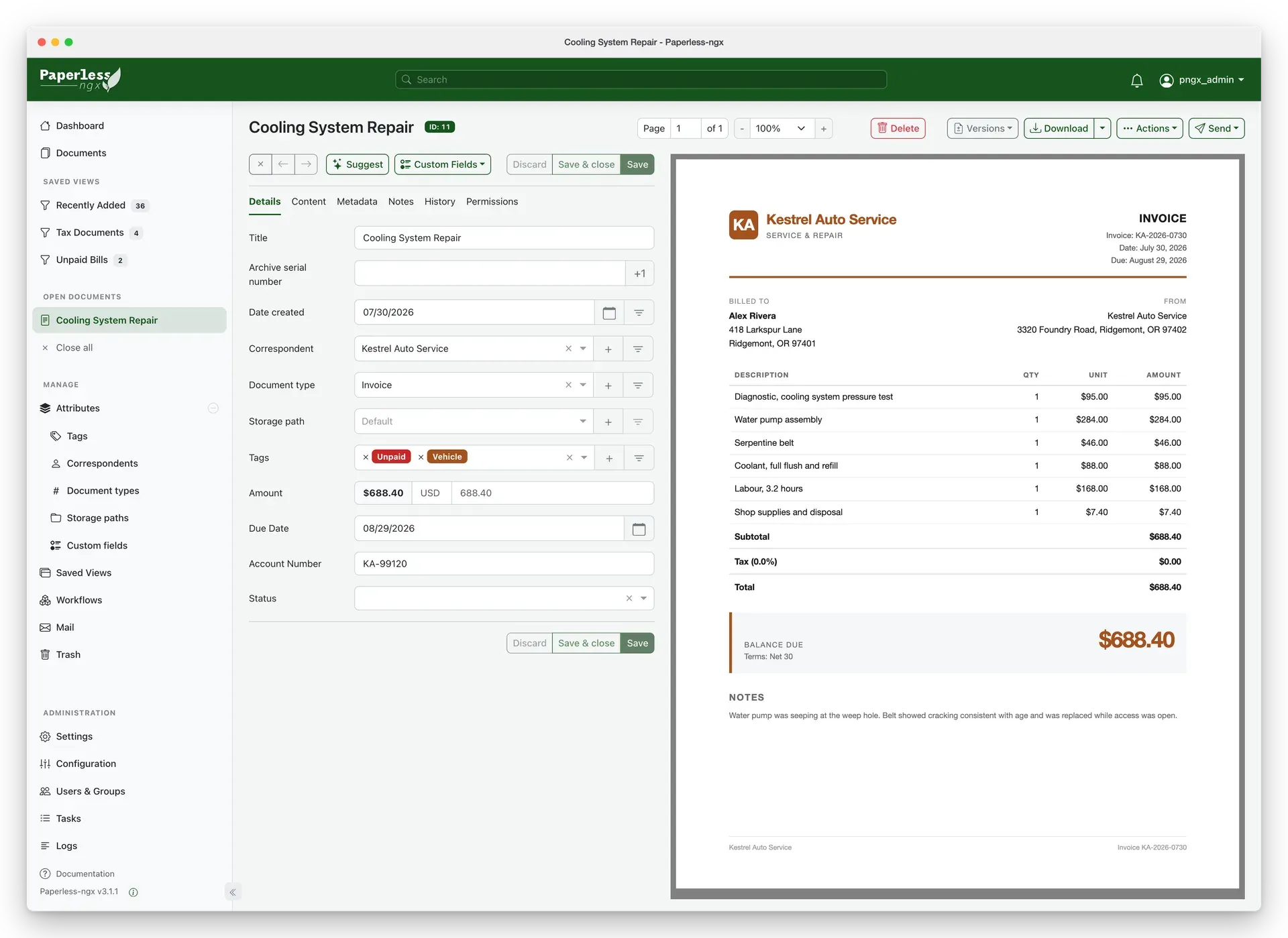
Side-by-side editing of a document: title, correspondent, type, tags and custom fields such as amount and due date next to the PDF preview, with Suggest, Versions and Send controls. Official documentation screenshot.
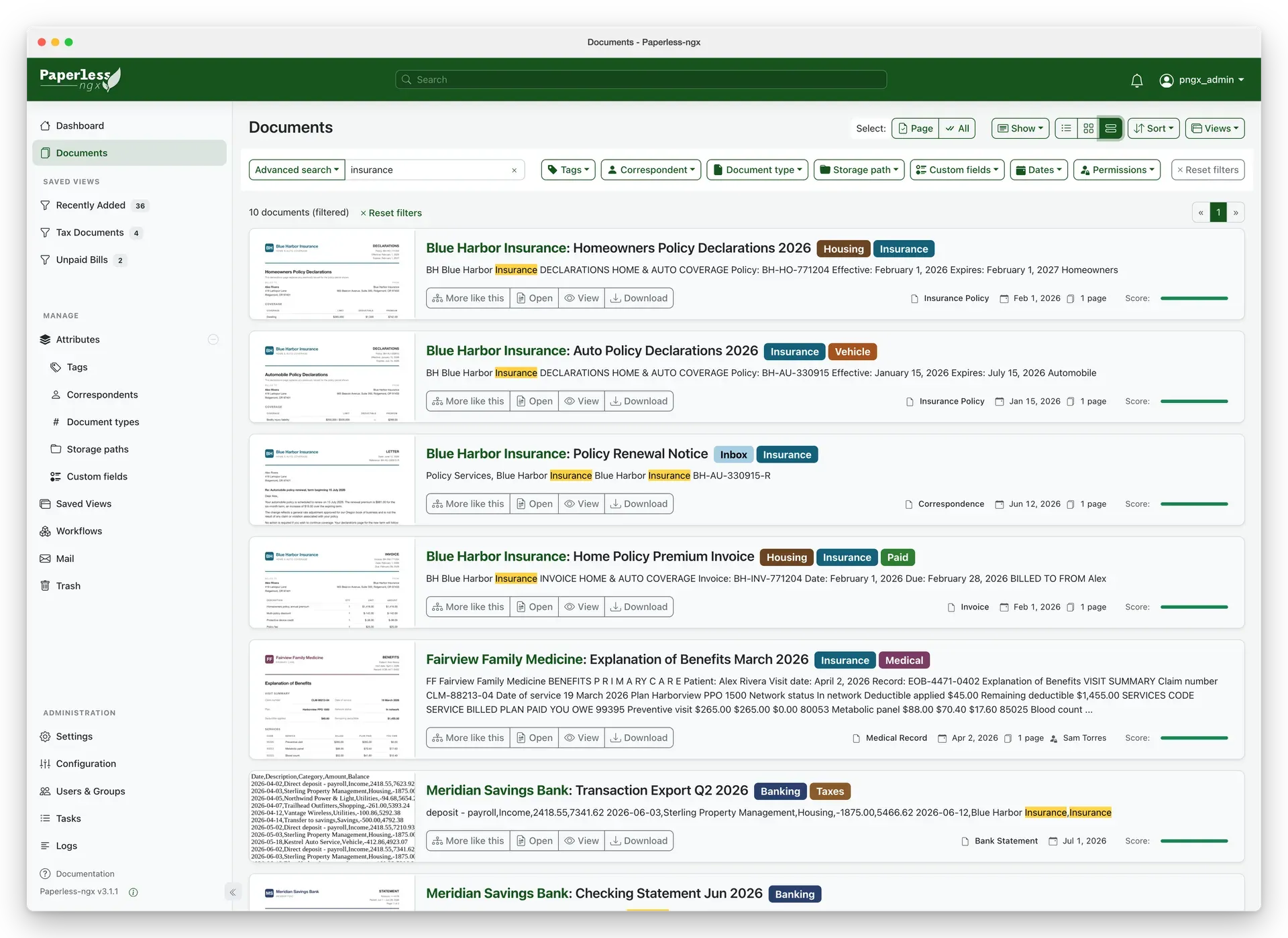
Full-text search results with highlighted terms in OCR content, relevance scores and "More like this" links. Official documentation screenshot.
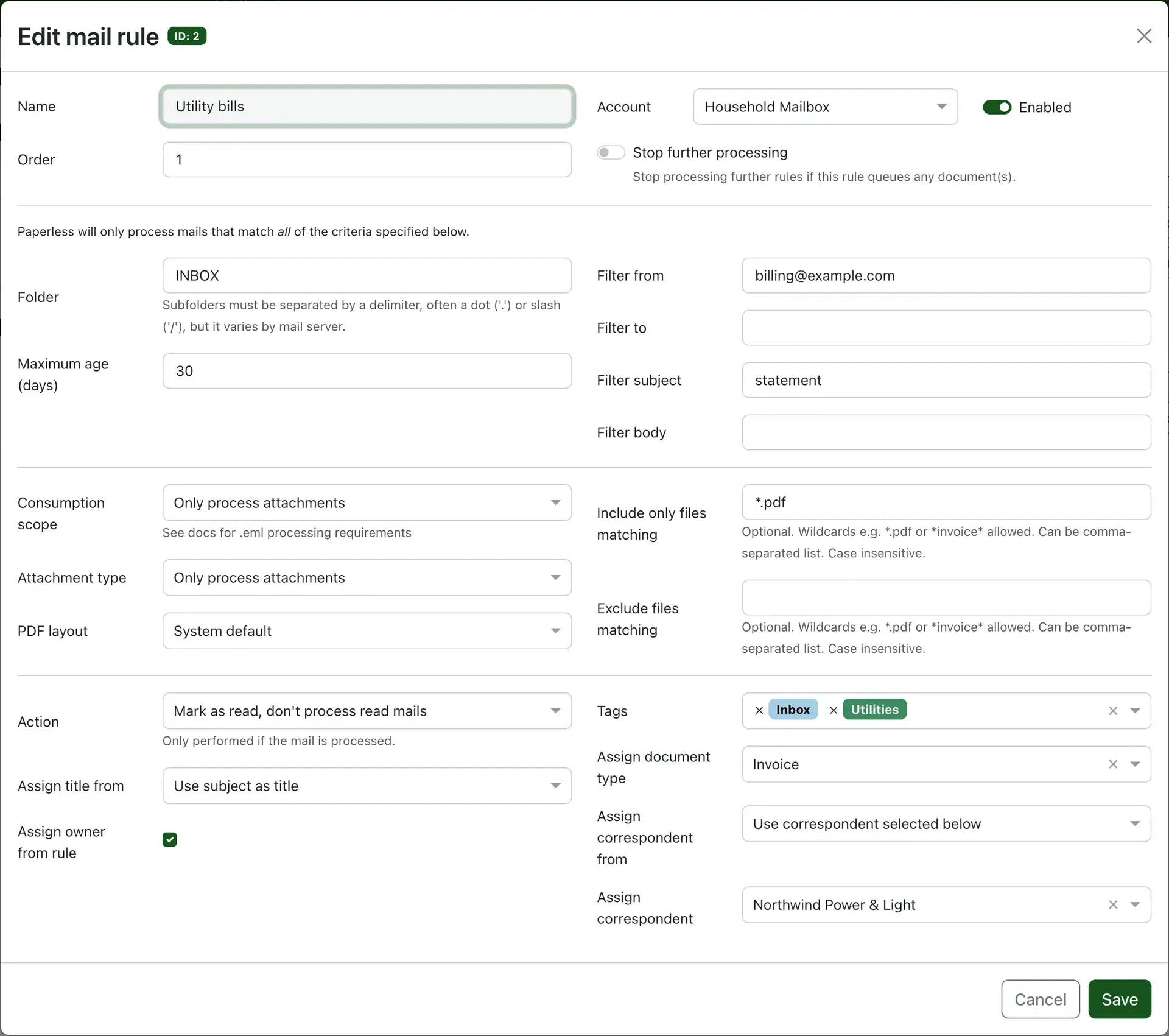
Mail rule that imports PDF attachments from a billing sender, marks messages as read and assigns tags, a document type and a correspondent. Official documentation screenshot.
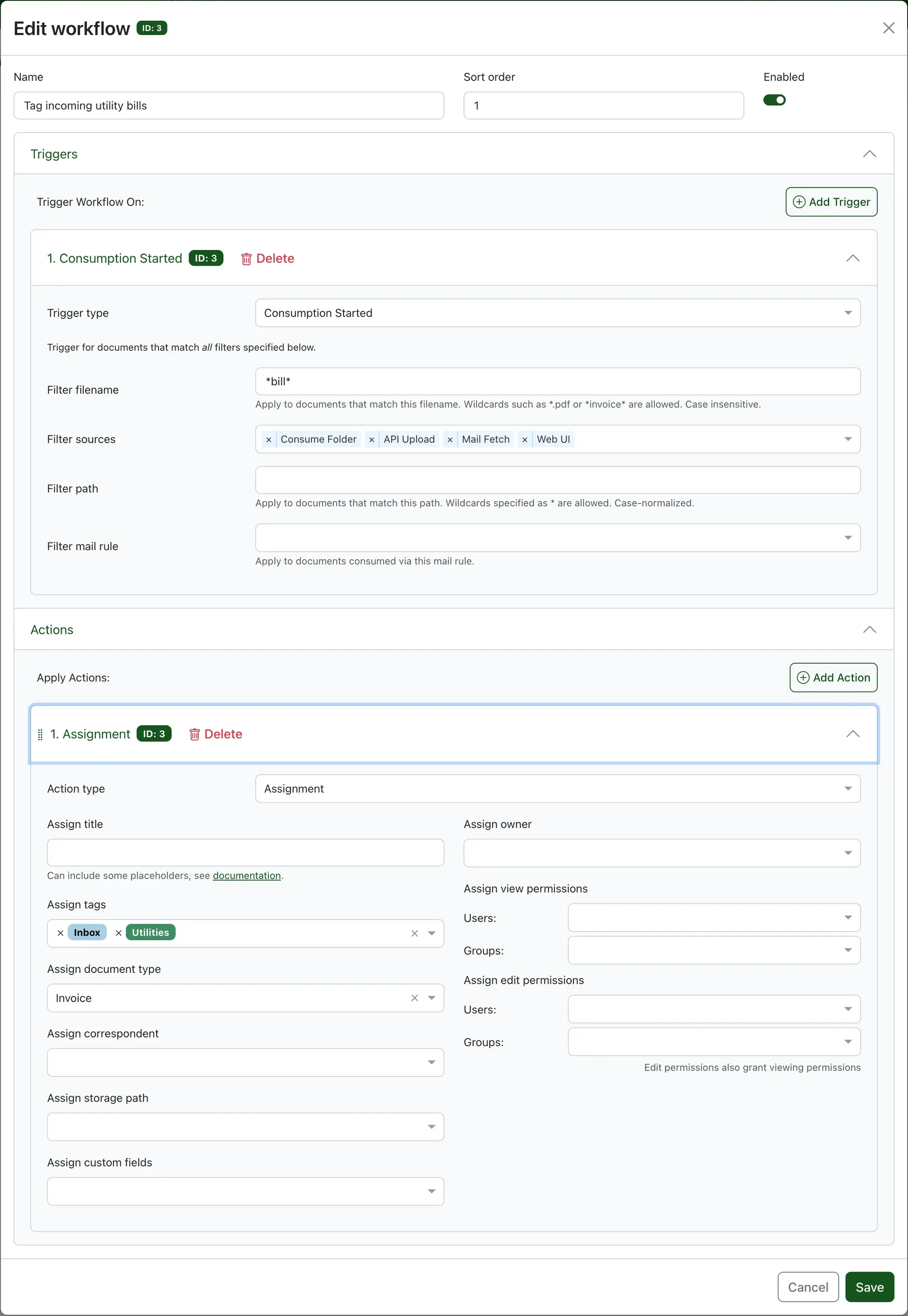
Workflow triggered when consumption starts for file names matching a pattern, with an assignment action for tags, document type and permissions. Official documentation screenshot.
Source: official Paperless-ngx project page.
Key capabilities
- Docker Compose installation Docker and Docker Compose are the only prerequisites for the recommended route. Run the interactive install script or copy a Compose template for PostgreSQL, MariaDB or SQLite, edit
docker-compose.env, then rundocker compose pullanddocker compose up -d. Containers can run rootless by settinguser:to the host UID and GID. Four Docker volumes hold media, auxiliary data and the PostgreSQL or MariaDB database. - Bare-metal and Raspberry Pi installs The bare-metal route installs the Python application (3.11 to 3.14) with Valkey or Redis, a database and system packages such as the database client libraries. It is described as higher effort and suited to packaging or development-adjacent setups. On a Raspberry Pi the docs suggest SQLite, fewer task workers, OCR on the first page only and disabling archive generation to save resources.
- Consumption folder, upload and API ingestion Files placed in the consumption directory are parsed, indexed and moved into the Paperless-ngx storage structure, so the folder is a temporary drop zone, typically fed by a scanner over FTP or an SMB share. Documents can also be dropped anywhere in the web interface or posted to the REST API. Every path ends in the same pipeline of OCR, archive creation and automatic matching.
- OCR with Tesseract and opt-in remote OCR Local OCR uses the open-source Tesseract engine, which recognizes more than 100 languages, and adds a selectable text layer to image-only scans. Remote OCR through Microsoft Azure Document Intelligence is disabled by default and requires your own Azure subscription. Since 3.1.0 the
workflow_onlymode limits remote OCR to documents selected by a workflow action, keeping the rest local. - PDF/A archive copies beside untouched originals Paperless-ngx stores the original file it received and, depending on
PAPERLESS_ARCHIVE_FILE_GENERATION, a PDF/A archive version for long-term storage. The defaultautoskips archives for born-digital files;neverdisables them. Originals are not overwritten except by explicit document actions that say so. - Supported file types PDF, images and plain text are handled natively. Word, Excel, PowerPoint and LibreOffice documents, as well as
.emlemail files, need the optional Apache Tika and Gotenberg services from the-tikaCompose templates. Barcode detection works on PDF and, when enabled, TIFF files. - Tags, correspondents, types and storage paths Documents are organized with nested tags, correspondents, document types and storage paths that control the folder and file name layout on disk. A non-LLM machine-learning classifier trained on your own archive suggests and assigns these attributes automatically; per-object matching rules can use exact, any-word, regular-expression or automatic matching. Version 3.2.0 removed bias from that matching and added a minimum match threshold.
- Custom fields Attach structured data such as invoice numbers, due dates or amounts to documents. Supported types include text, boolean, date, URL, integer, number, monetary values with an ISO 4217 currency, document links and select lists. A field's data type cannot be changed after creation, and 3.4.0 added relative-date queries on date fields.
- Full-text search on tantivy Since 3.0 the search index uses tantivy instead of Whoosh. Search offers autocomplete, relevance ranking, highlighted matches, "more like this" retrieval and field queries on notes, custom fields and, since 3.3.0, stored barcode contents. Version 3.2.0 improved fuzzy matching and CJK term matching inside parsed queries.
- Workflows Workflows fire on Consumption Started, Document Added, Document Updated or Scheduled triggers, filtered by file name, path, source, mail rule, tags or content. Actions assign or remove metadata and permissions, send email, call a webhook, move to trash, remove a PDF password, request remote OCR or apply AI suggestions. Title templates accept placeholders and, since 3.4.0, custom field values.
- Email consumption Multiple IMAP accounts can be polled, including OAuth setups, with ordered rules that filter by folder, sender, recipient, subject, body and attachment name. After processing, a rule can mark messages as read, move, flag or delete them, and it can assign tags, a document type and a correspondent. A rule can now stop further rules from processing the same message.
- Barcodes for splitting and numbering Separator barcodes split a batch scan into separate documents, other barcodes can assign an archive serial number or tags, and tag barcodes can also trigger splits. Supported symbologies include Code 128, Code 39, EAN-13, QR Code, Data Matrix, Aztec and PDF417, detected with zxing-cpp since 3.0.
- Document file versions A document entry can hold several file versions that share one set of metadata. New versions are uploaded from the detail page or the API, and since 3.1.0 existing documents can be merged as versions of a chosen root. Download, preview, thumbnail and metadata endpoints accept a version identifier.
- Multi-user permissions and authentication Global permissions and per-document or per-object owner, view and edit rights are managed for users and groups, including bulk permission edits. Two-factor authentication, OpenID Connect single sign-on with group claims, and API tokens are supported. Saved views can be shared with other users.
- Sharing and sending Share links give public, optionally expiring access to a single file, and share link bundles package a selection into a ZIP prepared in the background. Version 3.2.0 added a central place to manage all links. If outbound email is configured, documents can be sent from the Send menu or by a workflow action.
- Optional Paperless AI AI features are off by default and use either Ollama or any OpenAI-compatible API. They add LLM suggestions for titles, dates, tags, correspondents, types and storage paths, a document chat, and similar-document retrieval through an LLM index built with Hugging Face, Ollama or OpenAI-compatible embeddings. Enabling them sends document content and metadata to the chosen backend, so the docs recommend a local backend where privacy matters. See the AI features guide.
- REST API The REST API supports basic, session and token authentication, document upload, search, custom field filters, bulk edits, permissions and version-aware endpoints. Clients select an API version through the HTTP Accept header; versions 9 and 10 are supported, with 10 as the default, after 3.0 dropped everything older.
- Backups, export and maintenance commands The document exporter writes documents, thumbnails, metadata and database contents to a folder that can be updated incrementally and synced with rsync; since 3.1.0 ZIP exports allow a chosen compression type and level. Exports must be imported into the same Paperless-ngx version, and API tokens are not included. Management commands cover the sanity checker, retagger, search and LLM index rebuilds, duplicate detection and audit-log pruning, as documented in the administration guide.
Where Paperless-ngx fits
Building a household or small-office paper archive
Scan letters, bills and statements to a network share that maps to the consumption directory, then let Paperless-ngx OCR, archive and file them. Start with a few tags, correspondents and document types, and correct suggestions for the first weeks so the classifier has training data. The recommended workflow describes an inbox tag that marks documents still waiting for review. Check that searches return text from image-only scans before discarding paper originals.
Importing invoices from email
Add the mailbox, then create a rule per sender or subject that consumes only matching attachments, assigns a correspondent, a document type and tags, and marks the message as read. Use the Tika Compose variant if you need .eml files or Office attachments. Order the rules and enable "stop further processing" where one message should not be imported twice. Review the first imports for missed attachments and wrong titles before widening the filters.
Splitting batch scans with barcode sheets
Print separator sheets carrying a barcode and place one between documents in a scanner feeder, so a single PDF becomes several entries. Archive serial number barcodes can link each record to a numbered physical folder. Enable barcode detection in the configuration and keep the separator pages consistent. Test with a short batch first, because the separator page is discarded and the split always starts on the following page.
Automating metadata with workflows and custom fields
Create custom fields such as amount and due date, then a workflow triggered on Document Added that assigns tags, owner, permissions and a title built from placeholders. Scheduled triggers can act on documents relative to a date, for example to flag bills before they are due. Webhook and email actions can notify another system. Confirm the trigger filters on a copy of real documents, since workflows run without asking for confirmation.
Sharing a document set with family members or an accountant
Create users and groups, set default permissions, and share saved views such as "Tax Documents" with the people who need them. For external recipients, create an expiring share link or a share link bundle for a selection. If the instance sits behind an authenticating reverse proxy, the share path needs an exception to work. Remove links once the exchange is complete and check the central share link list periodically.
Adding local AI search without sending documents to the cloud
Point PAPERLESS_AI_LLM_BACKEND at an Ollama server you run, set a model, and choose a huggingface or Ollama embedding backend to build the LLM index for chat and similar-document retrieval. The index is rebuilt on a schedule, daily by default. Treat answers as suggestions, compare them with the source document, and keep the classic classifier, which works without any LLM. Read the AI security notes before connecting a remote provider.
Install
bash -c "$(curl -L https://raw.githubusercontent.com/paperless-ngx/paperless-ngx/main/install-paperless-ngx.sh)"Reviews of Paperless-ngx
Be the first to share your experience with Paperless-ngx.
Write a review
Loading review form…
Related to Paperless-ngx
 Stirling PDFStirling PDF edits, converts, signs, redacts and OCRs PDFs on the desktop, in the browser or on your servers, with REST APIs and no-code pipelines.KKarakeepKarakeep collects links, notes, images and PDFs in a searchable library, with shared lists, automatic tagging and content archiving. It supports self-hosting and a managed cloud service.