

What is Filee?
Filee is an open-source desktop file converter that processes files on your own computer. Its distinctive interaction is a radial menu at the pointer: hold the configured modifier, drag files and drop them on an available conversion preset. A normal drop zone, file-manager integration and a command line provide other entry points.
The reviewed release advertises a catalog of 255 formats across documents, images, PDFs, audio, video, archives and several technical formats. That is a format catalog, not a promise that every input can become every output. A route planner selects supported conversion steps, and some routes depend on optional engines such as FFmpeg, LibreOffice or Pandoc.
Filee is built with .NET and Avalonia. The app queues conversion work, applies the selected preset and writes the result under its output naming rules. Keeping a conversion local avoids uploading the document to an online converter. It does not mean the program can never access the network: update checks, engine installation and selected browser-file downloads are separate paths.
The reviewed version is Filee 2.0.0, published October 21, 2026, under MIT. Windows and Linux packages are documented; macOS remains a preview with different installation requirements. The official screenshots retained in the documentation can show an earlier interface version.
Filee screenshots
Explore the interface. Open a screenshot to view it at full size.
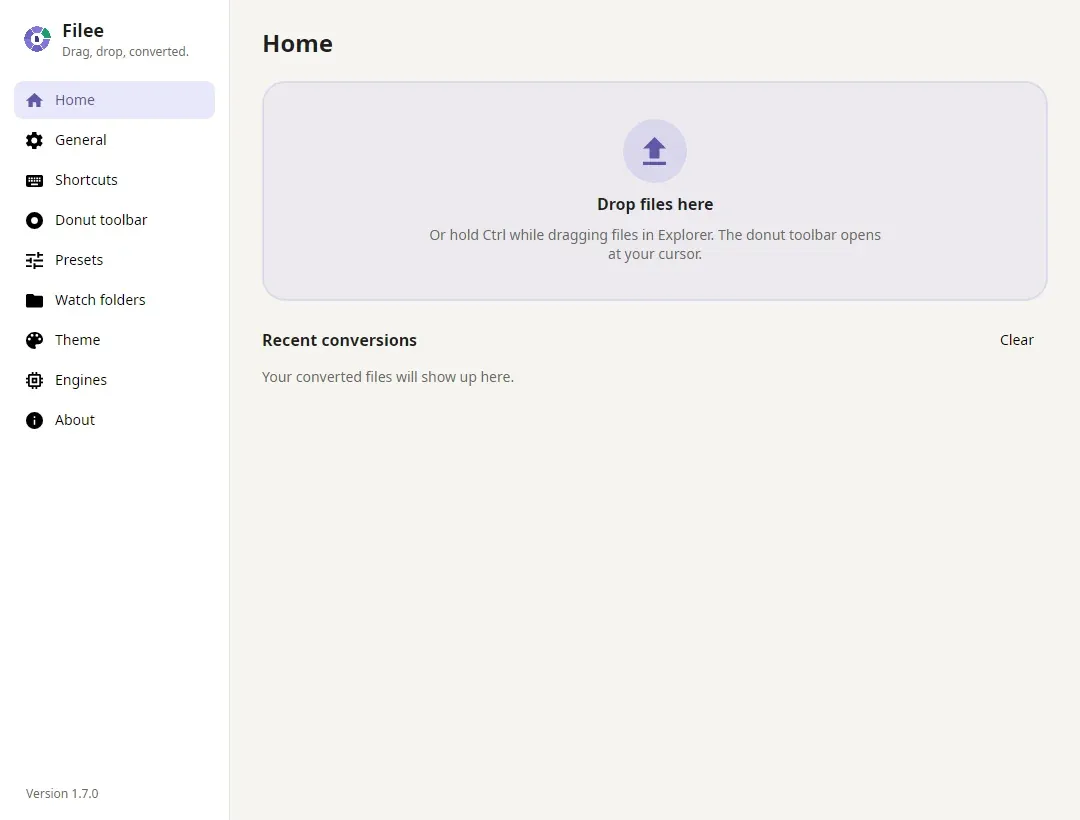
Official screenshot retained in the 2.0.0 documentation; the pictured interface identifies version 1.7.0.
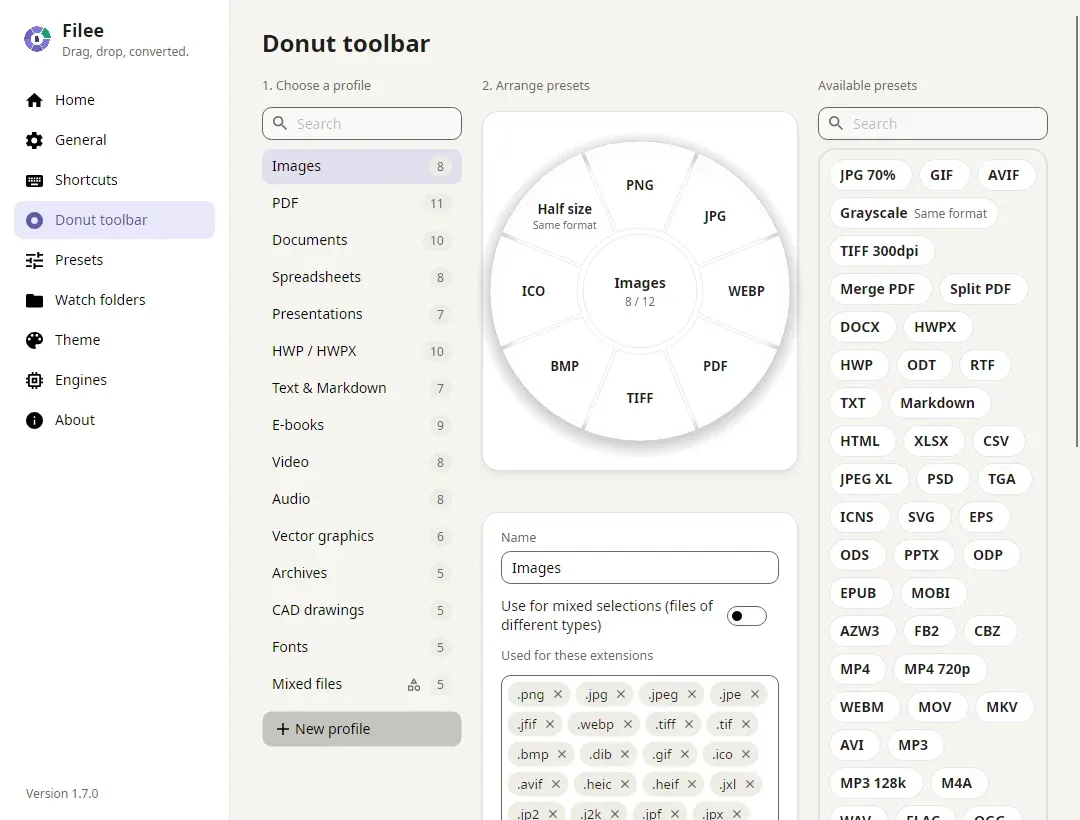
Official project screenshot from the reviewed documentation; interface examples may show an earlier release.
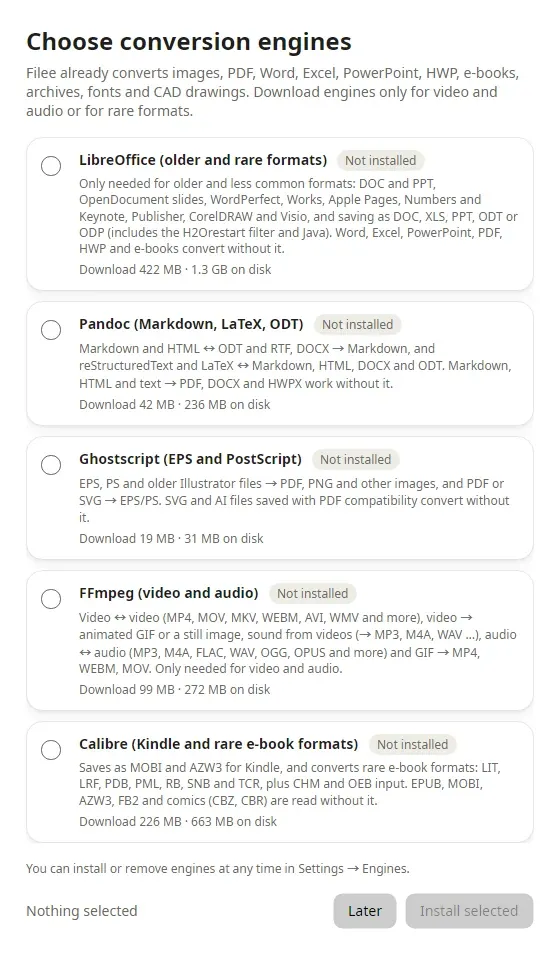
Official setup illustration showing the engine workflow. Availability depends on operating system and installed components.
Source: official Filee project page.
Key capabilities
- A radial conversion menu The menu presents presets that make sense for the current file selection. Its toolbar can be arranged by file type and includes a second face for less-used formats or tools. This reduces repeated navigation when the same few conversions are part of a daily document workflow.
- A conversion route planner The core models supported converters as edges between formats and chooses a chain when direct conversion is unavailable. The architecture guide documents a maximum of three steps. An indirect route can change layout or editability, so inspect the resulting artifact rather than judging success only by its extension.
- Built-in and optional engines Image and document processing use a mixture of libraries, bundled tools and optional downloads. The engine matrix identifies which route requires which component. Older Office formats, some document scripts and media operations can need additional software even when related formats work out of the box.
- Presets and batch jobs Presets control options such as image quality, dimensions, DPI, PDF pages, compression and output naming. Multiple files can be queued with per-engine concurrency limits. A batch shares a workflow, but each result still needs an appropriate check when the sources have different layouts, encodings or embedded objects.
- Watch folders and command-line conversion A watched folder can start a chosen conversion when a file arrives. The filee command reuses engines and presets from the desktop application. That is useful for repeatable local tasks. It does not establish a hosted conversion API, a multi-tenant service or a server deployment with an availability contract.
- Images, documents and technical formats The documented catalog includes Office and PDF workflows, image formats, archives, fonts, CAD files, 3D models and geospatial vectors. Coverage is directional and engine-dependent. For example, PDF-to-PPTX can produce page images rather than editable slide objects; that distinction changes whether the result meets a presentation-editing requirement.
- Browser-file intake Version 2 adds dragging supported pictures and file links from browsers into the workflow. The source is downloaded before conversion, without inheriting browser sign-in credentials. A protected download may therefore need to be saved through the browser first. This is separate from converting an already local document.
- Platform-specific entry points Linux drag gestures require X11; the README points Wayland users to the drop zone and file-manager menu. macOS packages are a preview and have their own permissions and packaging limitations. Choose an interaction that is supported on the actual workstation instead of assuming the Windows gesture works identically everywhere.
Where Filee fits
Preparing files for a shared workflow
Create a small preset set for the formats colleagues or customers actually need. Test an ordinary document, one with tables and one with unusual fonts before converting a large batch. Check the visible pages, selectable text and output naming. A consistent file extension is only one part of a usable handoff.
Processing documents without a web upload
Use local inputs and install the required engines before working offline. The project states that conversion content is not uploaded and that it does not send usage telemetry. Review update settings and browser-download behavior separately. An offline conversion path is easier to reason about when its inputs and dependencies are already on the device.
Automating repeated conversion
Use the CLI or a watch folder for a stable, well-understood route. Decide where outputs go, what happens to originals and how failures are noticed. Start with copies and verify naming collisions on a small set. Application automation does not replace the surrounding backup and retention policy for important files.
Selecting between conversion and PDF editing
Filee is useful when the main job is moving a file between supported representations or applying a conversion preset. SuniPDF and PdfCraft have different PDF-editing workflows. Review the operation you need, such as editing pages versus exporting a document, before treating the tools as substitutes.
Install
winget install KnifeLemon.FileeReviews of Filee
Be the first to share your experience with Filee.
Write a review
Loading review form…
Related to Filee
 SuniPDFSuniPDF is a free, open-source PDF editor for Windows, Ubuntu and macOS that works locally, with plan measurements, quantity reports and revision comparison.
 PdfCraftClean-room PDF workbench written in Rust by the ArtCraft team: read, search, organize, combine, split, comment, fill forms, OCR and encrypt PDFs on macOS, Windows, Linux, FreeBSD and the web, with a scriptable CLI and an opt-in MCP server.