

What is Hyperswitch?
Hyperswitch is an open-source payments platform, often described as a payment orchestrator, built and maintained by Juspay, a payments technology company headquartered in Bangalore. It sits between a merchant's checkout and its payment processors, exposing one API for payments, refunds, payouts, disputes and stored payment methods while connecting to many processors, acquirers, wallets, fraud tools and 3D Secure providers. The README lists Stripe, Adyen, Braintree, Worldpay, Checkout.com and Cybersource among the supported processors and refers to more than 120 connectors; each connector has a guide in the connector catalog.
The core of this repository is a Rust application server, the router, written against Rust 1.92 or later and licensed under Apache 2.0. Around it sit a scheduler (producer and consumer services that batch delayed jobs through Redis), a drainer that moves writes from Redis to PostgreSQL, a separate Rust card vault, an encryption service, the Control Center dashboard written in ReScript, and a web checkout SDK. Native SDKs exist for Android (Maven), iOS (CocoaPods), React Native (npm) and Flutter (pub.dev). The architecture overview explains how these pieces divide work.
There are three ways to run it. A script in the repository starts a local stack with Docker Compose or Podman. Production deployments use Helm charts on Kubernetes, with written guides for AWS EKS, Google Cloud, Azure and local Minikube, plus a Terraform umbrella project. Juspay also operates Hyperswitch Cloud, a managed service with a free hosted sandbox at app.hyperswitch.io; live processing there requires signed agreements. Release images are published to docker.juspay.io in two variants, with and without AWS SES email support.
The latest GitHub release at the time of writing is v1.129.0, published November 2, 2026. It bundles security hardening for authentication, client-secret validation, webhook verification and rate limiting, adds capture-method auto-fallback, AVS-check selection, separate payment and payout blocklists and automatic retries for v2 outgoing webhooks, and introduces breaking changes to the admin authentication header and credential configuration fields. It also ships 19 new main database migrations. The previous release, v1.128.0 from mid-October, added fraud-management framework flows, TLS for the Redis cache and platform-level payment and refund lists. Dated tags such as 2026.11.06.0 are cut between numbered releases.
Hyperswitch is infrastructure, not a merchant account. You still need contracts with the processors or acquirers you route to, and a self-hosted deployment makes you responsible for PCI DSS scope, encryption at rest and uptime. Revenue Recovery, Cost Observability and Reconciliation are documented modules, but the pricing page lists them as paid add-ons for the self-hosted editions. Changes are tracked in the changelog.
Hyperswitch screenshots
Explore the interface. Open a screenshot to view it at full size.
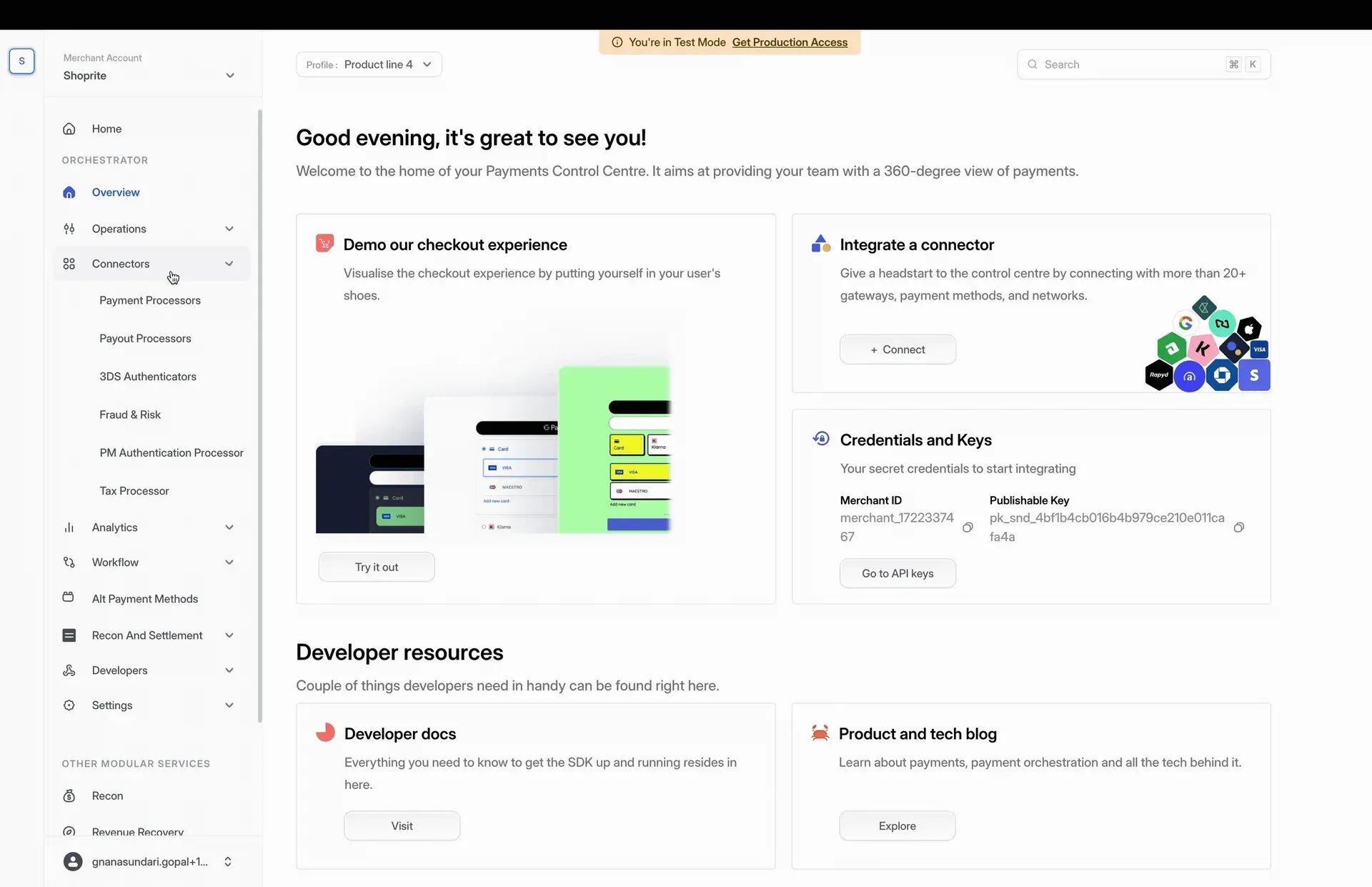
Control Center home in test mode, with the Orchestrator menu for operations, connectors, analytics, workflow and settings. Frame from the official quickstart recording in the README.
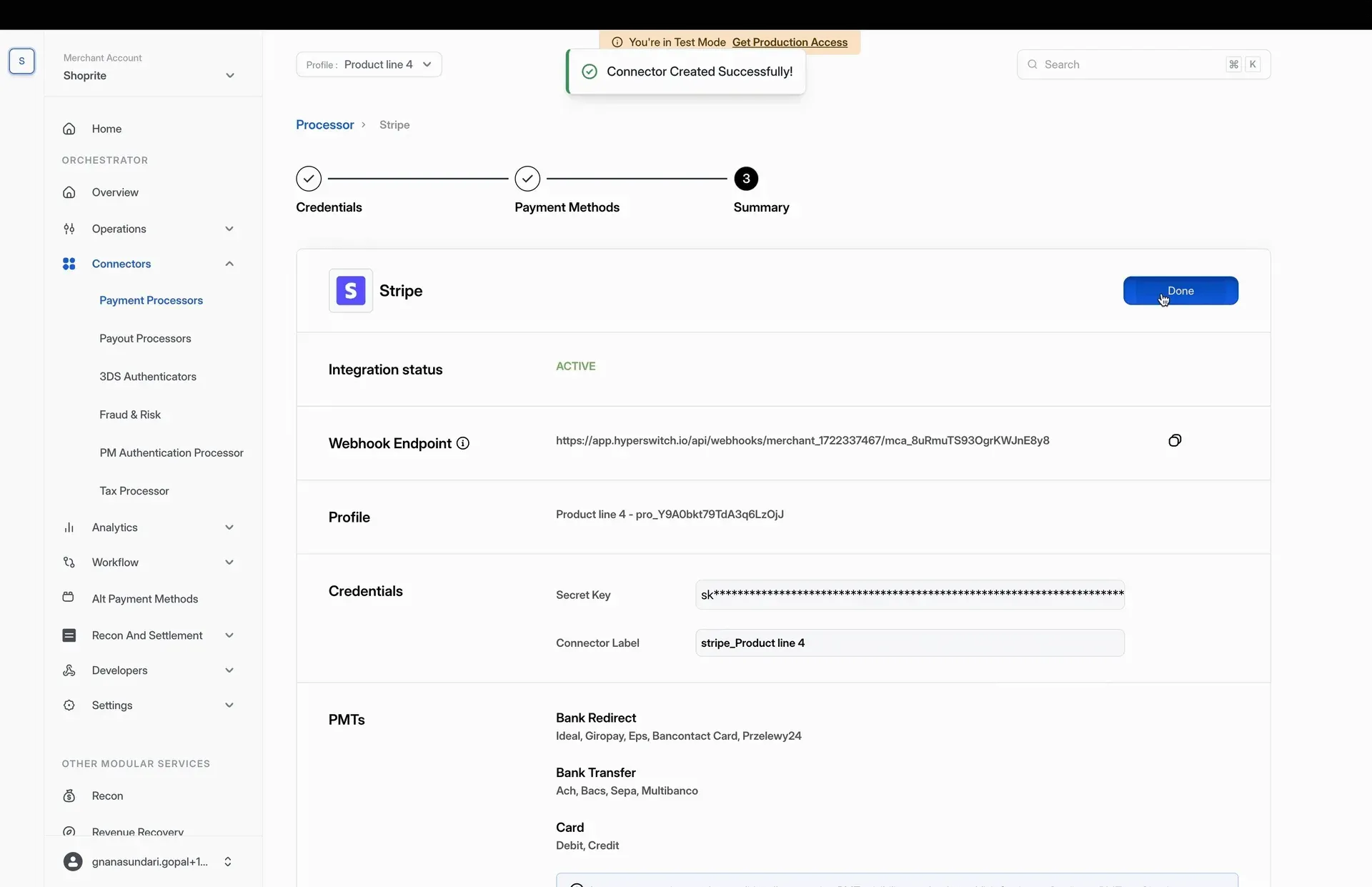
Summary step after connecting Stripe as a payment processor: integration status, generated webhook endpoint, masked secret key and enabled payment method types. Frame from the official quickstart recording.
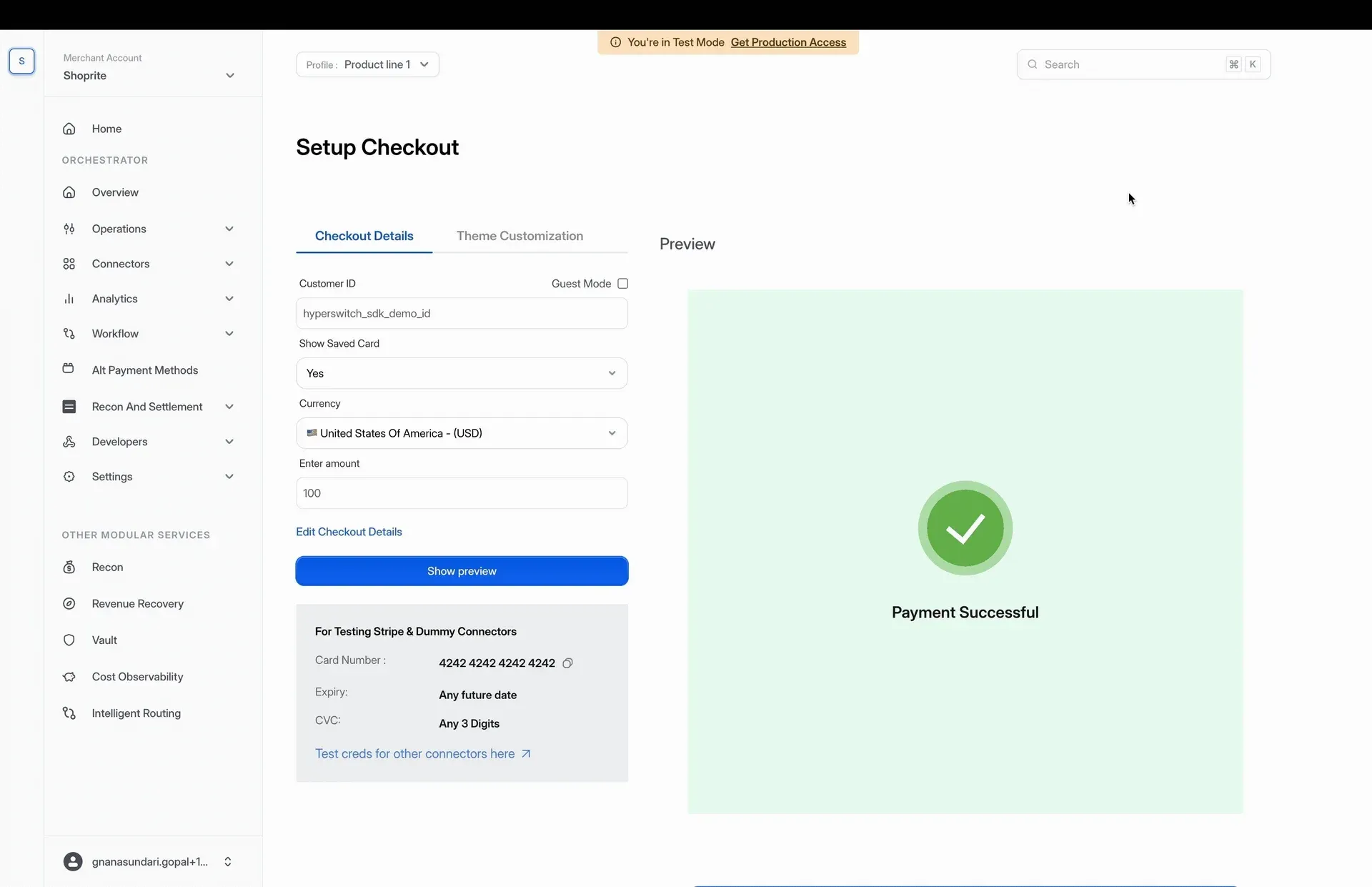
Setup Checkout page used to try the web SDK in test mode, with the published Stripe test card and a successful 100 USD payment preview. Frame from the official quickstart recording.
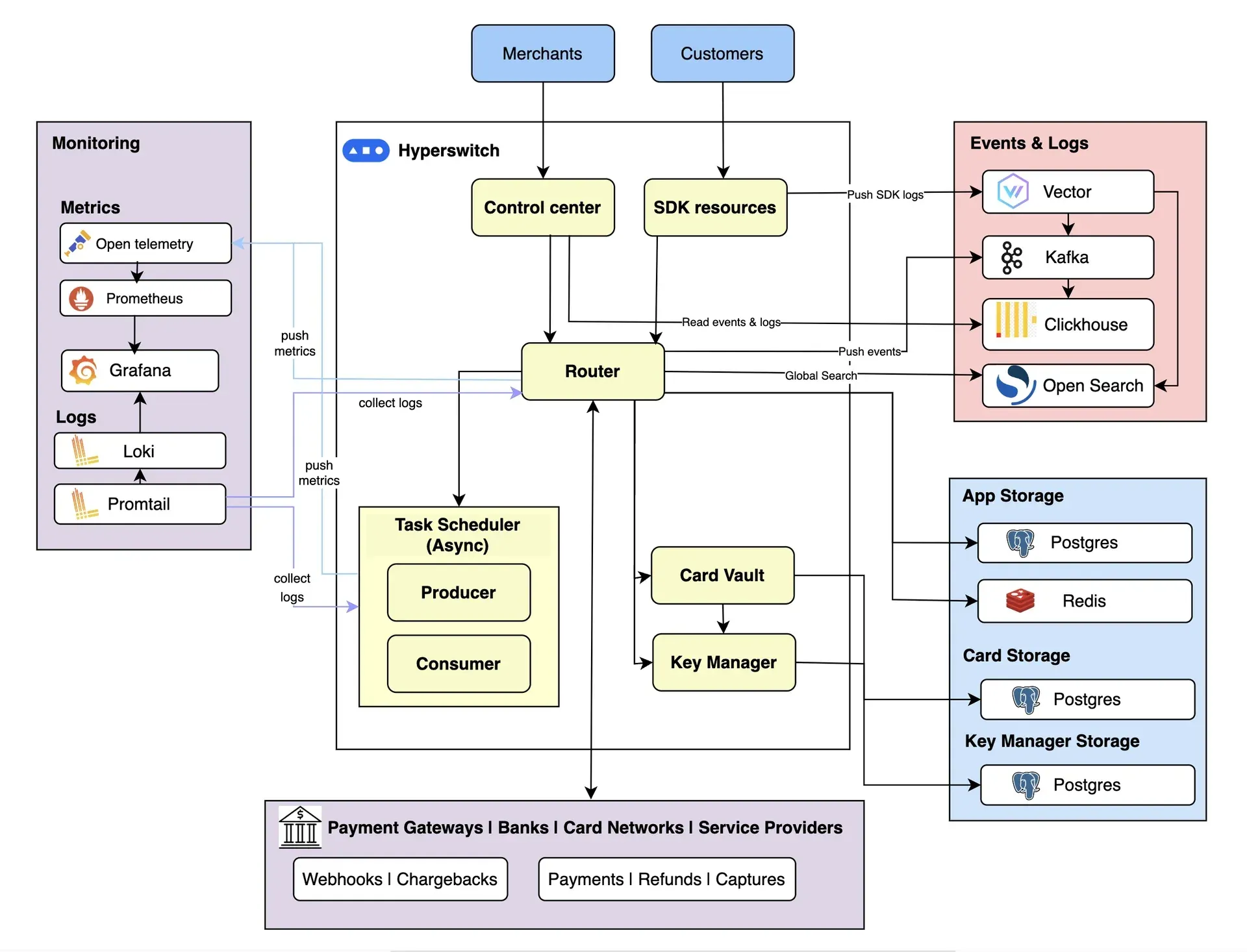
Official architecture diagram: the router connects merchants, customers and payment providers, with PostgreSQL and Redis storage, a separate card vault and key manager, Kafka and ClickHouse events, and Prometheus, Loki and Grafana monitoring.
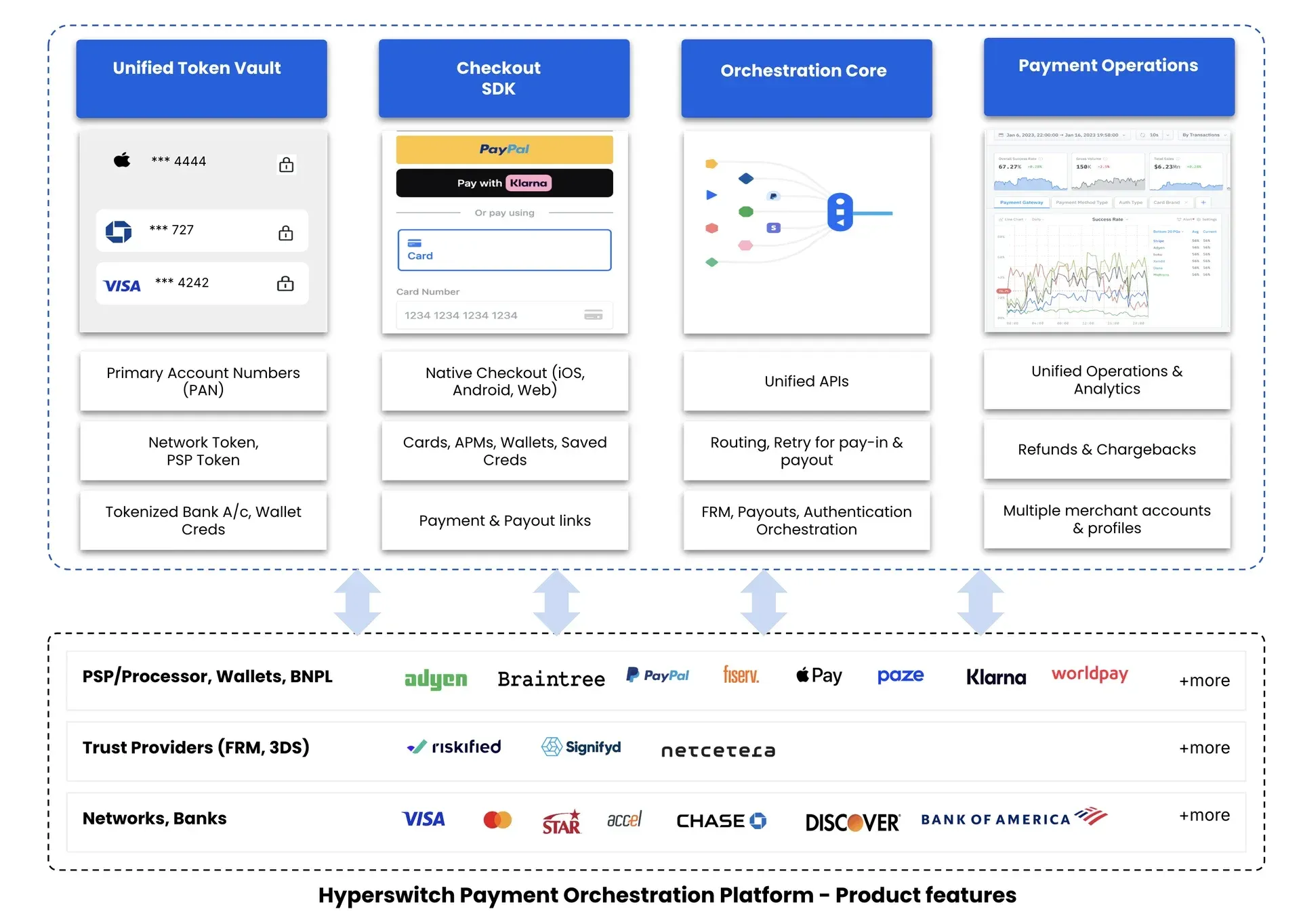
Official product feature map from the README: unified token vault, checkout SDK, orchestration core and payment operations, connected to processors, wallets, fraud and 3DS providers, networks and banks.
Source: official Hyperswitch project page.
Key capabilities
- Local stack with one setup script Clone the repository at the
latestbranch and runscripts/setup.sh. The script checks for Docker Compose or Podman, prepares PostgreSQL and Redis, and offers three profiles: Standard (app server, Control Center and web SDK), Full (adds monitoring and the scheduler) and Standalone App Server. The default compose file maps the app server to port 8080, the Control Center to 9000, the web SDK to 9050 and Grafana to 3000. See the Docker setup guide. - Kubernetes deployment with Helm The
hyperswitch-stackchart installs the router, scheduler, Control Center, web SDK, vault and their dependencies into one namespace. The AWS guide walks through IAM roles, an EKS cluster with the EBS CSI driver and a gp3 storage class, and recommends at least four nodes of t3.medium or larger to avoid Helm timeouts. Equivalent guides cover GCP, Azure and Minikube, listed on the self-hosting quickstart. - Container images per release Each numbered release publishes
hyperswitch-routerimages to docker.juspay.io, for examplev1.129.0with AWS SES email support andv1.129.0-standalonewithout it. Release notes include a compatibility matrix; v1.129.0 pairs with Control Center v1.39.0, web client v0.135.0, card vault v0.9.0 and encryption service v0.1.14. - Unified payments API One REST API covers payment intents, authorization and capture, manual and incremental capture, refunds, mandates and recurring payments, disputes and payouts. The repository carries API references for both v1 and v2, and v2 has its own compatible database migrations. The API reference and a Postman collection document request formats, and processor-specific behavior is described per connector.
- Connector library Connectors translate the unified API into each processor's protocol, error codes and webhooks; the separate hyperswitch-prism project packages them as a standalone library, embedded or over gRPC. The pricing page counts 90+ integrations for the self-hosted editions and 210+ for Hyperswitch Cloud; verify the specific processor and payment methods you need in the connector guide before planning a migration.
- Intelligent routing Routing chooses a processor per payment. Supported strategies are rule-based (payment method, amount, currency, country, card type), volume-based percentage splits, auth-rate routing on recent success rates, multi-objective routing that weighs processor cost, least-cost routing for supported debit networks, and default fallback ordering. A/B testing compares strategies before rollout. The routing documentation recommends starting with fallback and rule-based routing and adding auth-rate routing only once several processors carry meaningful volume.
- Smart retries When an authorization fails for a retriable reason, Hyperswitch can retry it. The four documented strategies are cascading retry to another processor, step-up retry with 3D Secure, clear-PAN retry after a network-token failure, and global network retry for debit network failures. Error codes from each processor are classified as retriable or not, and the merchant sets the maximum number of attempts. Details are in the smart retries guide.
- Card vault and tokenization The Rust card vault stores card numbers, network tokens, processor tokens and wallet or bank credentials behind one
payment_method_id. Supported models include a self-hosted vault inside your PCI environment, Juspay's SaaS vault for non-PCI merchants, and third-party vaults such as VGS or TokenEx without re-tokenizing stored cards. The vault deployment models table maps each option to its PCI responsibility. - Checkout SDKs and payment links The web SDK renders a unified checkout for cards, wallets such as Apple Pay, Google Pay, PayPal and Samsung Pay, bank methods and buy-now-pay-later providers like Klarna. A headless mode lets you build your own UI. Native SDKs for Android, iOS, React Native and Flutter share a common core, and low-code payment links and payout links cover cases without a custom frontend. Theme and layout options are documented per platform.
- Control Center dashboard The Control Center is the no-code operations interface. Teams use it to connect processors, configure routing and retries, look up payments, refunds, disputes and customers, manage API keys and webhooks, and administer users and roles. Work is scoped by an Organization, Merchant Account and Business Profile hierarchy, and test mode is the default. The Control Center guide explains the hierarchy and a first test payment.
- Fraud and 3D Secure orchestration Fraud checks can run before authorization for any payment method, or after authorization for cards only, through integrations with providers such as Signifyd and Riskified. Blocklists are scoped per business profile and, since v1.129.0, separated for payments and payouts. A 3DS Decision Manager selects when to authenticate, with external authentication through Netcetera, GPayments, 3dsecure.io or Juspay's own 3DS server. See fraud and risk management.
- Payouts The payouts API sends funds to bank accounts, cards and wallets. The documentation lists 21 payout connectors, including Adyen, Cybersource, Wise and PayPal, with rails such as SEPA, ACH, BACS, Pix and Interac depending on the connector. Bulk payouts can be uploaded as XLSX or CSV files in the dashboard, and payouts support routing, smart retries and the processor-independent vault. Coverage per rail is in the payouts reference.
- Revenue Recovery This module retries failed recurring payments for subscription businesses, working alongside an existing billing system such as Chargebee or a custom integration. Retry timing considers card BIN, region, payment method and other transaction attributes, with budgets and A/B monitoring added in recent releases. v1.129.0 changed the recovery request contract, so integrations written for earlier versions need updating. It is a paid add-on on the self-hosted editions according to the pricing page.
- Reconciliation Reconciliation matches orders, processor reports and bank statements using a double-entry ledger, with 2-way and 3-way matching, scheduled runs and exception queues for amount mismatches, split payments and expected differences. The reconciliation documentation includes an e-commerce walkthrough and resolution strategies. Like Revenue Recovery, it is listed as a paid add-on outside Hyperswitch Cloud.
- Cost Observability Cost Observability breaks processing costs down into interchange, scheme and acquirer fees, flags monthly anomalies, invoice mismatches and downgrades, and forecasts the effect of card network fee changes. Its output depends on the fee reports your processors provide.
- Multi-tenancy and platform accounts A single deployment can serve several tenants, each with logically isolated storage schemas, white-labelled API, payment page and dashboard endpoints, and its own branding and email templates. Platform organizations can share customers and saved payment methods across merchant accounts and act on behalf of connected merchants. The multi-tenancy guide describes the tenant, organization and merchant hierarchy.
- Observability built in The Full profile ships an OpenTelemetry collector, Prometheus, Loki with Promtail, Tempo and Grafana, and the architecture also uses Kafka, ClickHouse, Vector and OpenSearch for event logs, analytics and global search. All monitoring components except the OpenTelemetry collector can be swapped for an equivalent. Sensitive values are wrapped in a
Secrettype so logs record only the type name instead of card or personal data.
Where Hyperswitch fits
Adding a second processor to a Stripe integration
A common starting point, named in the README, is a merchant that has one Stripe or Braintree integration and wants a backup or cheaper route. Connect both processors in the Control Center, set a default fallback order, then add rule-based routing for the segments you want to move, such as one currency or card brand. Keep auth-rate routing for later, once both processors carry comparable traffic. Check that saved cards and mandates can be used on the second processor, which usually requires network tokens or a processor-independent vault.
Keeping an existing vault while changing processors
Merchants that already store cards with VGS or TokenEx can connect that vault instead of migrating stored cards. Choose the matching row in the vault deployment models, confirm who holds PCI responsibility in that model, and run a recurring payment end to end with a token created before the switch. Data import and export guides cover moving customers and payment methods when you do migrate.
Evaluating locally before a production decision
Run scripts/setup.sh with the Standard profile, sign in to the Control Center on port 9000, add a test connector and make a payment through the web SDK demo on port 9050. Use the Full profile when you need to inspect metrics, logs and traces in Grafana. The local stack is for development: production needs managed PostgreSQL with replicas, Redis, encryption at rest, secrets in a key management service and the Helm deployment.
Running a self-hosted production cluster
Install the hyperswitch-stack Helm chart into a dedicated namespace, size the node group as the AWS guide describes, and pin image tags to a numbered release rather than latest. Before each upgrade, read the release notes for breaking changes and migrations: v1.129.0 changes the admin authentication header to Authorization: admin-api-key=..., renames credential fields and adds migrations that must not be wrapped in a single transaction. Upgrade the Control Center, web SDK and vault to the versions in the compatibility matrix at the same time.
Recovering failed subscription payments
Subscription businesses can place Revenue Recovery behind their billing system so failed renewals are retried with timing chosen per card and decline reason. Define a retry budget, run the A/B monitoring against your existing dunning process and track recovered amounts separately from first-attempt success. On self-hosted editions this module requires a commercial agreement.
Operating payouts and marketplace splits
Platforms that pay sellers, drivers or affiliates can send payouts through the same API used for payments, route them across payout connectors and retry temporary failures. Split payments are documented for Stripe, Adyen and Xendit. Confirm the rail and currency coverage of each payout connector, test bulk uploads with a small file first, and check that the blocklist and fraud checks you enable for payouts behave as expected.
Install
git clone --depth 1 --branch latest https://github.com/juspay/hyperswitch && cd hyperswitch && scripts/setup.shReviews of Hyperswitch
Be the first to share your experience with Hyperswitch.
Write a review
Loading review form…
Related to Hyperswitch
 MedusaMedusa is an open-source commerce backend for Node.js with products, carts, orders, payments and inventory as modules, a React admin and Store and Admin APIs. Self-host it with PostgreSQL and Redis or run it on Medusa Cloud.
 RazorpayRazorpay is a Bangalore-based payment company offering a payment gateway for UPI, cards and netbanking, plus POS and API payouts.