

What is UnTangled?
UnTangled is an alternative web interface for routers running OpenWRT. It is developed by Krish Paul and published on GitHub under the GPL-2.0-or-later license. The project describes itself as a front end for the same router functions that LuCI exposes, with task-based screens, a short help text beside each setting, a command palette and collapsible "Advanced details" sections. It is installed next to LuCI, is served at /untangled/ and does not modify LuCI, which remains reachable at the root path.
The interface is a static single-page application built with Svelte 5, Vite and TypeScript. It does not add a separate daemon: the browser talks JSON-RPC to /ubus through the router's existing uhttpd, rpcd and UCI stack, using the standard session.login mechanism and an rpcd ACL shipped with the package. Sign-in uses the router's admin account, the same one used for LuCI. According to the README, the router itself does not contact outside services; the one exception runs in the browser, where the Network Map queries a public echo service for the internet-visible address when the WAN address sits behind carrier-grade NAT. The UI bundle is listed at about 96 KB gzipped and uses system fonts with no CDN and no telemetry.
Packages are architecture-independent (PKGARCH:=all). Every release tag builds .ipk files for the stable OpenWRT line, which uses opkg, and .apk files for OpenWRT snapshot, which uses apk. The packages are signed and published both as GitHub release assets and through a signed package feed on the project website. Three packages are built from one source: untangled (core UI, HTTP only), untangled-full (adds HTTPS by default, Wi-Fi scan, firmware upgrade and Wake-on-LAN) and untangled-mesh (the mesh Wi-Fi backend).
The latest release is v0.1.13, published on November 10, 2026, with releases v0.1.8 through v0.1.13 appearing in the preceding days. The project labels itself beta. The README states that each release is installed and exercised in OpenWRT 23.05 and snapshot containers, and that one physical-hardware field report exists so far (a JioRouter AX6000 JIDU6101 on OpenWrt 25.12); roaming and mesh behavior has not yet been validated across physical routers, and mesh is OpenWRT-to-OpenWRT only, not certified Multi-AP or prplMesh.
UnTangled does not run on stock vendor firmware, DD-WRT or pfSense. The published roadmap lists hardware validation reports, per-device VPN policy routing and a third mesh phase with automatic node discovery, dumb-AP bridging and 802.11s wireless backhaul. A browser-based live demo shows the full interface with sample data.
UnTangled screenshots
Explore the interface. Open a screenshot to view it at full size.
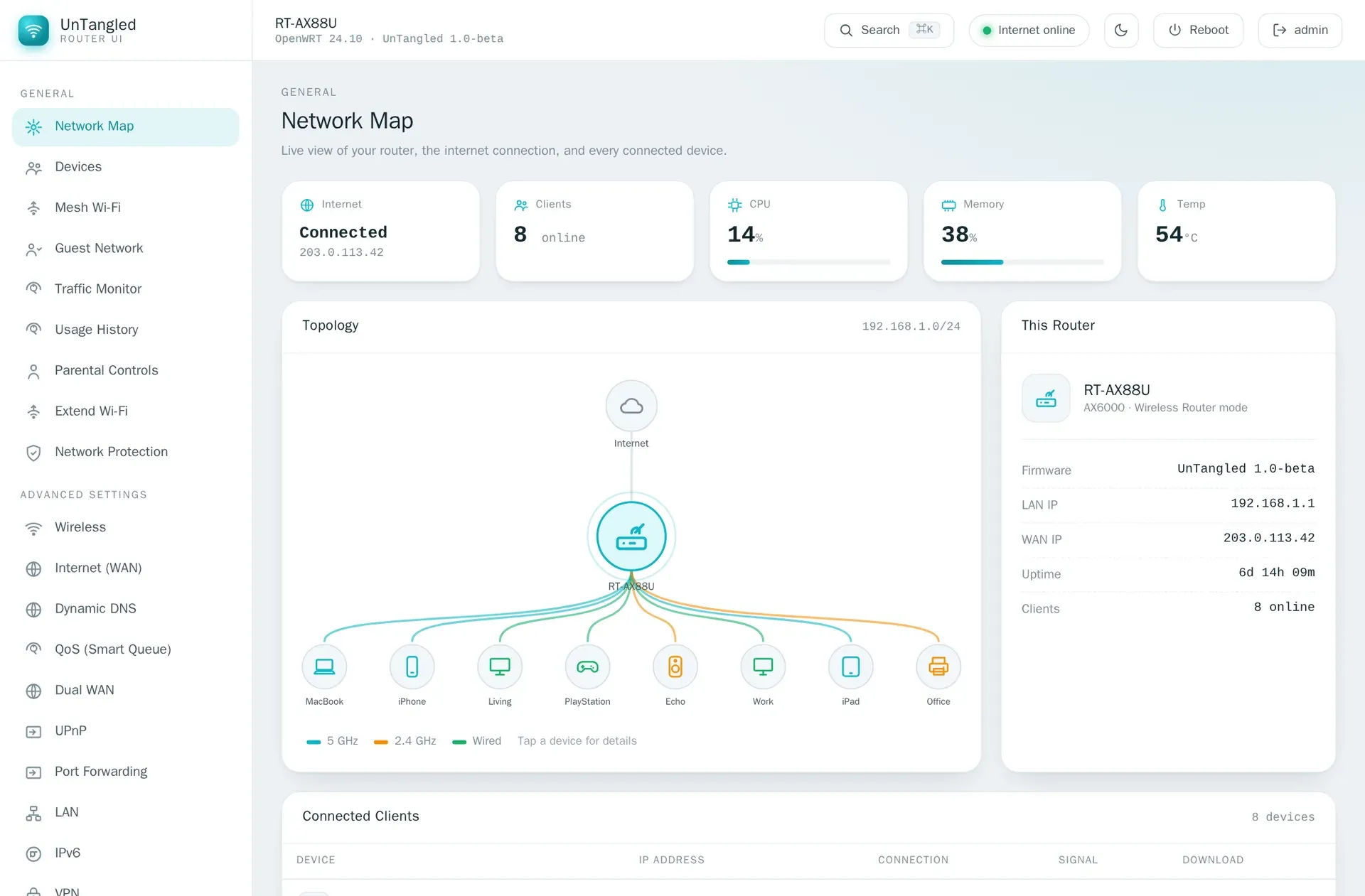
Network Map screen with sample data, from the UnTangled repository.
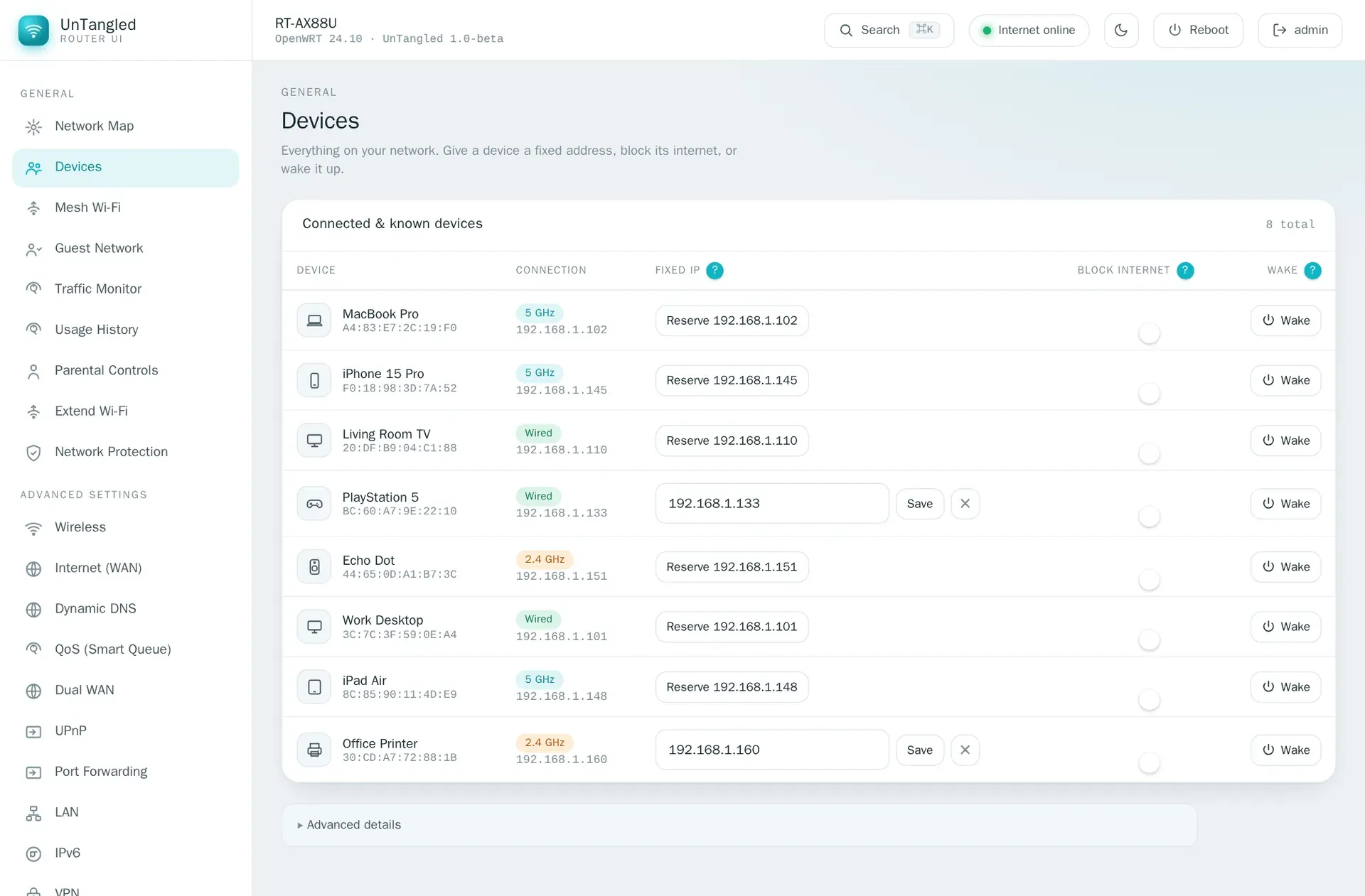
Devices screen with sample devices, fixed IP reservation, internet blocking and Wake-on-LAN.
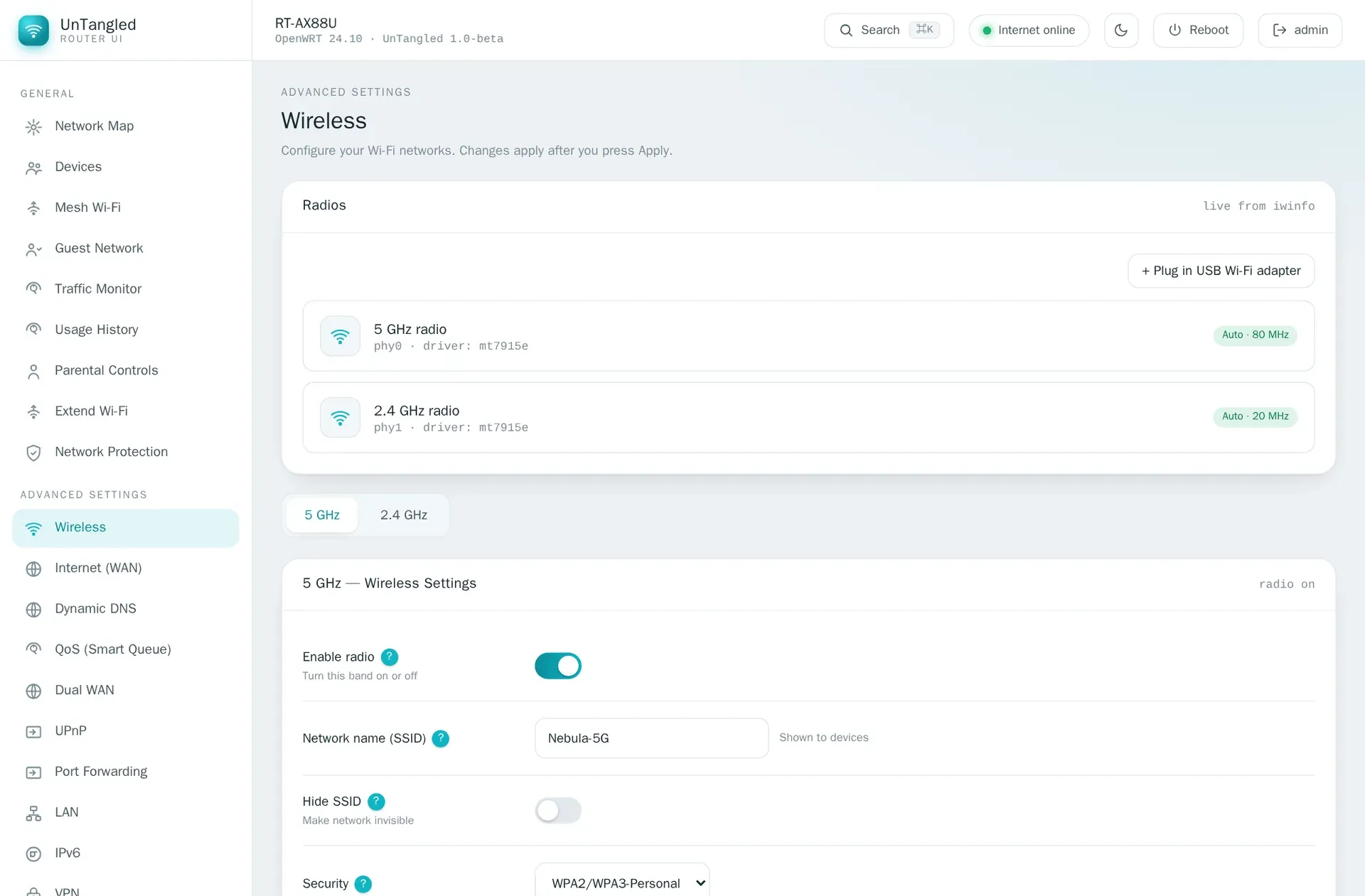
Wireless screen listing both radios and the 5 GHz network settings.
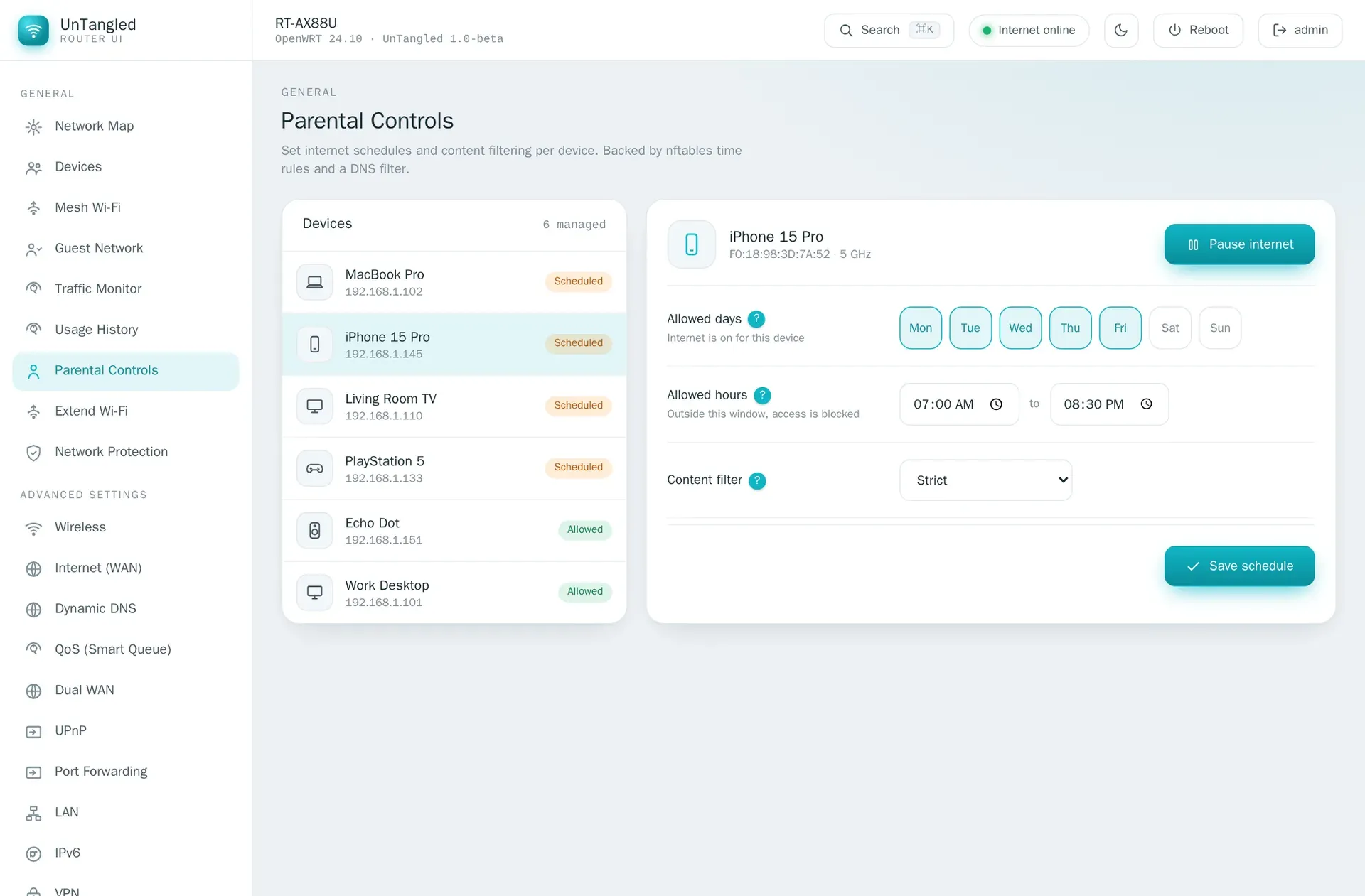
Parental Controls screen with a weekly schedule and content filter for one device.
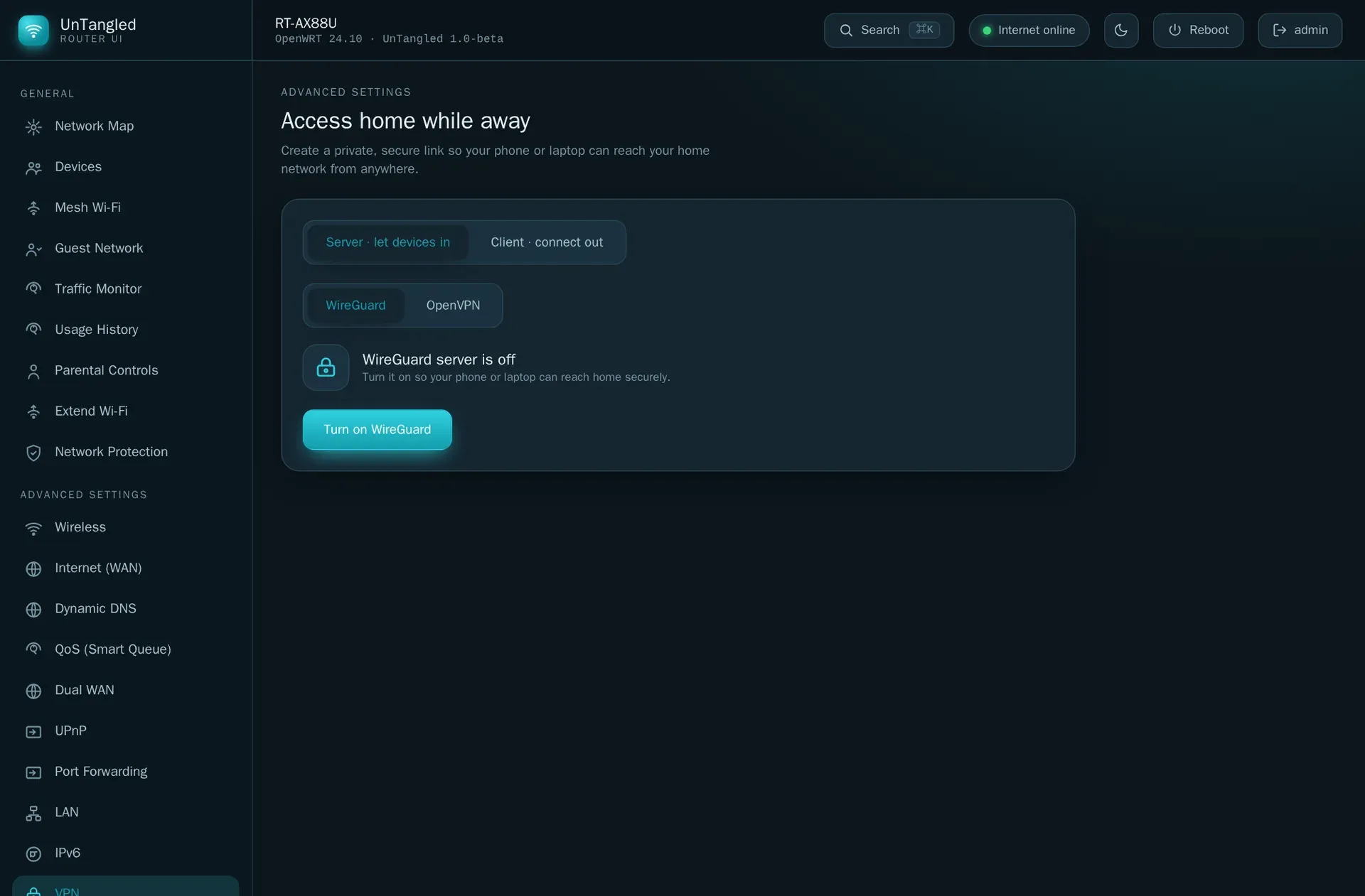
VPN screen in the dark theme, with the WireGuard server switched off.
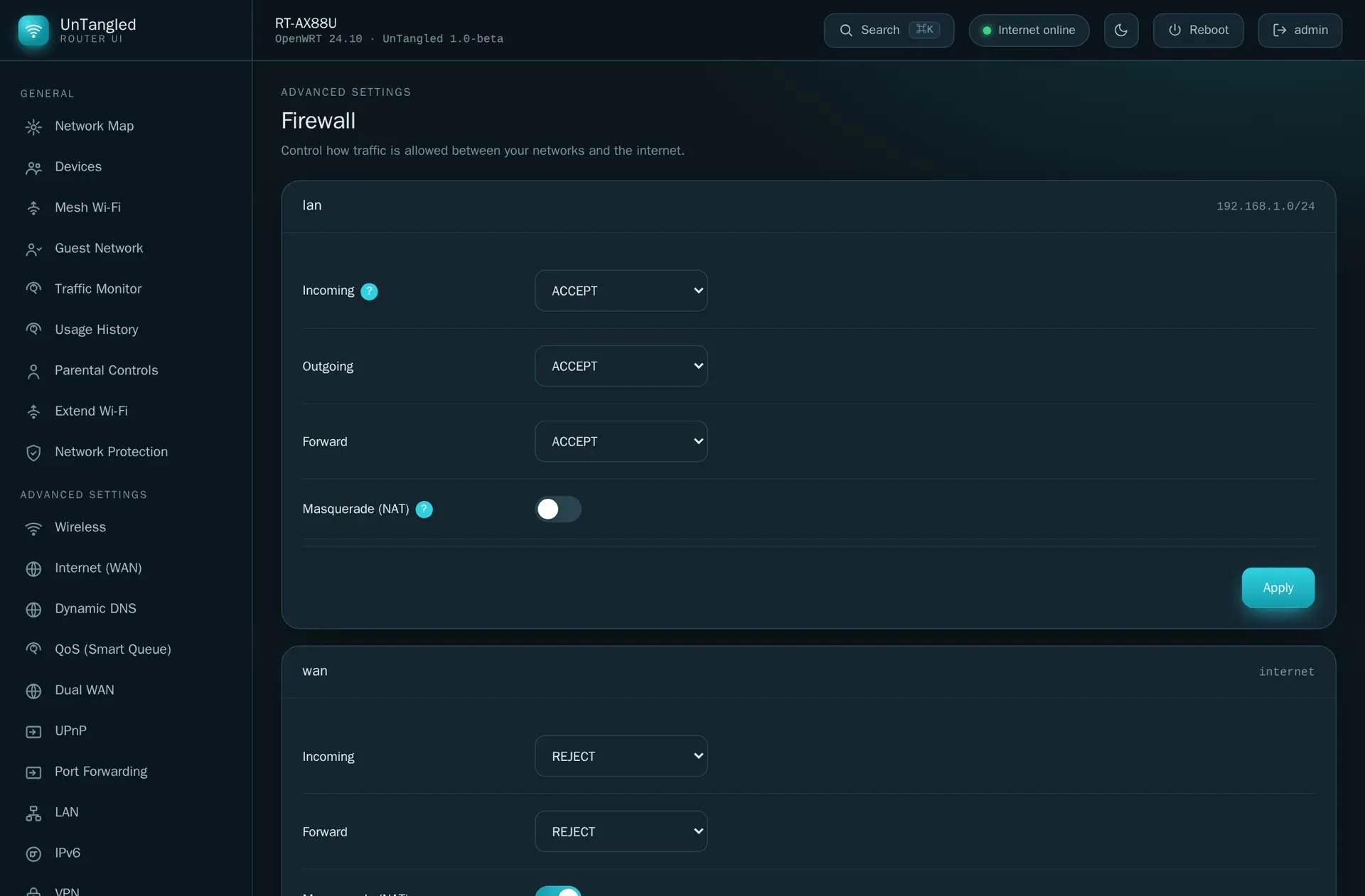
Firewall zone policies in the dark theme, built on fw4 and nftables.
Source: official UnTangled project page.
Key capabilities
- Install from the signed opkg feed (stable OpenWRT) On OpenWRT 23.05, 24.10 and the 25.x stable line, the README documents three steps: download the project's usign public key and add it with
opkg-key add, append the feed line to/etc/opkg/customfeeds.conf, then runopkg updateandopkg install untangled-full. The commands can be run over SSH or in LuCI under System, Custom Commands. Upgrades then arrive through normal opkg updates. - Install from the apk feed (OpenWRT snapshot) Snapshot builds use apk instead of opkg. The documented steps place the project's
untangled.pemkey in/etc/apk/keys/, add the snapshot feed to/etc/apk/repositories.d/, then runapk updateandapk add untangled-full. The release notes state that the apk set is built best-effort and may be missing when a snapshot build breaks. - Install by file Each release attaches
.ipkfiles for stable and.apkfiles for snapshot, for the core, full and mesh packages. One.ipkset covers every current stable release because the package is architecture-independent. The README asks users not to rename the files, since the package manager relies on the names. - Requirements The UI needs OpenWRT 23.05 or newer on any CPU architecture, plus
uhttpd,uhttpd-mod-ubus,rpcd,rpcd-mod-fileandrpcd-mod-luci. The project recommends about 8 MB or more of free flash; on old 4/32 MB class devices the dependencies may not fit. The packaging notes put the app assets at about 330 KB uncompressed, occupying about 65 KB on a compressed overlay. - Network Map The start screen shows internet status, the WAN address, connected client count, CPU, memory and temperature, a topology view of clients by 5 GHz, 2.4 GHz or wired connection, router model and firmware details, and a connected-clients table.
- Devices A device list shows connection type, IP and MAC address. From each row an address can be reserved as a fixed IP, internet access can be blocked, and Wake-on-LAN can be sent. Wake-on-LAN relies on
etherwake, whichuntangled-fullpulls in. - Wireless and Wi-Fi tools The Wireless screen places SSID, security and channel settings first and keeps transmit power, fast roaming and WMM under an advanced tab. Further screens cover a guest network, Extend Wi-Fi (repeater mode) and a Wi-Fi scan, which needs
rpcd-mod-iwinfofrom the full package. - Mesh Wi-Fi plugin The
untangled-meshpackage sets up one Wi-Fi name across OpenWRT routers with 802.11r/k/v roaming, using dawn for roaming decisions and umdns for discovery. Its rpcd helper rewrites SSID, key and 802.11r settings on the access point interfaces when a router leads or joins a mesh. - Parental controls, usage and protection Parental Controls sets weekly internet schedules and a content filter per device. Traffic Monitor and Usage History show daily, monthly and per-device totals when
vnstatandnlbwmonare installed. Network Protection covers ad and threat blocking and detects AdGuard Home when it runs on the router. - Internet, WAN and routing features Screens cover Internet (WAN), Dynamic DNS, QoS via SQM Smart Queue, Dual WAN through mwan3, UPnP through miniupnpd-nftables, Port Forwarding, DMZ, LAN and IPv6 (server or relay mode with announced DNS). Each depends on the matching OpenWRT package.
- VPN and Tailscale The VPN screen configures WireGuard and OpenVPN as server or client. A separate Tailscale screen appears when the
tailscalepackage is installed. - Firewall Zone policies for incoming, outgoing and forwarded traffic, plus masquerading, are presented in plain terms on top of fw4 and nftables.
- Auto-rollback on risky changes Changes to Wireless, WAN, LAN, Firewall and DMZ are applied with a rollback timer. If a change cuts off the connection to the interface, the router reverts it.
- Graceful degradation When the OpenWRT package behind a screen is missing, the screen shows a card offering to install that package instead of an error. This applies to QoS, Dynamic DNS, UPnP, Dual WAN, USB sharing (ksmbd or minidlna), usage history and others.
- Administration, firmware and software Administration covers hostname, time, password, scheduled reboot and an option to make UnTangled the default page. Firmware uploads, verifies and flashes a sysupgrade image while keeping settings, and handles backup and restore. Further screens show the system log, USB storage with SMB and DLNA sharing, and installed packages.
- Access control and HTTPS The security model describes an admin role with full UCI access and an explicit allow-list of file and command paths, with no shell, no file listing and no factory reset, and a read-only role without access to configs holding credentials.
untangled-fullenables uhttpd's HTTP to HTTPS redirect with the self-signed certificate frompx5g, only when an HTTPS listener already exists. - Command palette, help and themes A Cmd+K command palette jumps to any page, device or action. A question mark beside settings opens a one-sentence explanation. A light theme is the default, with a dark theme one click away.
- Runtime plugins Plugins are self-contained ES modules dropped into
/www/untangled/plugins/and listed inplugins/index.json. They add navigation entries, screens and palette actions without rebuilding the core, using a small host API (ubus,toast,navigate,getTheme). The plugin guide documents the contract; the core ships Mesh Wi-Fi and Ping plugins.
Where UnTangled fits
Adding a second interface to an existing OpenWRT router
The project targets routers that already run OpenWRT with LuCI. After the feed is added and untangled-full is installed, the interface is opened at http://<router-ip>/untangled/ with the router admin account, while LuCI continues to work at the root path. The README includes a specific section for Jio AirFiber (JIDU) AX6000 routers flashed with OpenWrt 25.12, on both MediaTek MT7986A and Qualcomm IPQ9574 hardware, and refers to the hardware matrix for model details.
Managing household devices
From the Devices and Parental Controls screens, a router administrator can give a device a fixed address, block its internet access, wake it over LAN and define the days and hours when it is allowed online, with a content filter per device. Usage History adds daily, monthly and per-device traffic totals when vnstat and nlbwmon are installed.
Covering a home with one Wi-Fi name across several routers
With untangled-mesh installed on OpenWRT routers, one router leads the mesh and others join it, sharing an SSID with 802.11r/k/v roaming. The Mesh Wi-Fi screen lists the routers in the mesh with their role and signal. The project states that this is OpenWRT-to-OpenWRT only and has not yet been validated across many physical routers.
Remote access and tunnels
The VPN screen turns on a WireGuard or OpenVPN server so phones and laptops can reach the home network, or sets the router up as a VPN client. Routers with the tailscale package get a dedicated Tailscale screen. Similar networking projects in this directory include Tailscale and the home server system FreedomBox.
Traffic shaping, WAN failover and port exposure
QoS uses SQM Smart Queue with download and upload speeds and a prioritization mode to reduce bufferbloat. Dual WAN relies on mwan3, while Port Forwarding, UPnP and DMZ control which services are reachable from outside. Changes to WAN, LAN, Firewall and DMZ use the auto-rollback timer.
Firmware upgrades and backups
The Firmware screen uploads a sysupgrade image, verifies it and flashes it while keeping settings, and creates or restores a configuration backup. The rpcd ACL limits these operations to fixed /tmp paths and to the upgrade_test, upgrade_start and upgrade_clean calls.
Extending the interface with plugins
Developers can run npm run dev locally, optionally proxying /ubus to a real router with the ROUTER variable, and write plugins as ES modules that register new screens at runtime. The architecture document maps each screen to its data sources.
Reviews of UnTangled
Be the first to share your experience with UnTangled.
Write a review
Loading review form…