

What is oMLX?
oMLX is an open-source LLM inference server for Macs with Apple Silicon. It is built on Apple's MLX framework and mlx-lm, serves models through OpenAI-compatible and Anthropic-compatible HTTP APIs, and is managed from a native macOS menu bar app plus a web admin dashboard. Its two central mechanisms are continuous batching, which runs concurrent requests through mlx-lm's BatchGenerator, and a tiered KV cache that keeps hot cache blocks in RAM and writes cold blocks to the SSD in safetensors format, so a previously seen prompt prefix can be restored from disk instead of being recomputed, including after a server restart.
The project is developed by Jun Kim, who publishes it on GitHub as jundot/omlx and presents it on omlx.ai. The README states that oMLX started from vllm-mlx v0.1.0 and then grew multi-model serving, tiered KV caching, vision-language model support with paged caching, the admin panel and the menu bar app. The code is Python, with a SwiftUI app in apps/omlx-mac/ and the web UI in apps/omlx-web/, and it is released under the Apache-2.0 license. Several components are adapted from other open-source projects, including MLX-based kernels from mlx-serve, MTPLX and Splash, which the README credits with their licenses.
oMLX is distributed in three ways: a signed and notarized .dmg app from GitHub Releases with in-app auto-update (separate builds for macOS 15 Sequoia and for macOS 26 and 27), a Homebrew formula in the project's own tap, and a source install with make install. Releases also carry Python wheels for CPython 3.11, 3.12 and 3.13. The documented requirements are macOS 15.0 or later, Python 3.11 to 3.13 and an Apple Silicon chip from M1 to M5. The website FAQ lists 16 GB of RAM as the minimum and names 64 GB or more for larger models.
The latest stable release is oMLX 0.7.3, published on October 31, 2026. According to its notes it adds a voice mode, web search, link reading and screen capture to the Ask AI feature, faster DeepSeek V4.1 prefill and batched decode, lower memory use when many long requests run at once, and incremental updates for downloaded models that fetch only changed files from Hugging Face. A release candidate, 0.8.0rc1, followed on November 12, 2026; it adds a Prefill Accelerator in which a second Mac or a Linux PC with NVIDIA GPUs runs the first layers of long prompts, and the release notes point users who need a stable build to 0.7.3.
The scope is single-platform: oMLX runs only on macOS with Apple Silicon and has no Windows or Linux server build. A Linux machine with NVIDIA GPUs can only take part as an experimental helper for prefill or cluster work through the separate omlx-cuda-helper container. Models are read in MLX format; GGUF files are listed but run on the external Splash engine. Similar local inference projects listed on iThub include Ollama, llama.cpp, LocalAI and InferSSD.
oMLX screenshots
Explore the interface. Open a screenshot to view it at full size.
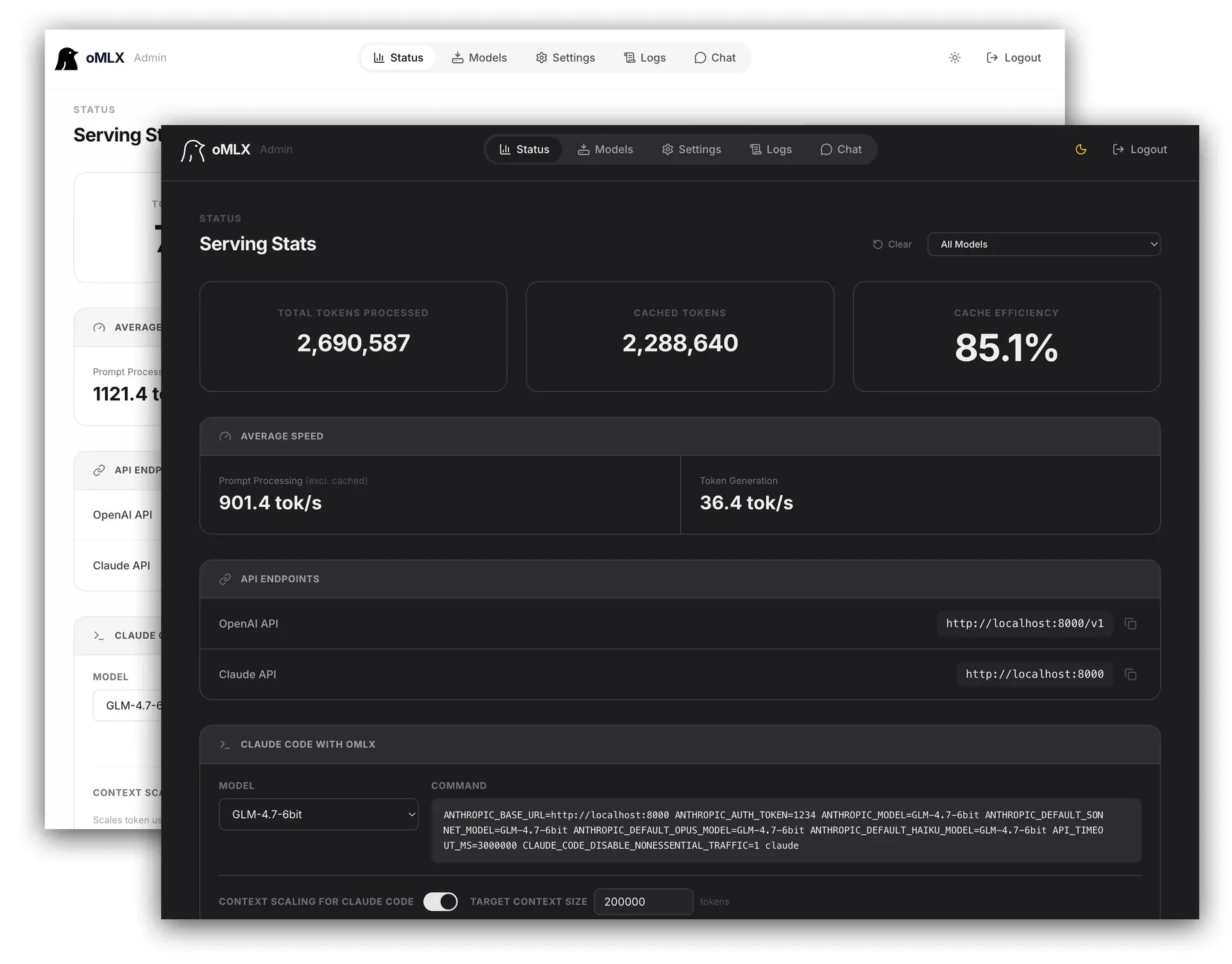
The oMLX web admin dashboard with total and cached tokens, cache efficiency, prefill and generation speed, OpenAI and Claude API endpoints and a generated Claude Code command.
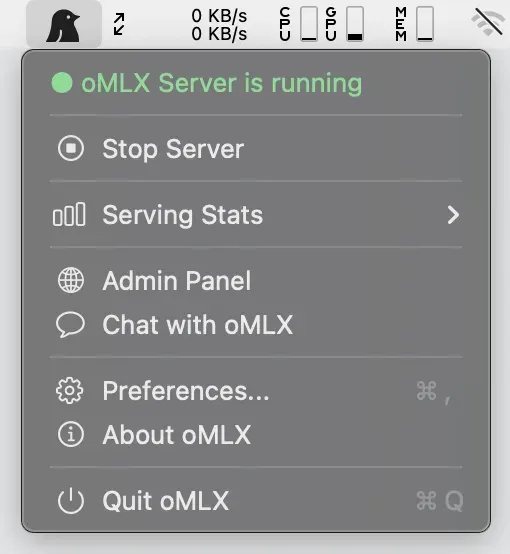
The native oMLX menu bar app with server status, serving stats, admin panel and chat shortcuts.
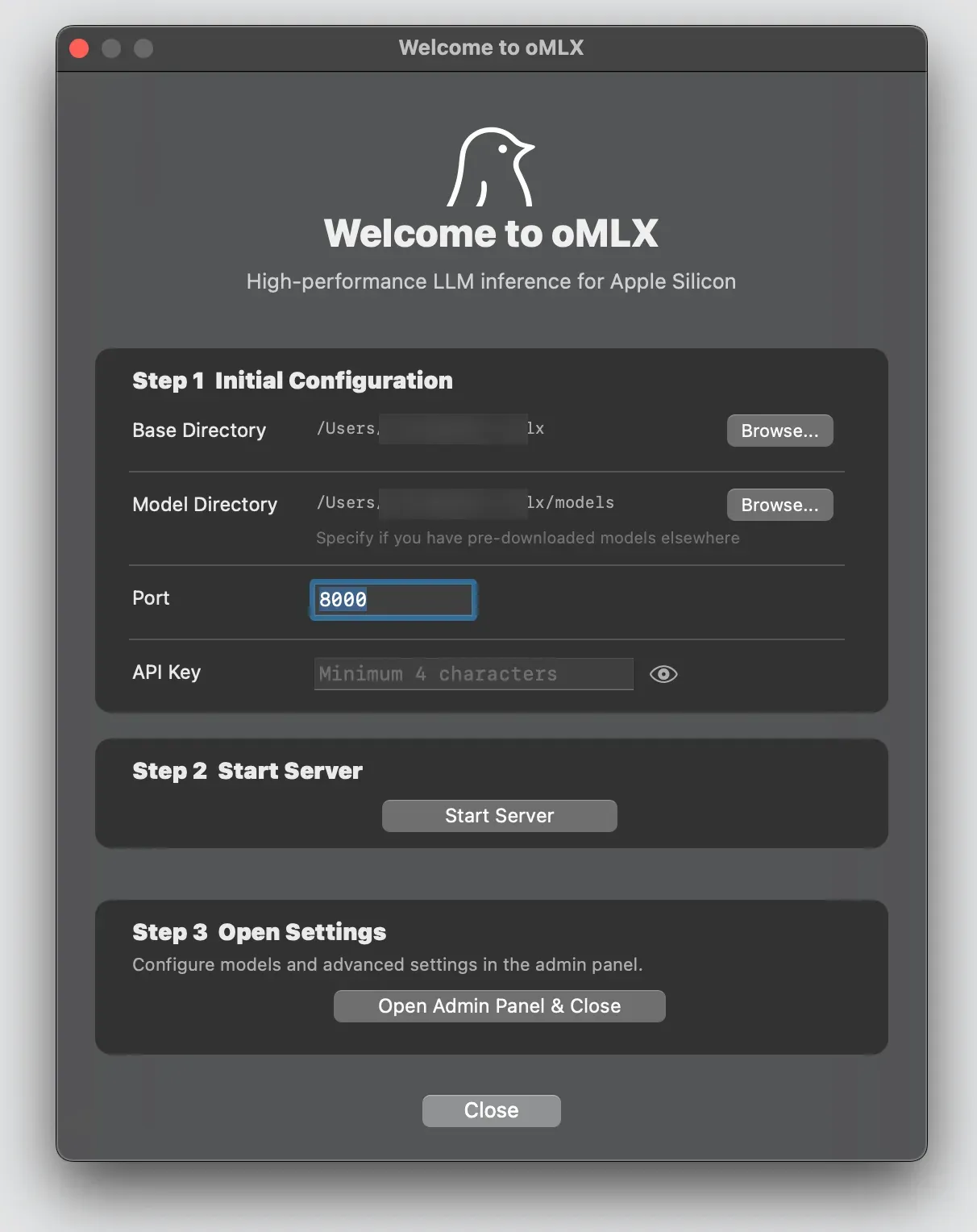
The macOS app's welcome screen, which sets the base and model directories, port and API key, then starts the server (user name in paths blurred).
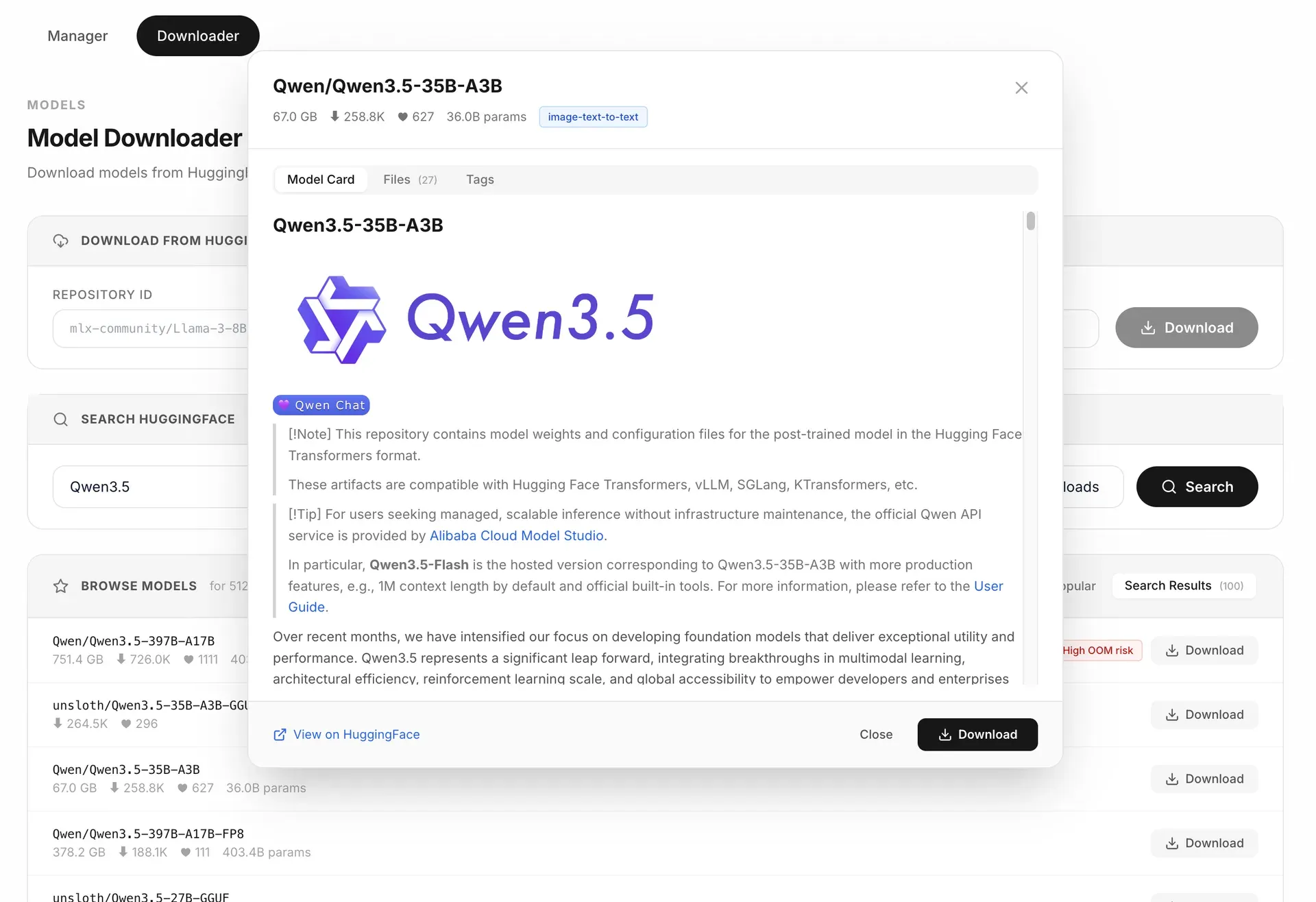
The built-in Hugging Face model downloader, showing search results and a model card before download.
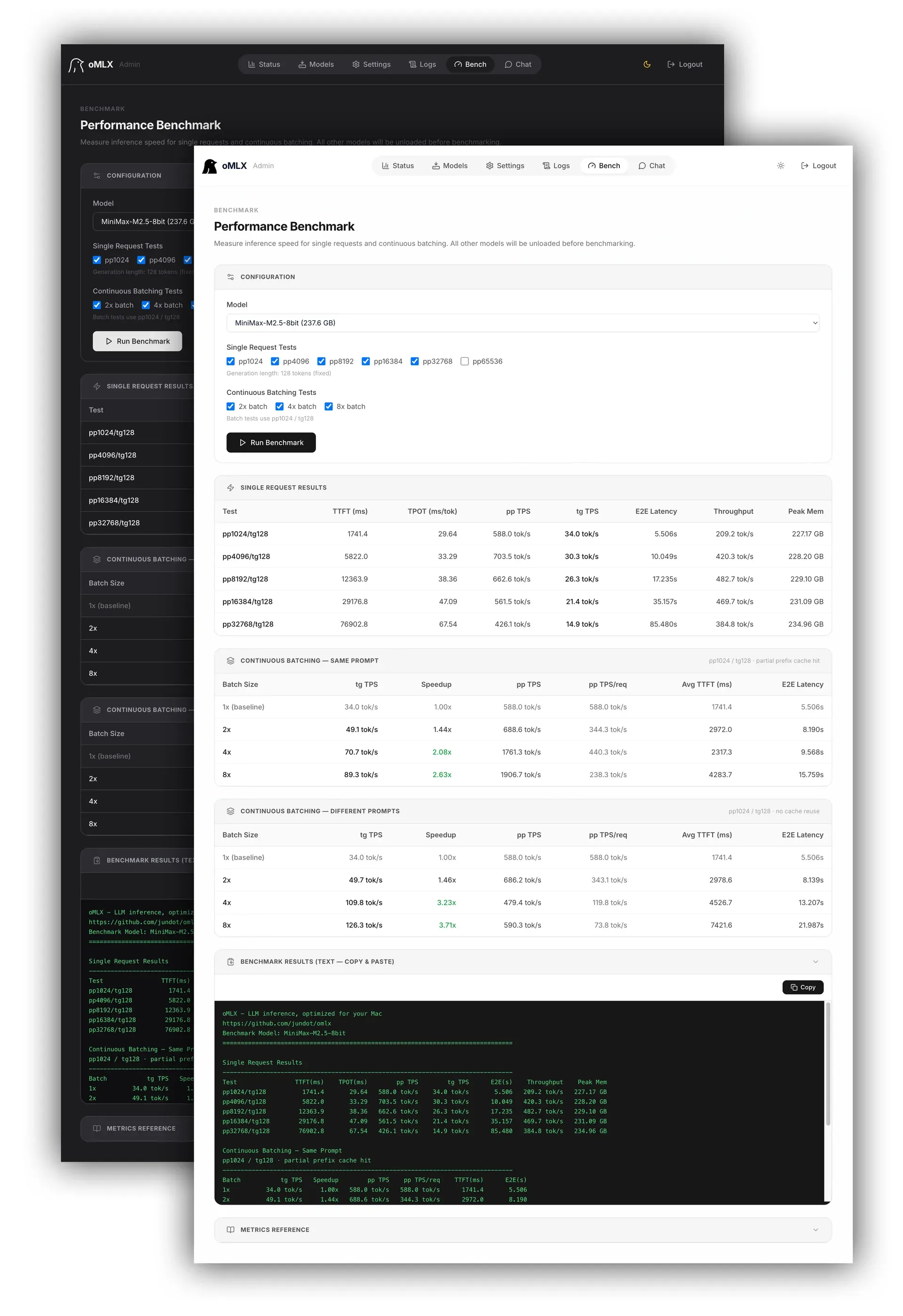
The admin panel benchmark, with single-request results from pp1024 to pp32768 and continuous batching results for batches of 2, 4 and 8.
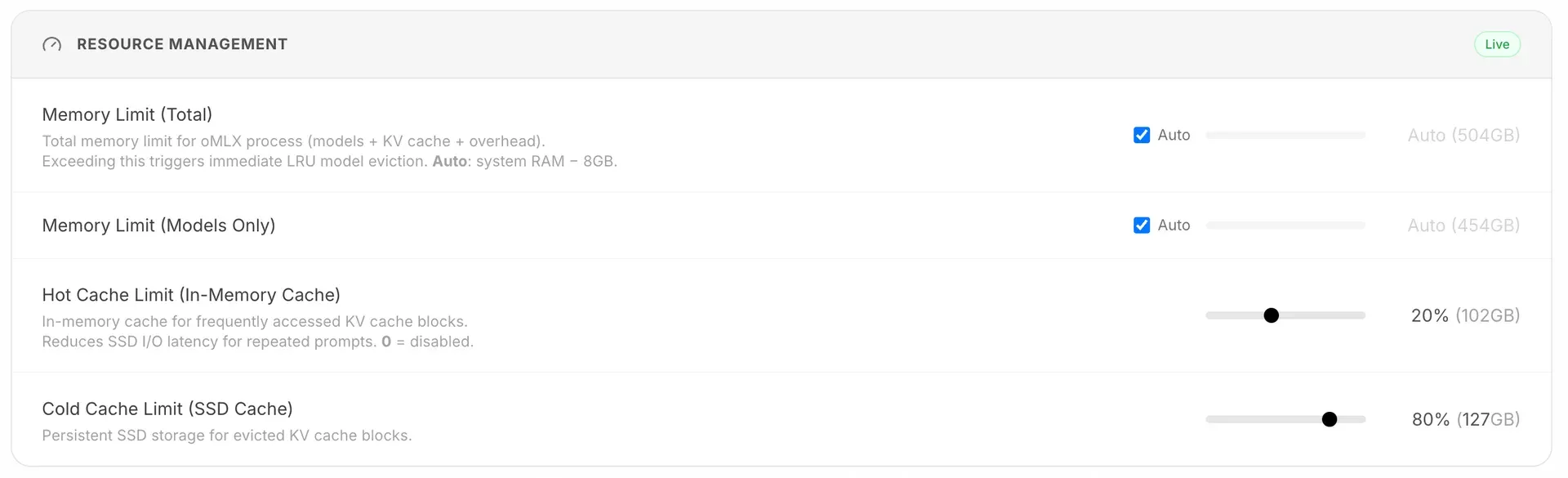
Resource Management settings for the process memory limit, the in-memory hot cache and the SSD cold cache.
Source: official oMLX project page.
Key capabilities
- Tiered KV cache in RAM and on SSD The block-based KV cache is modeled on vLLM, with prefix sharing and copy-on-write. Frequently used blocks stay in an in-memory hot tier, and when it fills up, blocks are written to an SSD cold tier as safetensors files that survive server restarts. The default SSD budget,
auto, is 50% of free disk space plus existing cache files, and--paged-ssd-cache-max-sizesets a fixed limit. Optional Affine4 and Affine8 KV compression store the cache in signed 4-bit or 8-bit formats. - Continuous batching Concurrent requests are scheduled first come, first served and batched through mlx-lm's BatchGenerator. The maximum number of concurrent requests defaults to 8 and is set with
--max-concurrent-requestsor in the admin panel. The project's website reports up to 4.14x generation throughput at a batch of 8 for Qwen3-Coder-Next-8bit on an M3 Ultra with 512 GB. - OpenAI and Anthropic compatible API The server exposes
/v1/chat/completions,/v1/completions, the Anthropic/v1/messagesendpoint,/v1/embeddings,/v1/rerank,/v1/modelsand vLLM-style tokenize and detokenize routes. It supports streaming usage stats, llama.cpp-style prefill progress, Anthropic adaptive thinking and image or video inputs. Release 0.7.3 addsignore_eosand a/v1/realtimeendpoint that follows a subset of the OpenAI Realtime API. - Multi-model serving with memory limits LLMs, vision-language models, embedding models, rerankers and decision models can be loaded in the same server. Models are evicted least-recently-used when memory runs low, can be pinned, loaded or unloaded by hand, and can have an idle TTL. A process memory limit, by default system RAM minus 8 GB, guards against out-of-memory conditions, and
--memory-guardtiers or--memory-guard-gbset the ceiling. - Native macOS menu bar app The app is written in Swift and SwiftUI, not Electron. It starts, stops and monitors the server, shows serving statistics that persist across restarts, restarts the server after a crash and updates itself. It also installs a small
~/.omlx/bin/omlxCLI shim so terminal commands and Apple Shortcuts can control the app-managed server. - Web admin dashboard The dashboard at
/admincovers real-time monitoring, model management, chat, benchmarking and per-model settings. It is available in English, Korean, Japanese, Chinese, French, Russian, Spanish and Brazilian Portuguese, and all CDN dependencies are vendored so it works offline. A--headlessmode serves only the inference and admin APIs without the web UI. - Per-model settings and profiles Sampling parameters, chat template kwargs, TTL, an API-visible alias and a model type override are set per model and apply without a restart. Named profiles bundle settings and can be exposed as separate model IDs such as
qwen3-8b:thinking, served from the same loaded engine with no extra memory. - Vision, OCR, audio and video input VLMs use the same batching and cache stack as text models and accept multiple images as base64, URL or file input, with tool calling. Qwen3.5, Qwen3.6 and Qwen3.8 checkpoints accept native video input, which needs OpenCV. OCR models such as DeepSeek-OCR, DOTS-OCR and GLM-OCR are detected automatically, and since 0.7.3 LFM3-Audio and LFM3-Omni serve transcription and speech endpoints.
- Tool calling, structured output and MCP All function calling formats available in mlx-lm are supported, with auto-detection for families such as Llama, Qwen, DeepSeek, Gemma, GLM, MiniMax, Mistral, Kimi K2 and Longcat. JSON schema, EBNF and regex grammars constrain output. MCP tools are loaded with
--mcp-configafter installing the optional MCP extra. - Built-in chat The admin panel includes a chat with conversation history, model switching, dark mode, reasoning output and image upload for VLM and OCR models. Documents in PDF, DOCX, PPTX, TXT and MD format can be attached, and 0.7.3 adds temporary chats that are not stored in history.
- Hugging Face model downloader Models can be searched and downloaded from Hugging Face inside the dashboard in MLX, GGUF or all formats, with model cards and per-file selection. From 0.7.3 the model manager can check for updates and download only changed files. The website states that oMLX also reads the standard Hugging Face cache and an existing LM Studio folder, so already downloaded models do not need to be fetched again.
- oQ quantization oQ converts a full-precision Hugging Face model into a mixed-precision MLX safetensors model from the dashboard, at levels from oQ2 to oQ8. It measures how sensitive each layer is to quantization and assigns extra bits where they help most. The output is a standard MLX model that also loads in mlx-lm and mlx-vlm.
- MoE expert offload An experimental expert offload mode keeps a configurable fraction of each MoE layer's experts in memory, from 5% to 95% in the UI, and reads the rest from the checkpoint's own safetensors on demand. The documentation reports load peak memory falling from 14.28 GB to 4.69 GB for gemma-4-26b-a4b-it-4bit at a 25% resident fraction, with the cost paid in latency.
- Coding agent integrations The dashboard sets up OpenClaw, OpenCode, Codex, Hermes Agent, Copilot, Pi, Mistral Vibe and DeepSeek Harness with one click, and generates the environment command for Claude Code.
omlx launch codex,omlx launch copilotandomlx launch vibestart those tools with a catalog of the server's models. For Claude Code, oMLX reports the model's real context window for auto-compaction and sends SSE keep-alives during long prefill. - Built-in benchmark A one-click benchmark in the admin panel measures prefill and generation tokens per second for single requests at several prompt lengths and for continuous batching at batch sizes up to 8, including partial prefix cache hits. Results can be copied as text, and the project collects community results on the omlx.ai benchmarks pages.
- Authentication and network binding An API key protects inference and admin endpoints, with sub keys limited to the inference API. oMLX refuses to start on a non-loopback address without a main API key, and disabling authentication entirely is restricted to loopback binds. Keyless inference on a network bind can be enabled separately, while management endpoints still need the main key or an admin login.
- Admin API and local usage history The admin API under
/admin/api/manages settings, models, downloads, quantization, benchmarks and stats with the main API key as a Bearer token, and an OpenAPI page lists every route. Usage history shows token totals, per-model speed and an hourly heatmap; the documentation states that it stays on the server, sends no telemetry and stores no prompts or responses. - Experimental multi-Mac inference Source builds can split one model across Macs with unequal memory using MLX pipeline ranks over Ring or Thunderbolt RDMA, with a Cluster dashboard for discovery, verification and shard planning. The Prefill Accelerator lets a second Mac or an NVIDIA Linux helper run the first layers of long prompts; release 0.8.0rc1 adds a Docker image for the CUDA helper. Both are marked experimental.
- Installation on macOS The DMG is dragged to Applications, and a welcome screen sets the model directory, starts the server and downloads a first model. Homebrew installs come from the project tap with an optional
--with-custom-kernelbuild that needs full Xcode, andomlx startruns the server as a background service. Native custom kernels, required for fast paths in GLM-5.2, MiniMax M3 and Qwen3.5, ship precompiled in the DMG.
Where oMLX fits
Local backend for coding agents
The workflow the project describes most often is serving a local model to Claude Code, Codex, OpenCode or OpenClaw. After starting the server, the dashboard's Claude Code panel shows a ready command with ANTHROPIC_BASE_URL pointing at http://localhost:8000, and the integrations panel generates omlx-cli launch commands for the other tools. Because coding agents often change their context, the SSD cold tier keeps earlier prefixes available; the website states that time to first token from the second turn falls under 5 seconds in its measurements.
Serving several models from one Mac
A model directory with MLX subfolders, for example ~/models, is passed with --model-dir or chosen in the welcome screen. oMLX detects each model's type, loads models on demand and evicts the least recently used one when the memory limit is reached. Everyday models can be pinned, heavier ones given an idle TTL, and the memory ceiling and hot cache size are set in the Resource Management settings.
Embeddings and reranking for retrieval
Embedding models such as BGE-M3, ModernBERT and EmbeddingGemma 2, and rerankers based on ModernBERT or XLM-RoBERTa, run in the same server as chat models. Applications call /v1/embeddings and /v1/rerank with the same base URL and API key used for completions, so a retrieval pipeline can stay on one machine.
Vision, OCR and document chat
VLMs and OCR models load like text models. Images can be sent as base64 or URL in API requests or uploaded in the built-in chat, and supported Qwen checkpoints also take video. In the web chat, PDF, DOCX, PPTX, TXT and MD files can be attached to a conversation, and OCR models receive optimized prompts automatically.
Shrinking and benchmarking models
Under Models, oQ Quantization converts a full-precision model to an oQ level, with the estimated size and memory shown before the job starts; the oQ guide names oQ4e as the starting point for most models. The finished model appears in the model list and can be measured with the built-in benchmark, which reports prefill and generation speed, time to first token and peak memory.
Headless server on the local network
For use from other machines, omlx serve --host 0.0.0.0 requires a main API key, set with --api-key or OMLX_API_KEY. --headless drops the web UI while keeping the inference and admin APIs, and Homebrew users can run the server under brew services, which restarts it after a crash and writes logs to the Homebrew log folder and ~/.omlx/logs/server.log.
Install
brew tap jundot/omlx https://github.com/jundot/omlx && brew install jundot/omlx/omlxReviews of oMLX
Be the first to share your experience with oMLX.
Write a review
Loading review form…
Alternatives to oMLX
 OllamaOllama is an MIT-licensed tool for downloading and running open models such as Gemma, Qwen, DeepSeek and gpt-oss on your own machine. It ships a desktop app, CLI and local REST API, and offers cloud-hosted models on a pay-as-you-go or subscription basis.Lllama.cppllama.cpp is an MIT-licensed C/C++ library, with CLI tools and an OpenAI-compatible server, for running language and vision-language models on CPU or GPU.
 LocalAILocalAI is an MIT-licensed inference server that runs language, speech, image, video and vision models on CPUs or GPUs and serves them through OpenAI, Anthropic, Ollama and ElevenLabs-compatible APIs, with backends pulled on demand.