

What is InferSSD?
InferSSD is an open-source inference engine for large mixture-of-experts (MoE) language models whose weights do not fit in a computer's RAM or VRAM. It is built on llama.cpp and ggml, reads standard GGUF files, and keeps the routed expert weights on an SSD. For each token the model's router selects a few experts; InferSSD indexes where those experts sit in the GGUF shards, reads the missing ones from the drive into bounded RAM and VRAM caches, and schedules CPU and GPU work around where each weight currently resides. Attention, shared layers and the KV cache stay in working memory. The engine serves a browser chat and an OpenAI-compatible API, and also offers terminal chat.
The project is published by WiCi, a systems research lab working on wireless GPU computing and local AI, in the wici-ai/inferssd repository. WiCi also ships WiCi Infer, a free desktop app for macOS and Windows that bundles the precompiled InferSSD engine; on Linux the WiCi site points users to the InferSSD command-line engine instead. The README lists the tested models: DeepSeek-V4.1-Flash-1017 (763B total parameters, Q8_0 GGUF with native MXFP4 routed experts), Muse-Spark-Open (816B total, 42B active, Unsloth UD-Q4_K_XL), Qwen3.6-35B-A3B and Qwen3.8 Flash Next with SSD expert offload, and Gemma 4 E4B on the ordinary RAM inference path.
The latest release is v0.1.4, published on November 9, 2026. It added Qwen3.8 Flash Next and Gemma 4 E4B, and for the first time published checked prebuilt packages for Apple silicon macOS and Windows 11 x64 together from the same tagged commit; Linux keeps a source installer. Version 0.1.3 added faster decode on CPU and CUDA expert paths, GPU computation of routed experts during prompt processing on Apple silicon, and per-model thinking controls through reasoning_effort. Version 0.1.2 added Qwen3.6-35B-A3B, per-machine decode speed estimates and the three-command CLI (serve, cli, profile). The first public release, v0.1.0, appeared on October 30, 2026. Every change is listed in the changelog.
The engine is written mainly in C++ as an extension of a bundled llama.cpp snapshot, with a standard-library Python framework that handles GGUF metadata, machine probes, typed settings and the launch. Reads go through one read ring per operating system: io_uring on Linux, IoRing on Windows and persistent reader threads with F_NOCACHE on macOS. Linux with CUDA adds a GPU expert cache tier; Metal and Vulkan GPUs that share host memory compute a prompt's heavy experts through a separate GPU lane. The How it works document describes the modules and ownership boundaries, and the WiCi research article Running 800B-Parameter LLMs on Consumer Hardware with InferSSD explains the design and SSD endurance considerations.
InferSSD is licensed under Apache-2.0. The bundled llama.cpp, ggml and other third-party components keep their own licenses and notices, and model weights remain under their publishers' licenses. The project states that throughput alone does not establish model quality, and that its benchmark tables compare complete configurations rather than isolating single optimizations. Related engines listed on iThub include llama.cpp, on which InferSSD is built, and colibri, which appears in the project's own benchmark tables.
InferSSD screenshots
Explore the interface. Open a screenshot to view it at full size.
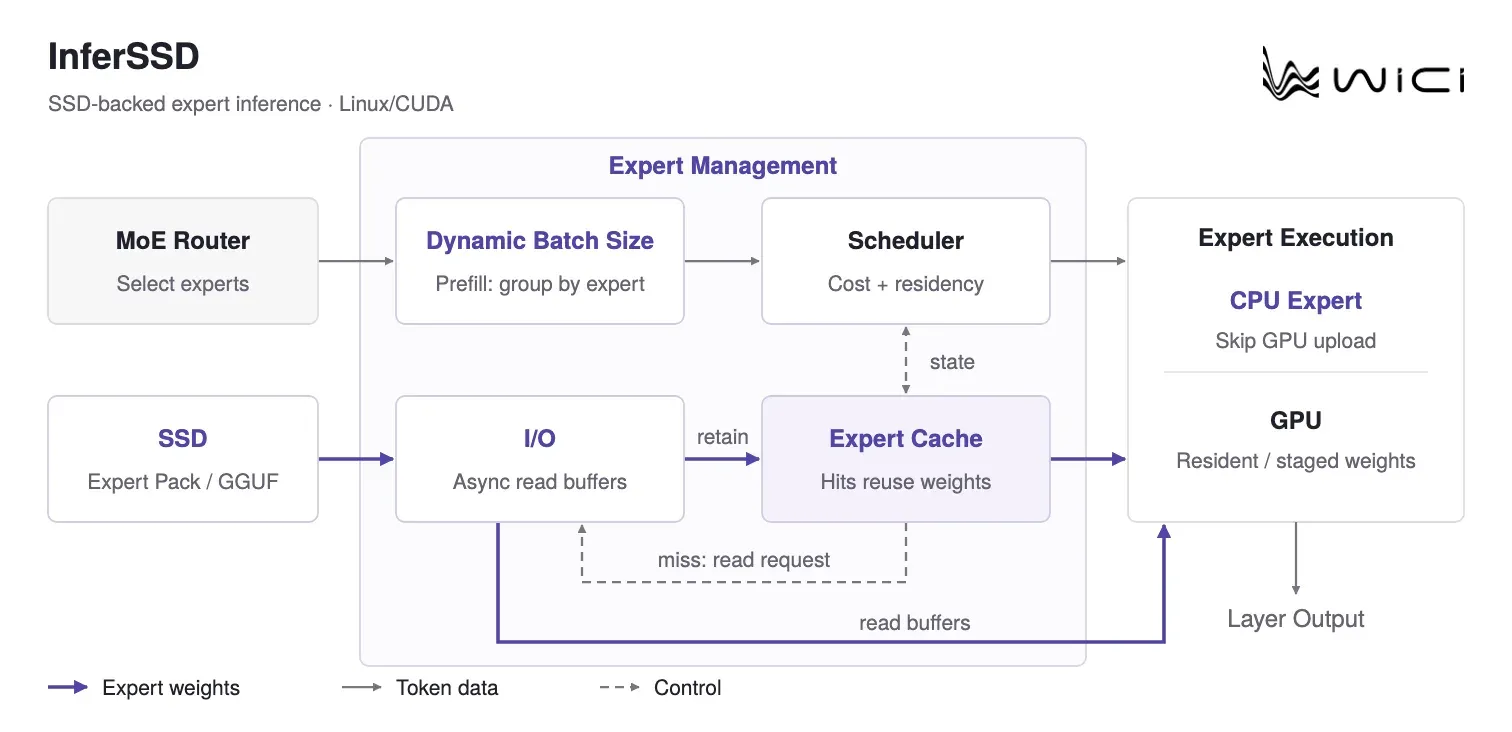
Official InferSSD diagram of SSD-backed expert inference on Linux/CUDA, from the WiCi research article.
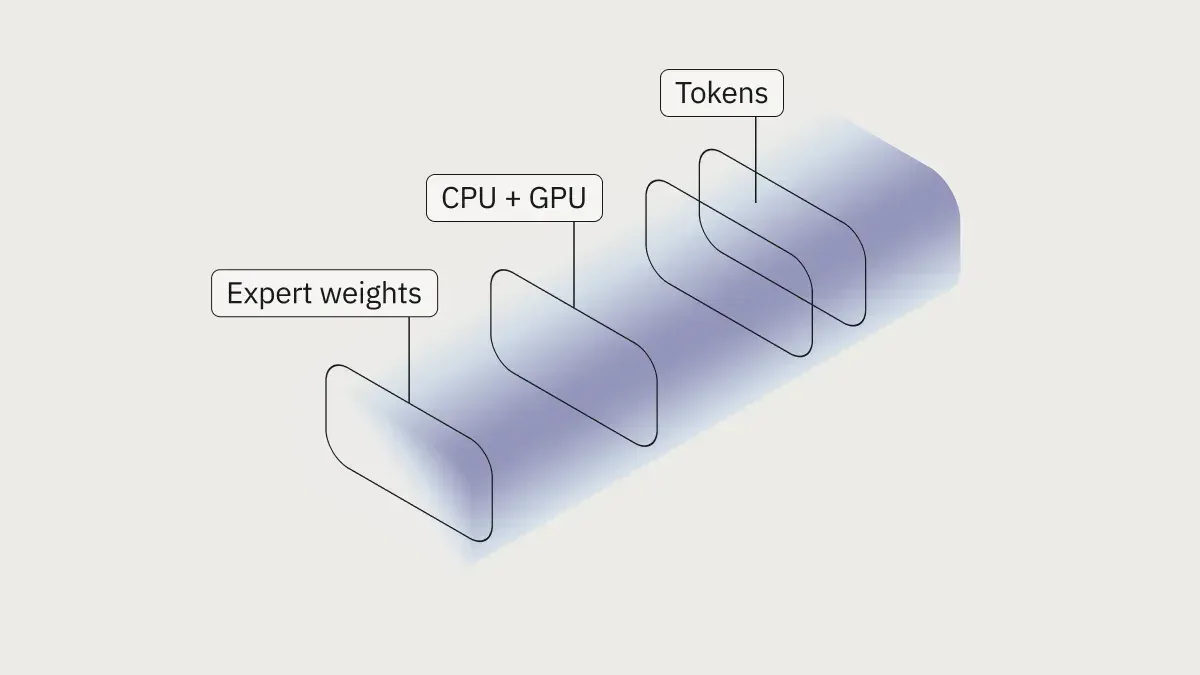
Illustration from the WiCi research article on running 800B-parameter models with InferSSD, showing expert weights, CPU and GPU compute and tokens as stages.

The official WiCi InferSSD logo lockup shown at the top of the project README.
Source: official InferSSD project page.
Key capabilities
- SSD expert streaming for MoE models Routed expert weights stay on the drive, and only the experts the router selects are read into memory. A source index locates each expert's up, gate and down matrices as byte ranges inside the original GGUF shards, so indexing reads the GGUF headers without copying the weight payload. The README states that the KV cache, shared layers and working memory must still fit in RAM or VRAM.
- Bounded RAM and VRAM expert caches Before reading from the SSD, the runtime checks whether an expert is already resident, and cache hits avoid a new read. The host-memory cache works under a budget that the launch derives from the machine, and on Linux with CUDA a GPU cache tier keeps selected experts in VRAM. Cache space can be reclaimed when other allocations, such as a growing KV cache, need room.
- Grouped prefill and read scheduling During prompt processing, tokens that select the same expert are grouped so one weight read serves several matrix multiplications. Reads for the up and gate matrices are prioritised so their computation can overlap with reading the down matrix. In decode, each layer predicts the next layer's experts and prefetches the likeliest ones (
prefetch.depth, 64 by default) while the drive would otherwise wait. - CPU and GPU placement A shared cost model decides whether an expert runs on the CPU or the GPU from measured costs and residency. During discrete-GPU decode, experts already in VRAM run on the GPU while the CPU computes experts held in host memory. On Apple silicon, Metal runs the dense layers and the CPU computes routed experts, and since v0.1.3 the GPU also computes a prompt's heavy experts. The project notes that a reply can then differ slightly between runs of the same prompt.
- Tested model profiles The README model table lists DeepSeek-V4.1-Flash-1017 (Q8_0 from mrfakename), Muse-Spark-Open (Unsloth UD-Q4_K_XL), Qwen3.6-35B-A3B (Unsloth UD-Q4_K_XL), Qwen3.8 Flash Next (Bartowski IQ4_XS) and Gemma 4 E4B (Google QAT Q4_0). The launch picks the model profile from the GGUF's architecture field. A GGUF whose routed experts use a quantization the engine does not run is refused, with the tensor types named.
- Browser chat and OpenAI-compatible API
inferssd servestarts a web UI and an OpenAI-compatible API onhttp://127.0.0.1:8080, with the API at/v1.--portchanges the port, and--host 0.0.0.0makes it reachable from other devices. The README warns that the API has no authentication, so anyone who can reach the port can use it. - Terminal chat
inferssd cliruns a chat session in the terminal that keeps conversation history;/clearstarts a new conversation and/exit, EOF or Ctrl+C stops the service. With-pand-nit returns one response and stops the server it started. - Thinking controls per model The
/propsendpoint reports what the loaded model's chat template offers for thinking, and requests can use exactly thosereasoning_effortvalues. According to the v0.1.3 notes, DeepSeek V4.1 acceptsnone,low,medium,high(default) andmax; Muse always thinks and acceptslowtoxhigh; Qwen3.6 acceptsnone. Other values get an HTTP 400 that names the valid ones. - Automatic machine profile The first launch measures the CPUs, memory, GPUs and the drive that holds the model, which takes one to three minutes, and saves the result for later launches. Each launch then chooses thread counts, CPU placement and cache sizes from that profile and the model, without a memory setting to choose.
inferssd profileruns the measurement on its own and can estimate each supported model's decode speed on the machine before download. See the machine profile guide. - Typed settings Optional settings use the
inferssd-settings 1format, passed as a file with--settingsor one value at a time with--set key=value. Keys cover expert sources, I/O CPUs, prefetch depth, VRAM budget and reserve, and host headroom;vram.budget = 0keeps every expert on the CPU. The configuration reference lists every key, unit, default and platform scope. - Optional expert packs A bundled builder can copy a model's experts into a v1 expert pack that groups expert slices by layer and expert with 4 KiB alignment, keeping the existing quantized bytes. Packs are optional because the launcher can index GGUF experts directly. The quick start lists about 473 GiB for the DeepSeek GGUF, plus about 269 GiB for an optional DeepSeek pack; the v1 format has no checkpoint fingerprint, so a pack must stay paired with its source shards.
- One-command install on macOS and Linux
curl -fsSL https://github.com/wici-ai/inferssd/releases/latest/download/install.sh | shinstalls into a private environment under~/.local/share/inferssdwithoutsudoand without editing shell profiles. On Apple silicon with macOS 15 or later it installs a prebuilt package of about 30 MB that needs no developer tools. On Linux it builds the release from source for the machine's CPU and GPU, which the README says takes about 2 to 12 minutes and needs Git, Python 3.9 or later and a C/C++ compiler. - Windows package On Windows,
irm https://github.com/wici-ai/inferssd/releases/latest/download/install.ps1 | iexin PowerShell installs a precompiled package with its own Python runtime, native engine, probes and runtime DLLs. The v0.1.4 notes describe a CPU/Vulkan engine that requires Windows 11 x64 and an AVX2 CPU, with GPU execution through the normal graphics driver; the current Windows package documentation on the main branch describes separate CUDA and Vulkan packages. The README header still labels Windows support as in progress. - Linux requirements On Linux the launch runs the server in a systemd scope whose memory limit is the computed budget and which forbids the server to swap. This needs systemd with the cgroup v2 unified hierarchy and, for non-root users, a systemd user manager with the memory controller delegated. The quick start notes that most containers, and WSL without systemd, do not provide this. The source build uses CUDA on NVIDIA GPUs, Vulkan for AMD and Intel GPUs when
glslcis installed, and the CPU otherwise. - Model downloads with pinned revisions
-hfaccepts the tested Hugging Face repositories, pins the resolved commit, checks the complete shard set and free disk space, and downloads only the tested quantization to~/.local/share/inferssd/models.--model-dirchooses another drive, and-mpoints at a local first shard, which also allows fully offline launches after installation. The README lists about 470 GiB for DeepSeek or Muse and 21 GiB for Qwen3.6. - Version and capability reporting
inferssd --versionprints the release number and a build label of the formyymmdd.build.commit, and--version --jsonadds the supported model profiles and the GPU backends the engine was built with. Applications that run the engine, such as the WiCi Infer desktop app, use these fields to check capabilities and offer updates. - Local telemetry and usage files Each
serveorclilaunch keeps logs, receipts and anative-events.jsonlstream of engine events in its run directory under~/.local/share/inferssd/state/runs. The server records request and token counts tousage-events.jsonlonly whenINFERSSD_USAGE_DIRnames a directory, as described in the usage events documentation. - Published benchmarks The README reports prefill and decode rates at a 4K prompt tier with 256 output tokens, against llama.cpp and Colibri on a MacBook Pro M5 Max, RTX 5060 Ti, RTX 5090 and DGX Spark. For DeepSeek-V4.1-Flash-1017 on the RTX 5090 system the project reports 164.5 tok/s prefill and 7.27 tok/s decode, against 8.06 and 0.867 tok/s for llama.cpp. The benchmark methodology defines the measurements and states that results compare complete configurations.
Where InferSSD fits
Running an 800B-class MoE model on a laptop or desktop
The main documented workflow runs DeepSeek-V4.1-Flash-1017 or Muse-Spark-Open on machines whose memory is far smaller than the model. After the one-command install, inferssd cli -hf mrfakename/DeepSeek-V4.1-Flash-1017-GGUF or inferssd serve -hf unsloth/Muse-Spark-Open-816B-A42B-GGUF downloads the tested files and starts the model. The WiCi site lists 16 GB of memory as the minimum and about 520 GB of free SSD space for DeepSeek V4.1 Flash, and 24 GB minimum for Muse Spark Open. The README reports DeepSeek decode of 2.874 tok/s on a 48 GB MacBook Pro M5 Max and 7.26 tok/s on DGX Spark in its benchmark setup.
Serving a local model to coding tools and apps
inferssd serve exposes an OpenAI-compatible endpoint at http://127.0.0.1:8080/v1, which any OpenAI-compatible client can use. The WiCi Infer page names Claude Code and OpenCode as tools that can connect to the same local model through this API. The server listens on loopback by default; binding to 0.0.0.0 opens it to the network without authentication, as the README states.
Smaller MoE and RAM-only models
Qwen3.6-35B-A3B, a single file of about 21 GiB, runs with its routed experts streamed from SSD, and the WiCi site lists 8 GB of memory as its minimum. Qwen3.8 Flash Next uses the same SSD offload path. Gemma 4 E4B runs on the ordinary RAM inference path and is admitted only when its estimated weights, KV cache and working memory fit the memory budget; on Apple silicon its per-layer embedding table stays in the file and is read from the SSD as tokens use it.
Estimating speed before a large download
inferssd profile --model <models directory> measures the machine and the drive that will hold the models, and estimates the decode speed of each supported model before any weights are downloaded. Given a directory without a large file, it measures the drive with a 4 GiB test file that it removes afterwards. --json prints the profile and the estimates as one JSON object for scripts or other applications.
Building and tuning from source
Developers can clone the repository and build with CMake presets such as macos-metal, linux-cuda, linux-cpu or windows-llvm, then write an engine descriptor with scripts/engine-resources.py and launch with --resources. Typed settings fix values such as the VRAM budget, I/O CPUs or prefetch depth, and the quick start documents each platform's toolchain. The engine reads only INFERSSD_DEBUG and INFERSSD_TRACE_DIR as observation channels for trace and profile output.
Contributing hardware results and engine work
The contributing guide invites hardware results and improvements to expert I/O, caching and batching, with GitHub issues for discussion. Benchmark data is kept in the repository as machine-readable JSON next to the methodology. Similar MoE offloading engines listed on iThub include Project Maya, Xolotl and FreeToken.
Install
curl -fsSL https://github.com/wici-ai/inferssd/releases/latest/download/install.sh | shReviews of InferSSD
Be the first to share your experience with InferSSD.
Write a review
Loading review form…
Alternatives to InferSSD
 colibricolibri is an Apache-2.0 inference engine in C that runs large mixture-of-experts models locally by keeping dense weights in RAM and reading experts from disk.PMProject MayaProject Maya runs large mixture-of-experts models locally, spreading experts across GPU memory, RAM and SSD, with browser chat and OpenAI-compatible APIs.
 XolotlXolotl is an MIT-licensed local inference engine built from Strata that serves DeepSeek-V4.1-Flash, GLM-5.3-Flash, Qwen3.8 and LFM3-Omni over OpenAI- and Anthropic-compatible APIs, tiering MoE experts across VRAM, pinned RAM and NVMe.