

What is PipesHub?
PipesHub is an open-source context layer for AI agents and an enterprise search platform. It connects to business systems such as Slack, Google Drive, Jira, Confluence, GitHub, Microsoft 365 and Notion, indexes their content together with the source permissions, and answers questions with citations that point back to the original blocks. The same permission-filtered context is available to people in the web interface and to agents and applications through MCP, a REST API and SDKs. The project describes its connector catalog as "50+ connectors" in the GitHub README.
The software is developed by the PipesHub team in the pipeshub-ai/pipeshub-ai repository and is licensed under the Apache License 2.0. It can be self-hosted with Docker Compose through a one-command installer, deployed on Kubernetes with the Helm chart in the repository, or used as the managed PipesHub Cloud service at app.pipeshub.com. The pricing page lists a free, self-hosted Community Edition and an Enterprise Edition sold on request, with cloud SaaS, hybrid bring-your-own-cloud, on-premise VPC and air-gapped deployment options.
According to the system overview and README, PipesHub has three parts: a Next.js web app for search, chat and administration, a Node.js API for accounts, permissions, knowledge bases and files, and Python services for connector sync, document indexing and query answering. Data is stored in a knowledge graph (Neo4j by default, or ArangoDB), the Qdrant vector store and MongoDB, with Redis as cache. Services exchange work over Redis Streams on a slim install or Kafka on a full install. Answers come from an agent loop that combines hybrid semantic and keyword search, grep-style pattern matching, knowledge-graph navigation and full-document reading, with every tool call filtered by the asking user's permissions.
The current release is PipesHub v1.0.0, published on October 27, 2026. It adds code graphs for repositories with agent tools for code exploration and impact analysis, focused and timeline retrieval, a POST /api/v1/retrieve endpoint that returns cited chunks without storing them, custom API actions from OpenAPI specifications, a Zendesk connector, per-tool approvals for agents and MCP, and a long list of permission and connector fixes. It also contains breaking changes: SAML and generic OAuth sign-in are removed, applications using client credentials must name a service account, and the Helm chart now requires a Qdrant API key. The release ships desktop app installers for Windows and Linux.
PipesHub does not include its own language model. An administrator connects at least one LLM provider, from hosted APIs to a local Ollama server, and an embedding model, where a built-in BAAI/bge-large-en-v1.5 model is available without credentials. Audio and video files can be stored but are not indexed yet, according to the README FAQ. Similar projects on iThub include Onyx, Dify and AnythingLLM.
PipesHub screenshots
Explore the interface. Open a screenshot to view it at full size.
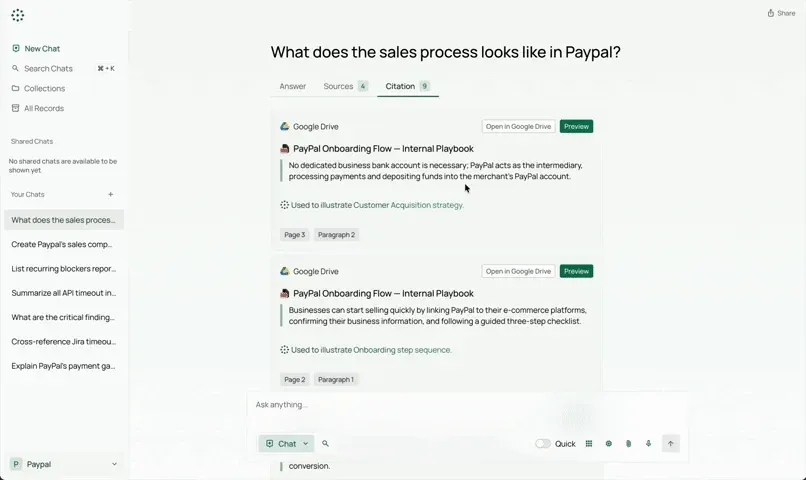
Citation view of a chat answer: each passage links to its Google Drive source with page and paragraph references. Frame from the official README demo.
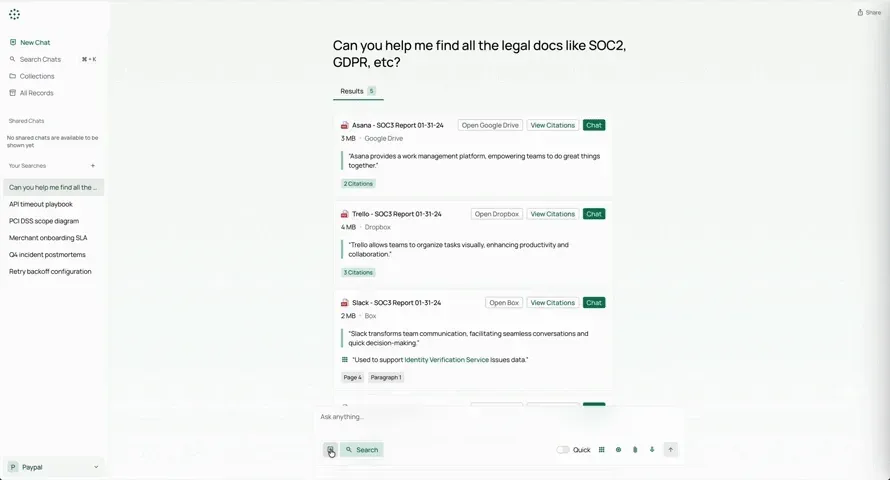
Knowledge search returning documents from several connected storage services, each with citations and a Chat button. Frame from the official README demo.
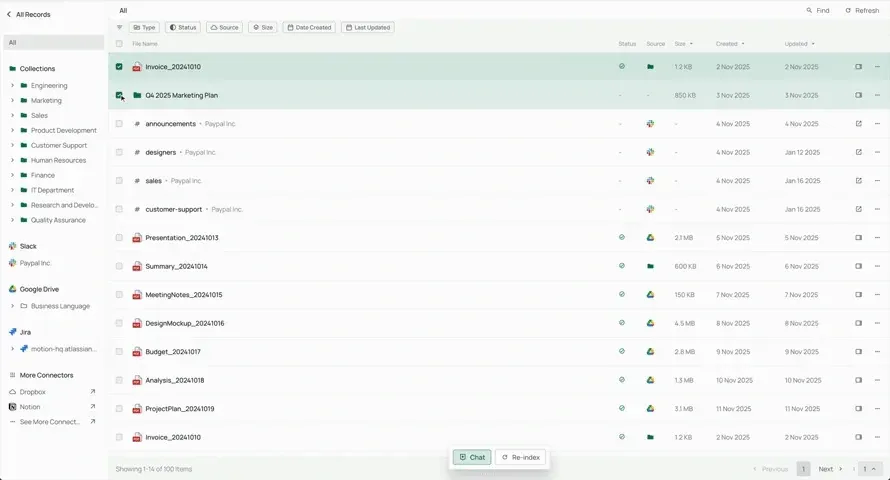
All Records view with collections and connected sources (Slack, Google Drive, Jira) in the sidebar and indexing status per file. Frame from the official README demo.
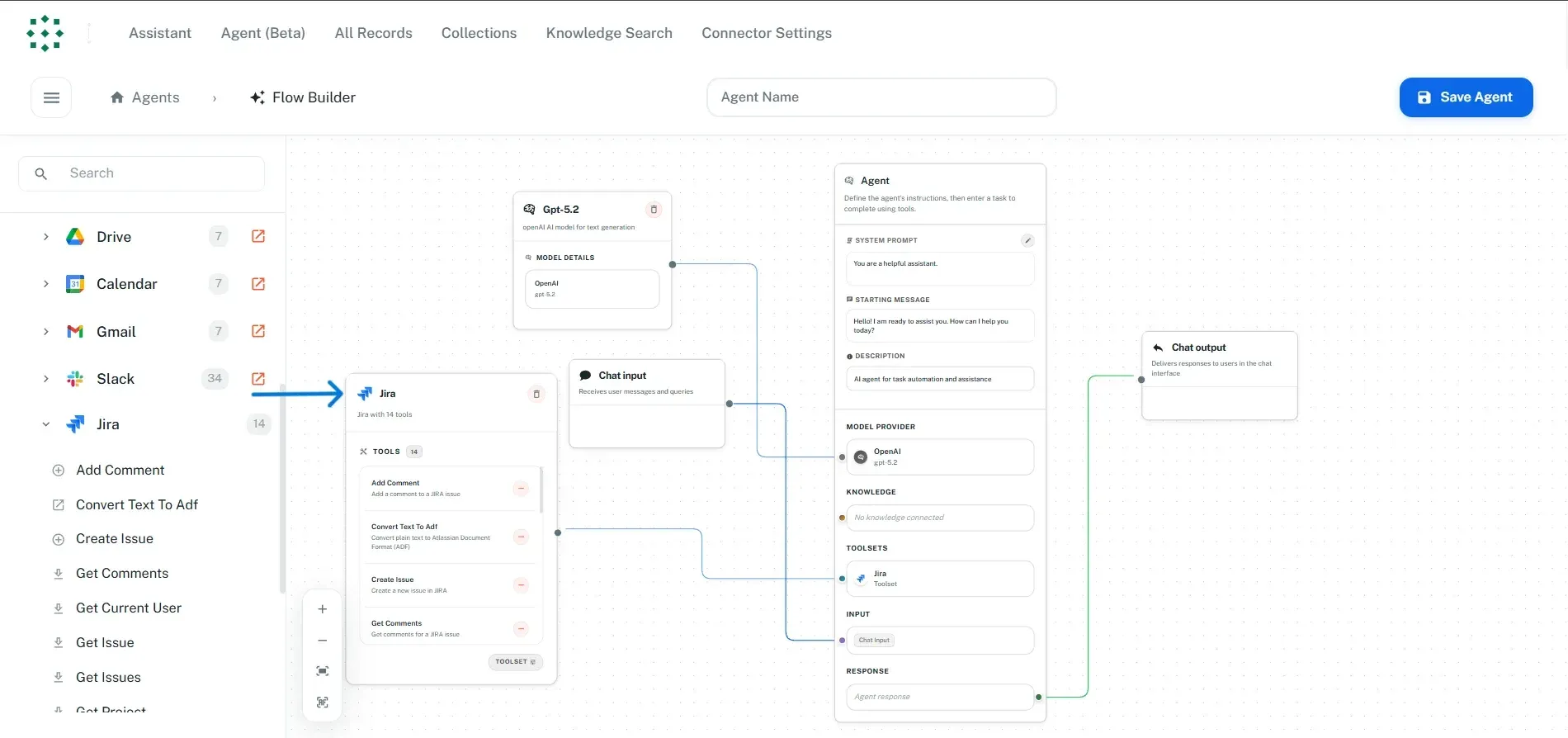
No-code agent flow builder with a Jira toolset of 14 tools wired to an agent node. Screenshot from the PipesHub documentation.
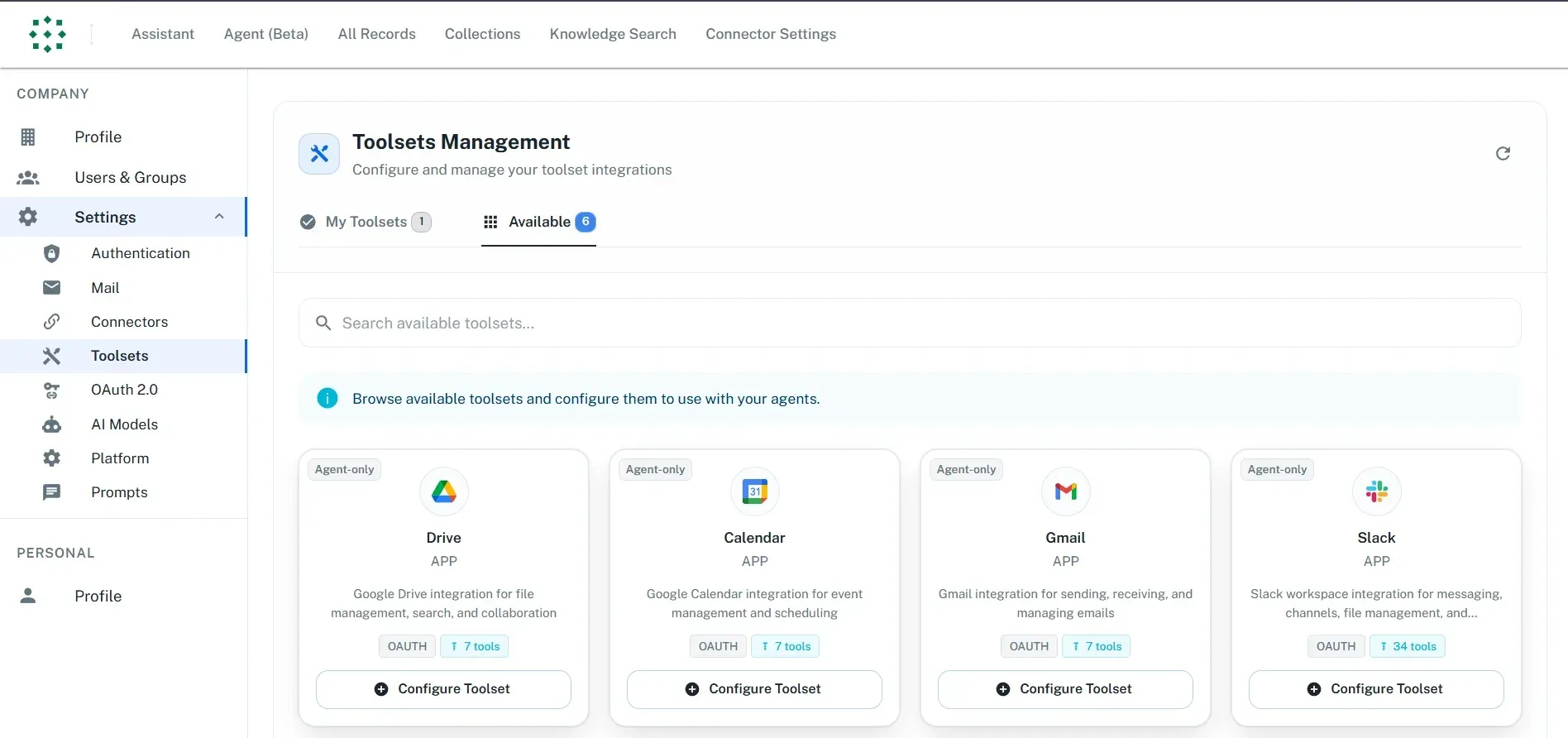
Toolsets Management settings with OAuth-based toolsets for Drive, Calendar, Gmail and Slack. Screenshot from the PipesHub documentation.
Source: official PipesHub project page.
Key capabilities
- Permission-aware enterprise search Connectors sync each source together with its access rules, and every search and agent tool call is filtered by what the asking user may see in the source system. An agent connects as a specific person rather than as the application, so it retrieves the same records that person could open. The v1.0.0 release adds enforcement of Jira issue-security levels and corrected SharePoint and OneDrive inherited access.
- Cited answers Chat answers reference the exact blocks they came from, with page and paragraph labels, a sources tab and buttons to open the original file in the source application. Release 1.0.0 improves passage highlighting, adds source and collection labels and groups citations. Shared chats remain view-only and hide records a viewer cannot read.
- Agentic retrieval loop Questions are answered by an agent that plans, calls tools and reads results until it has enough evidence, instead of a single retrieve-then-generate pass. Its tools cover hybrid semantic and keyword search, exact pattern matching for identifiers and error strings, knowledge-graph navigation between documents, people, tickets and pull requests, and full-document reading. Focused reading and timeline summaries are enabled by default in 1.0.0.
- Documented connectors The connector overview lists Google Workspace (Gmail, Calendar, Drive, Docs, Sheets, Slides, Forms, Meet, Admin, YouTube), Microsoft (Outlook, OneDrive, OneNote, Teams, SharePoint, Planner), Jira and Confluence in Cloud and Data Center editions, Slack, Zammad, Zendesk, Zoom, Salesforce, Web crawling, RSS, Local FS, SMB shares, Amazon S3, MinIO, Azure, Google Cloud, Box, Dropbox, Nextcloud, GitHub, GitLab, Linear, Notion, Drupal Wiki, Airtable, MariaDB and PostgreSQL. Connectors are one-way syncs into PipesHub and run on a schedule.
- Toolsets and actions Toolsets are separate from connectors and let agents act through an API, for example creating Jira issues, sending Gmail messages or managing Slack channels. Version 1.0.0 adds custom API actions created from an organization's OpenAPI specification. Agents can only call tools from their selected toolsets, data-deleting tools ask for approval and model-written SQL runs read-only unless approved.
- No-code agent builder A visual flow builder connects a model, knowledge sources (apps and collections), toolsets, chat input and chat output to an agent node with a system prompt and starting message. The pricing page lists the no-code agent builder, skills creation and artifacts in the free Community Edition. Artifacts such as reports, charts and dashboards are generated in a code execution sandbox.
- MCP server Each instance exposes a remote MCP endpoint over Streamable HTTP at
/mcp; PipesHub Cloud useshttps://app.pipeshub.com/mcp. The MCP documentation covers Cursor, Claude Code, Claude Desktop, Claude.ai, Gemini CLI, LibreChat and Omnigent, with OAuth apps or personal access tokens. Tools include search, record content, download, directory lookup, sources, chat and agents, plus creating collections, uploading files and adding web sources. A local stdio bridge is available asnpx @pipeshub-ai/mcp start. - SDKs and Retrieval API Official SDKs exist for Python (
pip install pipeshub-sdk), TypeScript (npm add @pipeshub-ai/sdk) and Go. The full HTTP API is published as an OpenAPI 3 file in the repository, and the SDKs cover a subset. The Retrieval API returns permission-filtered chunks with citations for use in a separate RAG pipeline or agent and stores nothing. - Bring your own models The AI models page lists OpenAI, Anthropic, Gemini, Azure OpenAI, Azure AI, Cohere, Mistral, Groq, xAI, MiniMax, Fireworks, Together, any OpenAI-compatible endpoint, Ollama and Amazon Bedrock as LLM providers. Admins can add several providers, set a default model and declare context length, multimodal and reasoning capabilities. At least one LLM is required before AI features work.
- Embedding options PipesHub ships BAAI/bge-large-en-v1.5 as a built-in embedding model that needs no API key. Other documented options include Sentence Transformers running inside PipesHub, OpenAI, Azure OpenAI and providers that implement the OpenAI embeddings API. In v1.0.0 the bundled embedding server gives queries priority over indexing.
- Document parsing and formats Indexing covers PDF including scans, Word, Excel, PowerPoint, Google Docs, Sheets and Slides, Markdown, HTML, CSV, plain text and images. Parsing uses Docling and pdfplumber, or a multimodal model for scanned PDF OCR; since 1.0.0, text PDFs over 30 pages are routed to pdfplumber. Audio and video can be stored but are not indexed yet.
- Code graph Release 1.0.0 indexes GitHub and GitLab repositories into a navigable graph with agent tools for code exploration and impact analysis. Impact traversal reaches five levels and path searches up to eight hops. GitHub and GitLab connectors also gained chosen-branch sync and diff-based pull and merge request indexing.
- Docker Compose installer The installer at
get.pipeshub.com/installchecks Docker, RAM and disk, asks for a slim or full deployment, lets the operator choose the graph database, message broker and key-value store, generates secrets into.envand starts the stack on port 3000. Flags cover unattended installs, pinned image tags, upgrades, stopping and uninstalling. The deployment overview lists 16 GB RAM for the full deployment and 50 GB of disk. - Kubernetes and cloud guides A Helm chart in the repository targets Kubernetes, and the roadmap marks production Kubernetes with HA defaults as done. Documentation includes guides for Google Cloud, AWS, Azure and private cloud or on-premises servers. Version 1.0.0 supports installation into an existing single-zone EKS cluster with S3 storage.
- Desktop app An Electron desktop app is released for Windows and Linux on x64 and ARM64, as installers, AppImage and .deb packages. It is required for the Local FS connector, which syncs a folder on the computer where the app runs while the app is open and signed in. The server never opens that folder itself.
- Storage backends Files are stored on local disk by default, with Amazon S3 and Azure Blob Storage as documented alternatives. The graph database defaults to Neo4j with ArangoDB as an option, the key-value store to Redis with etcd as an option, and the vector database is Qdrant. PostgreSQL-backed infrastructure and migration tooling are opt-in in 1.0.0.
- Community and Enterprise editions The Community Edition is free and self-hosted with core indexing, search, bring-your-own models, the agent builder, REST APIs, SDKs, MCP and community support on Discord and GitHub. The Enterprise Edition adds multi-tenancy, SSO and SCIM, RBAC, audit logs, agent and connector governance, white-labelling, custom connectors and 24x7 support, with prices available on request.
Where PipesHub fits
Company search with citations
An administrator connects sources such as Google Drive, Slack, Jira or SharePoint under Workspace Settings, and the connectors sync content and permissions on a schedule. Users then ask questions in the chat or knowledge search views and receive answers with citations to the exact page and paragraph, with links to open each file in its source application. The connector documentation asks users to authenticate a connector with the same email address as their PipesHub account to avoid permission mismatches.
Company context for coding agents
The pipeshub-ai/examples repository describes giving Claude Code, Cursor or Codex access to company knowledge through MCP. A user mints a personal access token in Developer Settings, adds the instance URL plus /mcp to the assistant, and the agent searches tickets, pull requests, chat threads and documents with that user's permissions. Claude Code and Omnigent attach with an Authorization header, while most other clients use an OAuth app.
Retrieval inside custom applications
Developers call the Retrieval API or one of the Python, TypeScript and Go SDKs to fetch permission-filtered passages with citations and pass them to their own model or agent. The endpoint does not store results, and v1.0.0 adds date filters, passage caps per record, optional source diversity and a query-rewrite bypass. The OpenAPI file in the repository documents the complete HTTP API.
No-code agents that take actions
In the agent builder, a flow combines a selected model, knowledge from apps and collections, and toolsets for systems such as Jira, Gmail, Google Calendar or Slack. The agent can search context and then perform actions like creating an issue or sending a message. Administrators control which tools an agent may call, and tools that delete data request approval before running.
Self-hosted deployment with local models
Teams run the Docker Compose installer on a laptop, VM or server, choose slim or full mode and place a TLS-terminating reverse proxy in front for access by hostname, since browsers block required features over plain HTTP. For a fully local setup, the LLM can run in Ollama at the default host.docker.internal:11434 endpoint and embeddings can use the built-in BAAI model. Upgrades run with ./install.sh --upgrade.
Code and engineering knowledge
GitHub and GitLab connectors index repositories, issues and pull or merge requests, and the 1.0.0 code graph lets agents trace calls, dependencies and the impact of changes. Cross-connector links relate Slack messages, pull requests, tickets and pages, so an answer about a code change can cite the postmortem, the pull request and the discussion thread together.
Install
curl -fsSL https://get.pipeshub.com/install | bashReviews of PipesHub
Be the first to share your experience with PipesHub.
Write a review
Loading review form…
Alternatives to PipesHub
 DifyDify by LangGenius combines a visual workflow builder, knowledge pipelines, sandboxed agents, model management and app APIs. It runs as Dify Cloud or self-hosted with Docker Compose under a modified Apache 2.0 license.
 AnythingLLMAnythingLLM from Mintplex Labs is an MIT-licensed AI app for document chat with citations, agents, MCP tools and scheduled jobs, using local or hosted LLMs, as a desktop app, a multi-user Docker server or a hosted cloud.