

What is WyrmRSS?
WyrmRSS, also called Wyrm in its documentation, is a self-hosted RSS reader and aggregator for web and mobile browsers that is also available as a desktop app. It subscribes to RSS and Atom feeds, discovers feeds from a blog homepage or YouTube channel URL, plays YouTube videos and HLS streams inline, and organizes feeds into folders with per-feed display modes and filters. The project is developed on GitHub and runs a shared, mostly read-only live demo that resets daily.
The stack is listed in the README: the backend is written in Rust with Actix-web, Diesel and Tokio; the self-hosted version stores data in PostgreSQL and the desktop app in SQLite; the frontend uses React, Vite, React Router v7 and TanStack Query; and the desktop build is made with Tauri. Startup configuration comes from environment variables prefixed WYRM_ or from config/wyrm.toml, with the backend listening on port 3001 by default. Runtime settings such as poll interval, HTTP timeouts, page size, read tracking and post expiry are stored in the database and hot-reloaded from the Settings page.
Distribution covers three paths. The Docker guide provides a Compose file with PostgreSQL 18 and the ghcr.io/kryoseu/wyrm-server and ghcr.io/kryoseu/wyrm-ui images, and Kubernetes manifests are included in the repository. The desktop guide lists a .dmg for Apple Silicon and Intel Macs, an NSIS .exe installer for Windows and .deb, .rpm and .AppImage packages for Linux. A source build needs Rust, PostgreSQL, Node.js and pnpm.
The latest release is v0.37.0, published on November 8, 2026. It shows post thumbnails in card mode for newly fetched posts, adds a setting to hide thumbnails, adds a slate accent color and persists the reader pane width across reloads. The previous release, v0.36.0, added an RSSHub integration, subscription links that discovery tools such as RSSHub Radar can use, and an Open original button on post list rows. The repository was created in May 2026.
WyrmRSS is licensed under the GNU General Public License v3. The desktop builds are not code-signed yet, so macOS Gatekeeper and Windows SmartScreen show warnings, which the desktop guide explains. Desktop data stays in the app's local data directory and is not shared with a self-hosted instance. Other self-hosted readers in this directory include FreshRSS, and read-it-later tools such as wallabag cover saved articles.
WyrmRSS screenshots
Explore the interface. Open a screenshot to view it at full size.
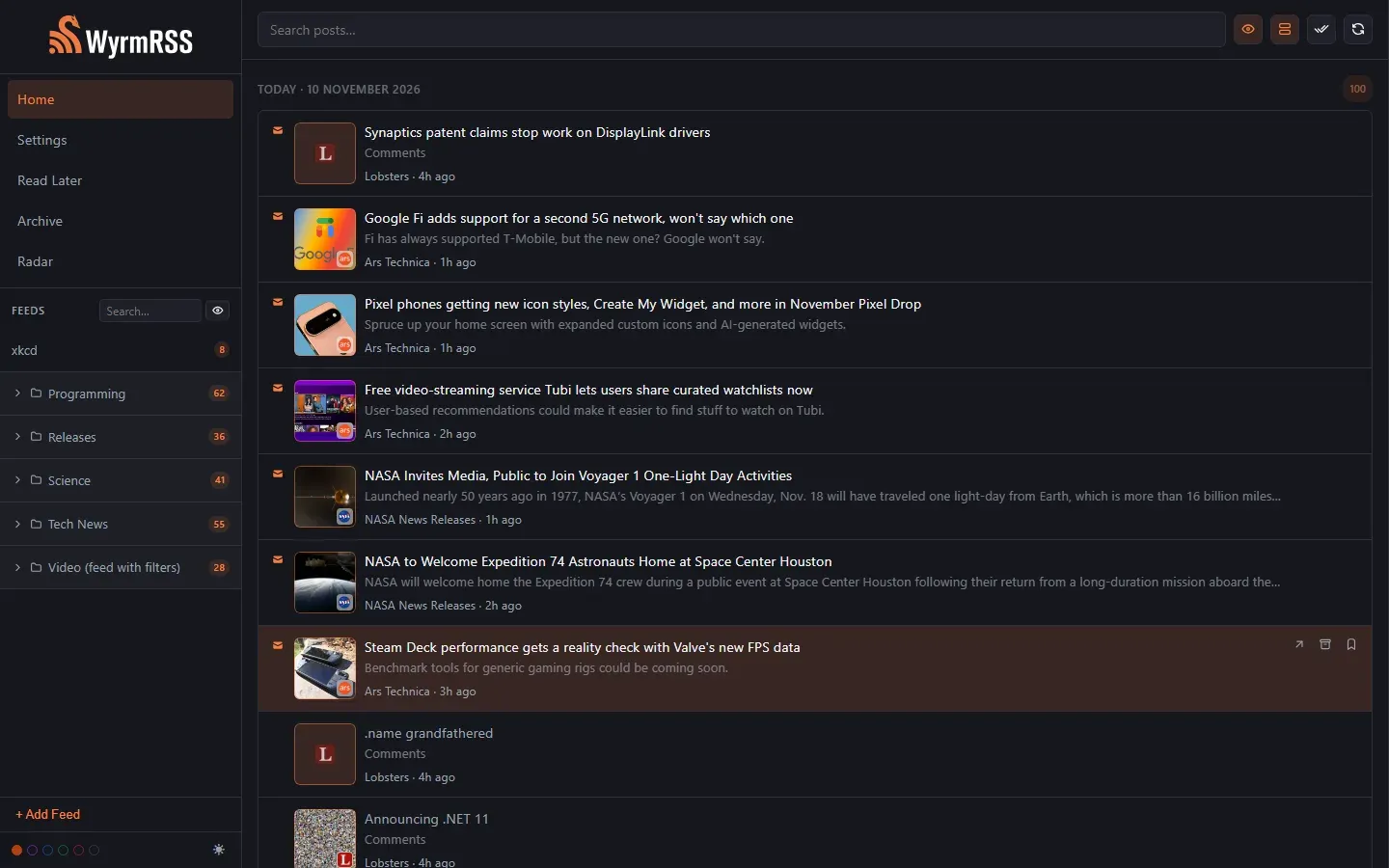
Home feed of the official WyrmRSS demo in card mode, with feed folders and unread counts in the sidebar.
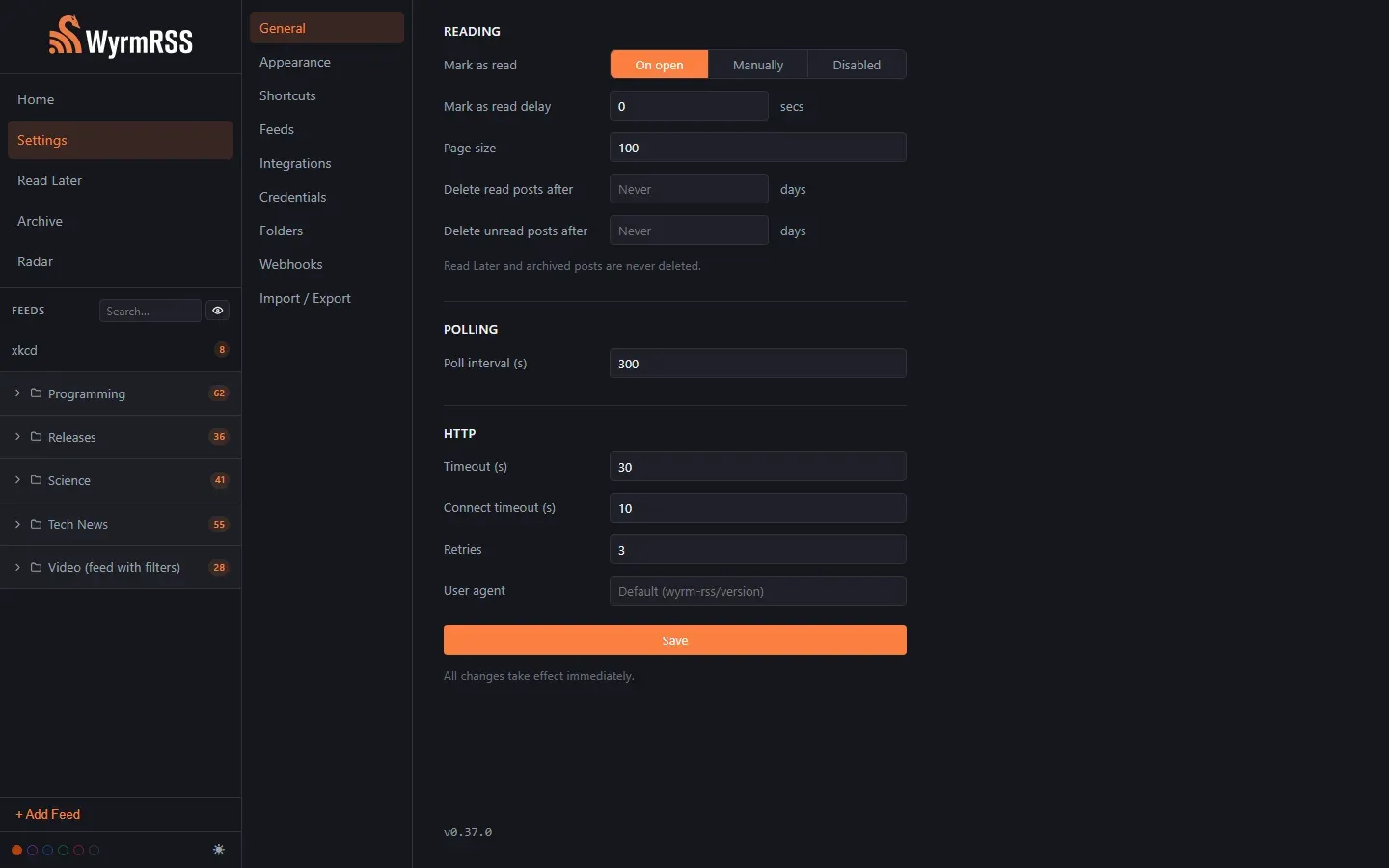
General settings: mark-as-read mode and delay, page size, post expiry, poll interval and HTTP timeouts, retries and user agent.
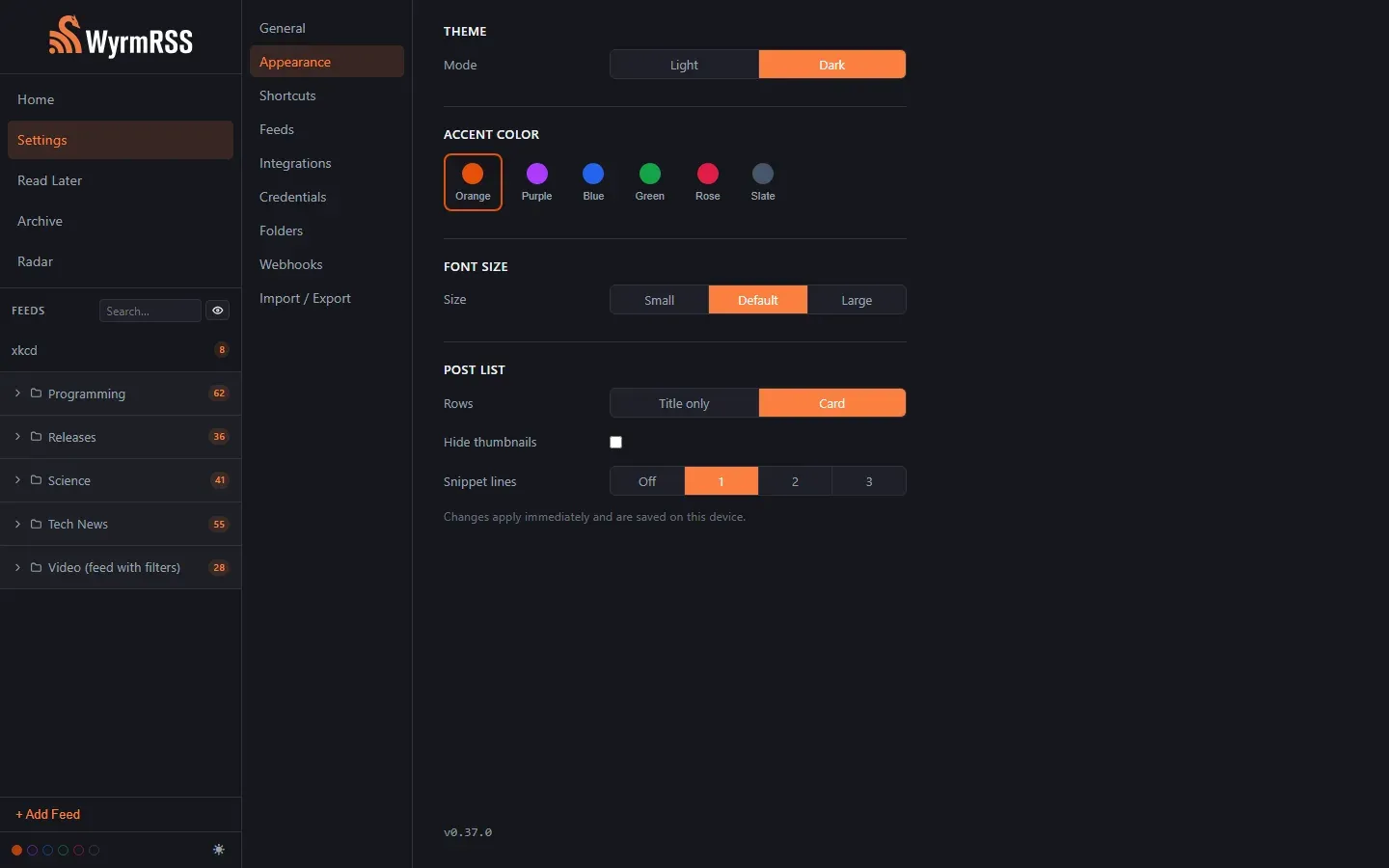
Appearance settings: light or dark mode, six accent colors, font size, card or title-only rows, thumbnails and snippet lines.
Source: official WyrmRSS project page.
Key capabilities
- RSS and Atom subscriptions Feeds are added by URL and polled in the background. The default poll interval is 900 seconds, with HTTP timeout, connect timeout, retry count and user agent configurable in Settings. Failed fetches are retried up to three times by default.
- Feed discovery Pasting a blog homepage or a YouTube channel URL lets Wyrm find the feed. The /subscribe route accepts a URL-encoded url and optional title to prefill the Add Feed form, so browser extensions and bookmarklets can hand over feeds; nothing is added until the user clicks Add.
- YouTube channels and inline video YouTube channels are treated as regular feeds through their videos.xml feed URL. The reader detects YouTube links and renders an embedded player in place of the article body. Posts with .m3u8 HLS streams or Reddit videos also play inline.
- Per-feed display modes Each feed can be set to River, where posts appear in the home feed, Feed only, where posts appear only on the feed itself, or Radar, a quieter section to visit when nothing else is new. Since v0.35.0 caught-up feeds can be hidden in the feed list.
- Folders Feeds can be grouped into collapsible sidebar folders with unread counts. Folders are preserved across OPML import and export.
- Include and exclude filters Filters are case-insensitive substring patterns, optionally scoped to url:, title: or content:. A plain pattern excludes matching entries, a + prefix keeps only matching ones, and exclusions win over inclusions. Filters apply to newly fetched entries and do not remove posts already saved.
- Read Later and Archive Posts can be saved to Read Later or archived. Automatic deletion of read or unread posts after a number of days is off by default, and Read Later and archived posts are never deleted by it.
- Read tracking options Posts can be marked read on open, manually, or not tracked at all. A delay in seconds can require a post to stay open before it counts as read.
- Full-text search Search covers post titles and descriptions. A search box at the top of the post list and a separate filter for the feed list are part of the interface.
- Keyboard shortcuts Moving between posts and sections, opening, marking, saving and archiving can all be done from the keyboard. Every shortcut can be rebound in Settings.
- Feeds behind authentication Settings, Credentials holds per-host basic auth or custom header credentials, for example an X-Api-Key or bearer token. They match on host and port, are sent with feed polls, discovery and icon fetches but not webhooks, and cannot be read back through the API once saved. The README states that they are stored unencrypted in the database.
- Webhooks New posts can trigger notifications to Discord, Slack or a custom webhook endpoint. Webhooks are configured in their own Settings tab.
- RSSHub integration With an RSSHub instance URL set under Settings, Integrations, feeds can be added as rsshub://route, for example rsshub://hackernews. Links to the instance are converted automatically, switching instances needs no feed edits, and turning the integration off pauses those feeds.
- OPML import and export Subscriptions move in and out through OPML, including the folder structure. This is available from the Import / Export tab in Settings.
- Appearance settings Light and dark modes, six accent colors (orange, purple, blue, green, rose and slate), three font sizes and a choice between title-only rows and cards are available. Card mode can show thumbnails and up to three snippet lines, and these settings are saved per device.
- API key protection Setting WYRM_API_KEY on the backend restricts access to the API. Setting the same key on the frontend build skips the in-app key prompt; if it is unset on the backend, the API is open and any key is accepted.
- Self-hosted deployment with Docker or Kubernetes The documented Compose file runs PostgreSQL 18, the Wyrm server on port 3001 and the web UI on port 3000, with health checks between them. An existing database can be used instead, and Kubernetes manifests are provided in docs/templates.
- Desktop app for macOS, Windows and Linux The Tauri desktop build embeds the same backend and frontend with SQLite, so no separate database is needed. The desktop guide notes that the AppImage fails on wlroots-based Wayland compositors such as Hyprland and Sway, and that Linux video playback depends on GStreamer codec plugins.
Where WyrmRSS fits
Running a personal reader on a home server
The Docker guide's Compose file starts PostgreSQL, the wyrm-server container and the wyrm-ui container, with optional settings in /app/config/wyrm.toml. The web UI is then reached on port 3000, and the frontend reaches the backend through WYRM_BACKEND_URL, which defaults to http://localhost:3001. Setting WYRM_API_KEY on the server restricts the API, and the same value on the UI container skips the key prompt.
Using the reader without a server
The desktop app for macOS, Windows and Linux bundles the backend and frontend with SQLite. Data such as feeds, posts and folders is stored in the app's local data directory and is not synchronized with a self-hosted instance. Uninstalling the app leaves that directory in place, according to the desktop guide.
Following YouTube channels as feeds
A channel is added through its videos.xml feed URL or by pasting the channel URL for discovery, and videos play in the reader through an embedded player. The README gives filter examples for YouTube: url:/shorts excludes Shorts, url:/live excludes live streams and title:trailer excludes trailers, while a + prefix such as +url:/shorts keeps only Shorts.
Subscribing to sites without RSS
With the RSSHub integration enabled and an instance URL such as http://localhost:1200 set, routes are added as rsshub:// feeds. RSSHub Radar can also send feeds to Wyrm through /subscribe links, and Wyrm opens the new feed after subscribing.
Reading private or authenticated feeds
Feeds protected by an .htaccess basic auth prompt or an API key header are handled through per-host credentials in Settings. A bare host means https on port 443; http feeds and custom ports are entered with the scheme or port, such as feeds.example.com:8443.
Pushing new posts to team chat
Webhooks send notifications about new posts to Discord, Slack or a custom endpoint. Per-feed filters apply when entries are fetched, and webhooks are not sent the per-host feed credentials.
Reviews of WyrmRSS
Be the first to share your experience with WyrmRSS.
Write a review
Loading review form…
Alternatives to WyrmRSS
 FreshRSSFreshRSS is an open-source, self-hosted feed reader with multi-user access, custom tags, article sharing and APIs for compatible clients.
 wallabagMIT-licensed PHP read-it-later application: save web articles, read a clean copy, tag with rules, annotate, export to ePUB or PDF and sync to apps and RSS readers. Self-host with SQLite, MySQL or PostgreSQL, or use wallabag.it.
 linkdinglinkding is a minimal, MIT-licensed bookmark manager you host yourself with Docker. It offers tags, bulk editing, Markdown notes, page archiving, browser extensions, OIDC single sign-on and a REST API.