

What is wallabag?
wallabag is a self-hostable web application for saving web pages and reading them later. You send it a URL, and it fetches the page, extracts the article text and images, removes menus and pop-ups, and keeps a clean copy in your own archive that you can read in the browser, on a phone, in an RSS reader or on an e-reader. The official site positions it as an open-source read-it-later app with no ads or tracking, and the project asks that its name is always written in lowercase.
The project has been public since 2013, according to the site and the repository history, and is developed by volunteers: the site credits a small team of maintainers and many contributors, translations are managed on Weblate, and donations go through Liberapay. The code is MIT-licensed and hosted at github.com/wallabag/wallabag. It is a PHP application built on Symfony, and article extraction relies on the Graby and php-readability libraries together with the community FiveFilters site-config rules.
You can run it yourself or use the hosted service at wallabag.it, which is operated separately and sold by subscription. For self-hosting, the requirements page lists PHP 7.4 or newer (PHP 8.4 is supported since 2.6.15), Composer, a set of PHP extensions and one of SQLite, MySQL or PostgreSQL through PDO. The README installs it with git clone and make install, then you configure a virtual host. A Docker image and a compose configuration are also published, and the official docker-compose setup lives in the separate wallabag/docker repository. Companion software includes an Android app, an iOS app and the Wallabagger browser extension.
The latest release is 2.6.15, published October 28, 2026. It adds PHP 8.4 support while keeping compatibility with PHP 7.4 and the locked legacy dependencies, introduces a REDIS_URL setting, escapes dynamic data in the ePUB export, updates the content extraction libraries and fixes the merging of fetched content. The previous release, 2.6.14, dates from October 2025, so the 2.6 series is maintained at a slow cadence. wallabag is not a general bookmark manager, a note-taking app or a full-text web archiver for non-article pages, and it does not run a search engine over the web.
wallabag screenshots
Explore the interface. Open a screenshot to view it at full size.
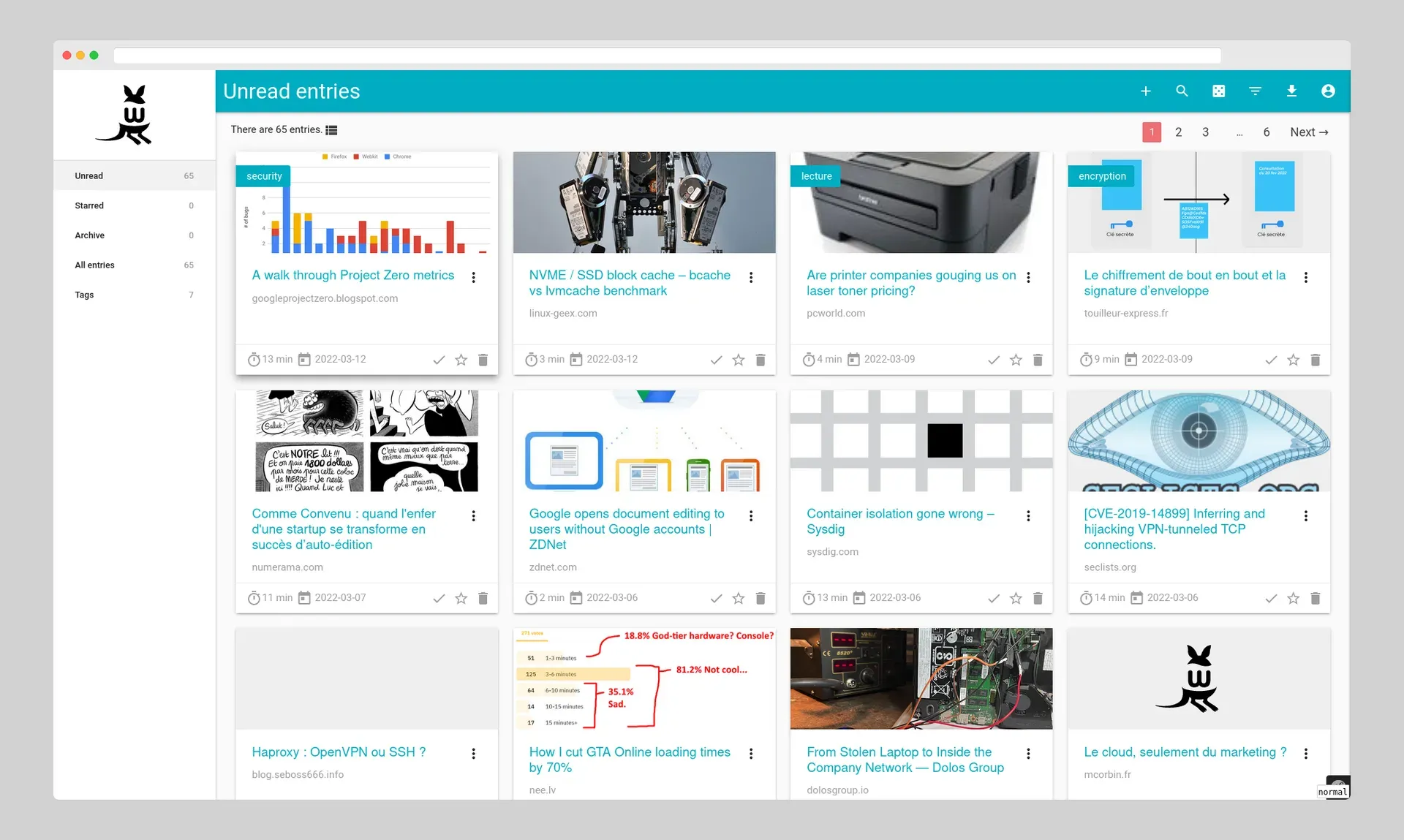
Official screenshot from the wallabag README: the main list of saved articles with reading time, date and actions on each card.
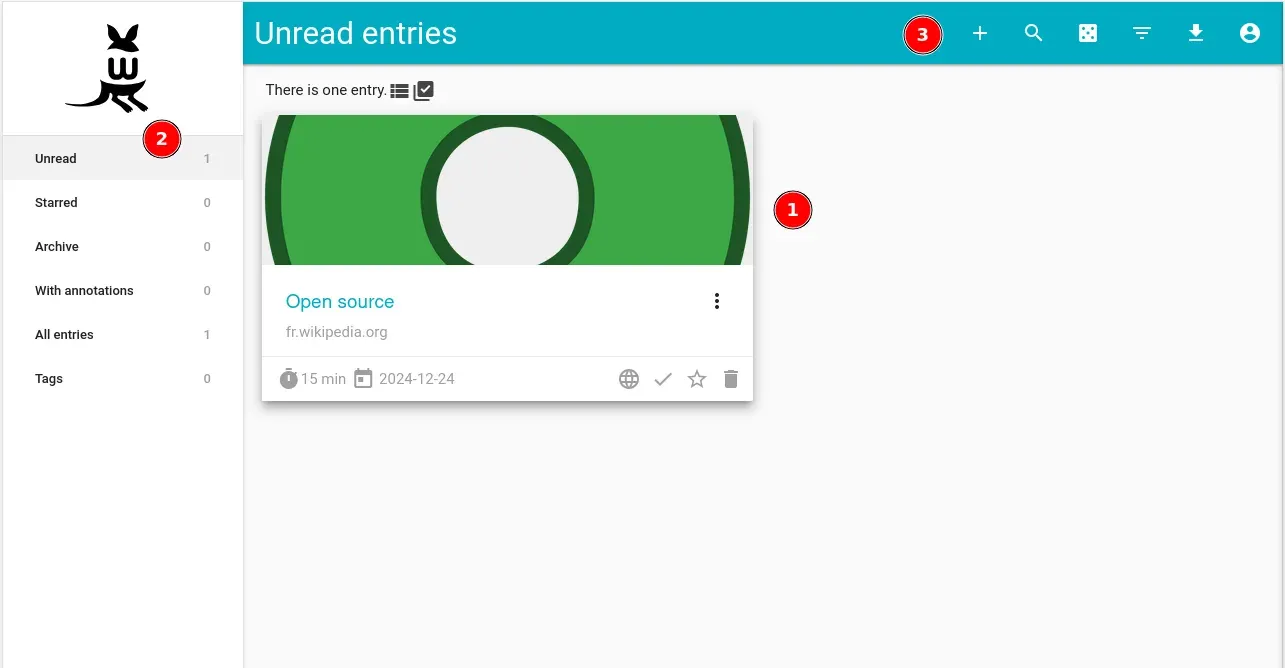
Figure from the official user documentation explaining the entry card, the sidebar and the top bar of the web interface.
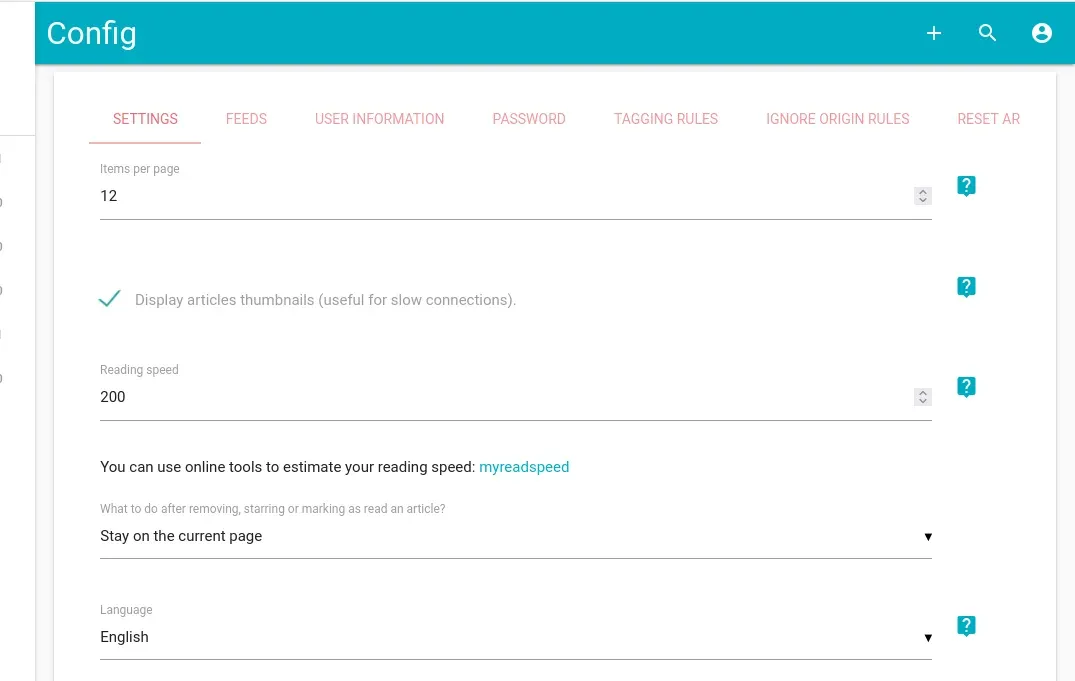
Figure from the official documentation showing the configuration tabs and the items per page, reading speed and language settings.
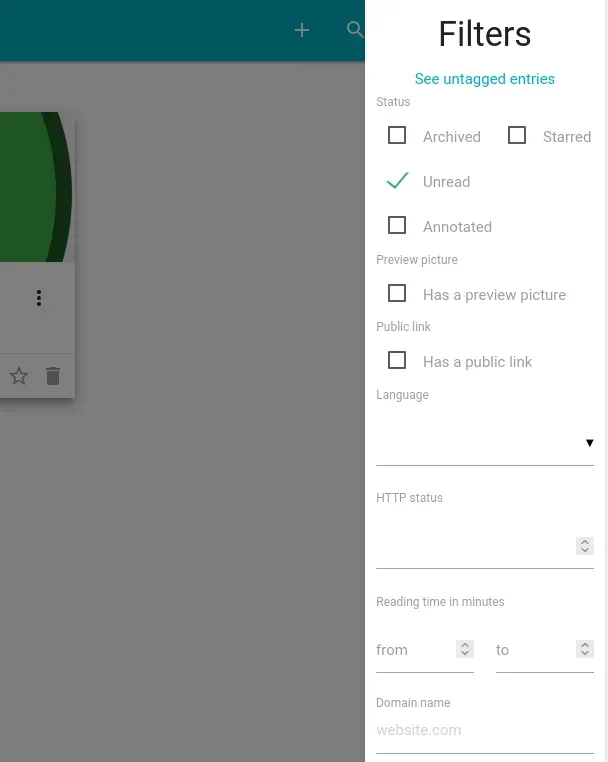
Figure from the official documentation of the filter panel used to narrow a list of saved articles.
Source: official wallabag project page.
Key capabilities
- Save pages from many places Articles can be saved with the plus button in the web interface, a bookmarklet called
bag it!, the Wallabagger browser extension for Firefox and Chrome, a Safari quick-save app, or the mobile apps through the share menu. The how-to page in your account shows the bookmarklet and API client details. - Readable article view Wallabag stores the extracted article text, images and metadata, and shows a distraction-free reading view with an estimated reading time. If a page is extracted badly, the documentation has a page on fetching errors and site-specific rules to fix it.
- Tags and tagging rules You can tag articles by hand or let tagging rules do it using expressions such as
readingTime <= 3or a combination withdomainName,language,titleorurl. The configuration screen also has a tab for ignore origin rules. Tags are listed in the sidebar for quick filtering. - Filters and search A filter panel combines status (unread, archived, starred, annotated), preview picture, public link, language, HTTP status, reading time range, domain name and creation date. A search box finds articles by text, which is useful once an archive grows large.
- Annotations You can select text in a saved article and attach a note, and the highlight shows the note on hover. Annotations are visible inside wallabag only, not on the original page, and can be exported with the article.
- Export in several formats Single articles or whole lists (unread, starred, archive) can be downloaded as ePUB, PDF, XML, JSON or CSV. MOBI export was deprecated in 2.5.0. Release 2.6.15 fixed escaping of dynamic data in ePUB files.
- Sharing and public links An article can be shared with a public link that shows a light view, and share buttons exist for email, Shaarli, Diaspora and Unmark.it. The release notes for 2.6.15 also hide the delete public link item when there is nothing to delete.
- RSS feeds per status After you create a personal token, wallabag publishes feeds for unread, starred and archived articles. The default feed length is 50 items and feeds paginate according to RFC 5005, so readers such as Miniflux, FreshRSS or Tiny Tiny RSS can show your saved articles.
- Import from other services Documented importers cover Pocket (including the CSV export), Instapaper, Readability, Pinboard, elCurator and wallabag 1.x and 2.x exports, and the site also describes migration guides for Omnivore. A console command,
wallabag:import, imports files from the command line, and large imports can use asynchronous workers. - Asynchronous imports with RabbitMQ or Redis Administrators can enable RabbitMQ (set
RABBITMQ_URL) or Redis for background import consumers, one consumer per importer. 2.6.15 adds a singleREDIS_URLvariable to simplify the Redis configuration. - REST API with OAuth Each instance serves interactive API documentation under
/api/docand uses OAuth with client credentials that you create in the API clients management screen. Apps and extensions use this API, and you can write your own scripts against it. - Mobile apps An Android app and an iOS app connect to your instance or to wallabag.it. The site notes that, since version 7.6, the iOS app's source and maintenance are no longer announced as the official open-source wallabag iOS app, so check the project note before choosing it.
- E-reader and RSS reader integrations The apps page lists wallabako for Kobo, wallindle for Kindle and Plop Reader for PocketBook, plus RSS readers that work with wallabag feeds such as Unread, Miniflux, Vienna RSS, FreshRSS, Tiny Tiny RSS and Fiery Feeds.
- Two-factor authentication and users The configuration screen supports two-factor login through a one-time password app, and an administrator can manage multiple users on one instance. 2.6.13 fixed a case in which an unvalidated OTP could be enabled, so keep 2.6 up to date.
- Restricted access to paywalled sites Users can store credentials for a list of compatible paywalled sites, such as Mediapart or Le Monde, so that wallabag can fetch the full article. The administrator enables the feature in internal settings, and the credentials are stored on your instance.
- Self-hosted installation On a server,
git cloneandmake installset up the application, and a virtual host for the web server is described in the docs. The docs say that for SQLite you setDATABASE_URLto a file path, and the Docker example starts the app on port 8080 with default credentials that you must change at once. - Hosted service at wallabag.it The separate hosted option has a 14-day free trial without a credit card, then plans at 4 euros for 3 months, 11 euros for one year or 30 euros a year as a support subscription. All plans include the same features, such as save by email, RSS feed following and imports, and data is hosted in Europe.
Where wallabag fits
Replace a read-it-later service you are leaving
Export your reading list from the old service, import it with the matching importer (Pocket CSV, Instapaper, Pinboard or Omnivore), and check that tags and read status came through. For large archives, enable the asynchronous importer first so the request does not time out, and compare the entry count before and after.
Run a private reading archive on a small server
Install on a PHP host with SQLite, or use the Docker image with MySQL or PostgreSQL for several users. Create a virtual host with HTTPS, change the default account, set the mailer for password resets and schedule backups of the database and parameters.yml, since both are needed to restore.
Organize articles automatically
Write tagging rules for the topics you follow, for example a rule that tags anything under 3 minutes as short reading or tags a domain you trust. Test each rule on a few new entries, then use the filter panel to review untagged entries and refine.
Read saved articles on an e-reader or in an RSS app
Create your feed token and add the unread feed to Miniflux or FreshRSS, or connect Kobo through wallabako or Kindle through wallindle. Check that images and long articles survive the transfer and decide whether archived items should leave the device after reading.
Research with highlights and exports
Save sources while researching, annotate key passages and tag them by project, then export a tag or the starred list as ePUB or PDF for offline reading. Keep the original URL in your notes, since the stored copy is an extraction and not a perfect archive of the page.
Integrate with scripts through the API
Create an API client in the configuration screen, request a token with your user credentials and call the entries endpoints to add or list articles from a script. Keep the client secret out of version control and use a dedicated user for automation. Test the script against a staging copy first, and handle failed fetches, since a saved URL may return an error page that wallabag records with its HTTP status.
Install
git clone https://github.com/wallabag/wallabag.git && cd wallabag && make installReviews of wallabag
Be the first to share your experience with wallabag.
Write a review
Loading review form…
Alternatives to wallabag
 linkdinglinkding is a minimal, MIT-licensed bookmark manager you host yourself with Docker. It offers tags, bulk editing, Markdown notes, page archiving, browser extensions, OIDC single sign-on and a REST API.KKarakeepKarakeep collects links, notes, images and PDFs in a searchable library, with shared lists, automatic tagging and content archiving. It supports self-hosting and a managed cloud service.
 LinkwardenOpen-source collaborative bookmark manager under AGPL-3.0. It preserves every saved page in several formats, adds highlights, shared collections, RSS, full-text search and mobile apps, and runs self-hosted with Docker or as a paid Cloud plan.