

What is Linkwarden?
Linkwarden is an open-source bookmark manager that stores a copy of each saved page next to the link itself. When a URL is added, a background worker opens it in a headless Chromium browser and produces a readable article view, a single-file HTML copy, a full-page screenshot and a PDF, so the content stays available when the original page moves or disappears. Links are organised in nested collections and tags, can be shared with other users through role-based collection membership, and can be published as public pages with their own RSS feed.
The project is developed in the linkwarden/linkwarden repository, where releases are published by the lead maintainer daniel31x13 and contributors coordinate through GitHub issues, a public roadmap and Discord. The code is licensed under AGPL-3.0. There are two ways to run it: Linkwarden Cloud, a hosted subscription operated by the project, or a self-hosted instance installed with the official Docker Compose file or manually from source, as described in the self-hosting setup guide. Official iOS and Android apps, a browser extension for Chromium browsers, Firefox and Safari, and a progressive web app connect to either kind of instance.
The current release is v2.16.3, published on September 9, 2026, which reworked the database queries behind links, search, tags, collections and the dashboard for large libraries. Version 2.16.0 moved the top navigation into the sidebar, added a Ctrl+K or Cmd+K search modal with locally stored recent searches and a system theme option, let the Android app accept self-signed certificates and added custom request headers in the mobile app. Version 2.16.1 added support for running the Docker container as a non-root user and rebuilt mobile offline storage on SQLite. Version 2.15 roughly halved idle memory to about 350 MB and cut the Docker image from about 3.0 GB to 1.5 GB.
The repository is a Yarn workspaces monorepo written in TypeScript. The web app runs on Next.js 15 with Prisma and PostgreSQL 16 or later, a separate worker process handles preservation, RSS polling and AI tagging, and the mobile app is built with Expo. Page capture uses Playwright with Chromium and the Rust archiver Monolith. Meilisearch is optional and provides full-text search over preserved article text plus search operators such as tag:, before: and type:. Files are stored in a local folder or in S3-compatible object storage.
Linkwarden is not a general note-taking app, a crawler or a replacement for a full web archive service: it preserves the pages its users save, as an anonymous visitor unless a copy is uploaded from the user's own browser. Pages behind a login or paywall need the browser extension or SingleFile upload path. Annotation works on the readable format only, and the export file contains metadata, not the preserved files.
Linkwarden screenshots
Explore the interface. Open a screenshot to view it at full size.
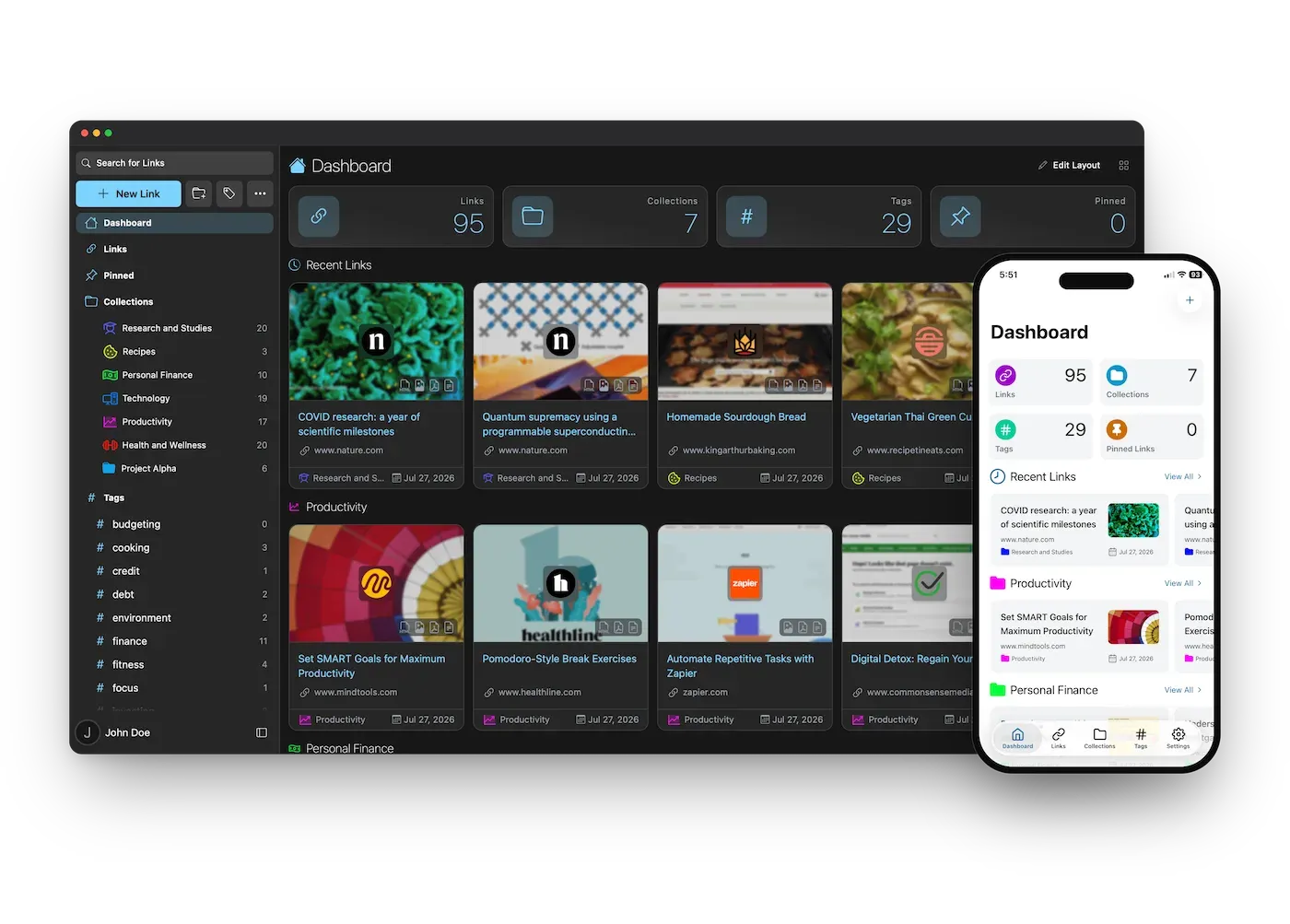
Official product image showing the web dashboard next to the iOS app, from the Linkwarden repository.
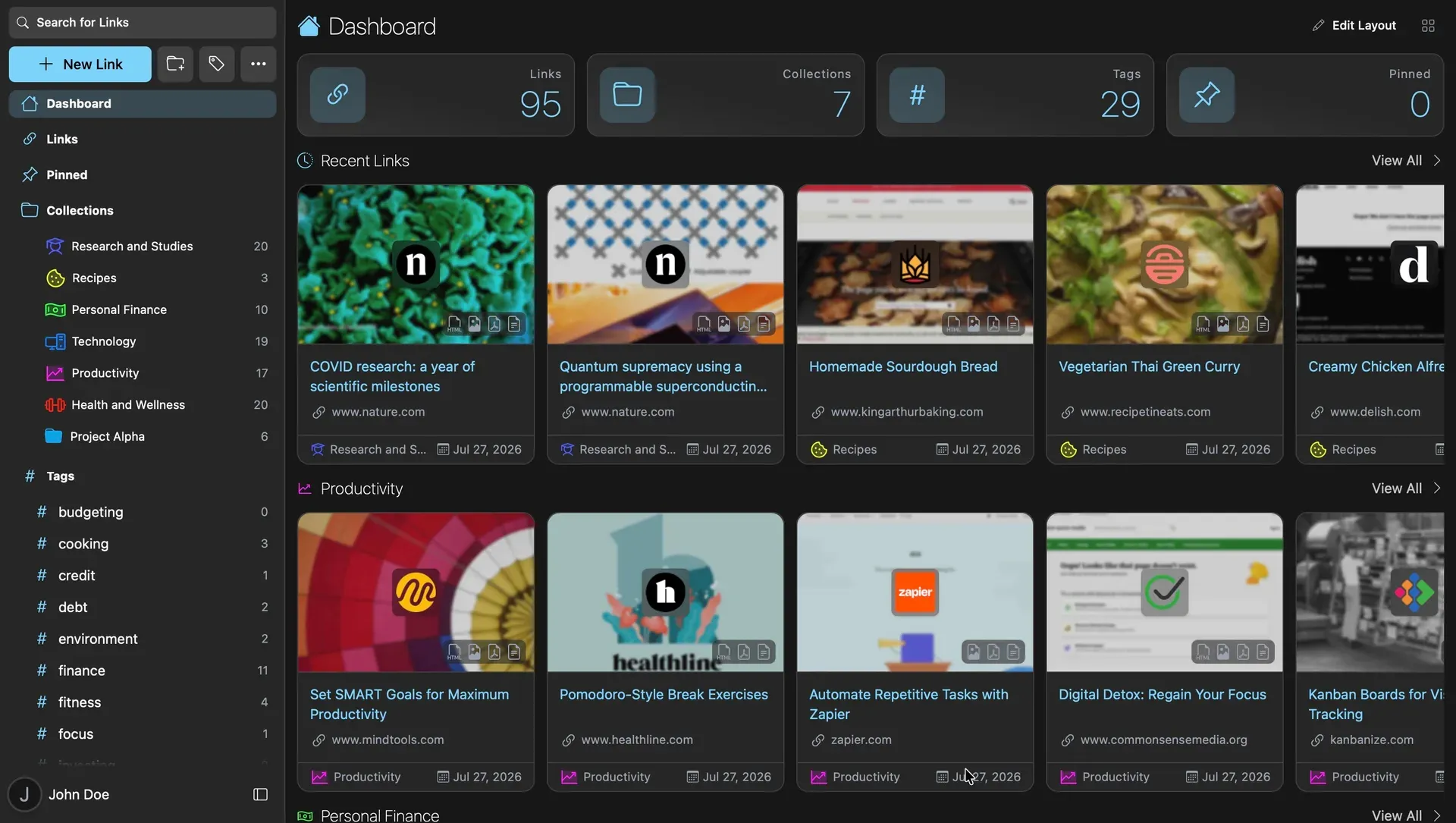
Refreshed web design introduced in Linkwarden 2.16.0, with navigation moved into the sidebar.
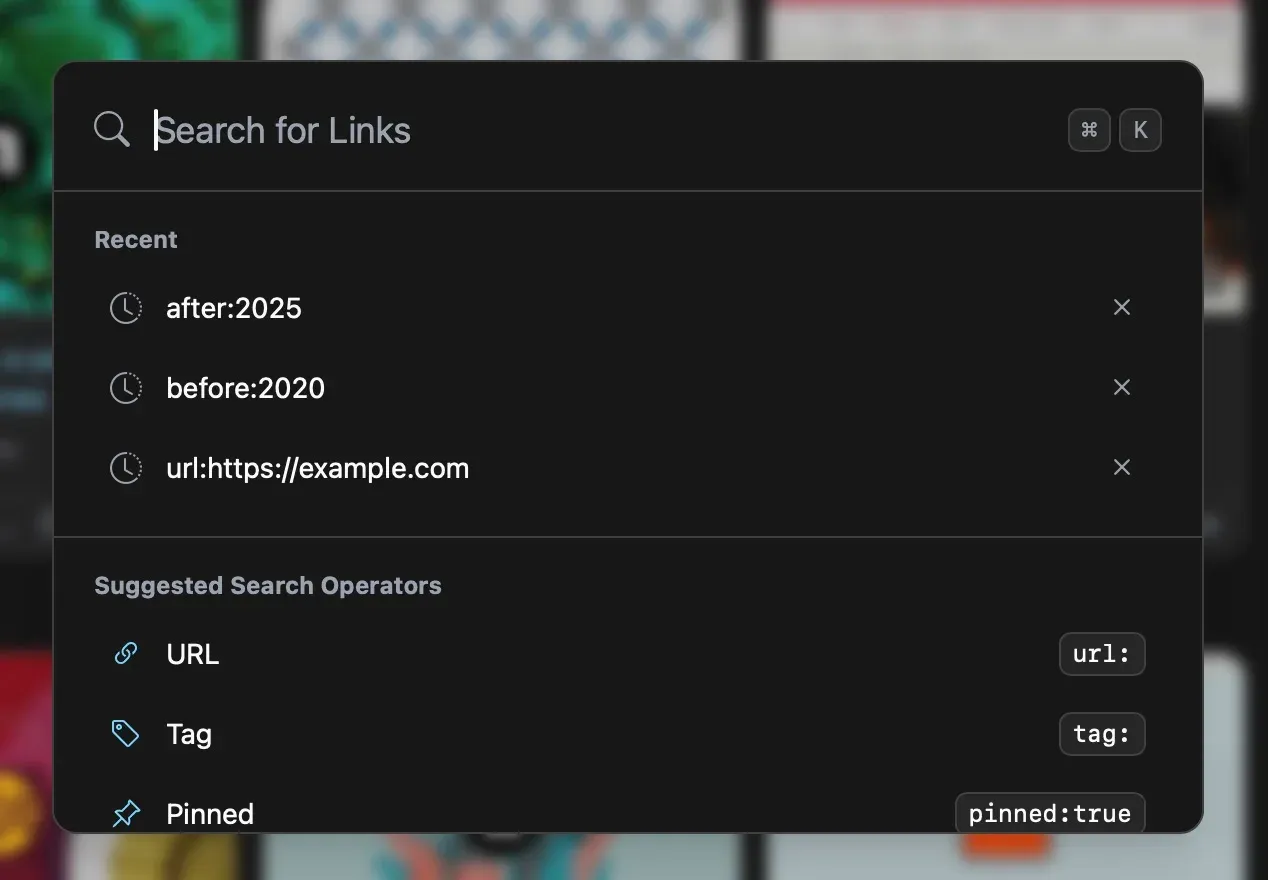
Search modal from the 2.16.0 release notes, opened with Cmd+K or Ctrl+K, with recent queries and search operators.
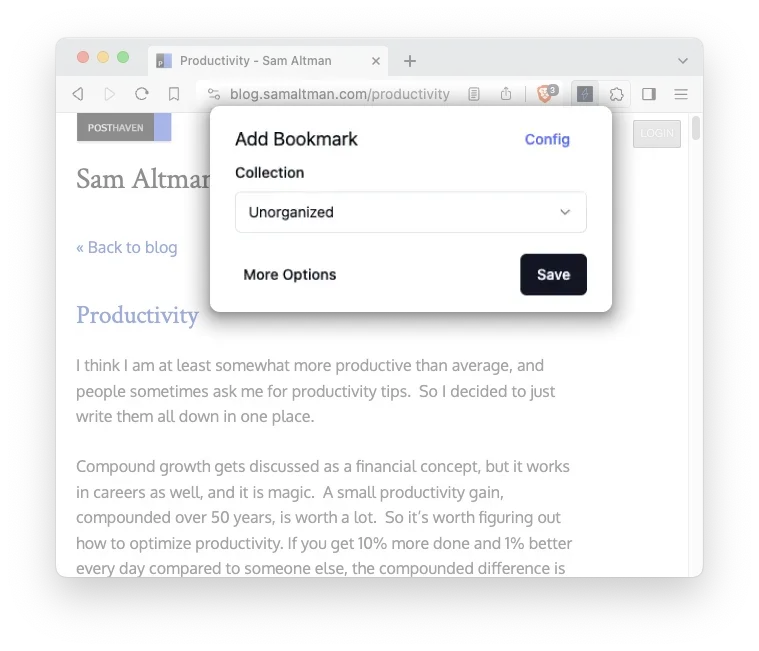
Official screenshot of the Linkwarden browser extension saving the current tab to a collection.
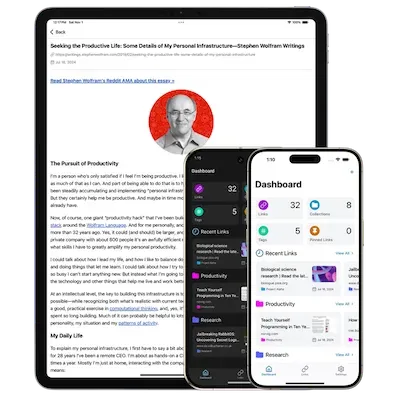
Official image of the Linkwarden apps on iPad, Pixel and iPhone, showing the reader view and dashboard.
Source: official Linkwarden project page.
Key capabilities
- Multi-format page preservation Each saved link is queued for a background worker that opens it in a real browser and stores a Readable article, a self-contained Webpage copy, a full-page JPEG screenshot and a PDF. Formats can be switched on or off globally or per tag in Archive Settings. Each format has a size ceiling, and pages that time out or exceed it are marked unavailable rather than left pending. The preservation guide documents the queue and its limits.
- Wayback Machine submission As an optional fifth format, Linkwarden can submit the address to archive.org. That copy is held by the Internet Archive, not by the Linkwarden instance, and the link details always point to the latest archive.org snapshot of the address.
- Reader view with highlights and notes The Readable format strips navigation and advertising and offers font, size, line height and line width controls that are saved to the account. Text can be highlighted in yellow, red, blue or green, and a note can be attached to any highlight. Annotations are private to each user, and annotating requires the Admin role or ownership of the collection.
- Collections, sub-collections and tags Every link lives in one collection, collections can be nested to any depth and reordered by drag and drop, and links carry multiple tags. Collections and links accept custom icons and colours. Links saved without a collection go to an automatically created Unorganized collection.
- Role-based collaboration Collection members are added as Viewer, Contributor or Admin. Viewers read links and preserved content, Contributors can also add links, and Admins can edit, delete and create sub-collections. Since 2.14, members and roles can be applied to all sub-collections, which replaces their existing member lists.
- Public collections and RSS output A collection can be published at a public URL that visitors can browse, search and filter without an account. Each public collection also exposes an RSS feed with its 20 most recently added links. Public pages show the names and usernames of collection members.
- RSS subscriptions Feeds can be subscribed to into a chosen collection, and new items become ordinary links that are preserved and searchable. Feeds are checked every 60 minutes by default, items without a publication date are skipped and nothing is deduplicated. Self-hosters can change the interval and the default limit of 20 subscriptions per user.
- Search and filters Without Meilisearch, search matches names, URLs, descriptions and tags in PostgreSQL. With Meilisearch, which Linkwarden Cloud includes, search covers the extracted article text and supports operators such as
name:,url:,tag:,collection:,before:,type:pdfand negation with!, as listed in the advanced search reference. - Optional AI tagging The worker can generate tags from page content or assign tags from a predefined list. Self-hosted instances connect either to Ollama, with a small model such as
phi3:mini-4k, or to an OpenAI-compatible endpoint. When no provider is configured, the tagging loop does not run. - Import and export Imports accept browser bookmark HTML files, Linkwarden
backup.jsonfiles, Pocket CSV, Wallabag JSON and Omnivore ZIP exports, with a default 10 MB file cap. Imports do not deduplicate and every imported link joins the preservation queue. Export produces a JSON file of settings, collections, links, tags and RSS subscriptions without the preserved files. - Browser extension The open-source extension is published in the Chrome Web Store for Chromium browsers, on Firefox Add-ons and as Linkwarden for Safari on the Mac App Store. It saves the current tab to a chosen collection and can upload a full-page screenshot captured in the user's own browser.
- SingleFile upload and browser-side capture The SingleFile extension can send a complete HTML snapshot straight to an instance. This captures pages that the server cannot see as an anonymous visitor, such as content behind a login. Uploads are limited by
NEXT_PUBLIC_MAX_FILE_BUFFER, which defaults to 10 MB. - Two-way browser bookmark sync Through Floccus, an independent sync extension, browser bookmark folders can be synchronised with a Linkwarden collection using an access token. Deletions travel in both directions and also remove the preserved files of the deleted link.
- iOS and Android apps The official apps are distributed through the App Store and Google Play, with Android APKs in the separate builds repository. Since 2.15 they support highlights, notes and an optional background download of all preserved formats for offline reading, and since 2.16 Android accepts self-signed certificates and both apps can send custom request headers.
- REST API and access tokens The API covers links, collections, tags, highlights, RSS, search, archives, users and worker control, and is described by an OpenAPI 3 specification in the docs. Requests authenticate with bearer access tokens created in Settings, which the extension, mobile apps and Floccus also use.
- SSO and account controls Self-hosted instances can enable generic OIDC or provider presets including Authentik, Authelia, Auth0, Apple and Atlassian, among others in the SSO guide. Username and password sign-in and self-registration can each be disabled, and an admin user ID controls user administration.
- Docker Compose deployment The official compose file runs the Linkwarden image from GitHub Container Registry with PostgreSQL 16 and Meilisearch v1.13.3 and stores data in local folders. Images are published for x86-64 and ARM64. The docs suggest 4 GB of memory and two CPU cores as a starting point, with about 1.5 GB of disk for the image plus stored pages.
- Manual installation A source install needs Git, Node 20 or later, Yarn with Corepack, PostgreSQL 16 or later and Monolith, with Meilisearch optional. Prisma migrations run with
yarn prisma:deploy, and the web and worker processes are started from the same workspace. - Linkwarden Cloud The hosted plan costs 4 USD per user per month, or 3 USD per user per month billed yearly, plus applicable taxes, with a 14-day trial that requires a card. Each seat adds 30,000 links to the subscription limit. The plan includes the same features plus Meilisearch search, automatic updates and priority support.
Where Linkwarden fits
Building a team reference library
Create a top-level collection per team or project, nest sub-collections underneath and add colleagues with the lowest role that fits: Viewer for readers, Contributor for people who add sources, Admin for curators. Use the option that applies members to sub-collections only when you want to replace their member lists. Remember that every member can read preserved content, and that downgrading a member does not hide what they have already seen. The collections guide lists what stays with the owner.
Guarding research against link rot
Save sources through the web app, the extension or the mobile apps and let the worker produce the Readable, Webpage, Screenshot and PDF formats. Check the Preserved Formats section of a few links once the queue has drained, because pages behind logins, paywalls or bot checks are captured as the anonymous visitor sees them. For those pages, upload a SingleFile snapshot or a browser screenshot instead. Avoid refreshing a link whose original is gone: re-preservation deletes the existing copies first.
Migrating from browser bookmarks or a read-later service
Export bookmarks as HTML from Chrome, Edge, Firefox or Safari, or use the Pocket CSV, Wallabag JSON or Omnivore ZIP exports, then import them under Settings. Folders become collections and original save dates are kept. Disable expensive formats before a large import if you only need the bookmarks, since every imported link enters the preservation queue. Import into a fresh account, because repeated imports create duplicate links and collections, as noted in the import and export guide.
Reading and annotating long articles
Set links to open in the Readable format, adjust typography once for the account and highlight passages in four colours with notes attached. The Notes and Highlights panel lists all marks on an article and jumps to each passage. Notes are private, are not shown on public collections and are deleted with the link, and the JSON export does not include them, so copy important notes elsewhere before removing a collection.
Running a small self-hosted instance
Install with Docker Compose, set distinct values for NEXTAUTH_SECRET, POSTGRES_PASSWORD and MEILI_MASTER_KEY, and place the app behind a reverse proxy with TLS. On low-memory hardware, follow the lighter setup guide: turn off unneeded formats, set ARCHIVE_TAKE_COUNT=1, cap the Node heap, drop Meilisearch if full-text search is not needed, or move Chromium to another host with PLAYWRIGHT_WS_URL. Back up the PostgreSQL dump, the data folder and the .env file before each upgrade.
Publishing a curated reading list
Make a collection public to share a list of links with people who have no account, and give subscribers its RSS feed of the 20 newest links. Review the member list first, because public pages show member names and usernames. Pair the public collection with an RSS subscription or the API when a script or another tool should add links to it automatically.
Reviews of Linkwarden
Be the first to share your experience with Linkwarden.
Write a review
Loading review form…
Alternatives to Linkwarden
 kagekage clones a website into a folder you can browse offline, using headless Chrome and stripping every script, and can pack the mirror into a ZIM file.
 MemosMemos is an MIT-licensed, self-hosted note-taking server written in Go. Short Markdown memos land on a dated timeline with tags, Views, Spaces and per-memo visibility, stored in SQLite, MySQL or PostgreSQL on your own host.