

What is Orgnise?
Orgnise is a web application for keeping a team's internal knowledge in one place: wikis, technical documentation, policies, announcements and project notes. Content is arranged in a fixed hierarchy of team, workspace, collection and page. The same collection can be read as a nested list, as board columns or as a table, so a page that describes a piece of work can also move through a simple workflow without being copied into a second tool. The project describes itself as an all-in-one knowledge, doc and project management system, and its documentation lists customizable workspaces, nested collections and granular permissions as the core features.
The source code is published in the Orgnise/webapp repository under the GNU Affero General Public License v3.0. The repository was created in October 2022; its first and only tagged release, early-beta-1.0.0 of January 6, 2023, still refers to the project's earlier name, pulse, and covers company and project APIs, member removal and onboarding. Development continued on the main branch without new tags: the public changelog records team roles and permissions and account management in April 2024, workspace member management in May 2024, and Stripe billing with plan-based limits on May 25, 2024. The most recent commits, from June and July 2025, rework session handling, team authorization checks and analytics events.
Most people use Orgnise as a hosted service at app.orgnise.in, with Free, Pro, Business and Enterprise plans described on the pricing page. There are no desktop or mobile apps, packages or container images. The repository contains the full application, an example environment file and maintenance scripts, but no installation guide, Dockerfile or upgrade notes, so running it yourself means assembling a Next.js deployment from source.
The stack is TypeScript on Next.js 14.0.4 with React 18, Tailwind CSS and shadcn/ui components. MongoDB stores teams, workspaces and content; NextAuth handles sign-in; uploaded images go to an S3-compatible bucket; transactional email is rendered with React Email. The page editor is built on the Novel editor, which is based on Tiptap. A REST API, described with zod-openapi and documented in the API reference, is labelled public beta.
Orgnise is deliberately small in scope. It has no real-time co-editing, comments, page history, full-text search or templates in the current source; the documentation marks search, templates and third-party integrations as planned. Task tracking is limited to moving pages between board columns and to-do checkboxes inside pages: there are no assignees, due dates, sprints or Gantt charts. Teams that need those functions should treat Orgnise as a wiki with a board view rather than as a project management suite.
Orgnise screenshots
Explore the interface. Open a screenshot to view it at full size.
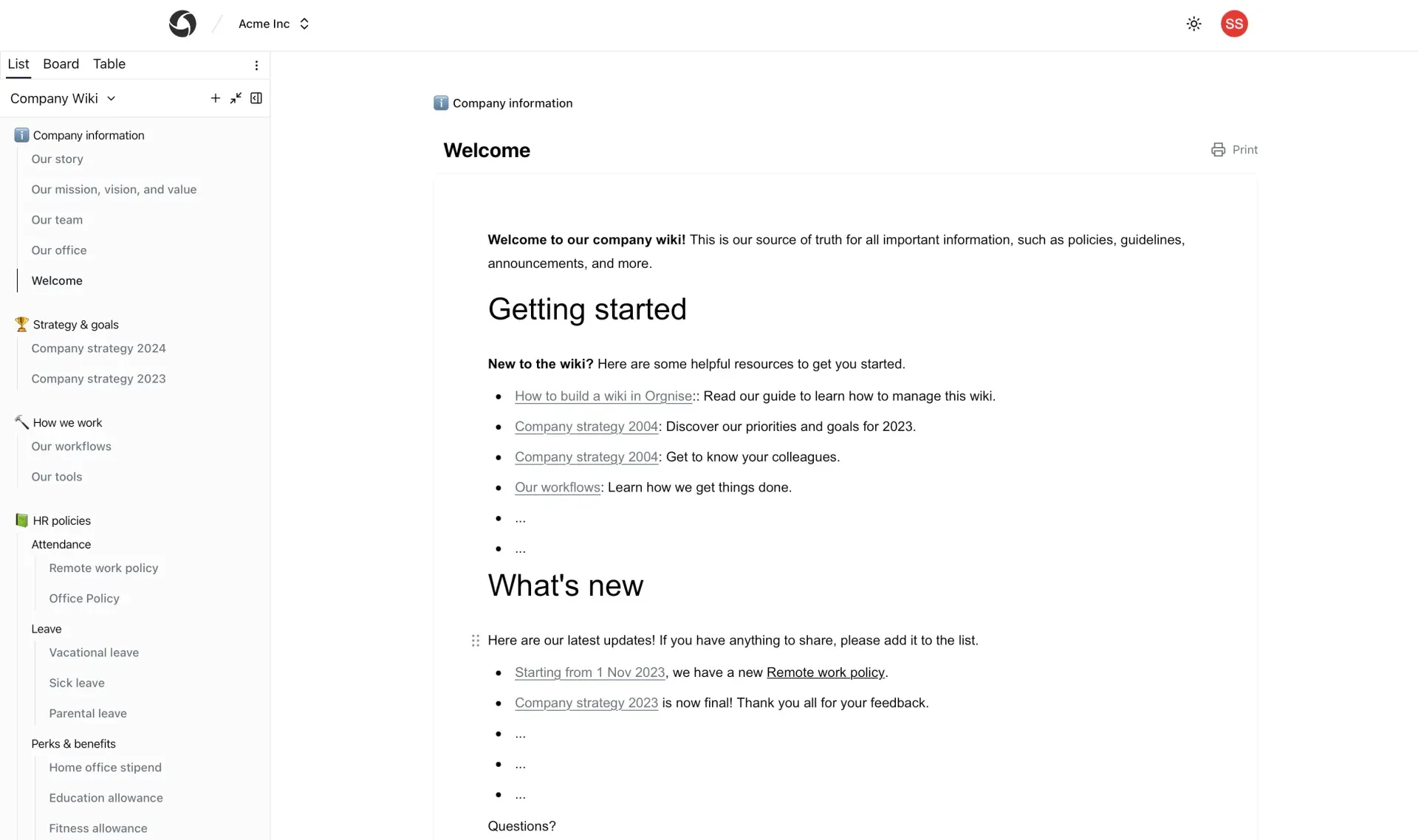
Official Orgnise product image of a company wiki in List view, with collections for company information, strategy, workflows and HR policies.
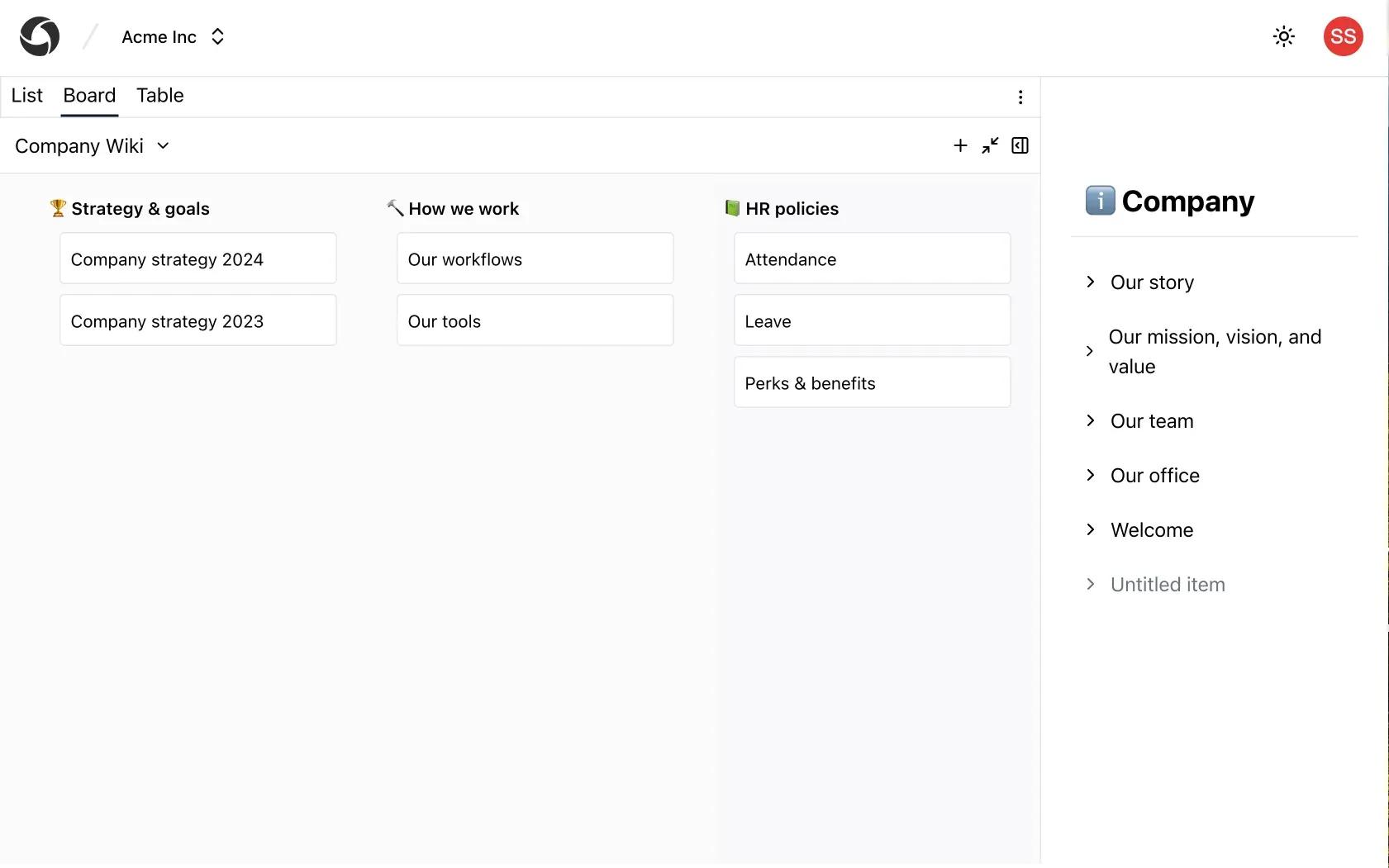
Board view turns top-level collections into columns, with a page outline open on the right.
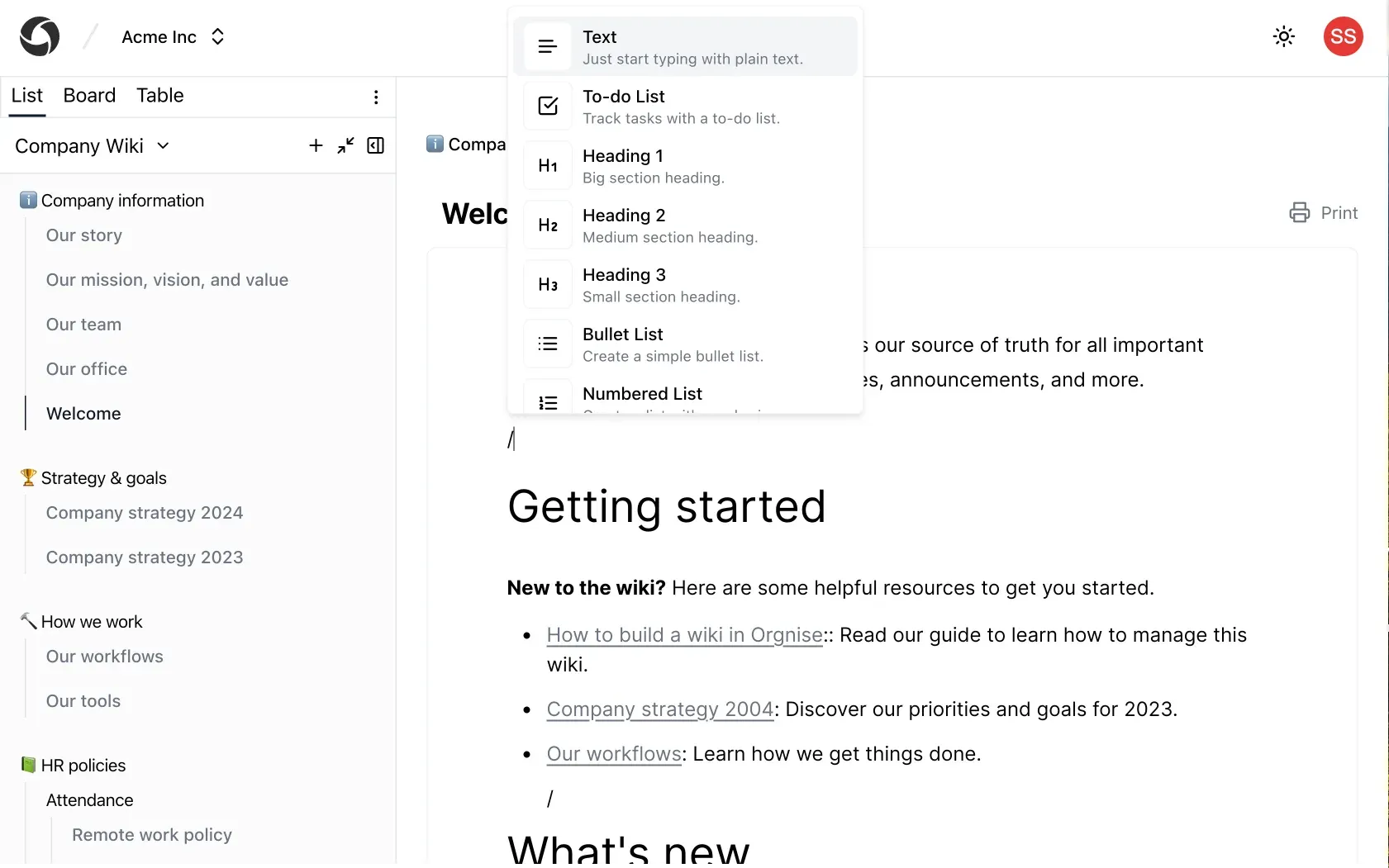
Slash-command menu in the page editor, offering text, to-do lists, headings and lists.
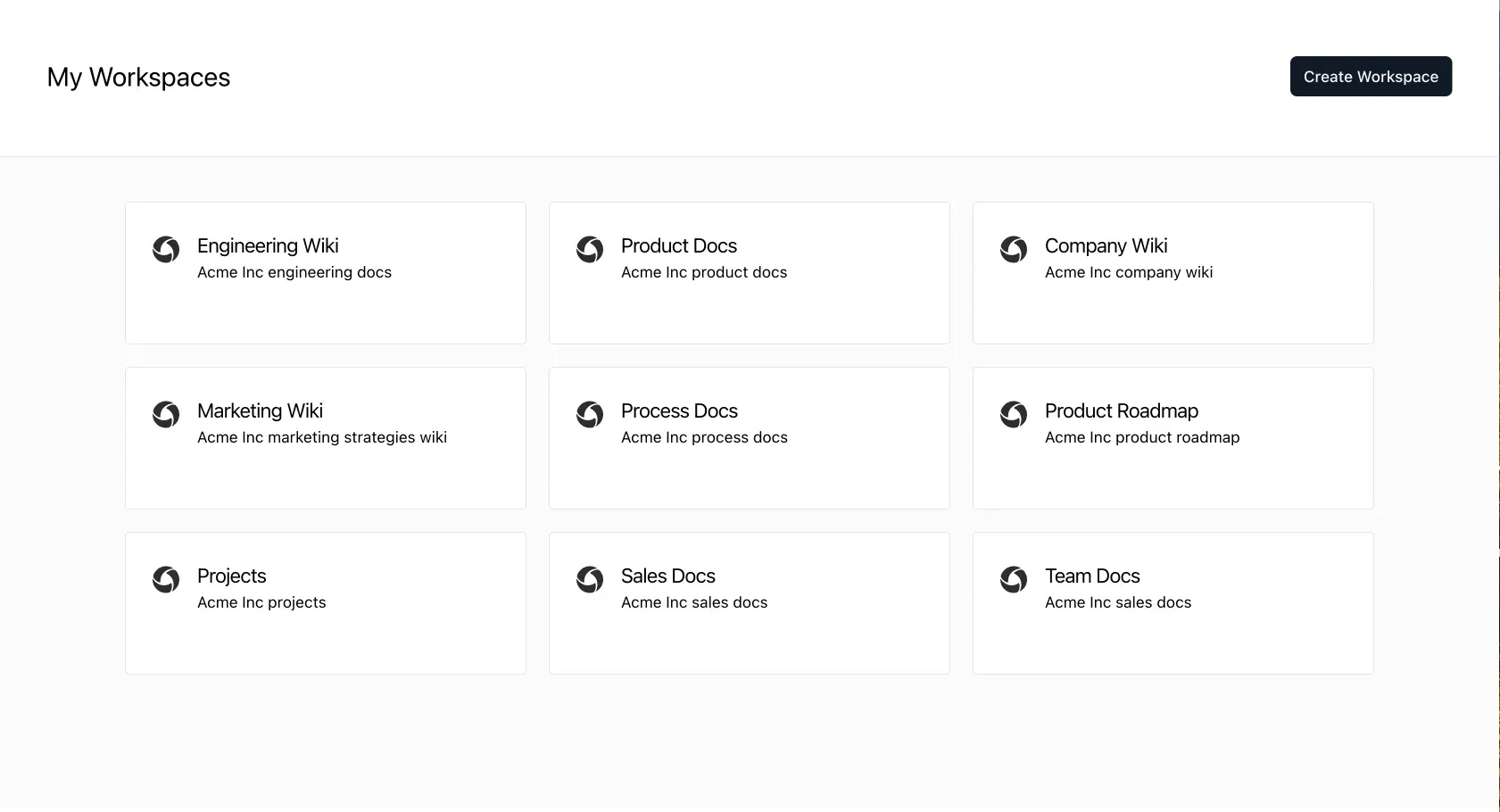
Workspace overview of a team, with separate workspaces for engineering, product, marketing, sales and projects.
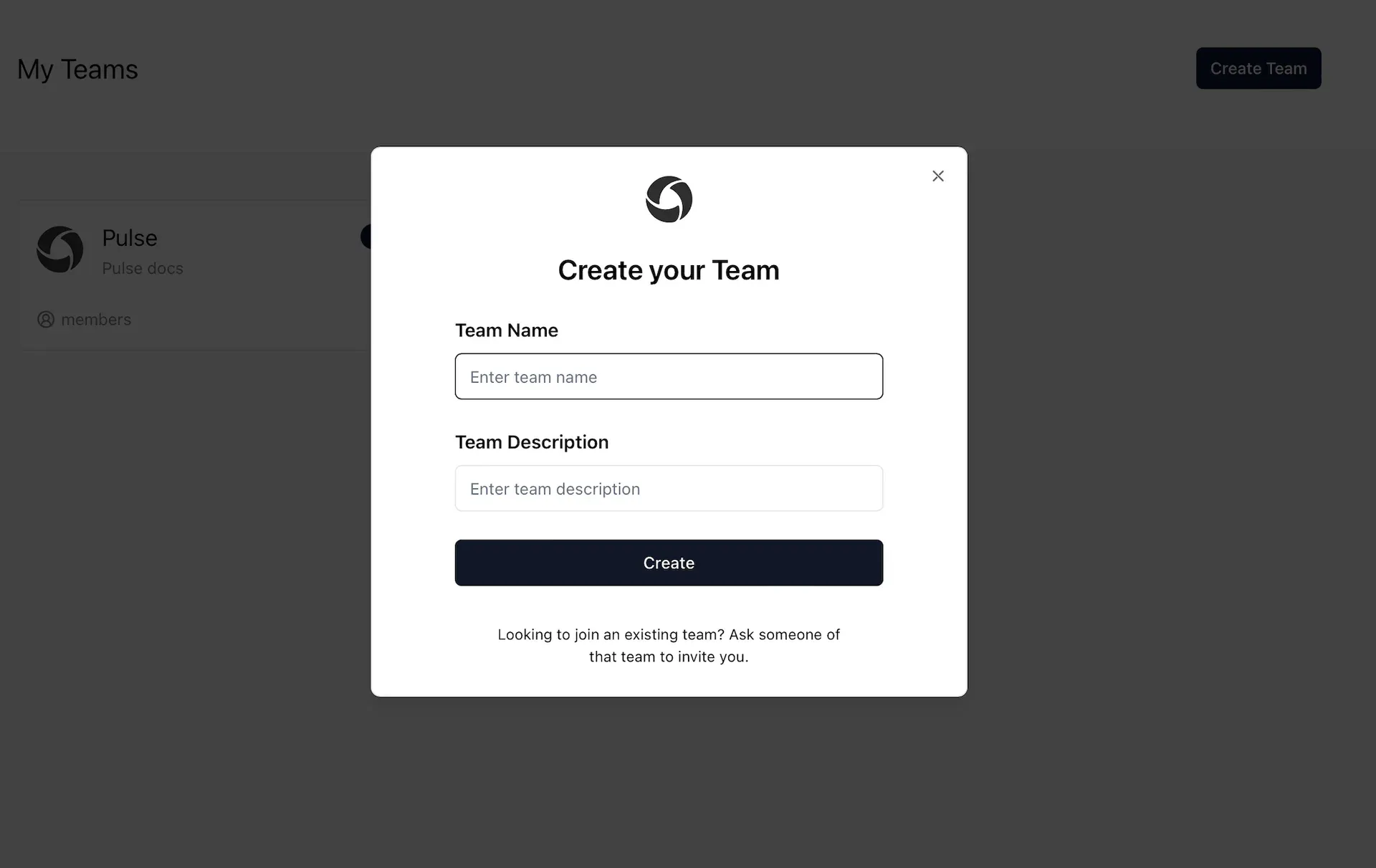
Creating a team, the top level that holds all workspaces, collections and pages.
Source: official Orgnise project page.
Key capabilities
- Team, workspace, collection and page hierarchy A team is the top-level space, usually one per company, and holds any number of workspaces such as Engineering Wiki, Product Docs or Sales Docs. Each workspace contains collections, which can nest sub-collections and pages to any depth. The workspace guide explains the model; plan limits count collections and pages together.
- List, board and table views of one collection The left panel switches between List, Board and Table tabs. List shows the nested tree used as a wiki sidebar; Board turns top-level collections into columns whose cards are the pages beneath them; Table shows the same items in rows. Moving a card on the board changes the stored order, not a copy of the page.
- Drag-and-drop reordering Pages and collections are reordered by dragging, using Atlassian's pragmatic-drag-and-drop library. A page can move within its collection or into another one. The same operation is exposed through the reorder endpoint of the API for scripted restructuring.
- Slash-command page editor Pages are written in a block editor built on Novel and Tiptap. Typing a slash opens commands for text, to-do lists, three heading levels, bullet and numbered lists, quotes, code blocks, images, YouTube videos and tweets. A bubble menu adds links, text colour and inline mathematics.
- Formatting extensions Code blocks use syntax highlighting through lowlight, task lists can be nested, and mathematical notation is rendered inline. Text can be underlined, highlighted and coloured. Content is held as editor JSON in MongoDB rather than as Markdown files, so exporting a page means using print or the API rather than copying files.
- Image upload and paste Images can be pasted or dropped into a page and are uploaded to the configured S3-compatible storage, then resized in place. Team logos and user avatars use the same storage client. Base64 images are also accepted by the editor, which can increase document size if storage is not configured.
- Saving and printing pages Edits are passed on after a short debounce, and the editor shows a Ctrl+S or Cmd+S shortcut for saving. A Print button on each page uses the browser print dialog, which is also the practical route to a PDF copy. There is no built-in version history, so a deleted paragraph cannot be restored from Orgnise itself.
- Team roles Teams use four roles: owner, moderator, member and guest. Owners can rename or delete the team and change the plan; moderators can invite and remove members and create, update or delete workspaces; members and guests can join public workspaces. The roles documentation describes the intent of each role.
- Workspace roles and visibility Inside a workspace, editors can create, edit and delete content, change workspace settings and visibility, and manage members, while readers can only view. Workspaces can be public to the team or private to their members. The documentation also lists a commenter role, but the current source defines only editor and reader, and there is no comment feature.
- Invitations by email or link Owners and moderators invite people by email or share an invite link with a code, which can be reset to revoke an old link. Invited users accept through a dedicated page after signing in. On paid plans, invitations count against the plan's user limit.
- Sign-in options Authentication runs through NextAuth with GitHub, Google and Slack OAuth providers, a passwordless email login link and an email-and-password option with bcrypt-hashed passwords. Sessions and accounts are stored in MongoDB through the NextAuth adapter. There is no SAML or SCIM provisioning in the source.
- REST API with bearer tokens Users create API tokens under account settings and send them as a Bearer header to https://api.orgnise.in. Documented endpoints list, create, read and update teams, manage workspaces including deletion, and list, create and reorder collections and pages. The API is in public beta and an OpenAPI 3.0.3 description is generated from the same Zod schemas the application uses.
- Plan limits and billing The hosted Free plan allows 1 user, 3 workspaces and 30 pages; Pro allows 5 users, 10 workspaces and 200 pages; Business allows 10 users, 30 workspaces and 600 pages. Usage against these limits is shown in team billing settings. The source contains webhook handlers for both Stripe and Paddle subscriptions.
- Transactional email React Email templates cover login links, team invitations, welcome messages, plan upgrade notices and a waitlist message. Mail is sent through Nodemailer with SMTP credentials or through Resend. A self-built deployment needs one of these configured before email sign-in and invitations work.
- Hosted service at app.orgnise.in The vendor-run instance needs only a browser and an account; the Free plan requires no credit card. Team owners upgrade from billing settings, and yearly billing lowers the monthly rate. Enterprise is arranged through a contact form and adds custom limits, a dedicated success manager and a Slack support channel.
- Source build for your own server Clone the repository, provide MongoDB, an auth secret, OAuth or email credentials and S3-compatible storage through the variables in .env.example, then run the standard Next.js build and start scripts. Scripts under scripts/ create database indexes and run data migrations through
npm run script. There is no official Docker image or self-hosting guide, and billing, Slack alert webhooks and Mixpanel analytics must be configured or left unset.
Where Orgnise fits
Company wiki and policy handbook
Create one workspace for company information and add collections such as Company information, Strategy and goals, How we work and HR policies, with pages for leave, remote work or benefits nested underneath. Make the workspace public to the team so every member can read it, and give editor rights only to the people who maintain policies. Check that readers cannot edit, and remember that without page history a careless edit has to be corrected by hand.
Engineering and technical documentation
A separate Engineering Wiki workspace can hold architecture notes, runbooks and onboarding pages, with code blocks highlighted in the editor and diagrams added as images. Keep it private if it contains internal hostnames or procedures. Because there is no full-text search yet, plan the collection tree carefully and link related pages from a welcome page so people can find content by navigation.
Lightweight project board
Switch a collection to Board view and use its top-level collections as stages such as Ideas, In progress and Done, with each card being a page that holds the specification. Dragging a card changes its position while the document stays in place. Check whether your team needs assignees, due dates or notifications: Orgnise does not provide them, so a dedicated tracker may still be needed beside it.
Customer support knowledge base
Support teams can keep troubleshooting guides, FAQs and macros in a workspace, with collections per product area. Readers on the support team see the content without being able to change it. Orgnise has no public help-center publishing, so the knowledge base is for agents rather than customers; confirm that this fits before moving articles out of a customer-facing tool.
Automating structure through the API
Generate a token in account settings and use the API to create workspaces, collections and pages for a new client or project from a script, or to list existing structure for an audit. Test against a non-critical team first, because the API is in public beta and may change. Keep tokens out of shared scripts and revoke any token that is no longer in use.
Running a private instance from source
Organizations that cannot store documents with a third party can build the AGPL source on their own infrastructure with their own MongoDB and object storage. Budget time for this: there is no installation guide, and the README links to an older repository path for issues. Disable or remove the Slack alert hooks, analytics and payment providers you do not use, and if you modify the code and offer it to users over a network, publish your changes as the AGPL requires.
Reviews of Orgnise
Be the first to share your experience with Orgnise.
Write a review
Loading review form…
Alternatives to Orgnise
 DocmostDocmost is an AGPL-3.0 wiki and documentation platform for teams, deployed with Docker, PostgreSQL and Redis on your own servers. Business and Enterprise license keys add SSO, AI search, MCP, the API, Bases and audit features.
 OutlineOutline is a team wiki by General Outline, Inc. with realtime collaborative Markdown editing, collections, search with AI answers, an MCP server and an API. It runs as a paid cloud service or self-hosted under the Business Source License 1.1.
 AppFlowyAppFlowy is an AGPL-3.0 open-source AI workspace for projects and wikis, with desktop and mobile apps and a self-hosting option.