

What is Koru?
Koru is a local-first workspace for writing and working with AI, made by Koru Works, Inc. Documents, files and terminal sessions open as tabs in one native window. The terminal tabs can run shells and coding agents such as Claude Code, Codex and Gemini beside the notes, and any MCP client can read and edit a workspace through the app's built-in MCP server. The official site describes it as a free notes app that works with your existing AI subscription, with no account needed.
Workspaces are stored on your own devices and work offline. Each workspace is a Loro CRDT snapshot, which lets two devices converge on the same state without a coordinating server. Devices sync directly with each other over iroh, and the README states that sync traffic is end-to-end encrypted, including when a relay forwards it between networks. Koru Cloud, run by Koru Works, is an optional hosted service for always-on sync and backup, and its server code is not part of the repository.
The latest GitHub release is v0.1.4, published October 31, 2026. It is the first stable release for Linux next to Windows and macOS, and it adds Mermaid diagram blocks that draw in place, callout blocks, sharper terminal text with fuller keyboard support, and a Windows installer that needs no administrator rights. Koru is pre-1.0: the README says more is built than is shown, and tasks, the Koru AI chat, canvases, reminders and Cloud sign-in sit behind product flags that are off unless a build enables them. The project publishes nightly builds frequently and stable builds roughly weekly.
The desktop app is written in Rust, using parley for text layout, vello for GPU rendering, winit for windowing and iroh for sync, while the iOS and Android apps are native Swift and Kotlin and are not released yet. The code is licensed under the Mozilla Public License 2.0; the Koru name and logo are trademarks of Koru Works, Inc. and are not covered by that license. Out of scope today: a self-hosted sync server (listed as coming soon), released mobile apps, and non-English interface languages. The company's public pages do not state a founding date or headquarters, so this listing does not either.
Koru screenshots
Explore the interface. Open a screenshot to view it at full size.
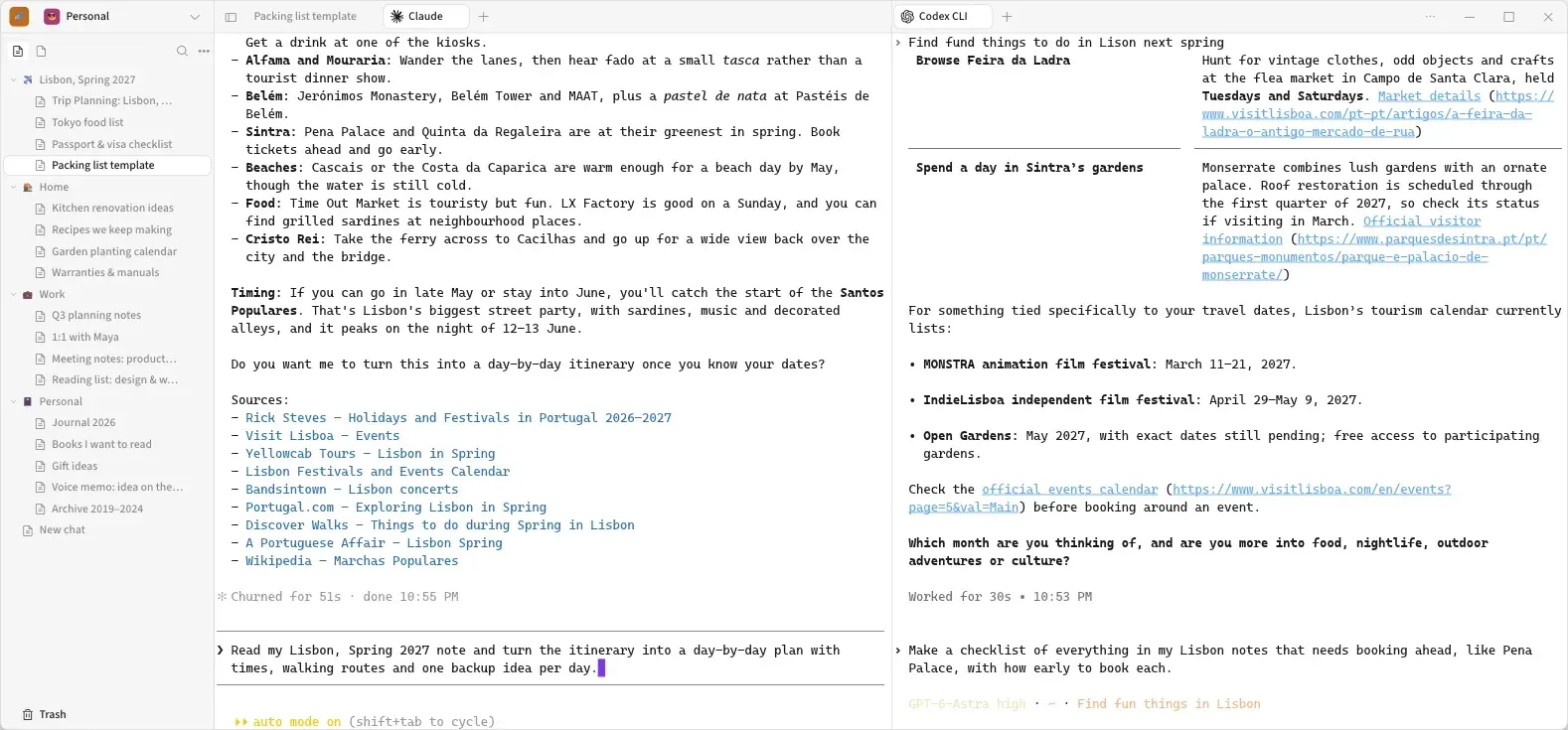
Official website image: coding agents running as terminal tabs next to a workspace tree.
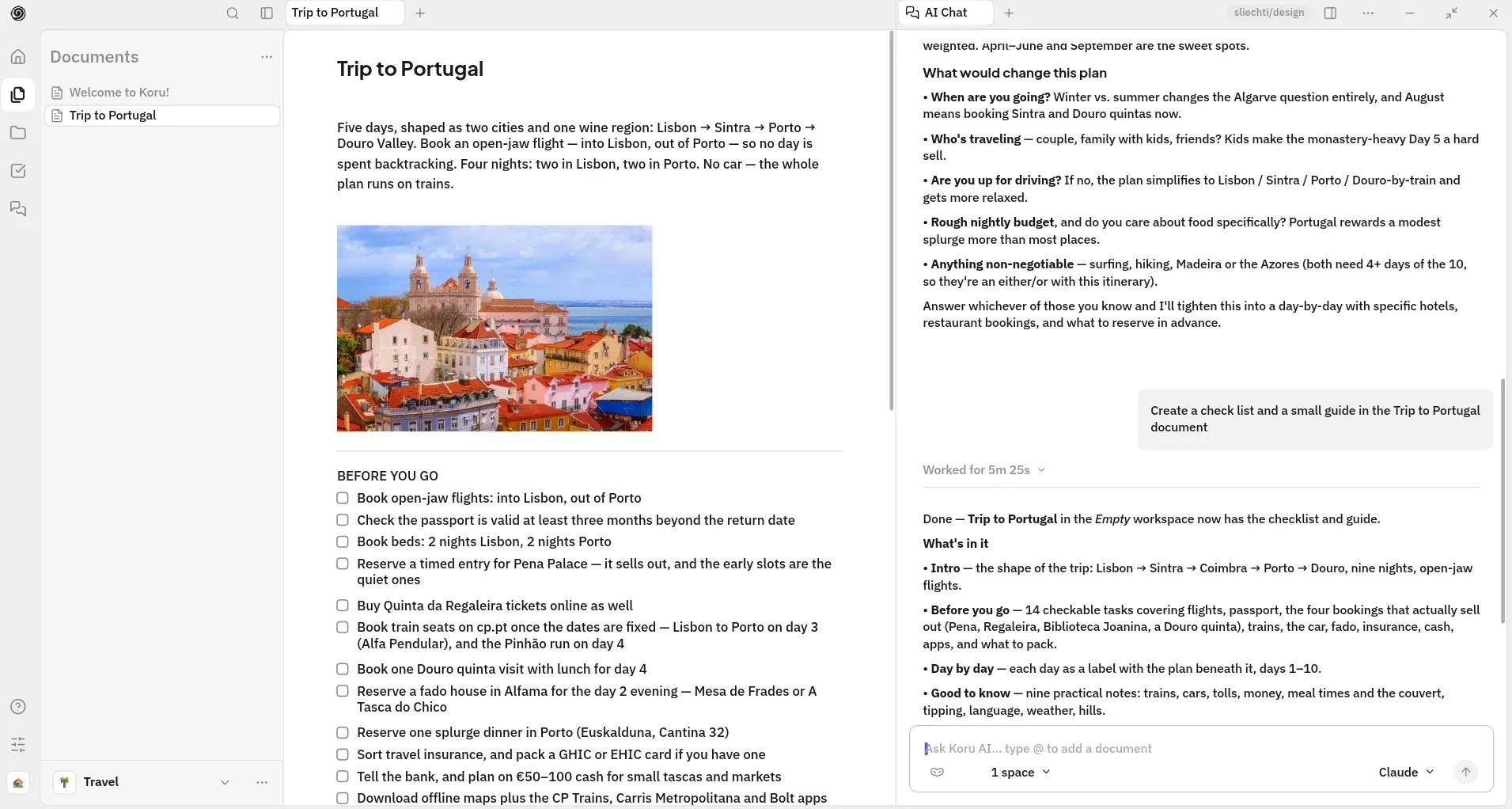
Official README screenshot: a document with a checklist beside the AI Chat tab.
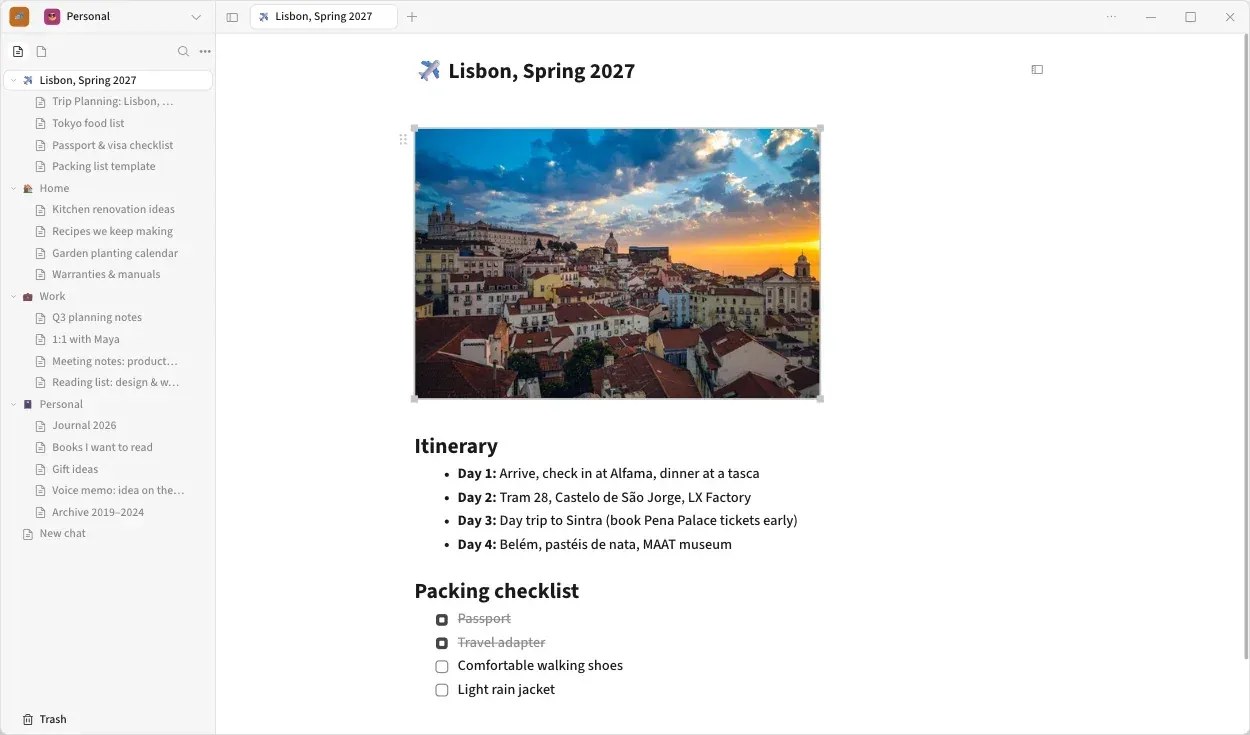
Official website image of the desktop editor with a workspace tree, an image, a list and a checklist.
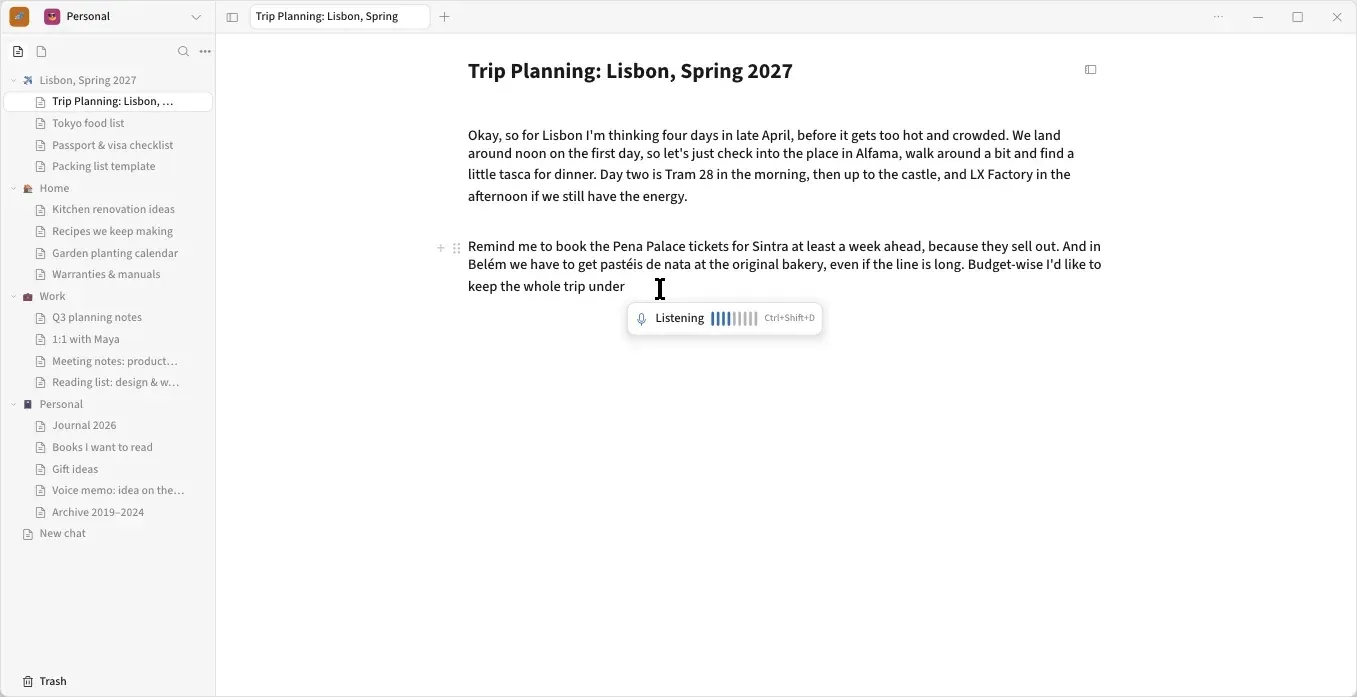
Official website image of Koru Voice dictating text into a document.
Source: official Koru project page.
Key capabilities
- Windows download Windows 10 and 11 on x86-64 get an installer (
setup.exe) that installs into the user's programs folder without administrator rights, or a zip that runs without installing. Both update themselves from GitHub releases. Builds are not code-signed yet, so SmartScreen asks before the first run and reminders show no notifications. - macOS download Apple silicon Macs running macOS 12 or later get a signed and notarized disk image that updates itself. There is no Intel build in the release assets. Switching between light and dark theme redraws every window immediately in 0.1.4.
- Linux download X86-64 Linux gets a tar.gz archive for glibc 2.35 or newer, extracted into a folder of its own and started with
./koru. It runs as an X11 app, through XWayland on Wayland desktops, and text can look soft at fractional scaling. Voice input is not available on Linux yet. Each release asset has a signature file and the updater verifies signatures. - Documents and rich editing Documents hold headings, tables, checklists, code blocks, images and attachments, nested in a tree with full-text search and
#tags. Named versions can be compared, and the app saves versions automatically during editing. Mermaid blocks render flowcharts, sequence diagrams and pie charts without an embedded browser; other diagram kinds such as Gantt charts stay as code blocks. - Callouts A callout puts selected lines into a tinted box with an emoji, and lists, links and formatting work inside it. Callouts survive copy, paste and Markdown export. The first callout written into a workspace makes it read-only for older Koru builds, so update every device first.
- Terminal tabs for shells and coding agents Terminals are tabs beside documents. Version 0.1.4 draws hinted text, joins box-drawing characters used by tools such as Claude Code and htop, passes Home, End, Page Up, Page Down, Insert, Delete and F1 to F24 to the running program, and scrolls back from the keyboard. Each tab can set its own theme and font.
- Agent tabs The website lists Claude, Codex, Gemini, Grok, GitHub Copilot, OpenCode, Antigravity, Kimi and Qwen Code as agents that can run as tabs. Koru does not supply the model: you use your own installed agent CLI and subscription, and Koru offers to run an agent's updater when it notices an outdated CLI.
- Built-in MCP server The
koru-mcpbridge lets an MCP client list workspaces, read documents as node trees, search by words, tags and attributes, and create or edit content. The MCP contract serves its own documentation in sections, and guides cover Claude Desktop, ChatGPT or Codex, and a local Ollama model. - Peer-to-peer sync Devices sync directly with each other using iroh, with end-to-end encrypted traffic. A single-device user never exchanges an operation. Both devices must be reachable through direct connections or a relay, and a self-hosted sync server is listed as coming soon rather than available.
- Koru Cloud Koru Cloud is an optional subscription for always-on sync, backup and access across devices. The pricing page lists it at $9.99 per month with 100 GB of storage for files and backup, while the Local plan is $0 with data on your own disk. Source builds run with Cloud turned off.
- Importers Koru imports Evernote
.enexfiles, Notion Markdown and CSV exports, OneNote files read offline without a Microsoft account, Google Docs, Markdown and TextBundle or TextPack packages. Export goes to Markdown or TextBundle, and a workspace can be backed up to a single.korufile. See the import page for per-source detail. - Koru Voice dictation Speech recognition runs on the device through sherpa-onnx, and the project states that audio never leaves it. A global dictation shortcut works on Windows. Dictation is not yet available on Linux.
- Profiles and workspaces A profile can hold several independent workspaces, each with its own documents. The user guide describes how profiles sync independently and how a workspace is exported as a backup.
- Experimental features behind flags Tasks, due dates and reminders, canvases, delegated agent runs and a Socials scheduler for X, LinkedIn and Reddit are documented in the user guide as experimental or flag-gated. Treat them as previews and check the guide for each build.
- Opt-in telemetry Usage data is off until switched on per device in Settings, and the README says it never includes documents, their names or what you type. Setting
KORU_TELEMETRY_ENABLED=0removes the destination in a source build, and the phone apps send no usage data. - Source build Building from source needs the Rust toolchain pinned in the repository, sccache, a GPU with DX12, Vulkan or Metal, Python 3 and curl. The launcher scripts
koru.batandkoru.shrun setup, run and test steps. First compile takes several minutes.
Where Koru fits
Keeping notes that stay on your own devices
Install Koru, create a profile and workspace, and import existing notes from Evernote, Notion, OneNote, Google Docs or Markdown. Confirm that the import warnings are acceptable, since OneNote handwriting is shown as a placeholder. Then make a backup with Export Backup and check that it restores, because data lives under the Koru store folder rather than the program folder.
Writing beside an AI coding agent
Open a terminal tab next to a document and start your installed coding agent in it. Keep project notes, plans and checklists in the document and have the agent read or update them through the MCP bridge. Check which workspace the bridge serves and what your agent provider receives from the prompts, because Koru does not change the provider's data handling.
Connecting another MCP client
Follow the guide for Claude Desktop, ChatGPT or Codex, or a local Ollama model to register the koru-mcp executable. Start by asking the client to list workspaces and read one document. Remember that mutation tools can change your notes, so test in a throwaway workspace before pointing an agent at real material.
Syncing between a laptop and a desktop
Link devices with the in-app linking code or QR code and watch the Cloud or device status in the Manage tab. Peer-to-peer sync needs both devices to find each other, so check behavior after sleep, on separate networks and after an update. Update every device together, since new block types such as callouts make a workspace read-only for older builds.
Writing diagrams and structured notes
Use /diagram or a mermaid code fence to draw a flowchart, sequence diagram or pie chart in place, and callouts to mark warnings. Export a document to Markdown and open it elsewhere to see what survives. Gantt charts and other Mermaid types are not drawn yet and remain code blocks.
Trying nightly and stable channels
Use the stable channel for daily work and the nightly build to preview changes. The project publishes nightly builds almost daily, and both channels update themselves. Keep a recent backup before moving to a nightly build, and read the release notes before upgrading shared workspaces. Source builds are another route: they run with Cloud and update signing disabled, which is expected, and they are best for contributors rather than daily use. When importing from another app, use a new workspace, keep the original export untouched and review the FAILED page for unresolved links.
Reviews of Koru
Be the first to share your experience with Koru.
Write a review
Loading review form…
Alternatives to Koru
 AnytypeAnytype is a local-first knowledge and collaboration app from the Swiss Any Association. Data lives in an encrypted vault on each device and syncs peer-to-peer, through the Anytype Network or through a self-hosted any-sync network.
 LogseqLogseq is a privacy-first, open-source platform for knowledge management and collaboration, with PDF annotation, task management and Markdown or Org-mode files.
 TolariaTolaria is an AGPL-licensed desktop app for macOS, Windows and Linux that manages a folder of Markdown files with YAML frontmatter as a vault, adding types, relationships, saved views, a built-in Git client, spreadsheet notes and AI agent integration.