

What is Tolaria?
Tolaria is a desktop application for managing Markdown knowledge bases. A vault is an ordinary folder of Markdown files with YAML frontmatter, and Tolaria reads and writes those files directly: its cache and interface state are derived from disk and can be rebuilt with the Reload Vault command. The project is developed by Luca Rossi, author of the Refactoring newsletter, under the refactoringhq organization on GitHub, and grew out of his own vault of more than 10,000 notes. The official site describes it as free, local-first, Markdown-based and Git-ready, with no account or subscription.
Desktop builds are published on GitHub Releases and linked from the download page: DMG files and updater bundles for macOS Apple Silicon and Intel, an NSIS setup executable for Windows x64, and AppImage, DEB and RPM packages for Linux x64. On macOS a Homebrew cask is also available. The supported platforms page lists macOS as the primary development and QA target, Windows and Linux as supported but early, and iPhone and iPad as a public TestFlight beta built with React Native and Expo that shares the vault format and Git repository with the desktop app.
Releases use calendar tags. The current stable release is v2026-11-06 (version 2026.11.6), published on November 6, 2026 and manually promoted from the main branch. It speeds up detection of installed AI agents, respects custom SSH commands during Git sync, fixes a spreadsheet crash after a stale model and restores multi-vault MCP context lookup. The 2026-10-30 release translated the editor slash menu and fixed a launch freeze at 100% CPU that affected some users after updating; 2026-10-26 added a hybrid appearance mode, Claude Code Skills in the AI panel and a cleaner PDF export. A separate Alpha channel follows pushes to main and often ships several builds a day.
The desktop shell is built with Tauri 2, Rust, React and TypeScript. The rich editor is based on BlockNote, spreadsheet notes use the IronCalc engine and whiteboards use tldraw while storing their state in Markdown. A bundled Node.js MCP server exposes vault search, read and write tools to external AI clients. The repository documents its design in an architecture document and close to 300 architecture decision records.
The code is licensed under AGPL-3.0-or-later, while the Tolaria name and logo fall under a separate trademark policy, so redistributed forks need their own branding. There is no documented hosted sync service, user account or end-user web edition: sync and backup go through a Git remote or file sync you choose, and AI features rely on agents or model providers you configure. The repository does contain web and server components for remote vaults, but they are not part of the documented install path. According to the architecture notes, crash reporting (Sentry) and usage analytics (PostHog) are opt-in.
Tolaria screenshots
Explore the interface. Open a screenshot to view it at full size.
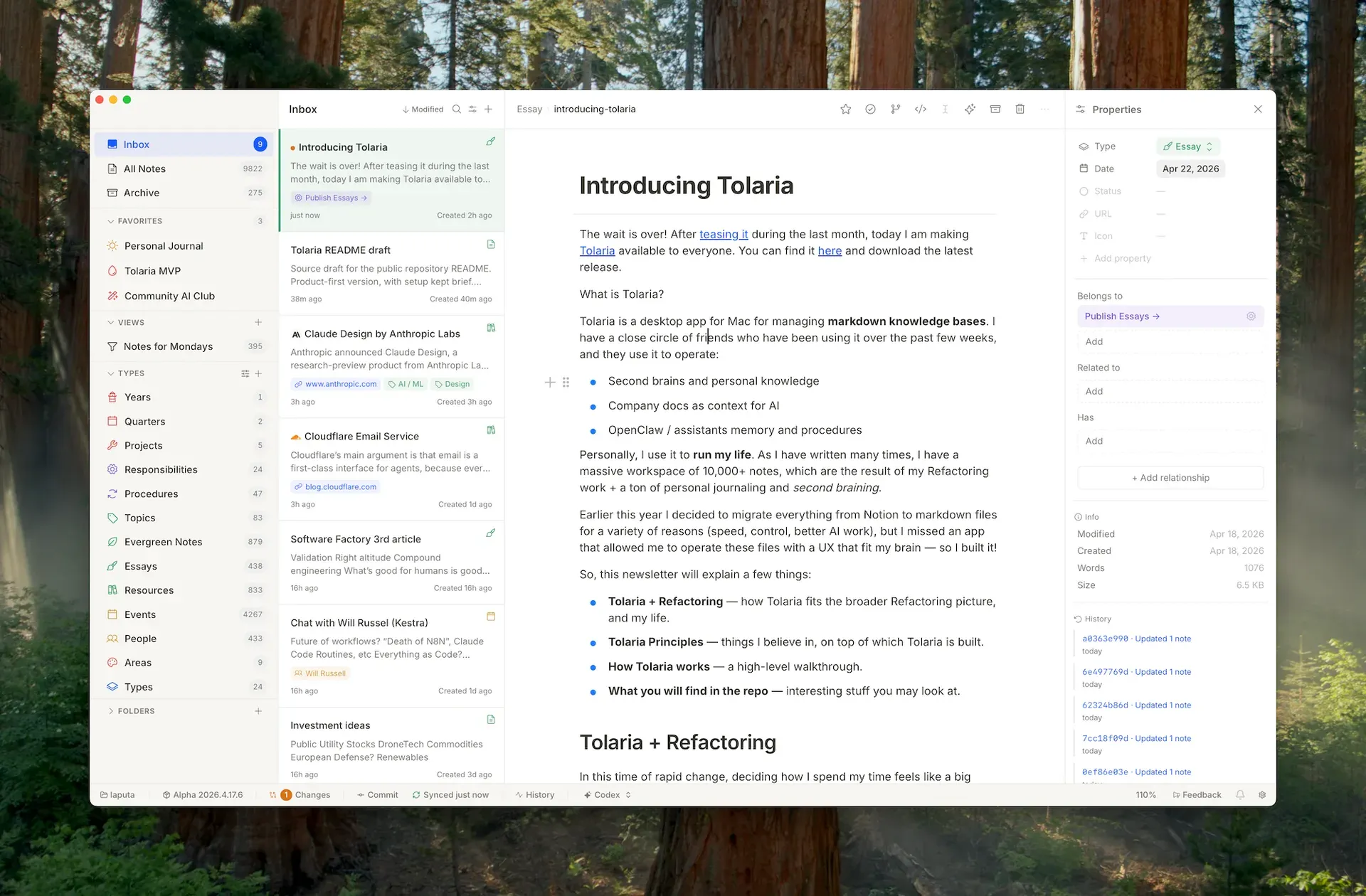
The four-panel layout on macOS: sidebar with Inbox, favorites, views and types, note list, editor and Properties panel with Belongs to, Related to and recent commits. Official screenshot from the project README.
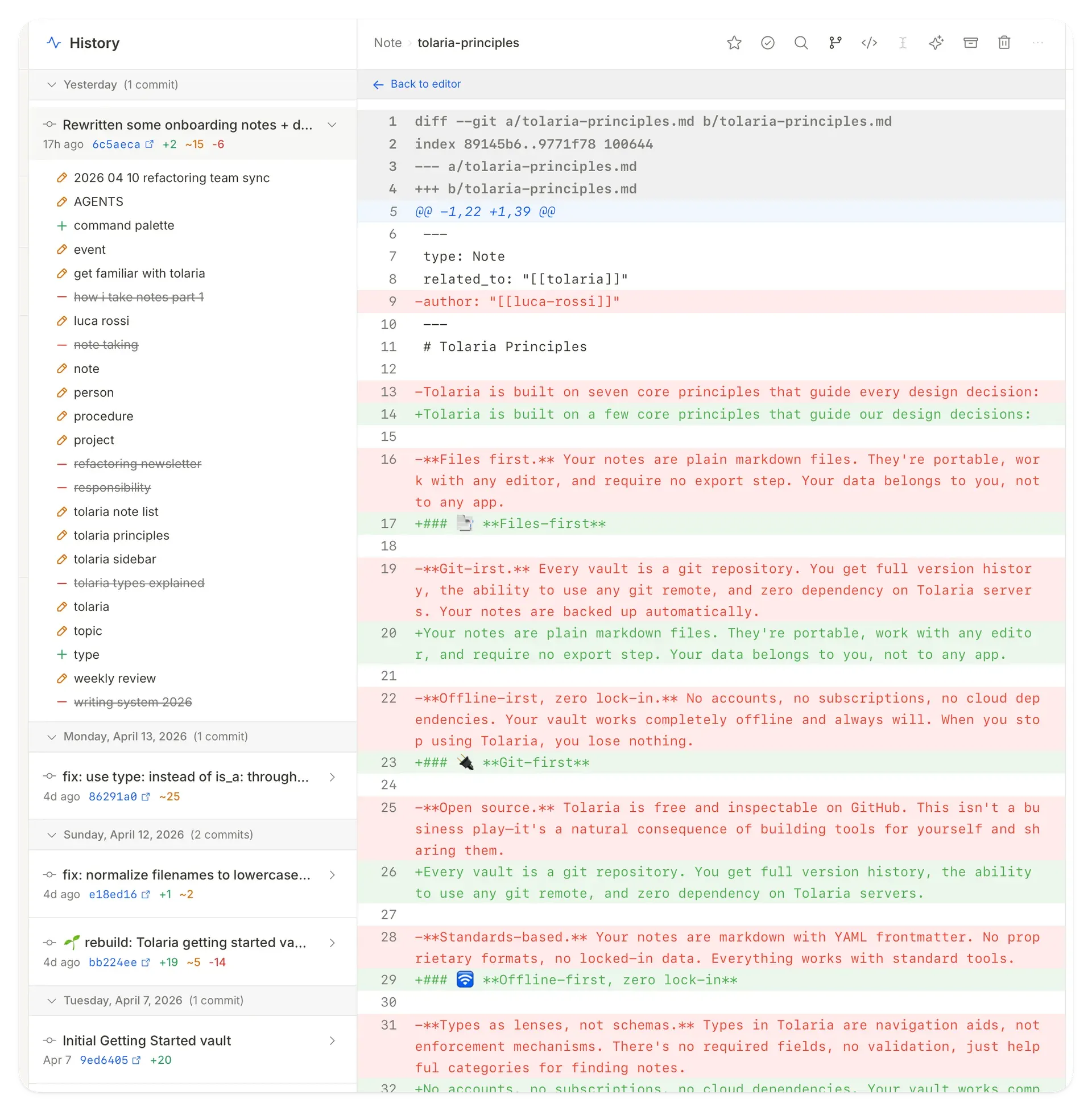
Vault history grouped by day, with added, edited and deleted notes per commit, and the diff of a single note. Official screenshot from the Tolaria Getting Started vault.
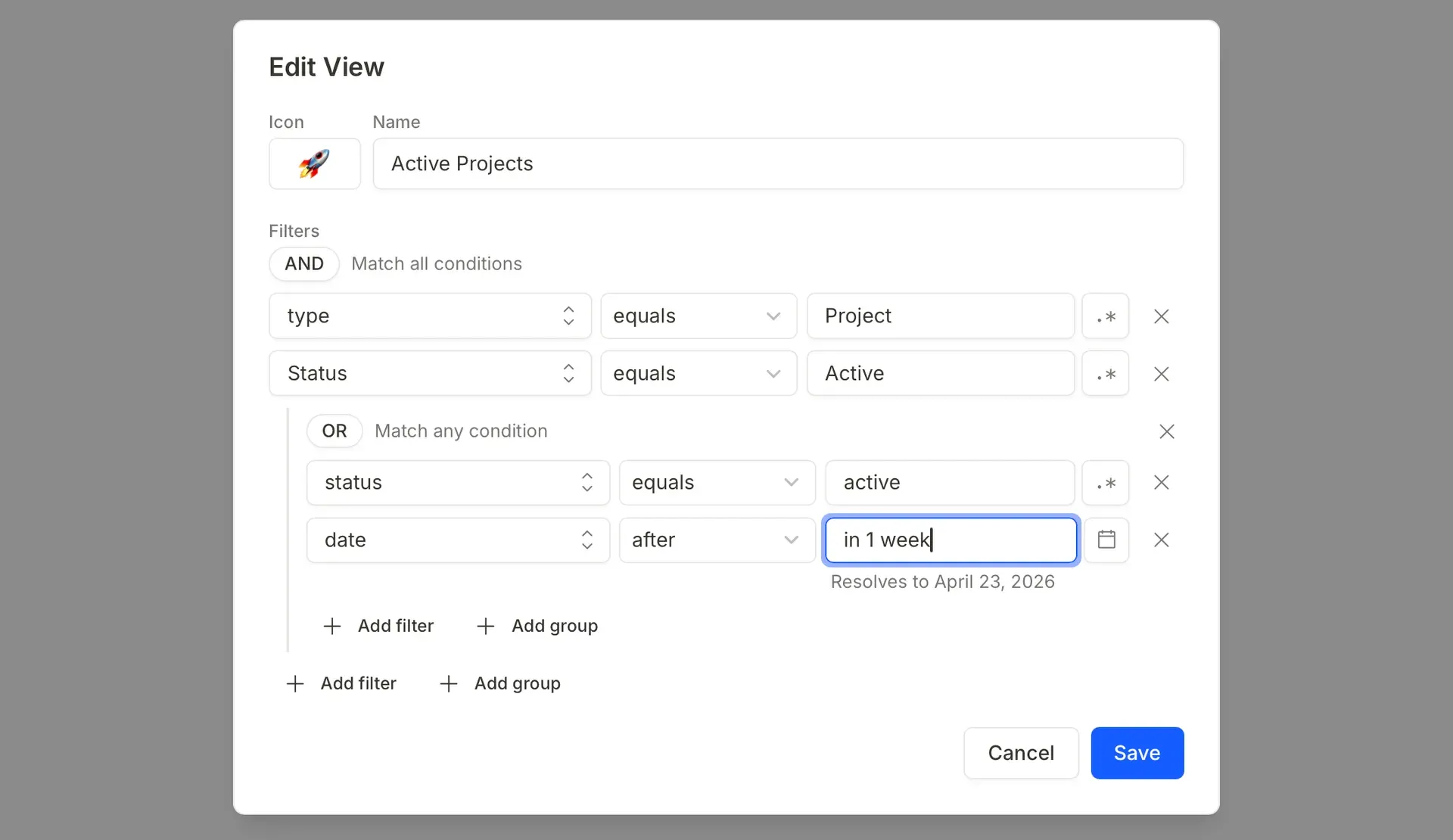
Editing a saved view named Active Projects: nested AND and OR filter groups, regex toggles and a natural-language date. Official screenshot from the Tolaria Getting Started vault.
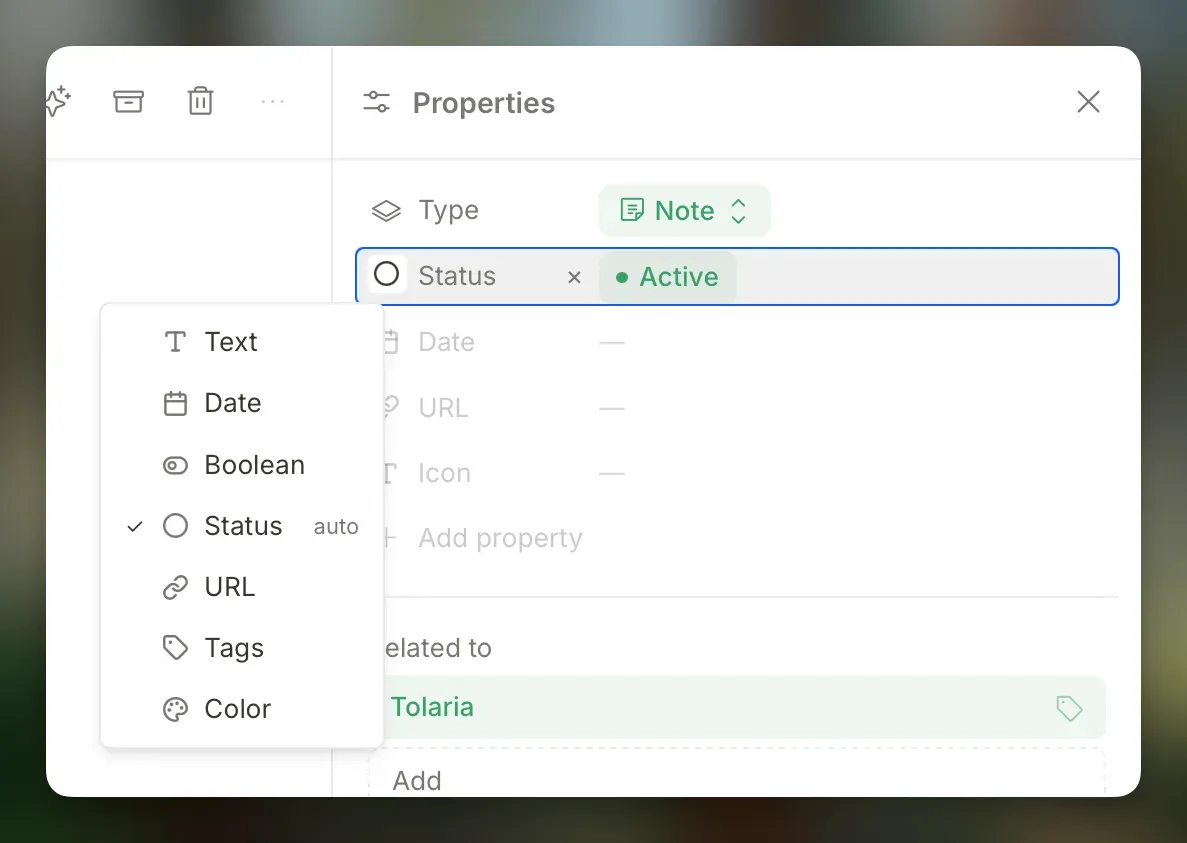
Properties panel showing a note's type, an Active status and the menu for choosing how a property is displayed. Official screenshot from the Tolaria Getting Started vault.
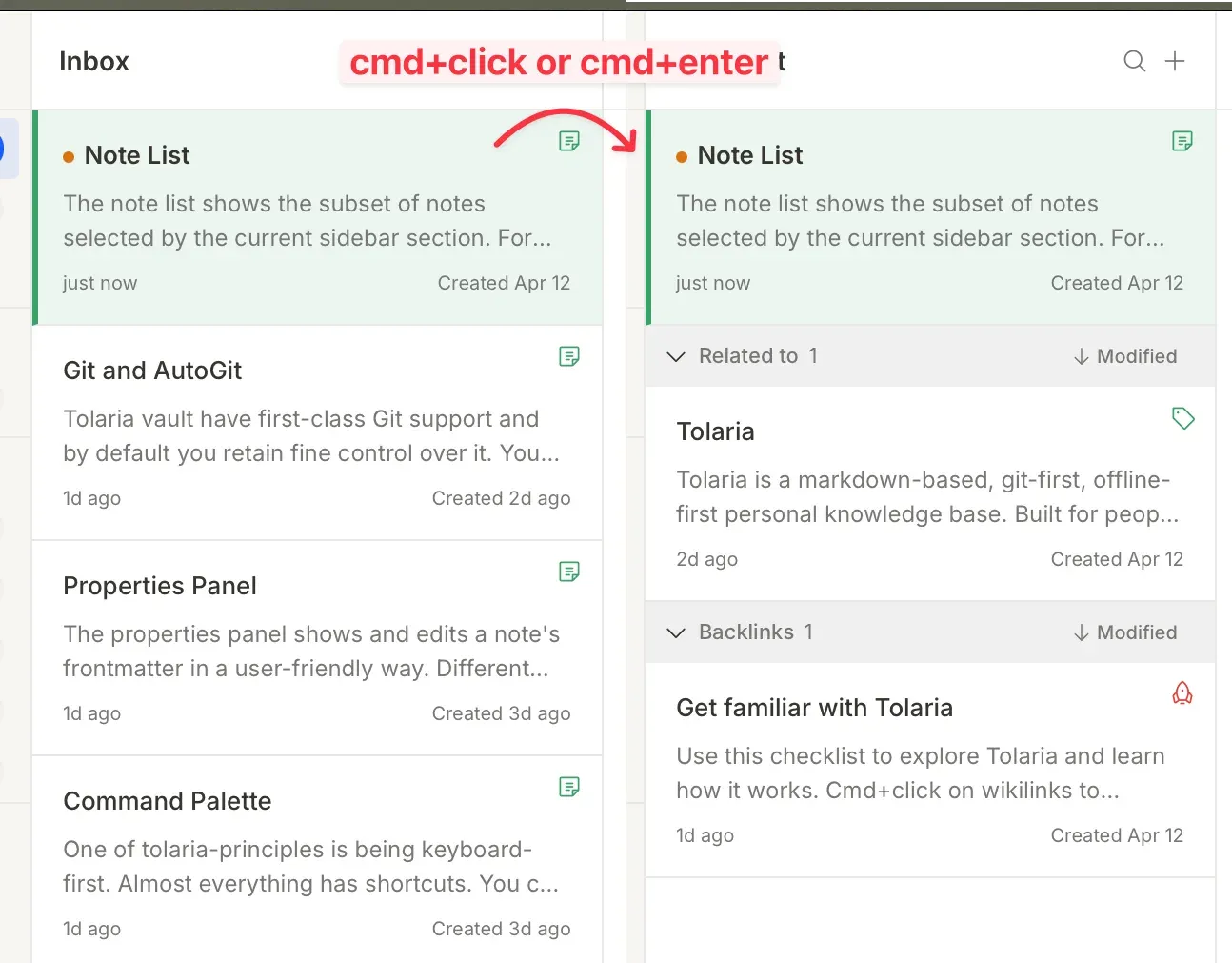
Neighborhood mode opened with Cmd+click or Cmd+Enter: the note list shows the selected note, its related notes and its backlinks. Official screenshot from the Tolaria Getting Started vault.
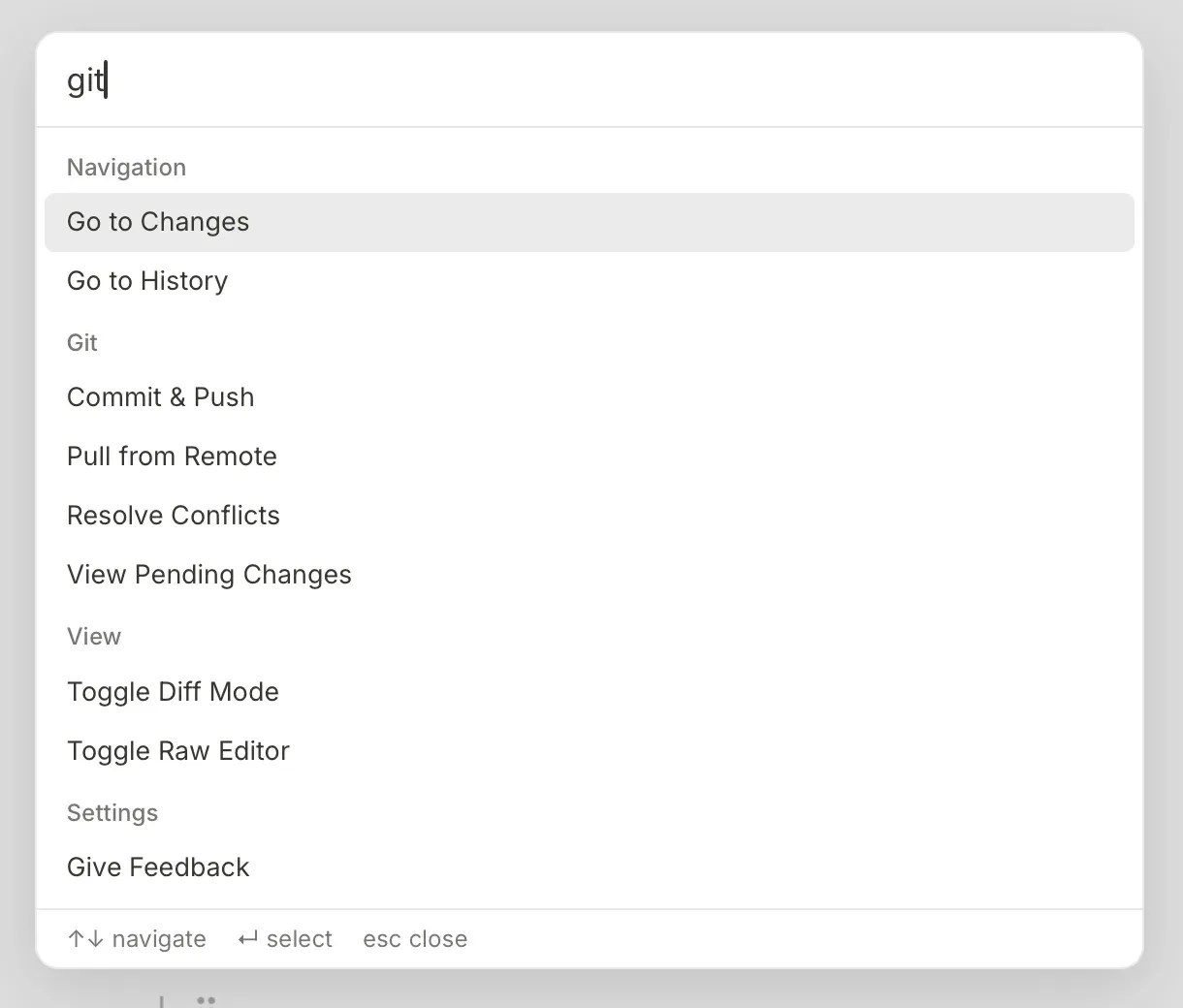
Command palette searching for git: navigation, Git, view and settings commands grouped by section. Official screenshot from the Tolaria Getting Started vault.
Source: official Tolaria project page.
Key capabilities
- Download Tolaria for macOS Each stable release ships separate DMG files for Apple Silicon and Intel Macs, plus signed
.app.tar.gzbundles used by the built-in updater. Homebrew users can runbrew install --cask tolaria. macOS is the primary platform: it is the main development and QA target, so platform-specific issues are usually fixed there first. - Download Tolaria for Windows Windows x64 is served by an NSIS setup executable with signed updater bundles. The README states that Windows installers are Authenticode-signed, while the install guide still describes publisher signing as pending; on company-managed devices, SmartScreen, Defender or WDAC policies may require IT approval of the publisher. Windows support is labelled supported but early.
- Download Tolaria for Linux Linux x64 builds are published as AppImage, DEB and RPM packages, each with an updater signature. The app depends on the distribution's WebKitGTK 4.1, and behavior can vary with Wayland or X11 and input-method setup; the AppImage applies WebKit rendering safeguards on Wayland. The bundled MCP server spawns the system
nodebinary on Linux, so install Node.js if you want external AI tools to reach the vault. - iPhone and iPad beta The iOS app is a public beta distributed through TestFlight. It provides a WYSIWYG Markdown editor, Git auto-commit with merge support and vault access through iCloud or the Files app, sharing the same repository as the desktop app. The AI panel, advanced search and some desktop power-user features are not available on mobile yet, and over-the-air updates follow a Stable or Alpha channel chosen in Settings.
- Vaults made of plain Markdown files Notes are
.mdfiles with YAML frontmatter, attachments are normal files in the vault, and type definitions and saved views are also stored as files. Any folder of Markdown can be opened as a vault, and other editors, scripts or search tools can read the same files. Machine-specific settings such as window size, zoom and the recent vault list stay in the local app configuration instead. - Rich editor with a raw Markdown mode The block editor supports slash commands, wikilinks, tables, code blocks with syntax highlighting, editable callouts, images, Mermaid diagrams, LaTeX-style math, collapsible headings and block selection. Raw mode (
Cmd+\orCtrl+\) shows the Markdown source and highlights invalid YAML frontmatter. Both modes write to the same file, and recent releases stopped rewriting untouched inline code, entities and table alignment on save. - Types and the Properties panel A
type:frontmatter field assigns a note to a type such as Project, Person or Procedure; Tolaria does not infer type from folder location. Type documents set the sidebar label, Phosphor icon, color, order, pinned properties and a template for new notes, and a value in the type document becomes the default for new notes. The Properties panel edits frontmatter as text, date, boolean, status, URL, tags or color fields. - Relationships, backlinks and Neighborhood mode Any frontmatter field containing wikilinks becomes a relationship. The defaults
belongs_to,hasandrelated_toget computed inverses, so a project lists the notes that belong to it without a reverse link written by hand. Neighborhood mode, opened withCmd+clickorCmd+Enteron a note, turns the note list into a view of related notes and backlinks. - Saved custom views Views are saved filters stored as files in the vault. The editor supports nested AND and OR groups, regular expressions and natural-language dates such as
todayorone week ago, so a view like active projects due soon keeps updating over time. Views can be renamed, reordered and given an icon in the sidebar. - Inbox for unprocessed notes Newly captured notes land in an Inbox until they have a title, a type and relationships. The documentation recommends keeping the Inbox small enough to review in one pass. The workflow can be switched off under Settings, Workflow if every note should appear as organized.
- Built-in Git client Tolaria shows whole-vault history, per-note history and diffs, and can commit, pull, push and resolve conflicts without leaving the app. It relies on your system Git authentication, so SSH keys, GitHub CLI and credential helpers keep working, and the latest release respects custom SSH commands. A vault can sit inside a larger repository: status and app commits stay scoped to vault files, while branches and pushes belong to the whole repository.
- AutoGit checkpoints An opt-in AutoGit mode creates conservative commits after an editing pause or when the app becomes inactive, then pushes when a remote is configured. Without it, commits stay manual. Tolaria only initializes Git in a folder when asked and avoids broad folders such as Desktop, Documents or Downloads.
- Multiple vaults in one graph With Settings, Vaults, Use multiple vaults at the same time enabled, several registered vaults appear together in note lists, search, quick open, backlinks and wikilink navigation, with a vault badge where needed. Git status, commits, sync, folders and saved views remain scoped to the selected vault, and cross-vault wikilinks use a stable vault alias.
- Spreadsheet notes A note with
_display: sheetopens in a spreadsheet editor backed by IronCalc. The file stays Markdown: cell inputs and formulas are stored as CSV-like text and formatting as YAML, so sheets remain diffable in Git and editable by agents. Each note holds one sheet; formulas can reference cells in other sheet notes, and cells can contain wikilinks. - HTML blocks and vault expressions Fenced
htmlblocks render as sandboxed previews for small dashboards and report fragments. They can read live values with{{...}}expressions, including the current note's properties, another note's property, sheet cells and formatting helpers. Remote resources, forms and network requests are blocked, and scripts run only when a block opts intoscripts="sandboxed". See the HTML blocks guide. - Files, media and whiteboards Images, PDFs, media files and standalone HTML files can be previewed in the app, with HTML previews stripped of scripts and remote resources. Remote images in pasted web content are imported into
attachments/in the background. Whiteboards use tldraw but save their state in Markdown, and files ignored by Git can be hidden from notes and search. - AI panel with local coding agents The AI panel streams installed CLI agents: Claude Code, Codex, GitHub Copilot, OpenCode, Pi, Antigravity CLI, Kiro and Hermes Agent. Each agent keeps its own authentication and tools. Vault Safe mode limits agents to file, search and edit tools; Power User mode can allow shell commands scoped to the active vault. The AI concepts page describes both paths.
- Chat with direct model providers Direct model targets answer in chat mode from the active note, linked context and conversation history, without vault-write tools or shell access. Supported shapes are local models through Ollama or LM Studio, hosted providers such as OpenAI, Anthropic, Gemini and OpenRouter, and custom OpenAI-compatible endpoints. API keys are saved on the device or read from an environment variable, never in vault settings.
- MCP server for external AI clients The bundled MCP server can search and read the vault, create notes, replace a note or append to one, with an optional modification-time guard on
update_note. The setup dialog can write Tolaria's entry into Claude Code, Antigravity CLI, Cursor or a generic MCP config, or copy the JSON snippet; closing it leaves third-party config files untouched. - Command palette, updater and release channels
Cmd+KorCtrl+Kopens a command palette that also matches commands loosely, in line with the keyboard-first design. The built-in updater follows the Stable channel of manually promoted releases or the Alpha channel built from main. A Getting Started vault can be cloned on first launch; it is disconnected from its remote so tutorial edits are not pushed.
Where Tolaria fits
Running a personal second brain
Open an existing Markdown folder or start from the Getting Started vault, then create a handful of types such as Project, Person, Topic and Procedure, each with an icon and a template. Capture quickly into the Inbox and process it in one pass: add a title, a type and belongs_to or related_to links. Check that saved views answer real questions, such as active projects or people without a recent follow-up, before adding more structure.
Organizing company documentation as AI context
Keep procedures, decisions and product notes in a Git-backed vault with consistent frontmatter, and add an AGENTS.md file so agents understand the conventions. Open the AI panel with an installed agent in Vault Safe mode to summarize or restructure notes, then review the changes in the diff view before committing. Confirm that the agent's own provider terms fit the material, since each CLI agent sends content to its configured model.
Storing assistant memory and procedures
The README names assistant memory, for example for OpenClaw, as a common use. Register Tolaria's MCP server in Claude Code, Cursor or another MCP client so the assistant can search notes and create or append to them. Use the modification-time guard on updates for read-modify-write workflows, and keep agent-written notes under a dedicated type so they are easy to review. Git history then shows exactly what an assistant changed and when.
Syncing a vault between desktop and iPhone
Connect the vault to a private Git remote using your existing SSH keys or credential helper, and enable AutoGit if you prefer automatic checkpoints. On iPhone or iPad, join the TestFlight beta and open the same repository. Test a deliberate conflict on two devices and resolve it with the Resolve Conflicts command, and read the Git concepts page for how a vault inside a larger repository behaves.
Building trackers with sheets and HTML dashboards
Create _display: sheet notes for budgets, pipelines or editorial calendars, link rows to project notes with wikilinks and reference cells across sheets in formulas. Add an HTML block that reads those values with vault expressions to build a small status page inside a note. Verify the result in raw mode and in a Git diff, since the readable file is the durable format.
Working across several vaults
Register a personal and a team vault, turn on multiple vaults in Settings and include both in the graph. Search, quick open and backlinks then cover both, while commits and sync stay scoped to the selected repository. Set a default destination for new notes and check that cross-vault wikilinks resolve through the vault alias, as described on the vaults page.
Install
brew install --cask tolariaReviews of Tolaria
Be the first to share your experience with Tolaria.
Write a review
Loading review form…
Alternatives to Tolaria
 ObsidianObsidian is a free note-taking app by Dynalist Inc. that stores notes as local Markdown files, with links, graph view, Canvas, Bases, a CLI and community plugins, plus optional paid Sync and Publish services.
 LogseqLogseq is a privacy-first, open-source platform for knowledge management and collaboration, with PDF annotation, task management and Markdown or Org-mode files.
 JoplinJoplin is a free, open-source note and to-do app for Windows, macOS, Linux, Android and iOS, with offline-first storage and encrypted sync.