

What is OpenTofu?
OpenTofu is an open-source infrastructure as code tool. Cloud and on-premises resources are described in human-readable configuration files that can be versioned, reused and shared, and the tofu command line program creates, changes and destroys those resources through the APIs of the platforms involved, following a write, plan and apply workflow. According to the official introduction, it manages low-level components such as compute, storage and networking as well as higher-level items such as DNS entries and SaaS features. The program is written in Go and released under the Mozilla Public License 2.0.
OpenTofu is a fork of Terraform. The OpenTofu manifesto explains that Terraform had been open source under the MPL since 2014 until HashiCorp moved it to the Business Source License on August 10, 2023; after asking for a return to an open-source license and receiving no response by August 25, the initiative behind the manifesto published a fork of the last MPL-licensed code. The project FAQ names Gruntwork, Spacelift, Harness, env0 and Scalr among the companies that started it, and on the supporters page Harness, Spacelift and env0 each pledge the cost of five full-time engineers for at least five years, Scalr three and Gruntwork one. The project is hosted by the Linux Foundation (the site lists OpenTofu as a Series of LF Projects, LLC), and the first stable release, 1.6.0, was published on January 10, 2024. A core team with a technical lead sets priorities, a Technical Steering Committee decides on larger changes, and major changes go through a public RFC process.
The project states that it aims to stay compatible with Terraform configurations and that it works with state files created by Terraform up to version 1.5.x. OpenTofu does not maintain its own providers: it uses the existing provider plugins, distributed through its own registry at registry.opentofu.org and searchable at search.opentofu.org. A step-by-step migration guide covers moving an existing Terraform project, including configurations that read each other through terraform_remote_state.
The latest release is v1.13.9, published on November 5, 2026. It is a patch release that fixes a local backend bug where state was not persisted correctly when the first apply crashed. The 1.13 series started with v1.13.0 on September 30, 2026: it made Windows on ARM64 an officially supported platform, added the convert function and a family of assume... functions that reduce unknown values during planning, introduced experimental linting and Symbol Libraries, removed the WinRM provisioner connection type and raised the macOS requirement to macOS 13 Ventura. The changelog states that the 1.13.x series is supported until August 1, 2027 and that it is the last series with official 32-bit (386 and arm) builds.
Earlier minor releases added most of the features that distinguish OpenTofu: client-side state encryption in 1.7, early evaluation of variables and locals in 1.8, provider for_each and the -exclude flag in 1.9, OCI registry support, native S3 state locking and OpenTelemetry tracing in 1.10, ephemeral values, write-only attributes and the enabled meta-argument in 1.11, and dynamic prevent_destroy, -json-into and the destroy = false lifecycle option in 1.12. Nightly builds of the main branch are published at nightlies.opentofu.org and removed after 30 days. Questions go to GitHub Discussions and the #opentofu channel on the CNCF Slack.
OpenTofu screenshots
Explore the interface. Open a screenshot to view it at full size.
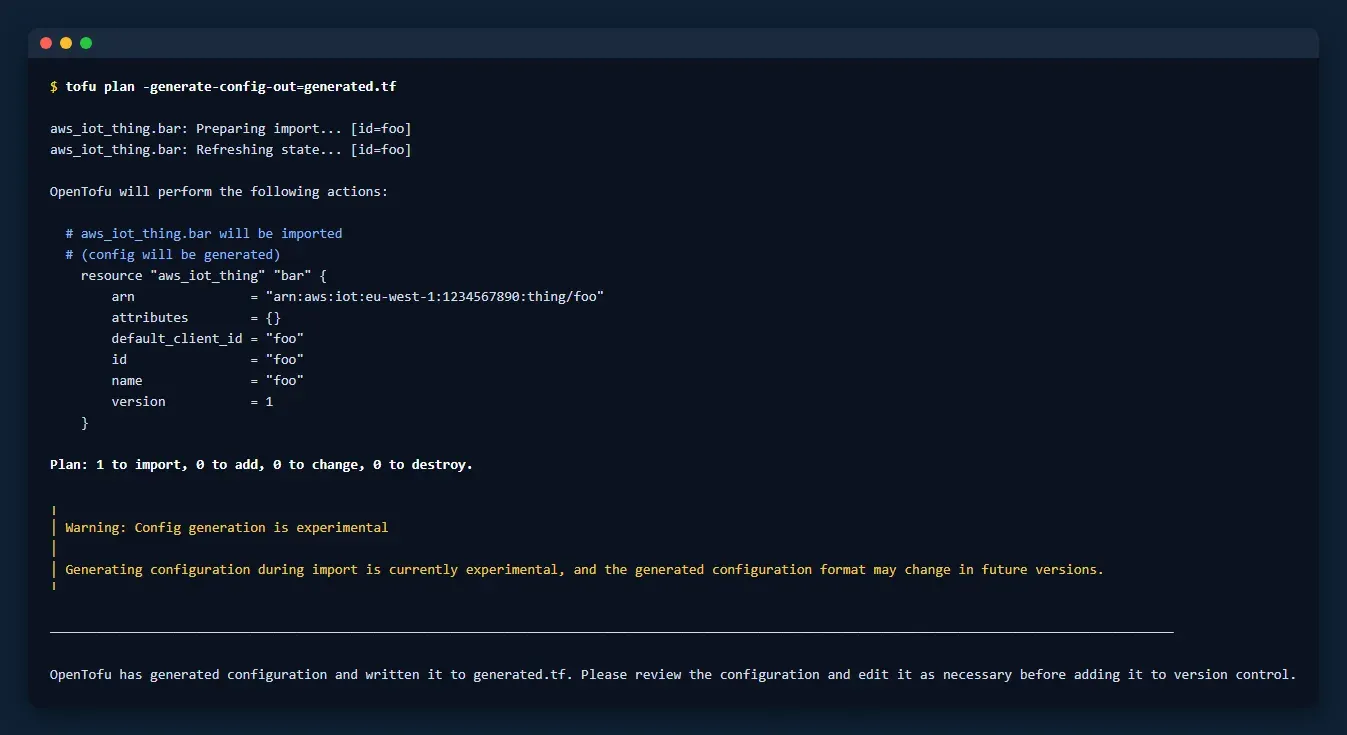
Output of tofu plan with -generate-config-out, text copied verbatim from the OpenTofu documentation page on generating configuration and rendered in a terminal-style frame.
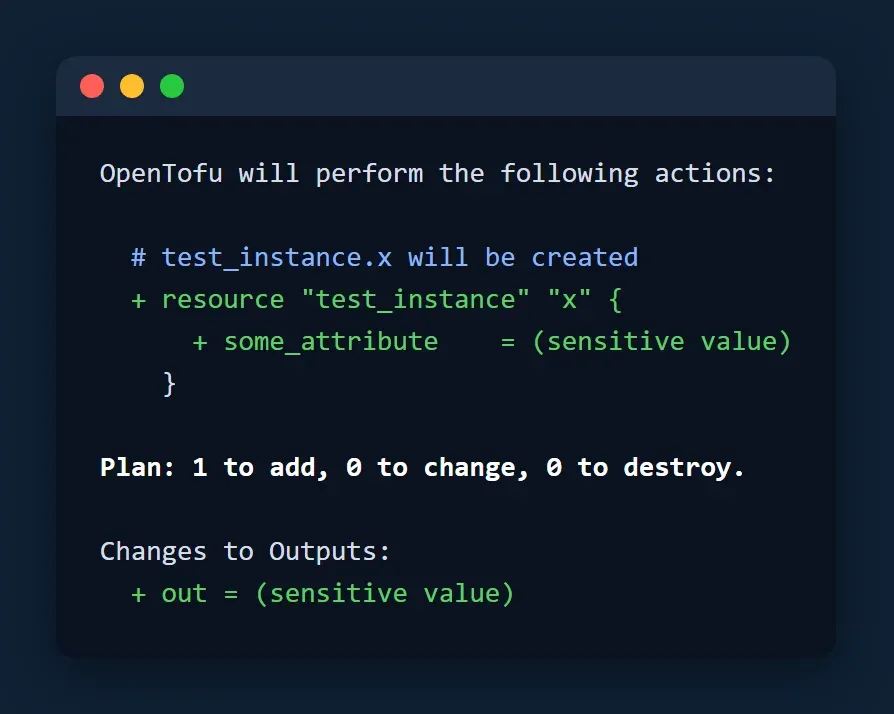
Plan output with redacted sensitive values, text copied verbatim from the OpenTofu output values documentation and rendered in a terminal-style frame.
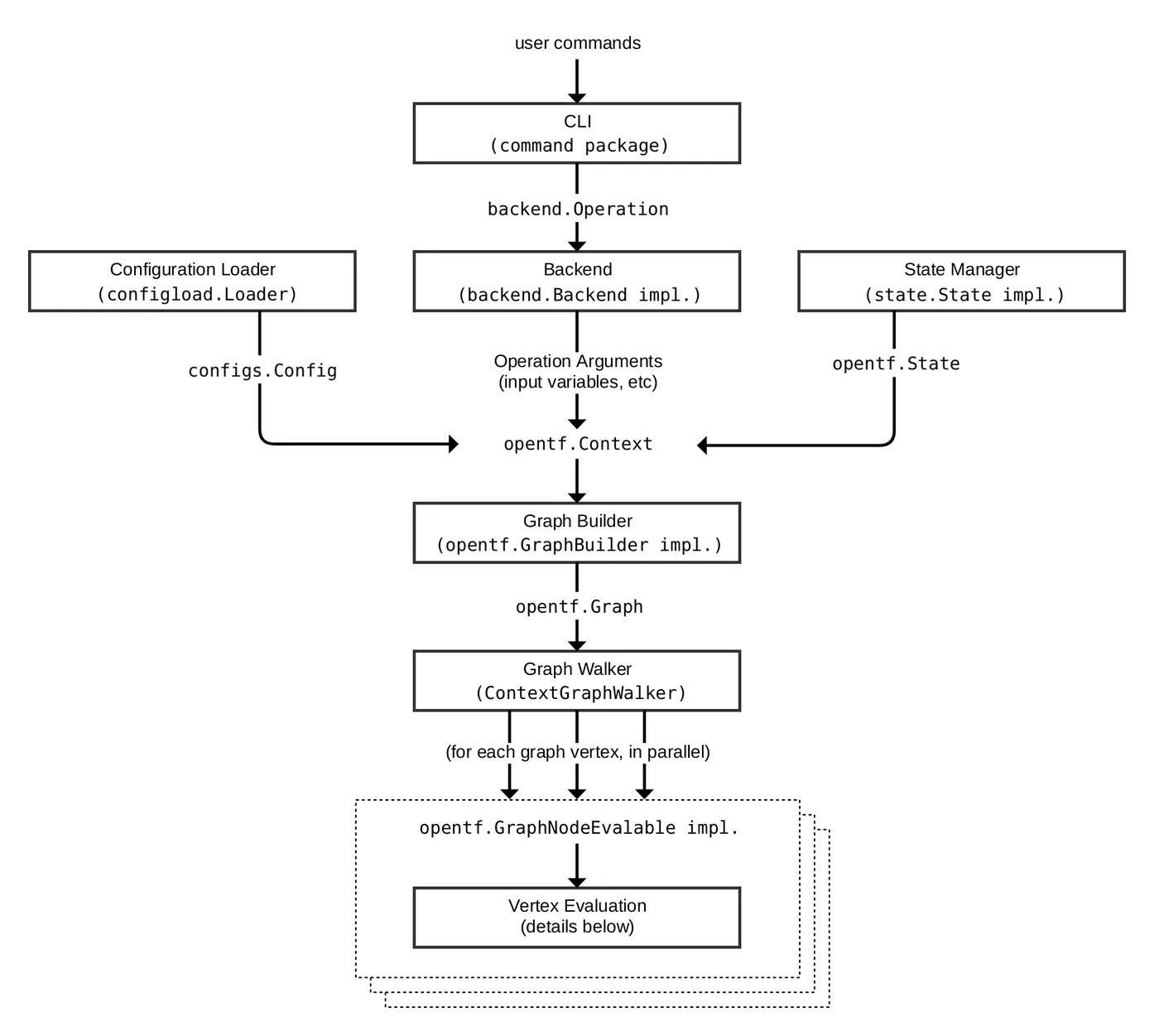
OpenTofu Core request flow diagram from the architecture summary in the project repository (docs/architecture.md).
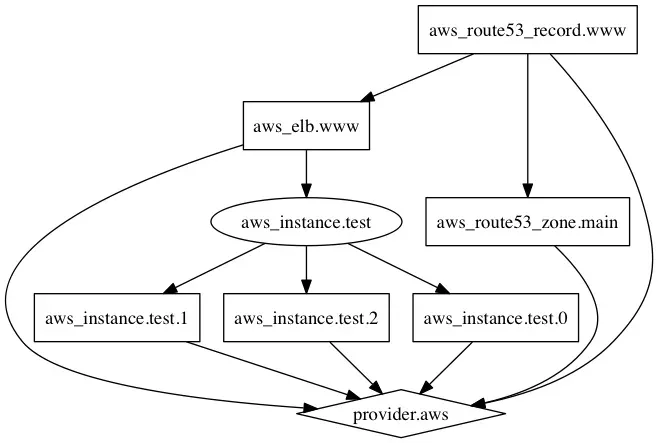
Example resource dependency graph from the tofu graph command documentation.
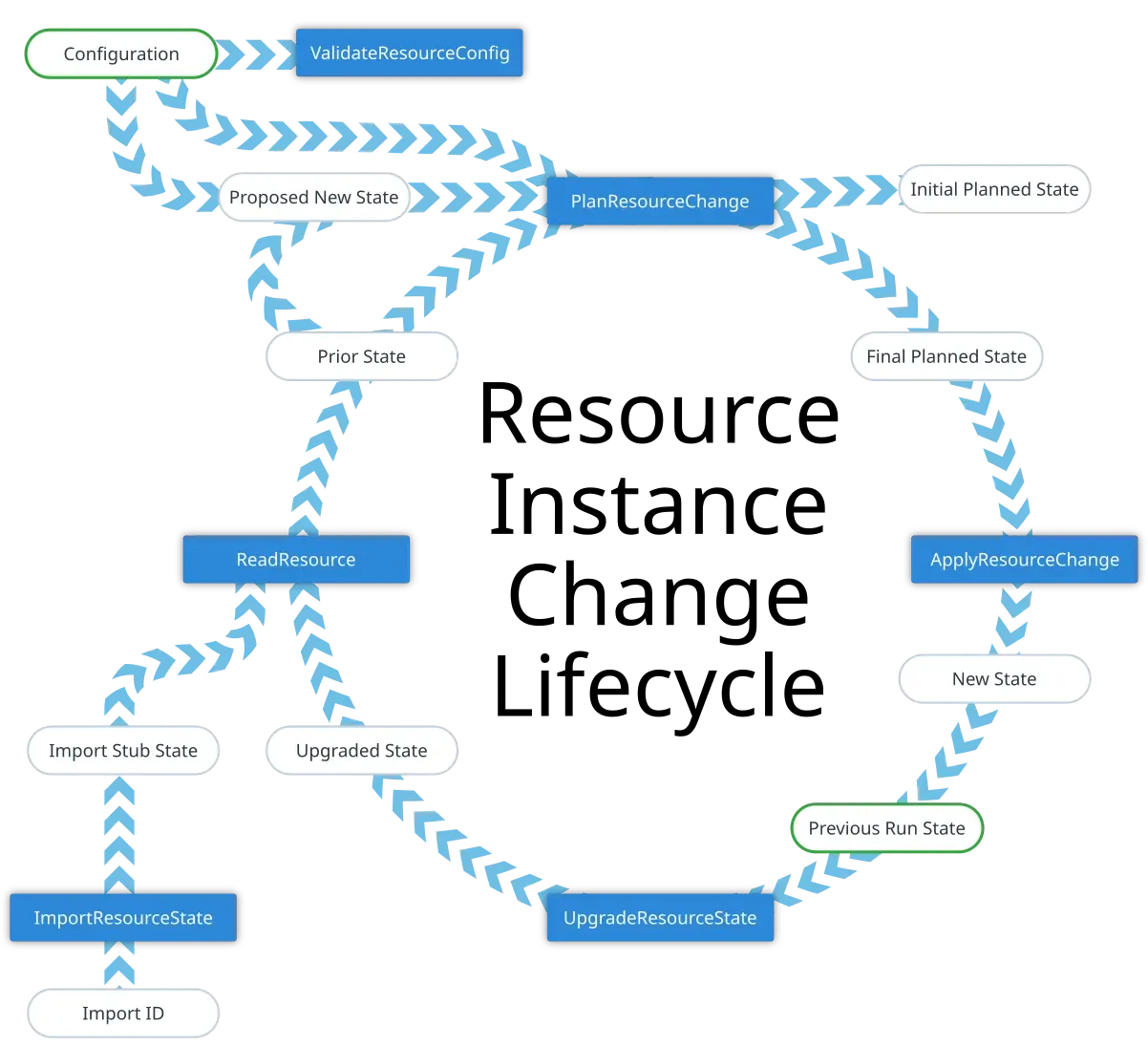
Resource instance change lifecycle diagram from the OpenTofu contributor documentation in the project repository.
Source: official OpenTofu project page.
Key capabilities
- Declarative configuration files Infrastructure is described in the OpenTofu language, an HCL-based syntax, in files ending in
.tfor the OpenTofu-specific.tofu, with JSON variants.tf.jsonand.tofu.json. When a.tfand a.tofufile share the same base name, OpenTofu reads the.tofufile and ignores the other, which lets one module carry OpenTofu-only syntax next to Terraform-compatible code. - Plan and apply workflow
tofu planproduces an execution plan that lists every resource to create, update, replace or destroy, andtofu applyshows the plan again and asks for confirmation before changing anything. Plans can be saved with-out; since 1.13 saved plan files include the provider schemas needed to render them, sotofu showusually no longer starts the providers. - Resource graph and parallel execution OpenTofu builds a dependency graph of all resources and creates or modifies resources that do not depend on each other in parallel.
tofu graphprints that graph in DOT format, which Graphviz turns into an image, as described in the graph command reference. - Providers from the OpenTofu Registry Providers are plugins that translate configuration into API calls for AWS, Azure, Google Cloud, Kubernetes, Helm, GitHub, Datadog and thousands of other services. The public registry is run by the project, and new providers can be written with the Terraform Plugin SDK. Since 1.12 the registry publishes checksums in every format, so the dependency lock file written by
tofu initworks directly with a shared plugin cache or a local mirror. - Reusable modules Modules package configurable collections of resources. They can come from local paths, the OpenTofu Registry, GitHub, Bitbucket, generic Git or Mercurial repositories, HTTP archives, S3 and GCS buckets and, since 1.10, OCI registries through
oci://sources. Early evaluation, added in 1.8, allows variables and locals in module sources and versions and in backend configuration, as long as they can be resolved duringtofu init. - State and backends The state file records the real infrastructure that the configuration manages and is used to compute each plan. Built-in backends store it locally or in S3, Azure Blob Storage, Google Cloud Storage, Kubernetes, PostgreSQL, Consul, an HTTP endpoint, Tencent COS, Alibaba OSS or a remote backend service. Since 1.10 the S3 backend can lock state with S3 conditional writes (
use_lockfile = true) instead of a separate DynamoDB table. - State and plan encryption OpenTofu can encrypt state and plan files at rest, both locally and in remote backends, and when reading other configurations through
terraform_remote_state. Key providers include a PBKDF2 passphrase, AWS KMS, Google Cloud KMS, Azure Key Vault, OpenBao and external programs, combined with AES-GCM or an external method, configured in code or through theTF_ENCRYPTIONvariable. The encryption documentation notes that encrypted state cannot be read without the key and that encryption does not protect against data loss or replay of old files. - Provider for_each and resource exclusion Since 1.9 a
providerblock can usefor_eachto create one configuration per region, account or environment from a single declaration. The same release added-excludeto skip selected resources or modules during plan and apply, and 1.10 added-target-fileand-exclude-fileto keep these address lists in version-controlled files. - OCI registry distribution Modules and provider mirrors can be stored in any OCI Distribution registry, which the release notes describe for private components and air-gapped environments. Since 1.13 OpenTofu tracks separate transient credentials for each repository, for registries that issue repository-scoped tokens, and
tofu providers lockaccepts-oci-mirror. Details are in the OCI registry documentation. - Ephemeral values and write-only attributes Since 1.11 ephemeral resources, variables and outputs carry confidential or temporary data, such as generated passwords or short-lived credentials, without storing it in state or plan files. Write-only resource attributes such as a
password_woargument accept these values and send them to the provider, which never returns them, so state and plan only ever record null for them. - Lifecycle and conditional resources The
enabledmeta-argument from 1.11, set inside alifecycleblock, creates a resource or module instance only when a boolean condition is true, replacing the oldercount = var.x ? 1 : 0pattern. Version 1.12 allowsprevent_destroyto depend on variables and addsdestroy = false, which removes an object from state without destroying the remote object. - Import and configuration generation
importblocks bring existing infrastructure under management through the normal plan and apply cycle. Runningtofu plan -generate-config-out=FILEwrites matchingresourceblocks for imported objects, a feature the documentation marks as experimental. - Built-in testing with tofu test
tofu testrunsrunblocks withassertconditions from*.tftest.hclor*.tofutest.hclfiles against a module, creating real or mocked infrastructure. Mock providers andoverride_resourceandoverride_datablocks replace provider calls; version 1.13 added instance-level overrides with wildcards. - Functions, linting and symbol libraries Configurations can call the built-in functions, provider-defined functions and, since 1.13, the
convertfunction andassume...functions that tell OpenTofu what an unknown value will look like. The same release introduced two experiments: a-lintflag that reports warning diagnostics from built-in rules, and Symbol Libraries for sharing functions, values and type aliases between modules. - Machine-readable output and tracing Many commands offer
-jsonoutput in a documented format, and since 1.12-json-into=FILEwrites that JSON to a file while the normal human-readable output still appears. Experimental OpenTelemetry tracing, added in 1.10, sends traces to an OTLP endpoint set through the standardOTEL_environment variables, and since 1.13 thelocal-execprovisioner passesTRACEPARENTto child processes. - Linux packages and installer script Official deb, rpm and apk packages exist for amd64, arm64, 386 and arm, with installation guides and convenience scripts for Debian, Ubuntu, RHEL, Fedora, openSUSE and Alpine, plus a Snap package and the FreeBSD ports and packages system. The
install-opentofu.shinstaller from get.opentofu.org verifies downloads with Cosign or GnuPG, as described in the installation guide. - macOS, Windows and other systems MacOS builds for Intel and Apple silicon require macOS 13 Ventura or later and are also available through Homebrew. Windows builds cover 386, amd64 and, since 1.13, ARM64, with installation through winget (
OpenTofu.Tofu), Scoop or a standalone zip; release archives also exist for FreeBSD, OpenBSD and Solaris. The unreleased 1.14 changelog removes official 32-bit builds. - Container images for custom builds Since 1.10 the official images are no longer supported for running OpenTofu directly with
docker run. Instead, minimal images such asghcr.io/opentofu/opentofu:minimalcontain only thetofubinary, which a multi-stage Dockerfile copies into its own image; the installer script can also be used inside a container build.
Where OpenTofu fits
Provisioning cloud resources from code
The core workflow is a loop: write configuration in a version-controlled directory, run tofu init to download providers and set up the backend, run tofu plan repeatedly while editing, and confirm tofu apply once the plan shows the intended changes. The examples on the OpenTofu home page use this loop to create an S3 bucket with the AWS provider, manage Cloudflare DNS records and set up GitHub repositories with branch protection.
Migrating an existing Terraform project
The migration guide describes six steps: back up state files and configuration, install OpenTofu, run tofu init in the project directory, run tofu plan and expect no changes or the same plan Terraform would show, run tofu apply so the state format is updated if needed, then make a small change such as adding a tag. If unexpected changes appear, the guide says not to apply them and describes a rollback to Terraform from the backups.
Reviewing changes in pull requests
For teams, the core workflow documentation describes speculative plans attached to pull requests, often produced by a CI system so that credentials stay off individual machines. The docs call platforms that orchestrate this TF Automation and Collaboration Software (TACOS). Examples include Atlantis, whose documentation covers OpenTofu as a distribution and reads .tofu files, and Terrateam, which is listed as an OpenTofu supporter. -json-into lets such tools read JSON while people still see normal output.
Keeping secrets out of plain-text state
Sensitive variables and outputs are shown as (sensitive value) in plan output but are still stored in state. To protect that data at rest, an encryption block in the terraform settings or the TF_ENCRYPTION variable enables state and plan encryption with a passphrase or a key management service, with a documented migration path from unencrypted state. Ephemeral resources and write-only attributes go further by never writing selected values to state or plan files.
Deploying across regions and accounts
A single provider block with for_each over a set of regions creates one provider configuration per region, and a module block can then use for_each with providers = { aws = aws.by_region[each.key] } to deploy the same module everywhere. The provider configuration reference explains how instance keys are derived from a map, an object or a set of strings, and -exclude can hold back selected instances during a rollout.
Bringing existing resources under management
Resources created by hand or by other tools are adopted with an import block that names the target address and the provider's import ID. tofu plan -generate-config-out=generated.tf then shows the import in the plan and writes a draft configuration for it, and tofu apply records the object in state. The configuration generation guide explains the hints added for sensitive and write-only attributes.
Install
curl --proto '=https' --tlsv1.2 -fsSL https://get.opentofu.org/install-opentofu.sh -o install-opentofu.sh && chmod +x install-opentofu.sh && ./install-opentofu.sh --install-method standaloneReviews of OpenTofu
Be the first to share your experience with OpenTofu.
Write a review
Loading review form…
Alternatives to OpenTofu
 TerraformTerraform codifies infrastructure as declarative configuration; versions 1.6.0 and later are source-available under the Business Source License, owned by IBM.
 AtlantisAtlantis is an Apache-2.0, self-hosted Go server that runs Terraform or OpenTofu plan and apply from pull request comments on GitHub, GitLab, Gitea, Bitbucket and Azure DevOps, with locking, apply requirements and conftest policies.
 SpaceliftSpacelift orchestrates Terraform, OpenTofu, Pulumi, CloudFormation, Kubernetes and Ansible workflows with stacks, policies as code and a free plan.