

What is Warpdrive?
Warpdrive is an open-source, self-hosted customer relationship manager for business-development teams, published at sneg55/warpdrive under the MIT license. It covers the core sales loop of a kanban pipeline, a deal workspace, contacts and organizations, and two-way Gmail, and the project describes itself as an alternative to Pipedrive. Its README states that the interface and code are original, that it is not affiliated with or endorsed by Pipedrive, and that it is single-tenant: one deployment serves one team on its own server.
The stack is Next.js (App Router) with React and TypeScript, Postgres through Drizzle ORM, tRPC with TanStack Query, shadcn/ui with Tailwind, a self-hosted WebSocket server fed by Postgres LISTEN/NOTIFY, pg-boss for background jobs, and Garage or another S3-compatible store for files. Sign-in uses Google Workspace, and mail uses the Gmail API over OAuth. A deployment runs an app process, a WebSocket server, a background worker, Postgres and Garage, with a Caddy reverse proxy providing automatic HTTPS.
The latest release is v2.0.0, published on November 4, 2026. Its notes describe a breaking change: bundled object storage moved from MinIO to Garage (dxflrs/garage:v2.5.0) because public registries no longer serve MinIO images. Existing installs must add a GARAGE_RPC_SECRET, check key lengths and copy files out of the old MinIO volume, using the procedure in the updating guide. Storage variables are now S3_ENDPOINT, S3_ACCESS_KEY, S3_SECRET_KEY, S3_BUCKET and S3_REGION, each falling back to its older MINIO_* name.
The project is young: the repository was created in July 2026, and its README says it is used in production for a single team's workflow and is actively developed. Documentation lives at docs.warpdrivecrm.com and in the repository's docs-site folder, and the product site is warpdrivecrm.com. The site and README list what is deliberately out of scope, including products, invoicing, forecasts, multi-currency, workflow automation, web forms and native mobile apps. The details come from the repository, release page and documentation.
Warpdrive screenshots
Explore the interface. Open a screenshot to view it at full size.
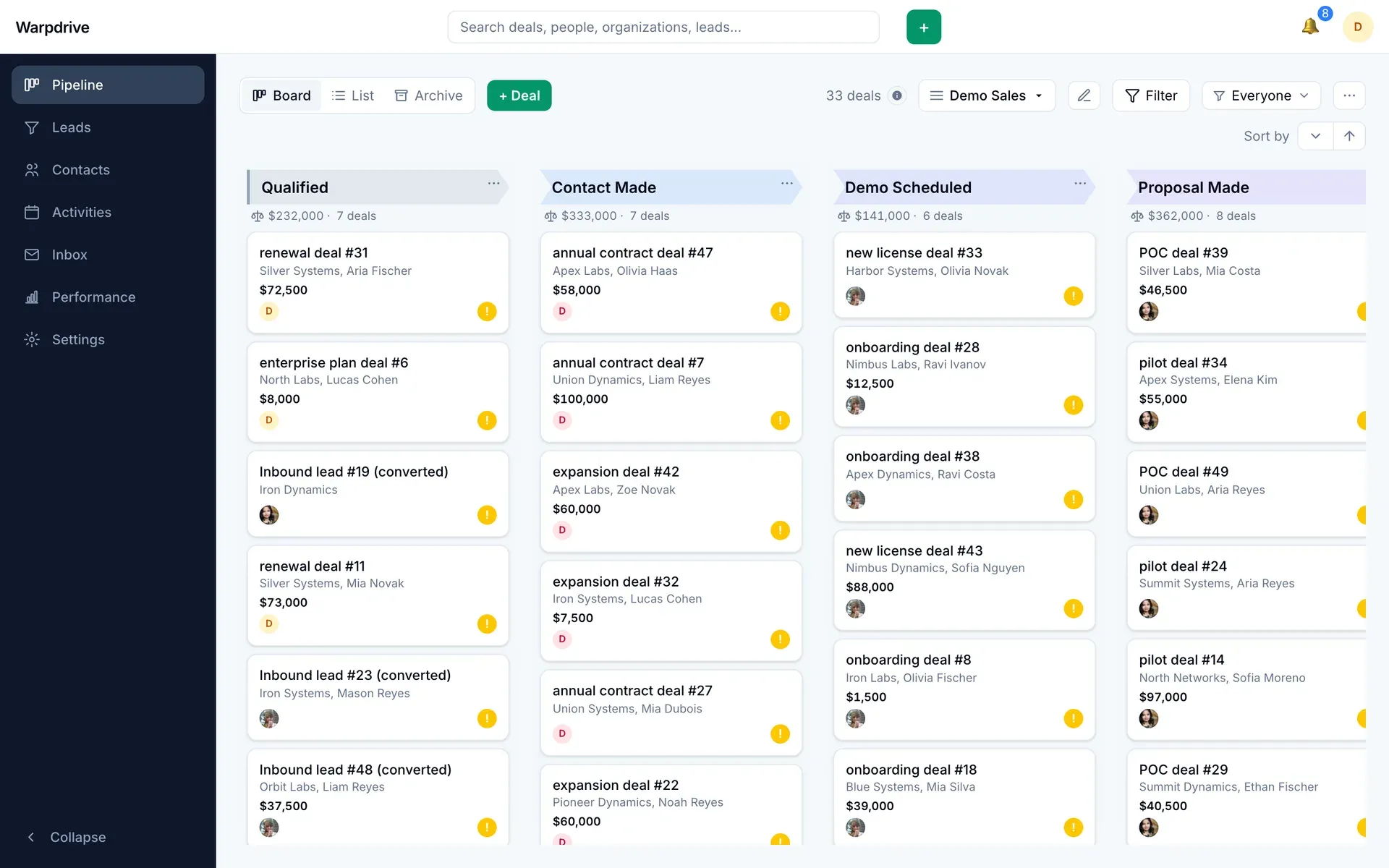
Kanban pipeline board with weighted stage totals, from the official documentation (demo data).
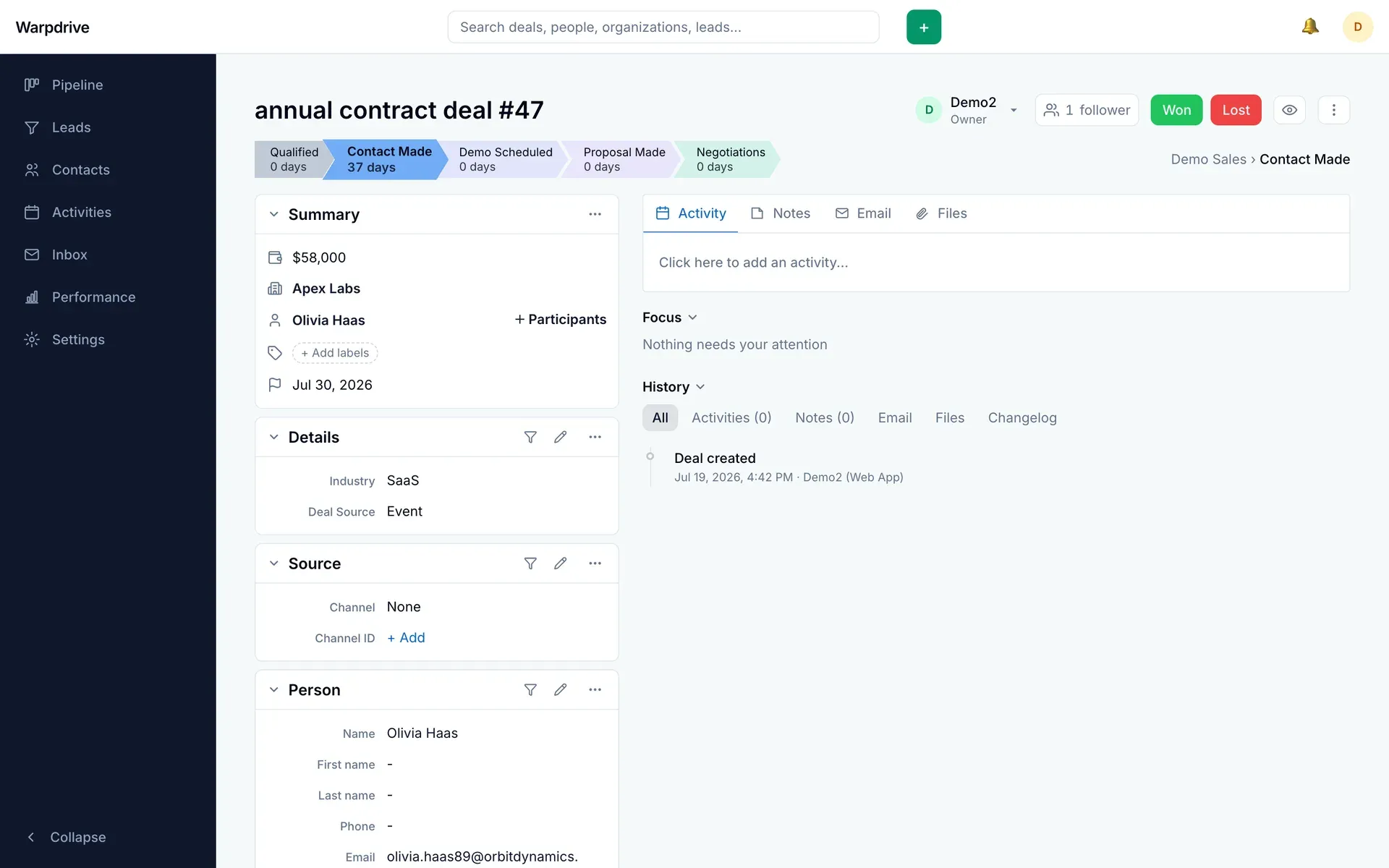
Deal workspace with stage progress, summary panels and history, from the official documentation (demo data).
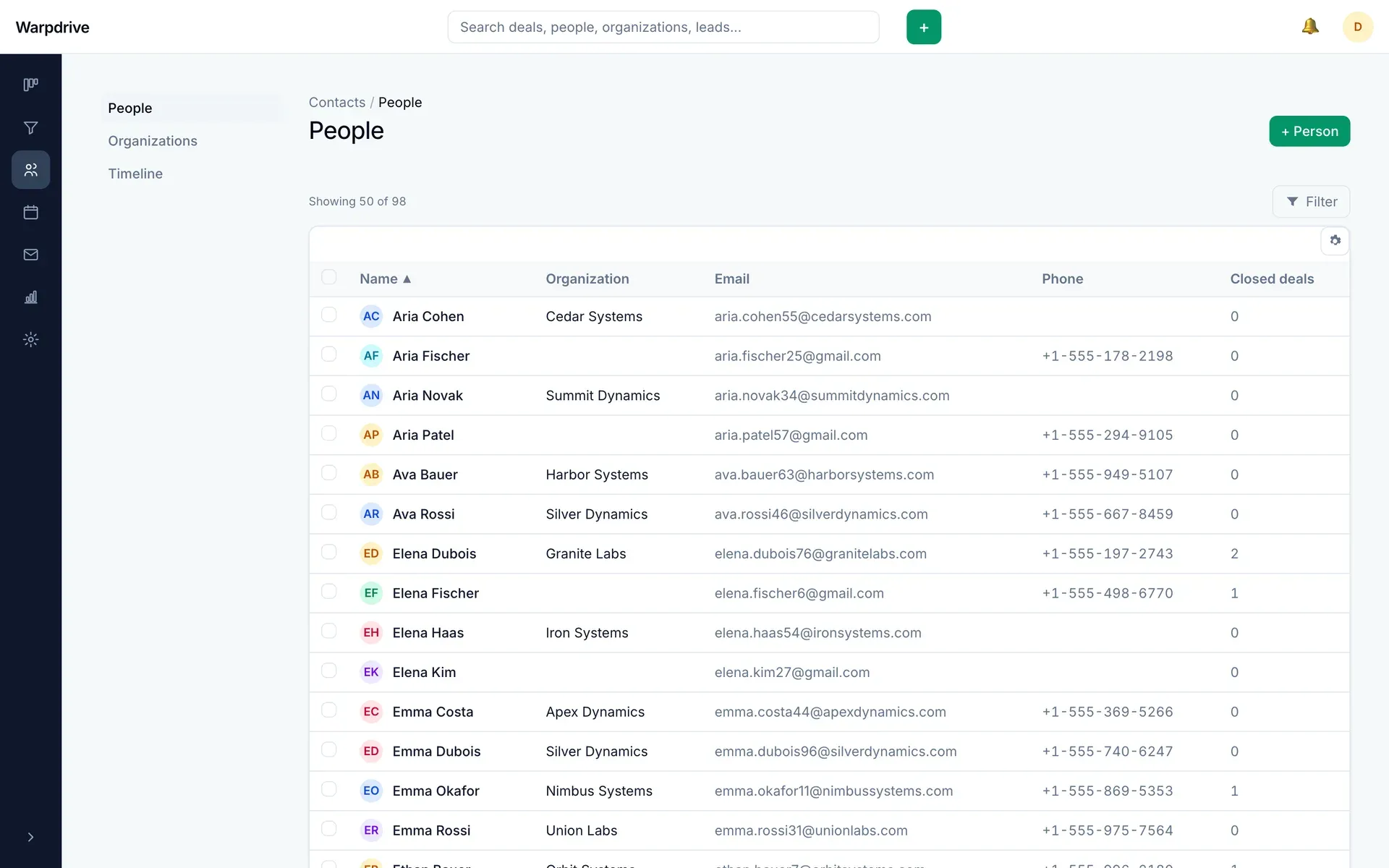
People list under Contacts, from the official documentation (demo data).
Source: official Warpdrive project page.
Key capabilities
- Kanban pipeline with custom stages Deals move across stages by drag and drop, and a deployment can hold several pipelines with their own stages. Each stage shows weighted totals, rotting-deal indicators and saved filters, and the pipeline has board, list and archive views.
- Deal workspace and timeline A deal page combines a summary, details and linked person and organization with tabs for activities, notes, email and files. The history timeline records changes, with a stage-progress bar showing days spent per stage and Won and Lost buttons to close the deal.
- Contacts and organizations People and organizations carry custom fields stored as JSONB, so administrators can add fields without a schema migration. Organizations have firmographic fields and relationships to other organizations.
- Leads inbox and CSV import A leads area holds prospects before they become deals, and CSV import includes an undo step. Converting a lead creates a deal; the Pipedrive migration guide advises converting only after all files are imported.
- Migration from Pipedrive CSV exports The import wizard reads Pipedrive exports of organizations, people, leads, deals, activities and notes in a fixed order, matching owners by email then name. The guide lists what is kept and what is not, such as lead source and channel.
- Two-way Gmail Each user connects their own mailbox over OAuth, and threads link to deals and people so mail appears on the record. Sync starts from the connection time with no backfill of older mail, which matters when planning a rollout.
- Email composing and tracking Templates, signatures, merge fields and scheduled send are supported, along with open and click tracking. The Inbox folder is personal, while shared visibility happens on linked records.
- Activities and calendar Activities are tracked per deal or lead with done states, list and calendar views and keyboard navigation. Overdue imported activities do not trigger reminders, according to the migration guide.
- Roles, teams and visibility Permission sets, teams, user management and visibility groups control what each person can see. Search, performance numbers and MCP calls all respect the same visibility rules, so two users can legitimately see different totals.
- Performance page and quota goals The performance dashboard reports deals added, won, lost and open, activity counts, win rate, deal size and sales cycle length, plus a stage funnel built from stage history. Goals have targets and show pace against the period. The README calls the stats basic compared with a mature SaaS CRM.
- Enrichment from lead providers A Fill the gaps button queries connected providers, Apollo, RocketReach and GetProspect, and opens a review dialog. Nothing is written until you apply it, and keys are stored encrypted by an administrator. This sends record data to those third parties.
- MCP server for AI assistants The built-in remote MCP endpoint at
/api/mcpuses OAuth 2.1 with PKCE and delegates login to Google sign-in. Tools cover search, deals, leads, people, organizations, activities, notes and email drafts, with no delete tool for CRM records and no send tool. - Realtime updates The board, inbox, notifications and presence update over a self-hosted WebSocket server.
NEXT_PUBLIC_WS_URLmust be set at build time, otherwise the app looks healthy but live updates silently never arrive. - Global search and shortcuts Header search covers deals, people, organizations and leads, grouped by type, and finds organizations by domain. Keyboard shortcuts jump between sections and open quick add.
- Docker Compose deployment One
docker compose up -d --buildstarts the whole stack. It needs a Linux host with Docker, a domain, a second DNS record for ans3.subdomain used for direct file uploads, open ports 80 and 443 and a Google OAuth client. - Documented administration Docs cover company settings, data fields, email sync, permission sets, users and teams, visibility groups and the architecture. A
.envfile is validated at startup, so a misconfigured deployment fails loudly at boot rather than later. - Test suite The repository provides unit tests and integration tests that run against a disposable real Postgres through Testcontainers rather than a mock, which exercises migrations and queries as they run in production.
Where Warpdrive fits
Running a small business-development pipeline
Create a pipeline with the stages your team actually uses, add deals from the quick-add menu and use saved filters for each owner. Check the weighted stage totals against a manual count at first, and confirm who can see which deals before inviting the whole team. Decide early who may create pipelines and custom fields, since those permissions are set per role.
Moving from Pipedrive
Invite users first so owners match, create pipelines and stages if their order matters, then export each record type as CSV with the ID column and import in the documented order. After the run, compare record counts and a handful of deals, and read the list of fields that do not carry over.
Working email into deals
Connect each salesperson's Gmail account and link threads to the relevant deal or person. Remember that sync starts at connection time, so earlier conversations stay in Gmail. Verify open and click tracking against your privacy notice before using it with customers.
Letting an AI assistant search and draft
Enable the MCP server with a signing key, add the endpoint as a connector in your assistant and approve its sign-in. Test with read requests first, then writes. Because there are no delete or send tools, review drafts yourself and check the change log for the actions taken on your behalf.
Reporting on pipeline health
Use the performance page for win rate, cycle length and the stage funnel, and set quota goals with pace. Compare as the same user when numbers disagree, since visibility scoping changes totals by design. For advanced forecasting, plan an export or a separate tool.
Self-hosting and upgrading
Provision a box, DNS records and the Google OAuth client, fill in .env and bring up the Compose stack. Back up Postgres and the Garage volume before each upgrade, and read release notes first, as v2.0.0 changed object storage and needs manual steps for existing installs. Keep the previous image available so you can roll back if the migration step fails.
Reviews of Warpdrive
Be the first to share your experience with Warpdrive.
Write a review
Loading review form…
Alternatives to Warpdrive
 TwentyTwenty is an open-source CRM with custom objects, workflows, AI agents and REST and GraphQL APIs, run on a managed cloud or self-hosted.
 Atomic CRMOpen-source CRM from Marmelab built with React, shadcn-admin-kit and Supabase. It covers contacts, companies, deals, notes and tasks, with inbound email capture, SSO, a mobile web app, a REST API and an MCP server.
 Frappe CRMFrappe CRM is an open-source sales CRM from Frappe Technologies for leads, deals, email, calls and tasks. It is AGPL-3.0, has no per-user pricing, and runs self-hosted with Docker or bench or on Frappe Cloud.