

What is Kiri?
Kiri is a container runtime for macOS, Windows and Linux, written in Rust and released under the Apache License 2.0. The project describes it as a lightweight replacement for Docker Desktop and OrbStack: it implements the Docker Engine API, so the regular docker CLI, Docker Compose, buildx and docker login work against it through a kiri Docker context that is created the first time the app opens. The name comes from the Igbo word ntakiri, meaning small. The project website is runkiri.com.
On macOS, Kiri runs containers in one small Linux VM using Apple's Virtualization framework; on Windows it runs inside a WSL 2 distro and serves the Docker API on a named pipe; on Linux there is no VM and the agent uses the host kernel. The VM boots a custom Linux kernel of about 10 MB, and PID 1 is a Rust guest agent of about 900 KB that starts each container with a single clone3 call into namespaces and a cgroup, without runc, a shim or dockerd. The development documentation describes the architecture. According to the README, the VM sleeps after 60 seconds idle, the daemon stays at about 15 MB and wakes in about 0.15 s, and the project's benchmark in bench/results.json measures a container run and removal through the Docker Engine API at a median of 2.55 ms, rerunnable with kiri bench.
The latest release is Kiri 0.2.0, published on November 10, 2026, following releases 0.1.14 to 0.1.18 earlier in November. Version 0.2.0 added USB devices in containers as a beta on all three platforms, an interface in 15 languages, and container names answering on chosen ports. It also fixed VM stops under heavy network traffic on the Mac, ran amd64 builds through Rosetta on Apple silicon, reported real sizes in docker system df, accepted images saved by Podman in docker load, and let Linux packages install beside Docker's own Compose and buildx. Older notes are in the release notes folder.
Installers are distributed from runkiri.com/releases and GitHub Releases: DMGs for Apple silicon and Intel Macs, MSI packages for x86-64 and Arm Windows, and .deb and .rpm packages for Linux, plus a SHA256SUMS file and the guest kernel source. Mac apps and DMGs are signed with a Developer ID and notarized, and kiri update checks the SHA-256 and signature of each new release. The guest kernel is Linux under GPL-2.0, with its configuration, patches and source offer in the repository. The name Kiri and its logo are not covered by the license; forks are asked to use a different name and logo. Questions go to GitHub Discussions.
Kiri screenshots
Explore the interface. Open a screenshot to view it at full size.
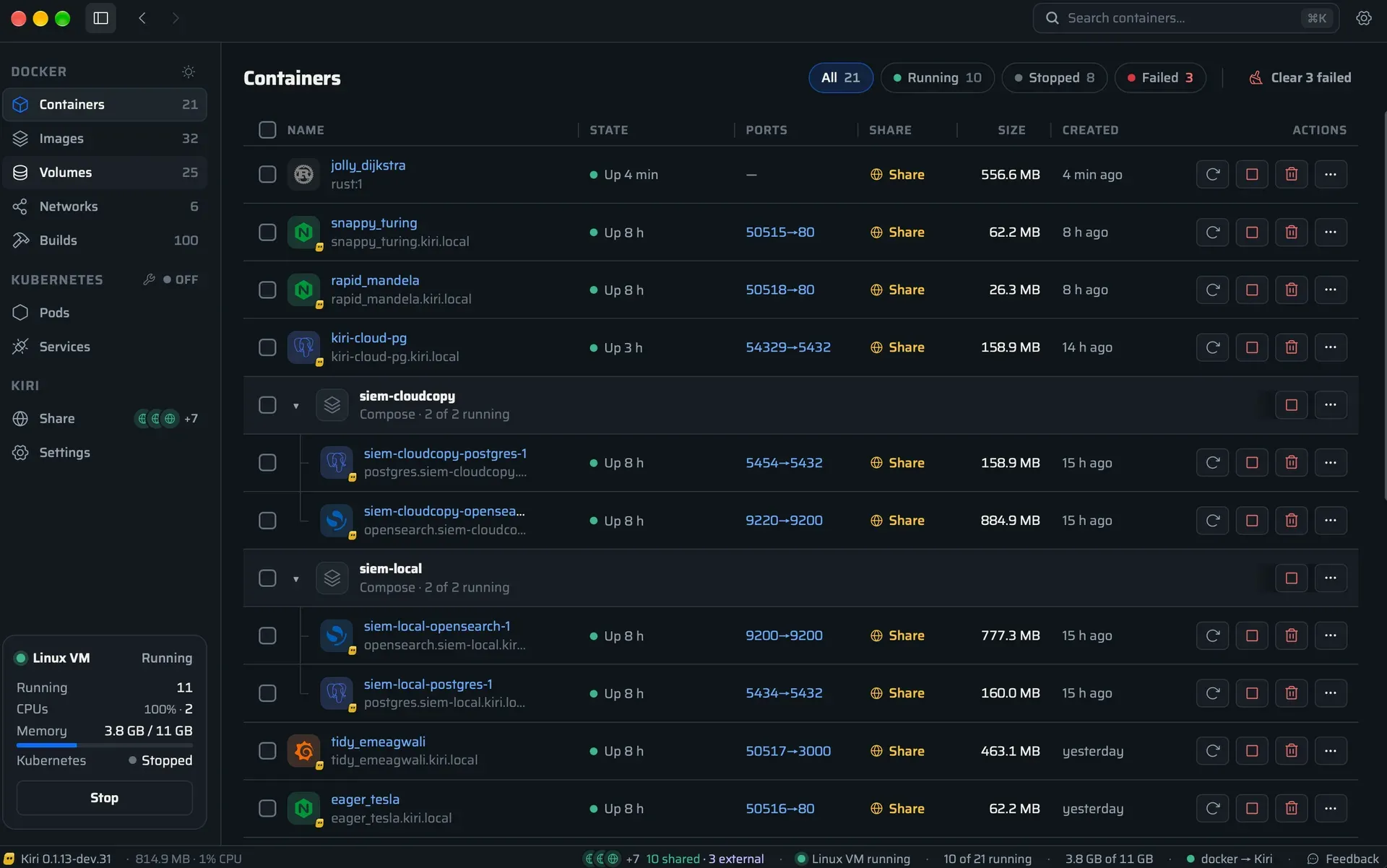
Kiri Containers window on macOS, from the project README.
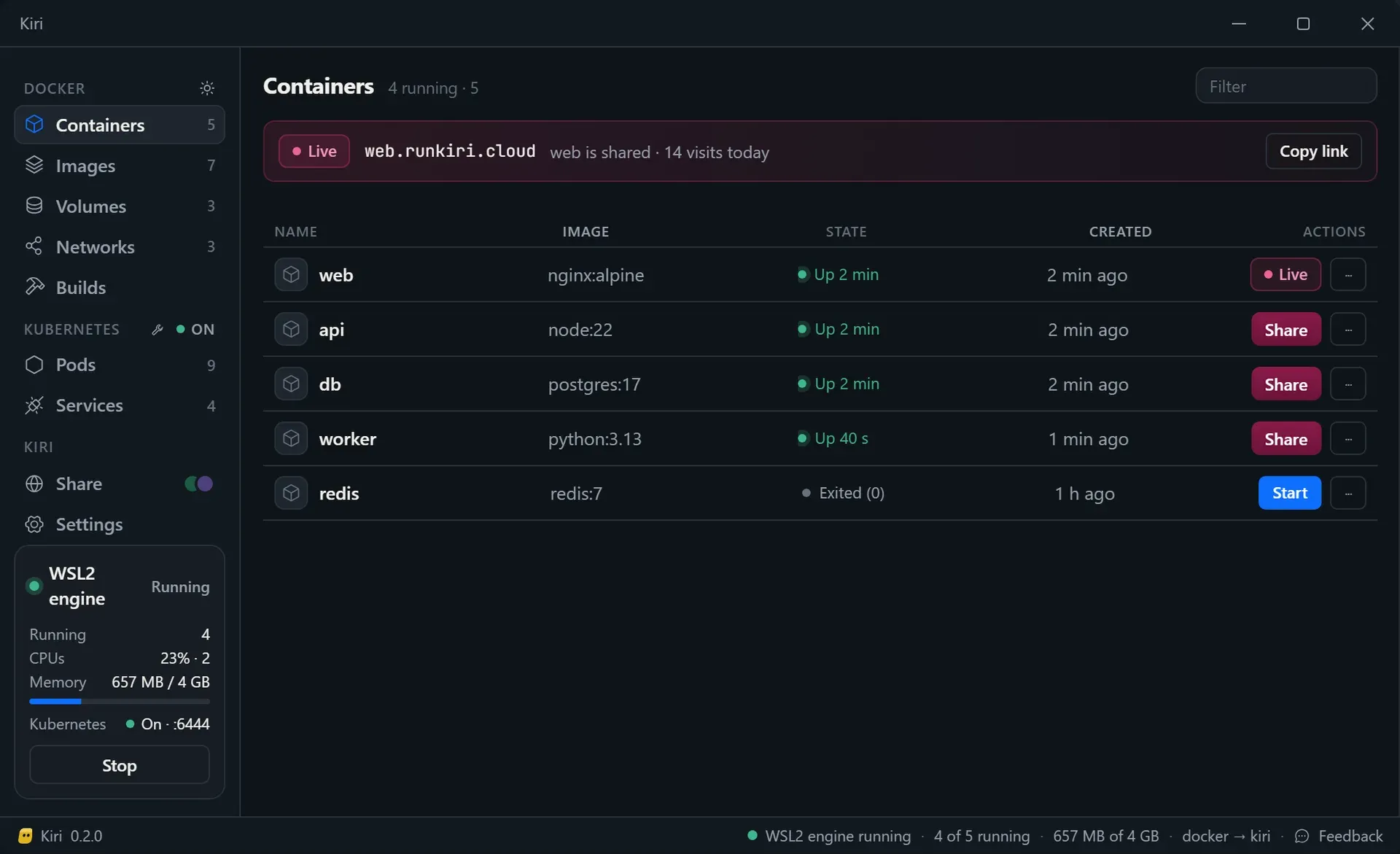
Kiri on Windows with the WSL2 engine running and Kubernetes on, as shown on runkiri.com.
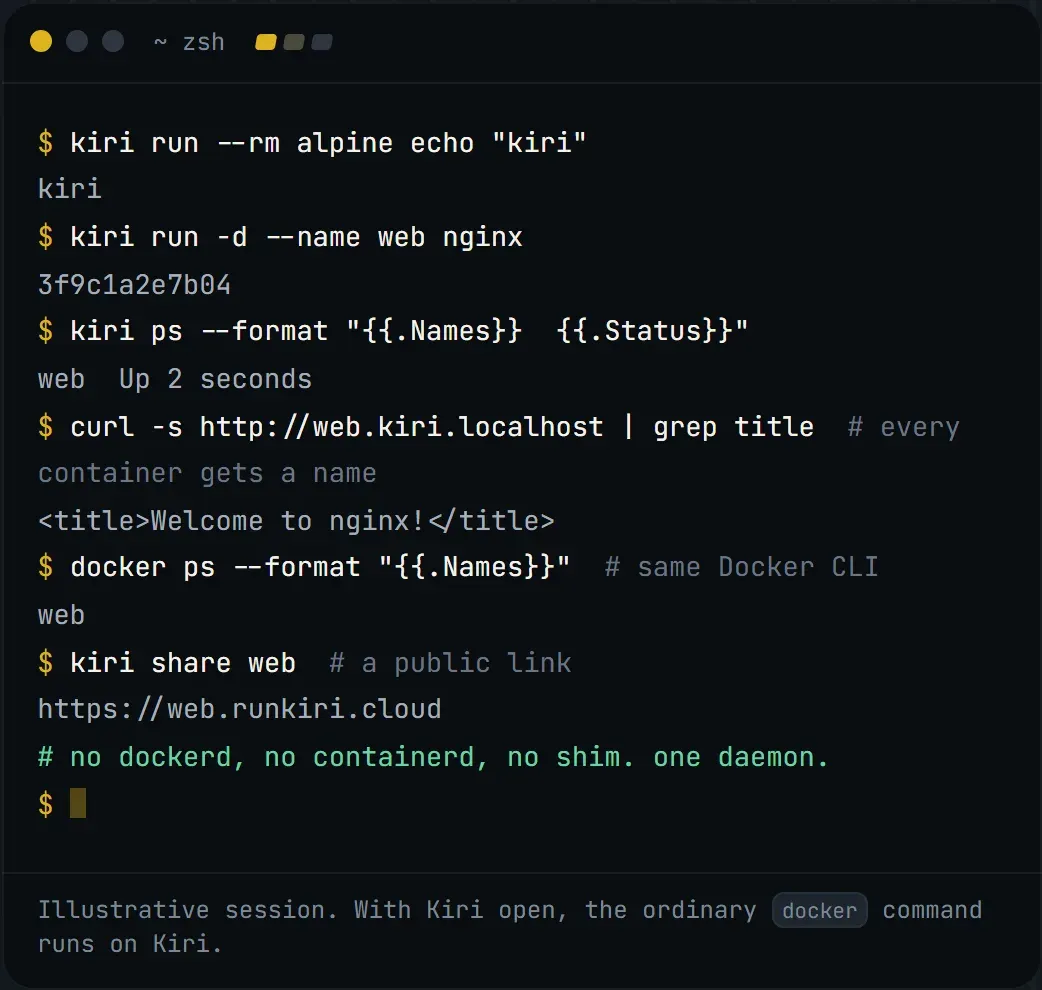
Illustrative terminal session from runkiri.com: kiri and docker commands, a local domain and a public share link.
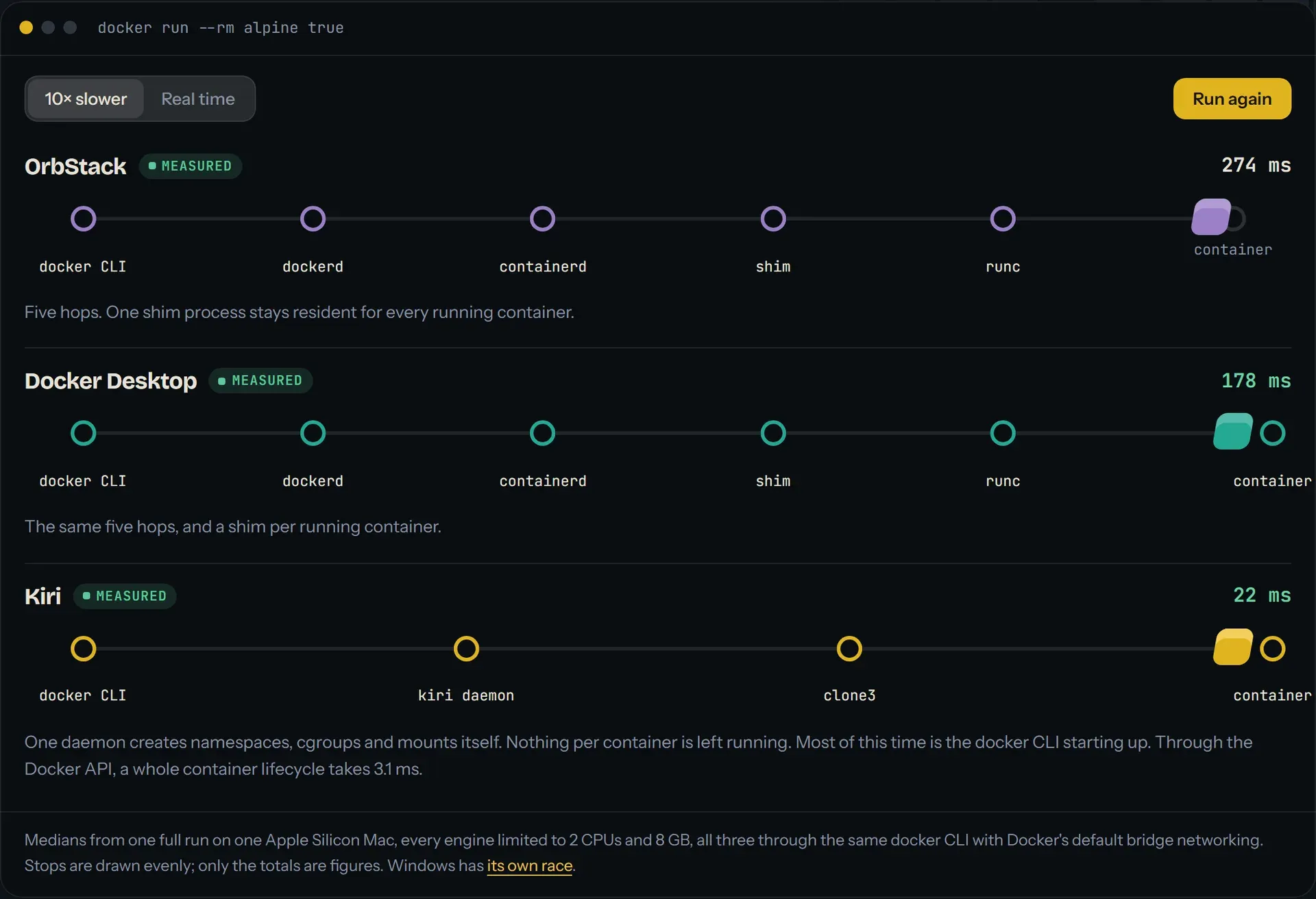
Container start path comparison published on runkiri.com, with medians measured by the Kiri project on one Apple silicon Mac.
Source: official Kiri project page.
Key capabilities
- Download Kiri for macOS MacOS 14 or later on Apple silicon or Intel:
Kiri-<version>-arm64.dmgor-x86_64.dmgbundles the docker CLI, Compose and buildx. A Lite DMG leaves those out and downloads the same pinned, SHA-256-checked versions on first launch unless a docker CLI already exists. Downloads are on runkiri.com/releases. - Download Kiri for Windows Windows 10 and 11 on x86-64 or Arm, through WSL 2: a per-user MSI installs
kiri-win.exe, which serves the Docker API onnpipe:////./pipe/kiriand carries it into WSL over a single bridge, so WSL and Windows network settings are not changed. Akiri.ps1script installs the same without an MSI. - Download Kiri for Linux The
kiripackage comes as.deband.rpmfor amd64 and arm64, with the docker CLI, Compose and buildx, andkiri-liteships the engine alone. The project tests on Ubuntu and Fedora. Membership of thekirigroup is root-equivalent, like thedockergroup. - Docker Engine API compatibility Containers support
runwith common flags,exec,logs,attach,stop,kill,pause,update,stats,top,diff,export,commit,cpand prune. Records survive a daemon restart. Docker's commands also exist askirisubcommands, such askiri runandkiri compose up, which always target Kiri. - Limits and container security Memory, CPU, CPU shares, PID and shm limits are supported, with Docker's default capabilities and seccomp filter,
--cap-add,--cap-drop,--privileged,--read-onlyandno-new-privileges. According to the features document, even privileged and unconfined containers get no vsock sockets and no io_uring. - Networking Kiri provides a default bridge, user networks with DNS by name and alias, host and none modes, published TCP and UDP ports,
host.docker.internal, shared container network namespaces, IPAM options, static IP and MAC addresses, custom DNS settings and IPv6 subnets on user networks. - Local domains with HTTPS Containers answer at
http://<name>.kiri.localhostwith no setup, or at<name>.kiri.localonce enabled; Compose services use<service>.<project>.kiri.local, and a label can set custom names. HTTPS uses Kiri's own certificate authority in~/.kiri/tls, whose name constraints allow only*.kiri.localand*.kiri.localhost. - Storage and images Named and anonymous volumes, bind mounts of Mac paths over virtiofs, tmpfs and
--mountare supported. Images can be pulled withdocker logincredentials, pushed, tagged, saved, loaded and pruned, and amd64 images run through Rosetta on Apple silicon. - Builds and Compose
docker buildandbuildx buildrun through BuildKit in a Kiri container using buildx's docker-container driver, stopped when idle. Composeup,down,ps,logs,exec, multiple networks and events work. The documented known issue is that--add-host name:host-gatewayfails with BuildKit until a built-in builder lands. - Kubernetes in one command
kiri k8s startruns a single-node k3s cluster in one container, ready in about 20 seconds, as thekirikubectl context. LoadBalancer services are published on localhost. - Linux machines
kiri machine create dev --distro ubuntuandkiri machine shell devcreate a Linux machine with the user's account, sudo and/Usersat the same path. The--systemdoption boots systemd as init. - USB devices (beta) Since 0.2.0, serial adapters, Zigbee sticks and other USB devices can be passed to containers on Mac, Windows and Linux. The device details show its Linux path and the matching
--deviceoption. - Native window and menu bar The app lists containers, images, volumes and networks, groups Compose projects for start, stop, restart or removal, and gives each container a page with details, live logs with search and level filter, a command line and a file browser. It uses AppKit and WebKit on the Mac, Win32 and WebView2 on Windows. On the Mac it stays in the menu bar with VM state and running containers.
- Mac integration Container files appear read-only in Finder at
~/Kiri, and SSH agent forwarding is available at/run/host-services/ssh-auth.sock. A memory balloon returns unused memory to macOS while the VM runs. - Migration and sharing
kiri importbrings images, volumes and containers over from OrbStack or Docker Desktop. The website also describeskiri share, which gives a running container a public HTTPS link on a runkiri.cloud address. - Resources and languages Settings cover fonts, text size, the VM's CPUs and memory (stored in
~/.kiri/vm.json, overridable withKIRI_CPUSandKIRI_MEMORY_MIB) and local names. The window and setup are available in 15 languages, following the system language.
Where Kiri fits
Running Docker workloads on a Mac
After installing the DMG and opening the app, the kiri Docker context is set up and commands such as docker --context kiri run --rm alpine echo hello or docker --context kiri compose up -d run against Kiri's VM. Similar tools in this directory include OrbStack, Docker and Colima.
Developing web services with named local URLs
Instead of remembering published ports, containers and Compose services can be reached at <name>.kiri.localhost or <service>.<project>.kiri.local, with HTTPS from Kiri's local certificate authority. Since 0.2.0, Settings, Domains chooses which ports container names answer on.
Testing on a local Kubernetes cluster
kiri k8s start creates a single-node k3s cluster and the kiri kubectl context, so manifests and Helm charts can be applied locally; LoadBalancer services become reachable on localhost.
Containers on Windows through WSL 2
On Windows 10 and 11, the MSI installs Kiri into a WSL 2 distro and exposes the Docker API on a named pipe, so the Windows docker CLI and Compose use the kiri context without changes to WSL networking. Setup continues after a failed step and reports the reason, as of 0.2.0.
Running the engine on a Linux host
On Ubuntu, Fedora and other distributions, the .deb or .rpm package runs the same agent on the host kernel without a VM, either bundled with the docker CLI, Compose and buildx or as kiri-lite. It can be installed beside Docker's own Compose and buildx.
Moving from Docker Desktop or OrbStack
kiri import copies images, volumes and containers from an existing OrbStack or Docker Desktop setup, and kiri bench reruns the project's start-up benchmark on the local machine.
Reviews of Kiri
Be the first to share your experience with Kiri.
Write a review
Loading review form…
Alternatives to Kiri
 OrbStackOrbStack is a proprietary macOS application for Docker containers, Kubernetes and Linux machines. It includes Docker CLI tooling and Compose, with separate personal-use and commercial licensing terms.
 ColimaColima is an MIT-licensed CLI for local container runtimes on macOS and Linux, with Docker or containerd, optional Kubernetes and multiple instances.
 PodmanPodman is an Apache-2.0 container engine for OCI images, containers and pods. It runs on Linux and uses a managed Linux machine on macOS and Windows, with a CLI and a documented REST API.