
What is ZapFast?
ZapFast is a desktop WhatsApp client written in Rust with the egui immediate-mode GUI library and fastframe, a shared framework for a family of native desktop apps that also includes the Spotify client Spotifast. It is developed in the crmne/zapfast repository under the MIT license. The project was previously called FastsApp; version 0.13.0 introduced the ZapFast package and executable names and moves existing sessions and data on first start.
The README describes ZapFast as an unofficial client that is not affiliated with WhatsApp or Meta. It states that using an unofficial client may be against WhatsApp's terms of service and could get an account suspended, and that it is used at the user's own risk. The account safety section of the guide adds that ZapFast uses WhatsApp's companion-device protocol, sends normal receipts, does not automate or send messages in bulk, and that WhatsApp may still restrict accounts that use unofficial clients. WhatsApp is a trademark of WhatsApp LLC.
Technically, ZapFast registers as a linked device through the whatsapp-rust library, which the project describes as growing out of the whatsmeow lineage. It is a single binary with no browser engine and a layout similar to WhatsApp Web. Messages are stored in an encrypted SQLite archive per account, with the key in the operating system keyring. The benchmark page reports a median of 150 MB idle RAM for version 0.13.1 against 1.13 GB for WhatsApp Web with Chromium on one Linux desktop, and about 200 MB for 0.16. The interface is translated into English, Chinese (Simplified and Traditional), Dutch, French, German, Indonesian, Italian, Brazilian Portuguese, Russian, Spanish and Turkish.
The latest release is v0.21.1, published on November 3, 2026. It fixes the disappearing-messages timer added in 0.21.0, aligns the info panel header and plays videos whose files place the aspect ratio before the decoder settings. Version 0.21.0 added chat export, link previews on sent messages generated on the local machine, contact blocking, disappearing-message controls, attachment progress and cancel, keyboard and screen-reader navigation through messages, and download folders per account and chat. Version 0.20.0 added voice and video calls, a Calls page, group invite links and management, starred and pinned messages and deletions that sync with the phone; its notes describe video calls as alpha and group calls as an experiment.
Release assets cover a universal macOS DMG signed with a Developer ID and notarized, Windows MSI installers and portable zips for x86_64 and ARM64, Linux tarballs and AppImages for x86_64 and aarch64, DEB and RPM packages, and a Flatpak bundle, with SHA-256 checksums. The download page also lists a Homebrew cask, AUR packages and a Nix flake with a Home Manager module. Similar listings on iThub include the messengers Signal and Element.
ZapFast screenshots
Explore the interface. Open a screenshot to view it at full size.
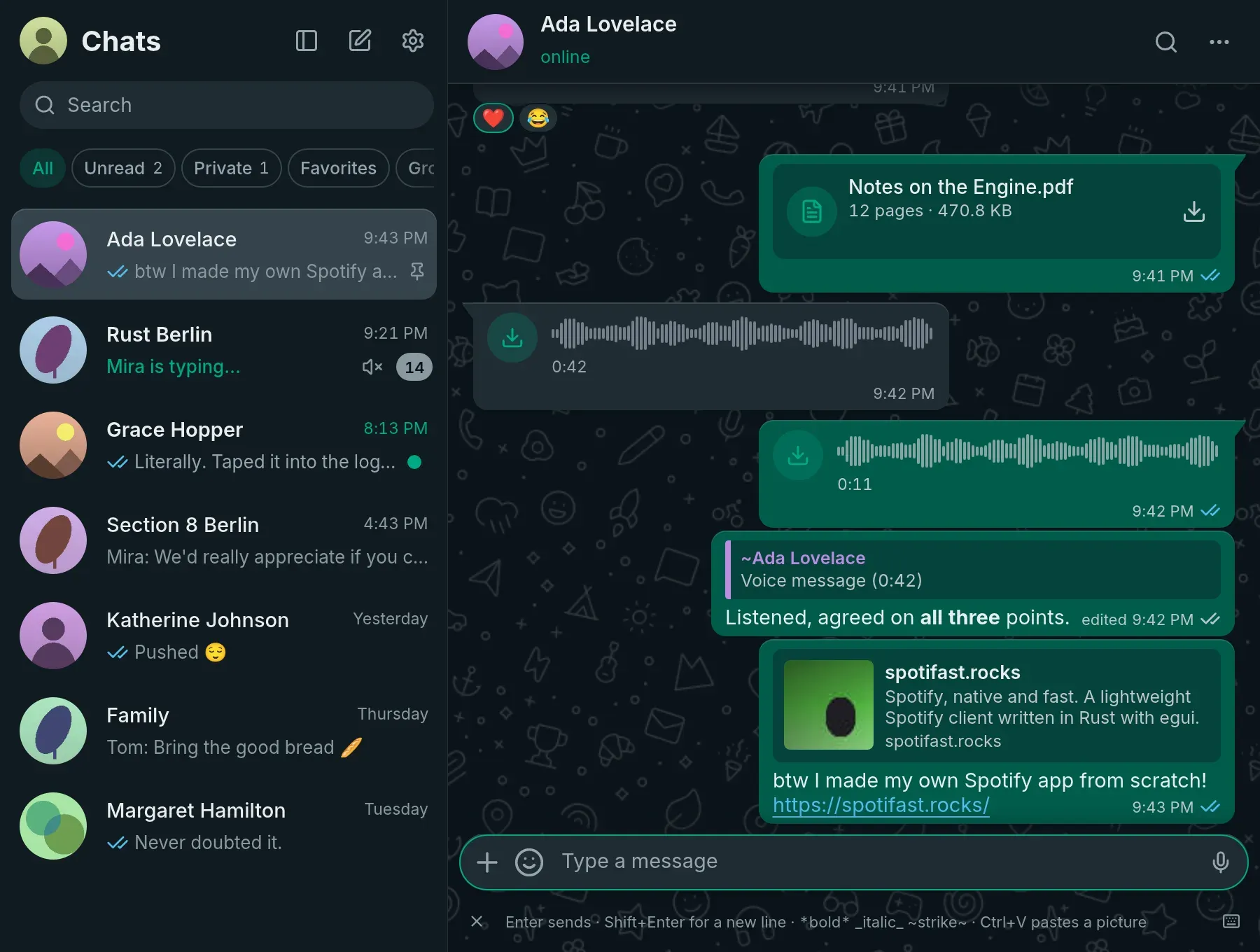
ZapFast conversation view in the dark theme, with the project's built-in demo content.
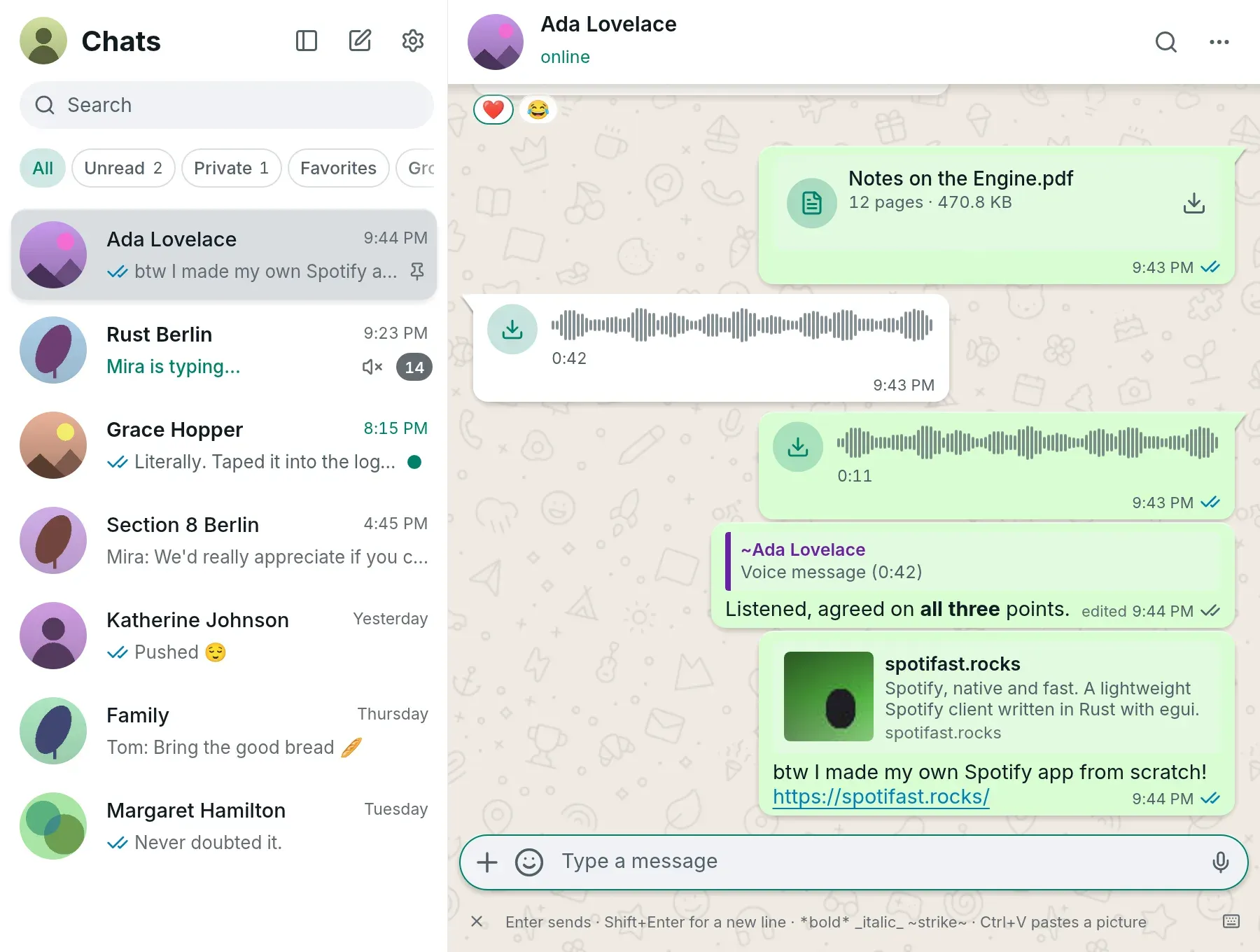
The same conversation in the light theme, with All, Unread, Private and Favorites filters above the chat list (demo content).
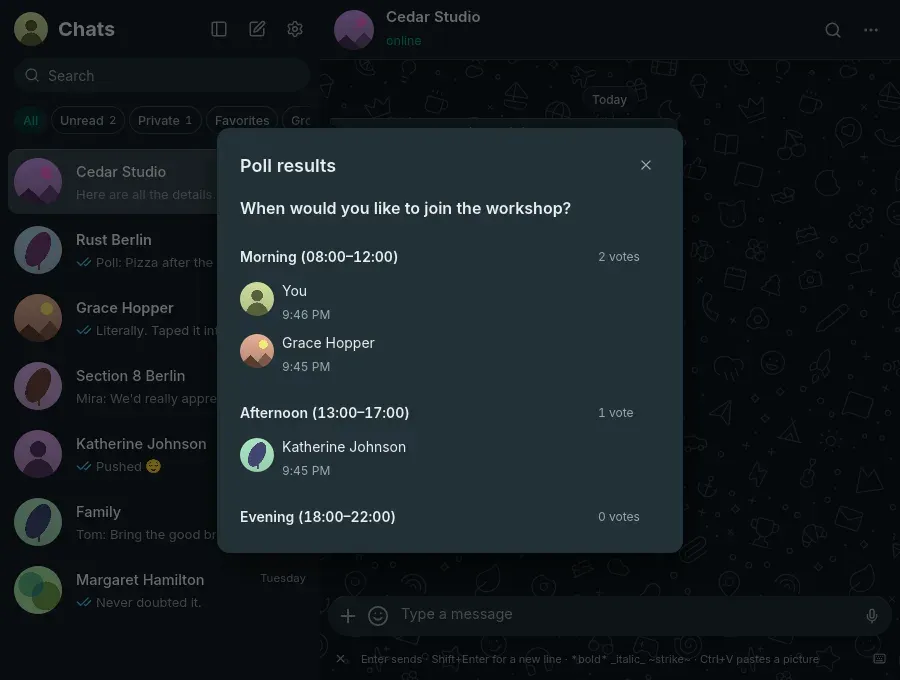
Poll results dialog showing who voted for each option (demo content).
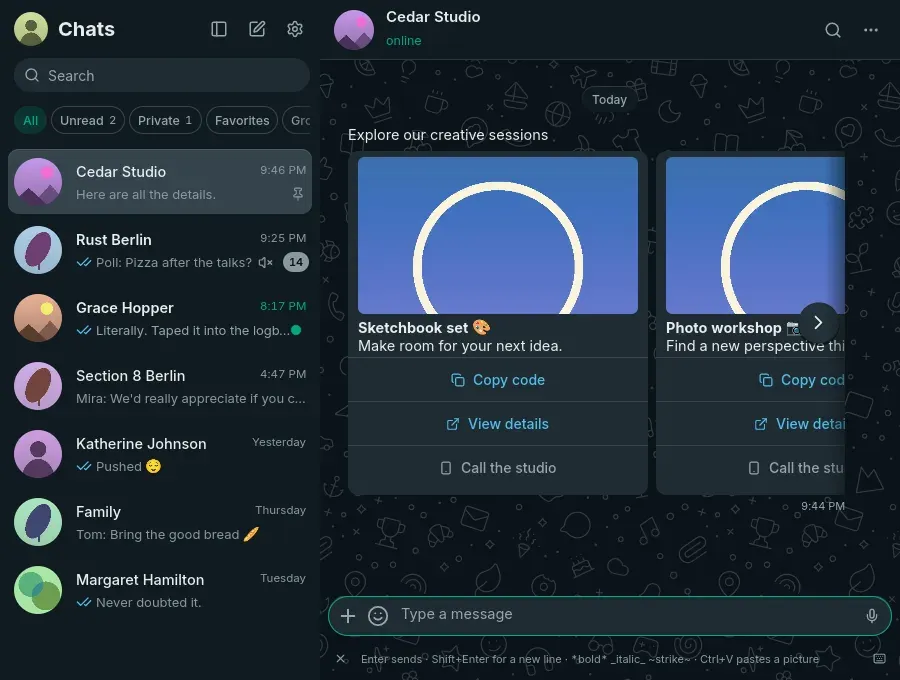
An interactive business message displayed as cards with copy-code, link and call buttons (demo content).
Source: official ZapFast project page.
Key capabilities
- Companion-device linking On first start ZapFast shows a QR code to scan from WhatsApp's Linked devices screen, or pairs with an eight-character code after Link with phone number. Recent chats arrive from the phone and older messages follow while scrolling. Each linked device allows one connection, so two clients with the same device keys disconnect each other.
- Messages ZapFast sends formatted text, replies, edits, reactions, forwards, pictures, files, stickers, GIFs, polls and recorded voice messages. Attachments can carry captions, and one photo can be sent as a view-once message. Version 0.21.0 added full-size review of staged attachments with progress and cancel.
- Media playback in the chat Voice messages, videos, round video messages, GIFs, animated WebP and supported Lottie stickers play in place. H.264 video in MP4 plays after download to the local cache; other formats open in the system player. Attachments larger than 64 MiB download only on click.
- Voice and video calls One-to-one voice and video calls can be placed and answered with mute, camera and device selection, and every call appears in its chat and on the Calls page. The 0.21.1 notes list calls as work in progress: video calls are alpha, and in group calls the user's video pauses every few seconds.
- Encrypted local archive Each linked number has an encrypted SQLite archive, session keys and caches in its own folder. The Settings and Files guide lists paths per platform. History persists after restart, and the phone must be online when older messages or expired attachments are requested.
- Several WhatsApp numbers More than one number can be linked and switched in one window. Settings, files, caches and keys are kept apart per number, and downloads are sorted into folders named by account number and chat.
- Chat export Locally saved history can be exported as text, or as a ZIP that includes downloaded attachments. The feature arrived in 0.21.0.
- Interactive business messages Business templates show their text, images and options. Reply buttons and simple lists send the chosen answer with a quote, web links open in the browser and copy-code buttons use the clipboard. Interactive forms, payments, shopping flows, carousel selections and forwarding of interactive messages are not supported.
- Privacy controls Locked chats can be hidden behind a local code, and an optional app lock hides the whole window behind a password; both are stored as salted verifiers. Unlinking from Settings tells the phone to forget the device and deletes the local archive and caches.
- Network connections According to the How it links page, ZapFast connects to WhatsApp's servers, to GIPHY for GIF search and to Signal's sticker CDN when a Signal sticker pack is imported, and it contacts a link's site to build a preview. It has no telemetry. It checks api.github.com once a day for a new release, which can be turned off.
- Desktop integration Closing the window keeps ZapFast in the system tray. Native notifications on Linux, macOS and Windows can show the chat picture and open the announced message, and unread counts appear on the taskbar or Dock icon where supported. Text can be selected and copied across messages with time, date and sender.
- Themes Light, dark, system appearance and custom colours are available, and on Omarchy ZapFast follows the desktop theme. New installs follow the system's light or dark mode, and the guide explains how to write a custom theme.
- Accessibility and keyboard Since 0.21.0, Alt+2 (Control+2 on a Mac) moves focus to the message list, and arrow, Home, End and page keys move through it. Screen readers announce each message as one item with sender, text and time.
- Download for macOS A universal DMG runs on Apple Silicon and Intel Macs; the app is signed with a Developer ID and notarized by Apple. The project's own Homebrew tap installs it with
brew install --cask crmne/tap/zapfast. - Download for Windows The MSI package adds ZapFast to the Start menu without administrator rights, for x86_64 or ARM64. Portable zips run
zapfast.exewithout installation. - Download for Linux Tarballs and AppImages exist for x86_64 and aarch64, plus DEB, RPM and Flatpak bundles, AUR packages and a Nix flake with a Home Manager module. The download page lists glibc 2.36 or newer, PipeWire 0.3.53 or newer and the standard egui libraries as requirements; ZapFast is not on Flathub yet.
- Demo mode for contributors Running the source with the
demoCargo feature and the--demoflag starts the interface with built-in demo content and no WhatsApp account. The project screenshots use this demo content.
Where ZapFast fits
WhatsApp on a Linux desktop
The guide notes that WhatsApp has no official Linux app. ZapFast provides a native client for Linux on x86_64 and aarch64, distributed as tarballs, AppImages, DEB, RPM, Flatpak, AUR and Nix packages. The phone links it as a companion device, after which sending, receiving, receipts and presence go through WhatsApp's servers even while the phone is offline.
A lighter client than WhatsApp Web
ZapFast runs as a single Rust binary without Chromium. The project's own measurements on one Linux desktop report 150 MB of idle RAM for version 0.13.1 and 152 ms from process start to first window, against 1,127.6 MB and 528 ms for WhatsApp Web with Chromium, and about 200 MB for version 0.16. The benchmark page publishes the samples as CSV and JSON.
Managing several numbers in one window
A personal and a work number, or several business numbers, can be linked side by side and switched in one window. Each number keeps its own archive, session keys, caches and per-number settings for notifications, receipts, typing indicators, automatic downloads and wallpaper.
Keeping and exporting chat history locally
WhatsApp replays only recent history to a new device. ZapFast archives new messages in an encrypted file and can fetch older ones from the phone while scrolling or in the background when Fetch older history is on. The archive can be backed up, and chats can be exported as text or as a ZIP with downloaded attachments.
Declarative setup on NixOS
The Nix flake installs ZapFast system-wide or per user, and the Home Manager module declares keys of settings.json, such as disabling update checks or message sounds. Secrets such as proxy credentials or a GIPHY key can be read from files through secretFiles, for example files decrypted by sops-nix or agenix, so they do not land in the Nix store.
Using an unofficial client with stated account risk
The project states that ZapFast is unofficial, not affiliated with WhatsApp or Meta, that using it may be against WhatsApp's terms of service and that an account could be suspended. It uses the companion-device protocol, sends normal receipts and does not automate or send messages in bulk. Related iThub listings for WhatsApp tooling: whatsapp-web.js and OpenWA.
Install
brew install --cask crmne/tap/zapfastReviews of ZapFast
Be the first to share your experience with ZapFast.
Write a review
Loading review form…
Alternatives to ZapFast
 SignalSignal is a nonprofit-run private messenger with end-to-end encrypted chats, voice and video calls, groups, stories, disappearing messages and optional usernames. Its Android app is open source under the AGPL.
 ElementElement is the open-source Matrix client from Element Creations for browsers, Windows, macOS and Linux. It connects to any Matrix homeserver, encrypts DMs and private rooms by default and can be self-hosted as static files, a Debian package or a Docker image.Wwhatsapp-web.jswhatsapp-web.js is an unofficial Node.js library, run through Puppeteer, for sending messages, handling media and managing groups in WhatsApp Web.