

What is Openinary?
Openinary is an open-source media processing platform that its repository describes as the self-hostable alternative to Cloudinary. Files are uploaded once and then requested through URLs that carry transformation parameters, for example /t/w_400,h_400,c_fill,f_avif/photos/portrait.jpg. Each variant is rendered on its first request and served from cache afterwards. The same URL syntax covers images and videos, and the project ships a web dashboard for asset management alongside a REST API. According to the legal notice, the openinary.dev website and the Openinary Cloud service are published by Florian Heysen, an individual entrepreneur based in France.
There are two ways to run it. The self-hosted edition is installed with the create-openinary CLI or with the official Docker images openinary/openinary (API and dashboard) and openinary/openinary-api (headless API only), as described in the Quick Start. Openinary Cloud is the hosted version, in public alpha with open sign-up at app.openinary.dev; it uses the same transformation syntax and upload API, with delivery URLs that carry a bucket prefix. The README also links one-click templates for Railway, Coolify and Dokploy. The project states that full backward compatibility is not guaranteed before version 1.0.0.
The latest GitHub release is v0.8.0, published on November 5, 2026; its notes point to the documentation changelog. That release added image effects through e_ parameters (blur, sharpen, brightness, contrast, saturation, grayscale, sepia, tint, colorize, fill light), o_ opacity and co_ color, automatic and blurred padding backgrounds, borders, dpr_ for high-density images, horizontal and vertical flips, additional crop modes, default placeholder images and a configurable STORAGE_PREFIX. It also fixed EXIF orientation handling and made image overlays resize instead of crop. Version 0.7.0 introduced image and video overlays and watermarks, and 0.6.0 moved the Docker images to Node.js 22 and fixed WebM output, which is now encoded with VP9 and Opus. The documentation changelog additionally lists a v0.9.0 entry dated November 6, 2026, with job phase and time estimates in 202 responses and a fix for the API-only image.
The code is a pnpm and Turbo monorepo written in TypeScript. The transformation engine lives in @openinary/core and uses sharp for images, FFmpeg through fluent-ffmpeg for video, the AWS SDK S3 client for storage and a SQLite job store for the video queue. The self-hosted API is built with Hono, the dashboard with Next.js 15, and authentication uses Better Auth on a SQLite database. The project structure page describes the layout package by package.
Licensing is stated in the README: the repository is AGPL-3.0, with two exceptions. The managed Cloud service under apps/cloud/ is source-available and needs a written agreement to run, and the marketing website under apps/marketing/ is MIT. Self-hosting needs nothing from apps/cloud/. The project's own Cloudinary migration guide lists what is not covered yet: AI effects, text overlays, adaptive streaming and webhooks.
Openinary screenshots
Explore the interface. Open a screenshot to view it at full size.
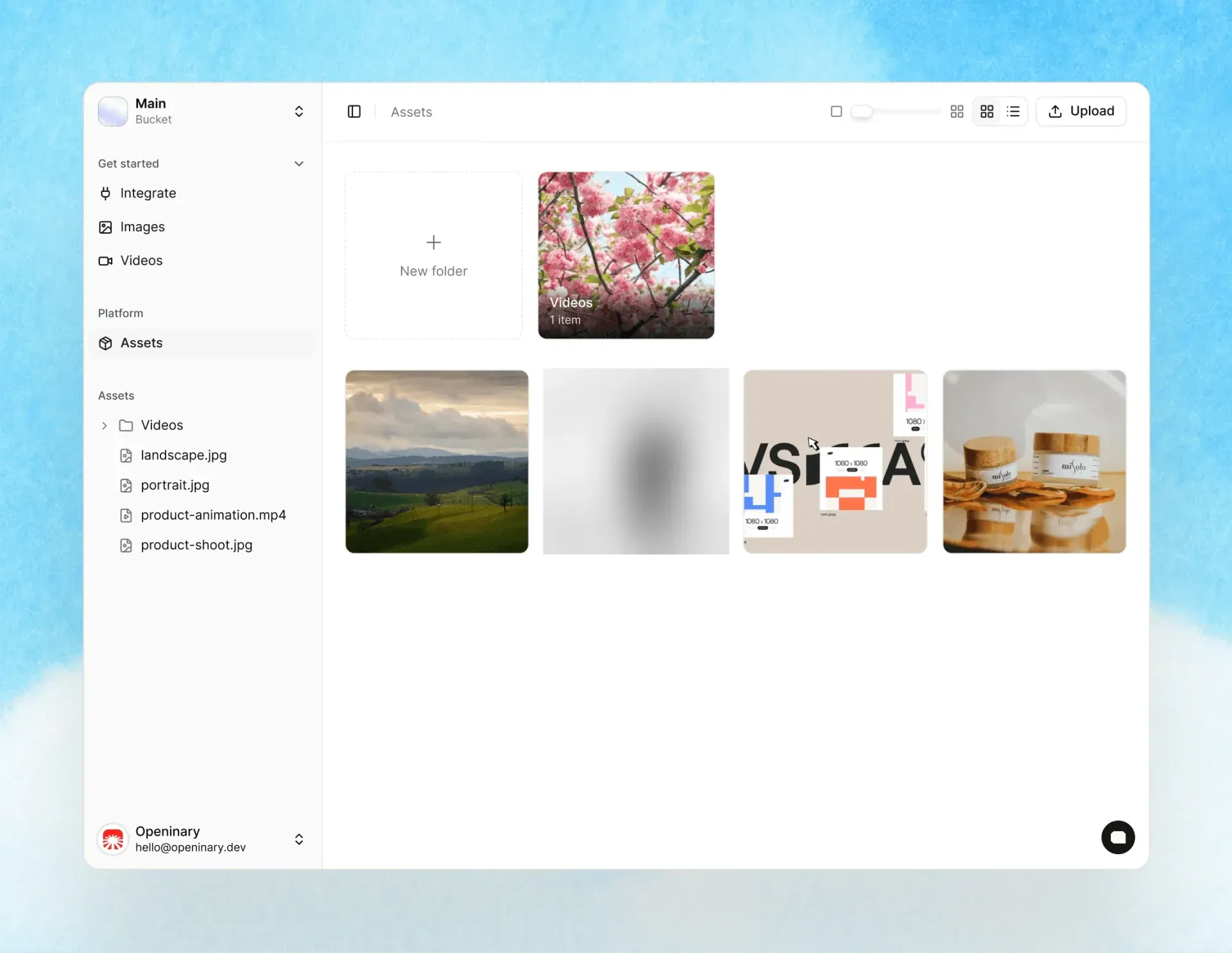
Official product preview of the Openinary dashboard asset browser; one sample photo thumbnail has been blurred.
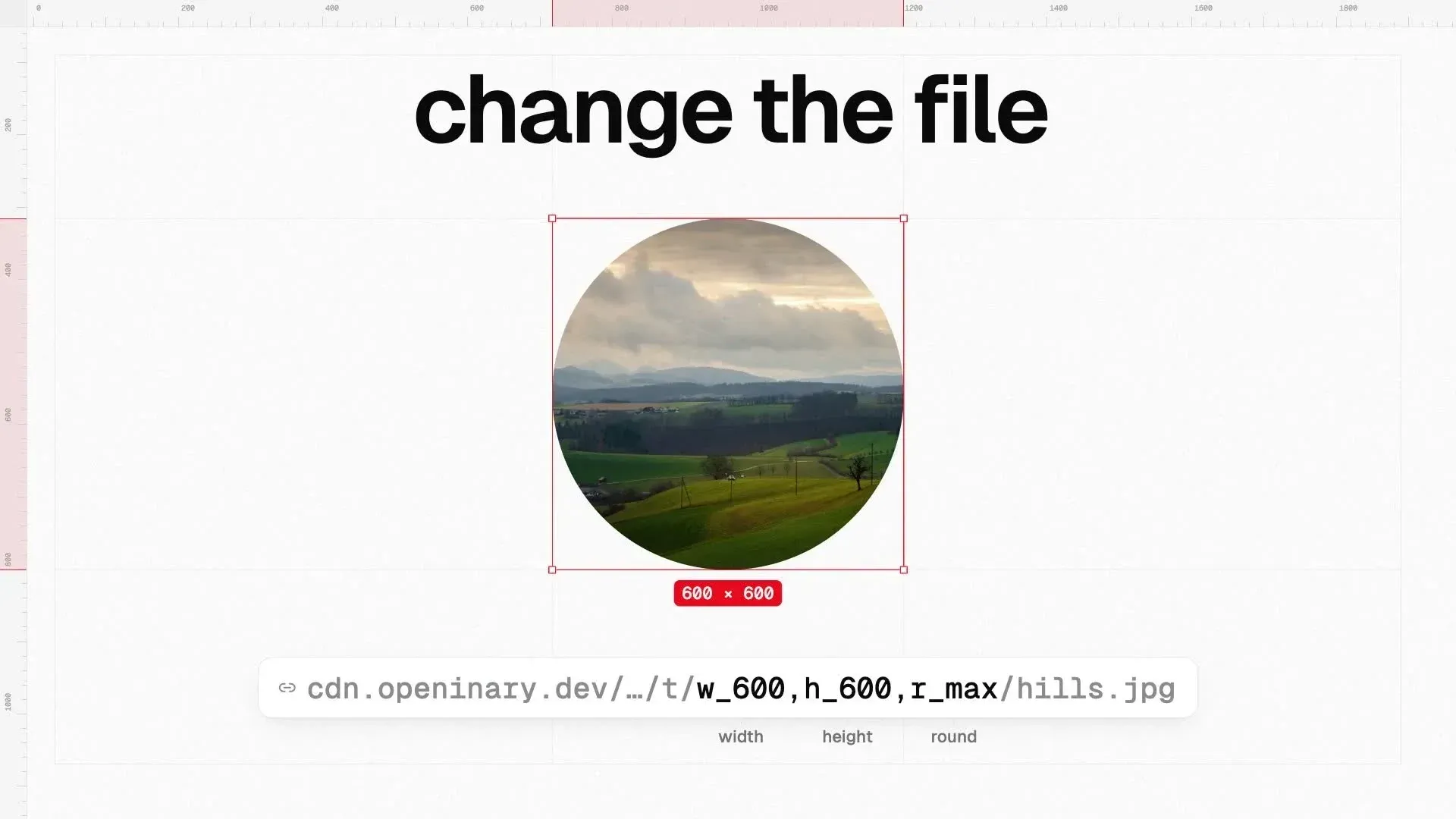
Frame from the official product film showing a circular 600x600 crop produced by URL parameters.
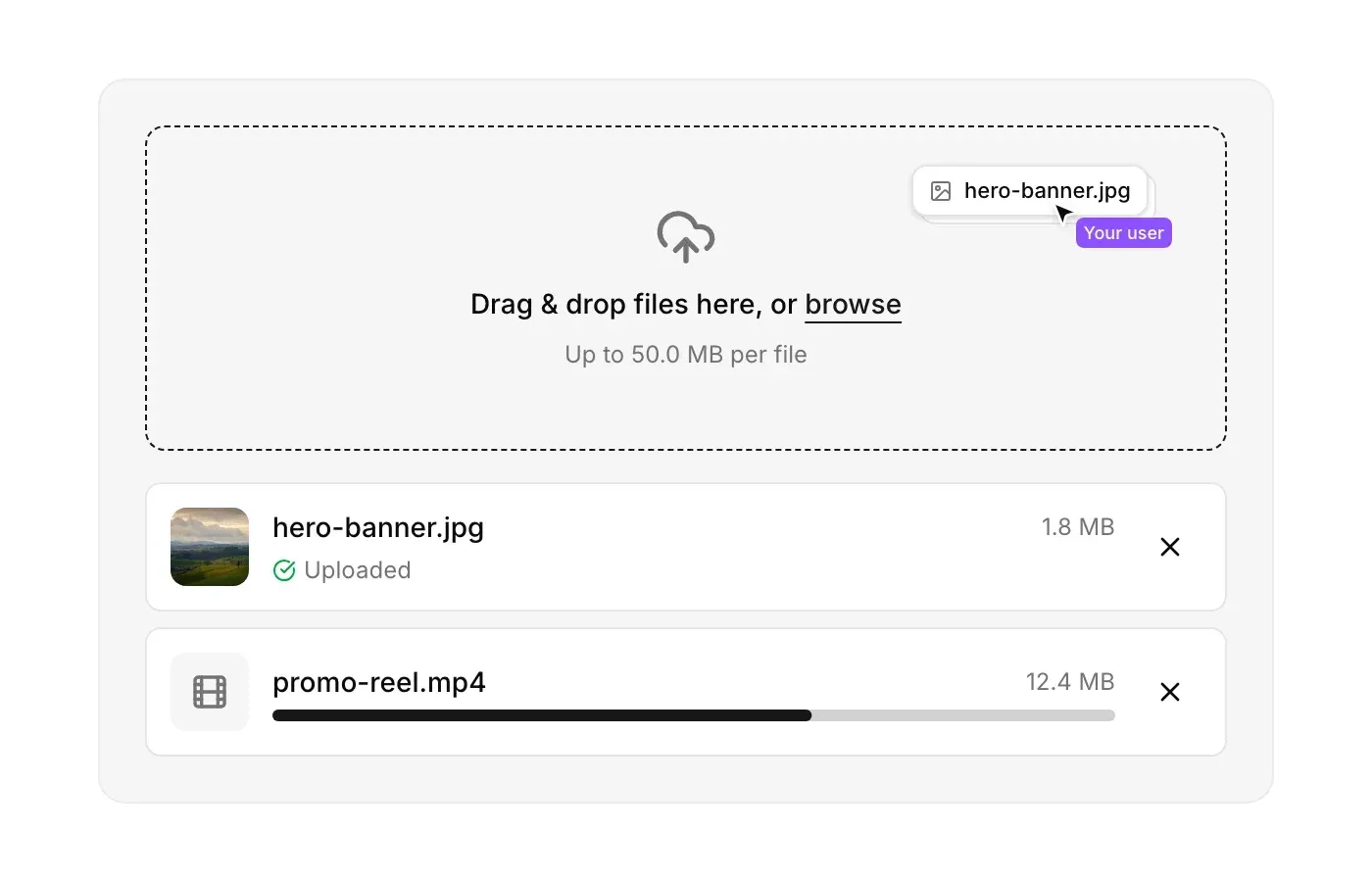
FileUploader component figure from the Openinary documentation.
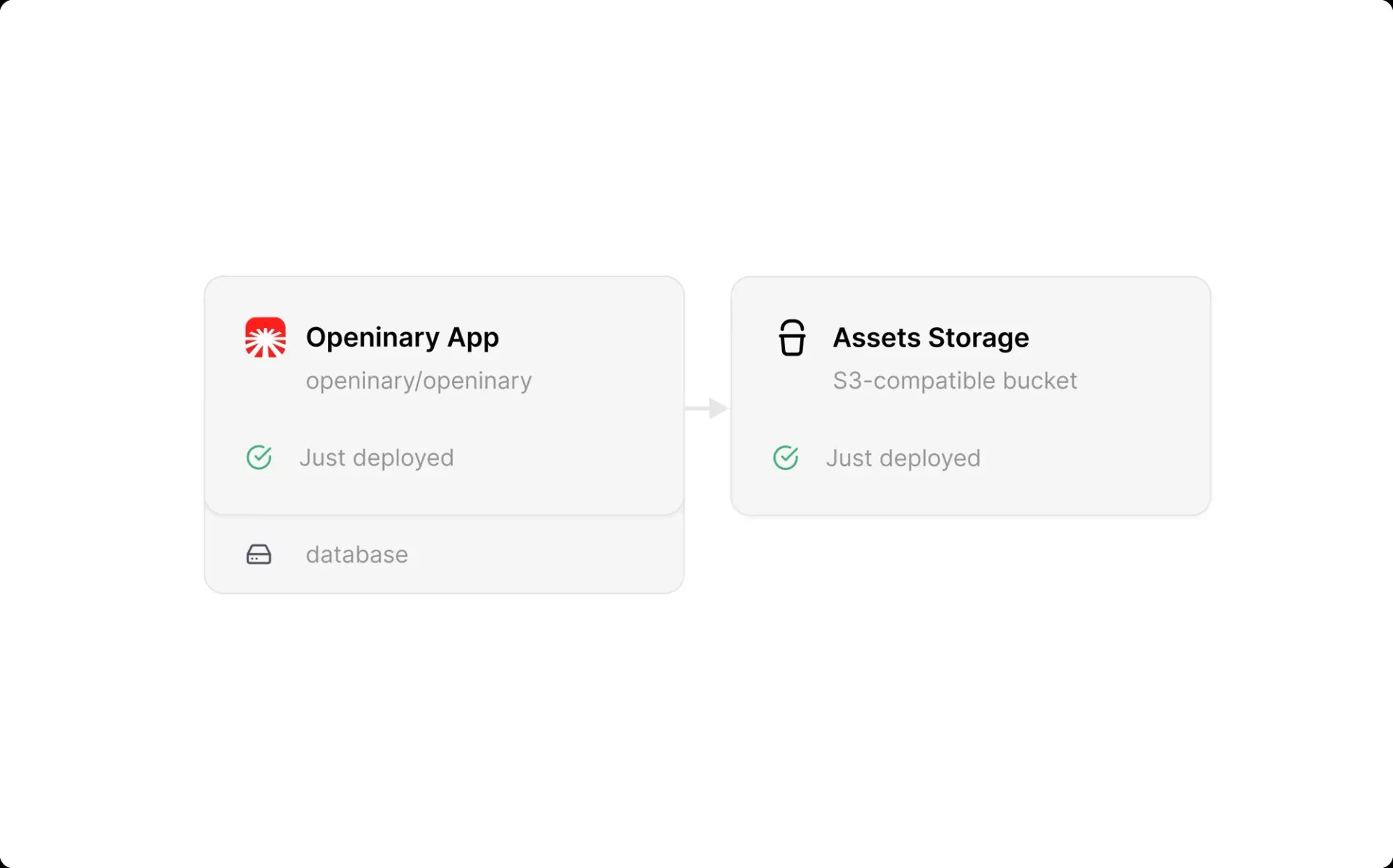
Documentation figure of the Railway deployment template: the Openinary app with its database and an S3-compatible bucket.
Source: official Openinary project page.
Key capabilities
- URL-based image transformations Parameters go after
/t/in any order, separated by commas: width and height, crop modes such asc_fill,c_pad,c_lfillandc_mpad, aspect ratio withar_, rotation, rounded corners withr_and quality withq_. Gravityg_facepicks the most visually salient region for avatar crops. The full parameter table is in the image transformations guide and the API reference. - Automatic format selection When no
f_is given, Openinary reads theAcceptheader and User-Agent and serves AVIF, then WebP, then JPEG or PNG, caching each format separately.f_autoencodes every supported format and serves the smallest, at a higher CPU cost on the first request. Default quality is 80 for AVIF, 85 for WebP, 90 for JPEG and lossless for PNG, as listed on the automatic format selection page. - Image effects (v0.8.0) The
e_family adds blur, sharpen, brightness, contrast, saturation, grayscale, sepia, tint, colorize and fill light, witho_for opacity andco_for color.b_autoderives a padding color from the image,b_blurredpads with a blurred copy, andbo_draws a border.dpr_serves high-density variants andd_serves a placeholder when the requested file does not exist. - Video transformations Videos use the same URL shape: resizing, quality, trimming with
so_andeo_, format conversion to MP4 or WebM, and poster frames witht_trueandtt_. A bare/t/video URL streams the stored file with range requests and is never transcoded. A transformation that is not cached yet answers HTTP 202 with a status URL and aRetry-Aftervalue, and the original is never served in its place. - Video processing limits Encoding runs as background jobs with FFmpeg. Fixed limits in the code are a 720p downscale when no width or height is requested, a 200 MB source size cap, a five minute FFmpeg timeout, the
ultrafastpreset and audio copied without re-encoding. Worker concurrency, retries, cleanup age and FFmpeg threads are set throughVIDEO_*variables, documented under video processing. - Overlays and watermarks Since v0.7.0,
l_places an image from the instance's own storage on top of an image or a video, with opacity, position, offsets, size and tiling parameters. Remote overlay URLs are not fetched. Tiled video overlays are limited to 400 tiles, and a pending watermarked video is never served without its watermark, per the overlays page. - Caching Every variant is rendered once and then served from cache, keyed by URL. Self-hosted instances keep cached transformations in the
openinary-cachevolume, or in the bucket when S3 storage is configured. A cache invalidation endpoint is part of the API, and replacing a file under the same name requires invalidating the variants that use it. - Upload and cache warming
POST /uploadaccepts atransformationslist, so selected variants are rendered right after upload instead of on the first visit. Video variants and thumbnails are queued in the background without blocking the upload response. Uploads are checked against magic-byte signatures, so a renamed payload with an allowed extension is rejected. - Storage backends Files go to local disk by default. Five
STORAGE_*variables switch the instance to AWS S3, Cloudflare R2, MinIO, DigitalOcean Spaces, Wasabi, Backblaze B2 or another S3-compatible provider, detected fromSTORAGE_ENDPOINT.STORAGE_PREFIX(defaultpublic) lets Openinary serve a bucket that another system already writes to. The storage page notes that the bundled Compose file does not pass these variables through by default. - Signed delivery URLs The public
/t/route accepts any transformation. The/authenticated/s--{signature}/route only serves URLs signed with an HMAC-SHA256 of the path, keyed onAPI_SECRET(at least 16 characters) and truncated to 16 hex characters. Signed delivery URLs are listed as not yet available on Cloud. - REST API and API keys Endpoints cover uploads, presigned upload signatures, folders, downloads and ZIP archives, storage listing and statistics, metadata, moves, cache invalidation, the video queue and health. Keys are sent as a Bearer token or
x-api-keyheader and stored hashed in SQLite. The API reference documents both Cloud and self-hosted, marking self-hosted-only pages. - Admin dashboard The full-stack image includes a Next.js dashboard with a media browser, folders, bulk actions, an asset details panel with Deliver, Transform and Info sections, API key management, image and video playgrounds and a Logs view. Logs keep the latest 500 public deliveries and hourly counts for a year. A first-run onboarding sets the workspace name and logo.
- React file uploader
<FileUploader />is a shadcn/ui-compatible component installed withpnpm dlx shadcn@latest add @openinary/file-uploader. It offers drag and drop, per-file progress, previews, retry and cancel, and uploads with short-lived presigned signatures minted by the application's backend, so the browser never holds an API key. A Next.js integration guide is included. - Self-hosted installation
npx create-openinaryneeds Docker 20.x or later and Node.js 20+, asks for full-stack or API-only mode and optional S3 storage, writes adocker-compose.ymland.env, and starts the containers on port 3000. The global CLI addsstart,stop,restart,upgradeandreset. Three volumes hold the database, uploads and cache. - Docker resource profiles The Compose file reads
DOCKER_CPU_LIMIT,DOCKER_MEMORY_LIMITand two reservation variables, defaulting to 2 cores and 4 GB. The documentation lists a 1 to 2 GB images-only profile and a 16 GB video-heavy profile, and states that video jobs fail below 2 GB of memory. The CPU limit also caps automatic video worker detection. - Openinary Cloud plans The Cloud overview lists a Free plan with 1 GB storage, 500 image transformations, 15 video minutes and 25,000 CDN requests per month, and an Alpha plan at no monthly fee with double those allowances plus pay-as-you-go overage: $0.03 per extra GB, $0.40 per 1,000 transformations, $0.01 per video minute and $0.50 per 100,000 CDN requests. Free returns HTTP 402 at its limits.
- Cloudinary migration script A Node.js script in the repository copies files from Cloudinary to Openinary with the same paths, supports
--dry-run, resumes after interruption and writes a JSONL file mapping old and new URLs. Openinary follows the Cloudinary URL parameter style, so migration mostly changes the start of each URL. - Anonymous telemetry Self-hosted instances send three anonymous events (first boot, a daily heartbeat and onboarding answers as option ids) through a project proxy to PostHog, with counts bucketed. The telemetry page states that the instance IP reaches PostHog for coarse geolocation, and
OPENINARY_TELEMETRY=falseturns it off.
Where Openinary fits
Responsive images from one upload
A single original is stored and every size is requested by URL. The documentation shows a srcset built by varying w_ (for example 400, 800 and 1600 pixels), with each width rendered once and cached. Omitting f_ lets the server pick AVIF, WebP or JPEG per browser, and f_avif,q_80 forces a format and quality. Thumbnails with fixed dimensions use c_fill, and letterboxed versions use c_pad with a background color.
Avatars and profile pictures
The image guide describes square avatars with w_400,h_400,c_fill,g_face, where gravity selects the most salient region, and circular crops with r_max. Because rounded corners are cut to transparency, the guide pairs them with PNG, WebP or AVIF output, or with b_rgb:ffffff to keep JPEG on a solid background.
Video previews, clips and poster frames
Video URLs request a downscaled copy (w_1280,h_720,q_80), a trimmed section (so_5,eo_12), a smaller file through a lower q_, or a still frame with t_true,tt_5,f_webp. The first request for an uncached video variant answers 202 with an estimate and a status URL; listing the variants in the upload's transformations field queues them in advance. Encoding time depends mainly on output duration and format, with WebM (VP9) slower than MP4 (H.264), as the video guide explains.
Watermarking images and videos
A logo stored in the instance is placed with l_logos:watermark.png, positioned with lg_southeast and offsets, sized with lw_ or lh_ and faded with lo_. lt_1 repeats it across the asset, and video thumbnails can carry the overlay too. An invalid combination or a missing overlay file answers 400 with the reason.
Serving media from an existing bucket
Self-hosted instances connect to AWS S3, Cloudflare R2, MinIO or other S3-compatible storage through STORAGE_* variables, with STORAGE_PUBLIC_URL pointing at a CDN or custom domain. Since v0.8.0, STORAGE_PREFIX maps an existing bucket layout so that an object at photos/2024/sunset.jpg is delivered at /t/photos/2024/sunset.jpg without moving it. Storage options listed on iThub include MinIO and Cloudflare, whose R2 service appears in the Openinary configuration examples.
Browser uploads and platform deployment
Web applications embed the React <FileUploader />, whose backend calls POST /upload/sign with an API key and passes short-lived signatures to the browser. Deployment guides cover Docker, Coolify, Dokploy and a Railway template that pairs the Openinary app with an S3-compatible bucket. Teams moving away from Cloudinary follow the five-step migration guide and rewrite URL prefixes.
Install
npx create-openinaryReviews of Openinary
Be the first to share your experience with Openinary.
Write a review
Loading review form…
Related to Openinary
 CoolifyCoolify is an open-source, self-hostable platform for deploying apps, databases and 360+ one-click services to your own servers over SSH.
 DokployDokploy is an open-source, self-hostable deployment platform on Docker and Traefik for apps, databases and Docker Compose stacks, with an optional paid cloud.