

What is Maxun?
Maxun is an open-source web data platform for extracting, scraping, crawling, searching and monitoring websites. Its central object is the robot: a saved job that runs in a real browser and returns structured data, Markdown, HTML or screenshots. Robots can be built by recording your own clicks in the dashboard (Recorder Mode), by describing the data in a prompt (AI Mode) or through code. The project describes its goal as turning any website into a structured API. The site is maxun.dev and the documentation is at docs.maxun.dev.
Maxun is developed in the open on GitHub under the getmaxun organization and is written in TypeScript. It is distributed two ways, described on the Cloud vs Self-Hosted page. The self-hosted open-source edition runs from Docker images (backend, frontend and browser) with Postgres and MinIO behind them. Maxun Cloud at app.maxun.dev adds managed stealth and proxy infrastructure, captcha handling, deep extraction, teams and email alerts, which the docs list as not available in the open-source edition.
The reviewed release is v0.1.0, published on October 25, 2026, after a long run of 0.0.x versions. Its notes describe faster scraping and crawling, a rebuilt AI Mode that generates a reusable extraction robot from a prompt, better document extraction for PDFs, spreadsheets, CSV and DOCX files, bulk deletion of runs, and a new MCP server with scrape, crawl, search and agent tools. The performance figures in those notes come from the maintainers' own benchmarks.
The source is licensed under AGPL-3.0, a network copyleft license that matters if you modify Maxun and offer it to others as a service. The README also asks commercial users to consider contributing or sponsoring. Maxun does not remove the legal and ethical limits of scraping: terms of service, robots rules and data protection law still apply to what you collect.
Maxun screenshots
Explore the interface. Open a screenshot to view it at full size.
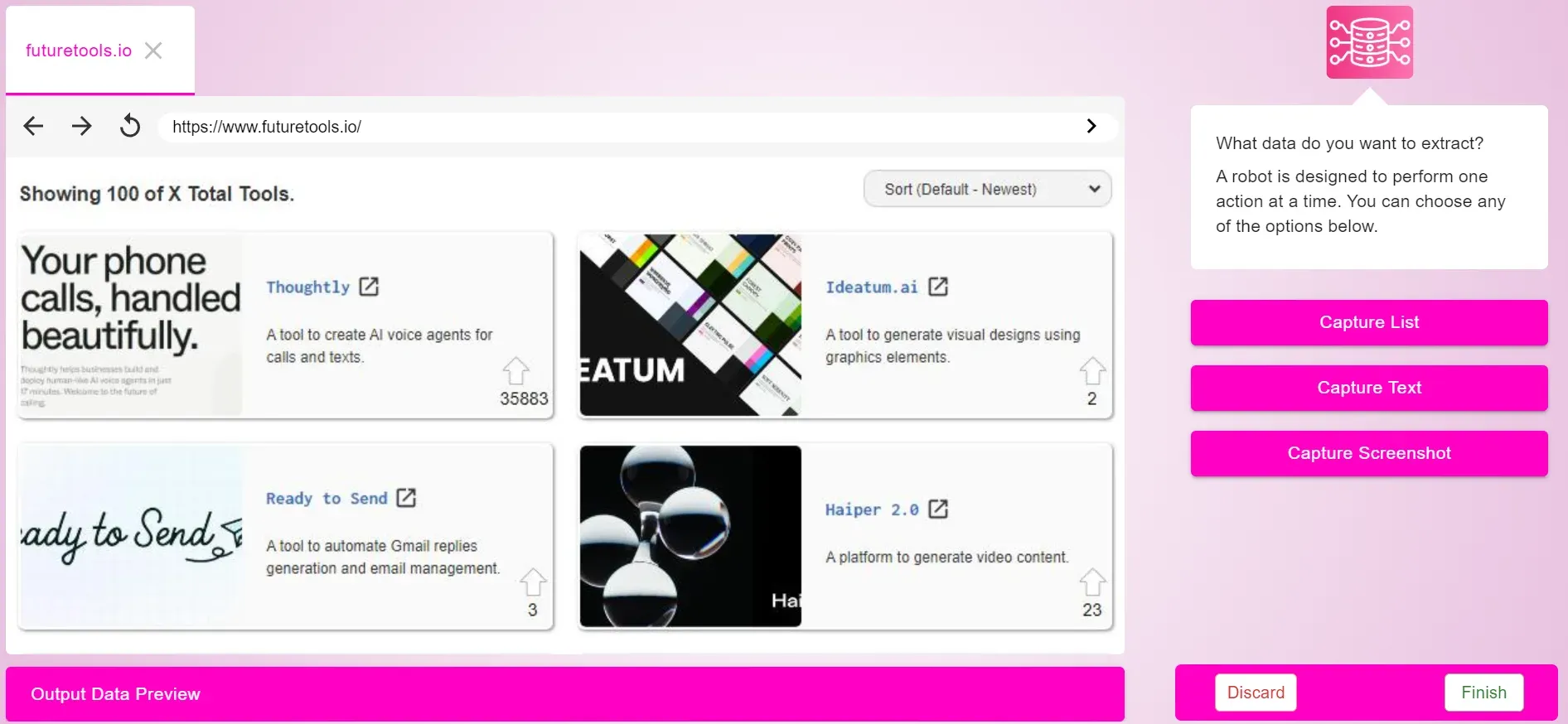
Official launch image of the recorder: a page loaded in the in-dashboard browser with the capture actions on the right. The UI has changed since 2024.
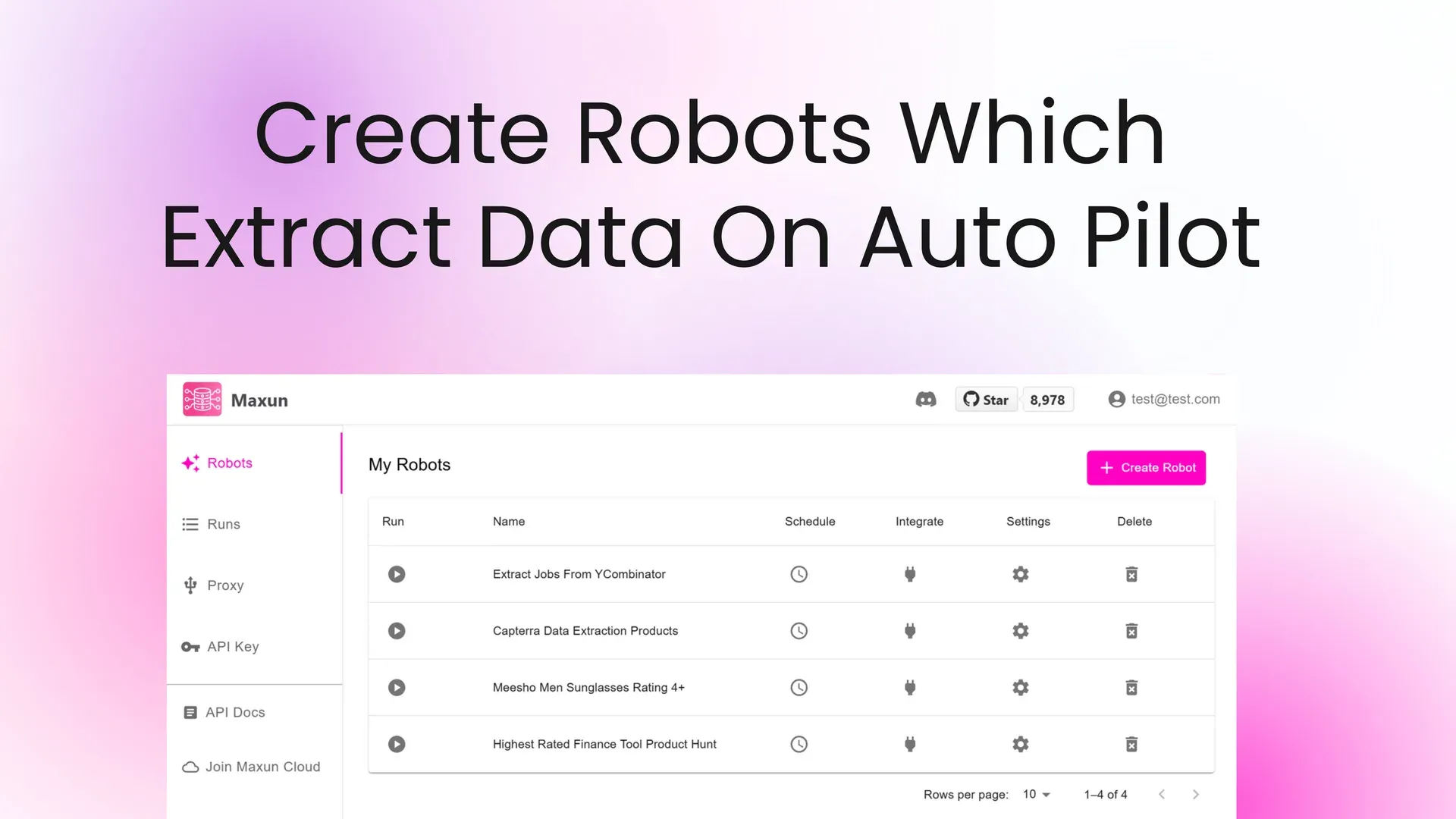
Official launch image of the robots list with sidebar entries for Robots, Runs, Proxy and API Key. Layout dates from 2024.
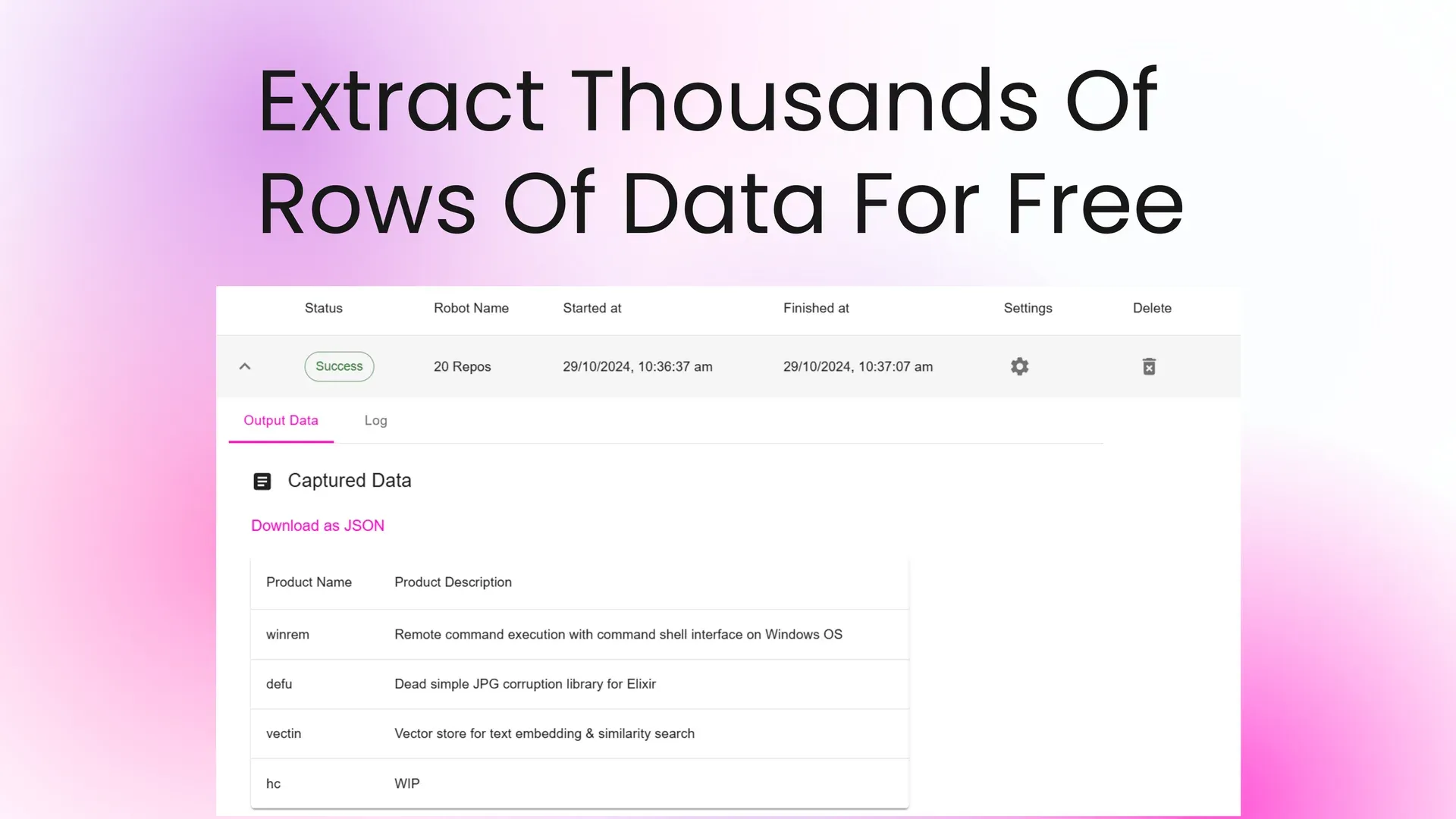
Official launch image of a finished run showing captured rows and a JSON download link. Sample data from a public site.
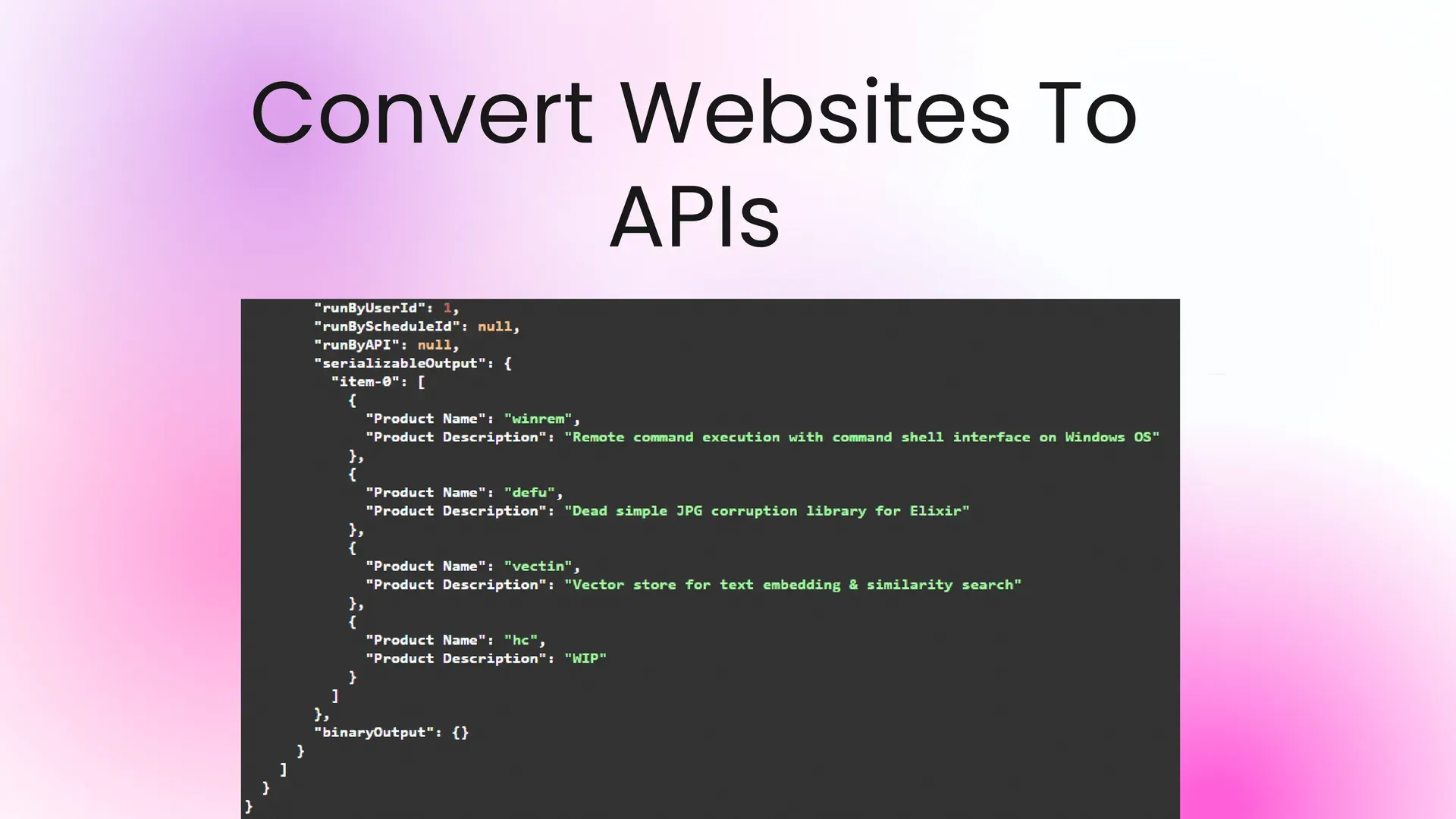
Official launch image of the JSON a run returns, with the serializable output grouped by item.
Source: official Maxun project page.
Key capabilities
- Recorder Mode You browse a site inside the dashboard and the recorder turns your actions into a workflow. The Recorder Mode page lists capture list, capture text and capture screenshot, with pagination by next button, load more, scroll down, scroll up or a single page. It also handles forms, dropdowns, iframes, Shadow DOM and logins you perform by hand.
- AI Mode You describe the data you want and Maxun builds a reusable extraction robot from the prompt and the page you provide. In v0.1.0 the robot then runs repeatedly without calling the language model on each run, which keeps later runs fast and cheaper. You supply your own model credentials when self-hosting.
- Scrape robots Convert a page into Markdown, HTML, text, links or screenshots. The scrape docs describe optional smart queries on Cloud pricing, and release notes say the 0.1.0 scraper isolates main content to reduce noise.
- Crawl robots Crawl a whole site with a configurable scope, depth and include or exclude paths, and capture each page in the chosen formats. Release 0.1.0 reduced duplicate links and page size in crawl output according to the maintainers' benchmark.
- Search robots Search the web and either list results or scrape each result, with time-range filters. The search feature is listed as available in both Cloud and the open-source edition.
- Document extraction Document robots parse and extract structured rows from PDFs, spreadsheets, CSV files and DOCX files. They call a language model, so large files depend on the model's output limits; 0.1.0 added recovery from truncated answers and parallel chunk processing.
- Monitoring and diffs A monitored robot compares each run with the previous one, and the Runs tab shows a Changed button with the difference. Screenshot comparison, crawl monitoring and email alerts are Cloud-only according to the monitoring docs; an AI prompt can filter which changes matter.
- Scheduling Robots can run on recurring schedules from the dashboard or through the API, so a scrape or monitor does not need a manual trigger.
- REST API The self-hosted backend exposes /api endpoints authenticated with an x-api-key header: list robots, duplicate a robot with a new target URL, schedule runs, start a run and fetch run data. The open-source API reference covers them; webhooks are recommended for long runs.
- Node.js and Python SDKs The docs describe SDKs with builders for scrape, crawl, extract, search, document and monitoring robots. Extract builders use CSS selectors, for example captureList with a selector and a maximum item count.
- CLI A command-line client creates robots, runs them and reads results, for example a prompt-based extract command followed by a run command with a robot ID. It targets the same robots as the dashboard.
- MCP server The new server exposes tools such as maxun_scrape, maxun_crawl, maxun_search and maxun_agent, plus run management. The MCP setup page gives a native HTTP configuration for Cloud and a separate path for self-hosted installs, which needs a build step.
- Bring your own proxy Self-hosted installs can attach HTTP or SOCKS proxies, including authenticated ones whose credentials are stored encrypted. Proxies are configured per user rather than per robot, and v0.1.0 added a session placeholder in the proxy username for per-run sticky IPs.
- Docker Compose self-hosting The documented install uses a .env file with generated JWT, session and encryption secrets, then docker compose up. A production guide places it behind NGINX with HTTPS and lists Postgres, Redis, MinIO, backend and frontend services. The sample environment sets MAXUN_TELEMETRY to true, so review it.
- Integrations The docs include guides for Google Sheets, Airtable, n8n, LangChain, LangGraph, LlamaIndex, Mastra, OpenAI, the Vercel AI SDK, Claude Code and OpenClaw, so run output can feed spreadsheets and agent pipelines.
Where Maxun fits
Extracting a product or listing table
Open the target page in Recorder Mode, choose capture list, select one item and its fields, then demonstrate pagination and set an item limit. Run the robot and compare the first rows with the page by eye. Check that a changed page layout is handled by retraining the robot rather than by guessing selectors.
Turning a prompt into a repeatable robot
Use AI Mode when you know the fields but do not want to click through the page. Review the generated robot's fields on a few runs before scheduling it, because the model decides the selectors once and later runs reuse them. Page changes can break that robot, so keep a known-good test run and the retrain option in mind.
Preparing site content for an LLM or search index
Use a crawl robot with Markdown output and a path scope so only the wanted section is collected. Check duplicate URLs, page counts and whether navigation text is stripped. Respect the target site's rules and set a limit before the first run.
Watching a page for changes
Enable monitoring on a scrape or extract robot, schedule it hourly or daily and review the Changed view for each run. Decide in advance where alerts go, because email alerts are a Cloud feature and a self-hosted setup needs its own notification step, for example a webhook.
Giving an AI assistant web access
Connect an MCP-capable client to Maxun and use the scrape, crawl and search tools for research tasks. Keep the API key in the client's secret storage, limit page counts per call and check logs for what the agent fetched. Self-hosted use needs a locally built MCP server, so test the connection before relying on it in an agent workflow.
Parsing documents into rows
Upload invoices, statements or CSV exports to a document robot and define the fields. Compare totals and row counts against the source file, since extraction relies on a language model and large files can be truncated or reformatted. Spot-check dates and number formats, which differ between countries.
Reviews of Maxun
Be the first to share your experience with Maxun.
Write a review
Loading review form…
Alternatives to Maxun
 FirecrawlFirecrawl turns URLs, search results and documents into Markdown, HTML, screenshots or schema-based JSON. Use the hosted API with SDKs, CLI and MCP, or self-host the AGPL-3.0 core with Docker Compose and a reduced feature set.
 Crawl4AICrawl4AI is an Apache-2.0 Python crawler built on Playwright that outputs Markdown, JSON, screenshots and PDFs for RAG and agents. Run it as a library, a Docker server with REST and MCP, or use the hosted Crawl4AI Cloud API.
 ScraplingScrapling is an open-source Python framework for web scraping that combines HTTP requests, stealth browsers, adaptive parsing and concurrent spiders.