

What is Apache Superset?
Apache Superset is a business intelligence web application for data exploration and visualization. The README lists a no-code interface for building charts, a web-based SQL editor (SQL Lab), a lightweight semantic layer for custom dimensions and metrics, support for nearly any SQL database or data engine, a wide set of visualizations from bar charts to geospatial layers, a configurable caching layer, extensible security roles and authentication, an API for programmatic customization and a cloud-native architecture. Superset queries data in place: a chart or dashboard triggers a SQL query to the database holding the dataset, and the result is rendered in the browser.
Superset is a project of the Apache Software Foundation and is licensed under Apache-2.0. According to the ASF Incubator record, the project entered incubation on May 2, 2017 and graduated on November 19, 2020; the GitHub repository dates from July 2015. Documentation is split into a User Guide, an Administrator Guide and a Developer Guide. Community channels named in the README include Slack, Stack Overflow, the dev@superset.apache.org mailing list, a community calendar of town hall meetings, X, LinkedIn, Bluesky and Reddit.
An installation consists of the Superset application (a Python Flask backend with an API layer and a React frontend), a metadata database for chart and dashboard definitions, users and logs, an optional cache and optional Celery worker and beat processes. The architecture page states that PostgreSQL and MySQL are tested as metadata databases, while the quickstart and PyPI installs use SQLite by default, which is not intended for production. Caching, alerts and reports, async queries and dashboard thumbnails need the optional components. Superset is distributed as the apache_superset package on PyPI (Python 3.10 to 3.12 for 6.1.0), as official Docker images and with a community-maintained Helm chart.
The latest GitHub release is 6.1.0, published on May 13, 2026, with the official source release on downloads.apache.org. Its changelog includes a global task framework with Redis-based locking and pub/sub, dynamic currency formatting, datetime format detection for dataset columns, a Google Cloud Datastore engine spec and many additions to the built-in MCP server. Release candidates for 7.0.0 have been tagged in the repository (7.0.0rc2 in October 2026).
Similar projects on iThub include Metabase, Redash and Lightdash; Preset offers a managed Superset service.
Apache Superset screenshots
Explore the interface. Open a screenshot to view it at full size.
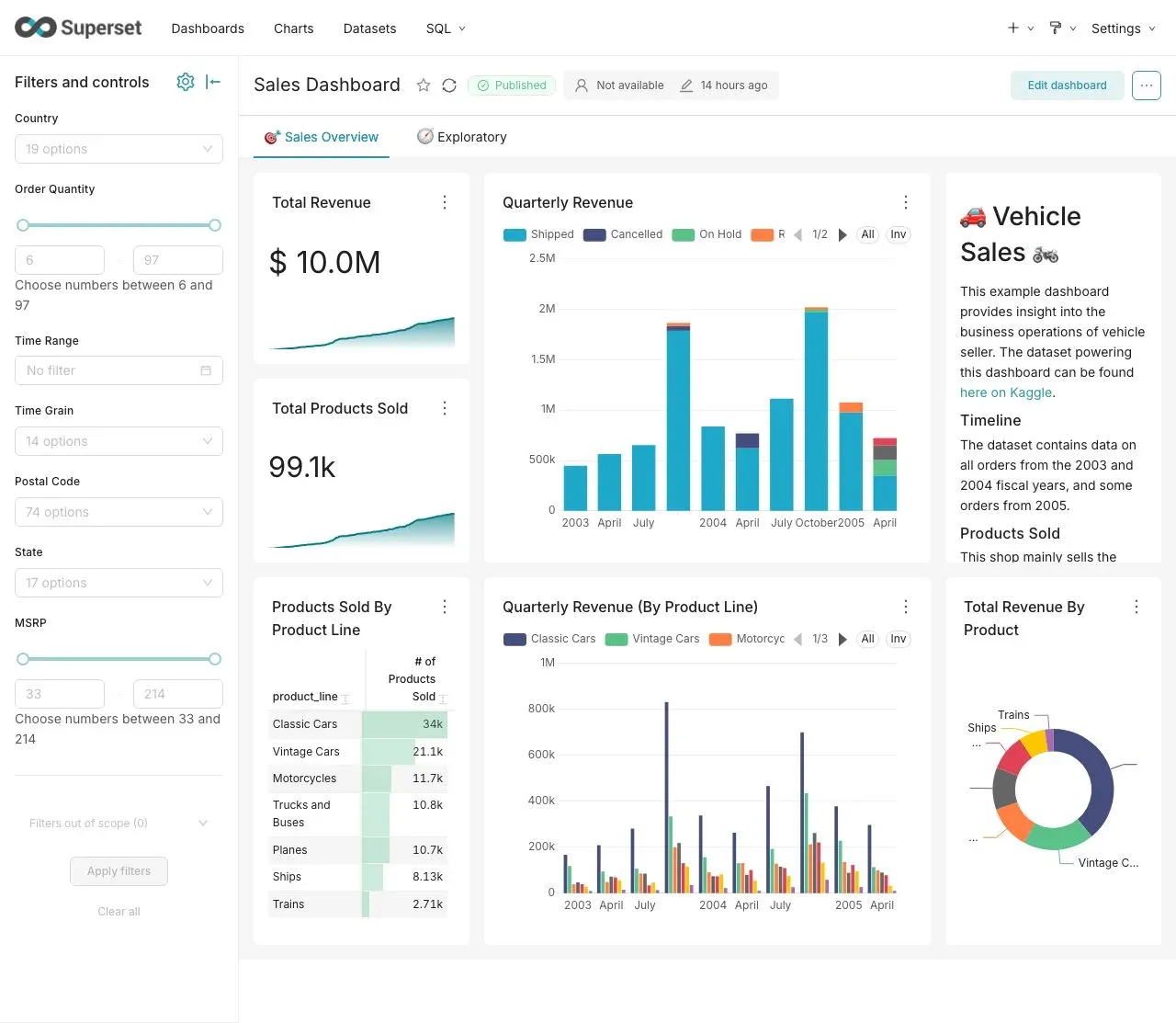
Sales dashboard with a native filter bar, from the Apache Superset README.
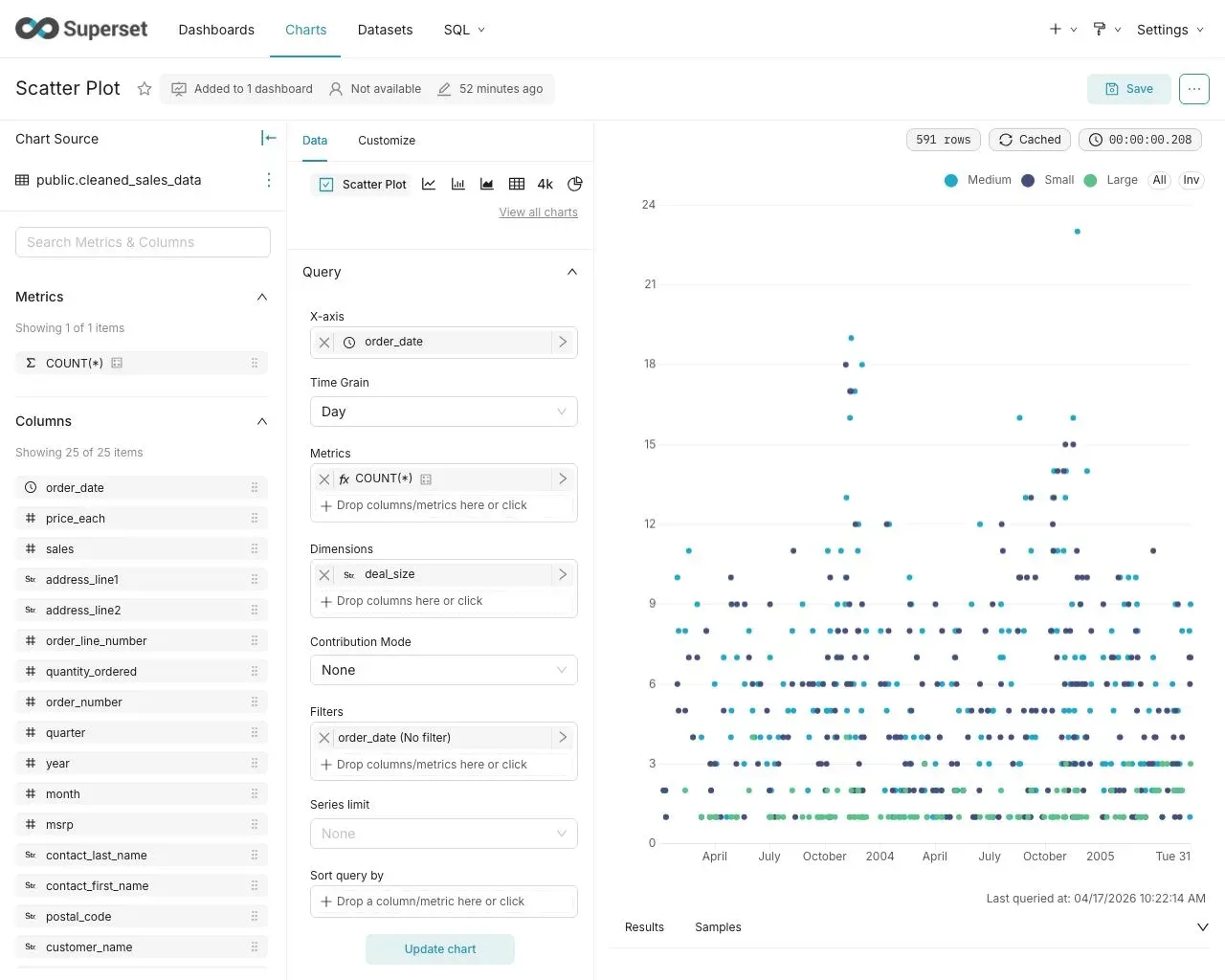
No-code chart builder (Explore) with dataset columns, query controls and a scatter plot result.
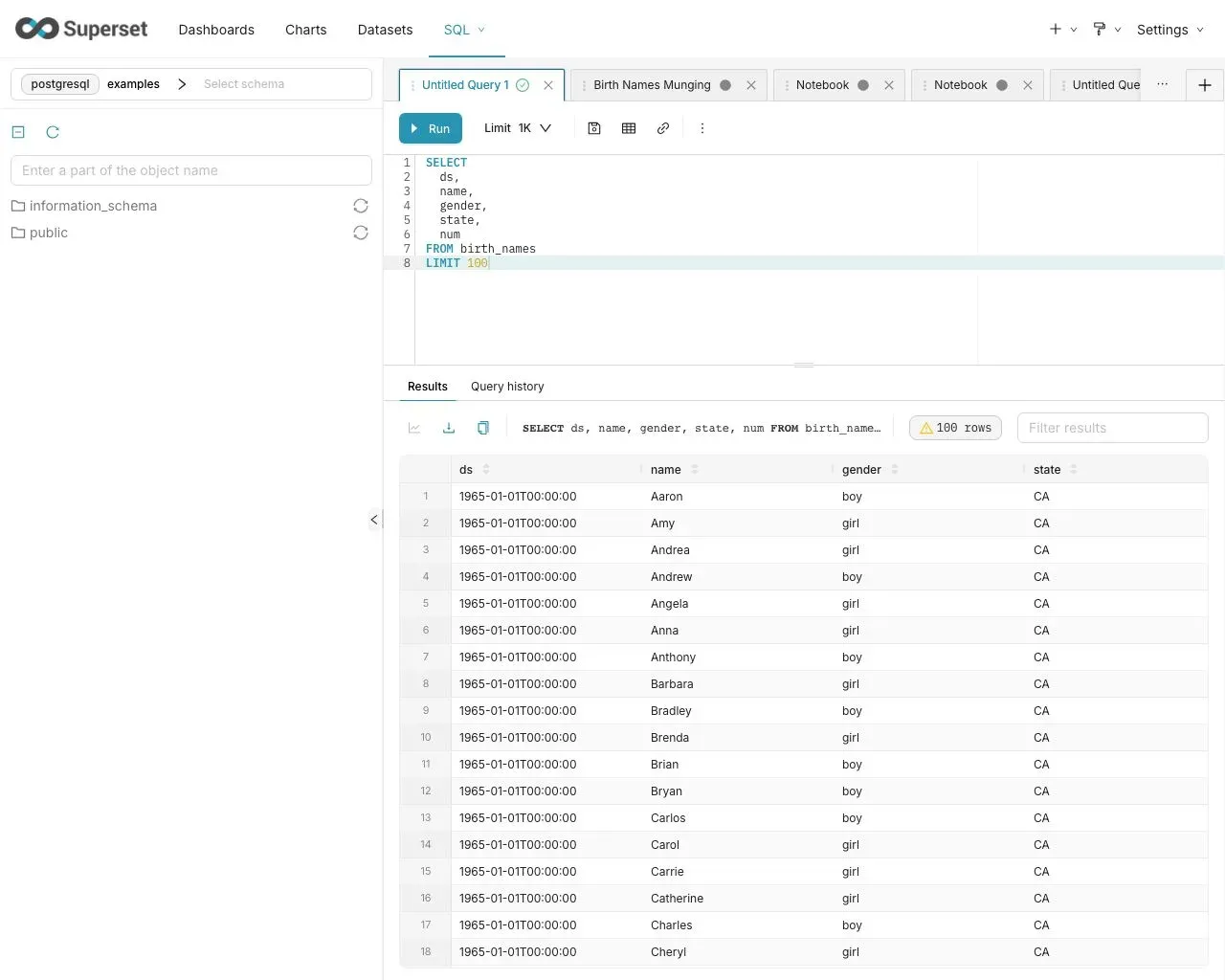
SQL Lab with schema browser, query tabs and a result grid.
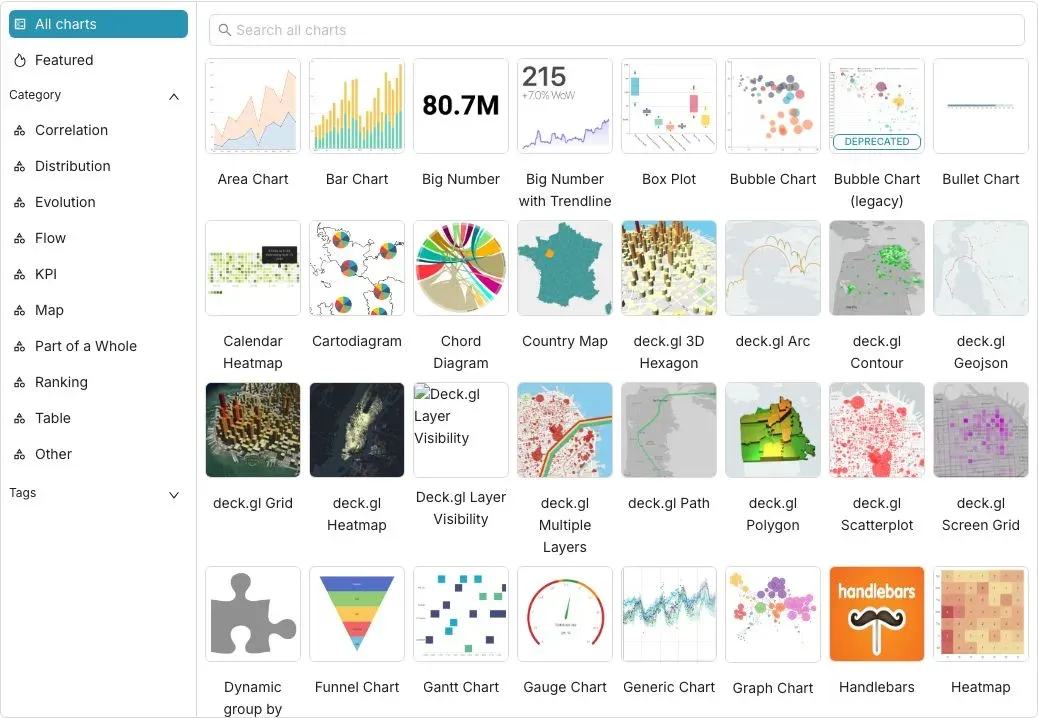
Chart type gallery listing visualizations by category, including deck.gl geospatial layers.
Key capabilities
- No-code chart builder (Explore) Charts are built from a dataset by choosing a visualization type, metrics, dimensions, filters, time grain, series limits and sorting in the Data tab, and adjusting appearance in the Customize tab. Results show row counts, cache status and query time.
- Visualization gallery The chart gallery groups visualizations by category (correlation, distribution, evolution, flow, KPI, map, part of a whole, ranking, table). It includes area, bar, big number, box plot, calendar heatmap, chord, country map, funnel, gantt, gauge, graph and heatmap charts, Handlebars templates and a family of deck.gl geospatial layers.
- Dashboards Dashboards combine charts, Markdown and tabs, with a native filter bar for value, range and time filters. Dashboards can be published, marked as favorites and access-controlled by dataset permissions or, with
DASHBOARD_RBAC, by dashboard-level roles. - SQL Lab SQL Lab is a web SQL editor with a schema browser, multiple query tabs, row limits, saved queries, query history and result export. Results can be turned into a chart or saved as a virtual dataset.
- Jinja templating SQL Lab and Explore support Jinja templating in queries, so SQL can reference filters, the current user or custom macros defined by administrators.
- Semantic layer Datasets are physical tables or SQL-based virtual datasets with calculated columns and saved metrics, forming the lightweight semantic layer described in the README. The developer documentation covers an extension point for external semantic layer providers.
- Database connectivity Superset can query any SQL-speaking datastore that has a Python DB-API driver and a SQLAlchemy dialect, such as PostgreSQL, MySQL, Presto, Trino or Athena. The databases page lists supported engines and the drivers to install.
- Security and access control Authentication and authorization are handled by Flask AppBuilder. The security documentation describes the provided roles Admin, Alpha, Gamma, sql_lab and Public, custom permissions, row level security filters, API key authentication, server-side sessions and Content Security Policy settings.
- Alerts and reports Alerts are sent when a SQL condition is met and reports are sent on a schedule, to email or Slack. The feature is disabled by default and requires the
ALERT_REPORTSfeature flag, Celery beat and a headless browser such as Playwright with Chrome in the worker image. - Caching and async queries A cache layer, typically Redis, reduces database load and stores chart data and dashboard thumbnails. Async queries run through Celery workers.
- REST API The REST API covers dashboards, charts, datasets, databases, saved queries, tags, annotation layers, security and user and role management, documented from the OpenAPI specification.
- MCP server Superset includes a built-in MCP server, started with
superset mcp runon port 5008 by default and requiring thefastmcppackage. According to the documentation, MCP clients can list dashboards, query datasets, execute SQL and create charts, with RBAC permission checks on MCP tools added in 6.1. - Embedded dashboards The Superset Embedded SDK (
@superset-ui/embedded-sdk) embeds dashboards into another application in an iframe using the host application's authentication. It requires theEMBEDDED_SUPERSETfeature flag and a strongGUEST_TOKEN_JWT_SECRET. - Theming and configuration Behavior is configured in
superset_config.py, with feature flags, theming, timezones, map tiles, event logging and import and export of datasources documented in the Administrator Guide. - Docker Compose The Docker Compose setup brings up the Superset application, a PostgreSQL metadata database, Redis cache, and Celery worker and beat. The default
leanimages do not include database drivers or a headless browser, so production images extend them. - Kubernetes Kubernetes deployments typically use the community-maintained Helm chart in the repository, with your own Docker image and an external metadata database. Work on a Kubernetes operator is tracked as SIP-149.
- PyPI
pip install apache_supersetinstalls Superset as a Python package. OS-level dependencies are required for the cryptography library, and caching, alerts and reports need separately configured Redis or RabbitMQ and Celery.
Where Apache Superset fits
Self-service dashboards for business teams
Data teams register database connections and datasets with saved metrics, and business users build charts in Explore and assemble them into dashboards with native filters. The README screenshot shows a sales dashboard with KPI tiles, revenue time series, a product table and a donut chart filtered by country, quantity and time range.
Ad hoc SQL analysis
Analysts write queries in SQL Lab against connected databases, browse schemas, keep several tabs open and review query history. A result can be explored as a chart directly or saved as a virtual dataset for reuse by others.
Querying a modern data stack in place
Superset connects to warehouses and query engines through SQLAlchemy dialects, so data stays in the source system and Superset sends SQL to it at chart render time. Caching reduces repeated load on the warehouse, and the cache documentation covers chart data and thumbnail caching.
Scheduled reports and threshold alerts
With Celery beat, a headless browser and SMTP or Slack configured, teams schedule dashboard or chart reports and define alerts that trigger when a SQL condition is met, with screenshots attached to the message.
Embedded analytics
Product teams embed Superset dashboards in their own applications with the Embedded SDK and guest tokens, combined with row level security filters that restrict the rows a guest user can query. The security documentation covers the RLS filter types used for this.
AI-assisted exploration
An MCP-compatible AI client connects to Superset's MCP server to list dashboards, query datasets, execute SQL and create charts, within the permissions of the authenticated Superset user, as described in the Using AI with Superset guide.
Install
pip install apache_supersetReviews of Apache Superset
Be the first to share your experience with Apache Superset.
Write a review
Loading review form…
Alternatives to Apache Superset
 MetabaseMetabase is open-source business intelligence for asking questions of your database, building dashboards and embedding analytics. Run the AGPL edition yourself with Docker or the JAR, or use paid Cloud, Pro and Enterprise plans.
 RedashRedash is an open-source tool where SQL users query data sources, build visualizations and dashboards, schedule refreshes and set alerts in the browser.
 LightdashLightdash is open-source BI that defines metrics once in dbt or YAML, then serves dashboards, AI agents and embedded analytics from cloud or self-hosted setups.