

What is Zero?
Zero is an AI coding agent that runs in a local terminal. It inspects a repository, edits files, runs shell commands and keeps durable sessions, while the user chooses the model provider and the permission level. It is developed by Twigpine, a company that publishes open-source infrastructure for AI agents, and is released under the MIT License. The project started in 2026 under the Gitlawb name: the npm package was @gitlawb/zero up to version 0.9.0 and became @twigpine/zero with 0.10.0. The Go module path still reads github.com/Gitlawb/zero, which matters for go install.
Distribution covers several routes, documented in the install guide. The npm wrapper requires Node.js 18 or later and pulls a native binary as an optional dependency, with no install scripts. Shell and PowerShell installers download a GitHub Release archive and verify its checksum. mise, go install and source builds with Go 1.26.10 or later are also documented. Release archives exist for Linux x64 and arm64, macOS x64 and arm64, and Windows x64, each with a SHA256 file. Windows on ARM runs the x64 build under emulation.
The current release is v0.12.0, published November 3, 2026. It lets the main binary re-execute itself as the Linux sandbox helper, so a separate zero-linux-sandbox file is no longer required, installs files bundled with a skill, adds MiniMax-M3.1-Flash to the model catalog and moves the toolchain to Go 1.26.10 for a Go security advisory. Fixes cover credential redaction, apply_patch checkpoints, image summaries on resume and headless guardrail stops, which are now reported as incomplete. Version 0.11.0 added a Concentrate provider preset and stopped a repository's own git configuration from running programs during Zero's git calls; 0.10.0 introduced per-model request limits and zero sessions prune.
One Go binary serves three surfaces: an interactive Bubble Tea TUI, a headless zero exec mode and an ACP bridge for editors. All of them feed the same agent loop, tool registry and sandbox engine, as described in How Zero works. Sessions are stored as metadata.json plus an append-only events.jsonl log, which is what makes resume, fork and rewind possible without a remote service.
Zero is not a hosted service and has no paid plan; the website states that there is no pricing page and that users pay only their model provider. It is a terminal tool rather than an IDE extension or desktop application. Using a Claude subscription instead of an API key is only possible through a local proxy, as the OAuth and subscriptions guide explains.
Zero screenshots
Explore the interface. Open a screenshot to view it at full size.
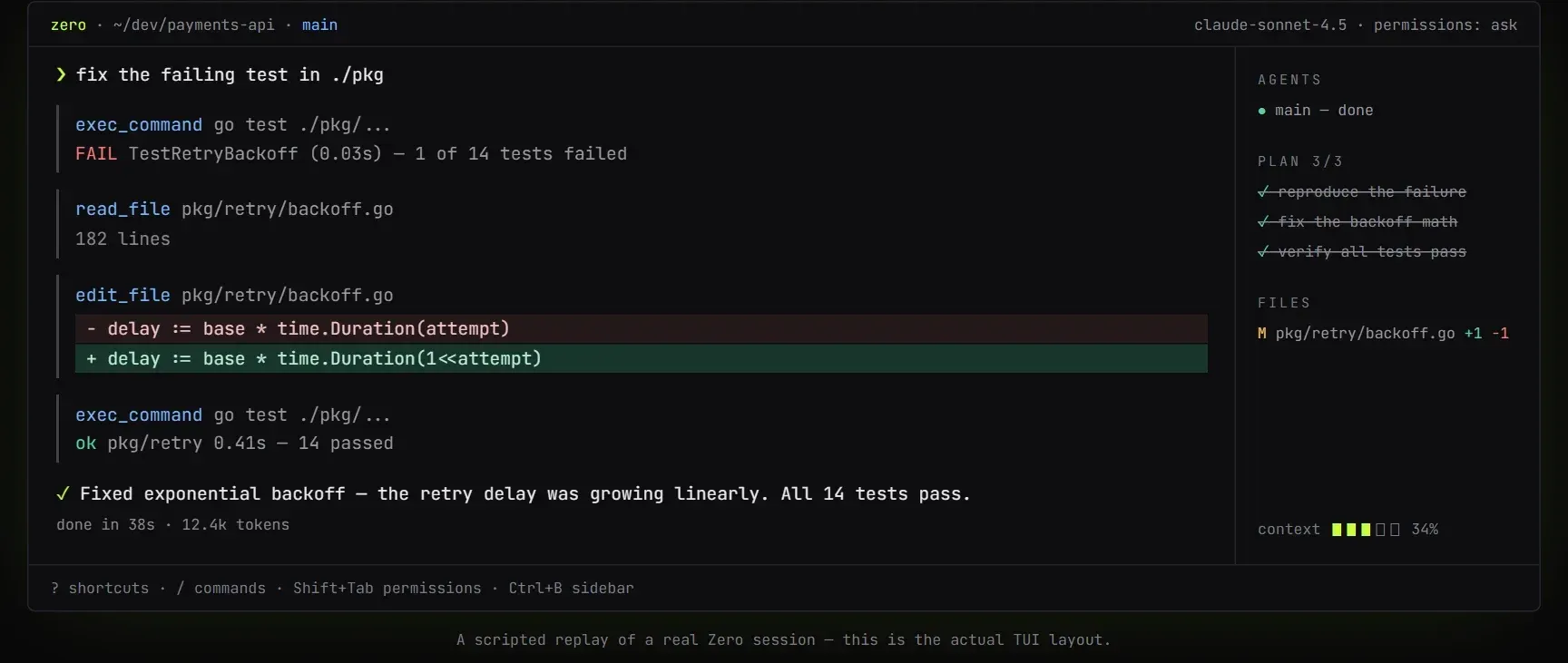
Scripted replay of a Zero TUI session on the official website: the agent runs go test, edits backoff.go and reruns the tests.
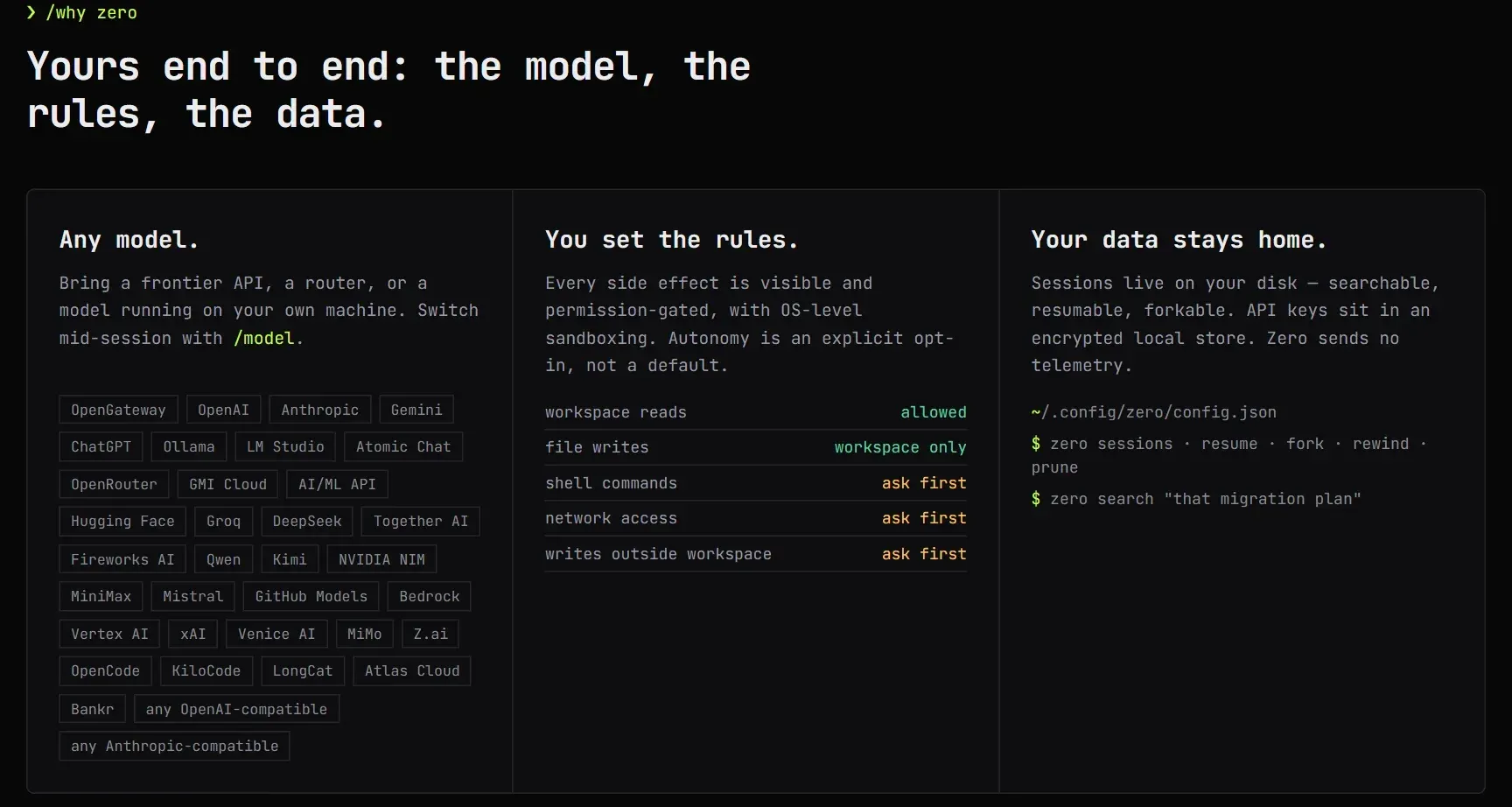
Website overview of provider choices, the default permission table (reads allowed, writes in workspace only, shell and network ask first) and local session commands.
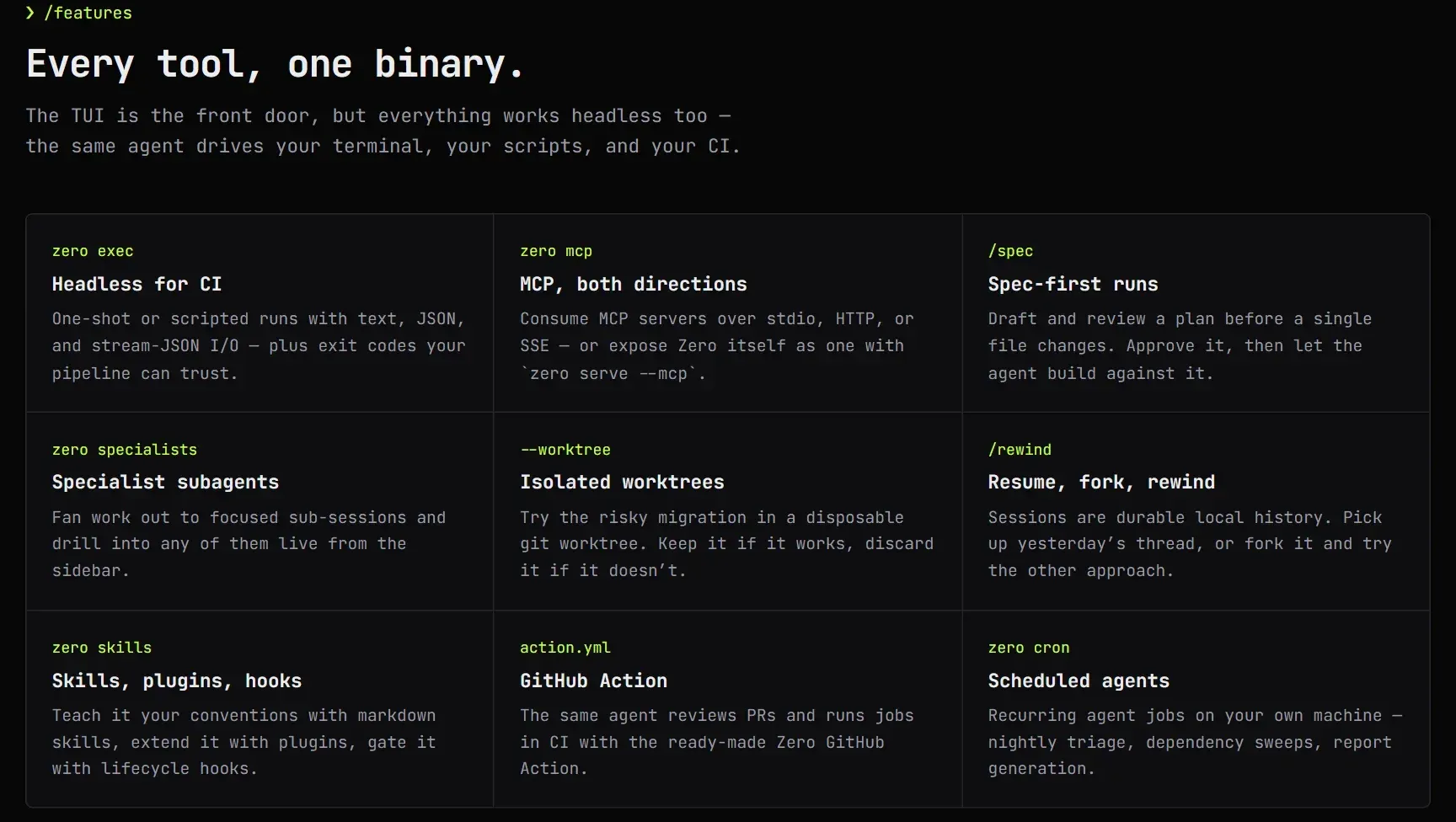
Feature overview from the official website, with the command or flag behind each capability.
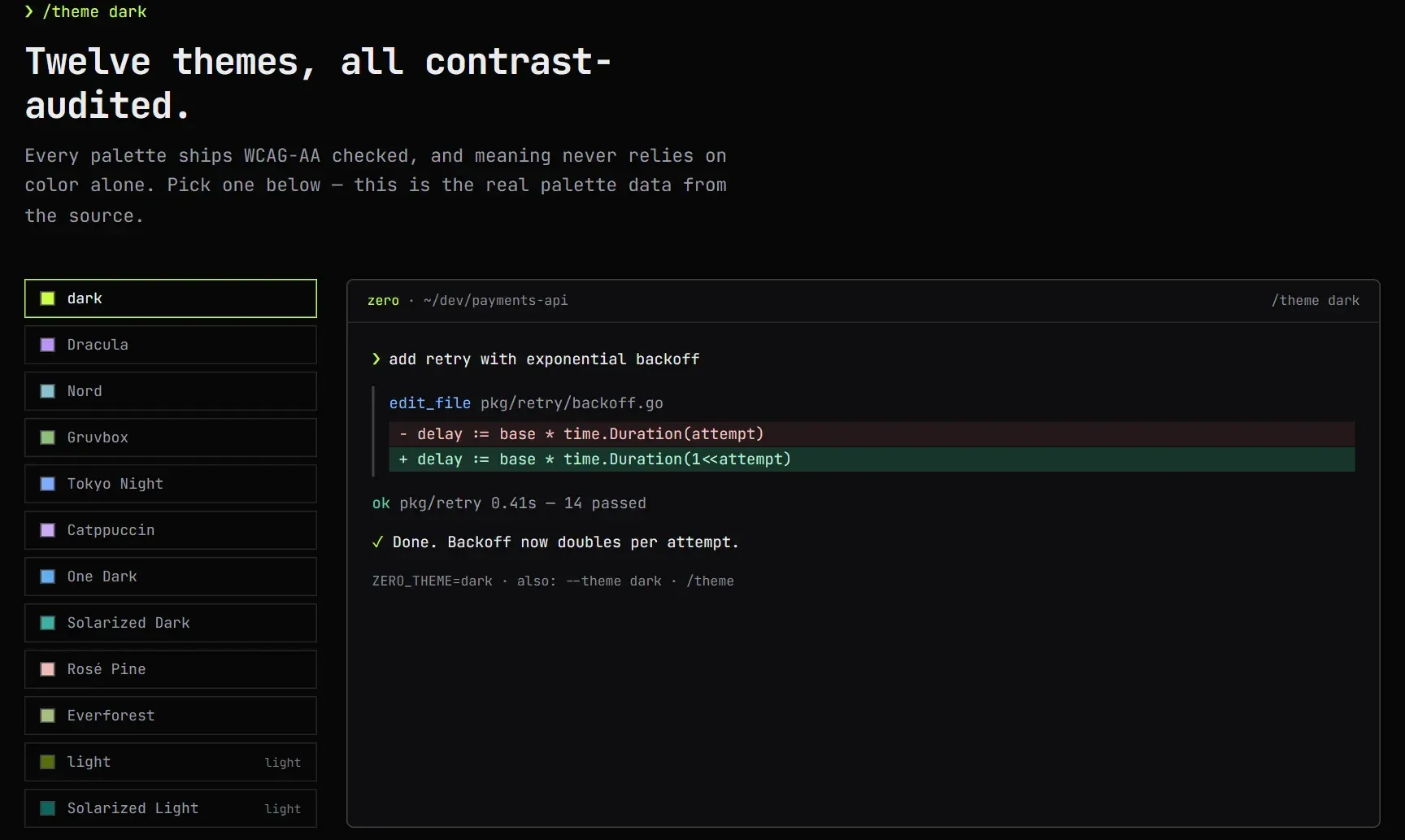
Theme preview from the official website, rendered from the palette data in the Zero source.
Source: official Zero project page.
Key capabilities
- Install with npm on Linux, macOS or Windows Run
npm install -g @twigpine/zerowith Node.js 18 or later. The wrapper installs a platform payload for Linux and macOS (x64, arm64) or Windows x64 as an optional dependency, including the browser and terminal control helpers. If optional dependencies are skipped, the wrapper downloads the binary from the matching GitHub Release and verifies its checksum. Bun, pnpm and yarn work the same way. - Install scripts and release archives On Linux and macOS, the bash installer needs curl or wget, tar and shasum or sha256sum, and places the binary in
~/.local/bin/zero. On Windows, the PowerShell installer writes to%LOCALAPPDATA%\zero\bin\zero.exe. Both accept a version pin and a custom directory. Archives with SHA256 files are also available on the releases page. - Source builds, mise and Termux Building from source needs Go 1.26.10 or later. mise installs from release archives through
ubi:Twigpine/zero, andzero upgradeshould not be used on a mise-managed binary. The install guide also documents a source build for Android under Termux withGOOS=android, which is not a published release target. - Model choice across many providers The website lists more than 30 providers, including OpenAI, Anthropic, Gemini, Groq, OpenRouter, DeepSeek, Mistral, xAI, Bedrock, Vertex AI, NVIDIA NIM, GitHub Models and Twigpine's OpenGateway, plus any OpenAI- or Anthropic-compatible endpoint. Local models run through Ollama, LM Studio or Atomic Chat, and
zero providers detectfinds them. The active model can be switched mid-session with/model. - OAuth logins for supported providers
zero auth loginhandles browser or device-code sign-in for OpenRouter, xAI, ChatGPT (Plus or Pro through the Codex backend) and Hugging Face, and for custom OAuth 2.0 providers configured through environment variables. Tokens are stored with 0600 permissions or in the OS keyring whenZERO_OAUTH_STORAGE=keyringis set. Claude subscriptions need a separate local proxy. - Permission policy and OS sandbox Workspace reads are allowed by default, file writes stay inside the workspace, and shell commands, network access and writes elsewhere ask first.
--add-dirgrants extra write roots without opening the whole filesystem, and unsafe autonomous modes are explicit opt-ins. Linux sandboxing needs Bubblewrap, macOS uses the system sandbox, andzero sandbox policyshows what applies. - Interactive terminal interface The TUI provides model and provider pickers, image input for vision models, live plan and tool rendering, a sidebar for agents, plan and changed files, and scrollback. Shift+Tab cycles the permission mode and Ctrl+B toggles the sidebar. Slash commands include
/spec,/plan,/compact,/context,/permissionsand/btwfor a side question in an isolated fork. - Headless runs with
zero execOne-shot and scripted runs produce text, JSON or stream-JSON output and return meaningful exit codes: 0 for success, 2 for usage errors, 3 for provider errors. Options include--worktreefor an isolated git worktree,--use-specfor spec-first work,--resumeand--fork. The stream-JSON protocol is at schema version 2 and rejects unknown input fields. - Local sessions with resume, fork and rewind Every session is kept on disk as metadata and an append-only event log of messages, tool calls, permissions, usage and checkpoints. Sessions can be resumed, forked, rewound to a checkpoint, searched with
zero searchand pruned; pruning skips sessions another process has open. Providers receive only the messages needed for the current completion. - MCP client and server Zero consumes MCP servers over stdio, HTTP or SSE, managed with
zero mcp, andzero serve --mcpexposes its own tools to another agent over stdio. The Exa MCP endpoint is enabled by default for keyless web search and can be turned off withzero mcp disable exa. The AI/ML API MCP server stays off until enabled. - Specialist subagents Named subagents receive focused work through the Task tool.
worker,explorerandcode-revieware built in; user and project specialists are Markdown manifests with a tool list such as read-only, edit, execute or plan, and an optional model override. The specialists guide lists the keys and the override order. - Skills, plugins and hooks Markdown skills teach project conventions, and since 0.12.0 a skill's bundled files are installed with it. Plugin manifests can declare custom tools with a prompt or deny permission, lifecycle hooks on
beforeTool,afterTool,sessionStartandsessionEnd, and extra prompts. A non-zero hook exit blocks the tool call. Details are in the extending guide. - Project and personal instructions Zero reads the first
AGENTS.md,ZERO.mdor.zero/AGENTS.mdin each directory from the git root down to the working directory, capped at 8 KiB per file and 32 KiB in total. A personalZERO.mdin the user config directory applies to every workspace before project guidance. - GitHub Action for CI
Twigpine/zero@v1installs a pinned release, runs a prompt in the checked-out repository and turns Zero's exit code into the step status. The provider, model and key are inputs, the autonomy ceiling defaults tolow, and a summary can be posted to the pull request or to Slack. See the Action reference. - Scheduled agent jobs
zero cronruns recurring agent jobs on the local machine, such as nightly triage or dependency sweeps. Each job keeps the newest 1,000 run outcomes inruns.jsonl; older records are trimmed on the next run, so archive the file first if you need them. - Usage, limits and diagnostics
zero usagereports token usage and estimated cost, andzero contextshows the context budget. AmodelRPMsetting caps completions per model in a sliding 60-second window; it is process-local, not an account-wide quota.zero doctorchecks setup, keys and connectivity. - Repository helpers
zero repo-mapbuilds a deterministic repository map,zero verifydetects and runs local checks,zero changesinspects and commits local git changes, andzero worktreesprepares isolated worktrees. These commands work from the same binary without the TUI. - Themes and accessibility Themes such as Dracula, Nord, Gruvbox, Tokyo Night, Catppuccin, Solarized and light variants are selected with
ZERO_THEME,--themeor/theme. The website states that its palettes are checked against WCAG AA, and diffs, permissions and statuses also use text or glyph markers.NO_COLORandZERO_NO_FADE=1disable color and the streaming fade. - Self-update with checksum verification
zero update --checkcompares the local version with the latest GitHub release and can print JSON for scripts.zero upgradedelegates to npm for npm installs, refuses for a Homebrew keg, and otherwise downloads, verifies and atomically replaces the binary and any installed sandbox helpers.
Where Zero fits
Fixing a failing test from the terminal
Start zero in the repository, describe the failure and let the agent run the test command, read the relevant files and propose an edit. In the default mode, shell commands ask for approval, so you see each command before it runs. Check the diff shown in the transcript and the changed-files list in the sidebar, then rerun the tests yourself before committing with zero changes or your normal git workflow.
Running a coding agent with a local model
Start Ollama, LM Studio or Atomic Chat, load a model, then run zero setup or zero providers detect. Prompts and code then stay on the machine, apart from features that call the network, such as the Exa web search MCP server enabled by default. Disable it with zero mcp disable exa if nothing should leave the host, and confirm with zero doctor that the local endpoint answers.
Automating changes in CI
Use zero exec with --output-format json or stream-JSON in a script, or the Twigpine/zero@v1 GitHub Action in a workflow. Pass the provider key as a secret through api-key and api-key-env, keep the autonomy ceiling at low unless the job needs more, and grant only the workflow permissions it uses. Check that a provider failure returns exit code 3 and fails the step rather than producing an empty success.
Trying a risky refactor in isolation
Run zero exec --worktree or use zero worktrees so the agent works in a disposable git worktree, optionally after drafting a plan with /spec or --use-spec. If the result is useful, review and merge the branch; if not, discard the worktree. /rewind and zero sessions fork let you return to a checkpoint or try another approach without losing the original history.
Encoding team conventions and review roles
Commit an AGENTS.md or ZERO.md with build commands and rules, then add project specialists under .zero/specialists, for example a read-only reviewer for API changes. Add skills for repeated procedures and hooks that block dangerous tool calls. Keep project instruction files under the 8 KiB per-file limit, and review plugin tools set to auto-approve before sharing them.
Exposing Zero to another agent or editor
Run zero serve --mcp and register it as a stdio MCP server in the receiving client, or connect an editor through the ACP bridge. The workspace and extra write roots are set with -C and --add-dir. Verify which tools the client can see and that the same sandbox policy applies to requests arriving through MCP.
Install
npm install -g @twigpine/zeroReviews of Zero
Be the first to share your experience with Zero.
Write a review
Loading review form…
Alternatives to Zero
 Codex CLIOpen-source Rust CLI from OpenAI that reads a repository, edits files and runs local commands inside a sandbox with approval prompts. Includes code review, MCP, skills, codex exec for CI, a TypeScript SDK and an app-server.
 gooseApache-2.0 AI agent written in Rust, with a desktop app, a CLI and an ACP server. It works with 15+ model providers or built-in local inference, connects to MCP extensions and runs reusable recipes. Originally from Block, now hosted by AAIF.