

What is Roomote?
Roomote is a self-hosted cloud coding agent. You ask for work in Slack, Microsoft Teams, Telegram, Discord, email, Linear, a source-control comment or the web dashboard, and Roomote starts a session, clones the repository into an isolated sandbox, makes changes, runs commands and tests, and returns a pull request, often with a live preview. It is a full-stack web application with its own database and queue, not an IDE extension or a desktop app. The license notice names Roo Code, Inc. as the licensor, and the site describes Roomote as the cloud coding agent you own.
Deployment is done by you. The documented routes are a one-command Linux installer for an Ubuntu or Debian host (4 GB of RAM recommended), one-click templates for Railway and Render, and guides for Coolify, Fly.io and home servers. The stack uses PostgreSQL and Redis, and a roomote backup command creates encrypted recovery bundles; each upgrade writes a pre-upgrade bundle first. Task sandboxes run on local Docker or on hosted providers: Modal, E2B, Daytona, Blaxel, Box, or Azure Container Apps, which the docs mark as a preview.
The latest release is v1.20.2, published on November 6, 2026. Its notes say long-running tasks now continue past 200 tool calls or 100 model steps, that work stopped for repetition can be resumed by replying to the task, and that a 1,000-request lifetime ceiling and repetition detection still apply. It also includes a security fix for excessive resource use when matching file patterns.
Roomote is source-available, not open source. It is licensed under the Fair Core License 1.0 with an Apache 2.0 future license (FCL-1.0-ALv2). You may read, modify and self-host it for any purpose other than a competing use, and each version converts to Apache 2.0 on the second anniversary of its release. Free use covers up to 10 users; larger deployments need a paid license, and the license key function may not be disabled or circumvented.
Roomote screenshots
Explore the interface. Open a screenshot to view it at full size.
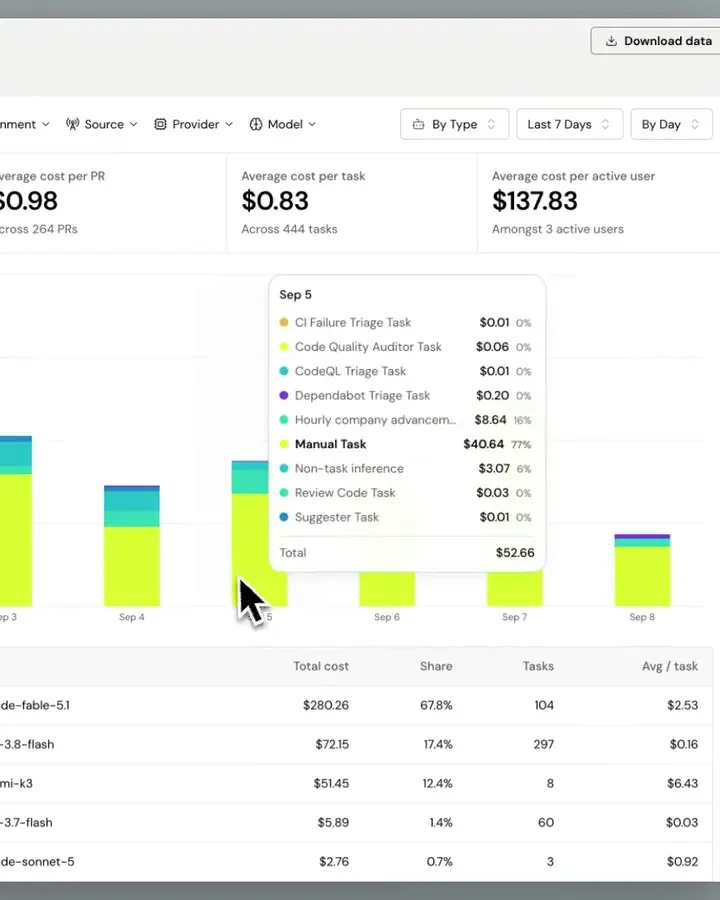
Frame from the official roomote.dev analytics video showing the costs view.
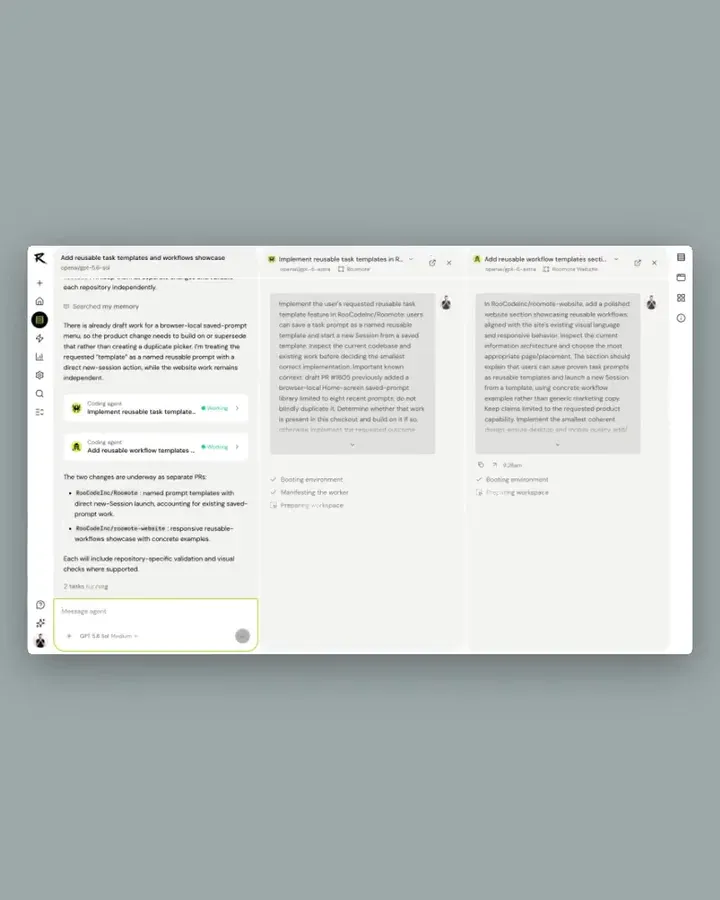
Frame from the official roomote.dev orchestration video showing parallel tasks in one workspace.
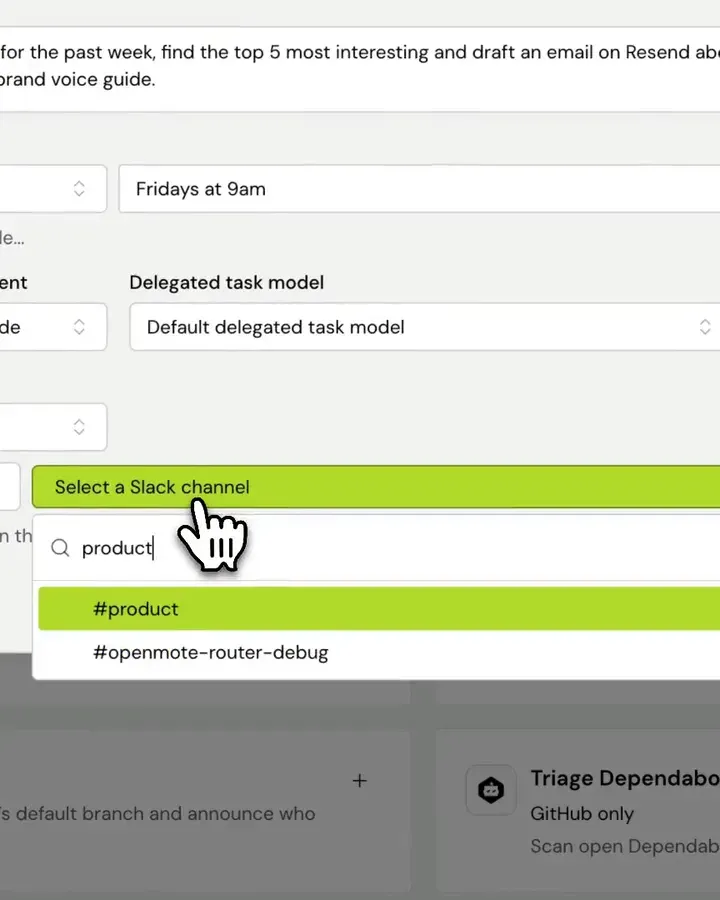
Frame from the official roomote.dev automations video showing a scheduled automation being configured.
Source: official Roomote project page.
Key capabilities
- Chat-first sessions Mention Roomote in Slack, Teams, Telegram or Discord, email an AgentMail inbox, or submit a prompt from the web dashboard. A session holds the conversation, and Roomote can answer directly or delegate repository work to tasks. Teammates can follow the thread, so work is visible instead of private to one terminal.
- Isolated task sandboxes Each task gets a temporary workspace where Roomote clones the selected repositories, installs dependencies, runs setup commands and tests, starts services and collects logs. Docker is the default and suits a trusted single host. Hosted providers move heavy work off the Roomote server, and provider support for snapshots and resume differs.
- Environments An environment defines repositories, services, variables, secrets and written guidance for a task, with a YAML definition related to Dev Containers. The docs advise starting with one environment that can prove work, such as one that runs the main test command or opens a preview.
- Pull requests and live previews Roomote opens branches and pull requests on GitHub, GitLab, Gitea, Azure DevOps and Bitbucket Cloud. Live Previews expose a named port from the sandbox as an authenticated URL, with desktop and mobile views, as the live previews page explains. A remote deployment needs a public preview origin, wildcard DNS and a TLS certificate.
- Bring your own models Connect an eligible ChatGPT subscription, or add API keys for providers including OpenRouter, Anthropic, OpenAI, xAI, Google Gemini, Amazon Bedrock, Vercel AI Gateway, Together AI, DeepSeek, MiniMax, Z.AI and Moonshot AI. The docs also list Ollama, vLLM, LiteLLM and OpenAI-compatible endpoints. Different model roles, such as helper and vision models, can be configured separately.
- Automations Recurring or event-driven work, such as reviewing pull requests, answering PR comments, resolving merge conflicts, triaging pipeline failures or posting a weekly summary to a Slack channel. Each run is a session that reports findings and failures. Custom automations take your own prompt, schedule, model and destination.
- Automation webhooks An enabled automation can be triggered over HTTP without changing its saved configuration. Use it to connect alerts from a monitoring tool, and protect the trigger like any other credential.
- Issue and alert integrations Roomote connects to Linear, Jira, Sentry, Grafana, PostHog, Notion, Figma and other tools so it can read tickets, logs and dashboards. Integration keys let an agent call a single HTTPS service without the key leaving Roomote.
- Code review loop A review pipeline runs as a task inside a session, on demand through a mention or automatically when enabled. The site describes reviewing changes with a different model from the one that wrote them, which is a useful check but not a substitute for human approval.
- Goal Mode The
/goalcommand keeps a session working toward one objective across several turns, checking whether the full outcome is complete. It suits work with a clear finish line, such as a benchmark target, and does not accept file attachments. - Shared memory A deployment-wide memory records completed tasks and their outcomes so later agents start with team decisions. There is no per-user or per-task corpus, so anything remembered is shared by everyone who can run a task. Review what your people put into tasks before enabling it broadly.
- Roomote MCP server Any OAuth-capable MCP client, such as Claude Code, Codex or Cursor, can start sessions, inspect delegated tasks and send follow-ups. A message accepts up to 20 attachments and 16 MiB of decoded data in total. See the MCP setup guide.
- Cost and usage analytics Built-in charts show cost per pull request, per task and per active user, grouped by provider, model, source and environment, with data download. Cost analytics stay inside the deployment and are separate from telemetry.
- Audit trail The README describes logging of which model was used, which tools were called and what code was written. SSO, custom SLAs and dedicated support are offered separately through enterprise contact.
- Voice and attachments Sessions can take files in chat and the web app and support spoken conversation with a realtime model. Confirm file-size limits and processing behavior in the file attachments documentation before relying on them.
- Self-hosted operations The operations guide covers encrypted backup and restore, upgrades with automatic pre-upgrade bundles, rollback, encryption key rotation and common issues. A restore needs the passphrase stored separately in your secret manager.
- Anonymous telemetry Enabled by default on self-hosted deployments and controlled by administrators. It sends usage events and a daily aggregate report keyed to random instance and user IDs, and never prompts, code, repository names, emails or credentials, according to the privacy page.
Where Roomote fits
Fixing a production bug from an alert
Connect Sentry or Grafana and let an automation or a mention start a session from the alert. Review the transcript, the diff and the test output before merging, and confirm the pull request links to the original alert. Keep humans as the approvers for anything that reaches production. Add the stack trace and the release number to the request so the agent can reproduce the failure.
Handling small chores in the background
Send dependency bumps, lint fixes, config changes and boilerplate to Roomote from chat. Give each request a scoped outcome and constraints, such as not changing an API contract. Check that CI passes on the pull request, because a passing sandbox run is not the same as your pipeline. Close requests the agent cannot finish instead of letting stale sessions pile up.
Letting non-engineers request changes
Product, support and operations staff can ask for small copy or content changes in Slack. Use a live preview so the requester sees the result without pulling a branch, and route the pull request to an engineer for approval. Limit which repositories those users can target.
Scheduled engineering reports
Create a custom automation that summarizes last week's pull requests and posts to a channel on a schedule. Choose a model and destination, then read several runs before treating the summaries as accurate.
Reviewing pull requests automatically
Enable the review automation for selected repositories so each pull request gets a first pass. Tune the noise boundaries described in the automation configuration page, and keep human review for security-sensitive code. Track how often reviewers accept the suggestions before widening the rollout.
Working from your existing coding agent
Connect the Roomote MCP server to Claude Code, Codex or Cursor, start a session for a long task and return to it later. Use a dedicated account and check which repositories that account can reach.
Install
curl -fsSL https://get.roomote.dev | sudo bashReviews of Roomote
Be the first to share your experience with Roomote.
Write a review
Loading review form…
Alternatives to Roomote
 OpenHandsOpenHands Agent Canvas is an MIT-licensed control center for coding agents. It runs the OpenHands agent or ACP agents such as Claude Code and Codex on local, Docker, VM, Kubernetes or cloud backends, with scheduled and event-driven automations.
 MulticaMultica is a source-available workspace for assigning issues to AI coding agents, tracking runs and reviewing results, via cloud, desktop or self-hosting.
 ArchonArchon is an open source, self-hosted workflow engine that runs AI coding agents such as Claude Code and Codex from YAML workflows in isolated git worktrees.