

What is Kodus?
Kodus is an open-source AI code review platform built by Kodus LLC. Its review agent, called Kody, reads pull requests on GitHub, GitLab, Bitbucket, Azure DevOps and Forgejo, posts inline suggestions with a severity level, and answers when a developer mentions @kody in a review thread. The model behind each review is chosen by the team: Kodus runs on Bring Your Own Key by default on every plan, so prompts and tokens are billed by the model provider rather than resold by Kodus.
There are three ways to run it. Kodus Cloud at app.kodus.io is the hosted service. The self-hosted edition runs as a Docker Compose stack on a virtual machine you control, installed from the kodus-installer repository, or on Kubernetes and OpenShift through the official Helm charts in the same repository. The third entry point is the Kodus CLI, published on npm as @kodus/cli, which reviews a working tree, a staged diff, a branch or a commit from a terminal or a CI job.
The latest tagged release is 2.2.12, published on November 5, 2026, a single fix for GitHub App linking that logs the failing step and skips null installations. Release 2.2.11 carried the larger batch: a separate key for a second OpenAI-compatible endpoint, Kody Rules evaluated on Azure Repos, committed secret files kept out of the agent tools and a reworked finder step with embedded verification. The product changelog for late October 2026 adds direct reading of coding-agent instruction files such as CLAUDE.md and AGENTS.md, automatic approval with a 30-day risk history, automatic pausing of noisy rules and a rebuilt business logic validation engine. Self-hosted builds are tagged separately, for example selfhosted-2.2.9.
The codebase is a TypeScript monorepo. apps/api is a NestJS API for organizations, rules, integrations and review orchestration; apps/web is the Next.js dashboard; apps/worker executes reviews from the queue; apps/webhooks ingests Git provider events; and libs/llm holds the provider abstraction used for BYOK. PostgreSQL and MongoDB store data, and RabbitMQ has been required since the 2.0 stack. To give the model cross-file context, Kodus parses each selected repository into an AST graph with @kodus/kodus-graph, caches it in PostgreSQL and updates it incrementally after merges, as described in the sandbox and AST graph guide.
Licensing is split. Code outside the Enterprise Code is under AGPL-3.0, while files with .ee. in the name or inside an ee/ directory fall under the Kodus Enterprise Code License. That license lets Community users run the unmodified Enterprise Code needed for Community features, including code review and BYOK, in internal production use, but not modify it, lift the Community limits or offer Kodus to third parties as a hosted service. Kodus is a review and quality tool: it does not write features, run your test suite or replace a static analysis scanner, and several functions (custom agents, plugins) are still labelled beta in the documentation.
Kodus screenshots
Explore the interface. Open a screenshot to view it at full size.
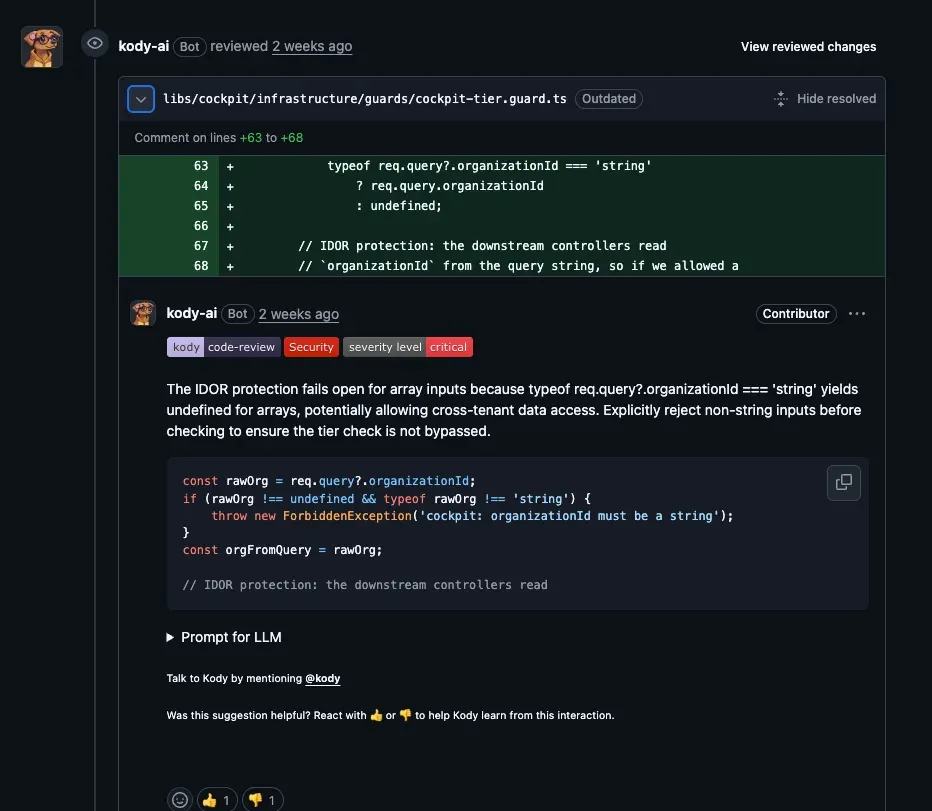
Official example of a Kody review: a Security comment of critical severity on a guard file, with replacement code and a prompt for an LLM.
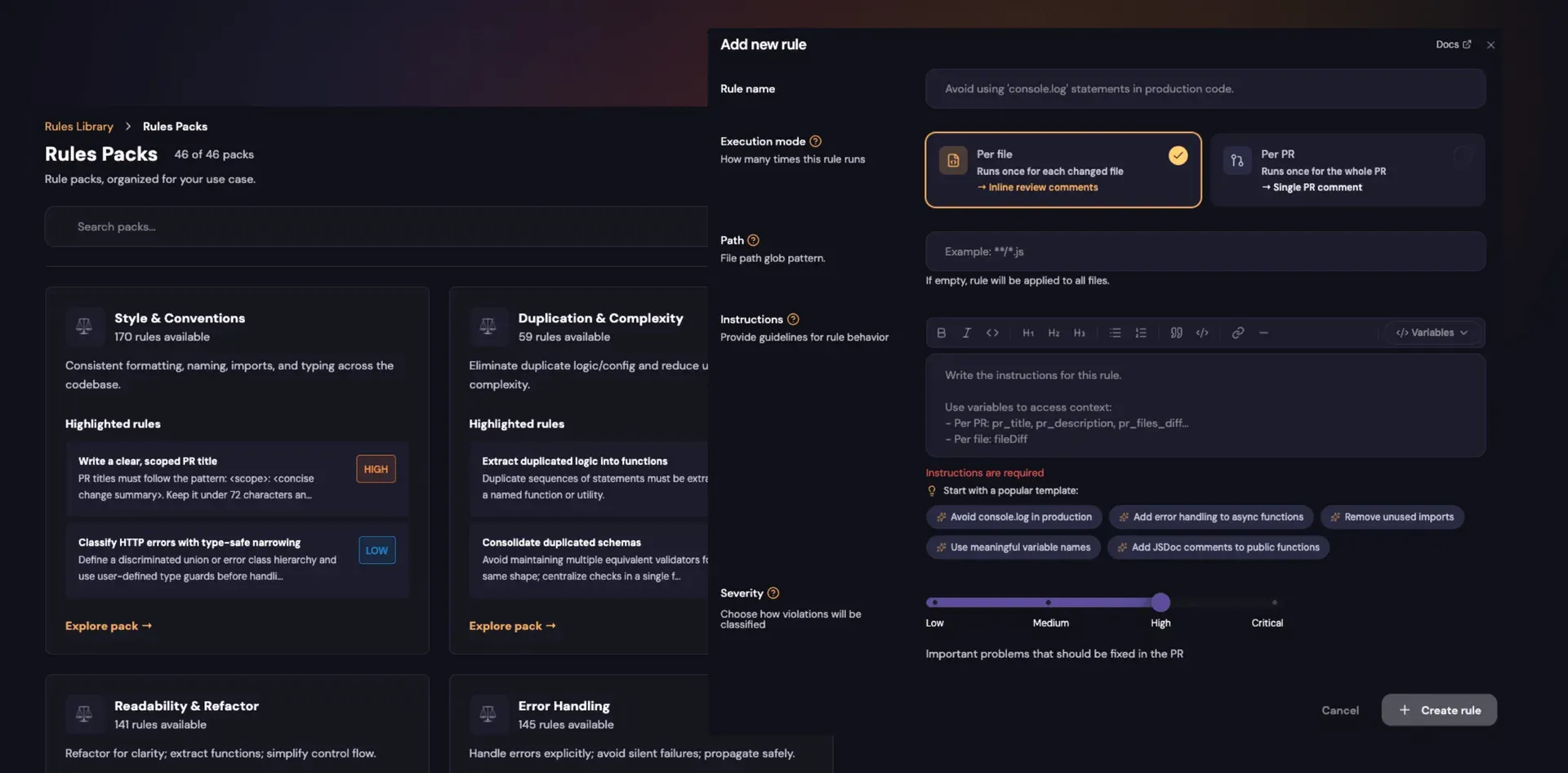
Rule packs and the rule editor: per-file or per-PR execution, a path glob, plain-language instructions and a severity slider.
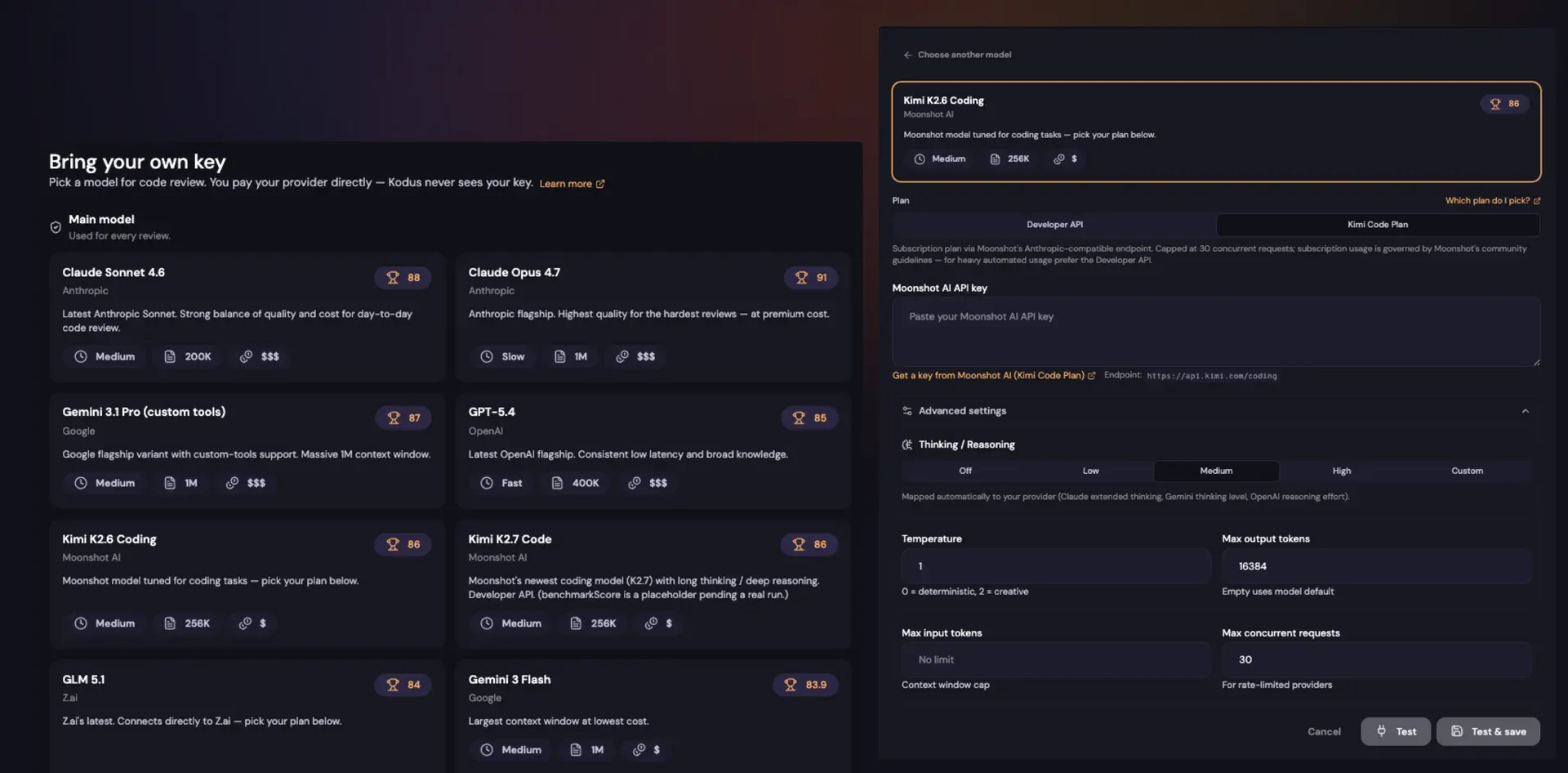
The BYOK model picker with a provider key form and advanced settings for reasoning level, temperature, token limits and concurrency.
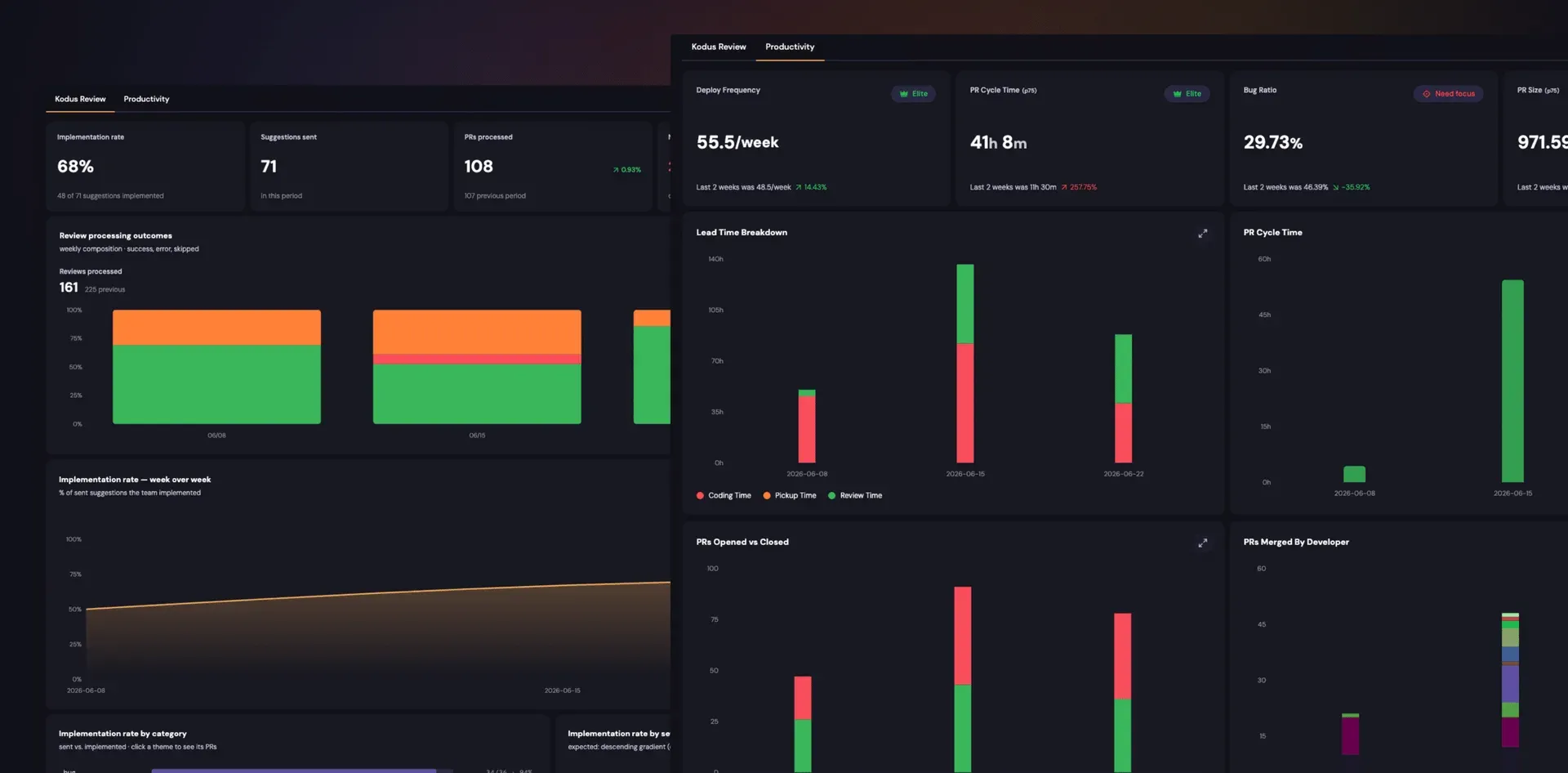
Cockpit with the Kodus Review tab (implementation rate, processed reviews) and the Productivity tab (deploy frequency, lead time, PR cycle time).
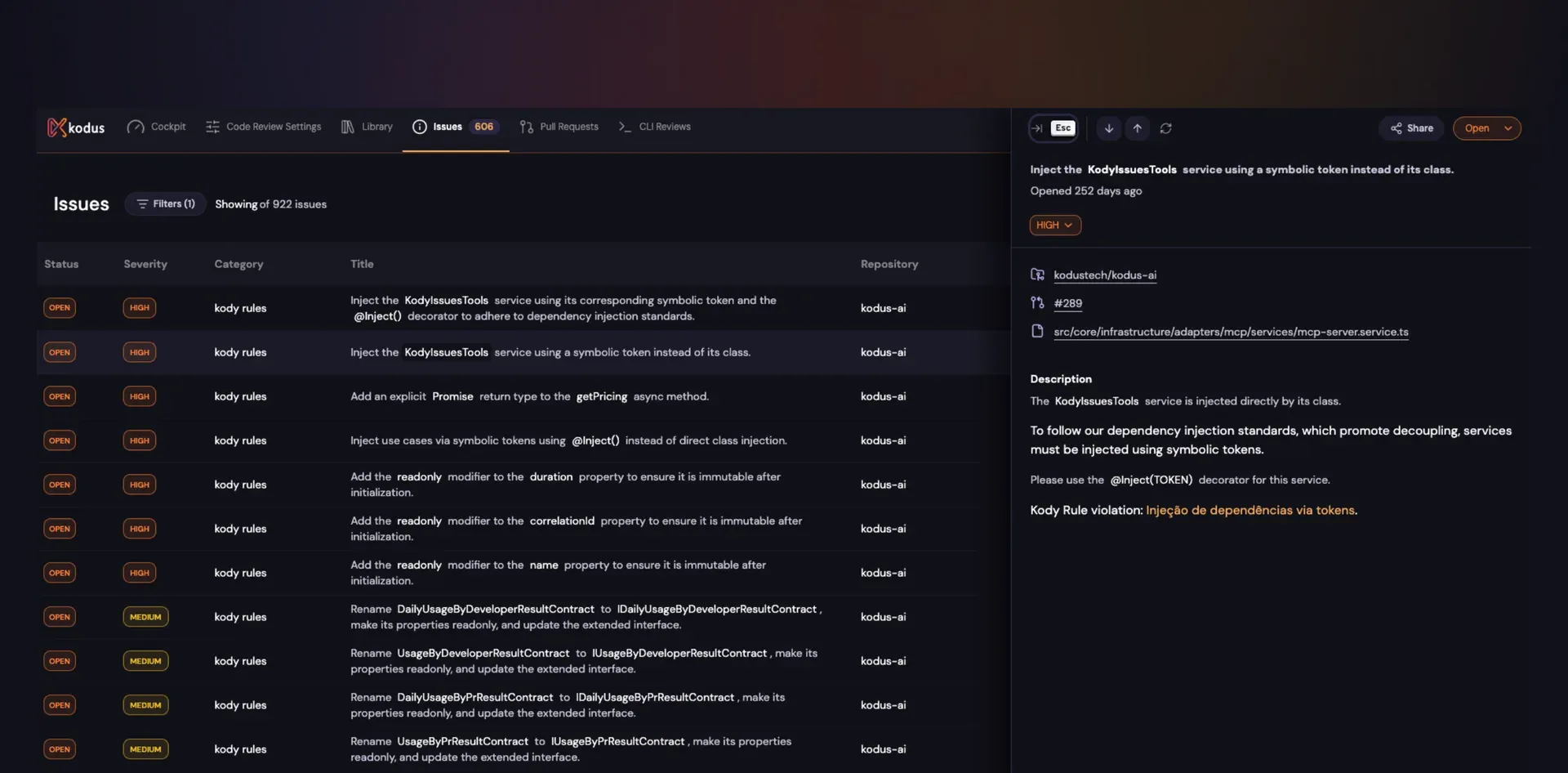
Kody Issues listing unapplied suggestions by status, severity and repository, with the detail panel for one Kody Rule violation.
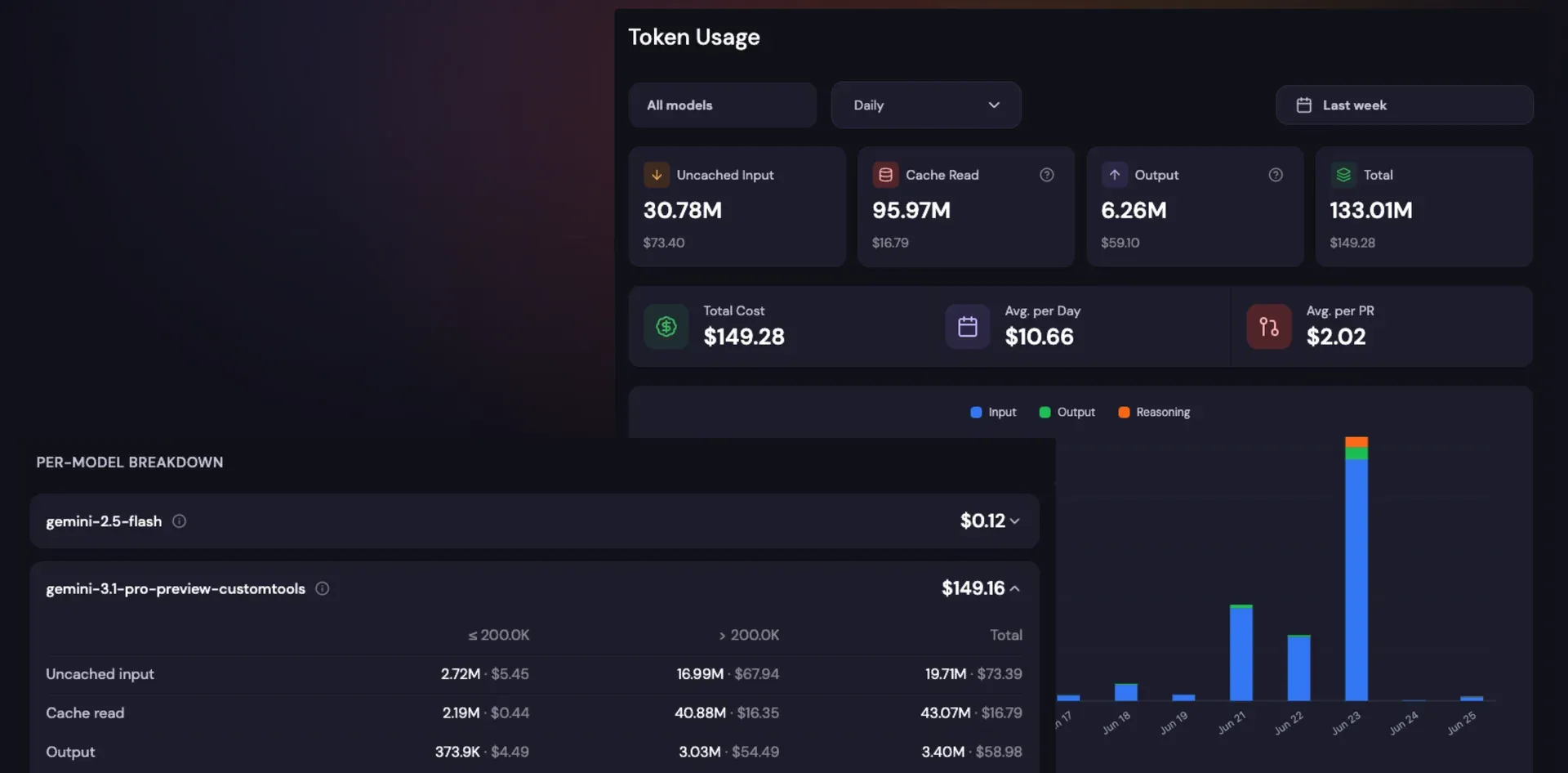
Token usage by model and day, with average cost per day and per pull request, from a sample workspace.
Source: official Kodus project page.
Key capabilities
- Pull request review on five Git platforms Kody reviews pull requests on GitHub, GitLab, Bitbucket, Azure DevOps (Azure Repos) and Forgejo, including self-managed GitLab and Forgejo instances when Kodus is self-hosted. Suggestions arrive as inline review comments with a category and severity, and a PR summary can be generated per pull request. A new push that removes a reviewed change triggers a fresh review.
- Bring Your Own Key model routing The AI providers page connects OpenAI, Anthropic, Google, OpenRouter, Novita, Moonshot, Z.ai and custom endpoints: OpenAI-compatible, Anthropic-compatible, Google Vertex AI, Amazon Bedrock and Azure OpenAI. A Routing tab picks one default model, an optional fallback and per-agent overrides, and a Budget tab sends spend alerts without stopping reviews. Only the Owner role can add or test keys, and a BYOK review never falls back to a Kodus-managed model on its own.
- Kody Rules in plain language Teams write review rules as natural-language instructions scoped to the organization, a repository, a directory or a file glob, with a severity from Low to Critical. Rules run per changed file (inline comments) or once per pull request (one PR comment), and a library of rule packs covers style, duplication, error handling and refactoring. The Community edition allows up to 10 Kody Rules; Teams and Enterprise remove the cap.
- Coding-agent instruction files When the option is enabled, Kody reads
CLAUDE.md,AGENTS.md,.cursor/rulesand Copilot instruction files directly during reviews, including files referenced from another instruction file. A finding based on these files is accepted only when the cited text can be verified in the file. The rules file detection page explains the toggle and onboarding list. - Centralized Config as code Centralized Config keeps every review setting (
kodus-config.yml) and every Kody Rule (.kody-rules/) in one repository whose folder layout mirrors the Global, Repository and Directory scopes. Changes go through a pull request on that repository and sync to Kodus after merge, which gives history, review and rollback for review behaviour. The initial sync can open a PR automatically or generate files for manual commit. - Kody Issues for unapplied suggestions When a pull request is closed, suggestions that were not implemented become Issues with status, severity, category, file and linked PRs. An issue is marked resolved automatically when a later pull request applies the fix. PR-level Kody Rules do not create issues, and automatic creation can be switched off per workspace.
- Cockpit metrics The Cockpit reports review effectiveness (suggestions sent, implementation rate, review outcomes) next to delivery metrics such as deploy frequency, lead time breakdown, PR cycle time, PR size and change failure rate. It also shows Kody Rule health, including rules flagged as noisy or ignored. Cockpit is part of Teams and Enterprise; on self-hosted installations it needs the Enterprise analytics worker.
- Token usage reporting A token usage view splits uncached input, cache reads and output per model and per day, and computes average cost per day and per pull request. Because billing stays with your provider, these figures help explain the provider invoice rather than a Kodus surcharge. Budgets and alerts are configured from the BYOK Budget tab.
- Automatic approval with risk checks Auto-approval can approve a clean pull request after checking labels, authors and sensitive file paths, and now also weighs the change history of the affected code over the past 30 days. On GitHub, an earlier Kody approval is dismissed if a later review finds a blocking problem. The feature is opt-in and should be limited to repositories where the team accepts bot approvals.
- Business logic validation With
@kody -v business-logicor an automatic check, Kody compares a pull request against task requirements and acceptance criteria fetched from an issue tracker plugin or pasted inline. Each requirement is marked MET, PARTIAL, MISSING, CHECK MANUALLY or NOT IN TASK in a single PR comment that is updated on each run. The validation guide covers sources and recheck settings. - Custom review agents (beta) Teams and Enterprise workspaces can define extra reviewers for one concern each, such as architecture boundaries, duplicated code or a security policy. Each agent has instructions, file globs it watches, linked repository docs, read-only tools including ast-grep rules and team CLIs, and its own model and comment limits. Agents are configured in the app only and do not run on the Free plan.
- Plugins over MCP (beta) Plugins are Model Context Protocol servers that give Kody business context, for example Jira tasks, during a review. Every workspace includes the Kodus MCP for Git operations, rule management and manual issue creation; custom MCP servers can be added over HTTP or SSE with bearer, basic, API key or OAuth 2.0 authentication. The Community edition runs up to 3 plugins at a time.
- Kodus CLI for local and CI reviews Install with
npm install -g @kodus/cli(Node.js 20 or later) or run once withnpx @kodus/cli review.kodus reviewchecks the working tree,--stagedthe staged diff,--fixapplies fixable issues and--prompt-onlyemits compact output for Claude Code, Cursor, Codex or Windsurf. Without an account the trial allows 5 reviews per day, 10 files per review and 500 lines per file;kodus hook installadds a pre-push hook. - Self-hosting with Docker Compose The generic VM guide asks for 2 or more CPU cores (4 for repositories above about 100k lines), 8 GB of RAM (16 GB for large repositories in local sandbox mode), 60 GB of free disk and Docker with the Compose plugin. You clone kodus-installer, copy
.env.example, run./generate-keys.shand./scripts/install.sh, then check the result with./scripts/doctor.sh. Web, API and webhooks listen on ports 3000, 3001 and 3332, and a reverse proxy with public hostnames is needed before cloud Git providers can deliver webhooks. - Kubernetes and OpenShift Helm charts The Helm deployment requires Helm 3.8+, Kubernetes 1.28+ or OpenShift 4.14+. The default bundled mode runs PostgreSQL with pgvector, MongoDB and RabbitMQ as StatefulSets, while operator and external modes connect to managed data stores.
imageTagpins one Kodus release across the stack, and the chart README documents air-gapped installs and ExternalSecrets. - Sandbox and AST graph context Each selected repository is parsed into a graph of files, functions, classes, imports and calls, built once at onboarding and updated after merges to the default branch. Reviews load only the subgraph touched by the pull request. The parser runs in the worker container by default (
localmode) or in an E2B remote sandbox, which is a paid third-party service. - Self-hosted telemetry and opt-out A self-hosted instance sends one anonymous heartbeat per UTC day, roughly 700 bytes of aggregated counters and runtime metadata, to telemetry.kodus.io. The telemetry page publishes the schema and states that code, names and identifiers are excluded. Set
KODUS_TELEMETRY_DISABLED=trueto turn it off.
Where Kodus fits
Adding AI review to an existing pull request flow
Connect the Git provider in Kodus Cloud or a self-hosted instance, select a few repositories and connect one model key on the AI providers page. Open a small test pull request and confirm that Kody posts inline comments, that severities match your expectations and that the summary comment is useful. Check which permissions the GitHub App, OAuth app or personal access token received, and keep the first rollout to repositories where reviewers will actually reply to bot comments.
Running reviews entirely inside your own network
Deploy the Docker Compose stack or the Helm chart, point it at self-managed GitLab or Forgejo, and configure an OpenAI-compatible or Anthropic-compatible endpoint served inside the network. With both Git and model on premises, outbound internet access is optional. Verify that webhooks reach port 3332 through your reverse proxy, disable the daily heartbeat if policy requires it, and pin IMAGE_TAG or imageTag so upgrades are deliberate.
Encoding team conventions as Kody Rules
Start from a rule pack or write rules for decisions reviewers repeat, such as dependency injection style, forbidden APIs or test expectations. Scope each rule to the paths it concerns and choose per-file or per-PR execution. For many repositories, move the rules into a Centralized Config repository so changes are reviewed like code. Watch the Cockpit rule health view and the automatic pause option, since noisy rules quickly train developers to ignore comments.
Checking changes before they are pushed
Install the CLI, sign in with kodus auth login, and run kodus review --staged before committing or add kodus hook install to block pushes above a severity threshold. In CI, use the documented exit codes to fail a job on high-severity findings. For coding agents, pipe kodus review --prompt-only output into Claude Code, Cursor or Codex and review what the agent changes, because the loop can apply fixes without a human reading each one.
Validating pull requests against task requirements
Install an issue tracker plugin, link tasks in pull request descriptions and run @kody -v business-logic or enable automatic checks per repository. Read the single consolidated comment: MISSING and PARTIAL items deserve a reviewer, and CHECK MANUALLY means the model could not confirm the requirement. This works best when acceptance criteria are written as testable statements in the ticket.
Measuring whether review automation helps
On Teams or Enterprise, compare implementation rate, suggestions sent and PR cycle time in the Cockpit over several weeks, and review open Kody Issues by severity. Pair these figures with the token usage report and your provider invoice to calculate a cost per reviewed pull request. If implementation rates stay low, tighten rules or lower the comment volume before adding more agents.
Install
npm install -g @kodus/cliReviews of Kodus
Be the first to share your experience with Kodus.
Write a review
Loading review form…
Alternatives to Kodus
 PR-AgentPR-Agent is an open-source AI code review agent that describes, reviews and improves pull requests from comments, a CLI, GitHub Actions or webhooks.
 OpenCodeReviewOpenCodeReview is an open-source CLI that reviews Git diffs or whole files with an LLM agent and produces structured, line-level comments.
 OllamaOllama is an MIT-licensed tool for downloading and running open models such as Gemma, Qwen, DeepSeek and gpt-oss on your own machine. It ships a desktop app, CLI and local REST API, and offers cloud-hosted models on a pay-as-you-go or subscription basis.