

What is Jean?
Jean is an opinionated workspace for AI-assisted development. Every task gets its own Git worktree, several agent sessions can run in parallel, and Git operations, diff review, terminals and issue trackers sit in one window. Jean does not ship a model: it drives the agent CLIs you already have installed and logged in, using your own subscriptions or API access. The README lists Claude, Codex, Cursor, OpenCode, Pi, Command Code, Grok, Kimi Code, Antigravity (beta) and Muse as backends, and v1.0.13 added a Devin backend. Jean is built by coolLabs, the company behind the Coolify self-hosting platform, with Andras Bacsai as core maintainer. Product information and documentation are on jean.build.
There are two ways to run it. The native desktop app is published on GitHub Releases as a universal macOS DMG (also installable with a Homebrew cask), a Windows x64 setup.exe and MSI, and Linux AppImage, .deb and .rpm packages for x64 and arm64. The headless jean-server runs on Linux amd64 and arm64 without a desktop, GTK or WebView, and serves the full interface over HTTP and WebSocket. It ships as release tarballs with SHA-256 checksums, an install script that registers a systemd service, and a container image at ghcr.io/coollabsio/jean-server. The desktop app can list projects from local and any number of remote servers in one sidebar.
The current release is v1.0.14, published on November 6, 2026. It adds remote MCP endpoints for all backends, project-scoped secret requests through Jean MCP, the Agent Browser enabled by default, opt-in SSH agent forwarding for servers, and grouped sub-sessions under a lead session. Web Access sign-in now uses HttpOnly session cookies, and rejected pushes are retried after merging remote commits. It also closes the experimental Agents feature to new users. Version 1.0.13 added GitLab as a provider with a Jean-managed glab CLI, made the GitHub CLI optional, introduced a persistent SSH tunnel transport for remote servers and made Plan mode opt-in.
Jean is a Tauri v2 application with a Rust core and a React 19, TypeScript and Tailwind CSS v4 interface, using xterm.js for terminals. A shared jean-core crate holds state, commands, persistence, chat backends and the HTTP and WebSocket protocol, and the server adapter is built on Tokio and Axum. The README states platform support plainly: macOS is tested, Windows is not fully tested, and Linux is community tested on Arch Linux with Hyprland on Wayland.
The code is licensed under Apache 2.0. The website describes Jean as free with no paid tiers, feature gates or usage limits, and funds it through optional sponsorships. There is no hosted Jean service or Jean account: projects, sessions and settings stay on the machine running Jean, while each backend sends prompts to its own vendor. Model quality, permissions and usage limits are set by those agent vendors, not by Jean.
Jean screenshots
Explore the interface. Open a screenshot to view it at full size.
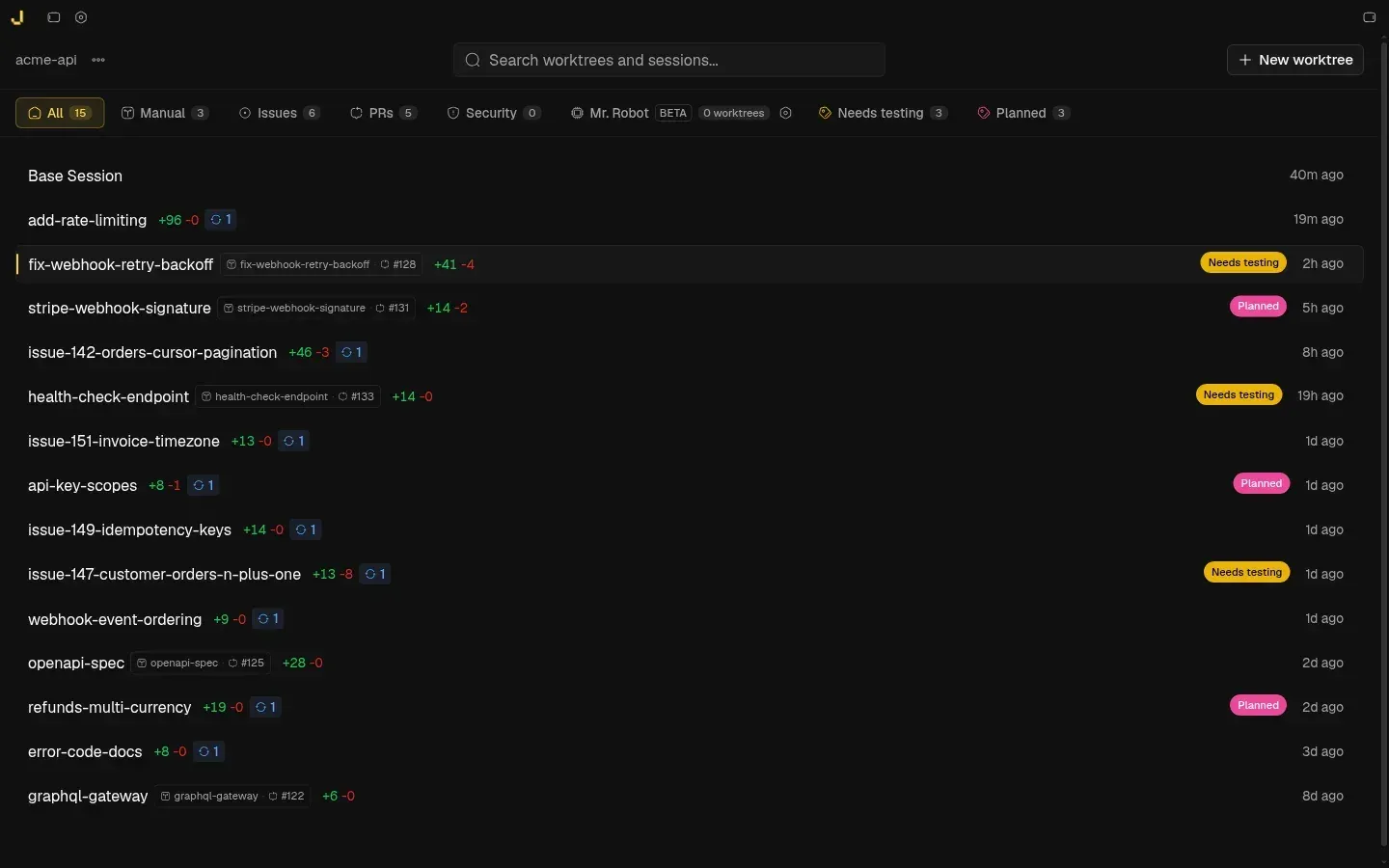
Official README screenshot: the project view of a sample repository with one worktree per task, filter tabs for issues, PRs, security and Mr. Robot.
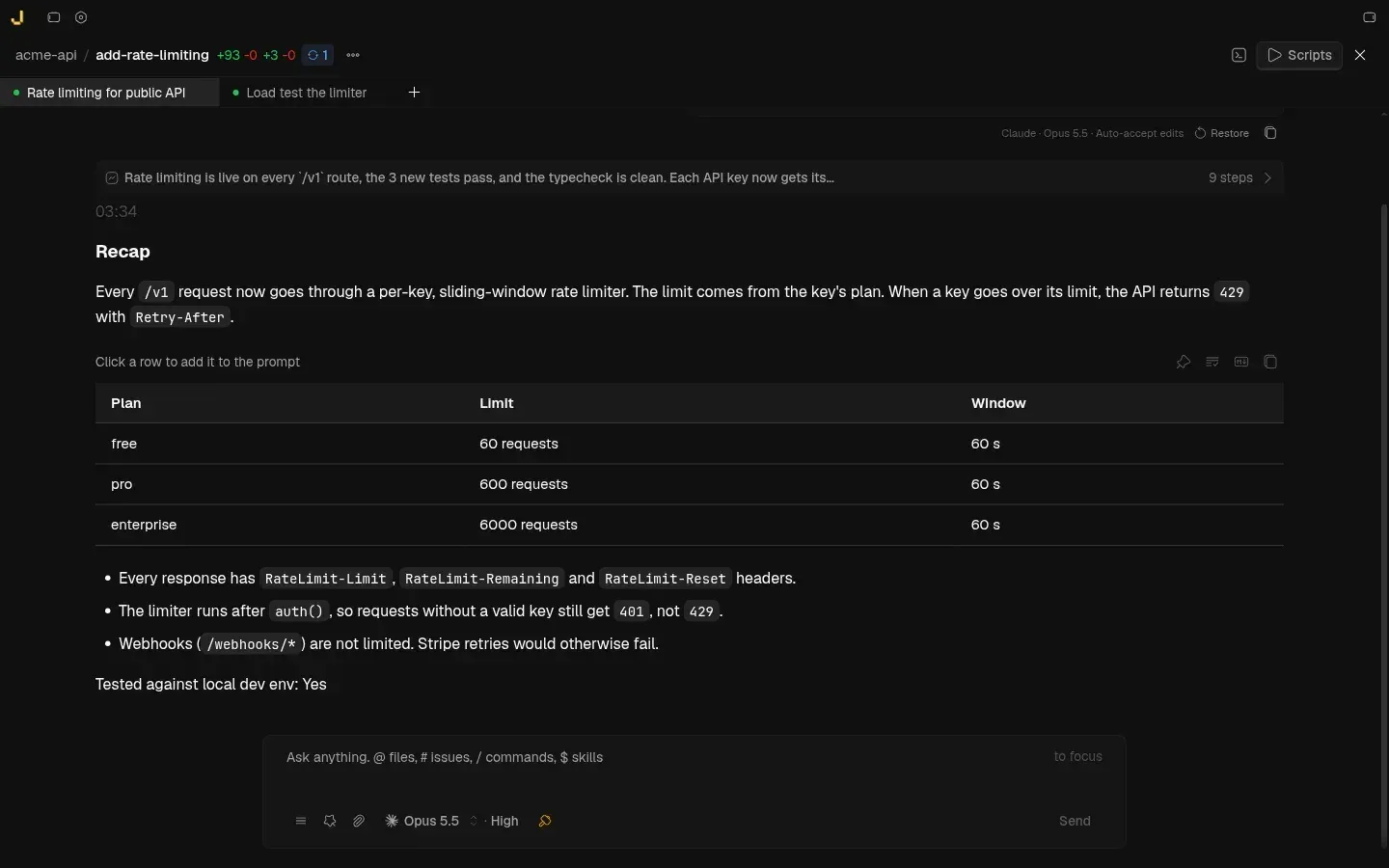
An agent session ends with a recap of what changed; a second session runs in the next tab. Official README screenshot.
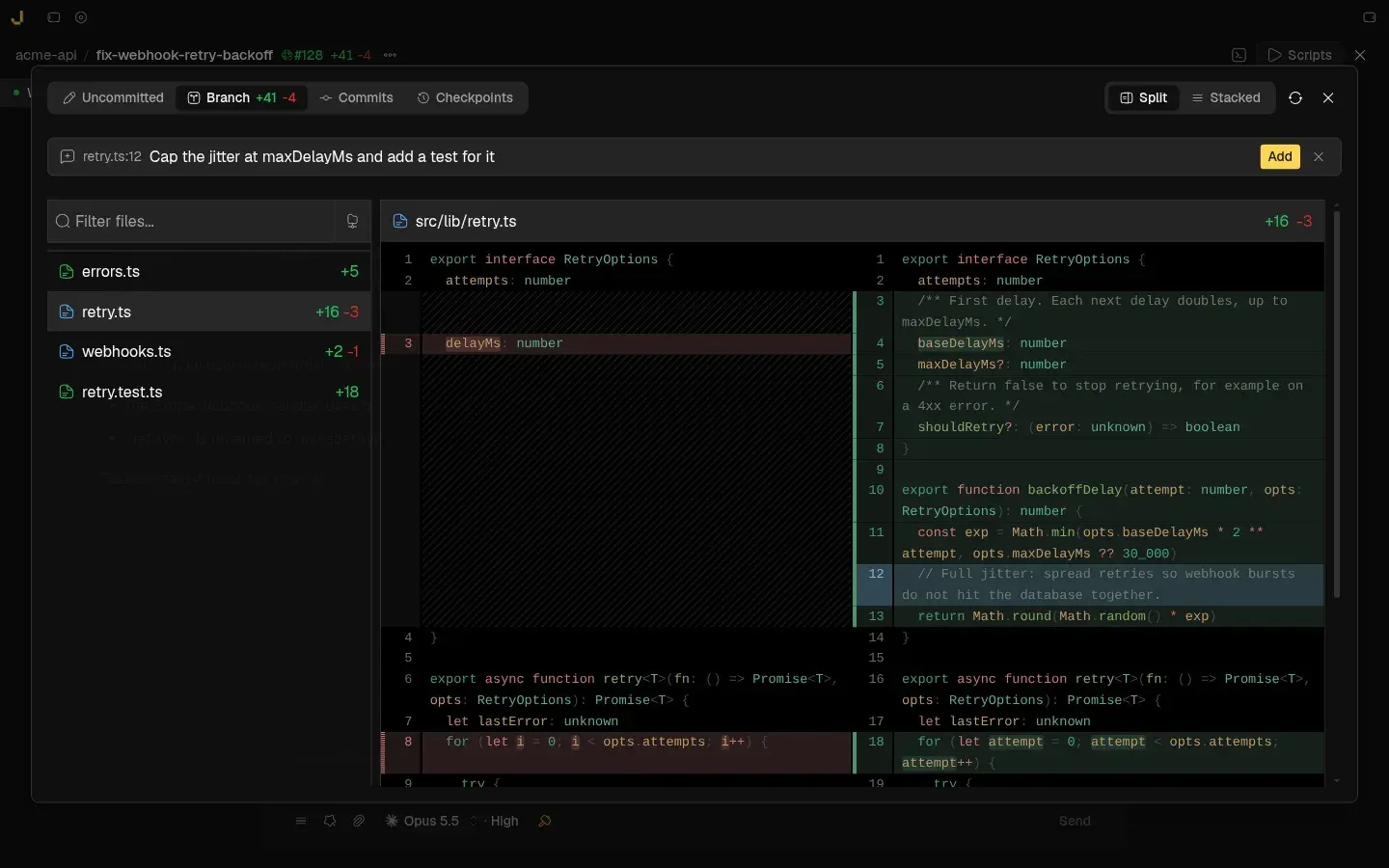
Split diff view of a branch with a line comment queued for the agent; tabs switch between uncommitted changes, branch, commits and checkpoints. Official README screenshot.
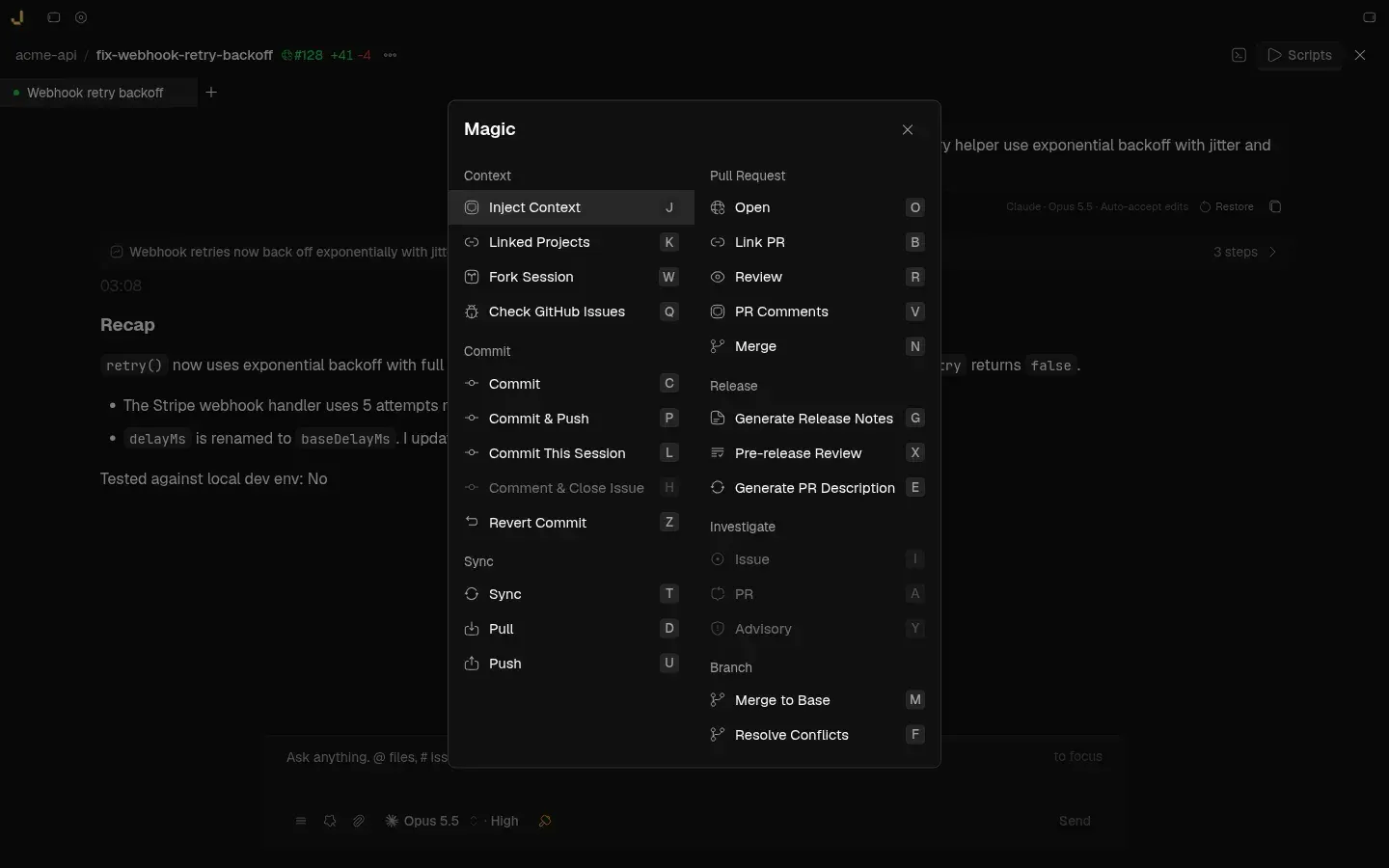
The Magic palette groups commit, sync, pull request, release, investigation and merge actions with single-key shortcuts. Official README screenshot.
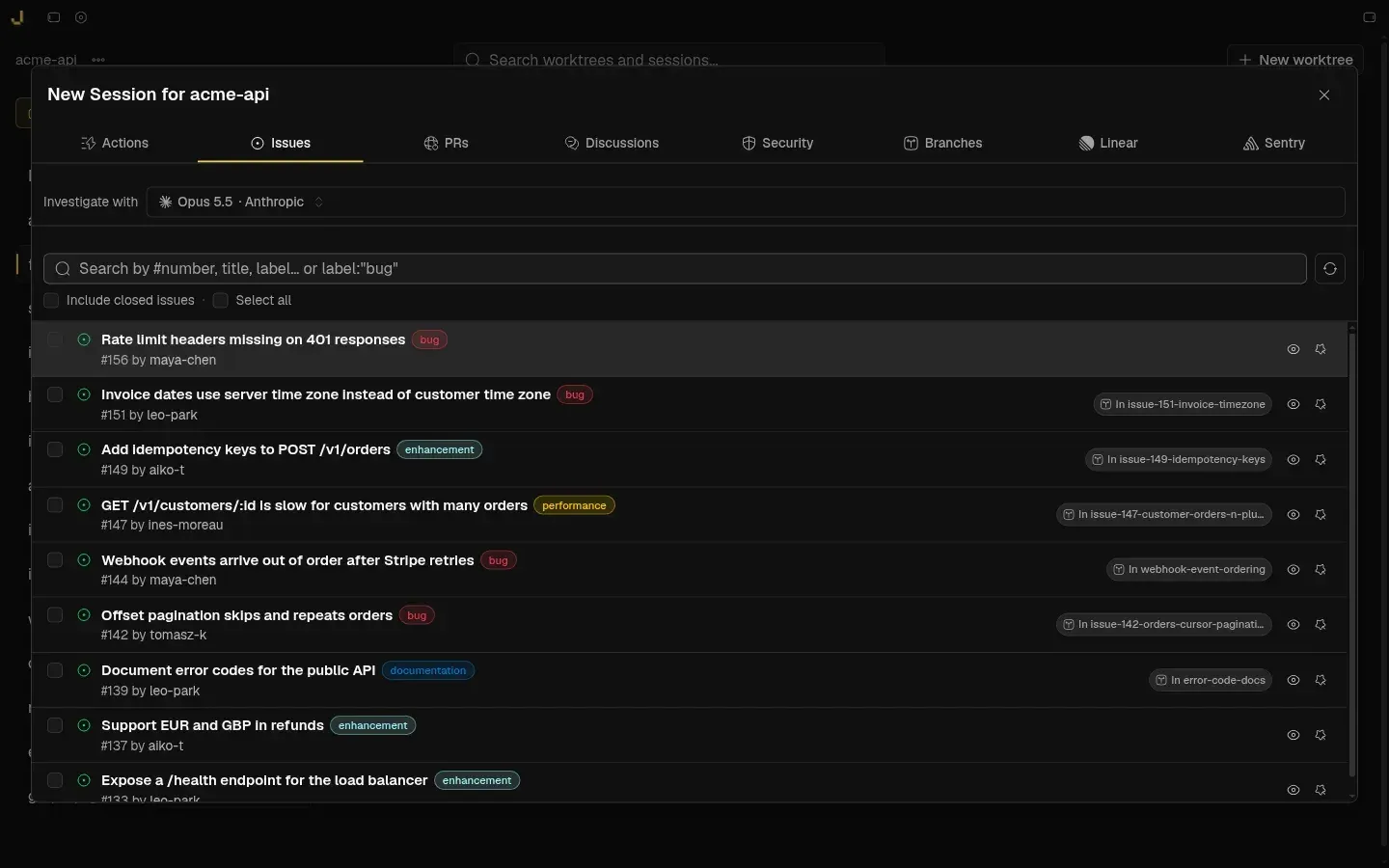
The new session dialog starts work from GitHub issues, pull requests, Discussions, security alerts, branches, Linear or Sentry. Official README screenshot.
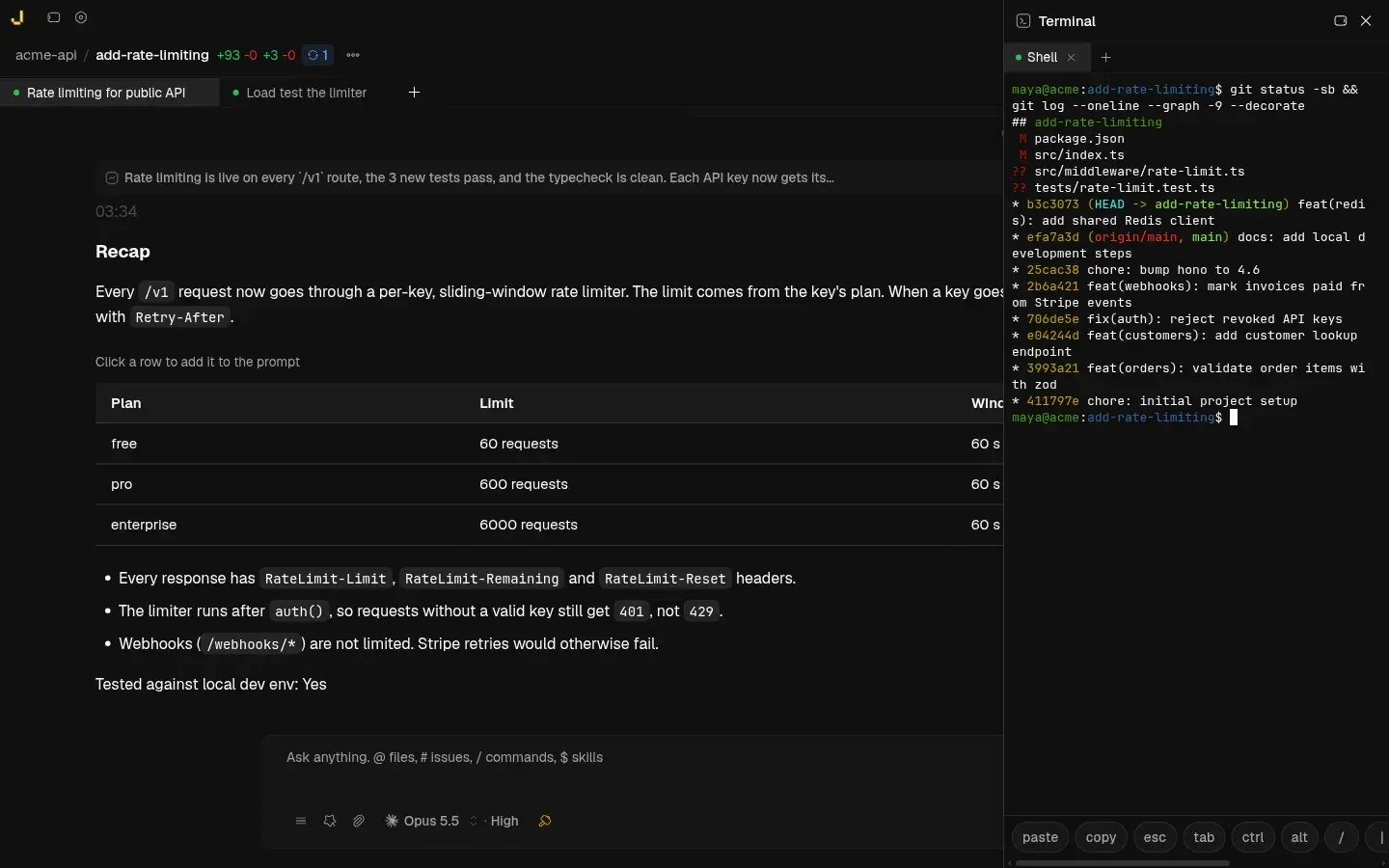
A docked terminal panel next to an agent session, running git commands in the worktree. Official README screenshot.
Source: official Jean project page.
Key capabilities
- Download for macOS Each release includes a universal DMG for Apple Silicon and Intel Macs. Homebrew users run
brew tap coollabsio/jeanfollowed bybrew install --cask jean. macOS is the platform the maintainers list as tested, and the app checks for updates after launch and prompts for a restart when one is installed. - Download for Windows Windows builds come as an x64 setup.exe and an x64 MSI, each with a signature file for the in-app updater. The README marks Windows as not fully tested. Building from source on Windows needs the Visual Studio "Desktop development with C++" workload, which provides the MSVC tools and Windows SDK that Rust requires.
- Download for Linux Releases include AppImage and .deb packages for amd64 and arm64 and .rpm packages for x86_64 and aarch64. The in-app updater handles AppImage artifacts. Linux desktop support is described as community tested on Arch Linux with Hyprland on Wayland, so other desktops may need more checking.
- Headless jean-server A standalone Linux server for amd64 and arm64 that needs glibc and OpenSSL 3, with Ubuntu 22.04+ or Debian 12+ recommended. The install script downloads the latest release, writes
/etc/jean-server.envwith host, port and token, and registersjean-server.service; a--user-installoption uses a user systemd unit instead. The headless server guide covers options, systemd, Docker and health checks. - One Git worktree per task Jean creates, archives, restores and deletes worktrees for each project, with labels and filters on the project view. Existing worktrees can be imported on demand, and pull requests can be checked out as worktrees. Closed work can be archived with a configurable retention period or deleted, as described in the archive and recovery guide.
- Parallel agent sessions A worktree can hold several sessions, and a Recent tab lists sessions across all projects. Sessions have execution modes (Plan, Build and Yolo) with plan approval, auto-naming, recaps that summarize what changed, saved contexts and recovery after a crash. Since v1.0.13 new sessions start in an implement permission, and Plan mode is entered only when chosen.
- Backends, models and effort A global default backend can be overridden per project or per session, with model and thinking or effort level stored per session. Cursor Agent supports only Plan and Yolo modes. Custom Claude CLI provider profiles can route Claude CLI to another endpoint. Details are on the backends, models and MCP page.
- MCP server discovery Jean reads MCP servers from the configuration of installed backends, including Claude config and
.mcp.json, Codex.codex/config.tomland OpenCodeopencode.json. Servers can be enabled globally, per project or per session, and servers you turned off stay off when new ones are discovered. Since v1.0.14 remote MCP endpoints work across all backends with token authentication. - Magic commands A command palette groups Git and review actions: inject context, fork a session, commit, commit and push, revert, sync, open or link a pull request, review, address PR comments, merge, merge to base, resolve conflicts, and generate release notes or PR descriptions. Each action has a single-key shortcut inside the palette. See the magic commands guide.
- Editable magic prompts Every built-in prompt behind those commands can be edited, and each has its own backend, model, reasoning effort and mode. This lets a team use a heavier model for planning or code review and a lighter one for commit messages. Settings live in the Magic Prompts pane.
- Diff review with line comments The diff viewer shows uncommitted changes, the branch, single commits and checkpoints, in split or stacked layout, with a file tree. Comments can be attached to specific lines and added to the next prompt for the agent. A built-in code review tracks findings, and since v1.0.14 it runs as a chat prompt in a separate Review session.
- GitHub and GitLab Sessions can start from GitHub issues, pull requests, workflow runs, Discussions, Dependabot alerts and security advisories, usually with a new worktree and an investigation prompt. Worktrees can be archived automatically when their PR merges. GitLab is supported through a Jean-managed
glabCLI, and the GitHub CLI is optional since v1.0.13. - Linear, Sentry and CodeRabbit A Linear personal API key lets Jean list and search Linear issues and start a session from a ticket. Sentry issues can start a session when Sentry is configured for a project, and one Jean project can map to several Sentry projects. CodeRabbit comments are shown in review flows. See GitHub, Linear and reviews.
- Mr. Robot (beta) A per-project setting that periodically checks open GitHub issues, filtered by included and excluded labels and limited to an active-hours window. It creates one worktree per issue up to configured limits, asks a planning backend to draft a plan, and can optionally execute ready plans with a separate Yolo backend. These worktrees are grouped separately on the project canvas.
- Terminals, browser and editors A terminal panel can be docked left, right, bottom or floating, and the desktop app includes a built-in browser. The jean-server uses the Agent Browser (vercel-labs/agent-browser) with one isolated browser per session, which needs
npmon the host. Worktrees open in Zed, VS Code, VSCodium, Cursor, Xcode or IntelliJ, and a file browser supports preview and editing. - Web Access from any browser Every Jean instance can serve the full interface over HTTP and WebSocket, default port 3456, including on phones. In the desktop app it is off by default and binds to localhost when enabled; jean-server always serves it. Token authentication is on by default, and the docs recommend Tailscale or another private network rather than a public port, as explained on the Web Access and headless page.
- Local and remote projects in one sidebar The desktop app connects to any number of jean-server instances, either by installing one over SSH or by pasting an existing Web Access URL and token. Projects are grouped by server, and sessions, terminals and Git actions run on the server that owns the project. Version 1.0.13 added a persistent SSH tunnel transport and per-client navigation state.
- Linked projects Related repositories can be linked so a session in one project can draw on context from another, for example a frontend and its API. This is configured per project, as described in the project linking guide.
- Opinionated plugins and usage tracking One-click installs are offered for RTK, which the project says cuts tool-output tokens by 60 to 90 percent, and Caveman, a Claude skill for shorter replies. Jean also shows usage and token tracking, and since v1.0.13 can continue a session automatically after a usage limit resets. Plugin details are on the opinionated plugins page.
Where Jean fits
Running several agents on one repository
Add a repository as a project, create a worktree per task and start a session in each, choosing the backend and model per session. Because each worktree is a separate checkout on its own branch, a Claude session and a Codex session can change the same files without colliding. A new worktree is a clean checkout, so check that ignored files such as dependencies and .env are recreated by your setup scripts or project automation in jean.json before relying on builds inside it.
Turning issues into planned work
Open the new session dialog and pick a GitHub issue, pull request, Discussion, security alert, Linear ticket or Sentry error. Jean creates the worktree and starts an investigation prompt with that context. For a backlog, Mr. Robot can sweep labeled GitHub issues on a schedule and draft plans. Keep its optional Yolo execution off until you have checked the label filters, run limits and active hours, and read plans before approving them.
Reviewing and merging agent output
Open the diff for a worktree, compare it against the branch or a checkpoint, and attach line comments that go back to the agent in the next prompt. Use the magic commands to generate a commit message, open a pull request with a generated description, address PR comments and merge, or merge to the base branch with AI conflict resolution. Keep branch protection and required reviews on your Git host, because Jean's review prompt is an agent's report and not a passing build.
Moving agents to a server
Install jean-server on a Linux machine with the install script or the container image, then add it to the desktop app with Install via SSH or an existing Web Access URL. Install and log in to every agent CLI, Git and gh or glab on the server itself, because laptop logins do not carry over. Codex on a headless host uses device-code login and needs bubblewrap for its sandbox. Confirm /healthz and /readyz respond, and that sessions keep running when the laptop disconnects.
Checking in from a phone or another machine
Enable Web Access and reach it through a private network. The documented pattern binds jean-server to 127.0.0.1 and publishes it with tailscale serve --bg 3456 so the browser gets HTTPS. Use a long random token, for example from openssl rand -base64 32, and avoid binding 0.0.0.0 on untrusted networks. Test that clipboard actions work, which need a secure context, and that each client keeps its own place in the app.
Tuning prompts and cost per workflow
Open Magic Prompts and assign a backend, model, effort and mode to each built-in workflow: a strong model for investigation and review, a cheaper one for commit messages and release notes. Compare the token tracking before and after enabling RTK on a sample of sessions, and decide whether Caveman's shorter replies still carry enough explanation for your reviewers.
Install
brew tap coollabsio/jean && brew install --cask jeanReviews of Jean
Be the first to share your experience with Jean.
Write a review
Loading review form…
Alternatives to Jean
 OrcaOrca is an MIT-licensed Electron app from Stably AI for running many coding agents at once, each in its own Git worktree. It adds chat and terminal views, diff review, a CLI, SSH and self-hosted servers, plus iOS and Android companion apps.EEmdashEmdash is an open-source desktop app that runs coding agents in parallel, each task in its own Git worktree, locally or over SSH, with diff review and PRs.
 PaseoPaseo is an Apache-2.0 agentic development environment. A local daemon runs the agent CLIs you already use, each task in its own Git worktree, with editor, terminals, diffs and a browser, and clients for macOS, Windows, Linux, iOS, Android, web and CLI.