

What is Mike?
Mike, also published as MikeOSS, is an open-source legal AI platform for document review, contract drafting and legal research. A user uploads agreements, leases, diligence packs or other matter documents, then works with them through a chat assistant, matter-scoped projects, a document library, spreadsheet-style tabular review and reusable workflows. Answers point back to the source page and quoted passage, and suggested edits to Word files arrive as tracked changes that a person accepts or rejects. The project was started by Will Chen in April 2026 and is now maintained in the Open Legal Products GitHub organization, whose stated purpose is building open legal products, chiefly Mike.
There are two ways to use it. The official website links to a free hosted service at app.mikeoss.com, which the project's privacy policy describes as a demo and evaluation service and not a place for confidential or privileged material. For real matters the intended path is self-hosting: the repository ships a Docker Compose stack that runs the web app, backend, an embedded Supabase (Postgres plus GoTrue authentication), RustFS object storage, Redis and Mailpit for local email. Backend and frontend images are published to GitHub Container Registry for linux/amd64 only; other architectures build from source. A native macOS shell and a self-contained Apple Silicon build exist in the desktop/ folder, but no signed installer is attached to a release.
The latest GitHub release is v2.0.0, published October 28, 2026, after the 0.1 to 0.4 milestone releases of April to July. Version 2.0 added the IDE workspace, the Microsoft Word add-in, contract playbooks, subagents, server-side citation checks, MCP and Google Workspace connectors, scoped memory, organizations with SAML single sign-on and audit history, hashed data exports and many more model providers. A v2.1.0 tag and matching VERSION file followed on October 30 without separate release notes. The security policy states that main ships continuously and is the only line that receives security fixes.
The stack is TypeScript throughout: a Next.js web application, an Express API with document processing, a Microsoft Word task-pane add-in, Postgres with row-level security through Supabase, and S3-compatible storage such as Cloudflare R2, MinIO or RustFS. LLM calls run through the Vercel AI SDK. Supported providers include Anthropic, OpenAI, Google Gemini and Vertex AI, Amazon Bedrock, Azure OpenAI and Azure AI Foundry, Mistral, xAI, OpenRouter and custom OpenAI-compatible endpoints, plus local models through Ollama. Background work such as conversion and extraction runs on BullMQ when Redis is set and on a Postgres queue otherwise. LibreOffice is needed for DOC and DOCX to PDF conversion.
Mike is licensed under the GNU Affero General Public License v3.0; bundled public contract templates keep their publishers' own licenses. The assistant and tabular workflow catalog lives in a separate mike-workflows repository. The project does not provide legal advice, its privacy policy states that MikeOSS does not train foundation models on user content, and it does not add OCR for scanned pages: scanned PDFs are reported as incomplete text coverage. Model quality, cost and data handling depend on the provider each deployment configures.
Mike screenshots
Explore the interface. Open a screenshot to view it at full size.
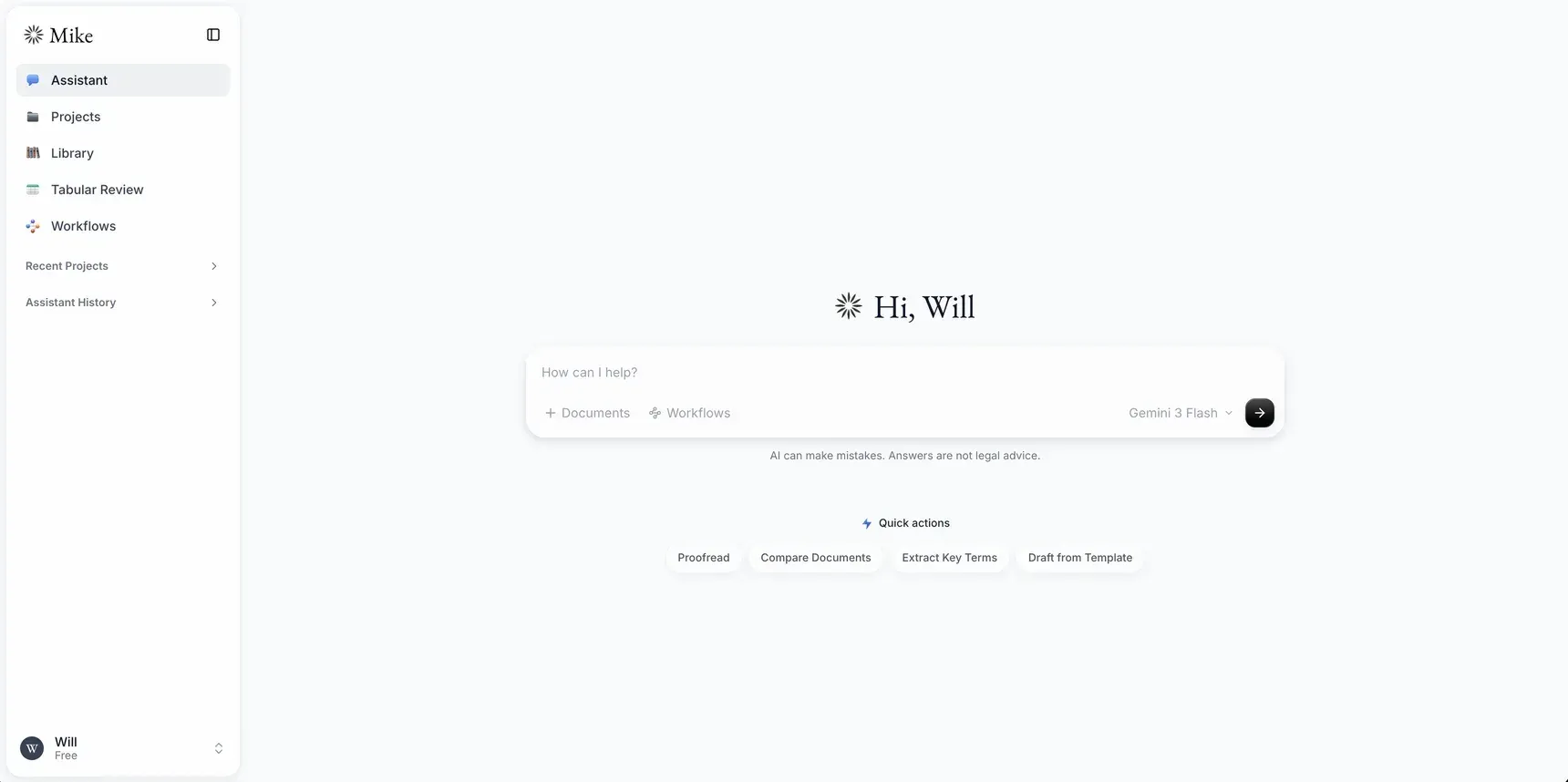
Mike assistant home with Projects, Library, Tabular Review and Workflows in the sidebar and quick actions below the prompt.
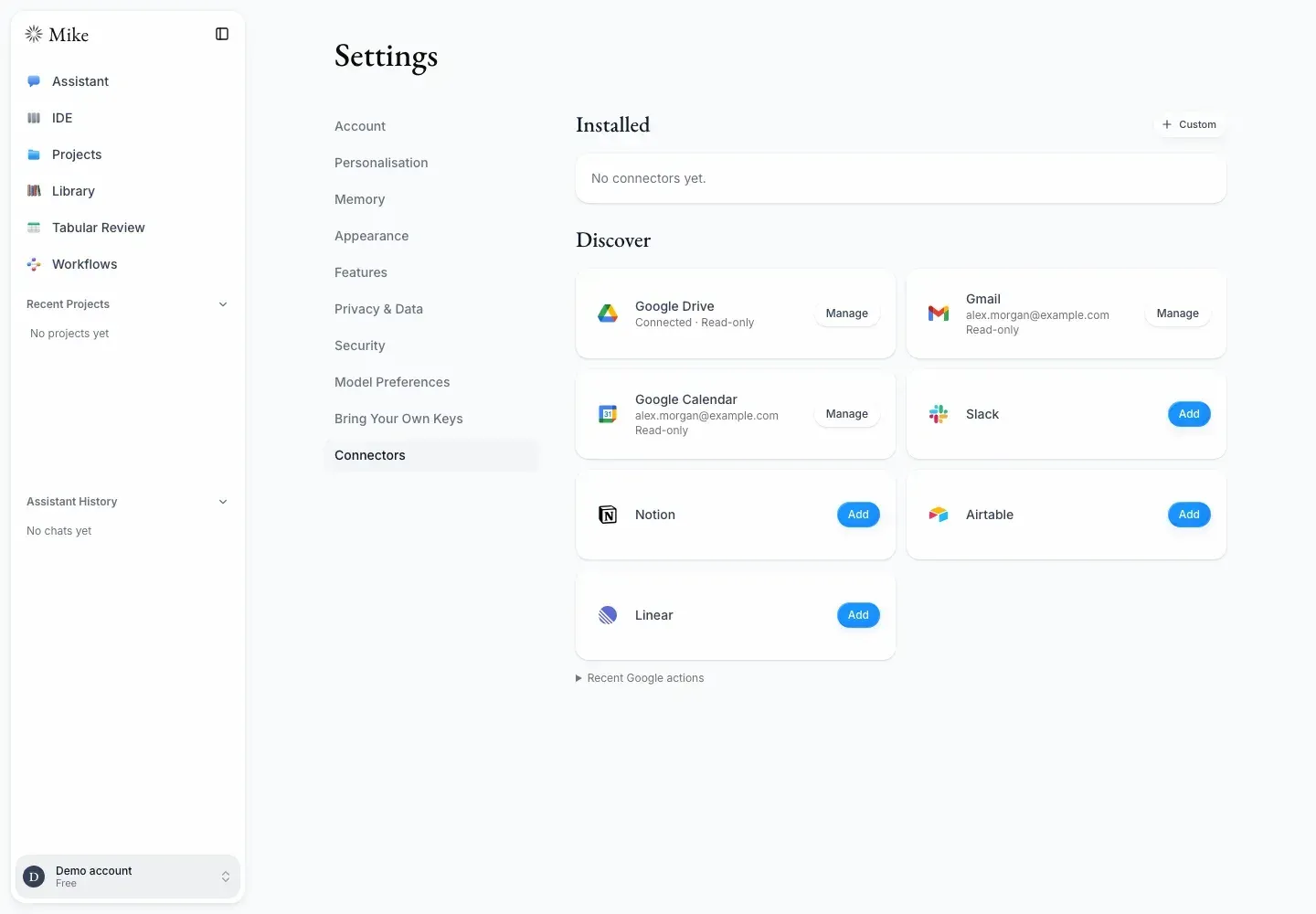
Settings, Connectors: Google Drive, Gmail and Calendar connected read-only, with Slack, Notion, Airtable and Linear available to add.
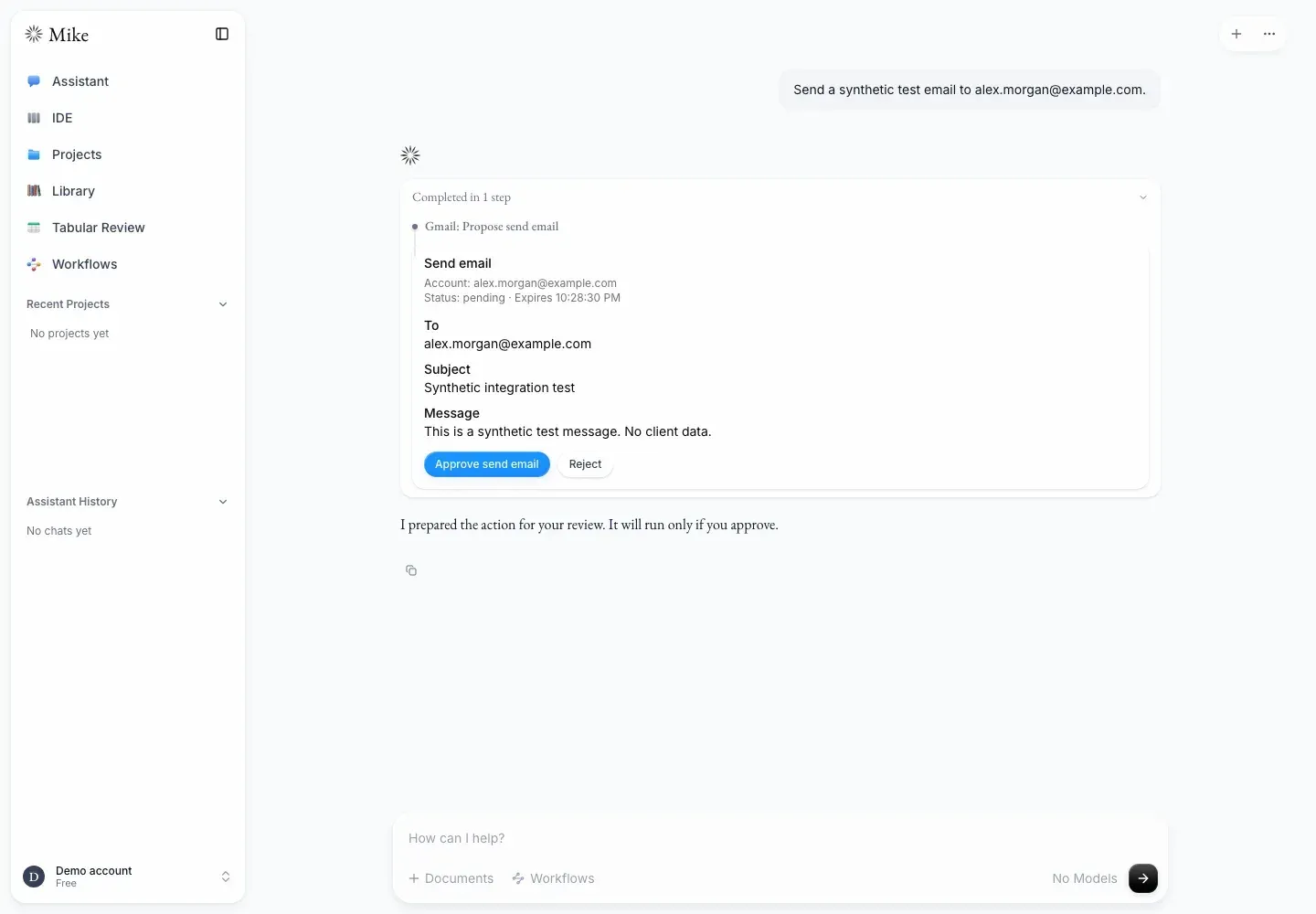
A Gmail write action proposed by the assistant waits for the user to approve or reject it; shown with synthetic test data.
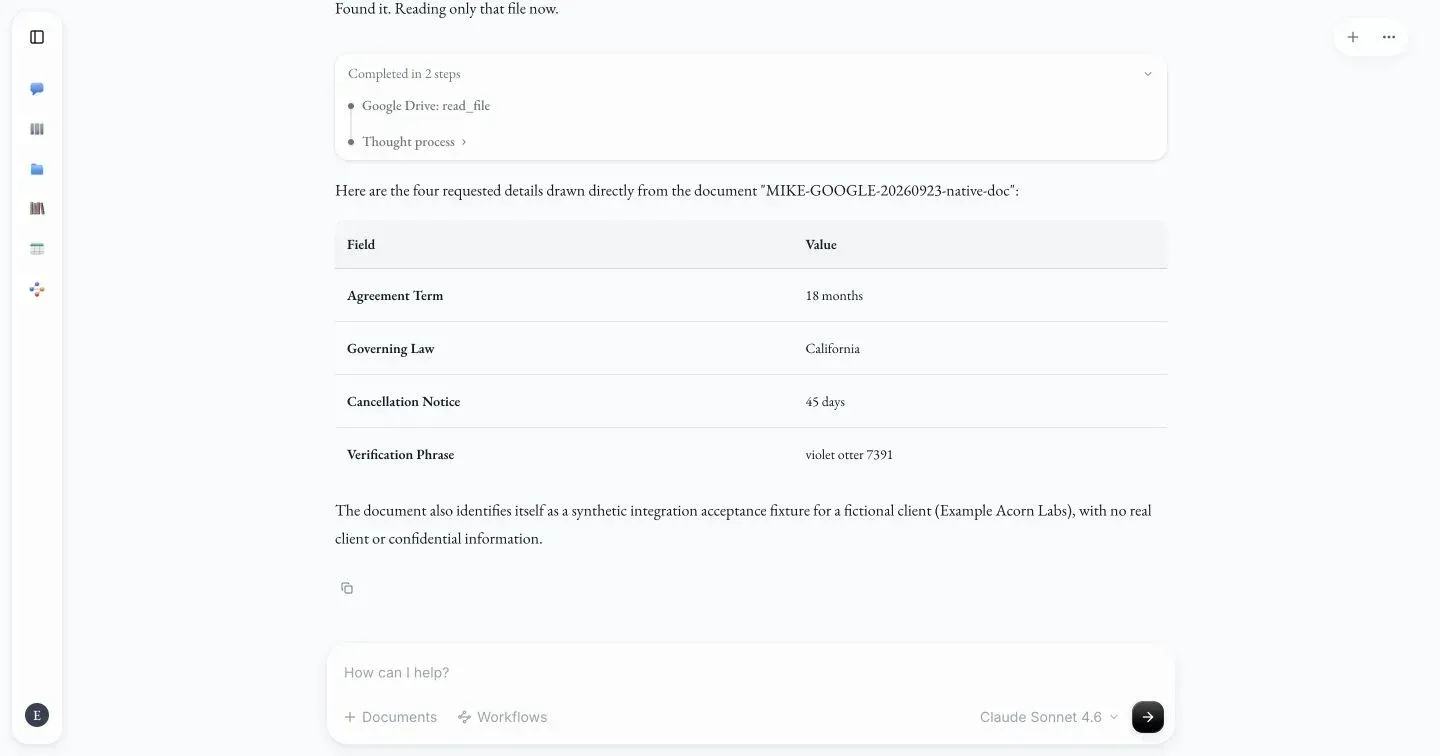
The assistant reads a synthetic contract from Google Drive and returns the requested fields as a table, with the tool steps shown above.
Source: official Mike project page.
Key capabilities
- Self-hosted Docker Compose stack The repository's
docker-compose.ymlruns Mike, an embedded Supabase, RustFS object storage, Redis and Mailpit without managed infrastructure. Copy the two.env.exampletemplates, set separate 32-byte secrets for download signing and API-key encryption, add a model key or plan for Ollama, then pinMIKE_IMAGE_TAGand rundocker compose pullor build from the checkout. The bundled credentials are for local development only, as the local development guide states. - Production deployment on managed services The manual path needs Node.js 22 or newer, a Supabase project, an S3-compatible bucket such as Cloudflare R2 or MinIO, and LibreOffice where conversion is required. Published images are tagged per version and never rebuilt; a fix ships as a new patch version. The deployment guide covers migrations, upgrade order, storage CORS, Redis, SAML and rollback.
- Hosted evaluation service Sign-up at app.mikeoss.com is free and requires no installation. The privacy policy positions it as a demo and asks users not to upload confidential or privileged material. No paid plan or service-level commitment is published for it.
- Assistant chat with grounded citations The assistant reads attached documents, answers with citations to the page and quoted passage, and highlights them in the viewer. Since v2.0 the server checks that quoted text actually matches the source document. Answers stream, survive navigation and refreshes, and can be stopped explicitly.
- Projects, library and IDE workspace Projects are matter-scoped workspaces with folders and a shared document library, including folder uploads and multi-row actions. The IDE view places an explorer, a document viewer and chat side by side and allows DOCX editing in the app. Document versions are kept, and agent edits write new immutable source objects.
- Tracked-change editing Suggested revisions to Word documents appear as edit cards that become tracked changes. A reviewer accepts or rejects each one, either in Mike or inside Word. The accept and reject trail is retained and appears in project export manifests.
- Tabular review Spreadsheet-style extraction runs one set of questions across many documents, with each cell cited to a page and quote. Rows can be grouped by folder, individual cells regenerated, and long reviews processed in the background and stopped. Tabular review does not use subagents, web search or CourtListener.
- Workflows and quick actions Reusable saved prompts cover tasks such as condition-precedent checklists, credit agreement summaries and change-of-control reviews, and can be launched with slash commands. Quick actions such as Proofread, Compare Documents, Extract Key Terms and Draft from Template are configurable. System workflows are maintained in the separate mike-workflows repository.
- Contract playbooks A Word or PDF negotiation guide is compiled into structured rules with standard, fallback and unacceptable positions, sample clauses, escalation actions and references back to the source paragraph. Rules can also be written by hand. Reviews snapshot the rules, and access uses viewer, editor and owner roles, as described in the playbooks documentation.
- Subagents for large reviews In chats and project chats the assistant can delegate self-contained tasks, up to 8 per answer, such as reviewing a long document or researching case law. Each subagent works with the user's own access and can be limited to some documents. Subagents use more tokens and run on the same API keys as the chat.
- CourtListener case-law research With a CourtListener API token saved per workspace, the assistant verifies citations, fetches cases and searches US opinions. Organizations can supply a token for members. Optional bulk data in Postgres and object storage is consulted first, with the live API as fallback; requests stay subject to CourtListener's limits.
- MCP and Google Workspace connectors Settings lists Google Drive, Gmail, Google Calendar, Slack, Notion, Linear, Airtable, CourtListener and custom remote MCP servers. Connections are private to each user and workspace, and credentials are encrypted at rest. Google connectors start read-only, and write actions such as sending email wait for explicit approval in the chat.
- Model choice, including local models Hosted models from Anthropic, OpenAI and Google ship in a static catalog; router prefixes cover OpenRouter, the Vercel AI Gateway and OpenCode Go. Other OpenAI-compatible endpoints are declared through
MIKE_MODEL_CONFIG_JSON, and anything listed byollama listappears under Local. Models with tool calling are needed to drive the full assistant. - Microsoft Word add-in A task pane brings document-aware chat, workflows, quick actions and tracked edits into Word desktop or Word on the web. It requires WordApi 1.6, uses the Personal workspace only and can store chats on the device instead of the server. The production image is not published, because the build bakes in the deployment's web-app URL.
- Scoped memory and custom instructions An optional, editable
memory.mdfile exists per user and workspace, plus one per project. A separate curator model updates it after a conversation goes quiet; the live chat model never writes memory, and memory is passed to the model as untrusted reference data. - Organizations, SSO and audit history Personal and team workspaces are separate, with roles, resource sharing, organization-supplied model keys, MFA, Google sign-in and SAML single sign-on through GoTrue. A history page records workspace actions, and offboarding transfers shared work.
- Tamper-evident exports Every written document version is hashed with SHA-256. A project export returns a manifest with those hashes, the accept and reject trail and an optional Ed25519 signature whose public key is served separately. Versions written before hashing support show a null hash and are reported as unverifiable.
- Web search Off by default per user. Claude and OpenAI models can use their provider's own search; any model can use Brave Search, Tavily or DeepSeek Search through the backend with that service's API key.
Where Mike fits
First-pass contract review
Create a project for the matter, upload the agreement and related documents, and ask the assistant for key terms, risks or deviations. Open each citation to confirm that the highlighted page and quote support the statement, and apply suggested edits only as tracked changes. Check which model the chat used, since quality and data handling follow that provider.
Bulk diligence with tabular review
Upload a folder of contracts, define columns such as governing law, term, assignment or change of control, and run the review in the background. Group rows by folder, spot-check cited cells against the source, and regenerate individual cells that look wrong. Scanned PDFs without a text layer report incomplete coverage, so run OCR before upload.
Negotiating against a firm playbook
Import the team's Word or PDF negotiation guide to compile rules with standard, fallback and unacceptable positions, then confirm that each rule links to the right source paragraph. Run counterparty drafts against the playbook and route escalations to the named reviewer. Share the playbook with viewer, editor or owner roles as appropriate.
Drafting and redlining inside Word
Lawyers who stay in Word can sideload the add-in, chat about the open document, run Proofread or Compare Documents, and accept or reject each tracked change. Confirm the Word version supports WordApi 1.6 and that the deployment's CORS and HTTPS settings allow the task pane. Organization documents cannot be attached to Word chats.
US case-law research and citation checking
Add a CourtListener token in Settings, switch the connector on for the workspace, and ask the assistant to verify or fetch cited cases. Firms with heavy use can import CourtListener bulk data so lookups hit local Postgres and storage first. CourtListener covers US case law only, and tabular review and the Word add-in do not offer it.
Running fully inside the firm perimeter
Self-host the Compose stack or managed equivalents, point Mike at Ollama or an internal OpenAI-compatible endpoint, set SENTRY_DISABLED=true, and enable SAML SSO. Verify that no hosted model keys are configured, that object storage and Postgres sit in the intended region, and that exports can be verified with the published signing key. Pin an image tag, apply dated migrations in the documented order, and schedule regular updates from main, since tagged releases are not patched separately.
Reviews of Mike
Be the first to share your experience with Mike.
Write a review
Loading review form…
Alternatives to Mike
 AnythingLLMAnythingLLM from Mintplex Labs is an MIT-licensed AI app for document chat with citations, agents, MCP tools and scheduled jobs, using local or hosted LLMs, as a desktop app, a multi-user Docker server or a hosted cloud.OOnyxOnyx is an AI platform that indexes connected applications for search, chat and agents, with self-hosting, configurable models and permission-aware retrieval.
 LibreChatLibreChat brings multiple AI providers, custom agents, file interactions, and conversation management into a self-hosted web interface with multi-user access controls.