

What is fullmoon?
fullmoon is a free chat application for small open-weight language models that run directly on Apple hardware. It is made by Mainframe Computer, Inc., the seller named on the App Store listing, and the Swift source code is published on GitHub under the MIT license. One universal build targets iPhone and iPad (iOS and iPadOS 17.6 or later), Mac (macOS 14.0 or later) and Apple Vision Pro (visionOS 2.0 or later). After a model has been downloaded, prompts and answers are generated on the device, and the conversation history is kept in local app storage rather than in an account or a vendor cloud.
Distribution runs through Apple channels. The App Store version, titled fullmoon: local intelligence, is listed as free, with no in-app purchases, in the Utilities category and at about 31.6 MB before any model is added. A public TestFlight beta is linked from the official website for newer features and models. Developers can also open the Xcode project from the repository and build the app themselves; there is no Android, Windows, Linux or web edition.
The latest GitHub release is 1.2.3, published on January 27, 2025. It fixed conversation bugs with the DeepSeek model and added the 8-bit variant of DeepSeek-R1-Distill-Qwen-1.5B; release 1.2.1 had introduced the 4-bit variant as the first reasoning model. The App Store shows version 1.2.0 from January 28, 2025 with the same DeepSeek additions. Later commits on the main branch, dated May 2025, add Qwen3 4B and Qwen3 8B in 4-bit form, hide models larger than 60 percent of the device memory and update the MLX libraries. Those changes have no tagged release, and the repository has seen no commits since May 5, 2025.
The stack is small and readable. SwiftUI provides the interface, SwiftData stores threads and messages, and inference uses Apple's MLX Swift array framework through the MLXLLM and MLXLMCommon libraries from mlx-swift-examples. Tokenizers come from Hugging Face swift-transformers, and answers are rendered as Markdown with swift-markdown-ui. Model weights are pulled from the mlx-community organization on Hugging Face, and the curated list is hard-coded in Models.swift.
The scope is deliberately narrow. fullmoon does not connect to OpenAI-compatible endpoints or other remote providers, does not offer document retrieval, file attachments or image input, and does not expose a server or API. Arbitrary Hugging Face models cannot be added from the interface; extending the list means editing the source and rebuilding. The app requires a device with Metal 3 support and shows a device not supported screen otherwise.
fullmoon screenshots
Explore the interface. Open a screenshot to view it at full size.
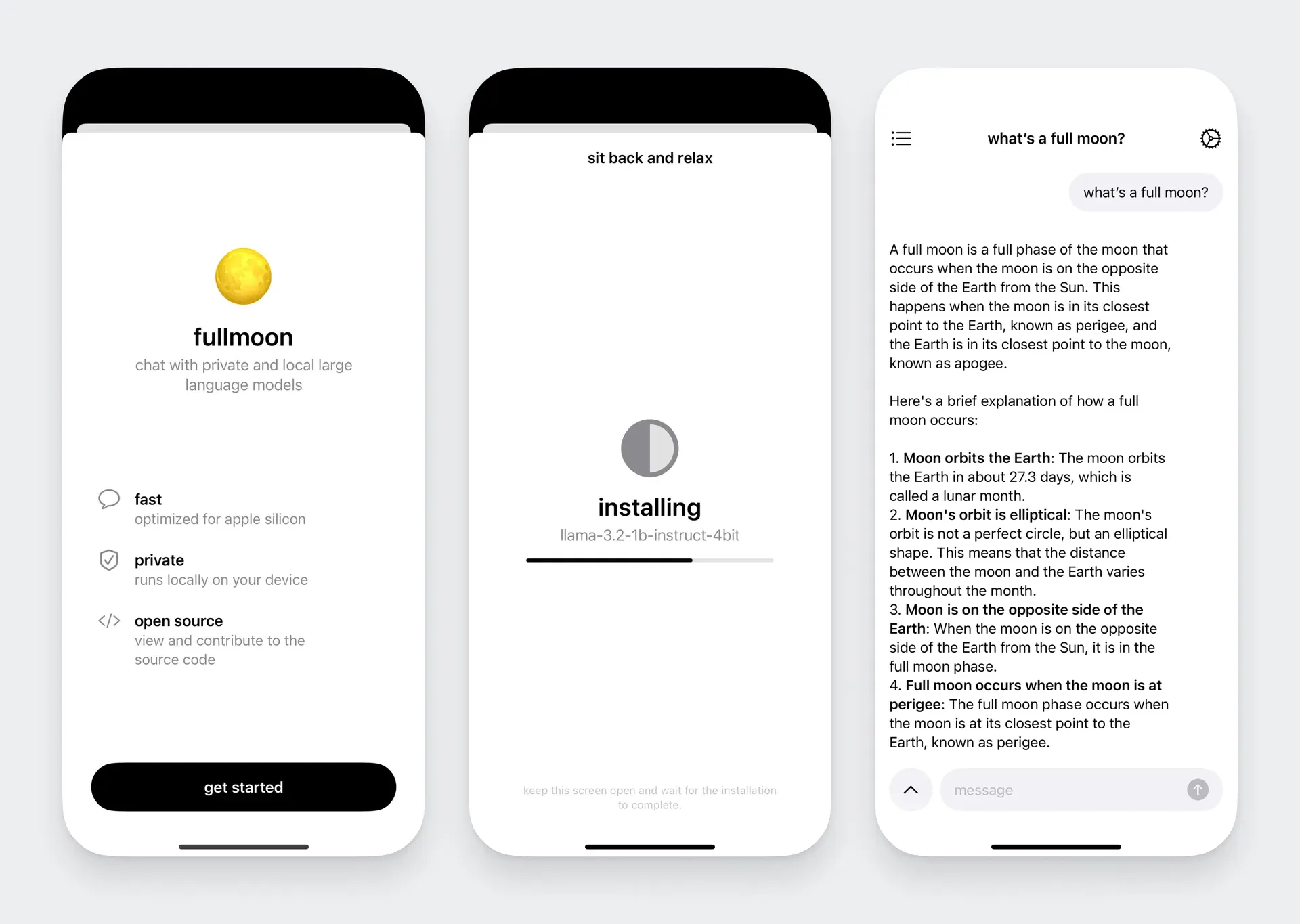
Official fullmoon overview image: onboarding, installation of llama-3.2-1b-instruct-4bit and a chat about the full moon.
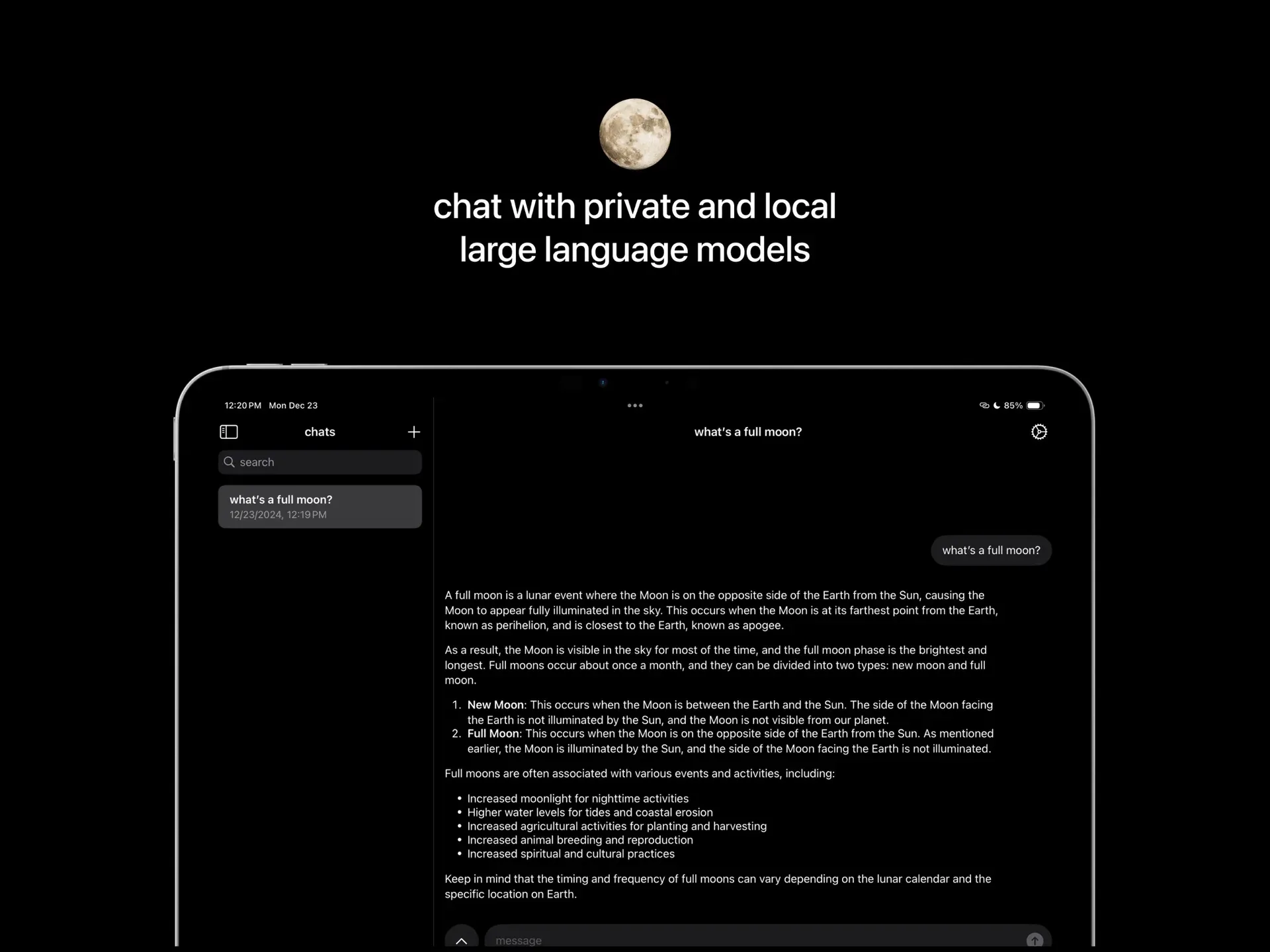
App Store screenshot of the iPad layout: chat sidebar with search and a Markdown-formatted answer.
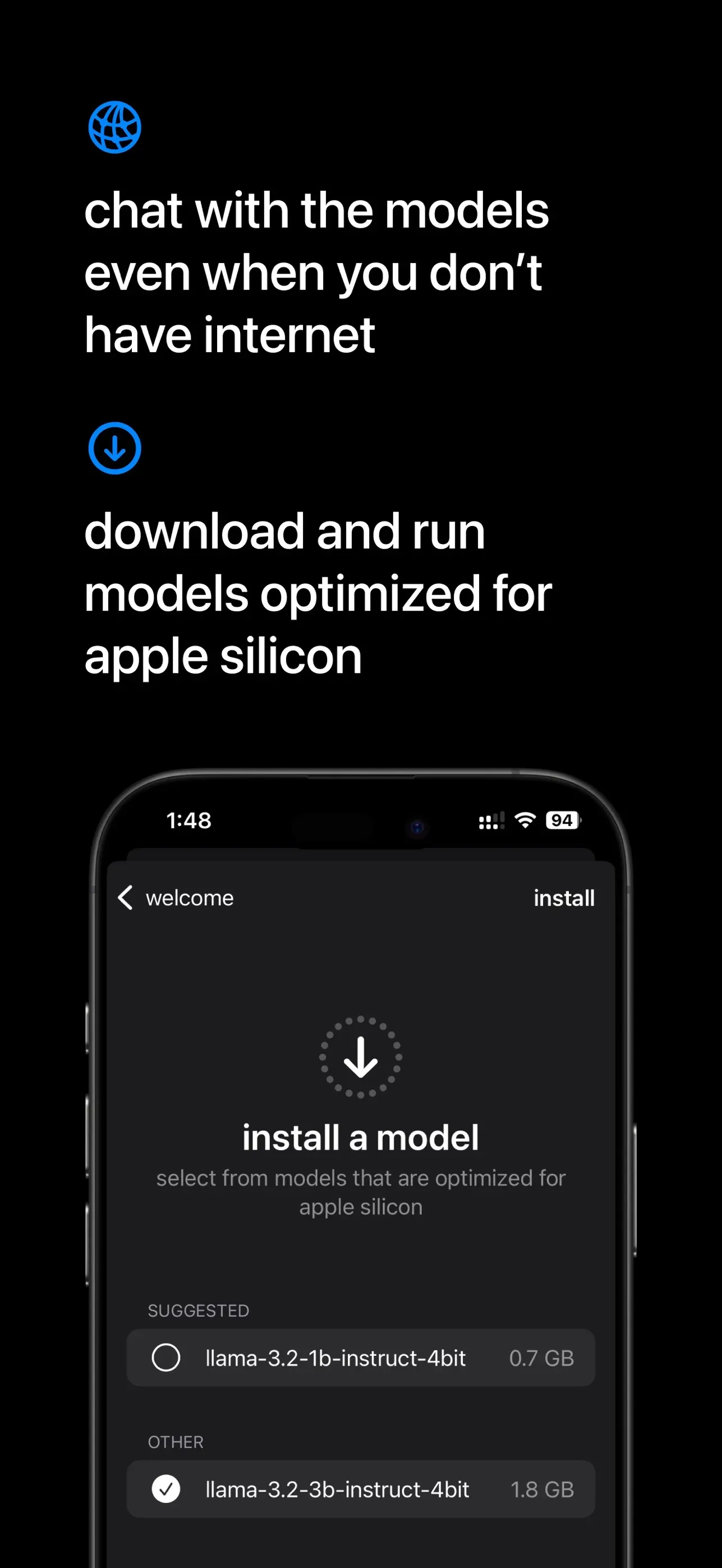
App Store screenshot of the model picker with suggested and other models and their download sizes.
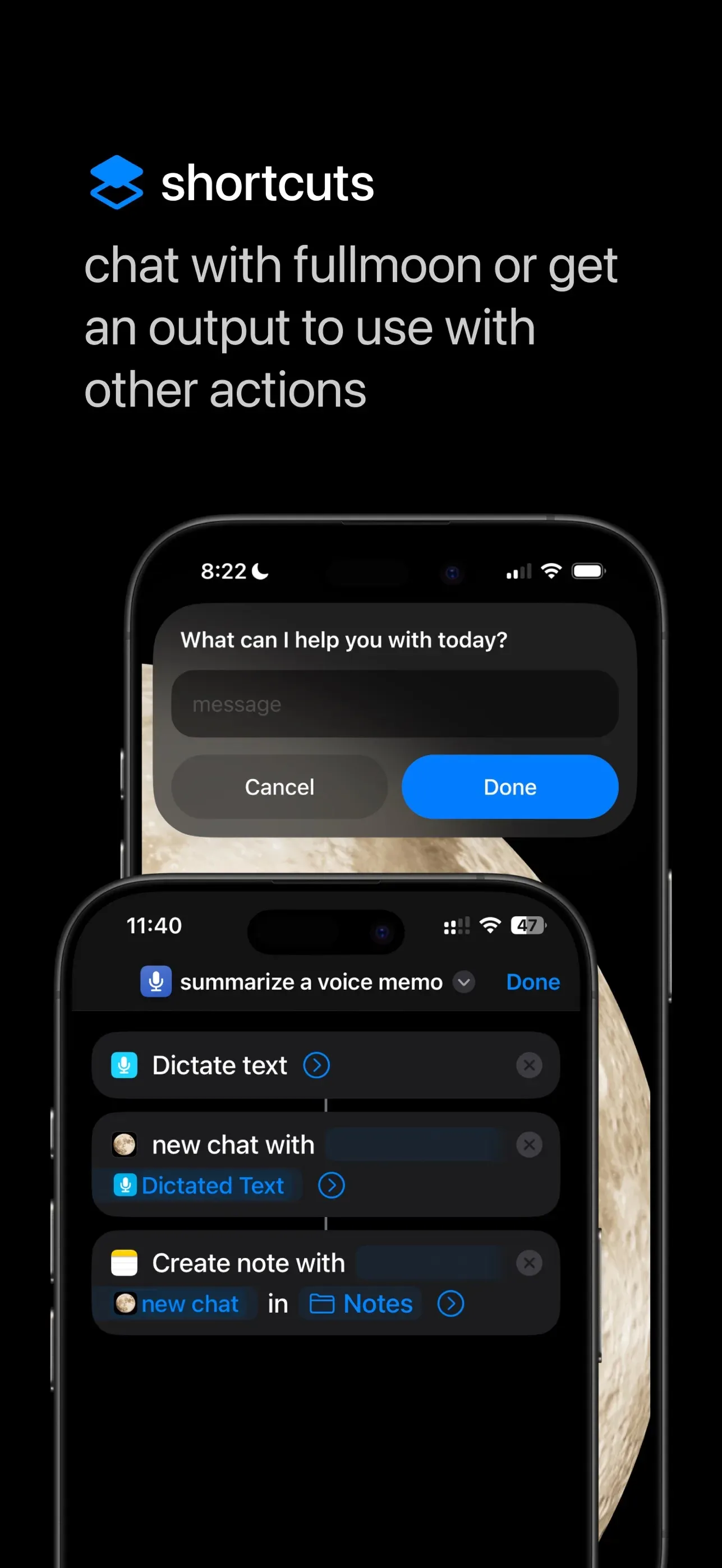
App Store screenshot of the Shortcuts integration: a summarize a voice memo shortcut and the fullmoon prompt dialog.
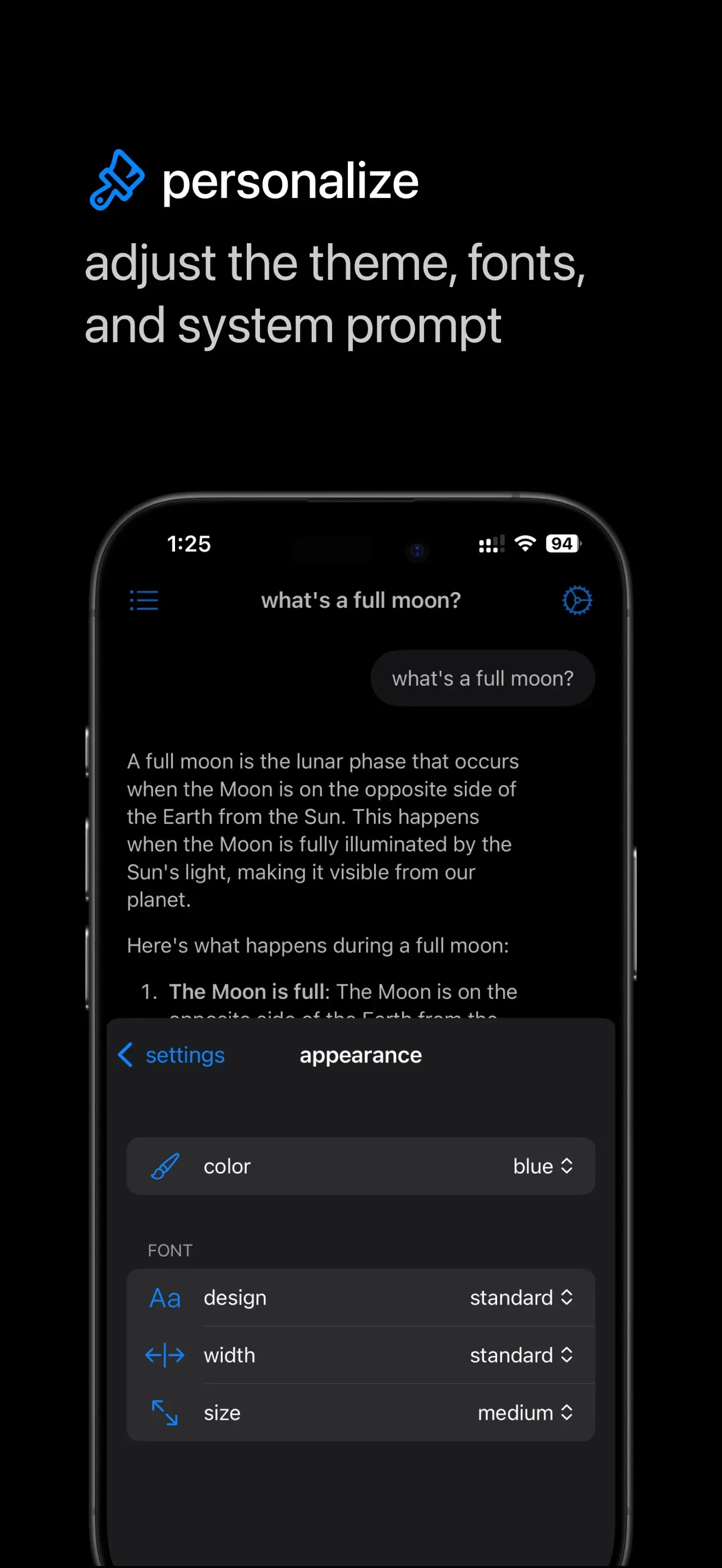
App Store screenshot of the appearance settings over an open chat.
Source: official fullmoon project page.
Key capabilities
- Install from the App Store on iPhone and iPad The free App Store build requires iOS or iPadOS 17.6 or later. The app download is about 31.6 MB; each model adds between 0.7 GB and 1.9 GB of storage in the released version. Onboarding asks you to keep the install screen open until the model download completes, and the screen idle timer is restored after the download finishes.
- Install on Mac and Apple Vision Pro The same listing covers Mac with macOS 14.0 or later and Apple Vision Pro with visionOS 2.0 or later. The Mac version opens a resizable window with a minimum size of 640 by 420 points and adds a Show Main Window menu command. The website lists Apple silicon and Metal 3 as the hardware requirements, because the models run on the GPU.
- TestFlight beta and source builds The website links a public TestFlight beta for features and models that have not reached the App Store. Developers can clone the repository and open fullmoon.xcodeproj in Xcode. An open issue from May 2025 reports compile errors with a newer Xcode release, so a source build may need small fixes.
- Curated MLX models Release 1.2.3 offers Llama 3.2 1B Instruct 4-bit (0.7 GB, the suggested default), Llama 3.2 3B Instruct 4-bit (1.8 GB) and DeepSeek-R1-Distill-Qwen-1.5B in 4-bit (1.0 GB) and 8-bit (1.9 GB) form. The main branch adds Qwen3 4B 4-bit (2.3 GB) and Qwen3 8B 4-bit (4.7 GB). All entries point to quantized conversions in the mlx-community organization on Hugging Face.
- Memory-aware model list Code merged after 1.2.3 hides models whose size exceeds 60 percent of the device's physical RAM, which keeps the 4.7 GB Qwen3 8B model off phones with too little memory. The released App Store build does not include that filter. The app also requests Apple's increased memory limit entitlement so larger models can stay resident on iPhone and iPad.
- On-device generation with MLX Swift Inference runs on Apple silicon through MLX Swift and Metal 3. Generation uses a temperature of 0.5, stops at 4,096 tokens and refreshes the visible text every four tokens to reduce overhead. A stop button cancels a running answer, and the GPU buffer cache is capped at 20 MB.
- Reasoning model handling For DeepSeek R1 Distill and Qwen3 models, the app shows a thinking label while the model reasons, then a thought for label with the elapsed time; the reasoning text is collapsed by default and expands on tap. Before a conversation is sent back to the model, the content inside think tags is removed from earlier answers so the context is not filled with old reasoning. Release 1.2.2 also stopped injecting think tags into user messages.
- Local chat history Threads and messages are SwiftData records on the device, each with timestamps and the generation time of an answer. The chat list shows titles and dates, has a search field, and lets you delete single threads with a swipe or delete action. Settings add a delete all chats command with a confirmation prompt; there is no iCloud sync or export function.
- Editable system prompt The default system prompt is a single line, you are a helpful assistant, and you can replace it in the chats settings. The prompt applies to every conversation, not per thread. It is stored in local user defaults together with the selected model name.
- Appearance settings You can choose a monochrome tint or one of twelve system colors, four font designs (standard, monospaced, rounded, serif), four font widths and five text sizes. Tint and font size are hidden on macOS, where the system settings apply. On iPhone a haptics toggle controls soft feedback while answers stream.
- Apple Shortcuts and Siri A new chat action, defined in RequestLLMIntent.swift, sends a prompt to the selected model without opening the app and returns the answer to other Shortcuts actions. In continuous mode, the default, replies are cut at 300 characters and the model is told to answer in four sentences or fewer, then the dialog asks for the next message. A model must already be installed and selected in the app.
- Markdown rendering Answers are rendered with swift-markdown-ui, so lists, bold text and code blocks display as formatted text. On Mac, Shift and Return insert a new line without sending. Rendering happens locally and does not fetch remote content.
- Offline operation after setup The first model download needs a network connection to Hugging Face. After that, chat works in airplane mode, as the App Store screenshots state. The app sandbox grants outgoing network access only as a client and read-only access to files the user picks.
- Model management The models screen lists installed models with a checkmark for the active one and an install a model sheet for the rest, each with its size badge. Switching models reloads weights on the next request. The interface has no delete button for individual model files, so reclaiming storage may require removing the app.
- Open source code The repository contains the complete Xcode project under the MIT license, including onboarding, settings, the App Intent and the model evaluator. The codebase has fewer than twenty Swift files, which makes it a practical reference for an MLX Swift chat app. The project credits MLX Swift from Apple as the foundation.
Where fullmoon fits
Private chat on an iPhone without a network
Install fullmoon from the App Store, download Llama 3.2 1B Instruct 4-bit during onboarding and switch the phone to airplane mode before asking anything sensitive. Answers then come only from the local model. Check that the device supports Metal 3, that at least 1 GB of storage is free, and that users understand a 1B model makes factual mistakes more often than large cloud models.
Trying reasoning models on a Mac
On an Apple silicon Mac, install DeepSeek-R1-Distill-Qwen-1.5B in its 8-bit form, or Qwen3 8B from a source or TestFlight build, and compare its visible thinking phase with a Llama answer to the same prompt. The collapsible reasoning section and the thinking time help judge whether the extra latency is worth it. Watch memory use in Activity Monitor and note answer speed for each model; an 8 GB Mac may struggle with the 4.7 GB Qwen3 8B weights while other applications are open.
Automating text steps with Shortcuts
Add the fullmoon new chat action to a shortcut, for example after Dictate Text and before Create Note, to summarize a voice memo on the device. Turn off continuous mode when a full answer should pass to the next action, because continuous mode truncates replies at 300 characters. Test the shortcut once with the app closed to confirm that the selected model loads correctly.
Writing support with a fixed system prompt
Replace the default system prompt with house rules such as tone, language or output length, then use separate threads for drafts. Because the prompt is global, change it back before using the app for other tasks. Review generated text before reuse; small quantized models can lose formatting instructions in long threads. Context is limited by the model and by the 4,096-token answer cap, so start a new thread when a draft changes topic.
Evaluating local AI for a privacy-sensitive team
Before approving a cloud assistant, a small team can use fullmoon to see what on-device models handle well: rewording, short summaries, simple explanations and brainstorming. Give each tester the same prompt set and compare results with the cloud tool already in use. Record where the 1B and 3B models fail, for example on recent facts, long documents or arithmetic, because those gaps decide whether local inference is enough or only a supplement.
Studying an MLX Swift reference app
Developers building their own on-device assistant can read LLMEvaluator.swift for model loading and streaming generation, Models.swift for the model catalog and Data.swift for SwiftData storage. Add a model by declaring another mlx-community configuration and its size. Expect to update package versions for current Xcode releases, since the repository has not changed since May 2025.
Reviews of fullmoon
Be the first to share your experience with fullmoon.
Write a review
Loading review form…
Alternatives to fullmoon
 GPT4AllGPT4All is an MIT-licensed desktop app from Nomic AI that runs GGUF language models locally on Windows, macOS and Linux, with LocalDocs document chat, a local OpenAI-compatible API server and a Python SDK.
 OllamaOllama is an MIT-licensed tool for downloading and running open models such as Gemma, Qwen, DeepSeek and gpt-oss on your own machine. It ships a desktop app, CLI and local REST API, and offers cloud-hosted models on a pay-as-you-go or subscription basis.