

What is Reflex?
Reflex is an open-source framework for building full-stack web applications in Python. The interface is written as Python functions that return components, and application state lives in rx.State subclasses whose event handlers run on the server. Reflex compiles the interface to a React application and connects it to a FastAPI-based backend; events travel from the browser to the backend over a WebSocket, and state changes travel back the same way. The How Reflex Works guide describes the compiler, the event queue and the state manager in detail.
The framework is maintained by Pynecone, Inc., the company behind Reflex, founded by Alek Petuskey and Nikhil Rao and based in San Francisco according to its About page. The repository was created in October 2022. In November 2026 the company announced a $14 million Series A led by Standard Capital, with Databricks Ventures participating. Around the open-source core it sells an AI Builder that generates Reflex apps from prompts, managed hosting called Reflex Cloud, a separately licensed reflex-enterprise package and engagements with its own engineers.
Reflex is distributed as the reflex package on PyPI and requires Python 3.11 or newer. The documented setup uses uv: create a project, run uv add reflex, then reflex init and reflex run, which serves the development app on port 3000 with hot reload. The frontend toolchain uses Bun, so a Windows machine without the Visual C++ runtime can fail during initialization, and the docs recommend WSL on Windows. Production apps run with reflex run --env prod, as an exported static frontend plus a Python backend, in containers built from the official Docker examples, or on Reflex Cloud through reflex deploy.
The latest release is v0.10.1, published October 27, 2026. It makes router.session.client_ip ignore untrusted X-Forwarded-For headers unless trusted_proxy_hops is set, adds an experimental React Compiler flag and rx.form.FormData for repeated form fields, and detects a frontend built for a different app version. Version 0.10.0, released October 8, dropped Python 3.10, changed how state vars behave when read or assigned on the class, removed the reflex component CLI and stopped sending request cookies and common credential headers to frontend router data. The upgrade guide lists the required code changes; 0.9 and 0.10 instances cannot share a Redis or disk state store.
The framework source is licensed under Apache-2.0. Enterprise components such as AG Grid wrappers and OIDC authentication ship in reflex-enterprise under a separate end-user license, and some are free only with a "Built with Reflex" badge. Reflex is not a visual drag-and-drop builder, a hosted database or a mobile app toolkit: it produces web applications that you run, scale and secure like any other Python web service.
Reflex screenshots
Explore the interface. Open a screenshot to view it at full size.
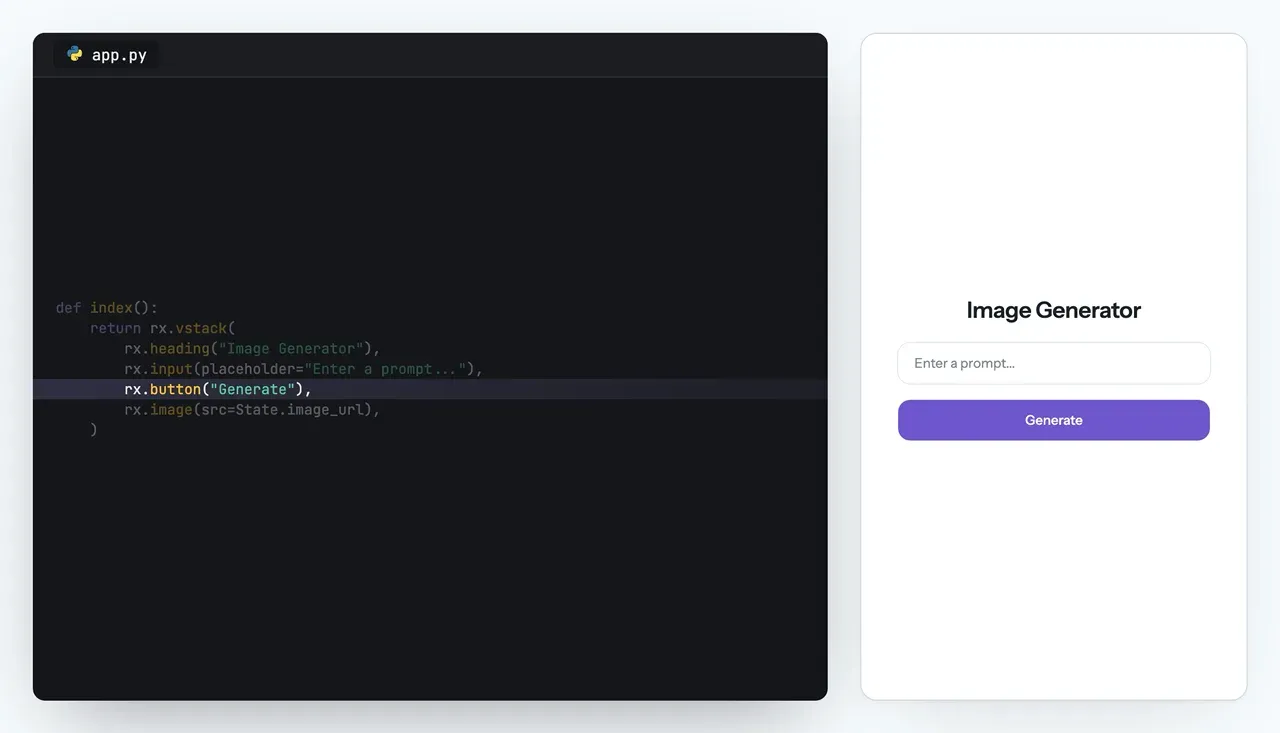
README figure: the Python page definition on the left and the resulting Image Generator app on the right.
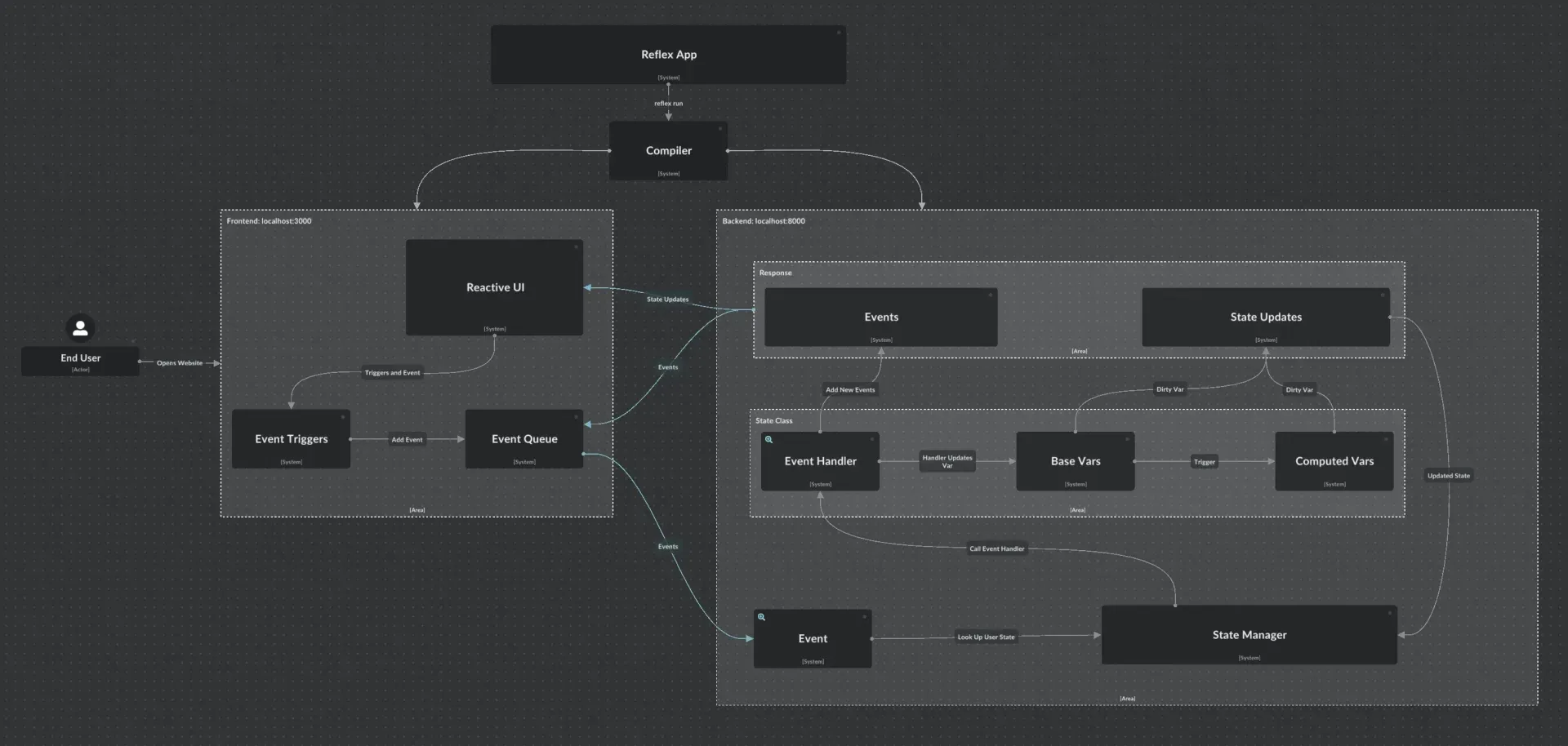
Architecture diagram from the How Reflex Works guide, showing events flowing to the backend and state updates flowing back to the reactive UI.
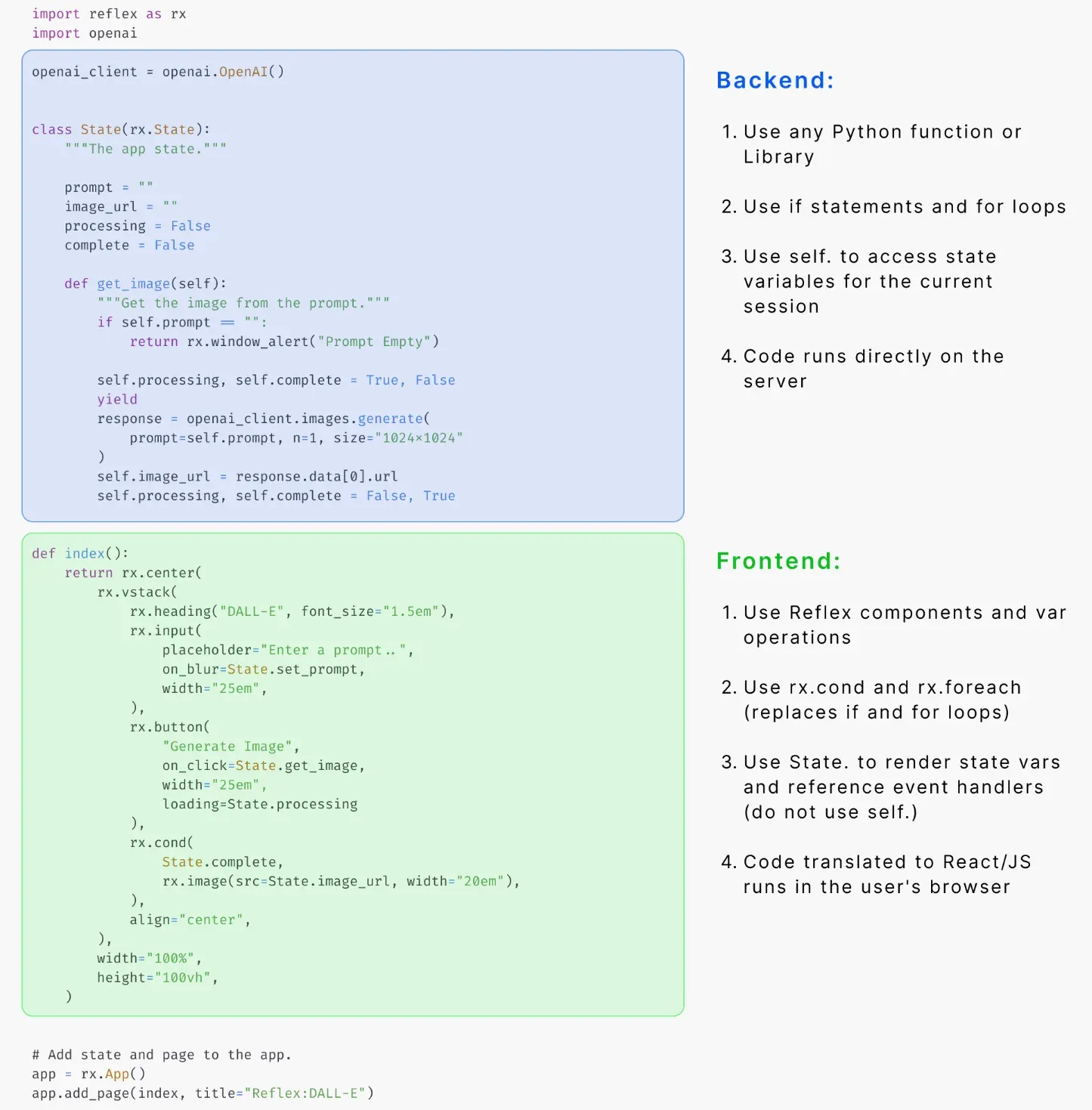
Repository figure explaining which code runs on the server and which is compiled for the browser. It uses an older API style than the current README example.
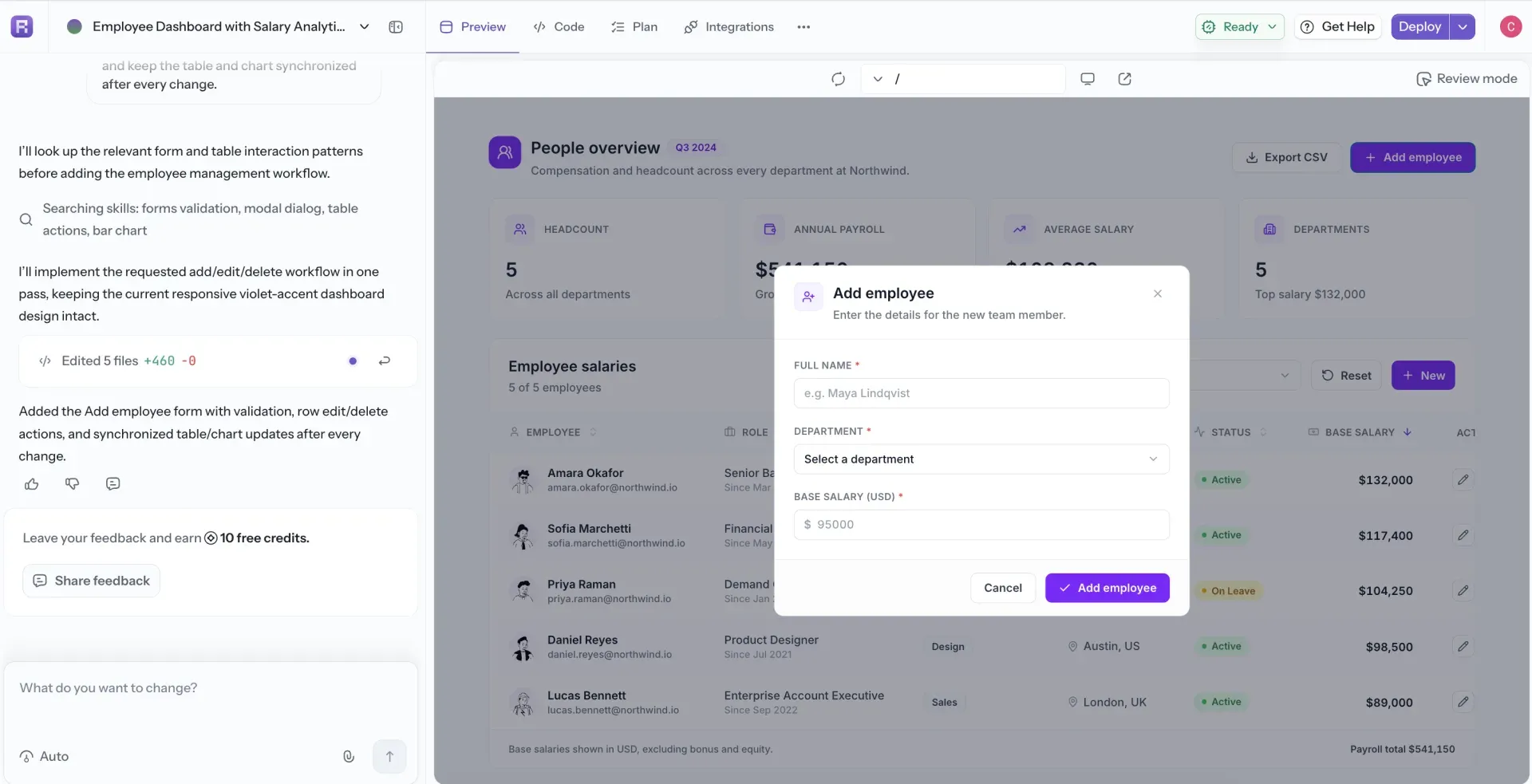
AI Builder tutorial screenshot from the official docs: a generated People overview app with salary table and add-employee form.
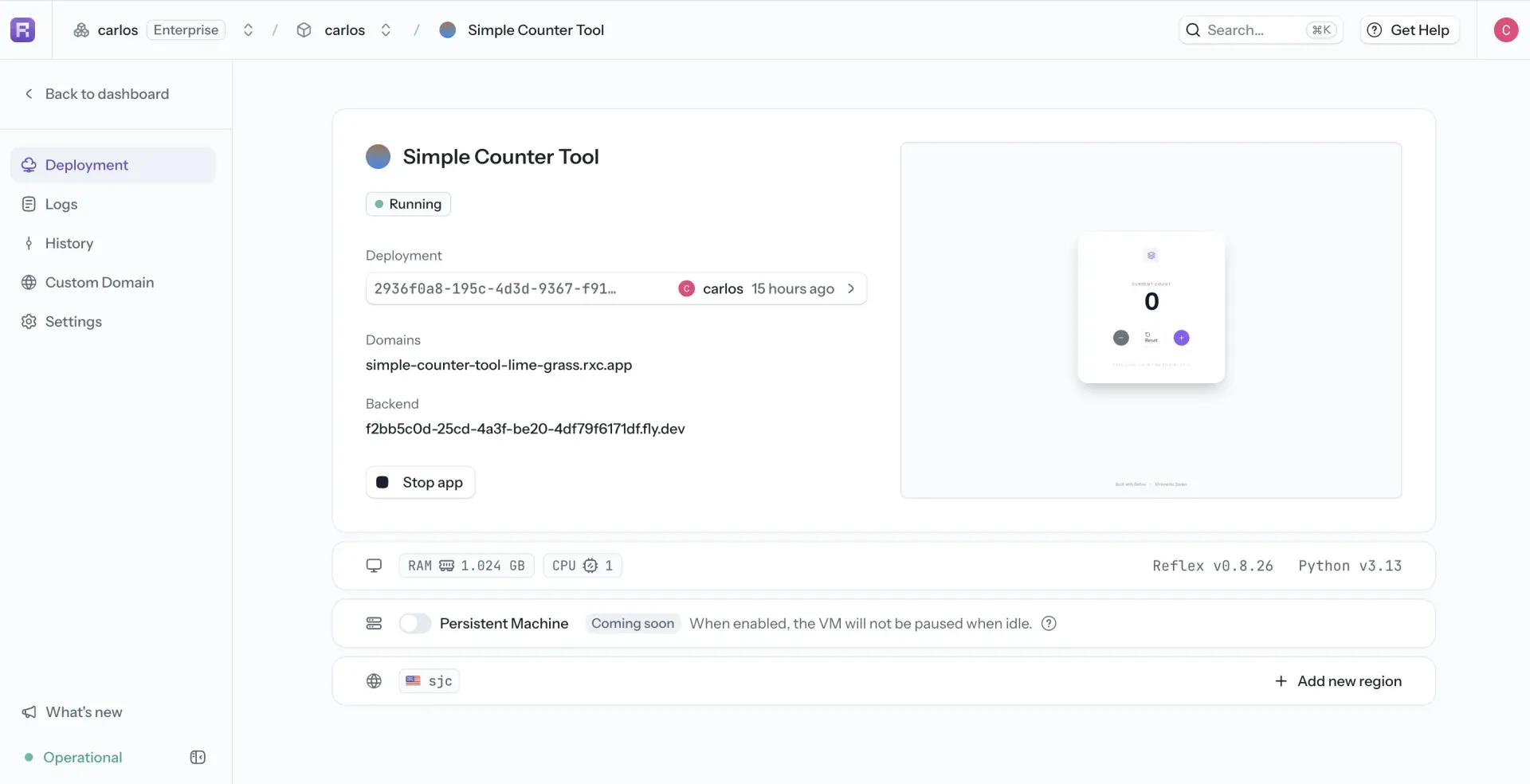
Reflex Cloud deployment view from the hosting docs. The example app runs Reflex v0.8.26, an older release than the current one.
Source: official Reflex project page.
Key capabilities
- Install with pip or uv on Windows, macOS and Linux Reflex is published on PyPI as
reflexand requires Python 3.11 or newer. The installation guide recommends uv in a project-local environment, with venv, conda and poetry as alternatives. Apple Silicon Macs need Rosetta 2, and native Windows needs the Microsoft Visual C++ 2015 runtime for Bun; WSL is the recommended Windows path. - Python components compiled to React Pages are Python functions returning components such as
rx.vstack,rx.inputorrx.button, configured with keyword props. The docs list more than 50 built-in components across layout, forms, data display, charts, tables and overlays. Plain Pythonifandforcannot operate on state values inside the render tree;rx.cond,rx.foreachand Var operators replace them. - Server-side state and event handlers Each browser session gets its own instance of the app's
rx.Stateclasses. Event handlers are ordinary or async Python methods that can call any library, and canyieldto push intermediate UI updates, for example to show a loading state during a slow API call. Computed vars derive values from other vars, and background tasks can update state withasync with self. - State managers for one or many workers State is held in memory, on disk or in Redis. With Redis configured, production mode starts up to eight backend workers by default, and settings such as
REFLEX_REDIS_MAX_CONNECTIONScap connection pools. The scaling guide covers multiple backend replicas, regional Redis, durable jobs and recovery tests, and notes that a queue library alone does not guarantee exactly-once execution. - Database models and migrations The
reflex[db]extra installs SQLAlchemy, Alembic and aiosqlite. The database docs cover PostgreSQL, MySQL, SQL Server and SQLite, with an async session per event handler andreflex dbcommands for migrations. NoSQL stores such as MongoDB work through their own Python clients without ORM features. SQLModel 0.0.45 and later store plaindatetimefields as UTC. - Custom API routes on the same backend The
api_transformeroption mounts an existing FastAPI or Starlette application, or any ASGI middleware, next to the Reflex event endpoint. This lets one deployment serve both the UI and a REST API for other clients. The API routes guide shows the supported transformer types. - Wrapping React libraries Any React component published on npm can be wrapped as a Python class with its props and events, and custom JavaScript hooks can be added where browser-side behavior is needed. Since 0.10.0, reusable component packages start from the official component template instead of the removed
reflex componentCLI. Wrapped components install their npm packages into the generated.webdirectory. - Forms, uploads and browser storage Form submissions arrive as dictionaries or, since 0.10.1, as
rx.form.FormDataor aTypedDictthat keeps repeated field names and checkbox values. File uploads go through a dedicated backend endpoint.rx.Cookie,rx.LocalStorageandrx.SessionStoragevars keep values in the browser and sync them with state. - Production server and static export
reflex run --env prodbuilds an optimized frontend and serves it with the backend on one port, 3000 by default. Frontend and backend can also run as separate processes, andreflex exportproducesfrontend.zipandbackend.zipfor a static host plus a Python server. Reverse proxies must forward the WebSocketUpgradeheader, andapi_urlorREFLEX_API_URLtells the frontend where the backend lives. - Docker deployment examples The repository's docker-example folder ranges from a single container serving everything on one port to a Compose stack with a TLS-terminating Caddy server, Redis and PostgreSQL. The self-hosting guide asks you to add a
requirements.txtand commitreflex.lockso the image uses the same frontend dependencies as development. - Reflex Cloud hosting
reflex loginandreflex deploypush an app to the managed service, which provides logs, deployment history, rollbacks, custom domains, secrets and machine-type selection. The regions page lists 18 locations in North America, South America, Europe, Africa, Asia and Australia. Billing combines organization seats with compute measured per running instance; idle instances do not accrue compute. - Bring your own cloud or on-premises The hosting product can deploy managed apps into a connected Google Cloud account, while AWS and Azure use a separate self-managed workflow. Self-hosted apps run on your own servers or containers, including behind a company VPN. The docs point out that external APIs, fonts and identity providers still need network access, so self-hosting alone does not make an app air-gapped.
- Reflex Enterprise package
pip install reflex-enterpriseadds AG Grid and AG Charts wrappers, Mantine components, maps, React Flow, drag-and-drop and an OIDCAuthPluginwith secure-by-default pages and handlers. The Enterprise overview marks each feature as free or Enterprise for cloud and self-hosted use. The package is covered by a separate EULA from Pynecone, Inc., not by Apache-2.0. - AI Builder and agent toolkit The hosted AI Builder generates and edits Reflex projects from prompts, with a preview, code view, plan mode, integrations and one-click deploy. For external coding assistants,
reflex initwrites a starterAGENTS.md, and the Agent Toolkit offers Markdown docs,llms.txtand skills. The Reflex MCP server for live component lookup is an Enterprise feature. - Telemetry and opt-out The framework sends anonymized usage statistics: counts of components and features used at compile time plus Reflex, Python and OS versions. Source files, state and runtime data are not collected, according to the telemetry page. Set
telemetry_enabled=Falseinrxconfig.pyorREFLEX_TELEMETRY_ENABLED=falsefor commands run outside an app directory.
Where Reflex fits
Turning a Python script or notebook into a web app
Move the existing logic into event handlers on an rx.State class, keep inputs and results as typed state vars and build the page from components that read those vars. Because handlers run on the server, existing libraries such as pandas or an LLM client work unchanged. Check that slow calls are async or run as background tasks, since a blocking handler stalls other events on the same worker.
Building an internal dashboard on a SQL database
Install reflex[db] with the async driver for PostgreSQL, MySQL, SQL Server or SQLite, define SQLAlchemy models and open a short-lived session inside each handler that queries or writes data. Use reflex db for migrations. Before going live, confirm how datetimes are stored, whether access control is needed per page or per handler, and whether an OIDC setup from reflex-enterprise or your own authentication fits your licensing.
Adding an LLM or image-generation feature
The project's own example calls an image model from an async handler, sets a processing flag, yields to update the UI and stores the result in state. The same pattern applies to chat or retrieval apps: stream partial results by yielding from the handler. Keep API keys in environment variables or Reflex Cloud secrets, and check what prompts and outputs are logged by the model provider, since Reflex does not process them itself.
Self-hosting behind a company network
Start from the production or production-compose Docker example, configure the WebSocket-capable reverse proxy, set api_url when the backend has a different address and add Redis once more than one worker or replica handles traffic. Load balancers that serve several backend versions need sticky sessions. Test reconnect behavior, upgrades of every instance together and the restore path for the state store before relying on it.
Deploying and rolling back on Reflex Cloud
Run reflex login, then the project-specific reflex deploy --project command from the dashboard, with a requirements.txt that matches the environment. Machine type and regions are chosen per app, and the deployment history allows returning to an earlier release. Review seat and compute usage in the organization dashboard, because no public price list is published for the hosted plans.
Extending an app with React or a REST API
Wrap an npm React component as a Python class when the built-in library lacks a widget, and mount a FastAPI or Starlette app through api_transformer when other services need JSON endpoints. Pin the npm package version in the wrapper and check that the generated frontend still builds in CI, since wrapped libraries are compiled into the same bundle as the rest of the app.
Install
pip install reflexReviews of Reflex
Be the first to share your experience with Reflex.
Write a review
Loading review form…
Alternatives to Reflex
 RetoolRetool is a platform for building internal software, with an AI app builder, drag-and-drop apps, workflows and Free, Team, Business and Enterprise plans.
 AppsmithAppsmith is an Apache-2.0 low-code platform for admin panels, dashboards and internal tools, with drag-and-drop widgets, JavaScript, Git versioning, database and API connectors, self-hosting on Docker or Kubernetes, and a cloud.
 ToolJetToolJet is an open-source, AGPL-3.0 platform for building internal tools, admin panels and dashboards on your existing databases, APIs and SaaS systems.