

What is SerenityOS?
SerenityOS is a graphical Unix-like operating system for 64-bit x86, Arm and RISC-V computers. The project describes it as a love letter to 1990s user interfaces built on a custom Unix-like core: the stated goal is to combine the look of late-1990s productivity software with the power-user accessibility of late-2000s Unix-like systems. Development started with a first commit on October 10, 2018, according to the project's fifth birthday post, and continues in the open in the SerenityOS/serenity repository, with a community of contributors coordinating on Discord.
The scope runs from the kernel to the desktop applications, and almost everything is written inside one C++ monorepo: the kernel, the C library, the window server, the GUI toolkit, system services, a web browser engine, a JavaScript engine, games and everyday applications. The project FAQ explains that the team implements features itself instead of pulling in third-party libraries, to keep the system hackable and accountable. Third-party software is available separately as ports, which are always compiled from source; the README counts over three hundred of them.
There are no ISO images, installers or tagged GitHub releases. The FAQ states that the project does not cater to non-technical users, and the supported way to run the system is to build it from source with Meta/serenity.sh run, which compiles a cross-compiler toolchain, the whole operating system and a disk image, then boots it in QEMU. Builds run on Linux, macOS, Windows through WSL2 and other Unix-like hosts, following the build instructions. The same tree can also produce GRUB, Limine and extlinux images for physical x86-64 machines and a disk image for Raspberry Pi 4 and 5. Because nothing is versioned, the current state of the system is the latest commit on the master branch.
The SerenityOS ABI, including library symbols and syscall interfaces, has no stability guarantee and can change at any moment, which is why there is no binary package manager. Hardware support on real machines is limited: there is no real GPU acceleration and no Wi-Fi, and only a few network and sound chipsets are supported. The installation guide lists these limits and states that physical installs are not yet ready for users who are not prepared to report bugs or assist with development.
The source code is released under the 2-clause BSD license, with copyright held by the SerenityOS developers. The project's browser engine and JavaScript engine also gave rise to the Ladybird browser, which now lives in its own repository; the SerenityOS tree keeps a copy of the Ladybird build for testing its LibWeb and LibJS libraries. User documentation is published as man pages at man.serenityos.org, generated from the Markdown sources in the repository.
SerenityOS screenshots
Explore the interface. Open a screenshot to view it at full size.
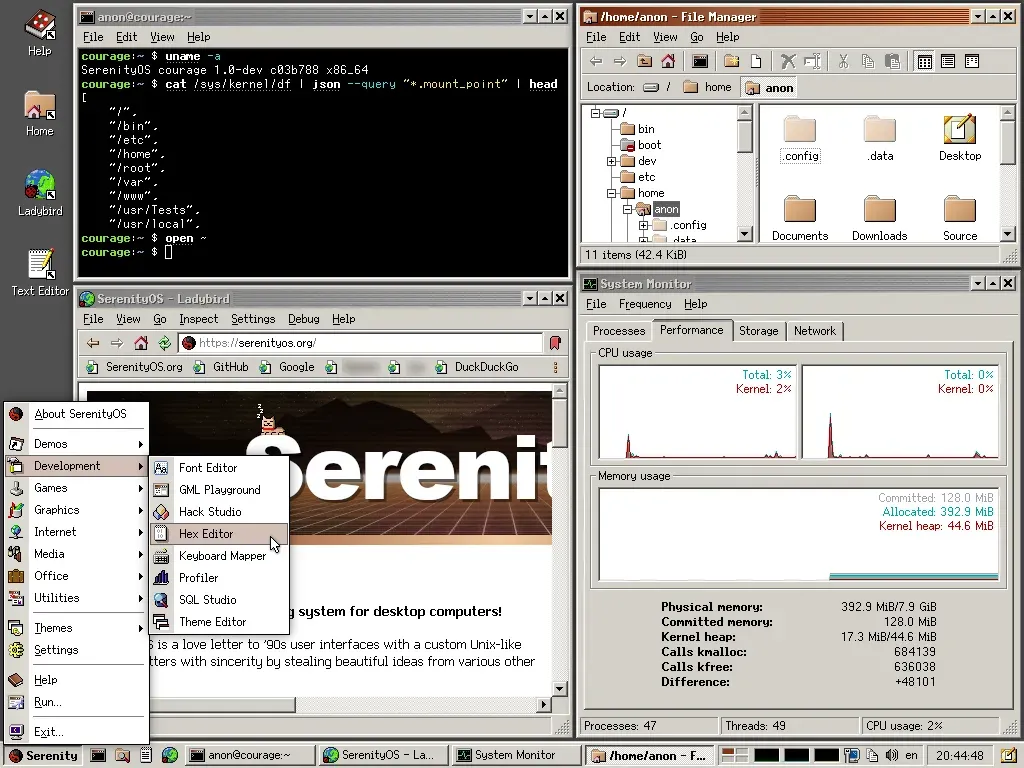
Official project screenshot from the SerenityOS README (commit c03b788, x86_64). Two personal bookmark labels in the browser toolbar are blurred.
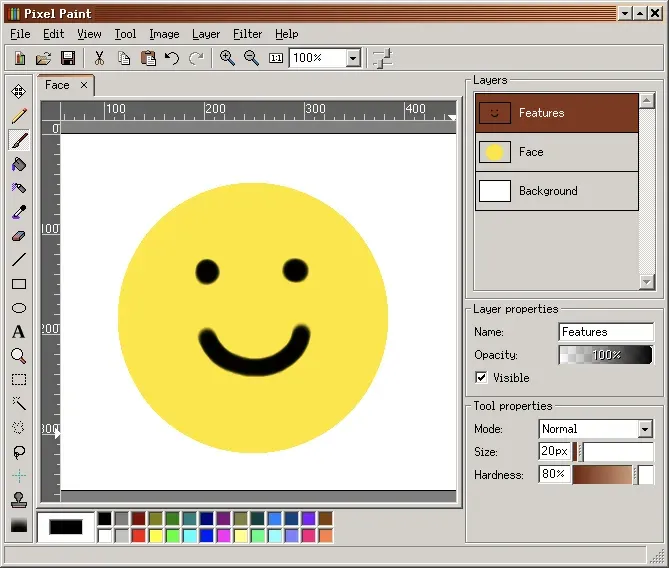
Pixel Paint with three layers and tool properties, from the official SerenityOS man page for the application.
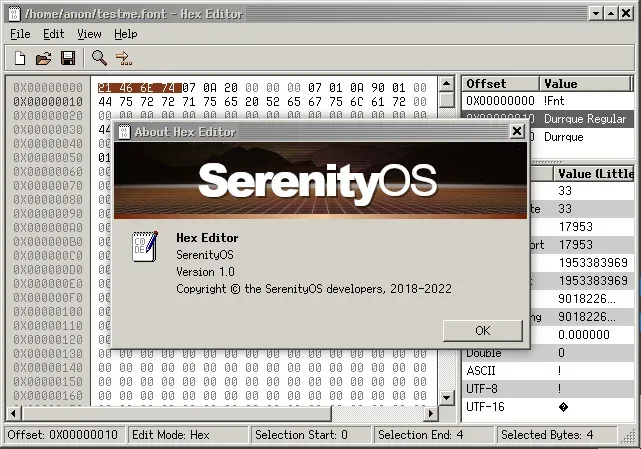
Hex Editor with its value inspector and About dialog, from the official SerenityOS man page.
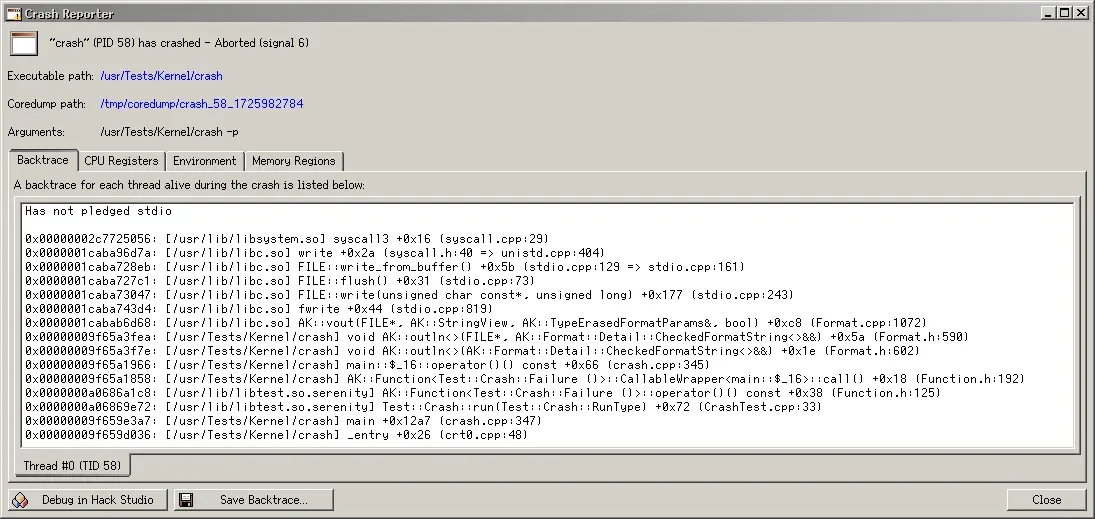
Crash Reporter backtrace view with tabs for CPU registers, environment and memory regions, from the official SerenityOS man page.
Source: official SerenityOS project page.
Key capabilities
- Own 64-bit kernel The kernel is written by the project and supports pre-emptive multi-threading on x86-64, AArch64 and 64-bit RISC-V. It provides POSIX-like virtual file systems such as
/proc,/dev,/sysand/tmp, and uses ext2 as its on-disk file system. On RISC-V only the RV64I base ISA is supported and only the boot hart is used, since SMP is not yet implemented on that port. - Process sandboxing with pledge and unveil Programs can call
pledge()to promise the kernel they will only use a named subset of system functionality, and the process is terminated if it breaks that promise.unveil()builds an allowlist of file system paths with read, write, execute, create and browse permissions. Both are documented in the pledge(2) and unveil(2) man pages. - Other security features The README lists hardware protections, limited userland capabilities, W^X memory, kernel and userland address space layout randomization, OOM resistance, web content isolation and current TLS algorithms. For development convenience the default
anonuser can become root without a password; the build instructions describe removing it from thewheelgroup to stop this. - POSIX compatibility layer SerenityOS ships its own LibC, a Shell, Unix signals, pseudoterminals, file system notifications and the standard Unix command-line utilities. The FAQ notes that the POSIX C library API is expected to stay relatively stable even though the internal ABI is not. Full POSIX shell support is still unfinished, so some ports need
bashlinked as/bin/sh. - System services and IPC Desktop and system functions run as separate services connected by the project's own IPC: WindowServer, LoginServer, AudioServer, RequestServer for network requests, WebContent for web page processes, ImageDecoder for image decoding, LookupServer for DNS, NetworkServer, SQLServer, a built-in WebServer, a TelnetServer and an SSHServer. SystemServer starts them at boot.
- Classic desktop environment The GUI uses a unified late-1990s style with a taskbar, start-style system menu, flexible theming and its own bitmap and vector fonts, published on fonts.serenityos.net. Settings applications cover display, keyboard, mouse, network, users, clock, calendar, certificates and the terminal.
- Web browser and JavaScript engine The built-in Browser uses the system's LibWeb engine and LibJS JavaScript engine, with WebAssembly support. The README links to public conformance dashboards for JavaScript (test262), CSS and WebAssembly. LibJS is also available as the
jsREPL in the terminal. - Everyday applications The base system includes a Spreadsheet scriptable with JavaScript, TextEditor, Terminal, File Manager, Calculator, Calendar, Mail, a PDF viewer, an image viewer, SoundPlayer, VideoPlayer, Maps, Weather, a Presenter for slides, a partition editor, System Monitor and the Assistant launcher.
- Pixel Paint image editor Pixel Paint is a layered image editor with tabs, filters, a levels dialog and a filter gallery. Documents are saved in its own
.ppformat, which keeps layers, and can be exported as BMP, PNG or QOI, according to its man page. - Developer tools HackStudio is an integrated development environment for C++ projects on the system itself. Hex Editor offers a value inspector with big and little endian modes, search by ASCII or hex, and copy as hex, text or C code. GML Playground previews GUI layouts, SQL Studio works with databases, and Font Editor, Theme Editor, Keyboard Mapper and a profiler with kernel support complete the set.
- Crash Reporter When a program crashes, CrashDaemon opens Crash Reporter, which shows the backtrace for each thread, the CPU registers, the environment variables and the mapped memory regions. Buttons open the relevant source in HackStudio or save the backtrace to a file.
- Networking and protocols The network stack supports IPv4, TCP and UDP, with applications and libraries for DNS, HTTP, Gemini, IMAP and NTP. On physical hardware the supported network chipsets are Intel e1000 and Realtek 8168, and there is no Wi-Fi support. The SSH server accepts only public-key authentication with ED25519 keys, as described in the SSH server guide.
- File format libraries Libraries in the tree handle PNG, JPEG, GIF, QOI, MP3, WAV, FLAC, ZIP, TAR, PDF and Gemini documents, along with cryptography, OpenGL, audio, GUI and chess. The FAQ explains that formats still covered by patents, such as H.264, H.265 and JPEG 2000, are not implemented in the monorepo; third-party ports such as ffmpeg can provide them under their own licenses.
- Ports collection More than three hundred third-party programs, including compilers, games, Unix tools and multimedia applications, are packaged as ports in the
Portsdirectory and listed at ports.serenityos.net. Running./package.shin a port's folder downloads its source, cross-compiles it on the host and installs it into the disk image for the next boot. Ports cannot yet be built with the Clang toolchain. - Build system and toolchains The build uses CMake 3.25 or later, Ninja and QEMU 6.2 or later, and needs a host compiler with C++26 support: GCC 14 or Clang 17 and newer. The first run downloads required data files and builds the SerenityOS GNU cross-compiler; an alternative Clang-based toolchain is built with
Toolchain/BuildClang.sh. Components can be added or removed at compile time withninja configure-components. - Lagom host builds and testing Lagom builds SerenityOS libraries and programs for the host system, which the project uses for host-side tests, sanitizer builds and fuzzers. SerenityOS is part of Google's OSS-Fuzz programme, and continuous integration runs on GitHub Actions. An optional build flag adds the Jakt programming language compiler as a host tool.
- Games and demos The base system ships games such as Solitaire, Spider, Hearts, Minesweeper, 2048, Chess, Snake, FlappyBug and Conway's Game of Life, and demos including CatDog, Starfield, Eyes, a Mandelbrot set viewer and WidgetGallery.
- Documentation inside the system Man pages are written in Markdown under
Base/usr/share/man, published online and installed with the system. Inside SerenityOS,manopens them in the terminal andhelpopens the graphical Help application.
Where SerenityOS fits
Building and running SerenityOS in QEMU
This is the main documented workflow. After installing the listed host packages (on Debian or Ubuntu with apt, on Arch with pacman, on macOS through Homebrew, on Windows inside a WSL2 distribution), running Meta/serenity.sh run from the repository builds the toolchain, the system and a disk image for the host architecture and starts QEMU with hardware or software virtualization. Meta/serenity.sh build compiles without starting the virtual machine, and SERENITY_ARCH selects x86_64, aarch64 or riscv64. The default anon account uses the password foo.
Installing on a physical x86-64 PC
The bare metal guide builds a GRUB image with ninja grub-uefi-image for UEFI machines or ninja grub-image for legacy BIOS, then writes it to a SATA, NVMe or USB drive of at least 2 GB with a tool such as dd, which wipes that drive. The documented minimum is 256 MB of RAM and an x86-64 CPU. Graphics use the multiboot or EFI GOP framebuffer, USB works with xHCI and UHCI controllers, and sound works on Intel AC'97 and HDA devices. VirtualBox and VMware use a converted copy of the same GRUB image and have known open issues.
Running on Raspberry Pi and RISC-V
The AArch64 build boots to the desktop on a Raspberry Pi 4 or 5 from a USB drive, with USB keyboards and mice. ninja -C Build/aarch64 raspberry-pi-image creates the image; the Pi 4 additionally needs EDK II firmware built with Toolchain/BuildEDK2.sh rpi4. The SD card controller does not work on real hardware, the Pi 3 lacks a USB host driver and 32-bit models are unsupported. The RISC-V port runs in the QEMU virt machine and can boot via UEFI when the firmware provides a devicetree.
Adding third-party software through ports
Software outside the monorepo is added by building ports on the host. Changing into a folder such as Ports/curl and running ./package.sh downloads and compiles the program and copies it into the disk image, so it is available at the next boot. Some ports need extra host tools such as autoconf, meson, nasm or a JDK. Compiling ports inside SerenityOS itself is possible but, per the FAQ, not an actively supported workflow.
Developing and debugging the system
Contributors work on the kernel, libraries and applications in the same tree, with editor setup guides for CLion, VS Code, Qt Creator, Vim, Neovim, Emacs and Helix. Inside the running system, HackStudio, the profiler, Crash Reporter and the GDB integration exposed through Meta/serenity.sh gdb help trace problems, while Lagom runs libraries and tests on the host with address, memory and undefined behaviour sanitizers. Code style is checked with ninja check-style, the same linters the CI uses.
Moving files between the host and the virtual machine
The file transfer guide lists several methods. Running ws . inside SerenityOS starts the built-in WebServer for the current directory, reachable from the host at localhost:8000. The ext2 disk image can also be mounted on a Linux host or inside WSL, and the SSH server accepts connections from clients with an ED25519 key.
Install
git clone https://github.com/SerenityOS/serenity.git && cd serenity && Meta/serenity.sh runReviews of SerenityOS
Be the first to share your experience with SerenityOS.
Write a review
Loading review form…
