

What is Kudu?
Kudu is a free, open-source system maintenance application for Windows, macOS and Linux, made by Advent Development, Inc. The company's about page states that it has offices in the United States and South Africa and also builds the LoadForge load testing platform. The repository describes Kudu as a cleaner, scanner and more; the README summarizes it as a system cleaner and security scanner that reclaims disk space, removes malware and handles privacy settings, and states that it ships without ads, bundled software or upsells.
The desktop app groups more than 25 tools into cleanup, protection, performance, software updates, storage, and automation and recovery. According to the features page, cleaner rules cover 168 apps and 15 browsers, Privacy Shield reviews 57 Windows and 33 macOS privacy settings, and the Malware Scanner uses YARA rules, heuristics and persistence checks. Some tools, such as the Registry Cleaner, Debloater, Game Mode, Driver Updates and Recovery Centre, are Windows-only. A scriptable command line mode is documented in CLI.md. The README lists 31 interface languages.
The latest release is v3.13.0, published November 7, 2026. It fixes macOS firewall status detection, collects disk throughput on Windows, and improves winget discovery in the software updater. v3.12.0 added prompts to close browsers and blocking apps before cleaning and new cleaner rules for CapCut, DaVinci Resolve, Adobe logs, Camera Raw and Figma on Linux; v3.11.0 added native Windows ARM64 builds, Persian language support and rules for LM Studio, Ollama, Hugging Face and others. Each release lists VirusTotal scan links for its packages. The first tagged releases date from March 2026.
Kudu is an Electron application written in TypeScript and released under the MIT license. Cleaning rules are plain JSON files in the rules folder, documented in the Cleaner Rules Guide, so new app support can be contributed without code. Packages are published on GitHub Releases and the download page, with winget and Chocolatey packages and a headless Linux agent.
The desktop tools are free; the company funds development through Kudu Cloud, an optional paid service for remote monitoring, alerts and fleet management priced per device. The safety page states that the malware tools are additional inspection tools and not a replacement for an operating system's security protection. Other cleaners and disk tools listed on iThub include BleachBit, WinDirStat and Mole.
Kudu screenshots
Explore the interface. Open a screenshot to view it at full size.

Official Kudu 3 home screen, dark theme, with sample data, from usekudu.com.
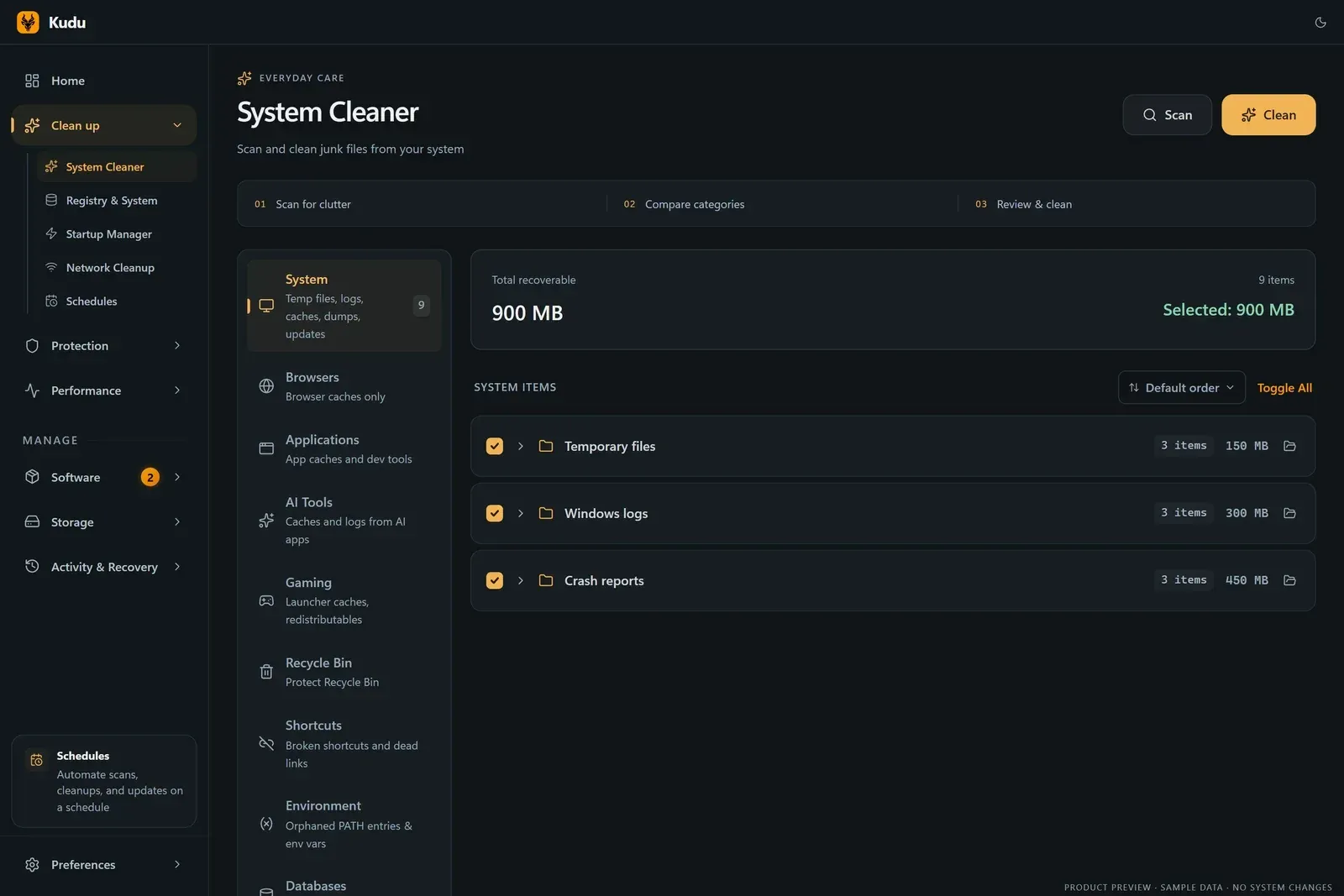
Official System Cleaner screenshot with sample data showing 900 MB recoverable.
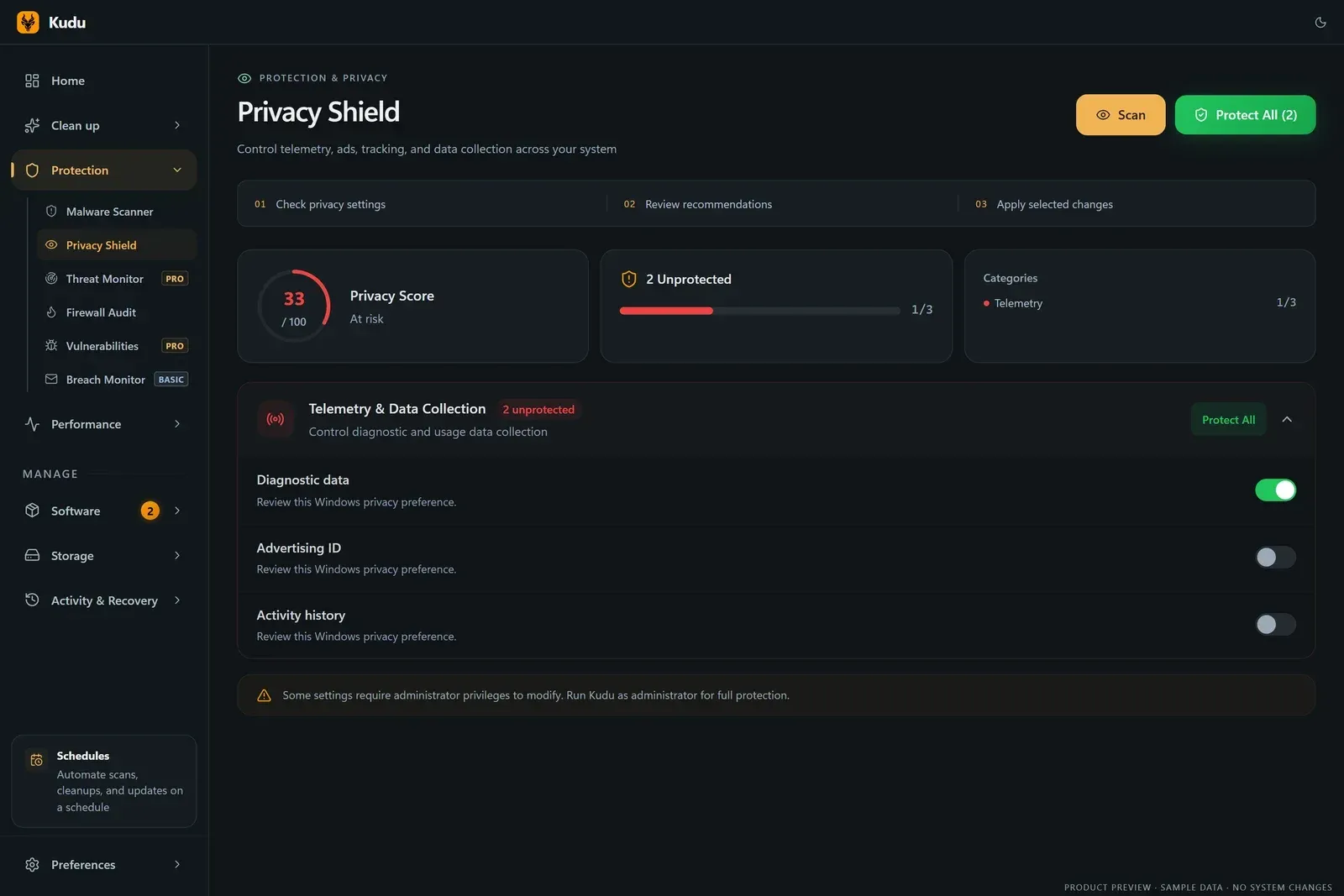
Official Privacy Shield screenshot with sample data; the Protection menu also lists Malware Scanner and Firewall Audit.
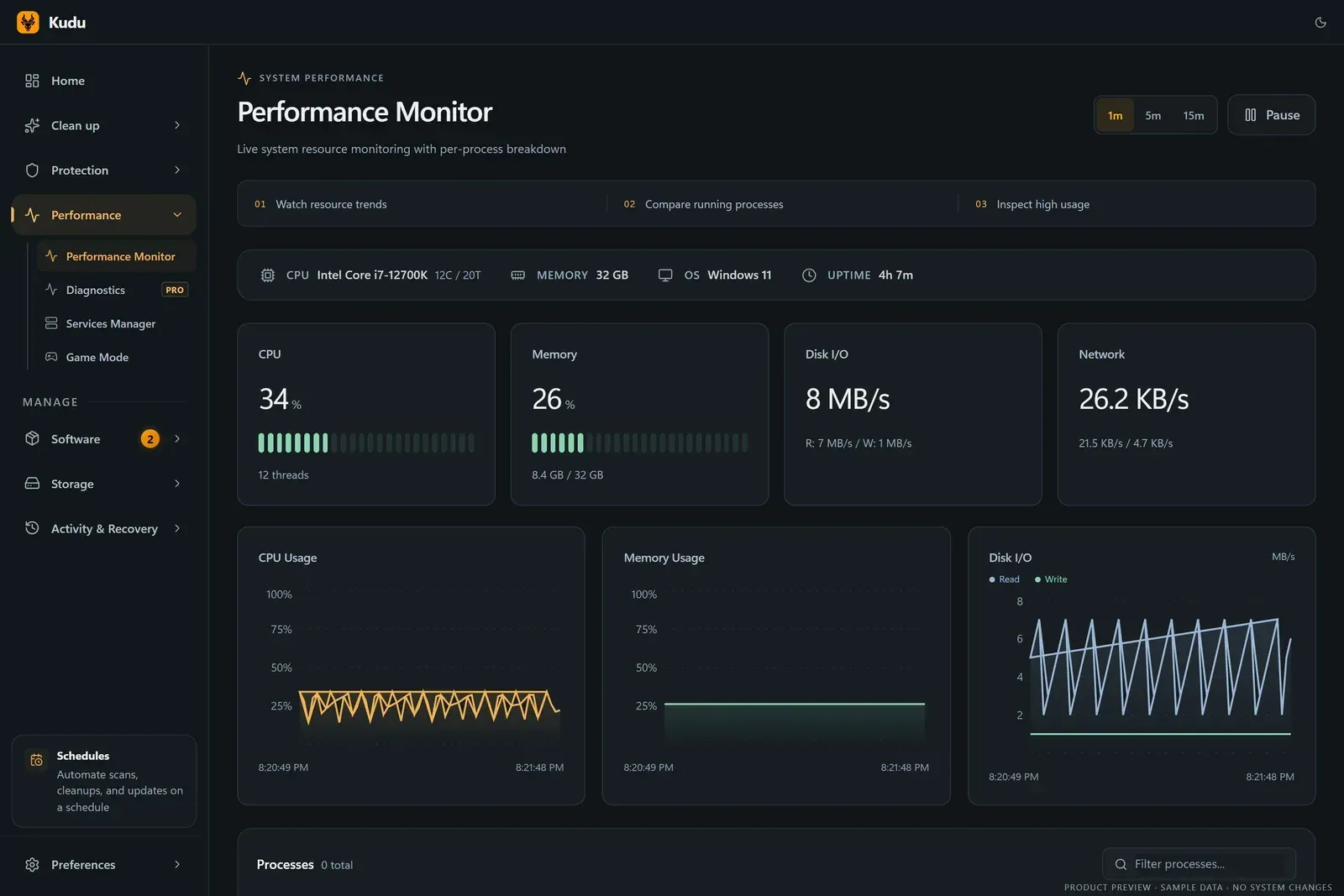
Official Performance Monitor screenshot with sample data.
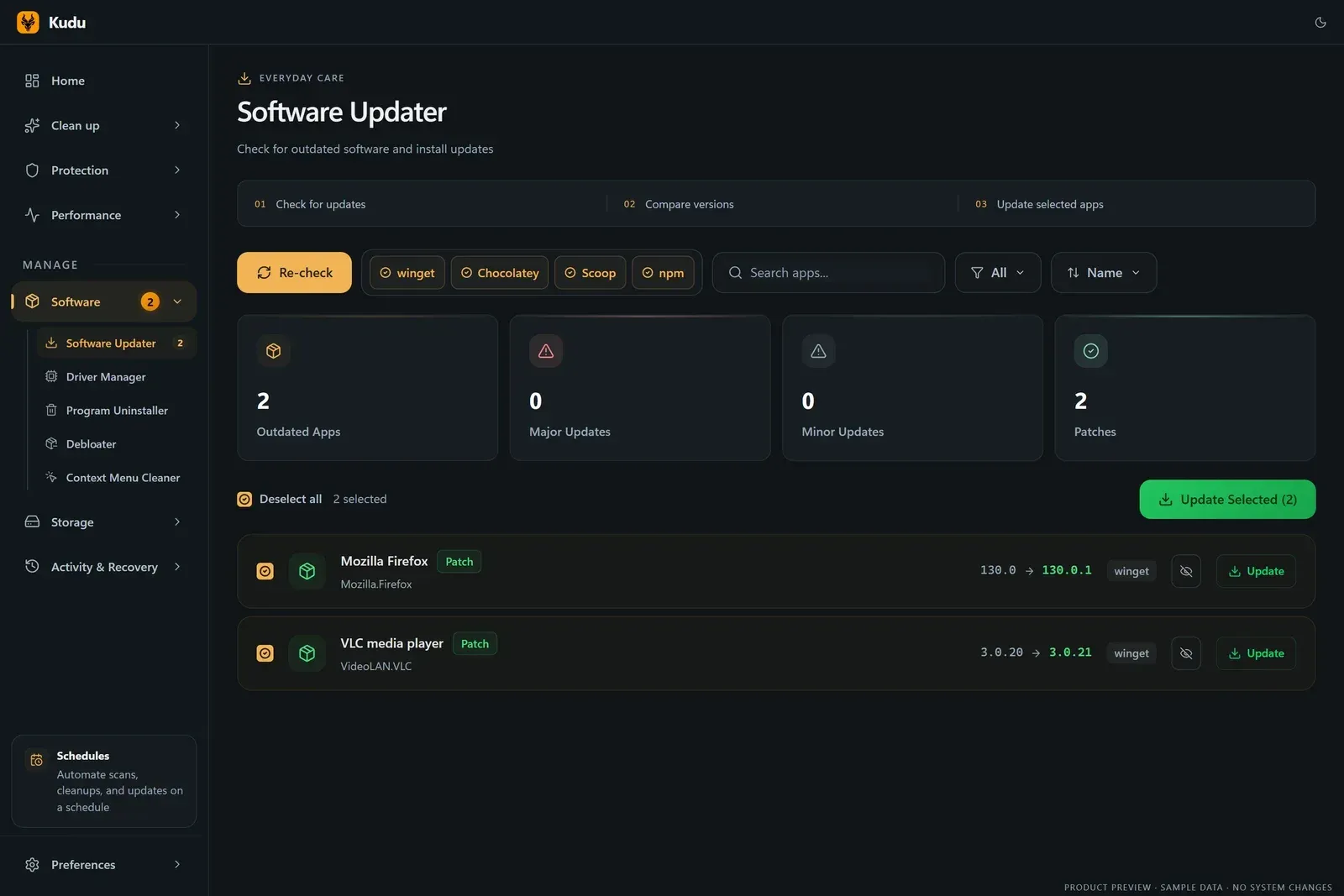
Official Software Updater screenshot with sample data and winget, Chocolatey, Scoop and npm sources.
Source: official Kudu project page.
Key capabilities
- System Cleaner Scans system temp files, logs, caches, crash dumps and leftovers, grouped into categories such as System, Browsers, Applications, AI Tools, Gaming, Recycle Bin, Shortcuts and Environment. Items can be previewed and excluded before cleaning, and each run produces a cleanup receipt. The cleaner directory lists every supported app; the features page counts 157 rules on Windows, 95 on macOS and 93 on Linux.
- Browser and privacy traces Ordinary browser cache cleaning keeps cookies, history, bookmarks, saved passwords and sessions, according to the safety page. Privacy Traces is a separate opt-in category for shell history and operating system activity traces. Since v3.12.0 Kudu prompts to close browsers and other apps that block cleaning.
- Custom cleaning folders Settings, Custom cleaning folders adds the user's own cache folders, including portable apps on another local drive. The custom-folder guide covers preview, selection and recovery from the Trash.
- Privacy Shield Reviews and changes privacy settings: 57 on Windows and 33 on macOS, from advertising IDs and telemetry to Copilot, Recall and Apple Intelligence, plus privacy hardening on Linux. The project states that every change is reversible. Some settings need administrator rights, and a macOS permissions guide explains the administrator prompts.
- Malware Scanner The website describes five engines: YARA rules, file and script heuristics, system integrity and persistence checks, with quarantine and restore for false positives. The security hardening page says it scans running processes, startup items, browser extensions and scheduled tasks for PUPs, adware, spyware, trojans and ransomware indicators. The safety page describes these as additional inspection tools, not a replacement for the operating system's protection.
- Firewall Audit A Windows-only tool that looks for broad, orphaned and unsigned firewall rules. v3.13.0 also fixed recognition of the on and off firewall status on macOS in the protection checks.
- Startup Manager Lists what launches at boot, ranked by impact, and lets entries be switched off. It is available on Windows, macOS and Linux. A Services Manager adds safety guidance for about 70 services.
- Performance Monitor Shows live CPU, memory, disk and network charts with a per-process table and S.M.A.R.T. drive health. Recording a slowdown for AI analysis is a separate Performance Diagnostics feature that requires Kudu Cloud Pro; live monitoring stays free.
- Game Mode A Windows-only optimizer that applies up to 18 performance tweaks, such as closing background apps, and restores them when it is turned off.
- Software Updater and drivers Finds outdated apps and updates them in bulk through winget, Homebrew, apt, dnf or pacman; the updater screen also shows Chocolatey, Scoop and npm sources on Windows. Windows users get driver updates with options to ignore updates and clean old packages.
- Uninstaller, Debloater and repair The Program Uninstaller removes leftovers on all three platforms. On Windows, the Debloater covers 112 known OEM and AppX packages, the Registry Cleaner backs up before changes, a Context Menu Cleaner removes right-click entries and Windows Repair runs SFC, DISM and WinRE checks.
- Storage tools A Disk Analyzer with an interactive treemap, a Duplicate Finder that always keeps one copy, large file and empty folder search, a File Shredder that overwrites before deleting, and Storage History snapshots that show folder growth over time.
- Scheduler, receipts and Recovery Centre Schedules run cleanup and update tasks only under set conditions: when idle, on AC power, inside a time window or not while gaming. Cleanup receipts record what was removed, skipped or failed. The Windows Recovery Centre restores supported settings and registry backups; the safety page notes that it does not restore arbitrary deleted files.
- Command line mode
kudu --cliscans system, browser, app and gaming caches and the Recycle Bin without opening a window. Without--cleanit only scans;--jsonprints a single JSON document on stdout, and the website mentions exit codes and Prometheus metrics. Details are in CLI.md. - Windows packages Release v3.13.0 provides an installer, a portable EXE and a portable ZIP for x64 and ARM64, for Windows 10 and 11 (ARM64 targets Windows 11). The README recommends the installer for automatic updates and scheduled scans at startup; portable builds keep settings in AppData and update manually. The official winget command is
winget install AdventDevelopmentInc.Kudu, and a Chocolatey package is also listed. - macOS packages DMG and ZIP builds for Apple silicon and Intel, for macOS 12 or later. The features page describes the DMG as notarized, and macOS app updates in the Software Updater go through Homebrew.
- Linux packages and headless agent AppImage and .deb packages for x64 and arm64. A headless Linux agent with an install script runs as a systemd service on Ubuntu, Debian, Fedora or Arch and connects servers to Kudu Cloud, as described in the documentation.
- Kudu Cloud (optional, paid) Cloud Basic costs 5 US dollars per device per month and adds a live dashboard, health scores, email alerts, breach monitoring for one address, remote cleanups, scans and updates, patch management and 30 days of history. Cloud Pro at 9 dollars per device adds CVE alerts, network threat monitoring, performance recordings with AI diagnostics, Slack, webhook and PagerDuty alerts and 90 days of history, according to the pricing page.
Where Kudu fits
Reclaiming disk space
The System Cleaner follows three steps shown in the app: scan for clutter, compare categories and review before cleaning. Items can be excluded, and the cleanup receipt lists what was removed, skipped or failed. The safety page notes that receipts record outcomes and are not backups.
Reviewing privacy settings
Privacy Shield checks telemetry, advertising and tracking settings, shows a privacy score and offers Protect All or per-setting toggles. Changes are reversible according to the project, and some settings require running Kudu as administrator.
Scanning for malware and persistence
The Malware Scanner checks files, running processes, startup items, browser extensions and scheduled tasks using YARA rules and heuristics, and moves detections to quarantine. The project states that existing operating system protection should stay enabled alongside it.
Managing startup items and performance
Startup Manager ranks boot entries by impact and can disable them; Performance Monitor shows live resource charts and per-process usage, and Services Manager adds guidance for common Windows services. Game Mode applies and later reverts Windows tweaks.
Keeping software current
The Software Updater lists outdated apps by package manager and version change, with bulk updates and the option to hide updates. On Windows it also covers drivers.
Looking after other computers
The safety page notes that the MIT license permits commercial use, including repair shops, and describes customer permission, backups and a separate agreement before linking a customer device to Cloud. Kudu Cloud, a paid option, adds a browser dashboard with health scores, email alerts and remote cleanups, scans and updates for linked Windows, macOS and Linux devices.
Scripted and scheduled maintenance
The Scheduler runs ordered cleanup and update workflows under conditions such as idle time or AC power. For external automation, kudu --cli --all --clean --json can run from Task Scheduler or cron, as shown in the CLI documentation.
Install
winget install AdventDevelopmentInc.KuduReviews of Kudu
Be the first to share your experience with Kudu.
Write a review
Loading review form…
Alternatives to Kudu
 WinDirStatWinDirStat is a GPL v3 disk usage analyzer for Windows that scans drives, shares and cloud storage and finds large or duplicate files.
 MoleMole is a free GPL-3.0 command-line toolkit (mo) for cleaning caches, removing apps with their leftovers, purging build artifacts, exploring disk usage and watching live system status on macOS, with separate Windows and early Linux CLIs.