

What is Alarik?
Alarik is an S3-compatible object storage server written in Swift and released under the Apache 2.0 license. It is made by Achtung Software, which the README describes as the team behind the German accounting software belegFuchs, and the stated motivation is an open alternative to MinIO and RustFS after licensing changes in that part of the ecosystem. The project is explicitly in beta: the README badge says so and every published release so far carries a 1.0.0-beta tag.
The installation guide recommends Docker. Two prebuilt images are published on GitHub Container Registry, one for the API and one for the Nuxt-based web console, and the documented Compose file maps ports 8080 for the S3 API and 3000 for the console. Single-node storage lives under a Storage/ directory in a volume. The repository also contains a Compose file for clusters, an Nginx example and a Helm chart in charts/alarik with a StatefulSet template for Kubernetes.
The server uses the Vapor web framework and SwiftNIO, and the Swift package depends on the ISA-L erasure coding library for cluster mode. The current tag is 1.0.0-beta-16, published September 3, 2026; the GitHub release carries only a changelog link, so the compare view is the place to read what changed. Release cadence was dense in the months before: betas 11 to 13 shipped in late July, beta 14 on August 19 and beta 15 on August 30.
Alarik is built for self-hosting only: there is no hosted service, and the website links a demo instance at demo.alarik.io that asks for a sign-in. The features cover bucket and object operations, versioning, multipart uploads, bucket policies, lifecycle rules, webhooks, bucket replication and an optional multi-node cluster with erasure coding. Out of scope are managed hosting, vendor support contracts and anything the S3 API compatibility list does not name.
Alarik screenshots
Explore the interface. Open a screenshot to view it at full size.
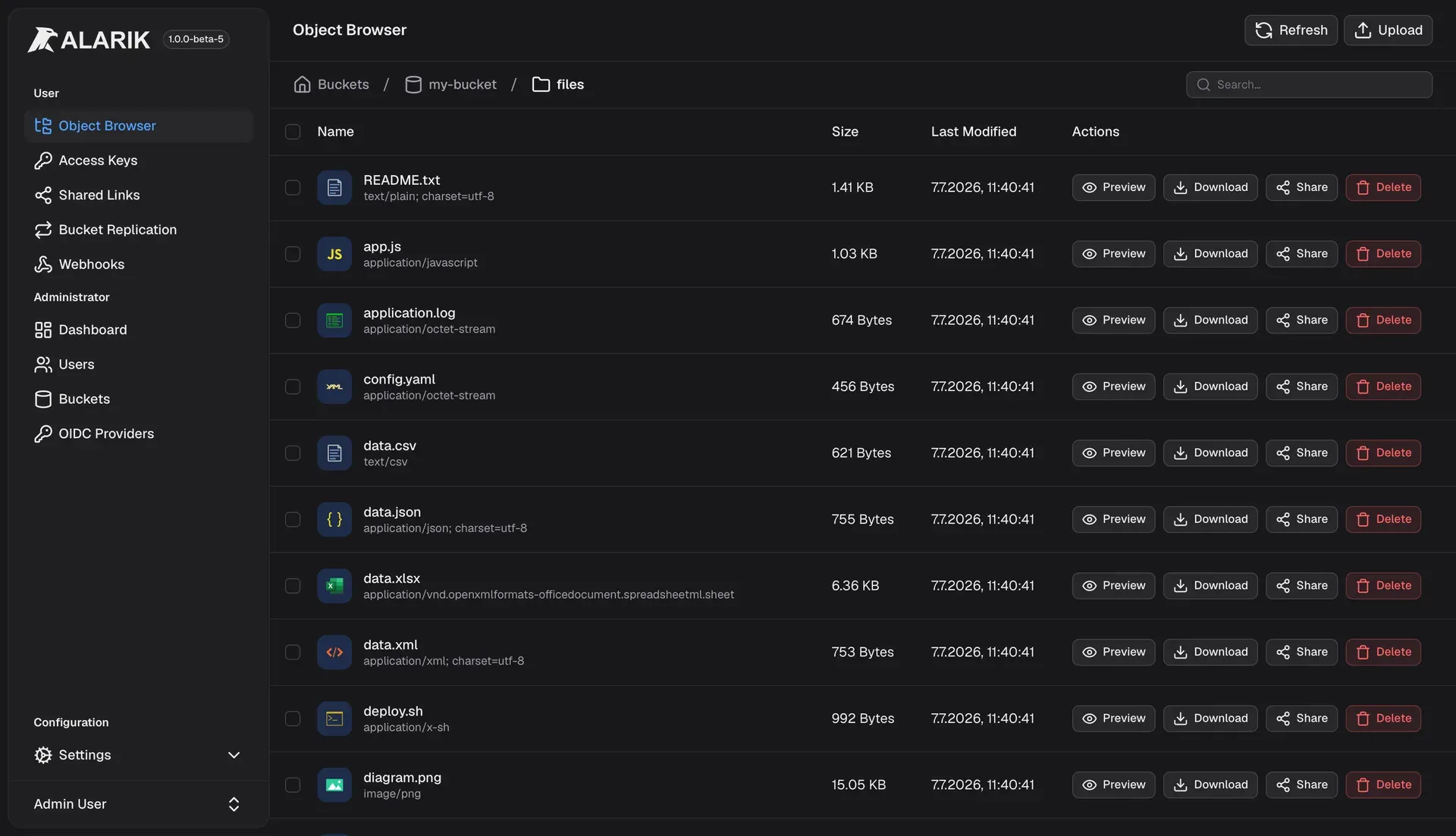
Official console screenshot from the repository README, taken from an earlier beta build.
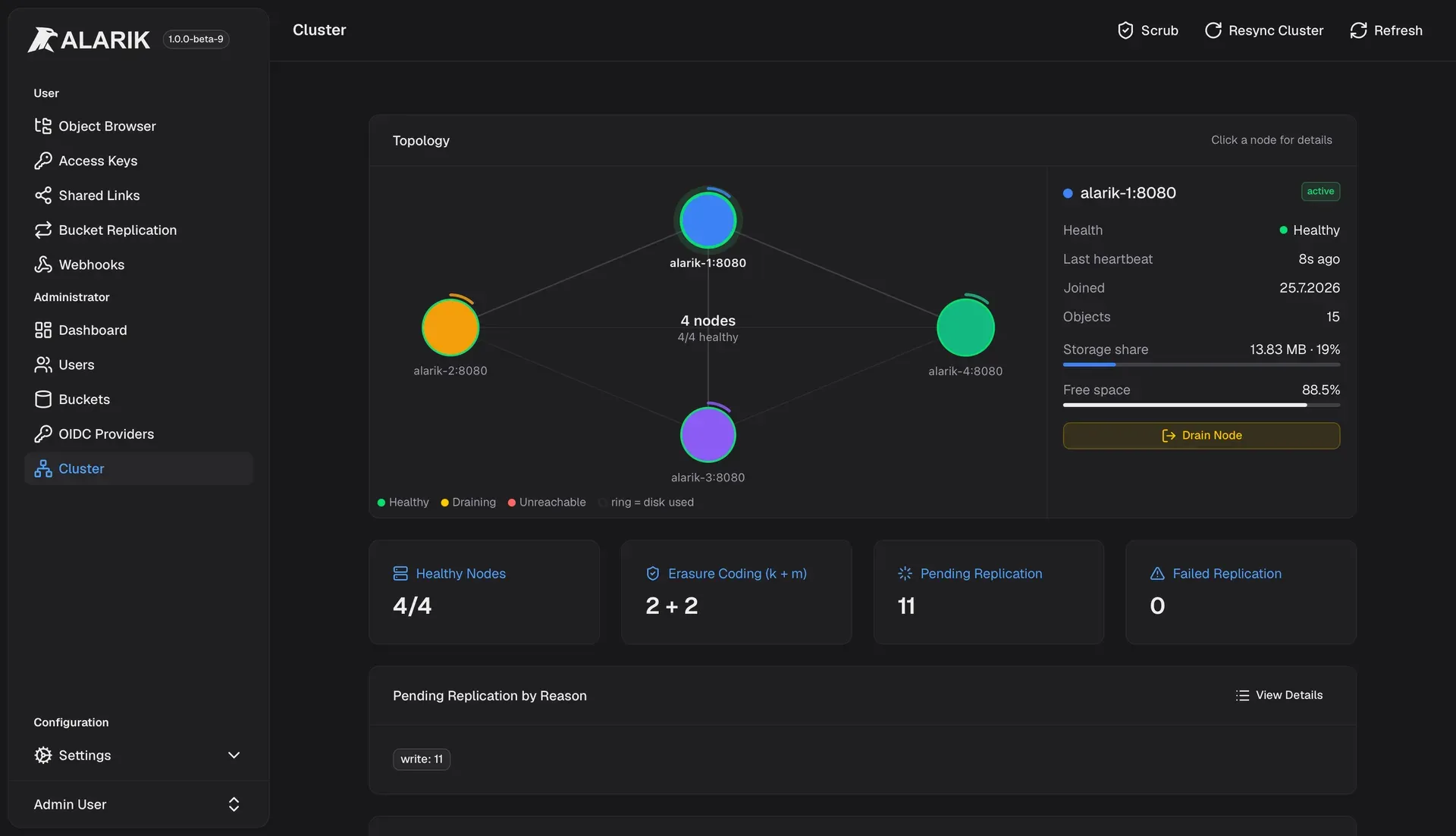
Official console screenshot of the Cluster admin page with node topology and health.
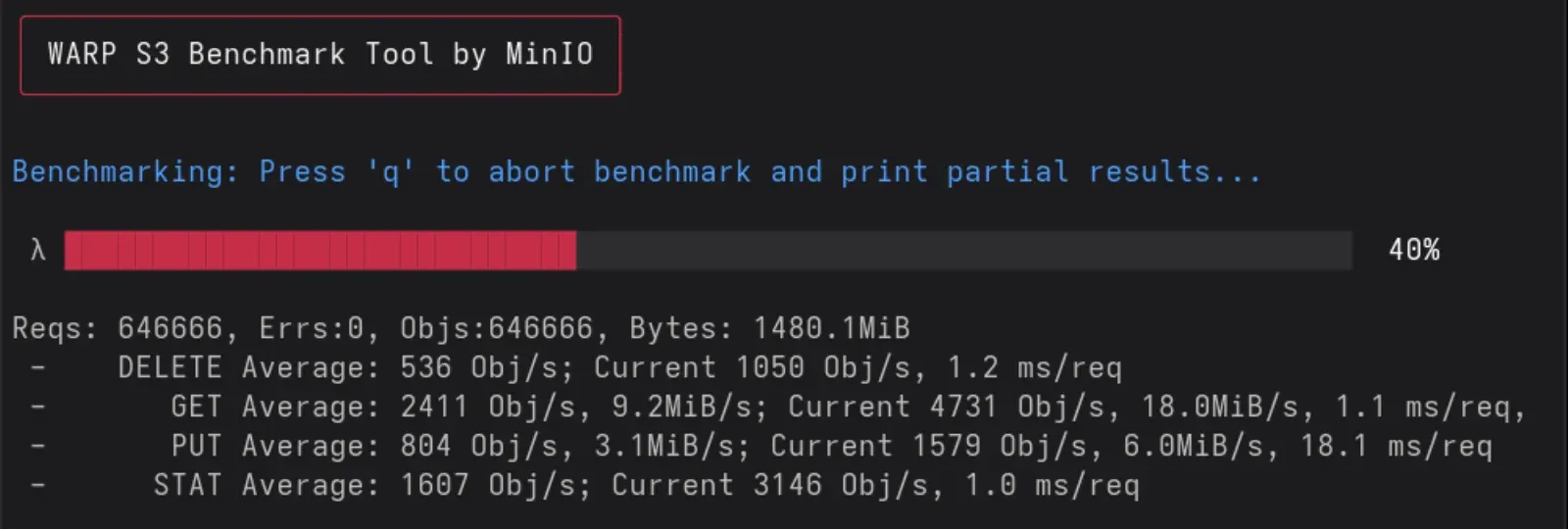
Cropped excerpt of the README benchmark figure: a partial warp run, not a finished or independent result.
Source: official Alarik project page.
Key capabilities
- S3-compatible API The README lists put, get, head, delete, copy and multi-object delete, multipart uploads, bucket versioning with delete markers, conditional requests, range reads, presigned URLs of up to seven days, object tagging, bucket policies and lifecycle rules. Compatibility is stated per feature in the README tables, so check the exact calls your applications use before migrating.
- Web console The Nuxt console offers an object browser with drag-and-drop folder upload, recursive search, bucket and folder statistics, in-place metadata editing, version browsing, time-limited shared links and an admin dashboard with CPU, memory and traffic charts. Screenshots in the repository show it in a dark theme.
- Access keys and users Local accounts use a username and password, with optional open self-registration that the documentation says should stay off in production. Each user can create S3 access keys with optional expiry. A default admin account is created on first start with the documented username and password, which must be changed before real use.
- OIDC single sign-on Administrators add one or more OpenID Connect providers in the console under Admin, OIDC Providers, rather than through environment variables. The documentation names Okta, Google Workspace, Microsoft Entra, Keycloak and Auth0 as examples, requires verified email claims and links accounts on first login.
- Bucket policies and public access block JSON bucket policies follow the S3 model, and a bucket-level public access block overrides any policy that would grant public access. These are the controls to test first when you move an existing application that relies on public reads.
- Bucket versioning Versioning can be enabled or suspended per bucket, with version listing, delete markers and a console view for browsing and deleting individual versions. Replication rules require versioning to be enabled.
- Lifecycle rules Lifecycle rules cover expiration, expiration of noncurrent versions and cleanup of incomplete multipart uploads. Test rules on a non-production bucket, because expiration permanently removes data.
- Webhook event notifications Bucket webhooks send S3 event-shaped payloads over HTTP with an HMAC signature from a per-rule secret. Deliveries go through a persistent outbox with retries and exponential backoff, and failed deliveries can be inspected and retried from the console or the API. Filters work by event type and key prefix or suffix.
- Bucket replication Replication copies a bucket to another S3-compatible endpoint, either another Alarik instance or a different service, using signed requests. A bucket can have up to four targets and four rules, rules can be synchronous or asynchronous, and delete and existing-object replication are opt-in. See the replication guide.
- Multi-node cluster mode Cluster mode is opt-in: set an internal node address and a shared secret on each node, then point nodes at seed nodes. Object data is erasure coded with k data and m parity shards, and control-plane metadata is replicated. The scaling guide says inter-node traffic is authenticated but not encrypted, so run it on a private network.
- No external database The scaling documentation states there is no database to provision: users, buckets, policies and cluster membership live in Alarik storage. Back up the
Storage/directory on each node to back up everything. A node offline longer than the tombstone grace period, seven days by default, should be wiped and rejoined rather than restarted. - Read repair and scrubbing Missing or corrupted shards are rebuilt from surviving shards on read and by a periodic background scrub. The admin console shows node health, k and m values, shard repair state and storage distribution under Admin, Cluster.
- Durability setting The
ALARIK_FSYNCvariable is on by default so an acknowledged upload survives a power failure; the guide recommends leaving it on for production data and describes turning it off only for benchmarks or reconstructible data. - Region and configuration A deployment is single-region, set by
ALARIK_REGION, and S3 clients must sign requests for that region. Settings are environment variables on each container, including base URLs, the JWT signing secret, default buckets and account creation. - Kubernetes chart The repository includes a Helm chart with a StatefulSet, services, a pod disruption budget, RBAC and network policy templates. The chart is part of the source tree rather than a published repository, so review its values file before using it.
- Benchmarks The README shows a run of MinIO warp mixed workload against a local Alarik instance and claims competitive throughput. Treat vendor benchmarks as a starting point and repeat them on your own hardware with your own object sizes.
Where Alarik fits
Replacing a self-hosted S3 store for development and staging
Start with the Docker Compose file from the installation guide, set the base URLs, a strong JWT secret and new admin credentials, then point an AWS SDK, rclone or s3cmd at port 8080. Run your own test suite against it, including multipart uploads, presigned URLs and range reads, before relying on it. Keep the S3 endpoint behind TLS, for example through a reverse proxy, because the containers expose plain HTTP in the example file.
Providing object storage to internal applications
Create one user and access key set per application, add bucket policies that grant only the needed prefixes and enable the public access block. Document the region value and keep it consistent, because clients that sign for another region are rejected. Rotate keys by creating a new one, switching the application and then deleting the old key.
Setting up disaster recovery with replication
Enable versioning, add a target on the remote S3-compatible endpoint, then create a rule with the prefix you care about. Decide whether deletes and existing objects should replicate, run a resync and watch the pending and failed task counts in the console. Test a restore from the remote copy at least once, not only the copy itself.
Reacting to uploads with webhooks
Create a webhook on a bucket, set the event types and key filters, store the shared secret in your receiver and verify the HMAC on each delivery. Use the delivery health view to confirm retries behave when the receiver is down.
Growing from one node to a cluster
Plan a private network, choose k and m values that fit the node count and install the ISA-L library where required. Start more nodes with the same cluster secret and JWT value, watch the Cluster page for health and rebalance tasks and test draining a node before you need to. Keep the Storage directory on reliable disks and monitor free space, since near-full nodes change write placement.
Evaluating a beta storage engine
Keep a copy of important data elsewhere, compare behavior with the S3 call list in the README, and repeat tests after each beta, because the project changes quickly. Track the release page and the issue list before promoting any workload. Write down which S3 features your applications use so that gaps show up early.
Reviews of Alarik
Be the first to share your experience with Alarik.
Write a review
Loading review form…
Alternatives to Alarik
 GarageAGPLv3 object store written in Rust that implements the S3 API, replicates data across zones over ordinary Internet links and runs as a single binary. Built for small to medium self-hosted clusters, not for maximum throughput.
 SeaweedFSApache-licensed distributed storage for S3 objects, POSIX-style files and Iceberg or Lance tables, with O(1) blob access, horizontal scaling and cloud tiering.
 CephOpen-source, software-defined storage on commodity Linux servers: S3 and Swift through RGW, RBD block devices, the CephFS file system, NFS, SMB and NVMe/TCP gateways, deployed with cephadm or Rook and governed by the Ceph Foundation.