

What is OpenPanel?
OpenPanel is a web hosting control panel built around containers. It is aimed at hosting providers, agencies and server owners who give each customer an isolated environment instead of one shared Apache, MySQL and PHP runtime. Every account gets its own web server, database, PHP-FPM containers, private network and storage volume, managed through two interfaces: OpenAdmin for the server administrator and OpenPanel for the end user. The software is published at stefanpejcic/OpenPanel and documented at openpanel.com. It is not the same product as the OpenPanel web and product analytics tool, which has its own iThub listing.
The project began in 2023 as a bootstrapped side project, according to the about page, and reached a first public beta in 2024. Version 1.0 introduced the Enterprise edition in 2025, and in 2026 the company was formalized as OpenPanel, LLC. Version 2.0, released on August 28, 2026, was a rewrite in Go that replaced Docker with Podman for rootless isolation. There is no update path from 1.x to 2.0, and the 1.x line stays supported on Docker. The repository owner and maintainer shown in the changelog is Stefan Pejcic.
The current GitHub release is 2.0.21, published on November 3, 2026, and it fixed a spacing problem in some compose files and a mailbox that was created with an uppercase letter. Version 2.0.20 added LiteSpeed Enterprise as a per-account web server with a trial license and introduced multi-server clustering for Enterprise installs, and 2.0.19 added a command to back up a single account on demand. Install it on a fresh server as root with the one-line script from the install page; the documented minimum is 1 GB of RAM and 20 GB of storage, with 4 GB and 50 GB recommended. Supported systems include Ubuntu 22, 24 and 26, Debian 10 to 13, AlmaLinux 9.5 and 10 and Rocky Linux 9.6 and 10, with some caveats listed in the documentation.
Licensing needs reading before adoption. The license file states that OpenAdmin and the OpenPanel user interface are under an End User License Agreement, while OpenCLI and configuration files use CC BY-NC 4.0. The agreement allows personal, evaluation, non-commercial and internal use, including production self-hosting for your own organization within the Community Edition limits, and it does not allow offering a hosting or reseller business built on it without an Enterprise license. The 2.0 changelog says the core and premium modules remain closed source. This is source-available software, not an OSI-approved open-source license.
OpenPanel screenshots
Explore the interface. Open a screenshot to view it at full size.
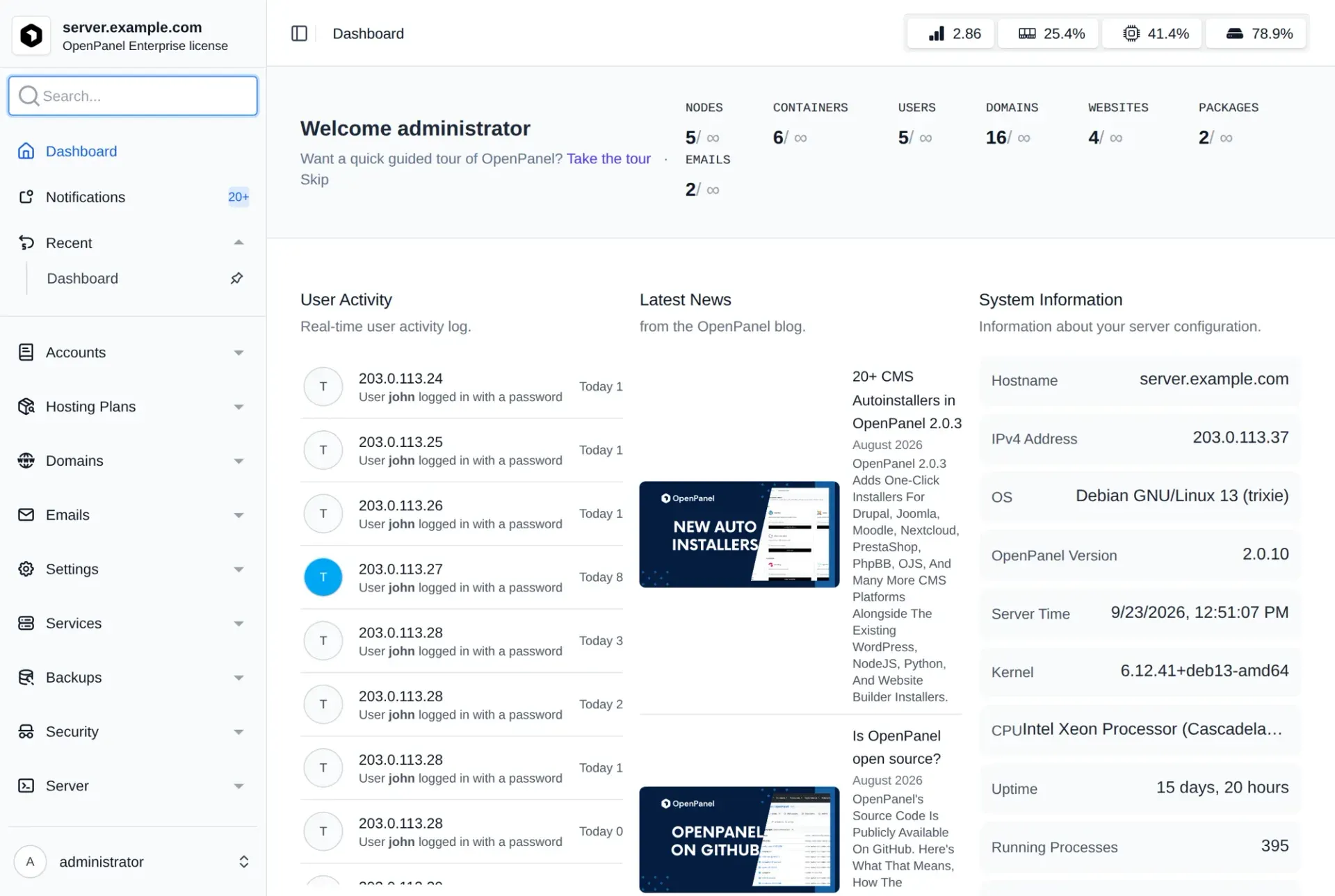
Official OpenAdmin dashboard screenshot using example data.
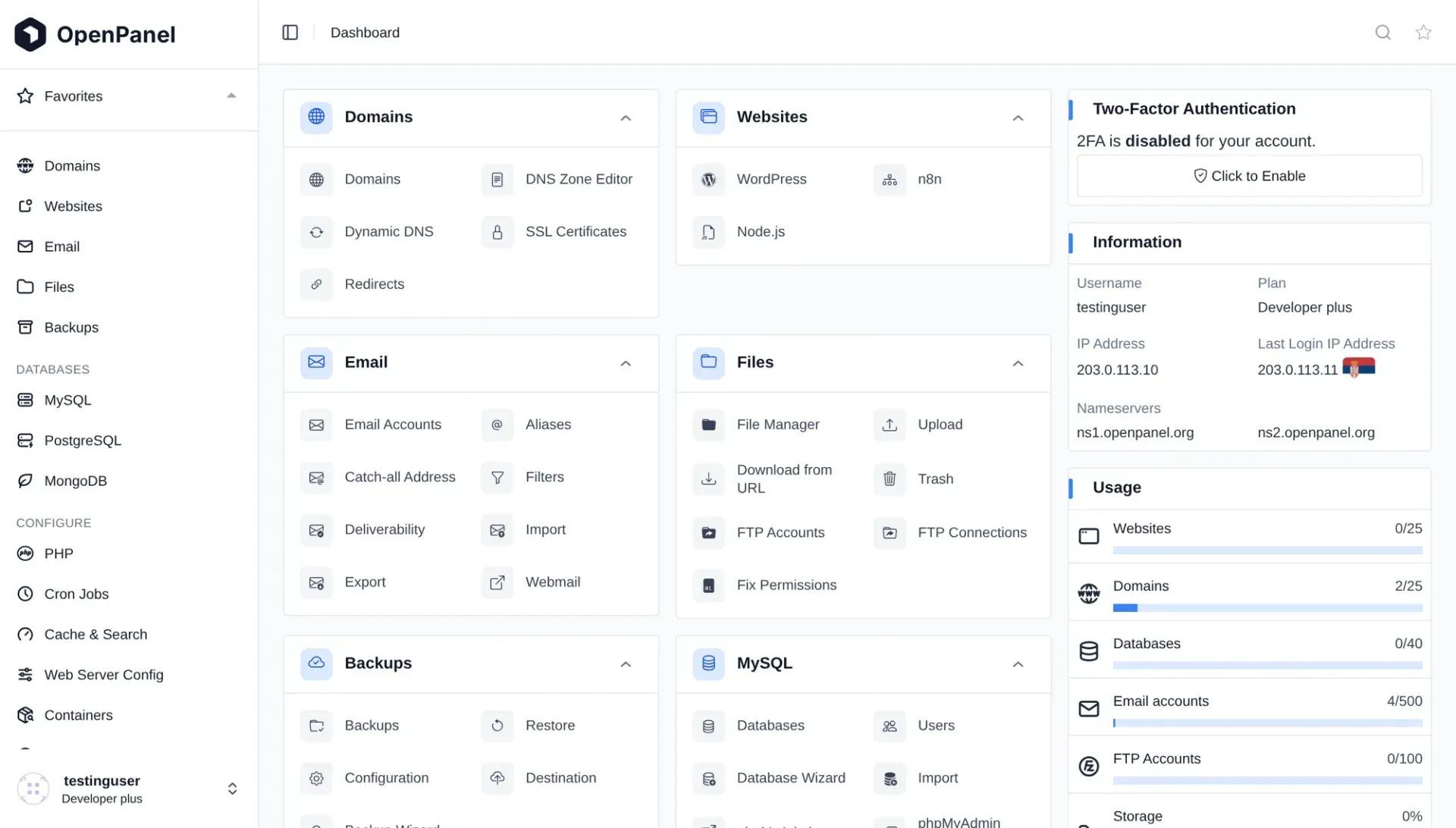
Official user panel dashboard screenshot from the documentation, using a test account.
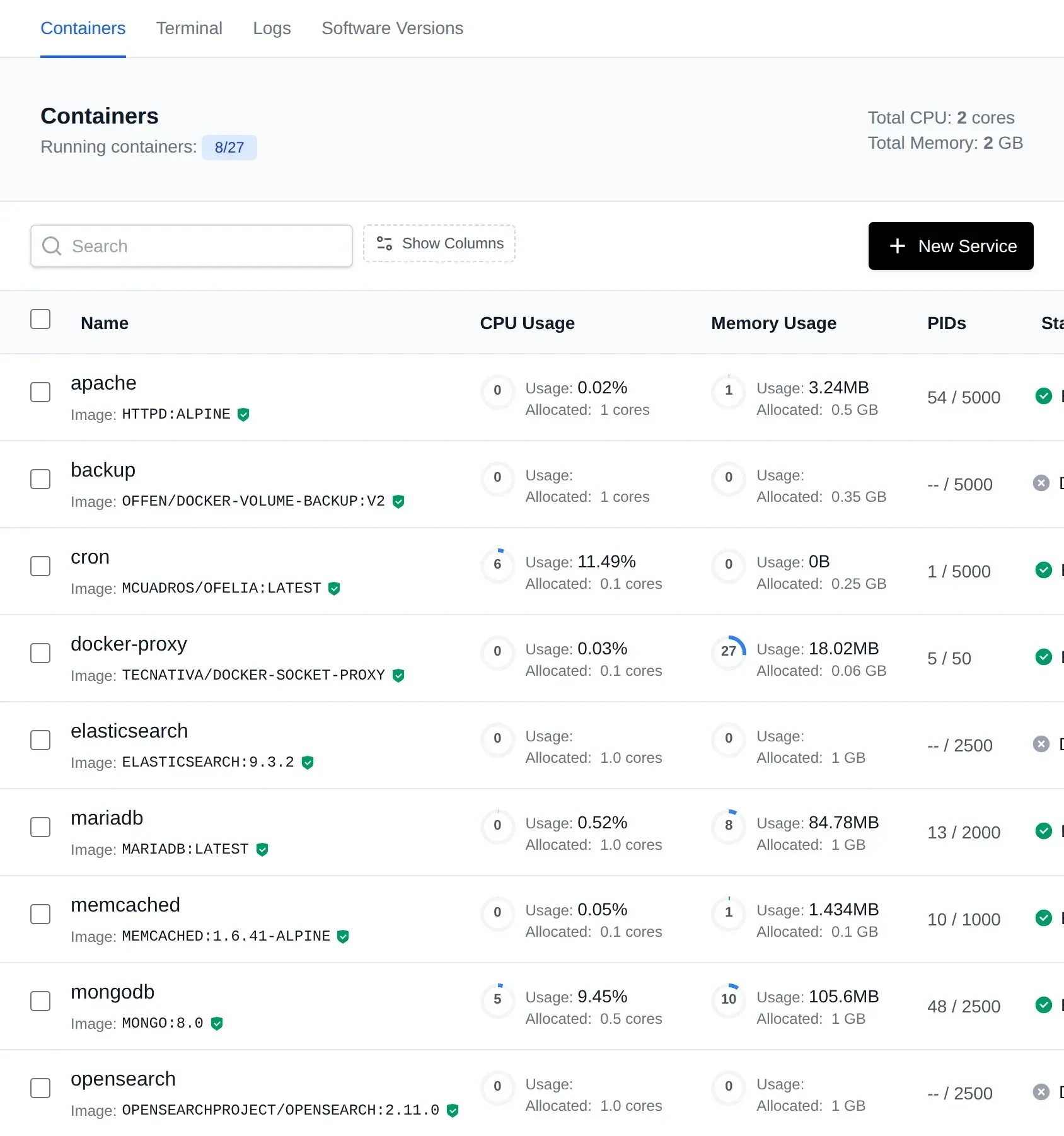
Official screenshot of per-account containers such as Apache, MariaDB, Memcached and MongoDB with resource limits.
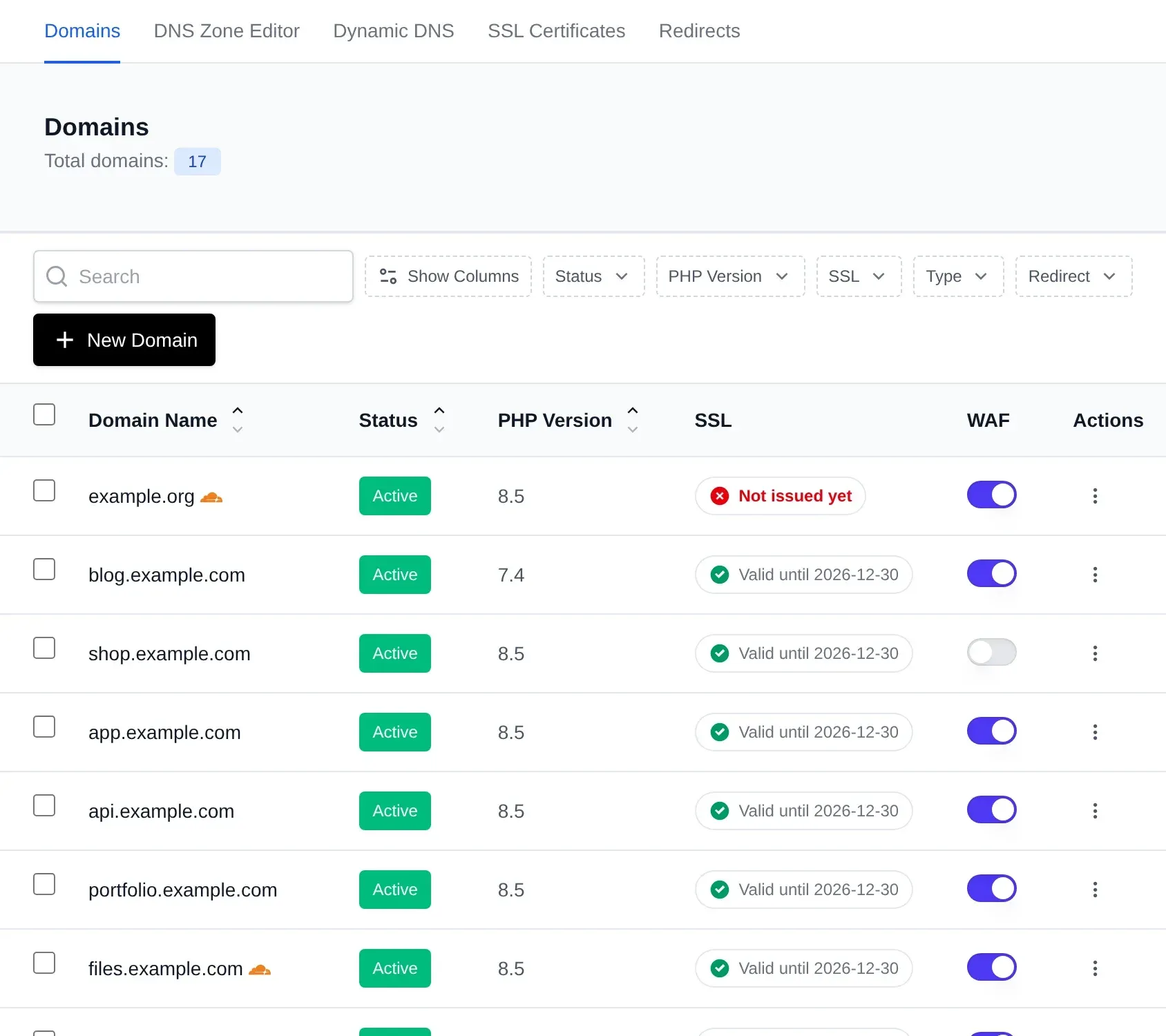
Official screenshot of the domains table, shown with example domains; cropped to the top of the page.
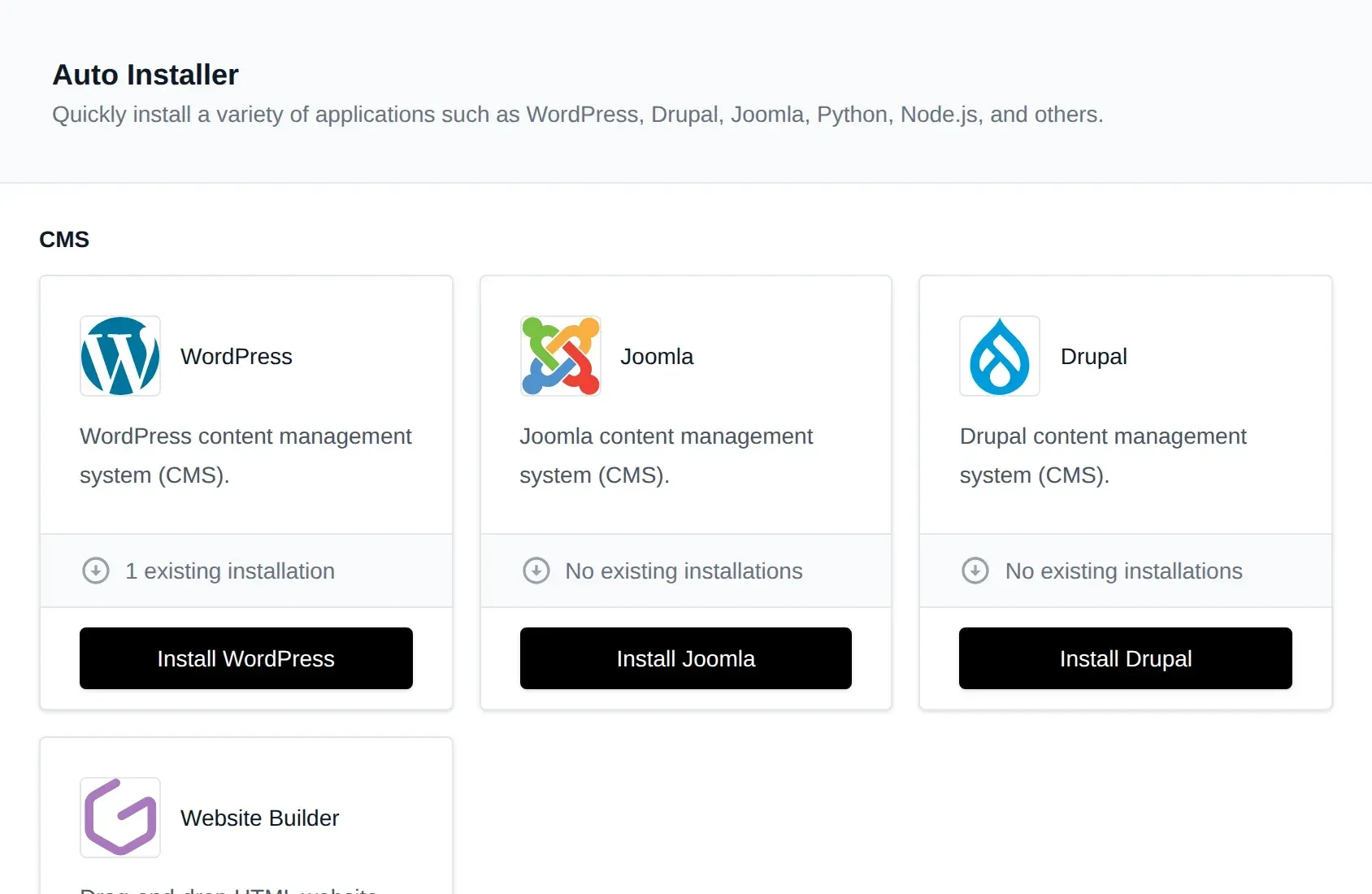
Official screenshot of the auto installer page; cropped to the top of the page.
Source: official OpenPanel project page.
Key capabilities
- Install with one command On a fresh supported server, connect as root and run the documented installer script. The install page generates variants with options such as a custom domain, admin and user ports (defaults 2087 and 2083), skipping the firewall or DNS server, an Enterprise key, or a post-install script. Run it on a machine without another control panel.
- Per-user container isolation Each account runs in its own Podman context with a dedicated web server, database, PHP-FPM containers and a private network, so one customer's runaway process or compromised site does not share a runtime with others. CPU, memory and storage limits are set per plan.
- Choice of web server per user Apache, Nginx and OpenResty are available, with Varnish caching, OpenLiteSpeed and LiteSpeed Enterprise marked as Enterprise features. The administrator sets a default and users can change it from the Containers page where the plan allows.
- Databases per user MySQL, MariaDB and Percona can run as the account's own database service, and the edition table also lists PostgreSQL and MongoDB; check which edition includes them before planning. phpMyAdmin is shared, remote MySQL access is optional, and database import tools are included.
- Multiple PHP versions and Node.js, Python, Ruby and Java apps Users select PHP versions per domain and edit PHP options. The edition table lists Node.js, Python, Ruby and Java application support, Git deployments and a PHP selector. Check the comparison table for the exact edition boundary before promising a feature to customers.
- Domains, DNS and SSL Add domains and subdomains, manage a DNS zone editor, redirects, document roots and dynamic DNS, and obtain Let's Encrypt certificates or upload custom ones. A BIND9 DNS server and the Caddy reverse proxy are part of the default install, and Coraza WAF can protect new domains.
- Websites and auto installers The Community Edition includes WordPress management, a website builder and apps such as Nextcloud, Matomo, phpBB and DokuWiki. Enterprise adds Joomla, Drupal, Moodle, MediaWiki, OpenCart, PrestaShop, Flarum, OJS and n8n. Autoinstaller coverage is still being extended, according to the roadmap on the about page.
- Email hosting Mailbox accounts, aliases, forwarders, filters, webmail through Roundcube and deliverability checks for SPF, DKIM and DMARC are marked Enterprise features. Test deliverability from a clean IP, since the panel cannot fix a poor sending reputation.
- Files, FTP and backups A file manager, download from URL, disk usage and inode explorers and a trash are included. Users configure their own backup schedules and restore from supported destinations (marked Enterprise), and administrators can run single-account backups with the opencli docker-backup command.
- OpenAdmin server administration The administrator interface shows nodes, containers, users, domains, websites, packages and emails on one dashboard, with live user activity, system information and a notification list. It manages accounts, hosting plans, domains, emails, services, backups and security settings.
- OpenCLI command line Terminal commands cover reports, domains, user passwords, suspensions, backups and updates, for example opencli domains-all or opencli user-password. Output formats such as JSON exist for several commands, which helps scripting and billing integrations.
- REST API, MCP and AI assistant The docs describe a REST API for OpenPanel and OpenAdmin. The edition table lists MCP (Model Context Protocol) access and an AI assistant among the integrations. Treat any automation that can create or delete accounts as sensitive and give it its own token.
- Billing integrations The edition table lists WHMCS, FOSSBilling, Blesta, ClientExec, WISECP and Paymenter modules. The README notes that the Paymenter module is not actively maintained.
- Security controls Two-factor authentication and passkeys, login history, an activity log, active sessions, IP blocking per domain and optional ImunifyAV scanning are documented. Firewall setup uses CSF unless skipped at install. Enterprise can enforce multifactor authentication for clients.
- Migration from other panels The README links guides for importing cPanel backups and CyberPanel backups, and the edition table lists transfers between servers. Test one real account before planning a bulk move, including mail, cron jobs and DNS.
- Multi-server clustering Enterprise 2.0.20 can manage several OpenPanel servers from one OpenAdmin, joined with a one-time code. Each server remains a complete install, so it keeps working if the master is down.
- Android app A free Android app, built from GitHub and distributed as an APK for Android 7.0 or newer, stores logins in the phone keychain and shows server status for OpenPanel and OpenAdmin accounts. It is installed outside the Play Store, so verify the source.
- Editions and pricing The Community Edition is free and limited to 50 websites, 50 domains and 3 user accounts per the comparison table. Enterprise costs 14.95 EUR per server per month or 149.50 EUR per year with unlimited accounts, and includes a 30-day trial.
Where OpenPanel fits
Running a small hosting business
Install OpenPanel on a VPS or dedicated server, define hosting plans with CPU, memory and disk limits, and connect billing through WHMCS, FOSSBilling or Blesta if you sell accounts. Check how many accounts fit before the Community limit of three user accounts forces an Enterprise license, and decide early whether you need email, FTP or the container manager, which are Enterprise features.
Isolating client sites on one server
Give each customer their own web server and database containers and review CPU and memory limits per plan. Test that a heavy site on one account does not slow its neighbors, and that file permissions stay inside each user's volume. Review the activity log after a few days to see which actions each account performed.
Migrating from cPanel or CyberPanel
Export a cPanel full backup or a CyberPanel backup and import it using the documented guides. Compare PHP versions, cron jobs, mail and DNS records before moving the nameservers, and keep the old server running for a rollback window. Move a low-traffic site first and compare page load times and error logs.
Hosting WordPress and CMS sites
Use the WordPress manager and the autoinstallers for common CMS applications, then enable the cache layer that matches the web server in use. Record which features such as Varnish or LiteSpeed belong to Enterprise before you promise them to clients. Test plugin updates and backups on one site before rolling the setup out to all of them.
Letting users run their own services
Allow users to start containers, change image tags and use Redis, Valkey, Memcached or Elasticsearch where their plan permits. Review which images they can pull and what resource limits cap them.
Managing several servers
Use OpenAdmin for one server or Enterprise clustering for several, and script routine work with OpenCLI and the REST API. Keep API tokens scoped, log administrator actions and test restore from backups on a spare machine.
Install
bash <(curl -sSL https://openpanel.org)Reviews of OpenPanel
Be the first to share your experience with OpenPanel.
Write a review
Loading review form…
Alternatives to OpenPanel
 1Panel1Panel is a GPL-3.0 Linux server management panel with a web GUI for containers, databases, files, websites, an app store, backups and AI tools.
 PodmanPodman is an Apache-2.0 container engine for OCI images, containers and pods. It runs on Linux and uses a managed Linux machine on macOS and Windows, with a CLI and a documented REST API.
 CoolifyCoolify is an open-source, self-hostable platform for deploying apps, databases and 360+ one-click services to your own servers over SSH.