

What is RustDesk?
RustDesk is an open-source remote desktop application for remote support, unattended access and file transfer. The client runs on Windows, macOS, Linux and Android, an iOS app is published on the App Store, and a web client runs in the browser. Out of the box the client registers with public rendezvous and relay servers operated by the project, shows a device ID and a one-time password, and connects to another device by its ID. The same client can instead point at a server you run yourself. The project is developed by the RustDesk team; the website footer names Purslane Tech Pte. Ltd. as copyright holder.
The architecture has two server roles. hbbs is the ID, or rendezvous, server that registers devices and coordinates NAT traversal; hbbr is the relay that carries a session when a direct path cannot be established. Both ship in the separate rustdesk-server repository, also under AGPL-3.0, as binaries, Debian packages and the rustdesk/rustdesk-server Docker image. The client is written in Rust with a Flutter interface; the older Sciter interface is deprecated and survives only in the 32-bit Windows and ARMv7 Linux builds.
The current client release is RustDesk 1.5.1, published November 1, 2026. It adds keyboard shortcuts, verification of signed update metadata, a trusted-device V2 format with an upgrade path from the legacy one, an address-book toolbar button that opens the web console, and direct file transfer through Android SAF folders. Its fix list concentrates on Linux capture under Wayland and DRM, Windows installer hardening, download path validation, HTTP API calls through HTTPS proxies and a warning for insecure custom API server connections. Version 1.5.0, released September 30, 2026, added WebRTC connections, an ID whitelist, HDR tone mapping, optional clipboard sync between connected sessions and new recording storage options.
Release assets cover Windows EXE and MSI for x86-64 and ARM64, macOS DMG for Intel and Apple Silicon, Debian, Fedora, openSUSE and Arch packages, AppImage and Flatpak, signed Android APKs, plus an SBOM file and a signed update manifest. The client is also listed on Flathub and F-Droid. A separate unattended Wayland package for x86-64 Debian and Ubuntu is distributed as a preview.
The commercial layer is RustDesk Server Pro, a self-hosted server sold as annual licenses. It adds a web console, user accounts, OIDC and LDAP sign-in, 2FA, audit logs, access control, strategies, multiple relays and a custom client generator. RustDesk does not sell a hosted SaaS subscription: Pro also runs on your own infrastructure. The project README carries a misuse disclaimer and the release notes warn users not to install RustDesk at the request of an unknown caller, a pattern common in support scams.
RustDesk screenshots
Explore the interface. Open a screenshot to view it at full size.
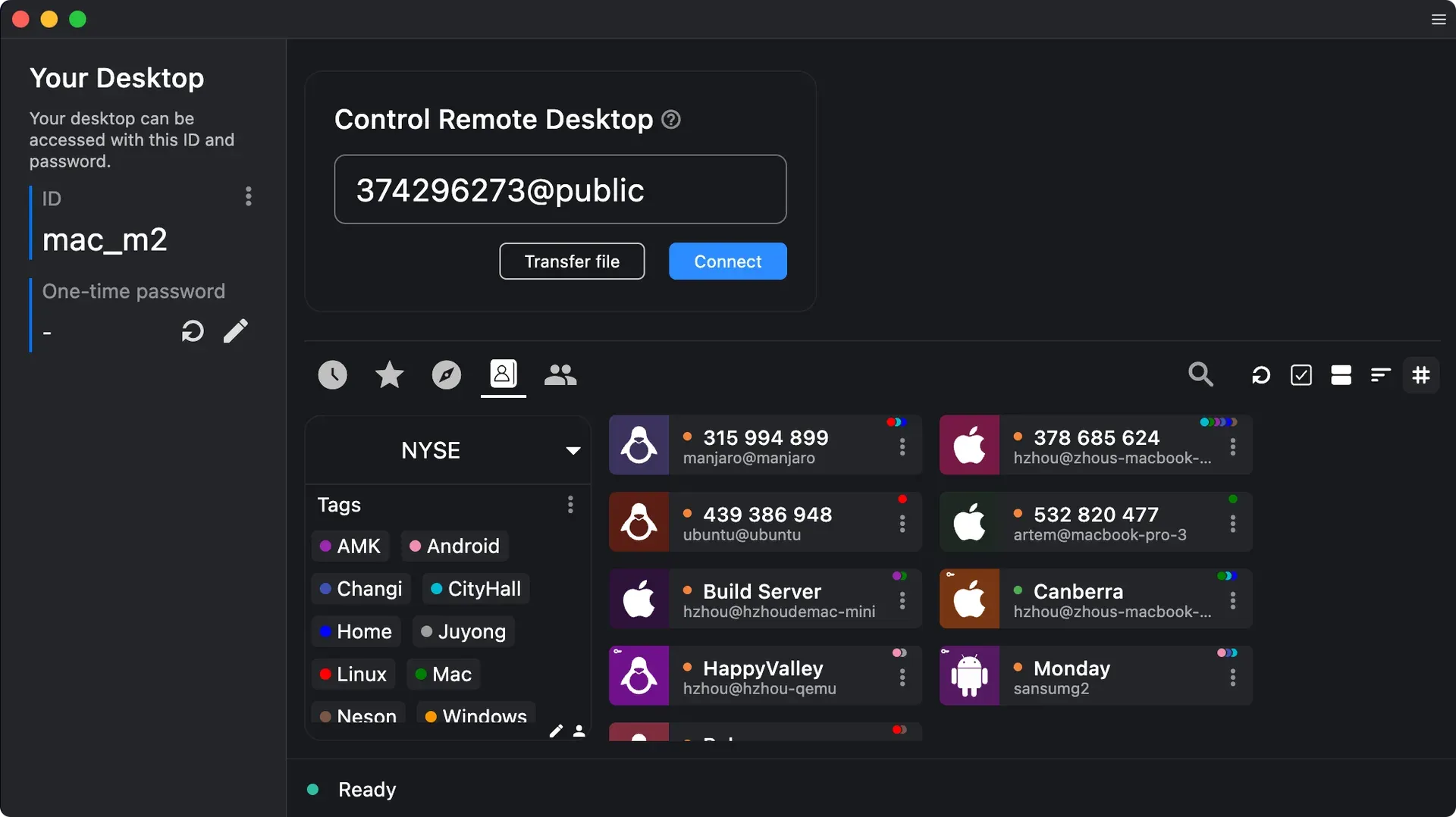
Official screenshot of the Flutter desktop client: own ID and one-time password on the left, remote ID field and address book with tags on the right.
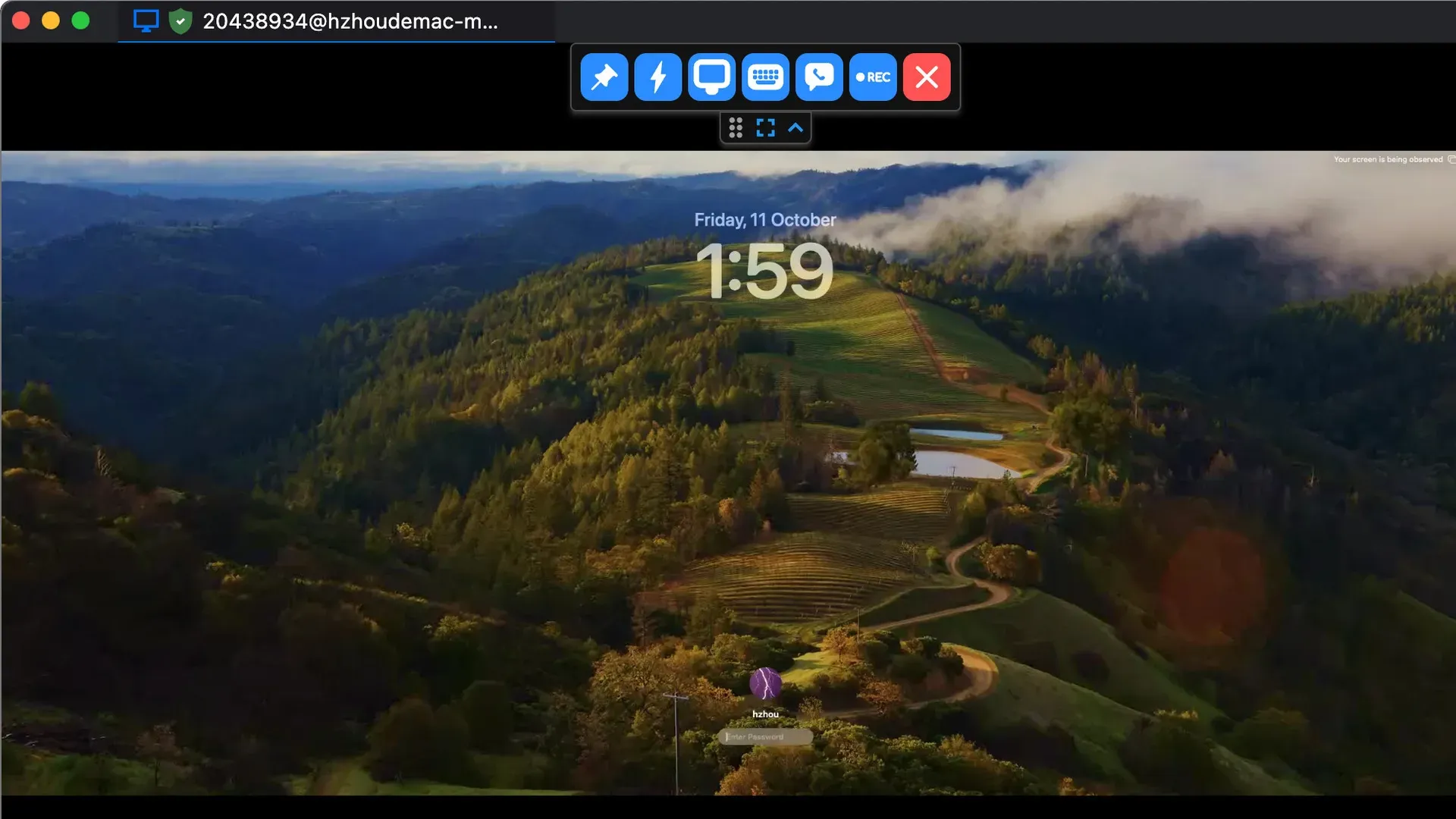
Remote session to a Mac at its lock screen, with the floating session toolbar including the recording button.
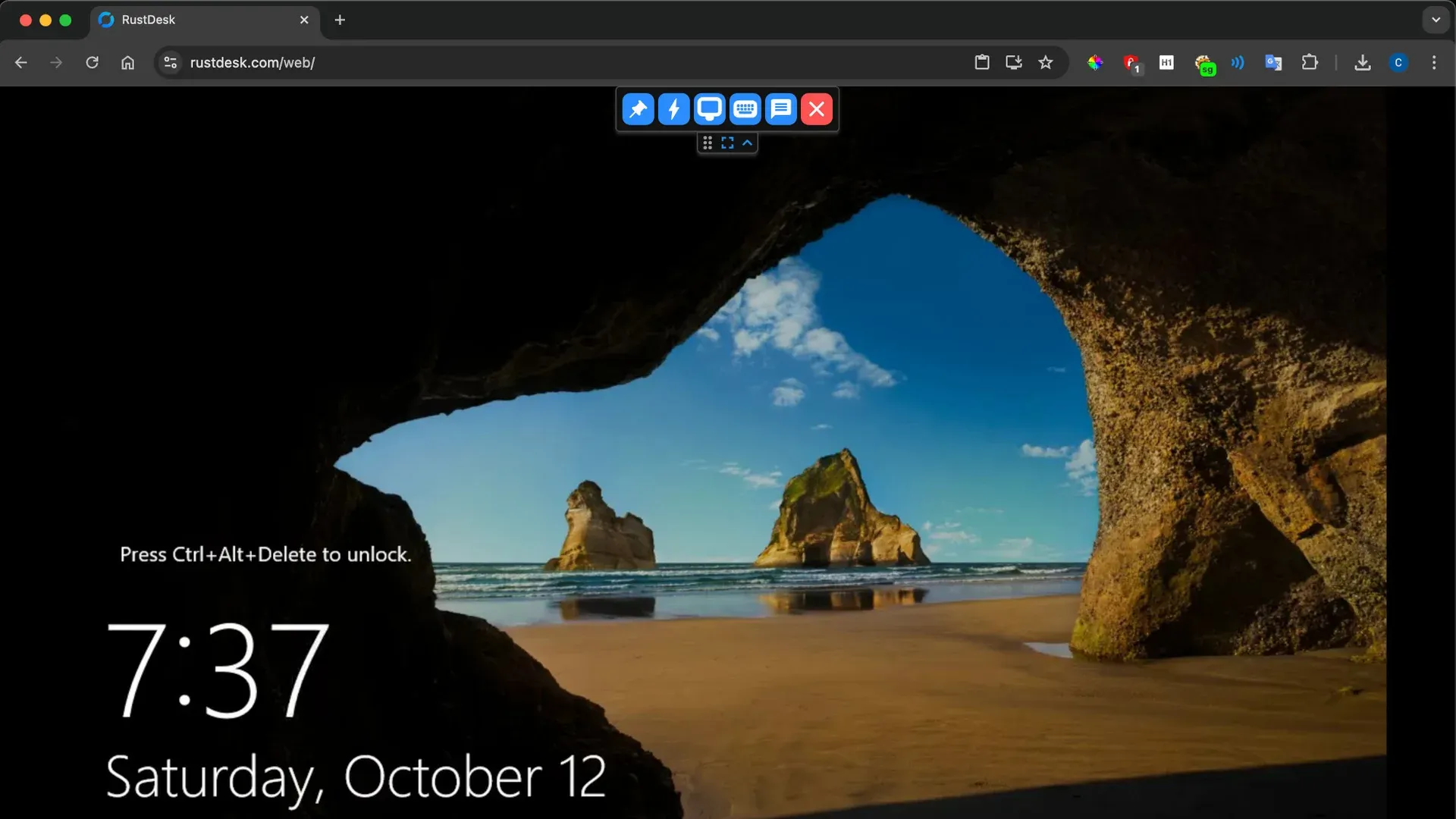
Browser-based web client controlling a Windows machine at its Ctrl+Alt+Delete lock screen.
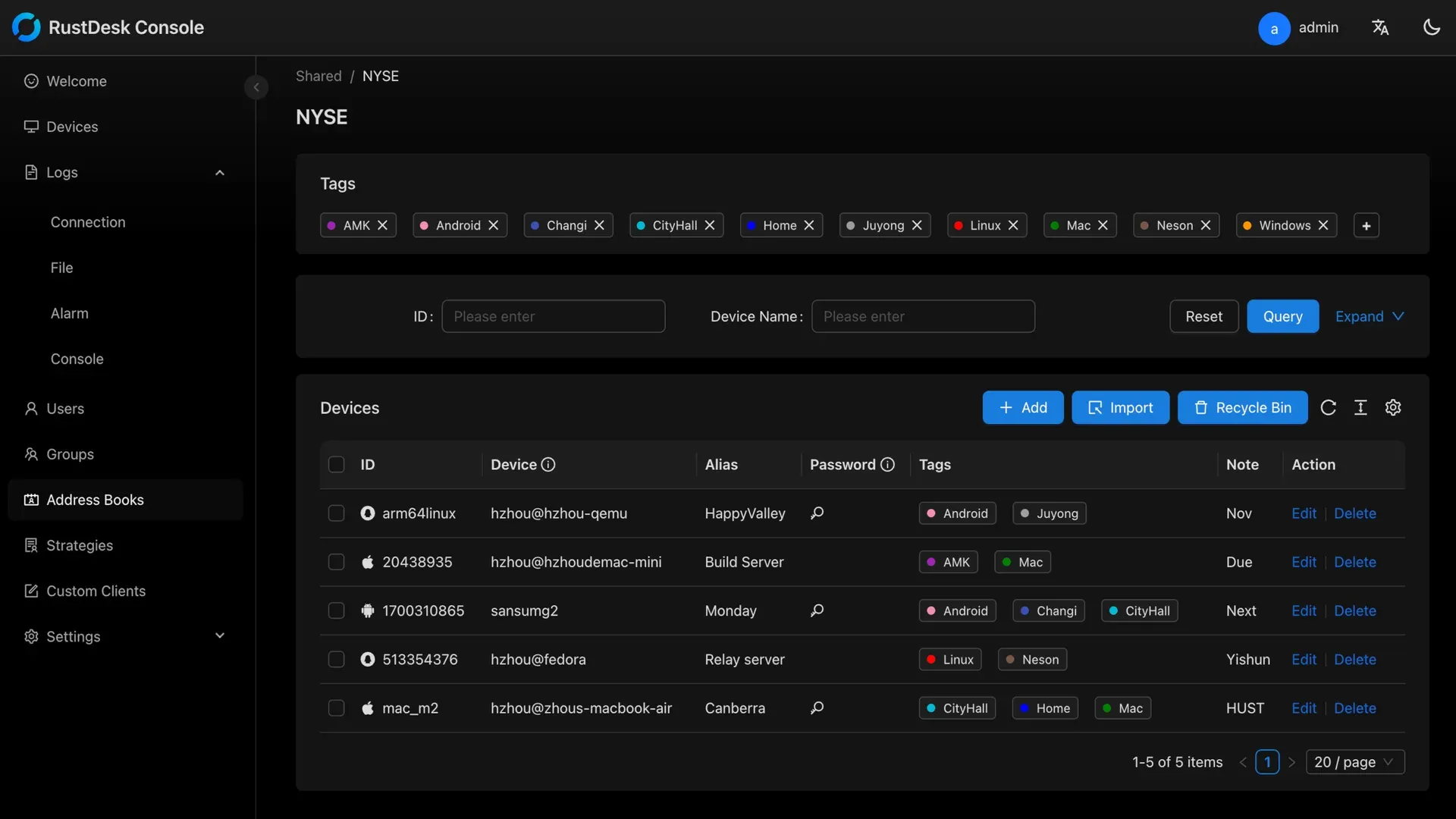
Server Pro web console: shared address book with tags, alongside log, user, group, strategy and custom client sections.
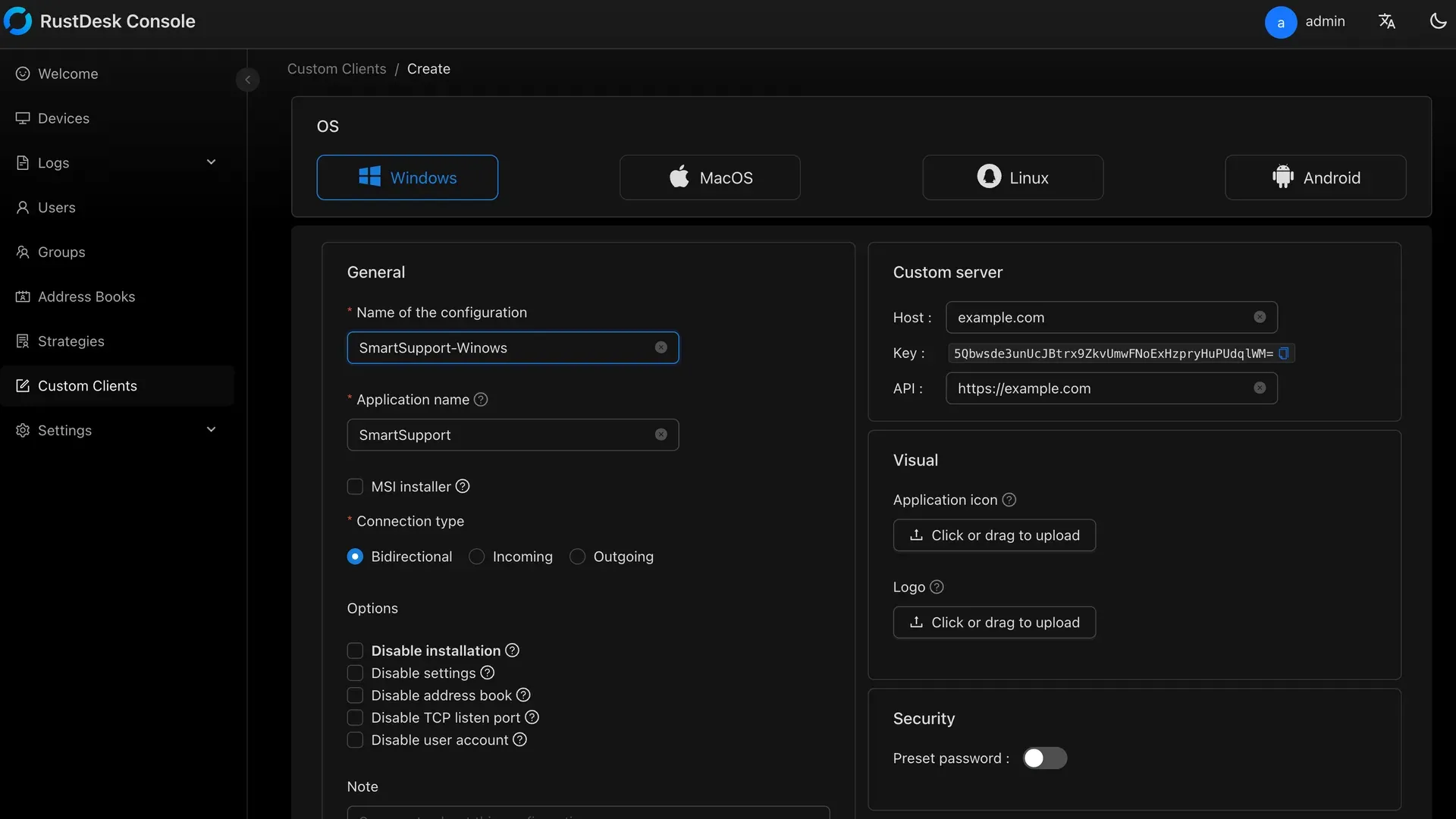
Server Pro custom client generator: target OS, application name, connection type, embedded server settings and branding.
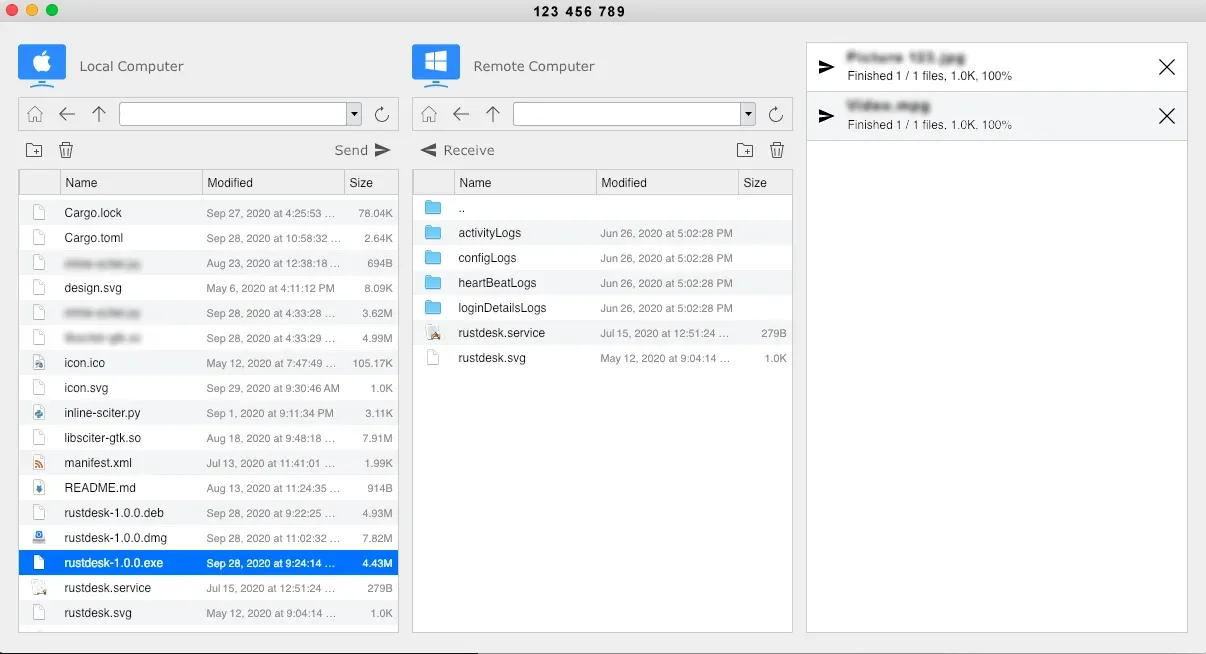
File transfer between a local Mac and a remote Windows machine; README screenshot from the older Sciter interface.
Source: official RustDesk project page.
Key capabilities
- Download RustDesk for Windows The 1.5.1 release provides EXE and MSI packages for x86-64 and ARM64, plus a legacy 32-bit Sciter EXE. The EXE accepts
--silent-installfor unattended installation, and the MSI suits managed packaging. Without installation the client can also run in portable mode, with documented elevation behavior for that case. - Download RustDesk for macOS Separate DMG files exist for x86-64 and Apple Silicon. Drag the application to Applications, then grant the Screen Recording and Accessibility permissions the client requests before the Mac can be controlled. Version 1.5.0 added silent auto-update support on macOS, and 1.5.1 fixes the Configure button so it opens the Screen Recording settings directly.
- Download RustDesk for Linux Packages cover Debian and Ubuntu (DEB for x86-64, ARM64 and a Sciter ARMv7 build), Fedora and openSUSE (RPM), Arch Linux (pkg.tar.zst), AppImage and Flatpak. The client documentation lists the install command for each family, for example
sudo apt install -fy ./rustdesk-<version>.deb, and a Nix package is available asnixpkgs#rustdesk. Wayland sessions are captured through PipeWire and xdg-desktop-portal. - Android and iOS apps Signed APKs are published for universal, ARM64, x86-64 and ARMv7 targets, and the app is on F-Droid. According to the Android guide, sharing an Android screen needs Android 6 or later, internal audio needs Android 10, and input control and file transfer are special permissions enabled manually in system settings. The iOS app on the App Store can control other devices, but an iOS device cannot be controlled remotely.
- Web client A browser client is available at rustdesk.com/web. Server Pro can host the web client on your own domain behind a reverse proxy with WebSocket Secure. Since 1.5.0 the web client can connect directly through WebRTC instead of always passing through a relay. Pro integration requires a plan where users times 10 plus devices reaches at least 400.
- ID-based connections with NAT traversal Clients connect outward to the ID server, which coordinates a direct peer-to-peer path through TCP and UDP hole punching, IPv6 or, since 1.5.0, WebRTC data channels raced in parallel. When no direct path succeeds, the session falls back to the
hbbrrelay. Endpoints need no inbound port forwarding; only the server accepts inbound traffic. - Session encryption and server keys The project states that ID-brokered sessions are end-to-end encrypted whether the path is direct or relayed. On a self-hosted server, clients must be configured with the server's public key from
id_ed25519.pubto establish that encrypted connection. Direct IP access is a separate mode that the project describes as unencrypted and recommends protecting with a VPN. - Video codecs and quality control The client supports VP8, VP9 and AV1 software codecs and H.264 or H.265 hardware encoding where the device supports it. Version 1.5.0 reworked quality of service: bitrate is lowered before frame rate during ordinary congestion, and frame rate drops require three consecutive bad replies. Version 1.5.1 re-encodes static frames after scrolling to improve clarity.
- File transfer and clipboard A dual-pane file manager sends and receives files and folders between local and remote machines, and file copy and paste through the clipboard works on Windows, Linux and macOS. Version 1.5.0 adds optional clipboard sync between connected sessions, and 1.5.1 adds keyboard navigation in the desktop file list and validates download paths.
- TCP tunneling and RDP Port forwarding maps a local port to a host and port reachable from the remote machine, for example SSH on 22 or RDP on 3389. The client can launch an RDP session through such a tunnel, and since 1.5.0 the mstsc window is titled after the peer. The tunnel lasts only while its window stays open.
- Unattended access and deployment flags A permanent password replaces the one-time password for machines without an operator. Command-line flags include
--password,--get-id,--set-id,--configand--install-service. The deployment guide provides PowerShell, batch, macOS and Linux scripts for RMM, Intune or GPO rollouts. - Session tools: recording, chat, privacy mode and terminal The session toolbar offers chat, recording, display selection and keyboard controls. Version 1.5.0 added recording visibility and service storage options. A privacy mode can be requested per connection, and a remote terminal is available, with Ctrl and Alt toggles on the mobile terminal keyboard since 1.5.0.
- Free self-hosted server (OSS) The AGPL-3.0
hbbsandhbbrpair is installed with the Docker Compose file atrustdesk.com/oss.yml, Debian packages, a documented third-party install script, or guides for Windows and Synology DSM. The self-hosting guide requires TCP 21115 to 21117 at minimum, with TCP 21114 to 21119 and UDP 21116 for the full set. Latest server release: 1.1.16. - RustDesk Server Pro web console Server Pro adds a console on TCP 21114 for users, groups, devices, shared address books, strategies that push client settings, admin and control roles, and connection, file-transfer, alarm and console logs with configurable retention. A default administrator account exists after installation and must be changed immediately.
- Identity: OIDC, LDAP and 2FA Pro supports OIDC single sign-on (documented with Azure), LDAP integration and two-factor authentication. OIDC and LDAP require the Basic plan or a customized plan; the Individual plan includes 2FA. SMTP settings are documented, including a Microsoft 365 guide.
- Custom client generator On Basic and customized Pro plans, the console builds branded clients for Windows, macOS, Linux and Android with your application name, icon, logo, embedded server host, key and API address. Options include an MSI installer, incoming, outgoing or bidirectional connection types, a preset password and switches that disable installation, settings or the address book.
- API tokens and CLI scripts Pro tokens are created under Settings, Tokens, with per-area permissions for devices, users, groups, strategies, address books, audit logs and roles. The documented Python scripts such as
devices.py,users.pyandaudits.pycall the server with--urland--token. Tokens also driverustdesk --deploy --tokenwhen the server requires explicit deployment of new devices. - Multiple relays and sizing Pro manages several relay servers and selects the closest one for a session. The Pro documentation estimates about 180 KB/s per relay connection and roughly 1,000 concurrent relay connections per CPU core with 1 GB of RAM, and links a scaling guide for 50,000 to 200,000 devices.
Where RustDesk fits
Replacing a hosted remote support tool for a help desk
Install the OSS server with Docker Compose on a small Linux host, open the documented ports and note the public key from id_ed25519.pub. Configure technician and end-user clients with the ID server and key, either manually under Settings, Network, or by importing an exported server config. Test a session from a network with strict NAT to confirm the relay path works. Before retiring the previous tool, check whether you need named technician accounts, audit logs or SSO, which only Server Pro provides.
Unattended access to servers and workstations
Install the client as a service with a permanent password, or deploy it through the scripts in the deployment guide and collect the printed ID and password. On Linux desktops running Wayland, standard builds capture logged-in sessions; access from the login screen after a reboot requires the preview unattended Wayland package described on the project blog, currently x86-64 Debian and Ubuntu only. Keep an existing access path until reboot and login-screen tests pass.
Mass rollout with a branded client
With a Basic or customized Pro plan, generate a custom client in the console with the server host, key and API address embedded, then distribute the MSI through Intune, GPO or an RMM tool. Use strategies to push settings centrally and enable explicit deployment if unknown devices should not self-register. Check that the generated build is signed as expected for your Windows and macOS endpoints and record which console configuration produced each build.
Port forwarding to internal services
Open a TCP tunnel from a client to a remote machine and map a local port to SSH, RDP or an internal web service reachable from that machine. This gives one-off access without a VPN, but the tunnel depends on an open RustDesk session and the remote host's network position. For permanent network access to many services, a mesh VPN is usually a better fit; use RustDesk tunneling for occasional administrative reach.
Browser-only access for occasional supporters
Use the public web client at rustdesk.com/web or, with Server Pro, host the web client on your own domain. Self-hosting it requires a reverse proxy such as Nginx with TLS, WebSocket locations for the ID and relay paths, and a plan that meets the users times 10 plus devices threshold of 400. If you use the public web client against your own server, add the CORS headers described in the Pro FAQ.
Air-gapped or regulated networks
Because both the OSS server and Server Pro run on your infrastructure, the ID server, relay and logs can stay inside a closed network. Set ALWAYS_USE_RELAY=Y if all traffic must pass through a controlled relay, and decide whether the 443-only WebSocket mode suits your firewall policy, since it removes direct peer-to-peer paths. Keep client update checks in mind; signed update metadata was added in 1.5.1, but offline sites still need their own package distribution.
Install
wget rustdesk.com/oss.yml -O compose.yml && sudo docker compose up -dReviews of RustDesk
Be the first to share your experience with RustDesk.
Write a review
Loading review form…
Alternatives to RustDesk
 NetBirdNetBird is a WireGuard-based overlay network from NetBird GmbH in Berlin. Agents connect peer to peer with relay fallback, while a management service applies group policies, posture checks, DNS and routes. It runs as NetBird Cloud or self-hosted.