

What is Certimate?
Certimate is a self-hosted tool for SSL/TLS certificates that implements the ACME client protocol. It requests certificates from ACME certificate authorities, deploys them to servers and cloud services, renews them before expiry and can monitor certificates on live sites. These steps are arranged as visual workflows in a web interface. The project describes itself as open-source, free and self-hosted, and its FAQ states that no SaaS edition is offered: all data stays on the server where Certimate runs.
The project is maintained by the certimate-go organization on GitHub, where the first release, v0.1.0, was published in September 2024. It is distributed as precompiled archives on GitHub Releases for Linux (amd64, arm64, armv7), macOS (amd64, arm64) and Windows (386, amd64, arm64), as the certimate/certimate Docker image, and as source code. The documentation also describes installation through the 1Panel and aaPanel server panels. A separate certimate-cli project provides a command-line client for workflows, certificates and credentials.
The current release is v0.4.37, published on November 9, 2026. It adds a Boop preset to the webhook callback templates and fixes deployment issues with Synology DSM through the SSH preset script, the BytePlus certificate center and the CMCC ECloud VLB load balancer. v0.4.36 added the LuaDNS DNS provider and Alibaba Cloud MSE as a deployment target, and v0.4.35 added OpenSSH user certificate authentication for SSH credentials. The v0.4 series started with v0.4.0 in October 2025, a release the migration guide lists as not backward compatible: it introduced a new workflow editor, the HTTP-01 challenge, certificate upload from local paths or URLs and template variables in notifications.
Certimate is written in Go and built on PocketBase, which stores all data in SQLite files inside the pb_data directory. ACME operations use the go-acme/lego library, and the web interface is a React application with a workflow canvas based on FlowGram. The project states that the binary has no external dependencies such as a database or runtime and needs about 20 MB of memory. By default the binary listens on 127.0.0.1:8090, while the Docker image listens on all interfaces inside the container.
Certimate is released under the MIT License. Its documentation states that the app and its API are not considered security hardened for public exposure and that the default administrator credentials should be changed immediately after setup. Releases follow semantic versioning in which, before v1.0.0, the second digit marks a major version; full backward compatibility is not guaranteed before v1.0.0, and downgrades after an upgrade are not supported. Related self-hosted tools in the directory include Uptime Kuma, which the Certimate documentation names for dedicated certificate monitoring, and PocketBase, the backend framework it is built on.
Certimate screenshots
Explore the interface. Open a screenshot to view it at full size.
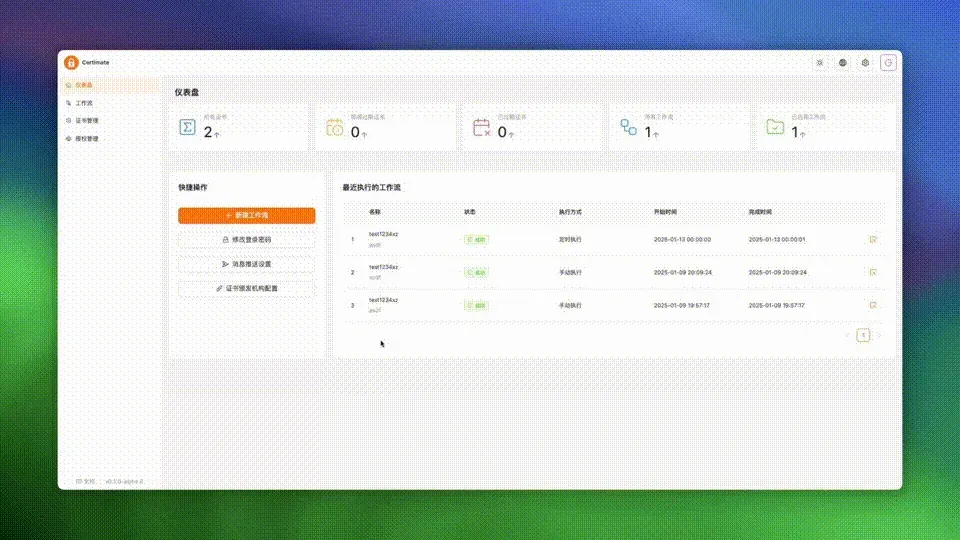
Dashboard from the official Certimate demo animation (v0.3 alpha, Chinese interface): certificate and workflow counters and recent runs.
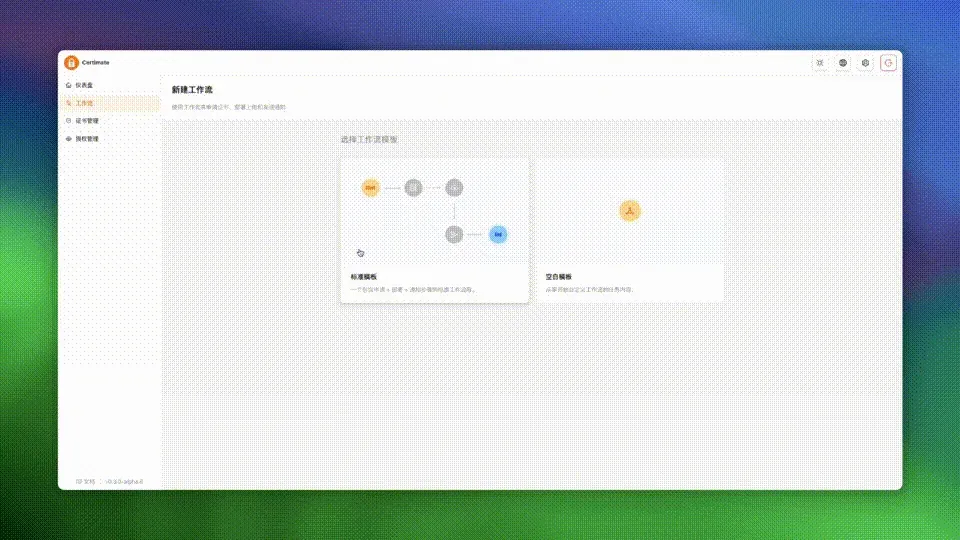
Workflow creation from the official demo animation: standard template (apply, deploy, notify) or blank template.
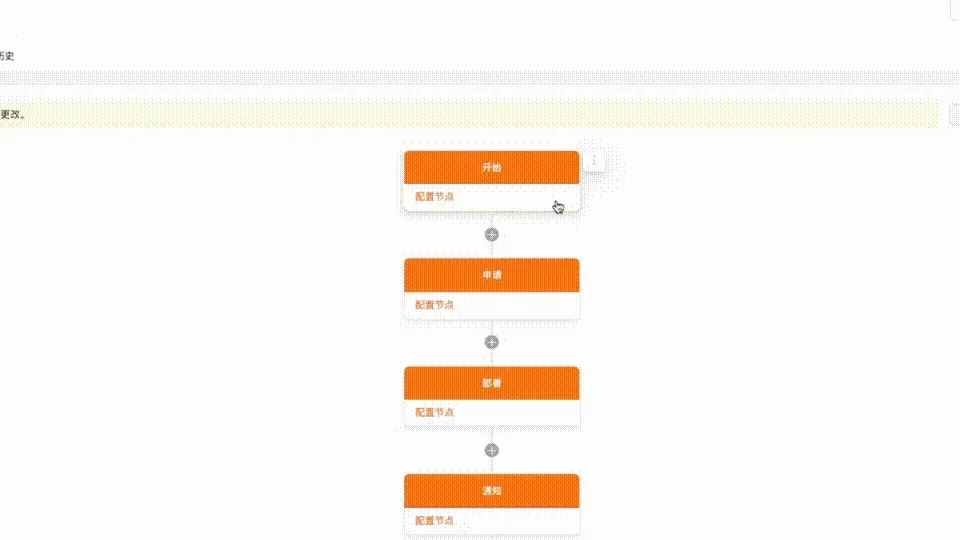
Zoomed view of a workflow from the official demo animation: start, application, deployment and notification nodes.
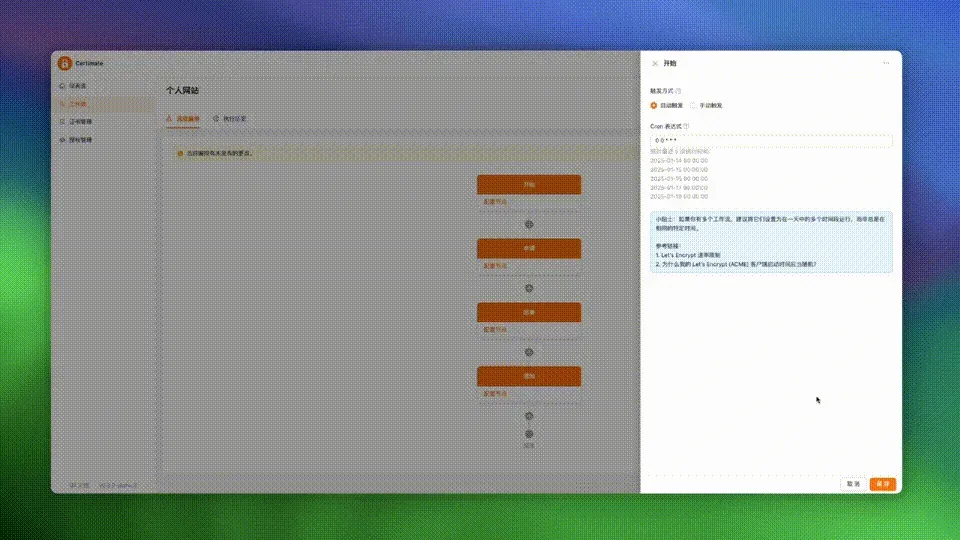
Start node settings from the official demo animation: scheduled trigger with a cron expression and upcoming run times.
Source: official Certimate project page.
Key capabilities
- ACME certificate issuance Certimate acts as an ACME client and requests certificates for single domains, multiple domains, wildcard domains and IP addresses, with RSA or ECC keys. Supported authorities listed in the providers reference are Let's Encrypt (production and staging), Actalis, Buypass, DigiCert, GlobalSign, Google Trust Services, LiteSSL, Sectigo, SSL.com and ZeroSSL, plus a customized ACME CA option. Only CAs that use the ACME protocol are supported.
- DNS-01 and HTTP-01 challenges Domain ownership can be proven with the DNS-01 challenge, where Certimate writes TXT records through a DNS provider API, or with the HTTP-01 challenge added in v0.4. HTTP-01 cannot be used for wildcard certificates. The application node exposes settings such as recursive nameservers, a propagation check timeout, a propagation waiting time and an option to disable CNAME following.
- More than 70 DNS providers The README counts more than 70 supported DNS providers, including AWS Route53, Azure DNS, Google Cloud, Cloudflare, GoDaddy, Hetzner, DigitalOcean, Namecheap, OVHcloud, Alibaba Cloud and Tencent Cloud. RFC 2136 dynamic updates, a webhook endpoint and the self-hosted cPanel, PowerDNS, Technitium DNS and ACME-DNS are also listed. For registrars without an API, the documentation describes delegating NS or CNAME records to a supported provider or using ACME-DNS.
- More than 160 deployment targets The README counts more than 160 deployment destinations. They include local and remote hosts over SSH, SFTP/SCP or FTP, webhooks, Kubernetes secrets and S3-compatible object storage, and cloud services such as AWS ACM, CloudFront and ELB, Azure Key Vault, GCP Certificate Manager, OCI Certificates Management, Cloudflare edge certificates, Netlify, Vercel and Fly.io, plus many CDN, WAF and load balancer products of Chinese cloud providers.
- Self-hosted deployment targets Certificates can be pushed to self-hosted software including 1Panel, Apache APISIX, aaPanel, cPanel, Dokploy, Kong, Nginx Proxy Manager, Proxmox VE, Proxmox Backup Server, SafeLine WAF, Synology DSM and Huawei iBMC. SSH preset scripts cover Synology DSM, fnOS and QNAP certificate replacement and Windows IIS, netsh and RDP bindings, and custom scripts can be used as well.
- Visual workflow editor Each automation is a workflow of nodes: start, application, upload, monitoring, deployment, notification, delay, end, parallel or conditional branches, and an execution result branch for failures. Since v0.4 the FlowGram-based editor offers canvas dragging and zooming, horizontal and vertical layouts, a mini-map, node reordering and import or export of workflows as YAML or JSON. New workflows can start from a standard template or a blank one.
- Scheduled and manual triggers The start node runs a workflow manually or on a CRON-style schedule that uses the server time zone. New workflows are inactive and must be activated before scheduled runs happen. The application node can skip renewal until a set number of days before expiry, and deployment nodes can skip a run when the last deployment succeeded.
- Certificate upload from files or URLs The upload node loads an existing certificate and private key from local paths or URLs instead of requesting one from a CA. This lets certificates bought from a commercial CA or issued by another ACME client move through the same deployment and notification steps. Before v0.4 this required selecting files manually in the web form.
- Certificate monitoring The monitoring node connects to a host and port over HTTPS and reads the certificate the site presents. The workflow documentation describes it as a safety net that can alert operators before expiry when automated renewal fails, not as the trigger for renewal, and points to Uptime Kuma for dedicated monitoring.
- Notifications Notification nodes send messages through email (SMTP), Discord, Slack, Telegram, Matrix, Mattermost, DingTalk, Lark/Feishu and WeCom bots, or webhooks with presets for Bark, ntfy, Gotify, Pushover and other services. Since v0.4, subjects and messages accept template variables such as workflow name, certificate domain and expiration time.
- Certificate formats and storage Certimate handles certificate formats such as PEM, PFX and JKS. All application data, including credentials and certificates, is stored in SQLite databases in the
pb_datadirectory, mainlydata.dbandauxiliary.db, which the backup guide marks as the files to keep. Restoring data from a lower version into a higher version is not supported. - Credential management Provider credentials such as API keys, tokens and usernames are managed centrally on an access page and reused by workflow nodes. The credentials guide lists least-privilege permissions for providers such as AWS, Azure, Google Cloud, Cloudflare, Alibaba Cloud and Tencent Cloud, separately for DNS-01 validation and for deployment.
- Binary installation Release archives contain a single executable that starts with
./certimate serve. Documented minimums are Linux kernel 3.2, macOS 12 Monterey and Windows 10 or Windows Server 2016. The docs show systemd and launchd setups and a Windows registry autorun entry, andcertimate.exe winsc installregisters a Windows service. On macOS the documentation describes allowing the binary in Privacy and Security settings if Gatekeeper blocks it. - Docker and Docker Compose The official image
certimate/certimaterequires Docker Engine 1.13.1 or later, and the Compose file needs Docker Compose 1.27.0 or later. The container exposes port 8090 and stores data in/app/pb_data, which the documentation says to mount on the host for backups. Image tags arelatestfor the stable release,nextfor pre-releases and fixed version tags; the image uses UTC unless/etc/localtimeand/etc/timezoneare mounted. - Source build and panel installs Building from source requires Go 1.24 or later and Node.js 20 or later and uses
make local.run; supported architectures are linux amd64, arm64 and armv7, darwin amd64 and arm64, and windows amd64 and arm64. Certimate is also available in the 1Panel app store, which the 1Panel team maintains and which may lag behind releases, and the docs cover aaPanel and xpPanel installs. - Configuration options The configuration guide covers the
--httplisten address, issuing a Let's Encrypt certificate for Certimate itself with./certimate serve your-domain, HTTP and HTTPS proxies through environment variables and Nginx reverse proxy examples. Experimental environment variables set the initial administrator, the maximum number of concurrent workflow workers and the multi-process mode enabled by default since v0.4.0. Passwords can be reset withcertimate superuser update. - Web interface requirements The WebUI is served on port 8090 and requires Chrome 128 or a comparable modern browser. The documentation publishes the default administrator account and states that these credentials should be changed immediately after setup. The interface supports English and Chinese and light, dark and system themes.
Where Certimate fits
Wildcard certificates through a DNS API
A workflow with an application node requests a certificate for names such as *.example.com and example.com together, using the DNS-01 challenge and stored credentials for a provider like Cloudflare or AWS Route53. The documentation notes that a wildcard name does not cover the bare domain, so both names belong in one certificate. The FAQ lists common DNS-01 errors, including wildcard CNAME records, SOA misconfiguration and leftover _acme-challenge TXT records.
Renewal and deployment to cloud services
The standard template chains start, application, deployment and notification nodes. With a scheduled trigger the workflow requests a new certificate when the configured number of days before expiry is reached, then pushes it through provider APIs to targets such as a CDN, a load balancer or a certificate store like AWS ACM or Azure Key Vault. The mechanism page describes this cycle of applying, storing, renewing before expiry and deploying.
Updating servers and appliances over SSH
Deployment to a remote host copies certificate files over SFTP or SCP and can run a preset or custom script afterwards. Presets replace the certificate on Synology DSM, fnOS and QNAP or bind it to IIS, netsh or RDP on Windows. When Certimate runs in Docker, a local deployment writes inside the container, so the FAQ points to bind mounts or SSH deployment to reach the host.
Distributing externally issued certificates
The upload node reads a certificate and key from a local path or URL, for example one bought from a commercial CA or renewed by another ACME client. Later nodes then deploy and announce it like an ACME-issued certificate. This path was added in v0.4 to make deployment of such certificates fully automated.
Watching certificate expiry on live sites
A monitoring node reads the certificate served on a host and port, and notification nodes can report the result through email, chat bots or webhooks with template variables. The workflow documentation positions this as a fallback that warns before expiry if renewal fails. For broader monitoring it names Uptime Kuma.
Running Certimate itself on a server
The documentation describes running the binary as a systemd service or the Docker image with pb_data mounted, with the listener on localhost by default or behind an Nginx reverse proxy. The upgrade guide describes backing up data before replacing the binary or pulling a new image, upgrading major versions in order, and the lack of downgrade support.
Install
docker run -d --name certimate --restart unless-stopped -p 8090:8090 -v $(pwd)/data:/app/pb_data certimate/certimate:latestReviews of Certimate
Be the first to share your experience with Certimate.
Write a review
Loading review form…
Related to Certimate
 Uptime KumaUptime Kuma is a self-hosted monitoring tool that checks HTTP, TCP, ping, DNS and Docker targets at 20-second intervals and publishes status pages.
 PocketBasePocketBase is a lightweight, self-hosted backend that ships as one executable with an embedded SQLite database, authentication, file storage and a realtime API.