

What is SeriesGuide?
SeriesGuide is an Android app for tracking the television shows and movies you watch. It keeps a list of your shows with the next episode to watch, shows upcoming and recent episodes, records watch history, organizes titles into lists and presents statistics. Show and movie data comes from The Movie Database (TMDB), and the app can optionally connect to a Trakt profile. It is made by Uwe Trottmann, who is named as the author on the official site and in the GitHub repository, and it is developed in the open with a community forum and translations on Crowdin.
The app is free to download and use for the basics. A subscription called Unlock all features adds SeriesGuide Cloud sync, episode notifications, setting an item watched multiple times, more list widget options and home screen shortcuts. According to the support page, every subscription unlocks all features, the first 30 days are a free trial and the subscription is then paid yearly. The page does not state a price in that text, and people who bought the older Pass app can install it separately. The author describes subscriptions as paying for the work on future updates.
You can get the app from Google Play, as an APK from GitHub releases or through Obtainium, from the Amazon Appstore for Kindle devices only, or through a preview program for earlier builds. Versions for Android 5 or older are listed as legacy releases. The latest stable release on GitHub is 2026.4.3, published September 23, 2026. The 2026.4 line changes Trakt links to go to Trakt's new web app, renames Trakt comments to reviews, caches movie genres and trailers so data appears before slow network requests finish, and adds new cloud sign-in screens. Preview build 2026.5.1 followed on November 6, 2026 with a review language filter and a new Trakt authentication subdomain.
The program is licensed under GPL 3.0 or later, and parts such as the SeriesGuide API library are under Apache 2.0, as stated in the README. The app is written in Kotlin. SeriesGuide tracks media; it does not play, stream or download video, and it is an Android app only. The help site has FAQ entries on iOS and Windows versions, so check them for current plans.
SeriesGuide screenshots
Explore the interface. Open a screenshot to view it at full size.
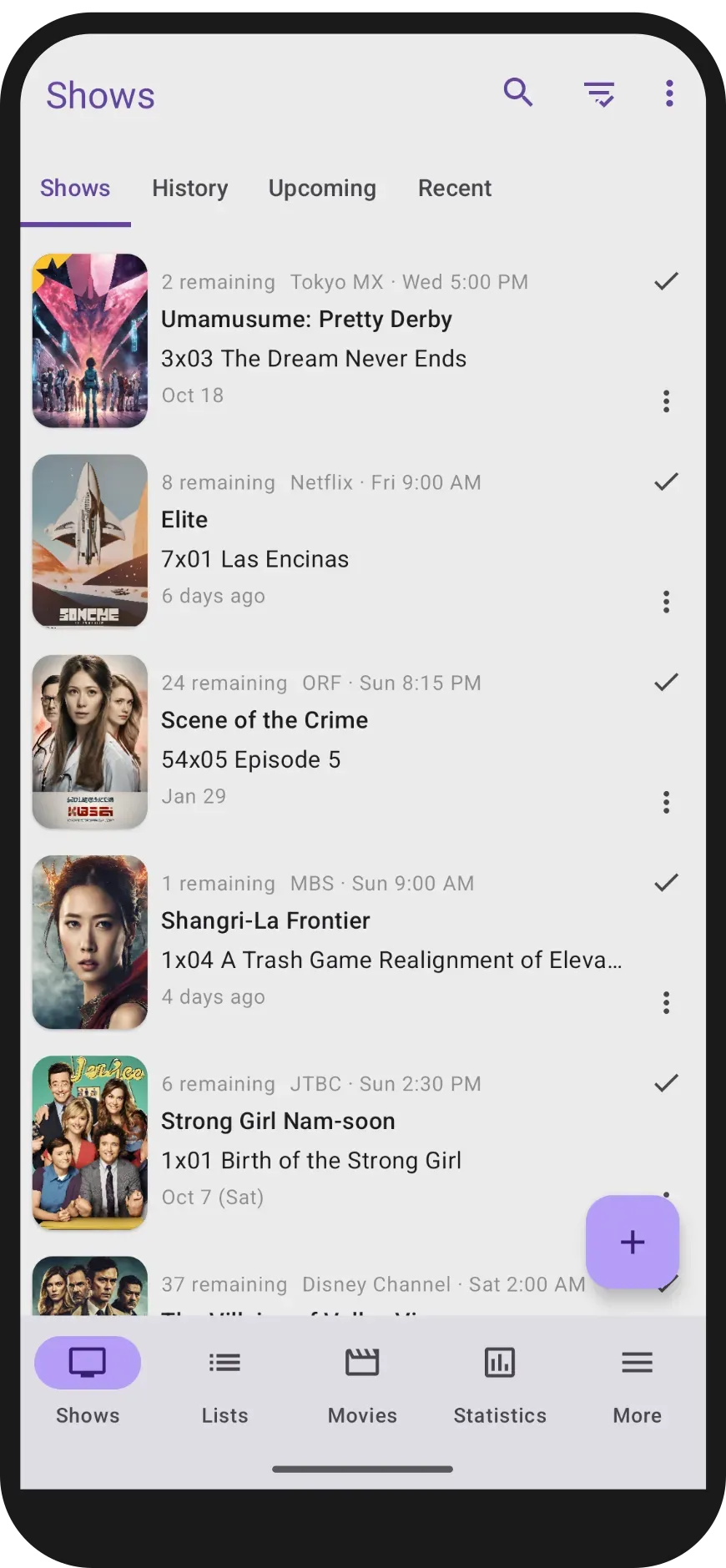
Official SeriesGuide screenshot of the Shows tab with History, Upcoming and Recent tabs and a bottom bar for Shows, Lists, Movies, Statistics and More.
Source: official SeriesGuide project page.
Key capabilities
- Download from Google Play The main distribution is the Google Play listing, linked from the SeriesGuide website. Play handles updates and the subscription billing. The application id is com.battlelancer.seriesguide.
- APK from GitHub and Obtainium Release APKs, such as SeriesGuide-goog-2026.4.3.apk, are attached to GitHub releases, and the website lists Obtainium as an update route. Use one source consistently, because a package signed with a different key cannot update in place.
- Amazon Appstore and legacy builds An Amazon Appstore version exists for Kindle devices only, and the help site explains how to transfer from it to the Google Play version. Versions for Android 5 and older are offered separately as legacy releases.
- Show list with next episodes The Shows screen lists each followed series with remaining episodes, network, airtime and the next episode, and lets you mark an episode watched with one tap. Tabs for History, Upcoming and Recent show what you watched and what airs soon. Release times depend on TMDB and on your time zone setting, which the help site covers.
- Movies The Movies screen tracks films to watch and watched films with TMDB metadata. The 2026.4 release caches genres and trailers in the local database so a movie page opens with stored data first.
- Lists Custom lists group shows and movies, for example a list of things to watch with family. Lists can be added to and edited from the app and are included in cloud sync when that feature is unlocked.
- Statistics A Statistics screen summarizes what you have tracked. The numbers reflect only what you recorded in the app, not viewing outside it.
- Add, hide and remove shows Search TMDB to add a show, hide shows you want out of the list and make them visible again later, or remove a show. The help site also explains how to change the language of a show and how to improve missing show, episode and movie data.
- Trakt integration Connect a Trakt account to add shows from your Trakt library, sync what you watched and check in to what you are watching. The help pages list exactly what is synced with Trakt. A locked Trakt account triggers a specific error message in release 2026.4.3.
- SeriesGuide Cloud (subscription) Cloud saves your shows, lists and movies and syncs them between devices. The 2026.4 release adds new sign-in screens, and the help site explains email changes, password reset and account deletion.
- Backup and export Export or import your data using files, restore from Android Auto Backup, or back up through Cloud or Trakt. Test a restore on a second device before trusting any single backup route.
- Episode notifications (subscription) Get a notification for upcoming episodes. The help site has a troubleshooting entry for notifications that appear too late, so check it if timing is off on your device.
- Widgets and shortcuts A list widget shows upcoming or recent episodes or your shows, and subscribers get more widget options including background transparency in the Dark or Light theme. Home screen shortcuts open a given show directly.
- Extensions API SeriesGuide extensions add an action button to an episode or movie page, which can open another app, a web page or show a status. The extensions page documents API v2.2.1, which uses TMDB IDs, with a getting started guide and example app. Search Google Play for third-party extensions.
- Watched multiple times A subscription feature lets you set an episode or movie watched more than once, which suits rewatches.
- Languages and themes The interface is translated through Crowdin, with an app language setting on Android 13 and newer that release 2026.4.2 links to directly. Light and dark themes are available.
- Community and support A Discourse community forum hosts announcements, bug reports and questions, and the author also posts on Mastodon. The in-app option to view and send a debug log helps with bug reports.
Where SeriesGuide fits
Keeping track of a weekly watch list
Add each series you follow, then use the Upcoming tab to see what airs soon and the Shows tab to see how many episodes remain. Check the time zone and the show's airtime if an episode seems to appear on the wrong day.
Syncing between two Android devices
Either subscribe for SeriesGuide Cloud or connect the same Trakt account on both devices. Cloud syncs shows, lists and movies, while Trakt syncs the subset described in the help pages. Start on one device, wait for the first sync to finish, then sign in on the second and verify counts before changing data on both.
Moving from another tracker
If your history lives in Trakt, connect it and add shows from your Trakt library. If it lives in a file export from SeriesGuide, import that file. Compare a few shows' watched counts afterwards, because third-party tracker data can differ in how rewatches are stored.
Planning backups
Use a file export for a portable copy, enable Android Auto Backup for device changes and treat Cloud or Trakt as sync rather than archive. Keep an export before a major app update or before using the preview program.
Trying early releases
The preview program delivers builds such as 2026.5.1 before the stable channel. Install it only when you can tolerate regressions, keep a fresh export and read the release notes for changes to Trakt and sync behavior before updating the main device.
Extending the app with other apps
Install a compatible extension from Google Play and choose Customize extensions on an episode or movie page. Extensions receive the title being viewed, so review what each one does and which permissions it requests before enabling it. Remove extensions you no longer use from the Customize extensions screen.
Fixing wrong or missing data
When a show has missing episodes, a wrong release time or no images, start with the help site's entries on outdated data and on TMDB or Trakt connection errors. Much of the data comes from TMDB, so a correction there can fix it for everyone, and a manual update of the show refreshes the local copy.
Reviews of SeriesGuide
Be the first to share your experience with SeriesGuide.
Write a review
Loading review form…
Alternatives to SeriesGuide
 ShowlyShowly is a GPL-3.0 TV show and movie tracking app for Android and iOS. It records episode progress, shows an upcoming calendar and syncs with Trakt.tv. It does not stream or download any video.CCloudStreamCloudStream is an open-source Android media center with streaming, downloads, bookmarks and Chromecast support. It includes no video sources by default and requires extensions to access content.
 KodiKodi is a free, open source media player and entertainment hub from the XBMC Foundation for Android, Linux, BSD, macOS, iOS, tvOS and Windows.