

What is PixelRAG?
PixelRAG is the official codebase for the research paper PIXELRAG: Web Screenshots Beat Text for Retrieval-Augmented Generation, published on arXiv on June 1, 2026 in the cs.IR category. The authors are Yichuan Wang, Zhifei Li, Zirui Wang, Paul Teiletche, Lesheng Jin, Matei Zaharia, Joseph E. Gonzalez and Sewon Min, and the README states that the work was done at the Berkeley Sky Computing Lab, BAIR and the Berkeley NLP Group. The code is published in the StarTrail-org/PixelRAG repository under the Apache-2.0 license.
The paper abstract describes the method. Instead of parsing HTML into text, which discards layout, visual structure and formatting, PixelRAG represents websites in their visual form and performs retrieval and reading in pixel space. The abstract states that it is, to the authors' knowledge, the first pipeline to operate over a full Wikipedia corpus this way, scaling to a datastore of 30 million screenshot images. It builds on the Qwen3-VL-Embedding model, fine-tuned on screenshot data with curated contrastive training data, and passes the retrieved screenshots directly to a vision-language model without text conversion.
According to the abstract, PixelRAG outperforms no-retrieval and text-based RAG baselines, including on text-centric tasks such as NQ and SimpleQA, and shows gains on multimodal open-domain QA (MMSearch), noisy news corpora (LiveVQA) and agentic benchmarks (MoNaCo), with accuracy improvements of up to 18.1% over text-based baselines. The abstract also reports that lower-resolution images can reduce token cost by up to 3x while maintaining accuracy.
The software is distributed as the pixelrag Python package. A base install provides the pixelshot renderer and the pixelrag umbrella command; optional extras add the embed, index, serve, PDF and Qdrant stages. Training is a separate uv project in the train/ folder. The README links a hosted endpoint at api.pixelrag.ai that serves a pre-built index of 8.28 million Wikipedia pages without an API key, a browser demo at pixelrag.ai, API documentation, a status page and a Colab quickstart notebook. The renderer is also packaged as the pixelbrowse plugin for Claude Code and as an npm plugin for opencode.
The latest GitHub release is v0.4.0, published on July 16, 2026. The repository also publishes a patched headless Chrome build as a separate release. Trained LoRA adapters and the training dataset are published on Hugging Face. Related listings on iThub include Crawl4AI, a text-oriented crawler for LLM input, and the vector database Milvus.
PixelRAG screenshots
Explore the interface. Open a screenshot to view it at full size.
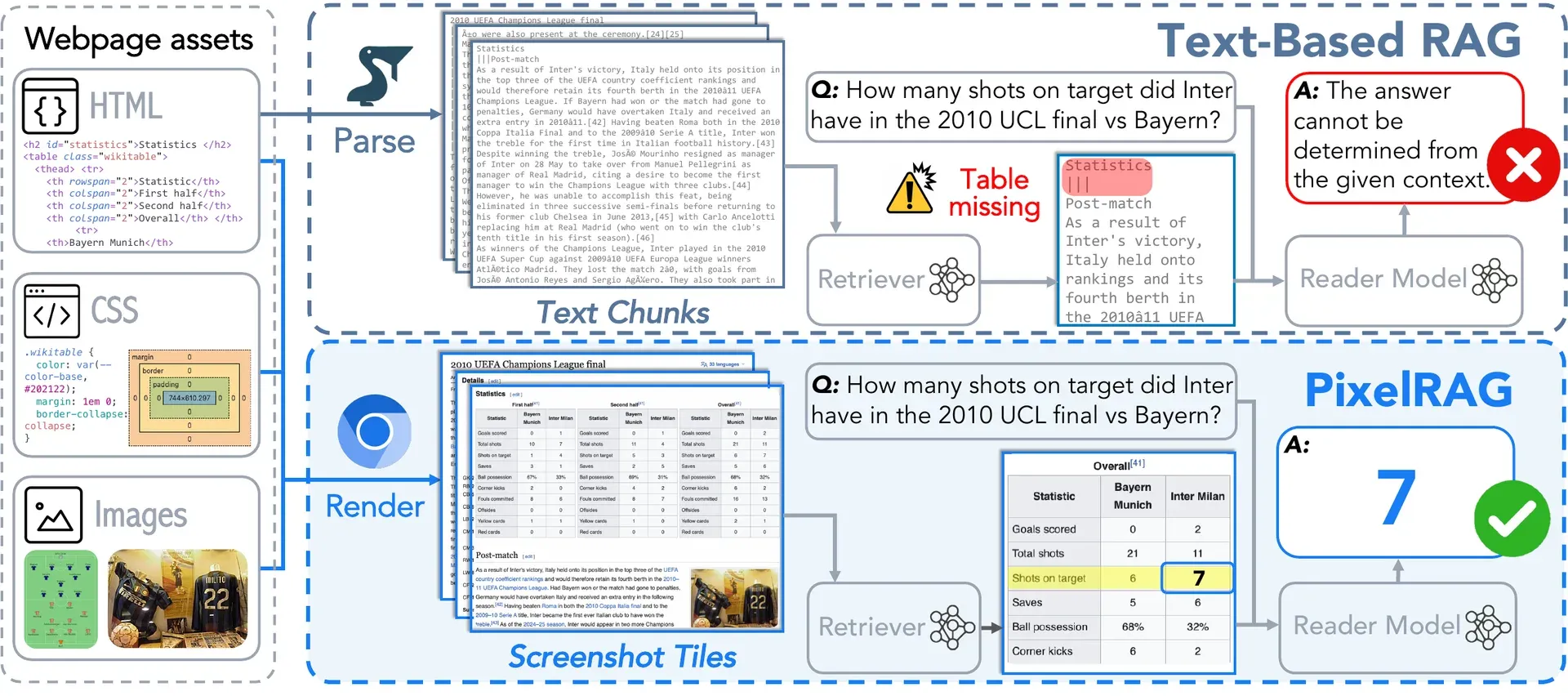
Official PixelRAG figure: text-based RAG parses a page to text chunks and loses a statistics table, while PixelRAG renders screenshot tiles and the reader answers from the image.
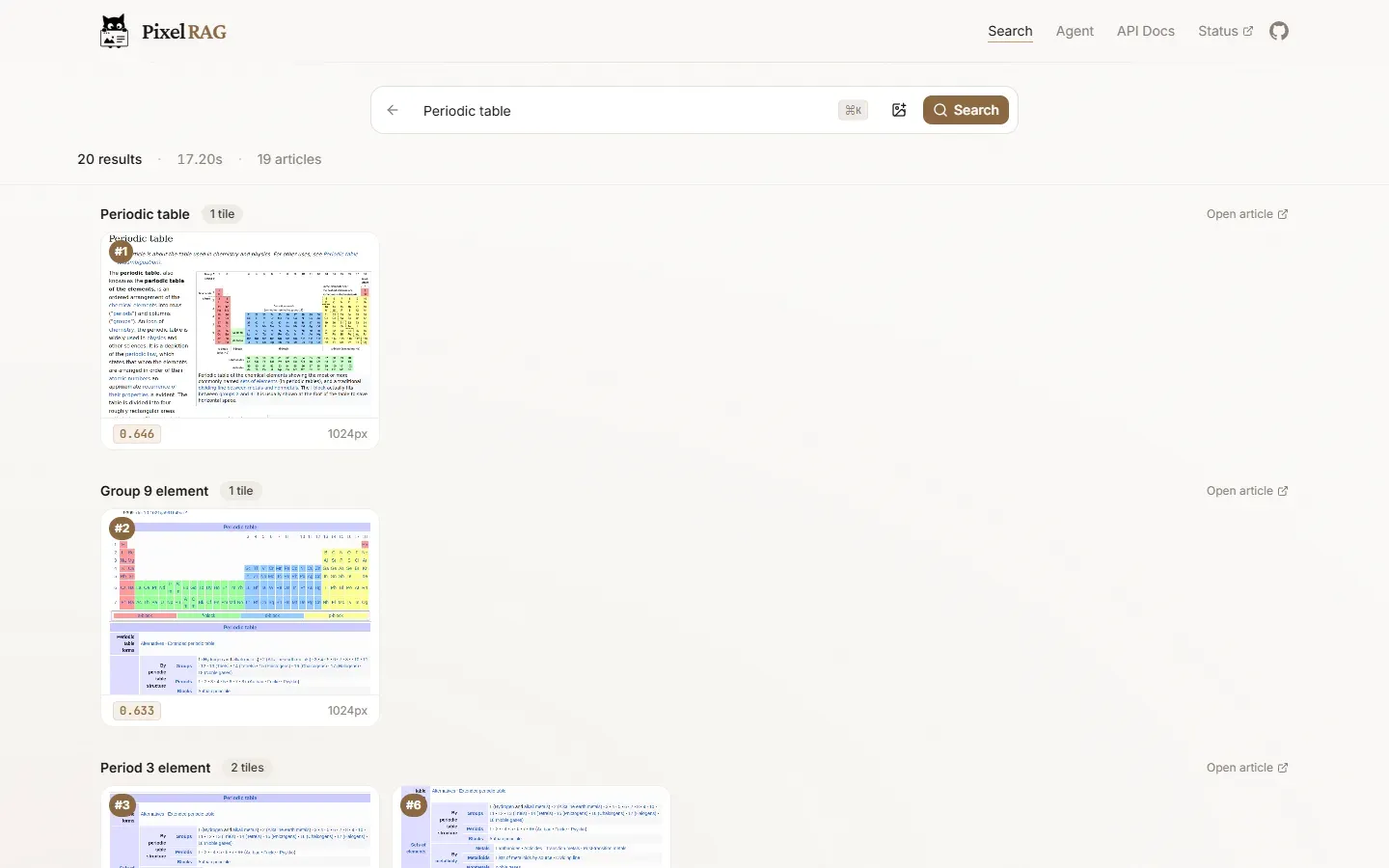
Search results on the pixelrag.ai demo: Wikipedia screenshot tiles ranked for the query Periodic table, grouped by article with similarity scores.

The pixelrag.ai demo home page, with text or image search over Wikipedia screenshots and Search and Ask modes.
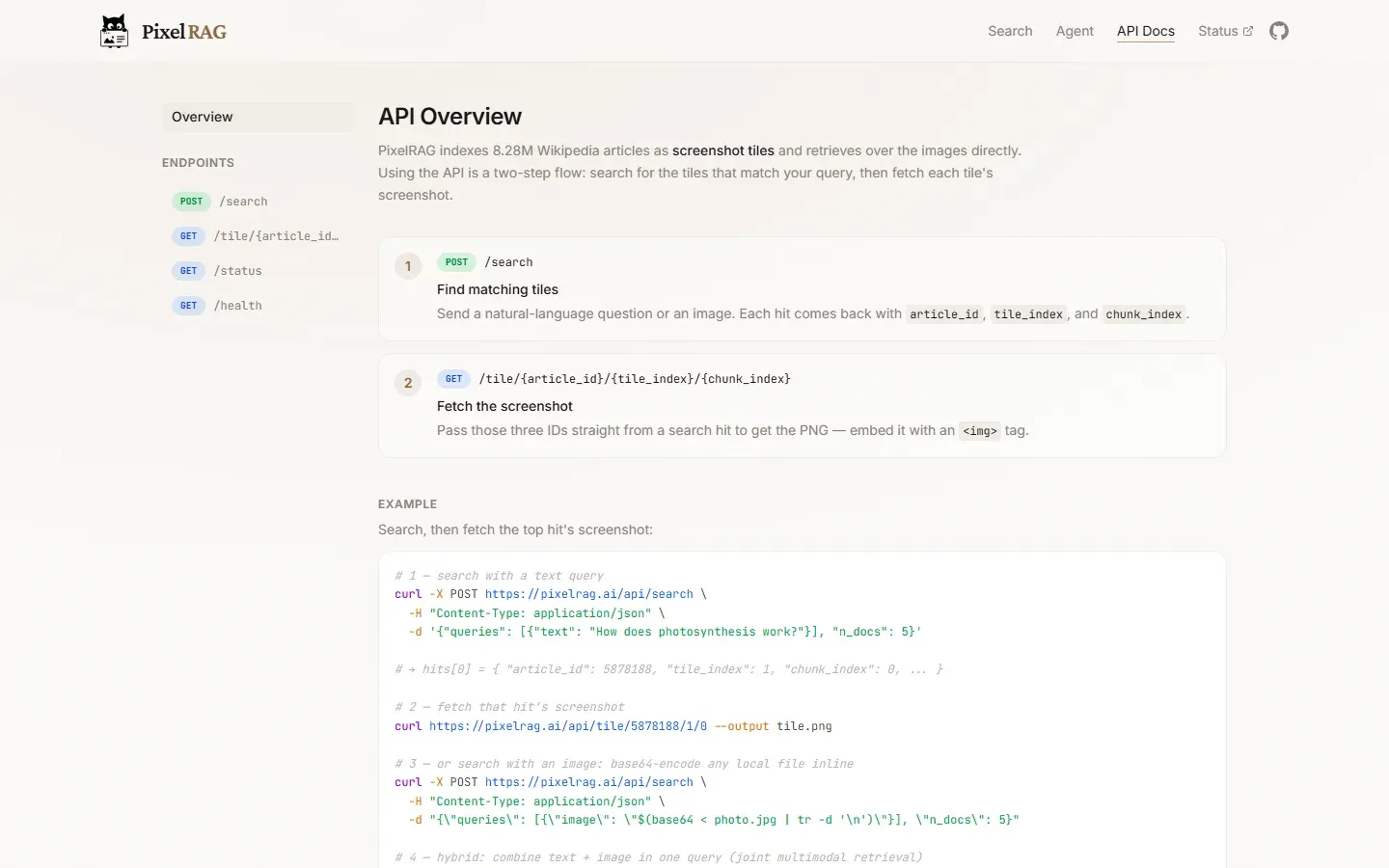
PixelRAG API documentation: search for matching tiles, then fetch each tile's screenshot, with curl examples.
Source: official PixelRAG project page.
Key capabilities
- Install with pip
pip install pixelraginstalls the light package with thepixelshotrenderer and thepixelragumbrella CLI. Extras add stages:pixelrag[embed]for chunking, embedding and index building,pixelrag[index]for the full orchestrated pipeline,pixelrag[serve]for the search API, pluspdfandqdrantextras. The README states that the PDF example runs with Python 3.10 or later. - pixelshot renderer
pixelshotturns a web page or document into screenshot tiles using headless Chromium over CDP, and PDFs through poppler. URLs and local files can be mixed in one command, and--dpisets PDF resolution. The same function is exposed in Python asrender_urlfrompixelrag_render. - Browser handling per platform A bundled headless_shell build installs automatically on linux-x64 only. On Windows and macOS,
pixelshotuses the system Chrome or Chromium, or Playwright's Chromium, detected from standard install paths, andCHROME_PATHcan point to a specific binary. Each render uses an isolated, throwaway Chrome profile. - Embedding model Page images are embedded with
Qwen3-VL-Embedding, LoRA-fine-tuned on screenshot data. The default configuration in the README usesQwen/Qwen3-VL-Embedding-2B, and the trained adapters are published on Hugging Face. - Standalone pipeline stages
pixelrag chunk,pixelrag embedandpixelrag build-indexrun independently: tiles to vectors to a FAISS index. The embed stage accepts GPU IDs for multi-GPU runs. - Orchestrated indexing
pixelrag index buildreads apixelrag.yamlfile with a source path, embedding model, device and output folder, then runs ingest, embedding and indexing. It works on Linux with CUDA and macOS with Apple Silicon (MPS);device: autopicks CUDA, MPS or CPU. - Search API
pixelrag servestarts a FastAPI search service over a FAISS index on CPU or GPU. Queries are sent as JSON to/searchwith a list of text queries and ann_docscount. - Hosted Wikipedia index The README describes a live endpoint at api.pixelrag.ai serving a pre-built index of 8.28 million Wikipedia pages, with no setup and no API key. It accepts an image as the query for visual search, documented in the API reference.
- Pre-built indexes on Hugging Face The
StarTrail-org/pixelrag-faiss-indexesdataset holds four FAISS indexes: base and LoRA Wikipedia pixel indexes, a Wikipedia text index and a news pixel index. The README notes that the base index alone is about 217 GB. - Qdrant backend FAISS remains the default for local indexes. With the
qdrantextra,build-indexcan write to a Qdrant server with a configurable quantization config, append to or recreate a collection, and serve one collection from multiple PixelRAG servers. The orchestrator can be set to Qdrant inpixelrag.yaml. - Docker image for the API A two-stage Dockerfile installs the serve extra and a pinned Chromium, and
docker-compose.ymlrunspixelrag serveon port 8000 against a mounted index. The README states that no CI job builds this image, that Apple Silicon builds skip the renderer, and that the container runs as root with Chrome's sandbox disabled. - pixelbrowse plugin for Claude Code The renderer ships as a Claude Code plugin that installs from the repository's plugin marketplace. Claude screenshots a page with
pixelshotand reads the image; a/screenshotslash command is included. The README states that it uses no MCP server or backend. - opencode plugin Opencode users can add the
@startrail/pixelbrowsenpm package toopencode.jsonto get the same screenshot tool, withpixelshoton the PATH. Details are in the plugin/opencode folder. - Training code and data The
train/folder is a separate uv project with its own pinned environment (torch 2.9.1 with CUDA 12.9, transformers 4.57.1, cuDNN 9.20) that LoRA-fine-tunes Qwen3-VL-Embedding-2B for webpage retrieval. The full training set and the data curation pipeline are published; see the training README. - Web search demo The browser demo at pixelrag.ai searches the hosted index and returns matching screenshot tiles. A Colab notebook renders a page and queries the hosted index with the images shown inline.
- Parallel Search demo An optional demo in
demos/parallel_searchfinds pages on the open web with the Parallel Search MCP, saves source URLs and text excerpts, and can render selected pages as screenshot tiles. - Apache-2.0 license The code is released under Apache-2.0. The README asks users of the work to cite the arXiv paper and provides a BibTeX entry.
Where PixelRAG fits
Querying a visual Wikipedia index
The quickest path in the README is a POST request to the hosted /search endpoint with a text query and the number of results. The endpoint serves an index of 8.28 million Wikipedia pages and also accepts an image as the query. The same index can run locally by downloading the base FAISS index from Hugging Face, about 217 GB, and starting pixelrag serve.
Building a searchable index from local documents
With pixelrag[index] installed, a pixelrag.yaml file names a local folder or file, the embedding model and the output path. pixelrag index build renders, embeds and indexes the content, and pixelrag serve exposes it on a local port. The README's PDF walkthrough indexes the PixelRAG paper itself in about 3 minutes on an Apple M-series machine or about 1 minute on a GPU, according to the project.
Giving a coding agent page screenshots
The pixelbrowse plugin lets Claude Code capture a page with pixelshot and read the image, so charts, tables, diagrams and layout are visible to the model. It installs through claude plugin marketplace add and claude plugin install, after installing pixelshot with uv tool or pipx so it is on the PATH. opencode gets the same tool through an npm plugin.
Scaling an index with Qdrant
For larger or shared deployments, build-index can target a Qdrant collection with quantization settings, disk-backed vectors and payload filtering. Collections can be appended to or recreated, and pixelrag serve reads the backend from the index summary file. Several PixelRAG servers can share one collection.
Reproducing or extending the research
Researchers can use the published LoRA adapters directly or retrain from train/, which fine-tunes Qwen3-VL-Embedding-2B on the released screenshot training set. The README states that the data can be used to adapt other backbones, such as a larger Qwen model, and documents the synthetic query generation, filtering and hard-negative mining pipeline. The paper on arXiv describes the evaluation on NQ, SimpleQA, MMSearch, LiveVQA and MoNaCo.
Serving the API from a container
The repository's Dockerfile and compose file run the search API on port 8000 against an index built beforehand and mounted read-only. The README notes that an empty index directory makes the container exit at startup, that on-demand rendering needs an amd64 image, and that the renderer runs without Chrome's sandbox inside the container.
Install
pip install pixelragReviews of PixelRAG
Be the first to share your experience with PixelRAG.
Write a review
Loading review form…
Related to PixelRAG
 Crawl4AICrawl4AI is an Apache-2.0 Python crawler built on Playwright that outputs Markdown, JSON, screenshots and PDFs for RAG and agents. Run it as a library, a Docker server with REST and MCP, or use the hosted Crawl4AI Cloud API.
 MilvusMilvus is an Apache 2.0 vector database for searching text, image and multi-modal data, from the Milvus Lite quickstart to distributed clusters or Zilliz Cloud.
 WeaviateWeaviate is a cloud-native vector database that stores objects and vectors and combines vector search with keyword filtering and reranking in one query interface.