

What is LLM Gateway?
LLM Gateway is an open-source, OpenAI-compatible API gateway for large language models. Applications send requests to one base URL with one key; the gateway routes them to a provider that can serve the requested model, records tokens, latency and cost, and applies the keys, caching, guardrails and limits you configure. The project is developed in the theopenco/llmgateway repository, described on llmgateway.io as a unified API for 40+ providers, and offered both as a managed cloud and as software you host yourself. Migration from the OpenAI SDK is a change of base URL and API key, and an Anthropic-compatible endpoint and an AI SDK gateway protocol are also documented.
Distribution has three paths. The managed cloud at api.llmgateway.io uses prepaid credits. The AGPL-3.0 core can be self-hosted as a single unified Docker image (ghcr.io/theopenco/llmgateway-unified), with Docker Compose, or on Kubernetes with an official Helm chart and AWS, Azure and Google Cloud guides. Repository directories under ee/ hold commercial Enterprise features that need a separate license. The monorepo contains the Next.js dashboard, a Hono API, the gateway service, a documentation site, the model and provider definitions, and a Drizzle ORM schema on PostgreSQL with Redis. The repository also includes other products from the same team, such as a consumer chat app, a coding-plan service and a provider portal named Airside through which inference providers onboard; the project does not accept pull requests that add new providers.
The latest GitHub release is v1.24.0, published on November 2, 2026, and releases arrive roughly weekly. Its notes show the typical content: gateway authentication before model resolution, new model listings, billing for the long-context tier of newer models, a week and month grain for the usage chart, content filter categories in the admin dashboard, security.txt and reporting contacts, and a code exchange for CLI browser login. Because the model catalogue changes continuously, check the live model catalogue for availability, pricing and capabilities instead of relying on a static list.
The license is dual. The core is AGPL-3.0, while Enterprise features in ee/ such as advanced billing, full request and response payload retention, custom provider key configurations and team and organization management require an Enterprise license, and multi-organization administration requires a white-label license. LLM Gateway is an API gateway and analytics layer; it does not host models itself, and each request is served by a provider or by your own provider keys.
LLM Gateway screenshots
Explore the interface. Open a screenshot to view it at full size.
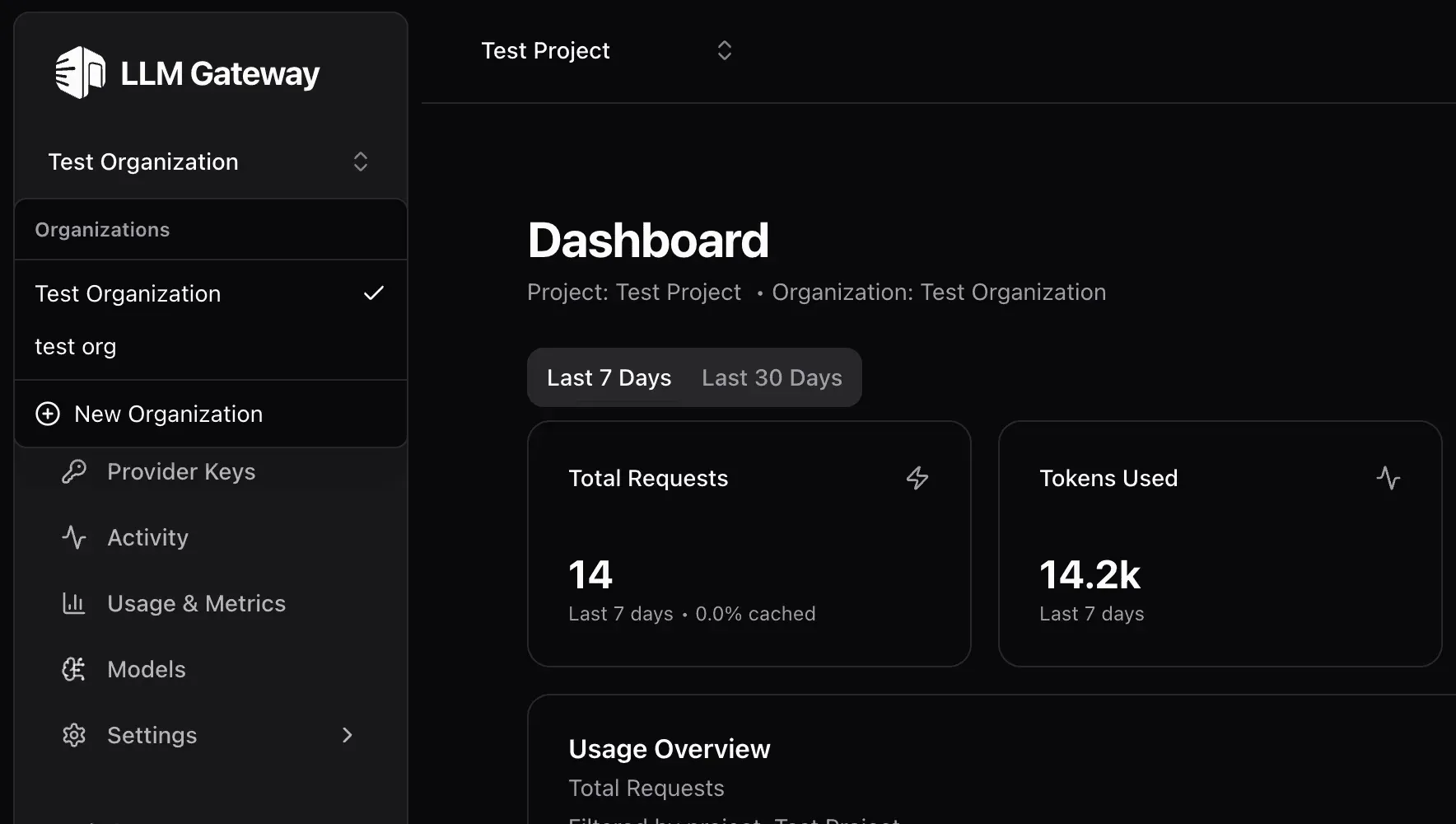
Official changelog screenshot of the dark dashboard with the organization switcher open, using test data.
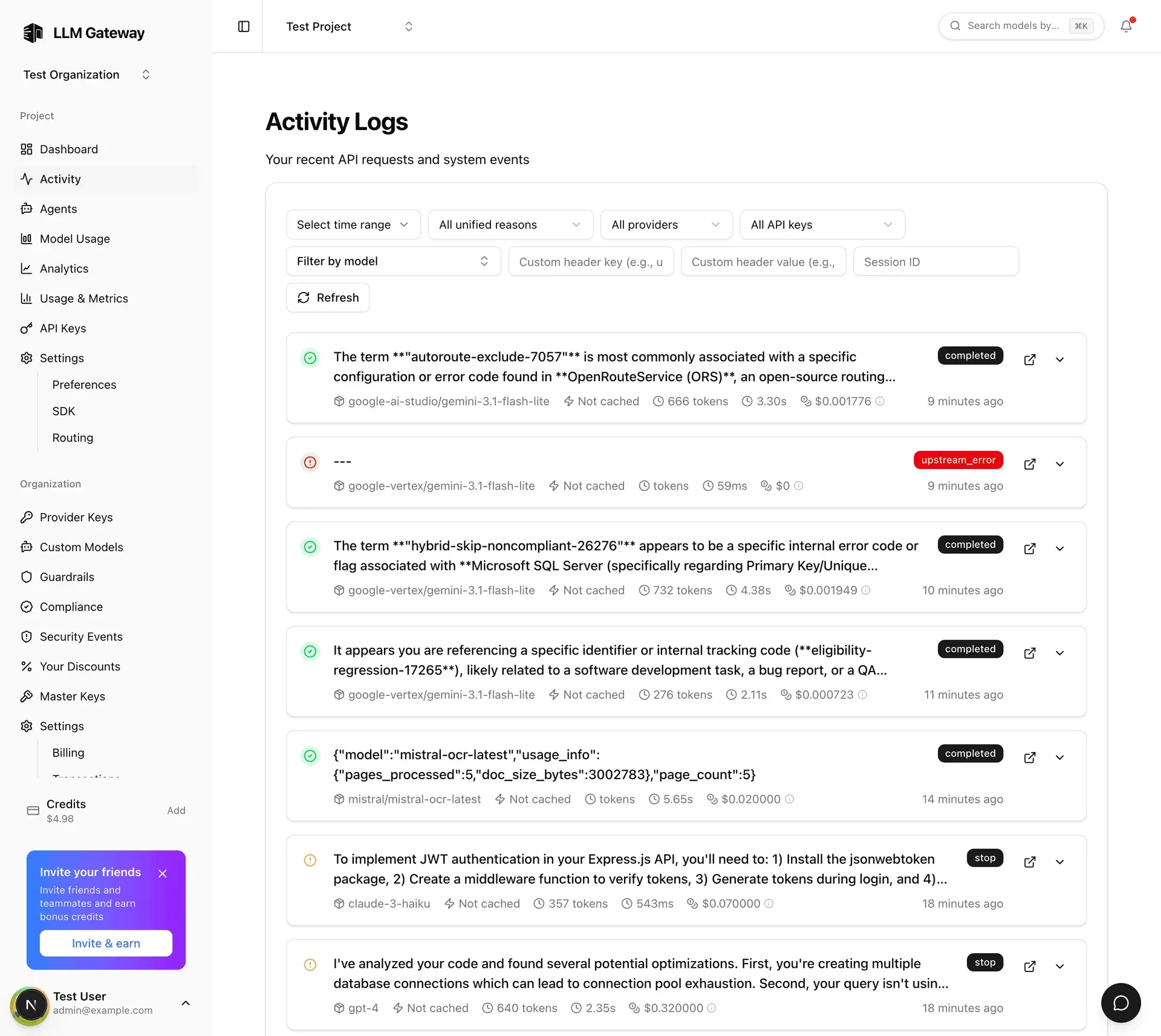
Official repository screenshot of the activity log with filters, using test data and example accounts.
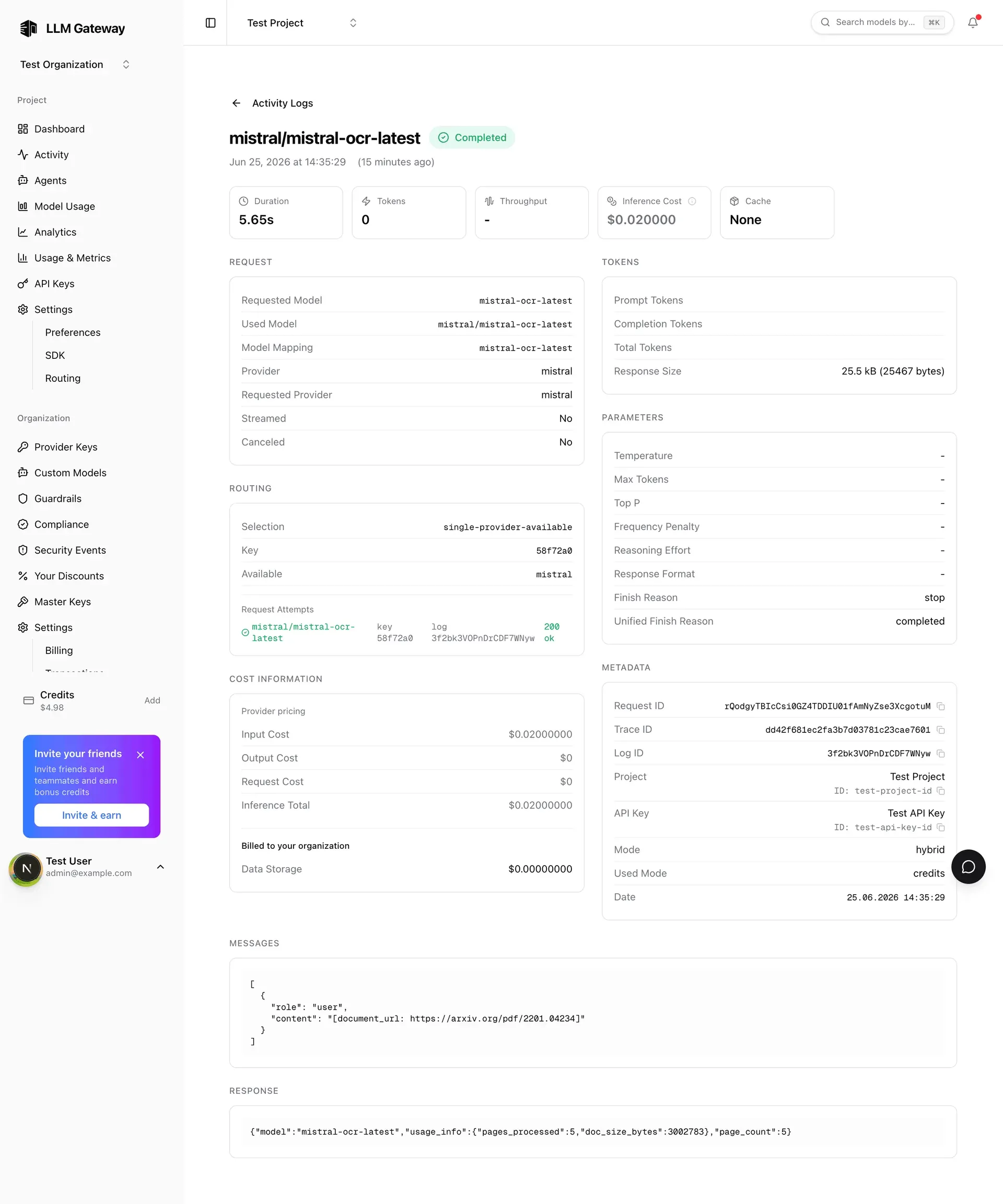
Official repository screenshot of a request detail view showing routing and cost, using test data.
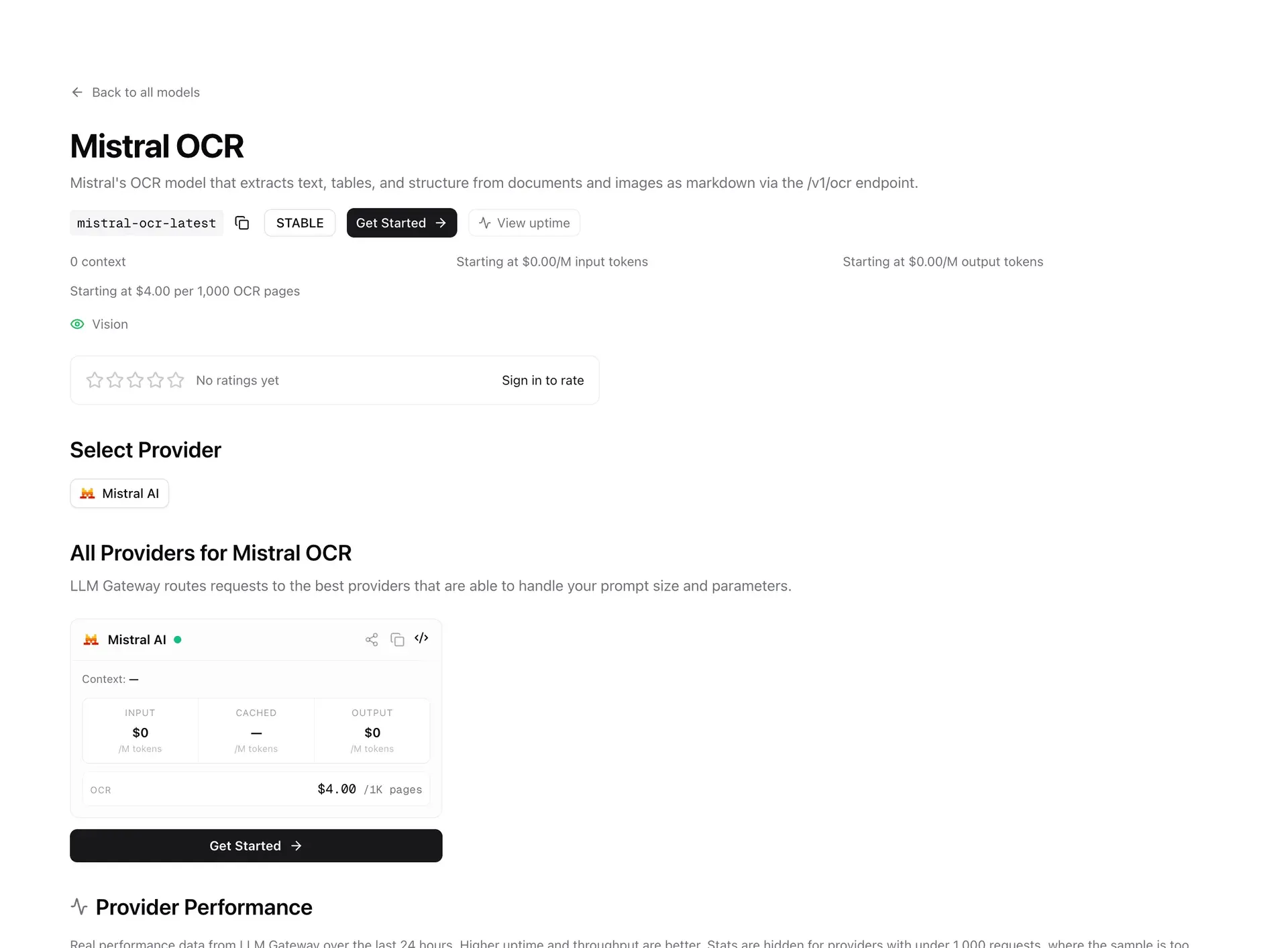
Official repository screenshot of a model page with provider list and pricing.
Source: official LLM Gateway project page.
Key capabilities
- OpenAI-compatible unified API The gateway exposes chat completions in the OpenAI format at
https://api.llmgateway.io/v1, along with embeddings, images, speech, transcription, moderations, rerank, OCR, search, video and realtime endpoints documented in the official docs. An existing OpenAI SDK needs only a new base URL and key. Model names such asgpt-4oare resolved through the catalogue. - Anthropic and AI SDK compatibility An Anthropic-compatible endpoint lets tools that speak the Anthropic API reach any catalogue model, and an AI SDK gateway protocol lets an app built for the Vercel AI Gateway point at LLM Gateway without code changes. Guides cover Claude Code, Codex CLI, Cursor, Cline, Continue, n8n and other clients.
- Multi-provider routing and failover Requests are routed to the best available provider that can handle the prompt size and parameters. Per-request attempts are recorded in the activity log, and automatic failover moves to another provider when one fails. Sessions can keep provider routing sticky across related requests.
- Dynamic routes Named, versioned routing flows combine conditions, percentage splits and model targets and are invoked by putting
dynamic/<name>in the model field. They can be built visually in the dashboard, which suits gradual model migrations and A/B splits. - Bring your own provider keys You can store your own provider API keys and use them without platform fees, mixing them with credits on the managed cloud. Integrations are documented for AWS Bedrock, Azure and Google Vertex AI, including Claude on your own Google Cloud project. Custom OpenAI-compatible providers are an Enterprise feature.
- API keys and IAM rules Gateway API keys can be created, limited and expired, with usage limits and fine-grained identity and access management rules. Project access delegates administration without organization-wide access, and Enterprise master keys provision projects and keys programmatically.
- Usage analytics and cost tracking The dashboard shows requests, tokens, total spend and average cost per 1K tokens over 7 or 30 days, with breakdowns by provider, model, project and team member, plus error rate, cache hit rate and reliability trends. Each API response can include a cost breakdown.
- Activity logs Every request appears in the activity log with the model, provider, cache state, token count, duration and cost, filterable by time, reason, provider, API key, model, custom header and session ID. A detail view shows the routing selection, attempts, cost information, parameters and messages according to retention settings.
- Agents monitoring Cost, tokens and sessions are tracked for each coding agent in a project, which helps teams that route Claude Code, Codex or similar tools through one gateway. A CLI launches coding agents, scaffolds projects and manages keys, budgets and usage.
- Caching Gateway caching serves repeated identical requests entirely from the gateway at no cost, while provider cache control uses provider-side prompt caching to reduce the price of long reused prompts. Caching is configured per project.
- Guardrails and moderation Content guardrails detect and block harmful content, and the moderations API classifies unsafe text and image inputs in an OpenAI-compatible format. Compliance settings restrict routing to providers that meet requirements such as zero data retention, SOC 2, ISO 27001, GDPR or no prompt training.
- Response healing and structured output Response healing automatically repairs malformed JSON from models, and the decisions endpoint returns typed, probabilistic decisions instead of generated text. Reasoning, vision, document reading and web search are available on models that support them.
- Prompt management Versioned prompt templates are stored in the gateway and referenced from requests, so wording can change without redeploying the application.
- Data retention and data streams Retention policies control whether full request and response data are stored; the repository lists full payload retention as an Enterprise feature, with other plans keeping metadata only. Data streams forward audit logs to a SIEM and export request log metadata to your own HTTPS endpoint.
- SSO, SCIM and audit logs Enterprise organizations get per-organization SAML single sign-on and SCIM provisioning with Okta, Microsoft Entra ID or Google Workspace domain sign-in, plus audit logs of organization activity.
- Notifications Alerts cover budgets, model retirement, price changes, provider health, compliance and organization limits.
- MCP server An MCP server lets a compatible client check usage, costs and the most used models, providers and coding apps. See the guide on the website for configuration.
- Self-hosting options The single-container image bundles PostgreSQL and Redis and exposes several ports (3002, 3003, 3005, 3006, 3007, 4001 and 4002 in the README example). It needs named Docker volumes, an
AUTH_SECRETand aGATEWAY_API_KEY_HASH_SECRET. For production, use Docker Compose or the Helm chart with managed PostgreSQL and Redis.
Where LLM Gateway fits
Moving an OpenAI-based app to a gateway
Create an API key, change the SDK base URL to the gateway and keep the same model names. Send a few real prompts, then open the activity log and verify the provider, token counts and cost on each request. Test streaming and tool calls separately, since provider support differs by model.
Adding fallbacks and model switching
Define a dynamic route with a primary model, a fallback target and, if needed, a percentage split for a gradual rollout. Force a provider failure in a test project and confirm in the request attempts that the gateway switches and that the final cost is recorded once.
Controlling team and agent spend
Give each developer, agent or service its own API key with usage limits and an expiry, then watch member analytics and agent monitoring. Set budget notifications and decide in advance what happens when a limit is reached.
Using your own provider contracts
Add provider keys for OpenAI, Anthropic, Bedrock, Azure or Vertex AI and route traffic through them without platform fees. Check that regional and data-processing terms of those contracts still apply to the traffic that now passes through the gateway.
Applying compliance and safety controls
Restrict routing to providers with the attributes your policy requires, enable guardrails for harmful content, and review security events. Test a prompt that should be blocked and a request that targets a non-compliant provider to confirm both are refused.
Self-hosting for data control
Deploy the unified image for a trial, then move to Compose or Kubernetes for production with managed PostgreSQL and Redis, TLS and backups. Review the data retention setting, because stored requests may include user prompts, and keep the AGPL source-availability duties in mind if you modify the code. Run a smoke test of chat, streaming and an embeddings call after every upgrade, and keep the previous image tag available for a quick rollback.
Auditing a pilot before production
Send a representative week of traffic through a test project, export the request metadata and compare totals with provider invoices. Check which fields are stored, who can read them and how long they are kept, and write down the findings before widening the rollout.
Reviews of LLM Gateway
Be the first to share your experience with LLM Gateway.
Write a review
Loading review form…
Alternatives to LLM Gateway
 LiteLLMSelf-hosted AI gateway and Python SDK from BerriAI. It translates OpenAI-format requests for 100+ model providers and adds virtual keys, budgets, spend tracking, routing with fallbacks, guardrails, an MCP gateway and an Admin UI.OOmniRouteOmniRoute is an MIT-licensed AI gateway by Diego Souza that routes requests across model providers through one endpoint, with a dashboard and API keys.HHeadroomHeadroom compresses tool outputs, logs, files and chat history on your machine before they reach an LLM, as a Python or TypeScript library, proxy or MCP server.