

What is BragDoc?
BragDoc is an open-source tracker for work achievements, often called a brag document: a running record of what someone shipped, fixed or was thanked for, kept for self-reviews, promotion cases and job searches. The project is developed by Ed Spencer in the edspencer/bragdoc-ai repository under the MIT license. The current code line, published on npm as @bragdoc/local, describes itself as a free, local-first app that keeps achievements and their evidence (screenshots, pull requests, quotes, documents) as plain files on the user's own machine.
The project has two generations. The official website at bragdoc.ai still presents the hosted BragDoc app at app.bragdoc.ai, described there as a career copilot for software professionals. In that model the @bragdoc/cli package runs bragdoc extract in a repository, sends commit messages to a language model chosen by the user, and stores the resulting achievements in the web app, which groups them into Workstreams and generates weekly, monthly and performance review documents. A blog post in the repository's documentation site, dated October 17, 2026, announced that BragDoc is being rebuilt as an app that runs on the user's own computer, with no account, no telemetry and data kept as Markdown and YAML files. The same post states that nothing changes for hosted users for now and that hosted data can be exported and imported into the local app.
The latest GitHub release is v0.6.0, published November 5, 2026, with an npm tarball (bragdoc-local-0.6.0.tgz) and a SHA256SUMS file. Version 0.6.0 changed bragdoc service install so that it refuses to install from a git checkout unless --from-checkout is given, added --json output to the service commands, and made reinstalls keep the existing port and data folder. Version 0.5.0 added bragdoc update and bragdoc doctor, 0.4.0 added bragdoc busy, 0.3.0 aligned service exit codes with systemctl, and 0.2.0 introduced opt-in AI features. The full history is in the changelog.
BragDoc Local is written in TypeScript and needs Node.js 22.12 or later on macOS or Linux; a Docker image is published at ghcr.io/edspencer/bragdoc. It serves a browser interface at http://localhost:2724, binds only to 127.0.0.1 and has no login, and the documentation states that the published port must stay on 127.0.0.1. Running it as a login service is not supported on Windows yet, according to the CLI reference. The documentation site lives in the repository's website/ folder and is built with Astro and Starlight.
The README lists no telemetry, no automatic update check, no analytics and no fonts or scripts loaded from a CDN. Outbound requests only happen for services the user connects (GitHub, or an AI model once AI is switched on), and each one is recorded in a Network activity log. Other local, file-based tools in the iThub directory include Obsidian and Logseq, which are general note-taking apps rather than achievement trackers.
BragDoc screenshots
Explore the interface. Open a screenshot to view it at full size.
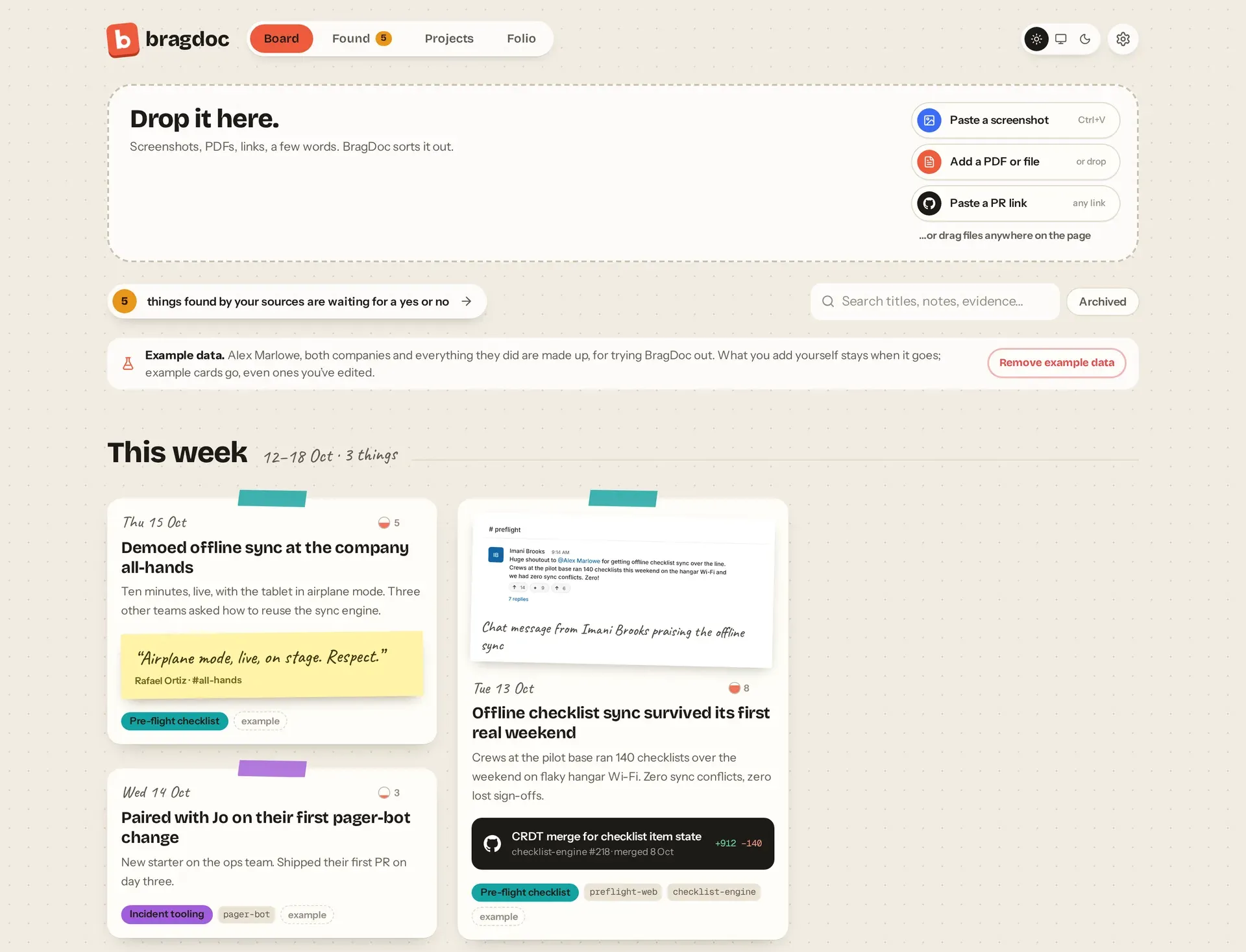
BragDoc board view with the made-up example data that ships with the app, from the official documentation captures.
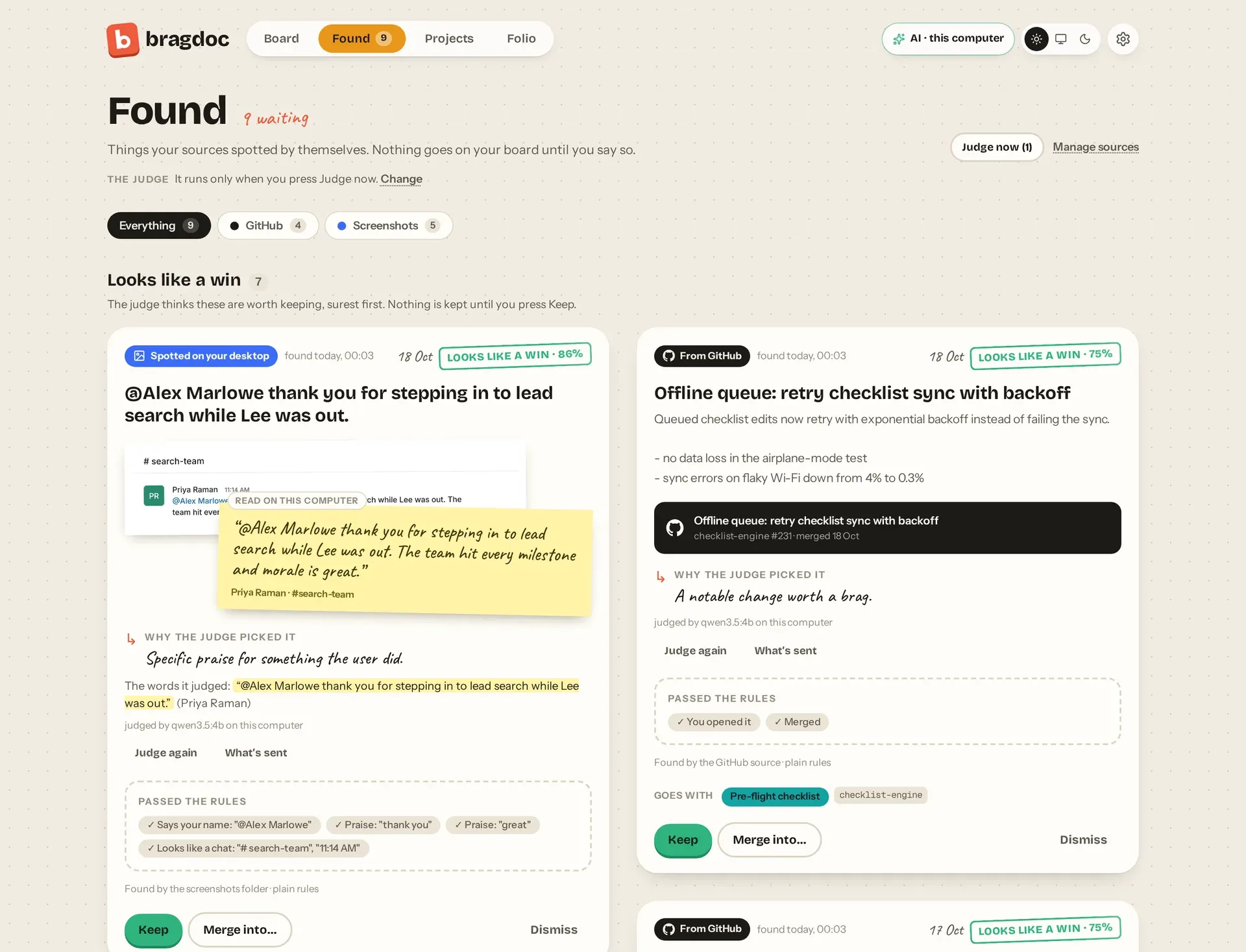
Found page with candidates judged by a local model, on the project's made-up example data.
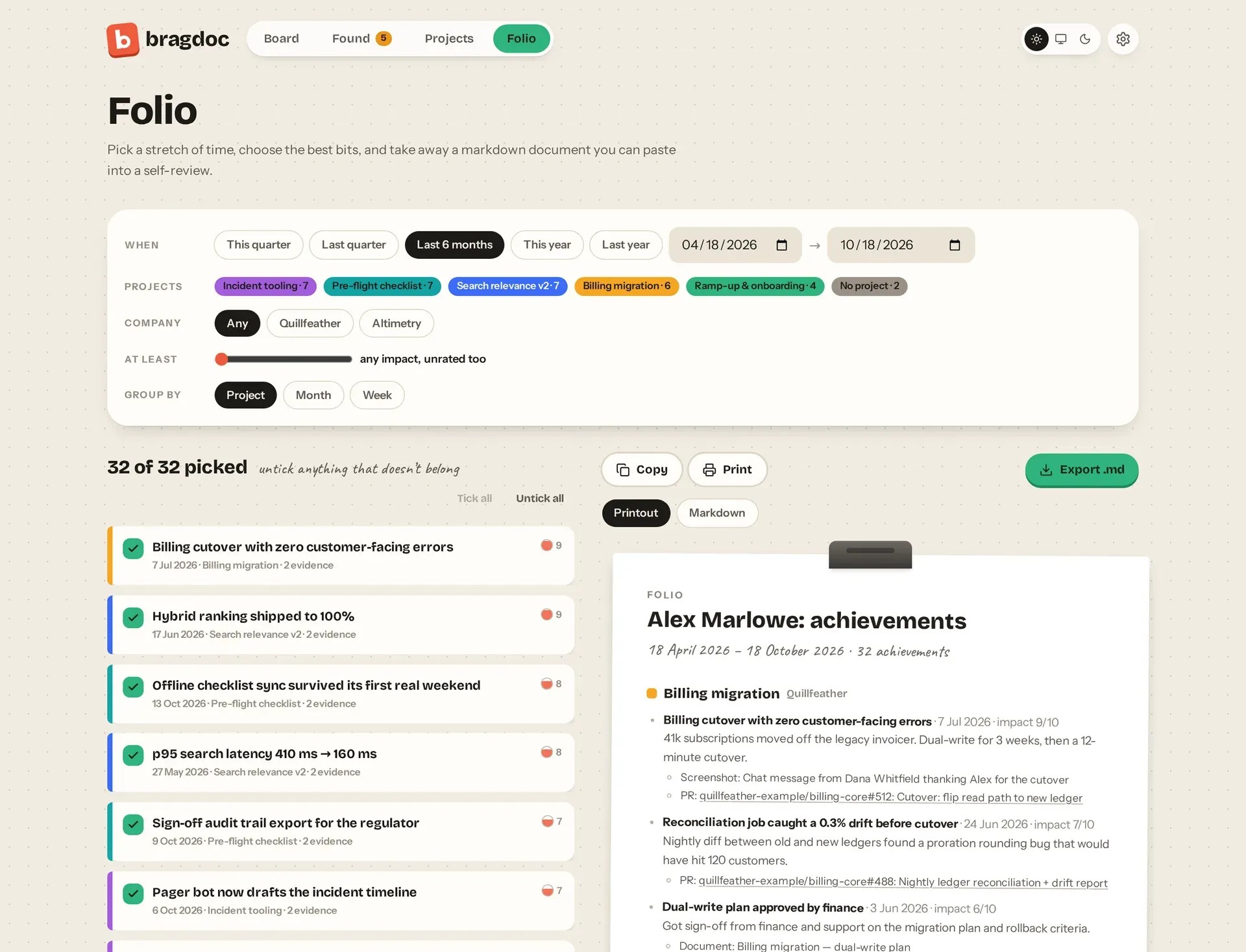
Folio selection and preview for a self-review export, on the project's made-up example data.
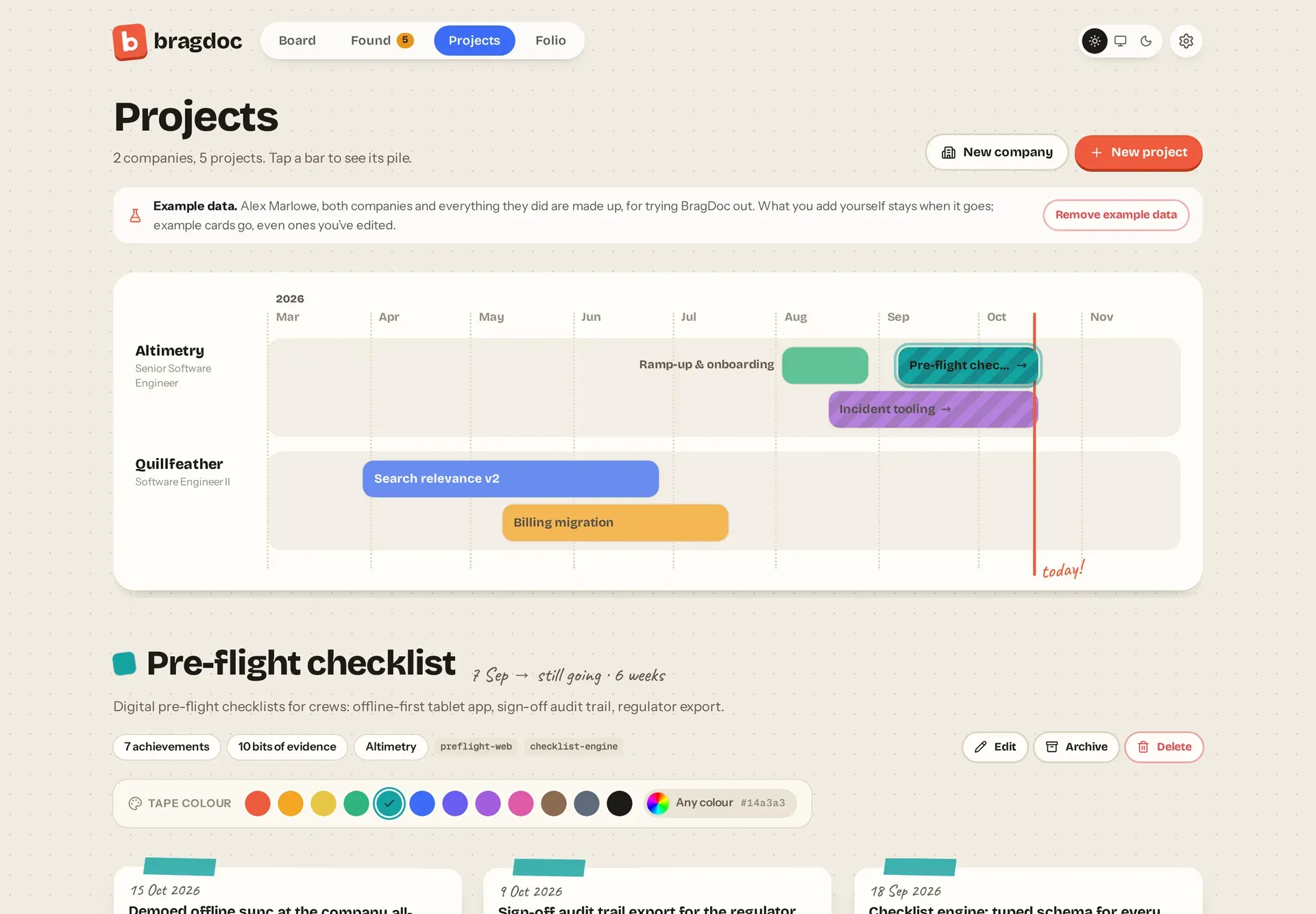
Projects timeline grouped by company, on the project's made-up example data.
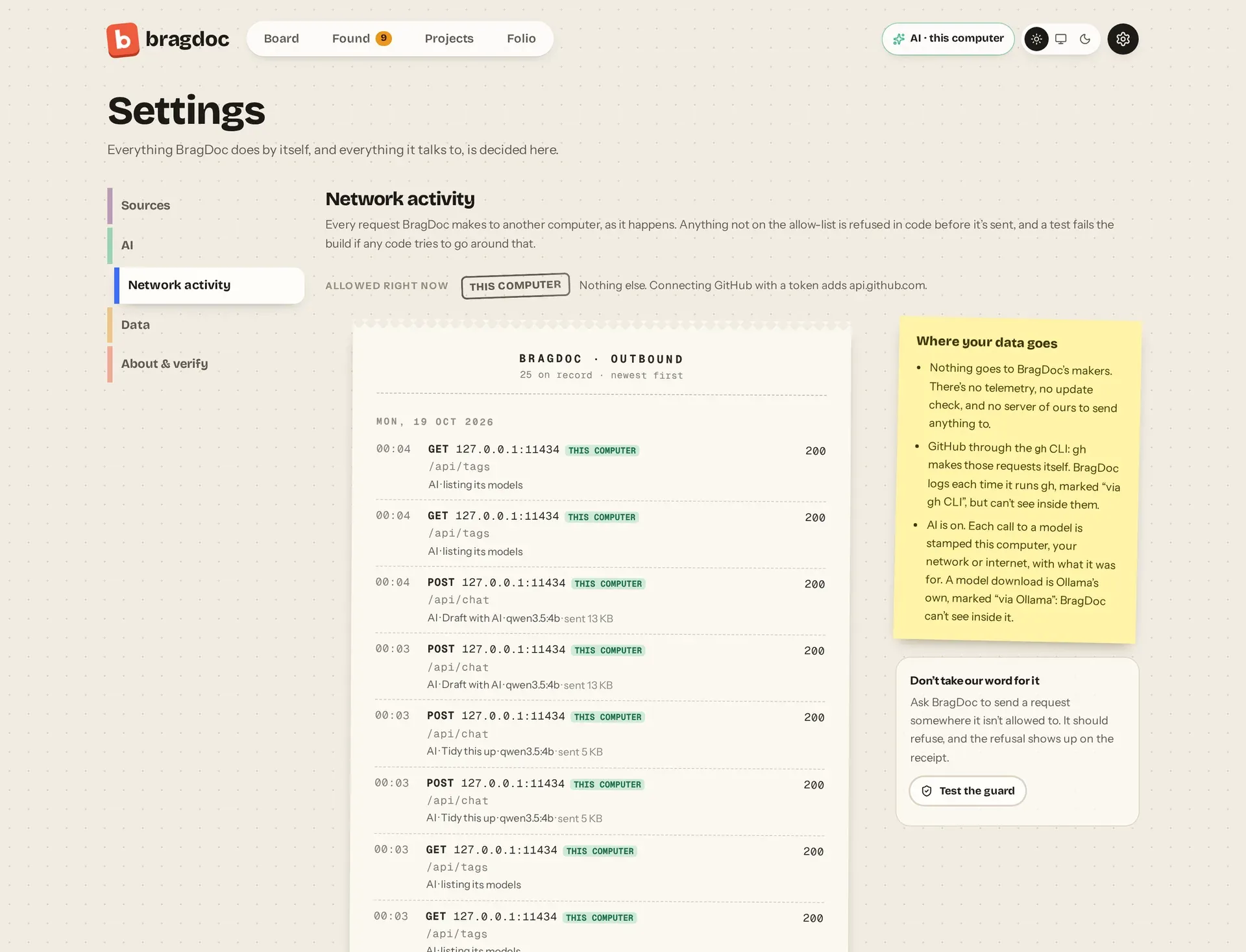
Network activity log listing each outbound request, here calls to a model runner on the same computer.
Source: official BragDoc project page.
Key capabilities
- Install with npm The README documents
npx @bragdoc/localto try the app (it serves until Ctrl+C) andnpm install -g @bragdoc/localto install thebragdoccommand. Node.js 22.12 or later is required, on macOS or Linux. Users of the older@bragdoc/clipackage must uninstall it first, because both packages install abragdocbinary; old CLI files in~/.bragdocare moved into~/.bragdoc/legacy-cli/on first run. - Docker image An alternative to Node is
docker run --rm -p 127.0.0.1:2724:2724 -v ~/.bragdoc:/data ghcr.io/edspencer/bragdoc, which shares the same data folder. The repository also contains acompose.yaml. The documentation states the port must always be published on 127.0.0.1 because BragDoc has no login. - Board Screenshots, PDFs, files, links and GitHub pull request links can be pasted or dropped onto a week-by-week board, or a line of text can be typed. Entries can be edited, archived, removed with Undo and searched across titles, notes and evidence. Edits made directly to the files on disk appear in the app live.
- Projects and companies Projects are shown on a timeline in company swimlanes, each with a chosen colour, and can be linked to the repositories they live in. Companies carry the user's role and dates. Achievements can be tagged with projects and filtered by company.
- Found inbox Found collects candidates that BragDoc spots by itself from two sources: merged GitHub pull requests and a screenshots folder scanned for praise. Both sources are off until switched on, and nothing reaches the board until the user presses Keep. Screenshot text is read with OCR on the computer, using Apple Vision on macOS and a bundled tesseract.js elsewhere.
- Folio export Folio selects a date window of achievements, filtered by project, company and minimum impact and grouped by project, month or week. The result can be copied, printed or exported as a Markdown file for a self-review.
- Opt-in AI features AI is off by default, and with it off no model is contacted and the AI SDK is not loaded. When enabled in Settings, three features are available: a judge in Found that says whether a candidate looks like a win and why (it never keeps or dismisses anything itself), Tidy this up on the board, which suggests a title, summary, date, impact and projects, and Draft with AI in Folio, which writes a self-review draft where every bullet cites its source achievement. See the AI overview.
- Local and cloud model support Models can run on the same computer or network through Ollama, LM Studio, llama.cpp or any OpenAI-compatible server, or in the cloud through Anthropic, OpenAI or OpenRouter with the user's own key. Cloud providers receive nothing, not even a test, until the user has read a consent screen describing what each feature would send and pressed Allow. BragDoc never installs a model runner and asks Ollama to download a model only after a confirmation that states the size.
- MCP endpoint for coding agents Coding agents such as Claude Code and Cursor can read projects and log achievements through MCP at
http://localhost:2724/mcp, using a per-install bearer token stored in~/.bragdoc/runtime.jsonwith mode 600, or through the stdio bridgebragdoc mcp.bragdoc mcp install clauderegisters BragDoc with Claude Code, and--printprints configuration for other clients. Agent entries are marked as written by the agent and can be routed to Found for review instead of the board. - Plain-file data folder Data lives in
~/.bragdoc, configurable with--data-dirorBRAGDOC_HOME. The project describes one Markdown file per achievement and YAML for everything else, so files can be edited by hand, backed up or kept in git. The data folder reference documents the layout. - Network activity log Settings shows every outbound request with its purpose, status and size. All outbound traffic passes through one module that refuses hosts not on an allow-list, and a test fails the build if other code reaches the network or starts a process. A Test the guard button sends a forbidden request to show it being refused. Requests that the gh CLI or a model runner makes on its own are outside this log.
- GitHub connection GitHub can be connected through the gh CLI, where BragDoc runs
gh auth status,gh search prsandgh pr view, or with a pasted token that is stored in~/.bragdoc/secrets.yamlwith mode 600 and used only against api.github.com. GitHub is contacted only on Check now, on connect, by an optional hourly check, and for a PR link title once connected. - Login service
bragdoc service installcreates a LaunchAgent on macOS or a systemd user unit on Linux that starts at login and restarts if it exits.status,start,stop,restart,logsanduninstallmanage it, with documented exit codes and--jsonoutput. The service log isservice/bragdoc.login the data folder, rotated at 10 MB. - Update and diagnostics commands
bragdoc updateinstalls the latest npm version, checks that BragDoc is not busy first, restarts the service and rolls back if the new version does not answer; data is copied tobackups/pre-<version>/when the file format changes.bragdoc doctorchecks Node, the install method, service, port, data folder, config, git and gh. Only these commands contact the npm registry, and only when run. - Import from the hosted app
bragdoc importreads a JSON export from the hosted BragDoc app (Account, Export Data) and imports companies, projects, repositories and achievements; documents and performance reviews become read-only Markdown underimports/. A--dry-runshows what would be added, and re-importing adds nothing. A snapshot of the data folder is taken inbackups/first. See Moving from the hosted app. - Localhost security controls The server checks the Host header against an allow-list, rejects foreign Origin headers and cross-site Fetch Metadata, never grants CORS, accepts only JSON or typed uploads, and caps JSON bodies at 1 MB and uploads at 25 MB. Pages use a strict Content Security Policy, and stored evidence is served sandboxed, with only common image formats displayed. Details are in Localhost security.
- Local HTTP API The web app uses a JSON API under
/api/with endpoints for achievements, evidence, settings, the network log, backups and busy state, plus a Server-Sent Events stream. The documentation describes it as the app's own local API with no versioning promise before 1.0, and points agents to MCP or the files as the stable interfaces. - Hosted app and legacy CLI The official website documents the hosted app and the
@bragdoc/clipackage (Node.js 18 or higher), with commands such asbragdoc login,bragdoc init,bragdoc extractandbragdoc standup, cron or Task Scheduler scheduling, and LLM providers OpenAI, Anthropic, Google, DeepSeek and Ollama. Its CLI page states the CLI reads commit metadata (messages, dates, authors), not source code, and its privacy page states only extracted achievements are stored in BragDoc Cloud.
Where BragDoc fits
Collecting evidence for a self-review
Throughout the year, screenshots of praise, PDFs, PR links and short notes are dropped onto the board, where they are arranged by week. At review time, Folio selects a date range, filters by project, company and impact, and exports the chosen achievements as Markdown. With AI enabled, Draft with AI writes a self-review draft whose bullets each cite the achievement they came from, as described in the Folio documentation.
Capturing merged pull requests and praise automatically
When the GitHub source is switched on, merged pull requests opened by the user appear in Found as candidates. When a screenshots folder is configured, images are read with on-device OCR and checked against plain rules, such as whether they mention the user's name and contain praise words. Each candidate stays in Found until it is kept, merged into an existing achievement or dismissed; the optional AI judge only adds a verdict and a reason.
Logging work from a coding agent
After bragdoc mcp install claude, or a printed configuration for another client, a coding agent can read the user's projects and record what was done during a session. These entries are labelled as written by the agent, and a setting under Settings, Sources sends them to Found for review instead of directly to the board. bragdoc guide prints the agent guide.
Running BragDoc in the background
On macOS and Linux, bragdoc service install sets up a login service so the app stays available at localhost:2724. bragdoc service status reports whether it is running and on which port, and bragdoc update upgrades the npm package and restarts the service, restoring the previous version if the new one does not answer. On Linux the service stops at logout unless lingering is enabled, which bragdoc doctor reports.
Moving from the hosted BragDoc app
Hosted users export a JSON file from the web app and run bragdoc import with --dry-run to see what would be added, what is already present and which fields have no local equivalent. The real import snapshots the data folder first. Settings, Data offers the same importer in the browser.
Keeping data local and inspectable
Because achievements are Markdown and YAML files in ~/.bragdoc, they can be edited by hand, kept in git or read by other tools, and hand edits show up in the running app. The Network activity page lists every outbound request, and the SECURITY.md file lists what BragDoc guarantees and how to report a vulnerability.
Install
npm install -g @bragdoc/localReviews of BragDoc
Be the first to share your experience with BragDoc.
Write a review
Loading review form…
Related to BragDoc
 ObsidianObsidian is a free note-taking app by Dynalist Inc. that stores notes as local Markdown files, with links, graph view, Canvas, Bases, a CLI and community plugins, plus optional paid Sync and Publish services.
 LogseqLogseq is a privacy-first, open-source platform for knowledge management and collaboration, with PDF annotation, task management and Markdown or Org-mode files.SPSuper ProductivitySuper Productivity is an open-source, offline-first to-do list, time tracker and planner with Jira, GitHub and GitLab integrations on desktop, mobile and web.