

What is Beaver Notes?
Beaver Notes is a free, MIT-licensed note-taking application for Windows, macOS and Linux that keeps notes on the device where they are written. It needs no account, sends no analytics according to the project's security policy, and treats sync as an optional step the user sets up. Daniele Rolli is listed as author in the package manifest and as the security contact; the code, translations and Linux packaging come from a group of contributors in the Beaver-Notes GitHub organization. The first public releases appeared in July 2023.
The current stable release is Beaver Notes 4.4.0, published April 17, 2026. It is a maintenance release: it fixes several reported issues, moves settings into a Pinia store, improves paste behavior and adds a community-contributed /today command. The same notes announce that Beaver Pocket, the separate mobile app, is discontinued. Version 4.3.0 redesigned note cards and links, allowed creating a note while linking and fixed lost clipboard images and Mermaid text rendering. Version 4.2.0 introduced folders, multi-note selection, Arabic and Portuguese, and moved the app to Tiptap 3 and Electron 38.
Stable builds are published on the download page and on GitHub: a Windows setup program and a portable executable, a universal macOS DMG and ZIP, and Linux DEB, RPM, AppImage and tarball packages for x86_64 and ARM64. Package-manager routes include Flathub, Homebrew Cask, the Scoop extras bucket and the AUR, as listed in the installation guide.
Version 5 is a rewrite that is still in beta. It replaces Electron with Tauri 2 and Rust, moves note storage from files to SQLite, stores note content as Yjs CRDT updates and brings Android and iOS into the same codebase. 5.0.0-beta.2, published August 13, 2026, made app-wide encryption mandatory, merged the asset folders and prepared integration with Beaver Sync, a hosted sync backend the developers say they will open-source under Apache 2.0. The beta ships Windows, macOS, Linux, Android and iOS builds, and the README warns that it will have rough edges. The architecture overview documents the v5 stack: Vue 3, Pinia and Tiptap in the interface, rusqlite and the yrs CRDT library in the Rust backend.
Some things are out of scope. There is no web client, no shared team workspace in the stable release and no built-in AI feature; the website sums up the approach as "No cloud. No AI. No tracking." Real-time collaboration, version history and a plugin system are planned for version 5 on the public roadmap and are not part of 4.4.0. The project is funded through donations and has no paid plan at the time of writing.
Beaver Notes screenshots
Explore the interface. Open a screenshot to view it at full size.

The Beaver Notes editor on macOS with the formatting toolbar, two labels, an embedded image and a quote block. Official product screenshot from the Beaver Notes website.
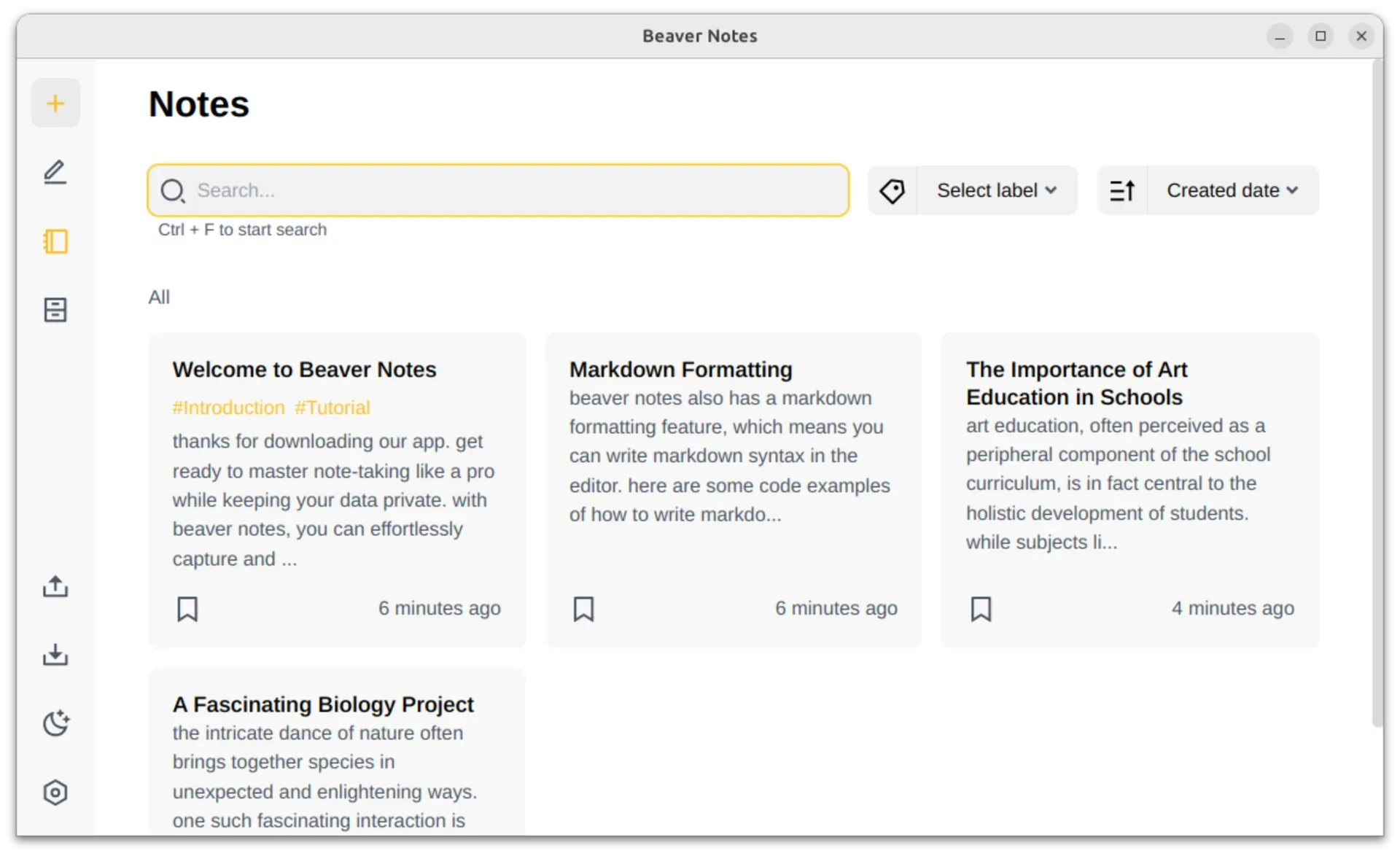
The note list on Linux with search, a label filter, sorting by created date and note cards with labels and bookmarks. Official Flathub screenshot from the Beaver Notes repository.
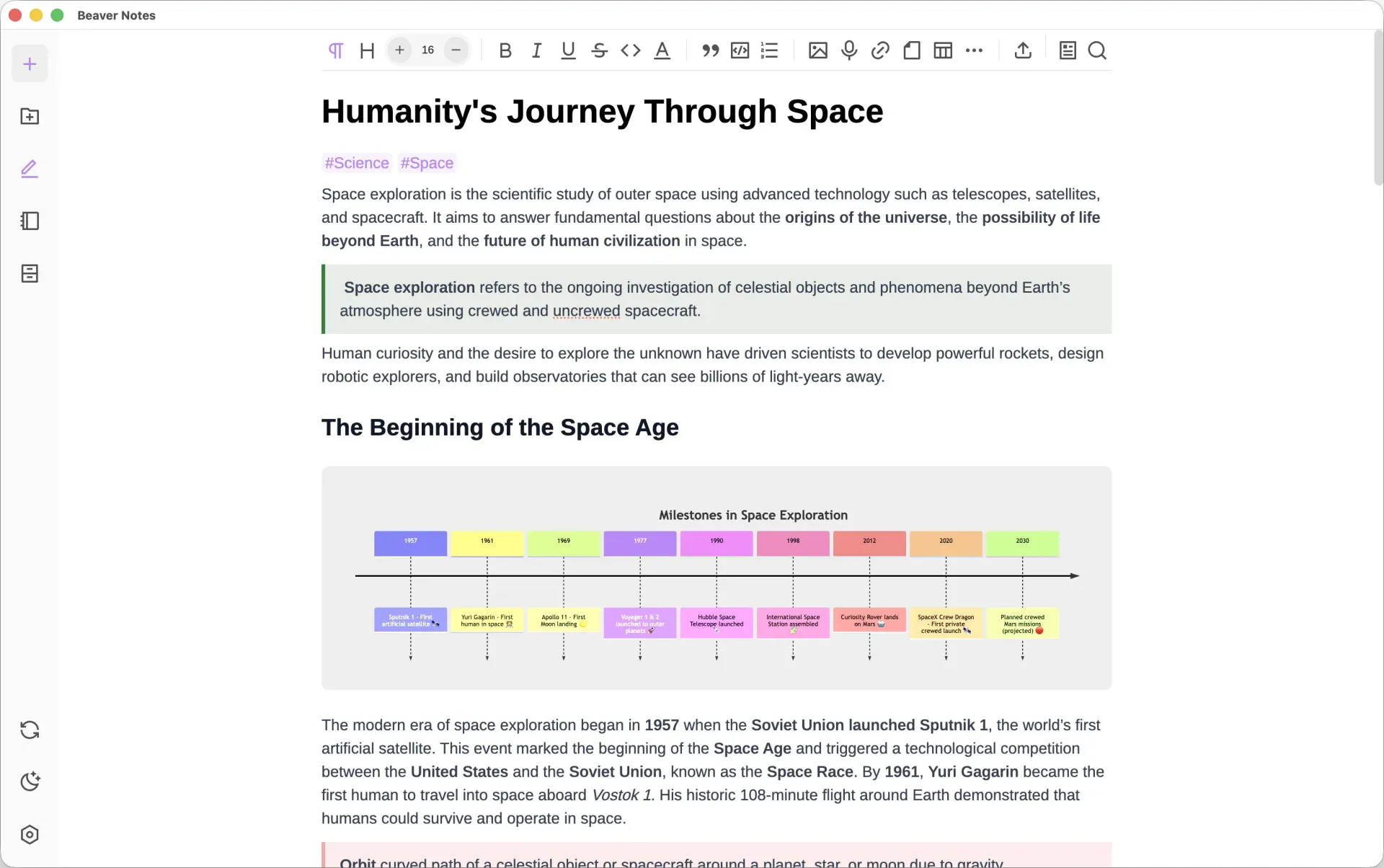
A note combining formatted text, a callout block and an embedded timeline diagram. Official product screenshot from the Beaver Notes website.

The version 4 editor on Linux, with heading, list, checklist, media, table and print controls in the toolbar. Official Flathub screenshot from the Beaver Notes repository.
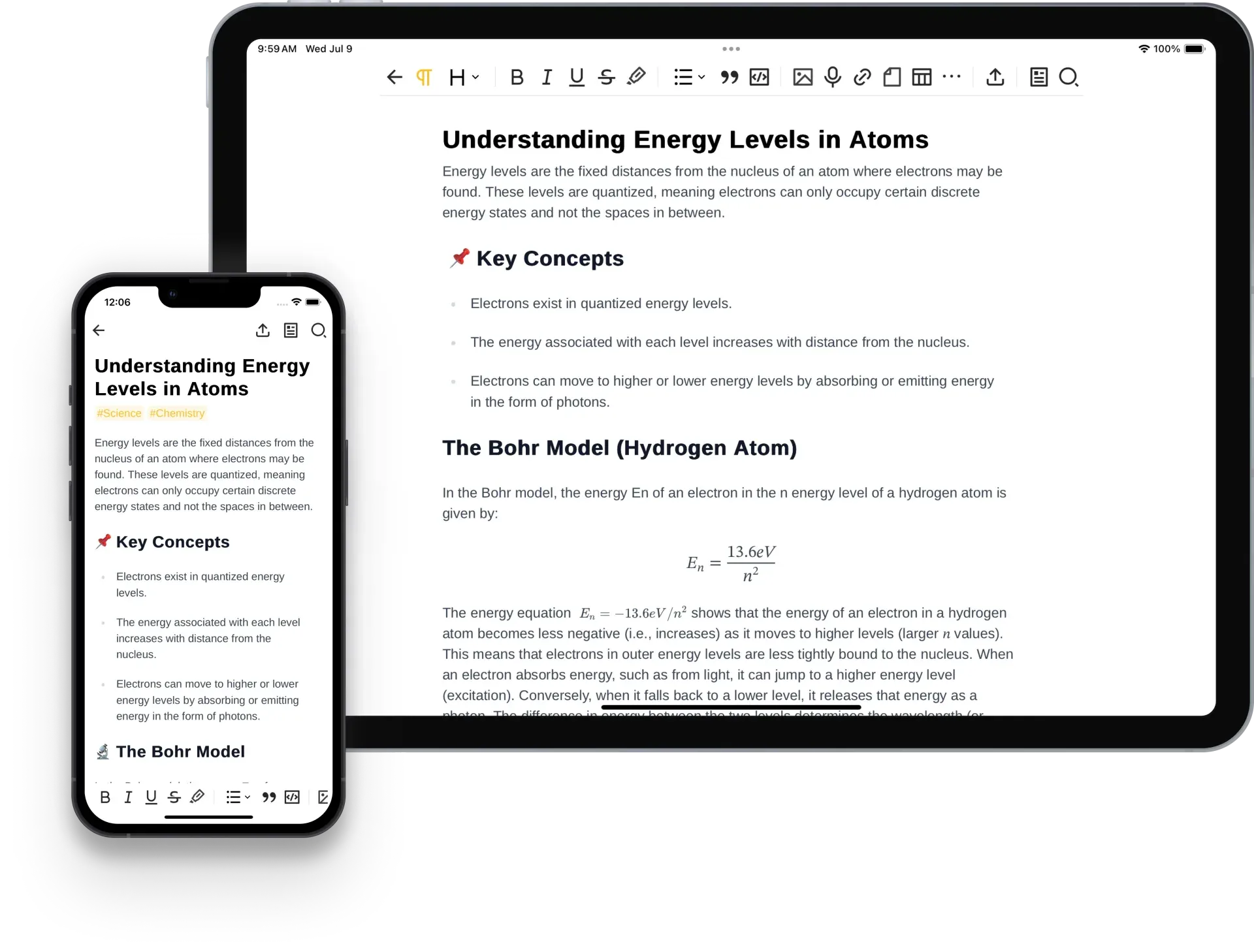
Tablet and phone layouts with a rendered math formula, from the website's Beaver Pocket section. Beaver Pocket is discontinued; mobile support moves into the Beaver Notes 5 beta.
Source: official Beaver Notes project page.
Key capabilities
- Download for Windows Version 4.4.0 offers a setup program and a portable executable. The portable build keeps its data in a
datafolder next to the executable, which suits USB drives and machines without install rights. Scoop users can runscoop bucket add extrasandscoop install extras/beaver-notes. The installation guide recommends turning off the built-in updater in Settings, About when a package manager handles updates. - Download for macOS A universal DMG and ZIP cover Intel and Apple Silicon Macs in one build. Drag the app into Applications, or install it with
brew install --cask beaver-notes. As with Scoop, disable in-app updates when Homebrew manages the version. - Download for Linux Flatpak is the recommended route:
flatpak install flathub com.beavernotes.beavernotes. DEB, RPM and AppImage files are available for x86_64 and ARM64, plus a binary tarball. On Arch Linux the AUR hasbeaver-notes, built from source, andbeaver-notes-bin, which repackages the release binary. The beta 1 notes say Linux packaging for version 5 will concentrate on Flatpak and the AUR. - Editor with Markdown shortcuts The editor is built on Tiptap and accepts Markdown syntax as you type, converting it into headings, lists, checklists, quotes, code blocks and inline code. Toolbar controls add tables, text color, highlights, font size and links. The Markdown syntax page lists the supported patterns. Notes are kept in the app's own data store rather than as a folder of Markdown files; Markdown is an import and export format.
- Labels, folders and bookmarks Labels are added with a hash sign and can filter the note list; version 5 adds custom label colors. Folders arrived in 4.2.0, together with selecting several notes to bookmark, archive, move or delete at once. The note list can be sorted, for example by creation date, and archived notes leave the main list without being deleted.
- Note links and backlinks Typing two at signs, or using the link menu, links one note to another. Since 4.3.0 a missing target can be created while linking, and links have a redesigned appearance. Backlinks, which show which notes point to the current one, are part of the version 5 beta rather than 4.4.0.
- Images, audio and file embeds Images can be pasted or inserted, and 4.3.0 fixed clipboard images that were previously lost. Audio can be recorded from the editor or added from an existing file. Files such as PDFs and web pages can be embedded in a note, and 4.2.0 made editing embedded files work again.
- Mermaid, math and drawing blocks A Mermaid block renders flowcharts and other diagrams from text, described in the Mermaid guide. Math blocks and a freehand drawing block cover formulas and sketches. Beta 2 replaced Mermaid with the beautiful-mermaid renderer; unsupported diagram types fall back to a plain-text block with a badge, and invalid syntax shows an error.
- Locked notes A note can be locked with a password, after which its content is encrypted and must be unlocked from the note card or the editor. The lock guide warns that a new password cannot be set without the old one and advises keeping it in a password manager.
- Search and command palette Ctrl+F searches titles, content and labels from the note list, and editor search finds text inside the open note. A command palette opens notes, folders and actions from the keyboard, and the slash menu inserts blocks. Version 4.2.0 made search find untitled notes and folders.
- Folder-based sync Sync writes data to a folder you choose under Settings, General, Sync Path, for example inside Dropbox, OneDrive, iCloud Drive, Nextcloud or Syncthing. Auto Sync runs it in the background; otherwise a sidebar reminder prompts a manual sync. The sync guide notes that autosync does not work on Linux folders mounted through GVFS.
- Import and export Version 4 imports a Markdown archive and exports notes as HTML, PDF, Markdown or the native BEA format. The version 5 beta adds importers for Apple Notes on macOS, Notion, Evernote, Bear, Obsidian, Simplenote and plain Markdown, an importer for Beaver Notes 4 data, and export of all notes as Markdown or HTML.
- Languages and accessibility settings The interface is translated by volunteers through the project's Weblate instance at translate.beavernotes.com. Version 4.2.0 added Arabic and Portuguese and bundled right-to-left and left-to-right options with the language setting. Dark mode, an interface size selector and keyboard navigation in the slash menu are included.
- Version 5 encryption model In the beta, note content, metadata, assets and sync payloads are encrypted with AES-256-GCM or XChaCha20-Poly1305, with keys derived by Argon2id and a master key held in the OS keychain where available. A 256-bit recovery code unlocks data if the passphrase is lost. The full-text search index and the settings database stay unencrypted by design, as the security policy states.
- Version 5 plugin system The plugin guide describes .beax packages with an app plane for notes, folders, labels, settings, network and files, and an editor plane for Tiptap extensions, slash commands and toolbar items. App-plane access is gated by permissions the user accepts, and each plugin gets 5 MB of key-value storage. Editor plugins run with full access to the editor's JavaScript context, so install them only from trusted sources.
- Mobile apps in version 5 Beaver Pocket is discontinued, and mobile support moves into the main codebase. The beta releases include an Android APK and AAB and an iOS IPA; the beta 1 notes say Play Store availability starts as a closed test. Spotlight integration on iOS and macOS is part of the same beta.
Where Beaver Notes fits
Keeping a private notebook on one computer
Install the stable 4.4.0 build from Flathub, Homebrew, Scoop or the release page and start writing without creating an account. Organize notes with labels and folders, bookmark the ones you use daily and archive finished material. Check where the app stores its data on your platform, and include that folder in your normal backup, because nothing is copied off the device until you configure sync. With the Windows portable build, the data folder sits next to the executable.
Syncing notes between two or more computers
Pick a folder inside a sync service you already trust, such as Nextcloud, Syncthing, Dropbox, OneDrive or iCloud Drive, and set it as the Sync Path on each device. Turn on Auto Sync or use the sidebar reminder. Test by editing the same note on two machines and confirming the result before relying on it. On Linux, avoid GVFS-mounted folders, which break autosync according to the sync guide, and use a native client for the service instead.
Moving notes in from another application
In version 4, export notes from the old tool as Markdown and use the Markdown import. The version 5 beta can import directly from Apple Notes, Notion, Evernote, Bear, Obsidian and Simplenote. Spot-check tables, embedded images, internal links and code blocks after any import, since each source app stores these differently, and keep the original export until you have compared a sample.
Protecting sensitive notes
Lock individual notes that hold credentials, personal records or client details, and store the lock password in a password manager, because it cannot be replaced without the old one. The lock guide only states that note content is encrypted, so avoid putting sensitive words in titles or labels. In the version 5 beta, app-wide encryption is mandatory; record the recovery code during onboarding and test that it unlocks a copy of the data before you depend on it.
Documenting technical work
Developers and administrators can keep runbooks, meeting notes and troubleshooting logs with fenced code blocks, tables, checklists and Mermaid diagrams for flows or network layouts. Math blocks handle formulas, and audio recordings capture spoken notes. Export important pages to HTML, PDF or Markdown when they need to be shared, since Beaver Notes has no built-in publishing or shared workspace in the stable release.
Trying the version 5 beta safely
Install the beta beside a backed-up copy of your version 4 data rather than over your only notebook. The beta 2 notes explain that encryption became mandatory and that beta 1 users may need to reinstall or repeat onboarding, while Electron-era assets are migrated during onboarding. Read the release notes for each beta, report problems on GitHub and keep version 4.4.0 as the production install until version 5 is declared stable.
Install
flatpak install flathub com.beavernotes.beavernotesReviews of Beaver Notes
Be the first to share your experience with Beaver Notes.
Write a review
Loading review form…
Alternatives to Beaver Notes
 JoplinJoplin is a free, open-source note and to-do app for Windows, macOS, Linux, Android and iOS, with offline-first storage and encrypted sync.
 NotesnookNotesnook is a free, open-source note-taking app with end-to-end encryption, web, desktop and mobile clients, positioned as an alternative to Evernote.
 ObsidianObsidian is a free note-taking app by Dynalist Inc. that stores notes as local Markdown files, with links, graph view, Canvas, Bases, a CLI and community plugins, plus optional paid Sync and Publish services.