

What is Anki?
Anki is a free, open-source flashcard program built around active recall and spaced repetition: you rate how well you remembered each card, and the scheduler picks the day it should come back. The desktop version is developed in the ankitects/anki repository by Damien Elmes and a large group of contributors, and Anki is a registered trademark of Ankitects Pty Ltd. The program has existed since 2006; the current GitHub history starts in December 2012, when the separate libanki and ankiqt code bases were merged into a single distribution. The official website describes collections of more than 100,000 cards as a normal workload.
Anki is one part of a small ecosystem. The desktop application for Windows, macOS and Linux is free and licensed under the AGPL. AnkiWeb is a free hosted service for synchronization and browser-based study. AnkiMobile is the official, paid iOS app whose sales fund development, and AnkiDroid is a free Android app developed by a separate team of contributors. A self-hosted sync server is built into the desktop program and is also available as separate Python and Rust packages, for people who prefer not to use AnkiWeb.
The current release is Anki 26.09.4, published November 4, 2026. It is a security update: shared decks could run code through iframes when opened in the editor, a crafted image file name could run commands on macOS through the Show in Folder action, and compromised eMudhra intermediate CA certificates are now refused. Version 26.09 (September 2026) closed two other editor issues involving local file access and unchecked image extensions, updated FSRS to 6.6.2, moved to Qt 6.11.2 and removed the legacy anki.importing and anki.exporting Python modules. Version 26.08 added an Experiments section in Preferences with a reworked editor and raised the macOS minimum to 13.0. Version 26.05 replaced the terminal-based launcher introduced in 25.07 with standard installers, an in-app update check, a Windows MSI and a Windows ARM64 build.
Most program logic lives in a Rust library (rslib). A Python layer (pylib, imported as import anki) wraps it for the user interface and for scripts, and the interface itself combines Qt through PyQt with TypeScript, HTML and CSS views. Protocol Buffers define the backend methods shared between the languages, as described in the architecture notes. Official builds bundle their own Python and Qt; the 26.05 notes state that they ship Python 3.13, with 3.10 as the minimum for other installs. Collections are stored locally per profile, with media in a folder beside them.
The license file places Anki under the GNU Affero General Public License version 3 or later, with some user-contributed portions under BSD-3 and a short list of vendored components under MIT, Apache 2.0 or CC BY 4.0. The documentation, now a single site at docs.ankiweb.net, covers the desktop manual, AnkiMobile, add-on development and core development. Out of scope: Anki does not include shared editing of one collection by several people, classroom monitoring, DRM for deck authors, or a hosted service with data processing agreements for schools and companies.
Anki screenshots
Explore the interface. Open a screenshot to view it at full size.
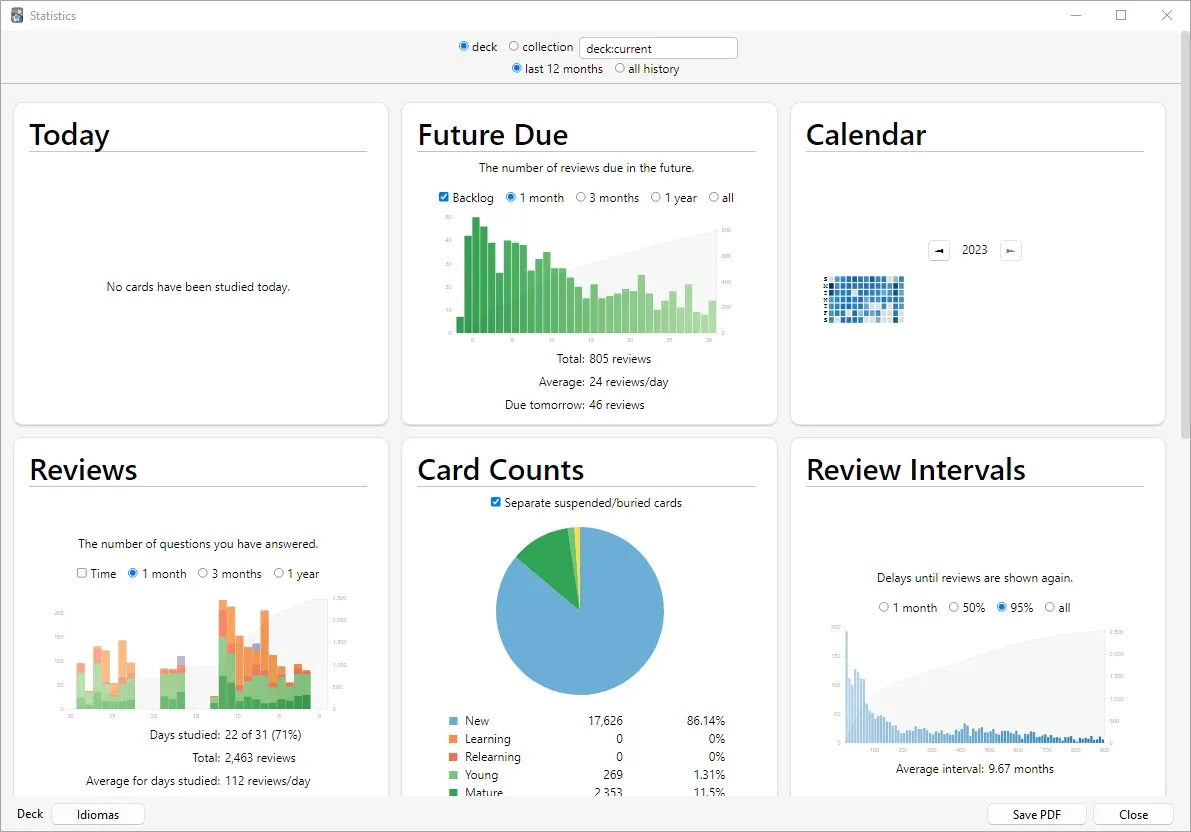
The Statistics screen for a deck: future due reviews, a calendar heat map, answered questions, card counts by state and review intervals, with a Save PDF button. Screenshot from the official Anki manual.
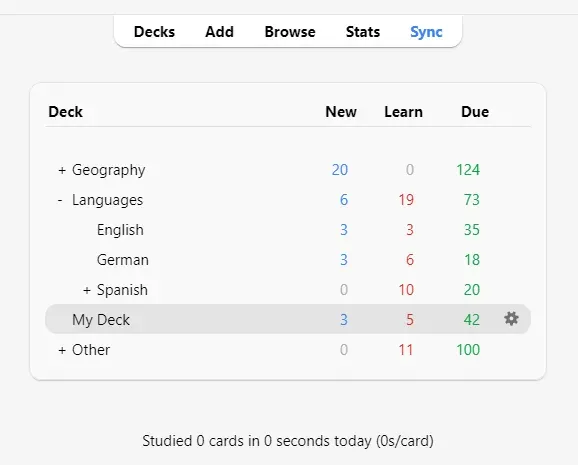
The main deck list with subdecks such as Languages::German and the counts of new, learning and due cards per deck. Screenshot from the official Anki manual.
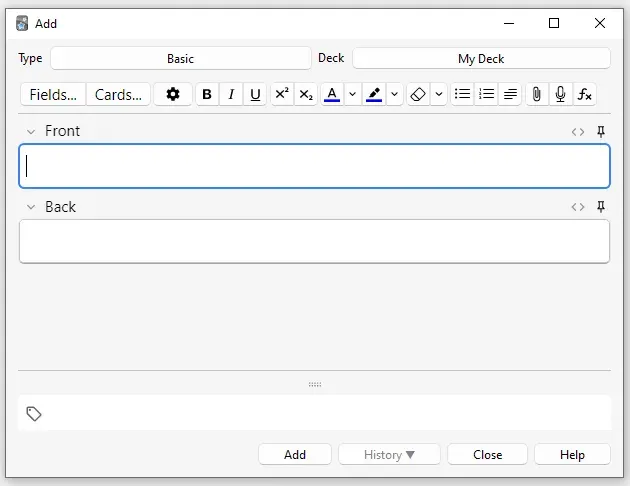
Adding a Basic note: note type and deck selectors, the formatting toolbar with attachment, recording and formula buttons, the Front and Back fields and tags. Screenshot from the official Anki manual.
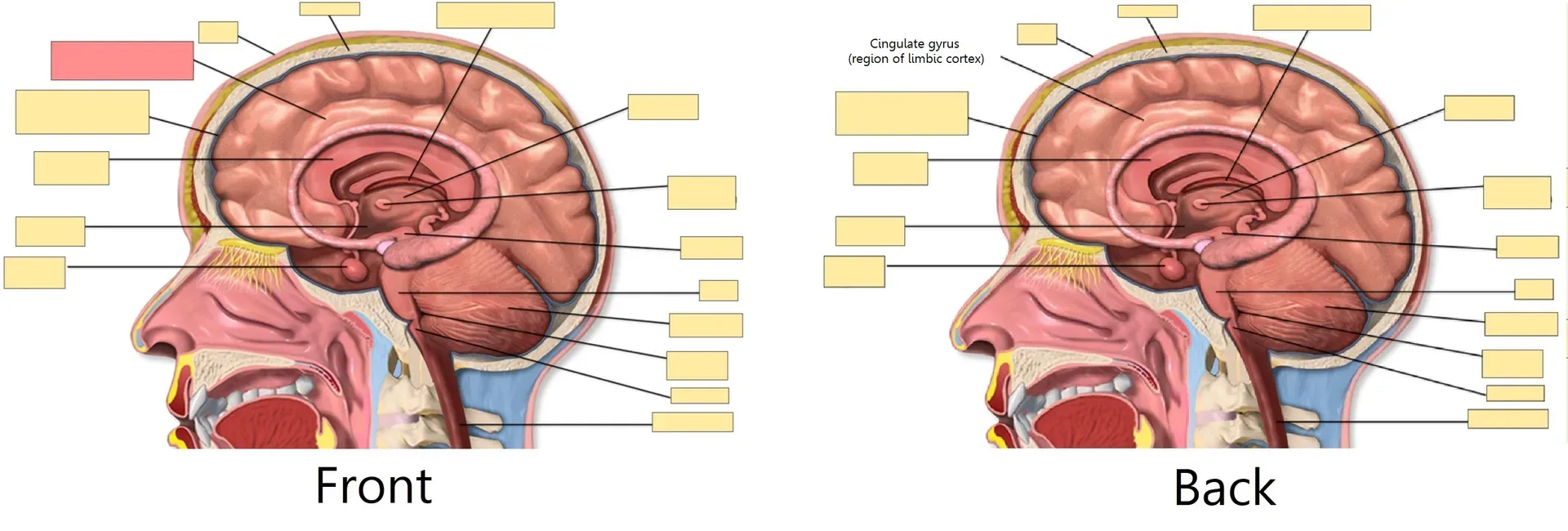
Image Occlusion example from the manual: masked labels on an anatomy diagram, with the tested label highlighted on the front and revealed on the back.
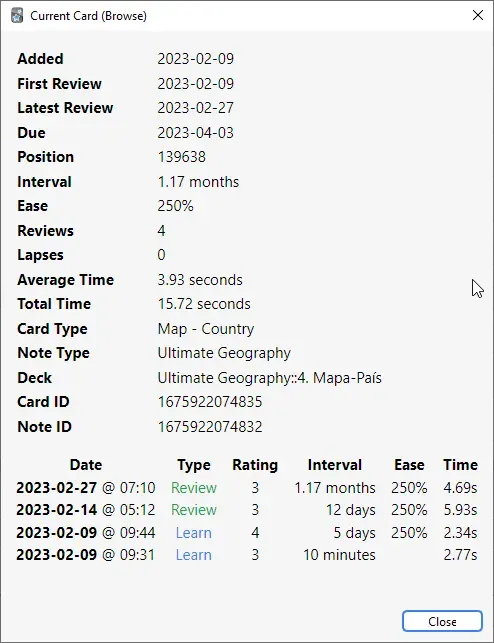
Card Info for a single card: added and due dates, interval, ease, review count, note type and deck, followed by each review with rating, interval and time. Screenshot from the official Anki manual.
Source: official Anki project page.
Key capabilities
- Download Anki for Windows The download page offers an MSI installer for x64 (64-bit Windows 10 version 1703 or newer, or Windows 11) and a separate MSI for ARM64 on Windows 11. Upgrading from 2.1.6 or later does not require uninstalling first, and card data is kept. The last release for Windows 7 and 8.1 was 2.1.49; older versions stay on the GitHub releases page.
- Download Anki for macOS Separate DMG images exist for Apple Silicon and Intel Macs, both requiring macOS 13 or later since 26.08. Install by dragging Anki to Applications; upgrading overwrites the application and keeps your collection. Homebrew users can run
brew install --cask anki, which the macOS install guide documents. - Download Anki for Linux Packaged builds are
.tar.zstarchives for x86_64 (glibc 2.35 or newer) and AArch64 (glibc 2.39 or newer), unpacked with zstd and installed with the bundledinstall.sh. Debian, Ubuntu and Arch need a few extra X and NSS libraries listed in the Linux guide. Musl-based distributions are not supported, and the project recommends its own build over distribution packages, which may substitute different Qt versions. - Built-in updates since 26.05 Releases from 26.05 onward can be updated through Tools, Check for Updates, and installation no longer needs network access. The update function in 25.07 to 25.09 cannot move to the newer packaging, so those versions need a manual download. Beta builds are published separately and can also be installed with pip into a Python virtual environment.
- Notes, note types and cards Information is entered once as a note with fields, and the note type decides which cards are generated from it, for example a forward and a reverse card from one vocabulary note. Templates are HTML and CSS, can show fields conditionally and can include JavaScript. The editor supports formatting, audio recording, media attachment and MathJax for formulas.
- Cloze deletions and image occlusion Cloze notes hide parts of a sentence, and 26.05 added syntax for multi-card cloze deletions. Since 23.10, Image Occlusion is a built-in note type: you mask rectangles, ellipses or polygons on an image and choose between Hide All, Guess One and Hide One, Guess One. Extra fields hold a header, back text and comments, as explained in the editing chapter.
- FSRS and SM-2 scheduling Two algorithms are available: a modified SM-2 and FSRS, which estimates difficulty, stability and retrievability per card from your review history. FSRS is enabled globally, its parameters are fitted with the Optimize button, and desired retention defaults to 90%. The deck options manual advises staying below 97%, because workload rises steeply near 100%.
- Deck presets and daily limits Decks can be nested with double colons, and each deck uses an options preset for new cards per day, maximum reviews, learning steps, display order, burying of sibling cards, audio and timers. Easy Days reduces the workload on chosen weekdays without changing existing intervals. Auto Advance can show the question and answer for fixed times.
- Filtered decks and search The browser uses a search syntax with field limits, tags, decks, card states, flags, card properties such as interval or ease, recent events and regular expressions. 26.05 added case-insensitive tag searches with
tag:nc:. The same queries build filtered decks for cramming or catching up on a topic without changing the original deck structure. - Statistics and card info The Statistics screen shows today, future due counts, a calendar heat map, review history, card counts by state, review intervals and further graphs for a deck or the whole collection, and it can be saved as a PDF. Card Info lists every review with rating, interval, ease and time. With FSRS enabled, memory state values are shown per card.
- Import from text, CSV and packages Plain text files separated by commas, semicolons or tabs can be imported if they are UTF-8, with fields mapped to note fields and tags. File headers can set the separator, note type, deck and GUID columns, and a GUID column makes later updates match existing notes. Packaged
.apkgdecks merge into the collection; the text import guide covers duplicates and media. - Export and shared decks Exports produce a full collection package (
.colpkg), a deck package (.apkg) or tab-separated text. Options control whether scheduling information, deck presets and media are included, and whether the file stays readable by older Anki versions. Importing a.colpkgreplaces the current collection, while an.apkgadds to it. AnkiWeb lists decks shared by users. - Backups and recovery Automatic backups run every 30 minutes by default and before one-way downloads, collection imports and Check Database. They contain card text and scheduling but not media, and stay on the same device. For a complete copy, export a
.colpkgwith media enabled; deleted notes are also logged todeleted.txtper profile, as described on the backups page. - AnkiWeb synchronization Sync sends the collection to a free AnkiWeb account, automatically when a profile opens or closes. Reviews and note edits merge; structural changes such as adding a field require a one-way upload or download. Collections are limited to 100 MB compressed and 250 MB uncompressed, and single media files to 100 MB, per the AnkiWeb limits FAQ.
- Self-hosted sync server The server runs from the desktop build with
--syncserver, from theankipackage on PyPI, or as the Rustanki-sync-serverbuilt with cargo; a user-contributed Dockerfile is also provided. Users are set withSYNC_USER1and further variables, optionally with hashed passwords, and data goes to~/.syncserverunlessSYNC_BASEis set. Details are in the sync server manual. - Add-ons Add-ons are Python packages that can modify any part of the program; they are installed from Tools, Add-ons, Get Add-ons, using the list published on AnkiWeb. Because they hook into internal code, an Anki update can break them, and the documentation suggests staying on an older version if a critical add-on lags. 26.09 removed legacy import and export modules that some add-ons used, keeping temporary wrappers tested only with AnkiConnect.
- Python and Rust libraries The
ankiPython package exposes the same backend used by the desktop program, so scripts can open collections, search, add notes and answer cards without the GUI. The Python API reference is hosted at dev-docs.ankiweb.net. Protocol Buffer definitions are not treated as a public API. - Profiles, languages and text to speech Each profile has its own collection and settings while add-ons are shared, and only one profile can sync to a given AnkiWeb account. The interface is translated by volunteers, and recent releases improved right-to-left layouts. Templates can read fields aloud with the system text-to-speech voices on supported platforms.
Where Anki fits
Learning a language
Create one note type with fields for the word, meaning, example sentence and audio, and enable a reverse card so recognition and production are tested separately. Import an existing word list as UTF-8 CSV with a header line, then add audio or field-based text to speech. Keep new cards per day realistic for the review load they create later, and check the Future Due graph after a week before raising the limit.
Preparing for a large medical or law exam
Use cloze notes for definitions and lists, and Image Occlusion for anatomy, diagrams or maps. Shared decks from AnkiWeb are a common starting point; import them as .apkg and check that media and templates display correctly. With FSRS, run Optimize after a few weeks of reviews and choose desired retention deliberately, since the deck options guide shows workload rising sharply above 90 to 95%.
Keeping a technical knowledge base in memory
Anki can also hold commands, ports, protocol details and certification material. Write small, single-fact cards, keep source links in a field, and use tags rather than many small decks so filtered decks can pull a topic together before an exam. Code snippets can be styled with template CSS, and MathJax handles formulas. Review leeches regularly, because a card failed repeatedly is usually badly worded.
Synchronizing across devices without AnkiWeb
Start the bundled server or the PyPI package on a home server, set SYNC_USER1 and a storage path, and point each client to the server URL in preferences. The server speaks plain HTTP, so the sync server manual recommends a VPN or HTTPS reverse proxy instead of exposing it directly. Update the server together with clients, since protocol changes can stop older servers from syncing.
Moving or backing up a collection
Before switching computers or testing add-ons, export a .colpkg with media and store it on another device. Check that the import on the new machine shows the same card counts and review history in Statistics. Remember that importing a collection package replaces the existing collection, and that automatic backups do not include images or audio.
Scripting decks from other data
Generate notes from a database, spreadsheet or documentation set with a CSV file, using a GUID column so later imports update the same notes instead of creating duplicates. For more control, the anki Python package can open a collection directly; work on a copy and close Anki first. The Python API docs describe the available calls.
Install
brew install --cask ankiReviews of Anki
Be the first to share your experience with Anki.
Write a review
Loading review form…
Related to Anki
 ObsidianObsidian is a free note-taking app by Dynalist Inc. that stores notes as local Markdown files, with links, graph view, Canvas, Bases, a CLI and community plugins, plus optional paid Sync and Publish services.
 LogseqLogseq is a privacy-first, open-source platform for knowledge management and collaboration, with PDF annotation, task management and Markdown or Org-mode files.
 JoplinJoplin is a free, open-source note and to-do app for Windows, macOS, Linux, Android and iOS, with offline-first storage and encrypted sync.