

What is OpenUEM?
OpenUEM is a self-hosted, open-source unified endpoint manager. Small agents installed on Windows, Linux and macOS machines report hardware, operating-system, software, security and update information to a server that you run yourself, and administrators work with that inventory through a web console. The project is developed in the open under the open-uem GitHub organization, is written in Go and is published under the Apache License 2.0. Its documentation and download pages are at openuem.eu.
The project is split into several repositories that together form one product. The console is the web interface. The agent runs on each endpoint. The workers process agent reports, send email notifications and issue certificates. Further services provide the NATS message bus, an OCSP responder for certificate validation, and updaters for servers and agents. The architecture page describes how they fit together; every component can run on one machine or be spread across several.
Distribution depends on the platform. Servers can be installed on Windows with an installer, on Debian 12 or Ubuntu 24.04 from the signed apt repository, on RPM-based distributions such as Fedora, Alma Linux and Rocky Linux from the signed rpm repository, or as containers with the openuem-docker compose files. A PostgreSQL database and a DNS name that resolves the server are the two stated prerequisites; the Docker route can start its own database. Agents are available for Windows (amd64), Debian and RedHat based Linux, and macOS on Intel and Apple Silicon.
The latest console release is v0.12.0, published on March 7, 2026. It improves task and deployment reporting with a new task tab, lets administrators enable or disable profiles, adds search filters to the computer, software and EDR views, adds a Norwegian translation and sets a minimum number of rows per page. Version 0.11.0 added username and password sign-in, NetBird integration and a reworked Docker compose file; 0.10.0 introduced OpenID Connect sign-in and RustDesk integration; 0.9.0 brought configuration profiles to Linux and macOS. The project is still before 1.0, so the release notes are worth reading before every upgrade.
OpenUEM is not a hosted service and has no vendor-operated cloud console. It is also not a mobile device manager: Android management appears only on the public roadmap. Windows Server agents are described by the documentation as having limited support, with some data missing from reports. The interface is translated into English, Spanish, German, Catalan, French and Norwegian according to the release notes.
OpenUEM screenshots
Explore the interface. Open a screenshot to view it at full size.
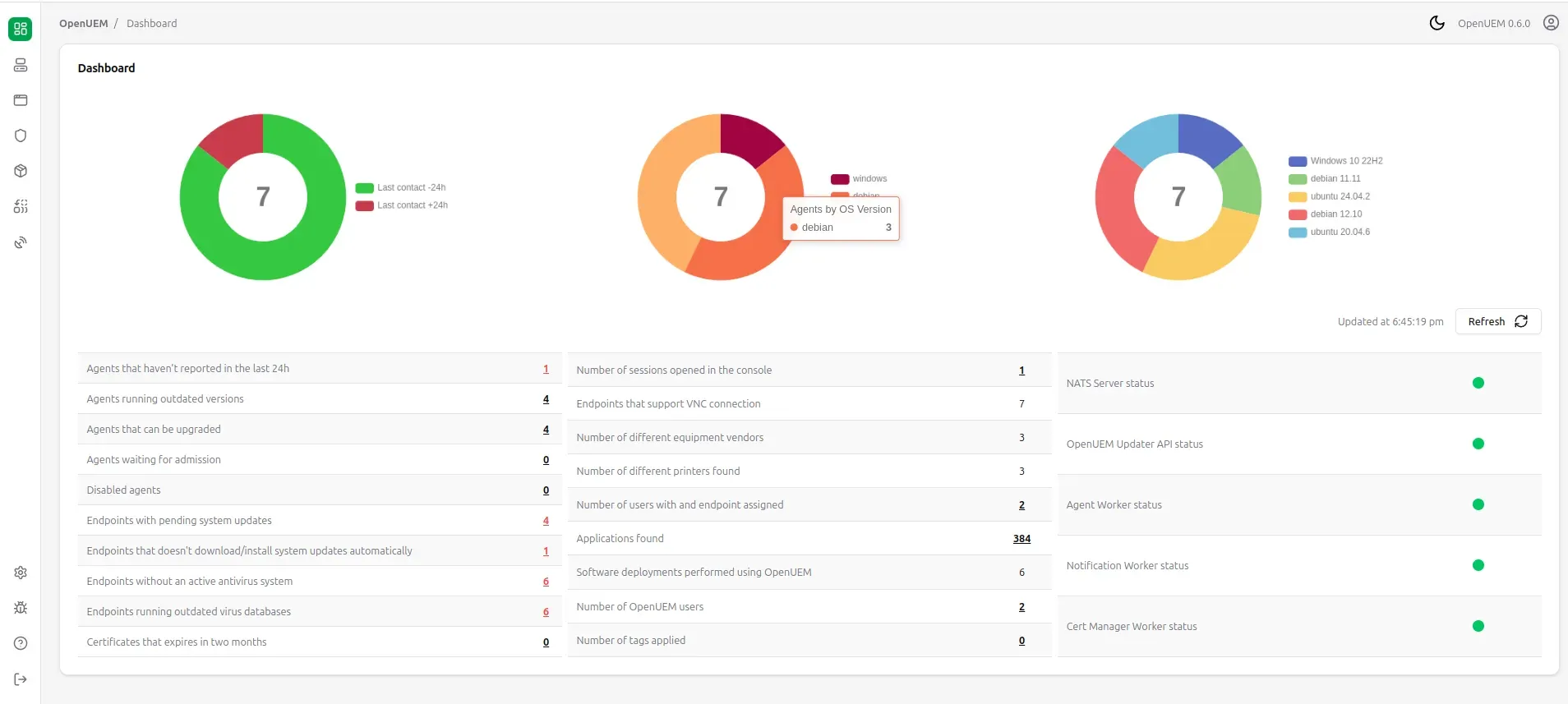
OpenUEM console dashboard from the official documentation, showing agent counts, operating-system breakdown and the status of the NATS, worker and updater services.
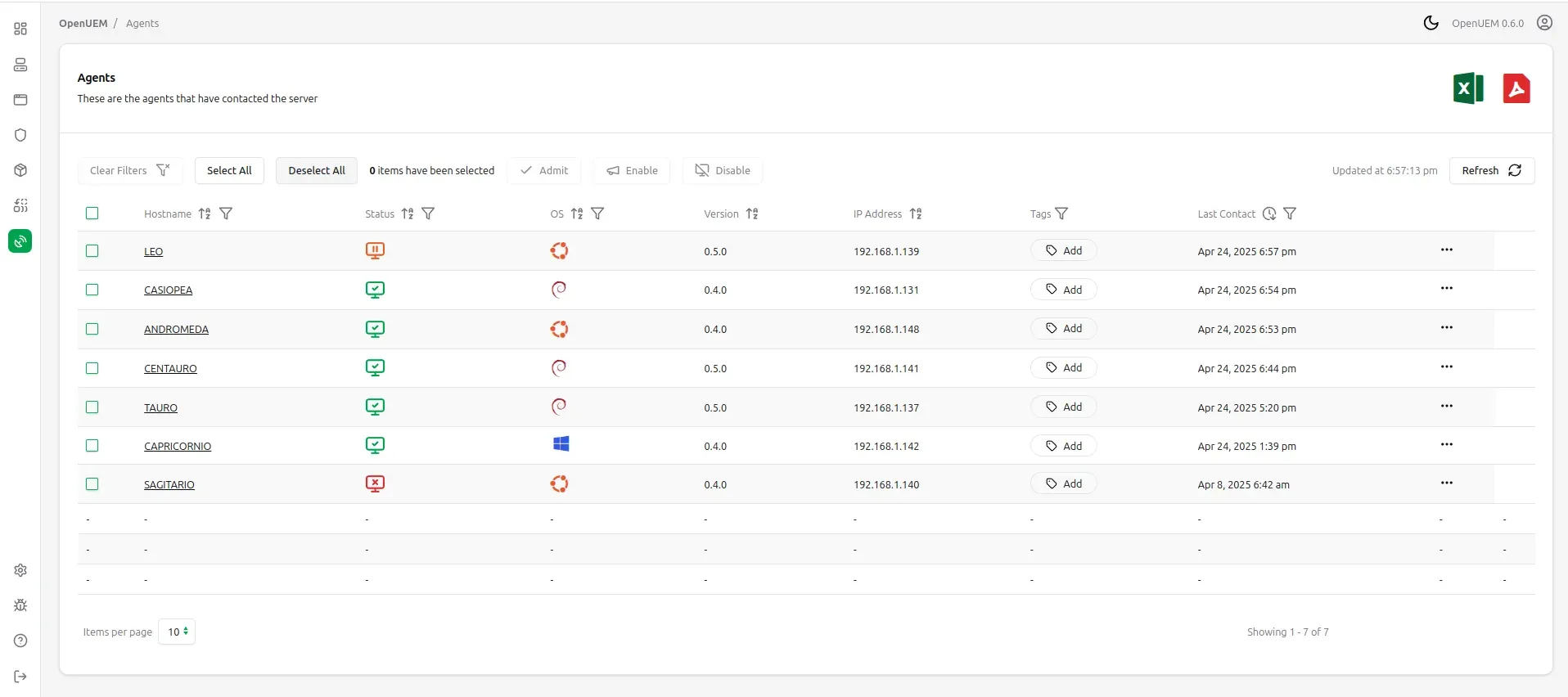
Agents list from the official documentation, with bulk admit, enable and disable actions and PDF and Excel report buttons.
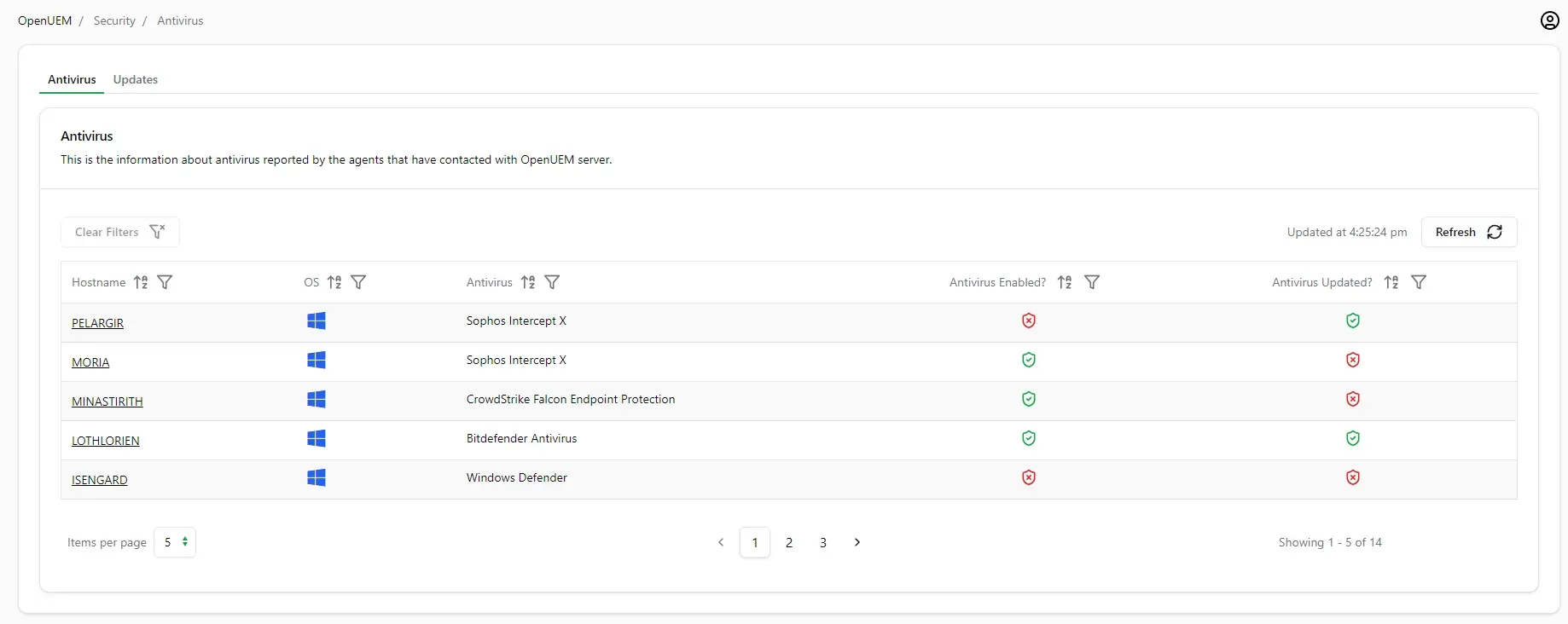
Security view from the official documentation showing antivirus product, enabled state and signature freshness per Windows endpoint.
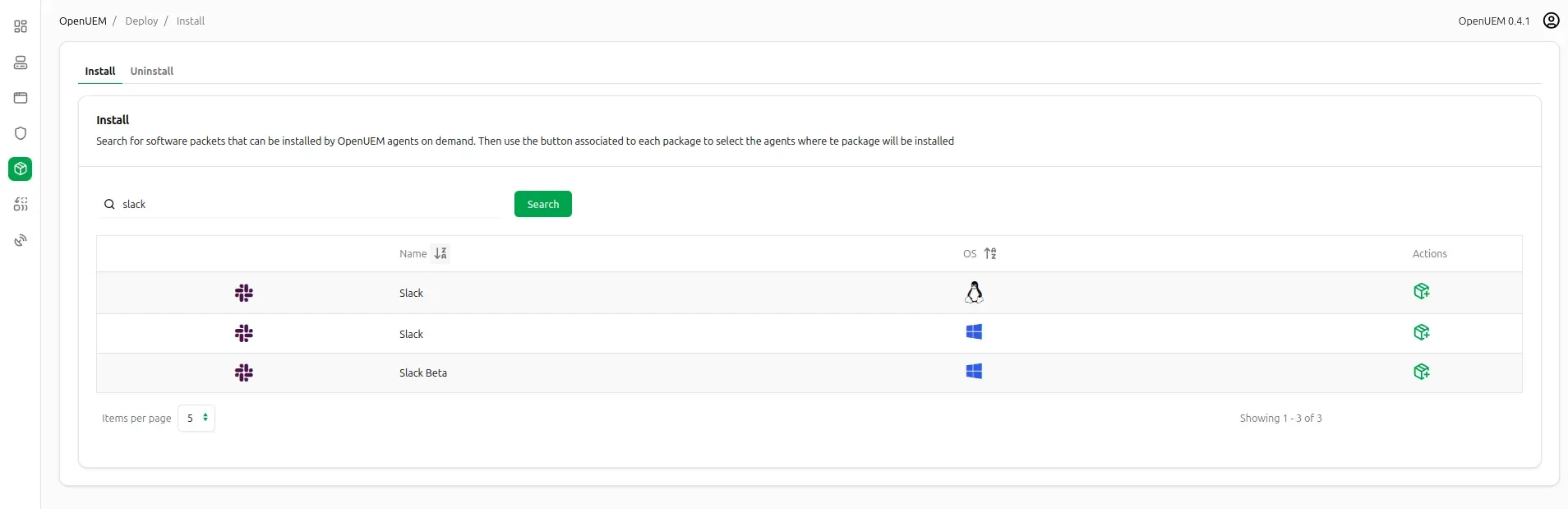
Package deployment page from the official documentation: search a package, then choose the endpoints where it is installed.
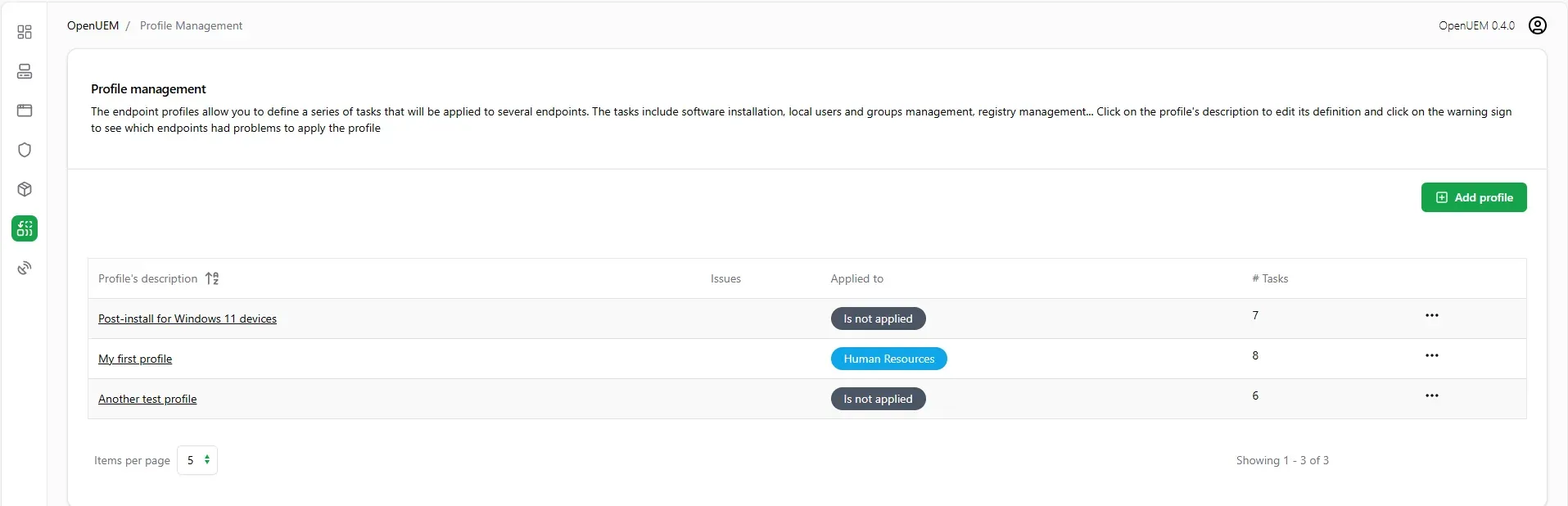
Profile management view from the official documentation, listing profiles, the tags they apply to and how many tasks each contains.
Source: official OpenUEM project page.
Key capabilities
- Self-hosted server on Windows The server components install on Windows desktop or server editions with an installer that is listed with its SHA256 checksum on the Windows downloads page. The installer asks for the database connection and DNS names. The documentation warns that Microsoft Edge or SmartScreen may flag the download as uncommon because the project is new, so verify the checksum before overriding the warning.
- Self-hosted server on Linux Debian 12 and Ubuntu 24.04 install the
openuem-serverpackage after the signed apt repository is added; amd64 and arm64 are both published. RedHat based distributions install individual packages such asopenuem-console,openuem-agent-workerandopenuem-cert-managerfrom the rpm repository. The Linux server guide lists the certificate and configuration steps for each. - Docker and Podman deployment The container guide uses docker compose or podman compose to run all components on one host, with an optional Caddy reverse proxy. The example environment file sets up a demo domain; production use needs your own domain, a random JWT key of 32 characters and the certificate import steps. Deployments created before December 22, 2025 need the documented migration because the compose file changed.
- Agents for Windows, Linux and macOS The agent reports inventory, applies profiles, installs software and can run an SFTP server and a VNC proxy when enabled. A new agent waits in an admission state until an administrator approves it, at which point it receives its certificates. Windows Server is supported with limits, and macOS packages exist for both Intel (amd64) and Apple Silicon (arm64).
- Hardware, OS and software inventory The computer view lists hardware model, memory, physical and logical disks, shares, printers, network adapters, monitors and installed software, with per-endpoint tabs. Computers can carry a nickname, notes, tags and custom metadata, and can be assigned an endpoint type such as all-in-one. Domain information is shown for Windows agents since 0.11.0.
- Security and update status The security views show whether the Windows antivirus is enabled and its signature database current, whether BitLocker is enabled on logical disks, whether Windows updates are applied with their history, and whether Linux systems have pending security updates. The dashboard counts endpoints without an active antivirus or with pending updates.
- Software deployment Administrators search for a package and choose target endpoints. Windows uses Microsoft WinGet and its repositories, Linux uses Flatpak with Flathub, and macOS uses Homebrew. Packages installed through OpenUEM can also be uninstalled from the console. Availability depends on what those package sources publish, and you can pin a WinGet package version for a task.
- Configuration profiles A profile groups ordered tasks applied to all endpoints or to endpoints with chosen tags. Windows tasks cover WinGet packages, MSI packages, registry keys, local users and groups, and basic PowerShell scripts. Linux and macOS profiles cover Flatpak or Brew packages, local users and groups and shell scripts, applied through Ansible. Agents check for new profiles every 30 minutes by default, and a failed task does not stop the remaining tasks.
- Remote assistance with VNC, RDP and RustDesk The console can start a VNC session using TightVNC, UltraVNC or TigerVNC on Windows and x11vnc on Linux, started on demand with a one-time password and stopped when the window closes. RDP is supported for GNOME on Wayland, and RustDesk can be configured on endpoints by the agent, including a self-hosted RustDesk server and key.
- SFTP file browser The console can browse, download and upload files on an endpoint's logical disks through the agent's SFTP server, which requires a certificate to log in. The feature has to be enabled on the agent. It is meant for support tasks rather than for bulk file distribution.
- Power management and Wake on LAN Computers on the same LAN can be woken with Wake on LAN, and shutdowns or reboots can be scheduled from the console. Wake on LAN depends on the endpoint firmware and network, so test it on a sample machine first.
- NetBird integration Since 0.11.0 the console can install, register and manage NetBird clients, and the SFTP feature will use a NetBird connection when one exists. This helps with endpoints in remote locations; the console can also flag which endpoints appear to be remote. See NetBird for the network side.
- Multi-tenancy with organizations and sites One installation can hold several organizations, each with sites. Agents are tied to a site, tags and metadata are per organization, and profiles belong to a site. Organizations can override global settings. Moving an endpoint between organizations deletes its tags and metadata.
- Console authentication options Sign-in works with username and password, with client certificates, or with OpenID Connect using Authelia, Authentik, Keycloak or Zitadel. Administrators can show or hide self-registration and choose whether accounts created through an identity provider are approved automatically or manually.
- Reports and exports The agents, computers, security and software views can generate PDF or CSV reports, and a computer's inventory can be exported as PDF or XLSX since 0.10.0. Tables are sortable and filterable, with a configurable number of rows per page.
- Certificate-based security model Components authenticate each other with mutual TLS, agents and workers use their own certificates, and an OCSP responder validates them. A bundled cert-manager tool can create the certificate authority and certificates, or you can supply your own with tools such as CFSSL or EasyRSA. Let's Encrypt cannot replace this client-certificate chain, according to the FAQ.
- Server and agent updates A server updater service and an agent updater service let administrators update components from the console. The dashboard shows agents running outdated versions and agents that can be upgraded, plus the status of NATS, the workers and the updater API.
Where OpenUEM fits
Building an inventory of mixed Windows, Linux and macOS machines
Install the server first, then deploy the agent with the CA and SFTP certificates from the server's certificate folder, silently from the command line or with the installer wizard. Admit each agent in the console, then check the computers and software views against a machine you know well. Add tags and metadata early so filters and PDF or CSV reports match how your organization is structured. The computers documentation explains each tab.
Checking security posture and pending updates
Use the security views to find Windows endpoints with the antivirus disabled or its signatures outdated, BitLocker off, or updates missing, and Linux machines with pending security updates. Remember that antivirus detection is a Windows feature in the screenshots and documentation, so Linux and macOS rows can show it as unsupported. Treat the list as a reporting aid and confirm findings on the endpoint before acting.
Deploying software and applying a baseline
Search the package catalog for the application, select target endpoints and watch the task report. For a repeatable baseline, create a profile with registry keys, local groups, WinGet packages and a PowerShell script, attach it to a tag such as new laptops, and read the profile run details introduced with agents 0.11.0 and server 0.12.0. A profile run must finish within 24 hours or it is aborted. The profiles guide covers MSI paths and one-time scripts.
Helping a user remotely
Open the endpoint's remote assistance tab and check which options the console reports as available. VNC needs a supported server on the endpoint, RDP applies to GNOME on Wayland and RustDesk requires its client to be configured. The VNC notes show the TightVNC command that avoids installing it as a service. Close the session afterwards so the temporary server stops.
Running several customers or sites from one console
Create an organization per customer or business unit and a site per location, and give each agent its organization and site ID at install time. Keep tags, metadata and profiles aligned to those boundaries, and set per-organization settings only where they differ from the global ones. Test the move of an endpoint between organizations on a spare machine, because tags and metadata are deleted.
Planning an upgrade and keeping certificates healthy
Read the server and agent release notes, back up PostgreSQL and the certificate folder, then update servers before agents. Watch the dashboard for certificates that expire within two months. For containers, follow the update instructions that recreate the cert-manager image. See the server release notes for breaking changes between versions.
Install
git clone https://github.com/open-uem/openuem-dockerReviews of OpenUEM
Experiences shared by the iThub community.
Excellent open-source alternative to commercial RMM tools
OpenUEM is exactly what the IT community needed - a genuinely open-source endpoint manager that doesn't cut corners on security. The certificate-based authentication, multi-platform agent support (Windows, Linux, macOS), and integrated package management via Winget/Flatpak/Homebrew make it a serious contender against paid solutions. The web console is clean and responsive, and the Docker deployment makes getting started straightforward. Active development with regular releases. Highly recommended for sysadmins and small MSPs looking for a self-hosted RMM without licensing costs.
Write a review
Loading review form…