

What is Excalidraw?
Excalidraw is an open-source virtual whiteboard for sketching diagrams, wireframes and notes in a hand-drawn visual style. One TypeScript monorepo produces two things: the @excalidraw/excalidraw React component, which other applications embed as an editor, and the web app at excalidraw.com, which the README describes as a minimal showcase built on that component. All of it, including the excalidraw.com app source, is MIT licensed. The repository was created in January 2020 and is maintained by the Excalidraw team, which also operates the paid Excalidraw+ service.
The editor package and the hosted app differ in scope. The package provides the infinite canvas, drawing tools, shape libraries, localization, dark mode and export to PNG, SVG, clipboard and the JSON-based .excalidraw format. Real-time collaboration, end-to-end encrypted shareable links, offline Progressive Web App support and browser autosave belong to the excalidraw.com app. The package FAQ states that collaboration is not built into the package, because the transport depends on each host application; the APIs needed to build it are exposed instead.
Distribution follows the same split. Developers install the component with npm or Yarn next to React and React DOM, with versions 17, 18 and 19 accepted as peer dependencies. Teams that want a whiteboard under their own domain can run the client image published on Docker Hub as excalidraw/excalidraw, a static build served by nginx. Live collaboration in a self-hosted setup needs the separate excalidraw-room Socket.IO server. Excalidraw+ at plus.excalidraw.com is the hosted commercial product with cloud storage, team management and sharing permissions.
The latest tagged release is v0.18.1, published April 21, 2026. It is a security patch for the 0.18 line: it updates @excalidraw/mermaid-to-excalidraw to 2.2.2 to carry the upstream Mermaid XSS fix for CVE-2025-54881. The previous feature release, 0.18.0 from March 2025, added a command palette, multiplayer undo and redo, text wrapping, a font picker with a Chinese, Japanese and Korean font, elbow arrows, flowchart creation, scene search, image cropping and element linking. It also replaced the UMD bundle with ES modules, which requires a TypeScript moduleResolution of bundler, node16 or nodenext.
Work on the master branch continues ahead of the next release. The package changelog lists unreleased changes from October 2026, including a breaking export API that replaces exportToCanvas, exportToBlob and exportToSvg with a single exportScene function, a programmatic selection API and arrows that are no longer clipped to frames. Unreleased builds are published as @excalidraw/excalidraw@next. Excalidraw does not validate UML, BPMN or other formal notations, and its sketchy rendering is a deliberate style rather than a precision drafting mode.
Excalidraw screenshots
Explore the interface. Open a screenshot to view it at full size.
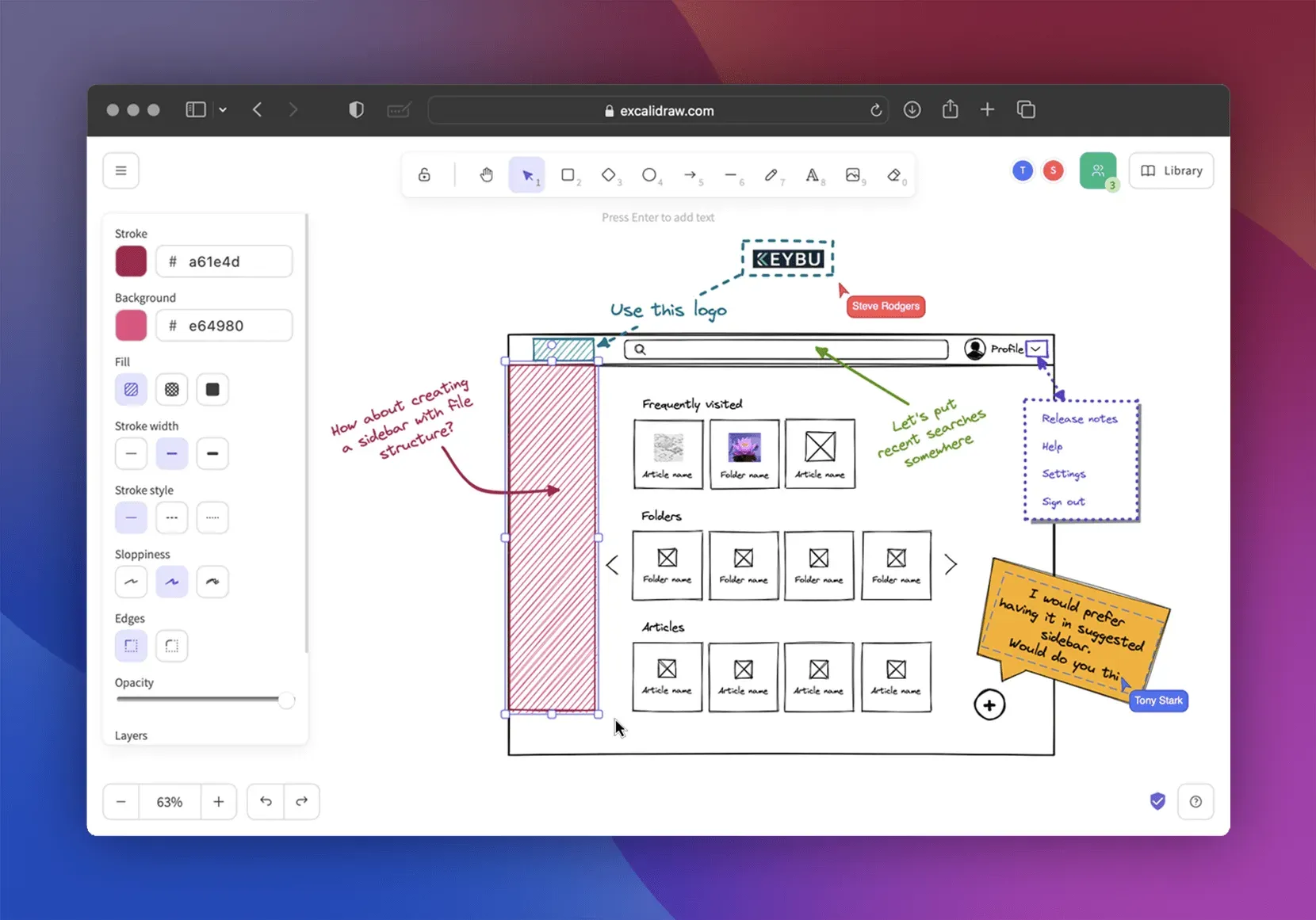
Official product showcase: the editor with the properties panel, toolbar, a wireframe, comments and two named collaborator cursors.
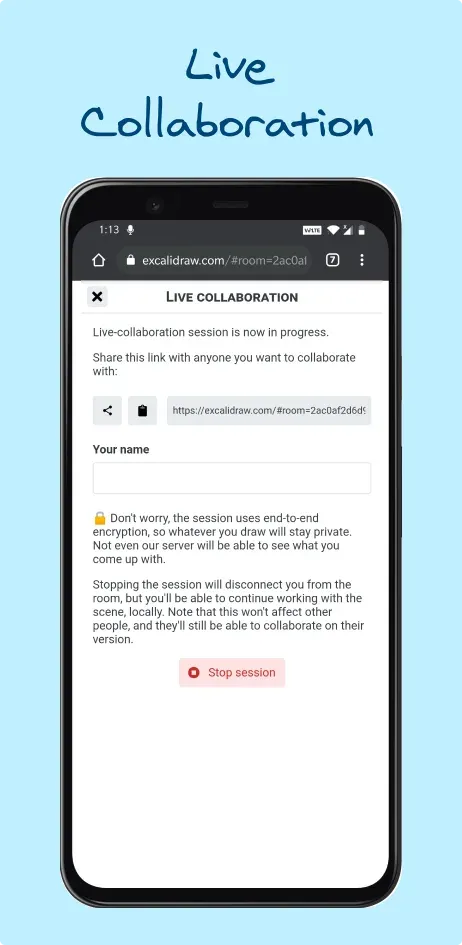
Official app screenshot of the live collaboration dialog: room link, name field, encryption notice and Stop session button.
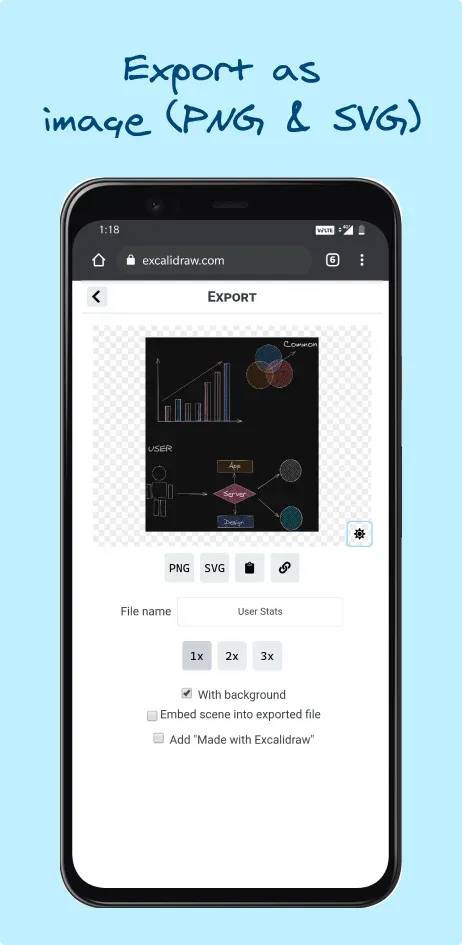
Official app screenshot of the export dialog with PNG and SVG output, 1x to 3x scale, background and embed scene options.
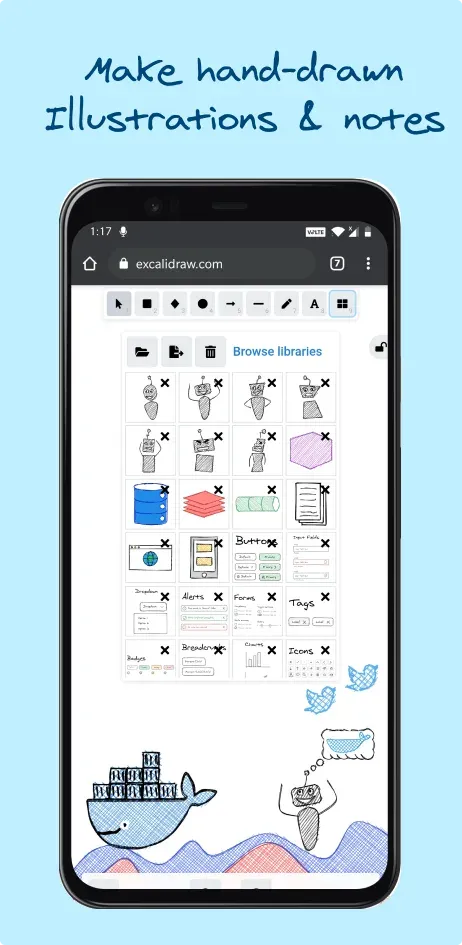
Official app screenshot of the library panel with imported shape libraries and a hand-drawn illustration on the canvas.
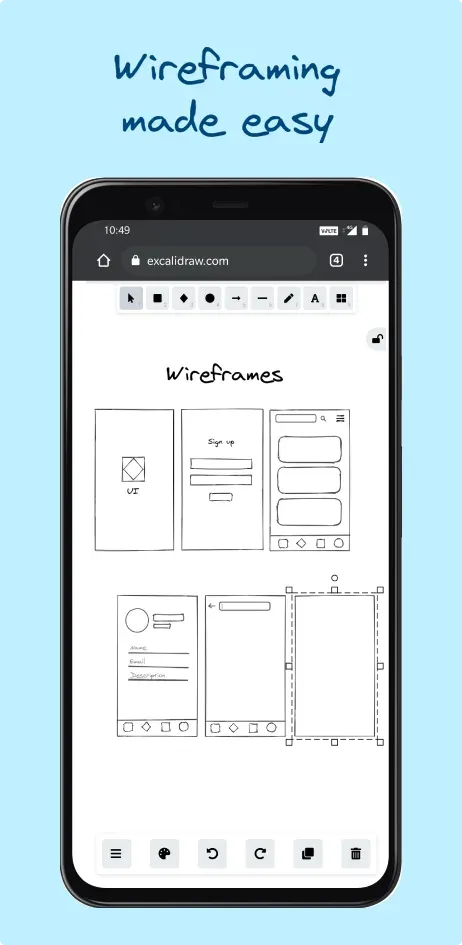
Official app screenshot of mobile wireframes drawn on the canvas, shown in an earlier version of the toolbar.
Source: official Excalidraw project page.
Key capabilities
- Infinite canvas and core drawing tools The toolbar offers selection, hand panning, rectangle, diamond, ellipse, arrow, line, free draw, text, image and eraser, each with a number key shortcut. Zoom, panning and undo and redo are available on every scene. A lock control keeps the active tool selected for drawing several shapes in a row.
- Hand-drawn style controls The properties panel sets stroke and background colors by hex value, hachure, cross-hatch or solid fill, stroke width, solid, dashed or dotted stroke style, sloppiness, sharp or rounded edges, opacity and layer order. Lower sloppiness gives cleaner lines for diagrams that need to look tidier, but the rendering never becomes precise CAD-style geometry.
- Arrow binding, elbow arrows and flowcharts Arrows bind to shapes and stay attached when shapes move, and they can carry text labels. Version 0.18.0 added elbow arrows for orthogonal connectors and a flowchart mode that creates linked nodes from the keyboard. The unreleased master branch changes Alt plus arrow navigation to move to the visually nearest node and lets arrows cross frame boundaries.
- Text, fonts and multilingual content Text elements wrap inside containers, and a font picker offers several hand-drawn and plain fonts, including a font for Chinese, Japanese and Korean added in 0.18.0. SVG export subsets fonts so exported files only carry the glyphs used. Fonts load from a CDN by default; self-hosted builds can serve them locally through
window.EXCALIDRAW_ASSET_PATH, as described in the installation guide. - Images, frames, links and search Images can be placed on the canvas and cropped since 0.18.0. Frames group content into named areas that can be exported individually. Elements can link to other elements in the same scene, scene search finds text across the canvas, and a command palette exposes actions by name.
- Shape libraries Reusable libraries of icons, UI components, cloud and network symbols can be browsed on libraries.excalidraw.com and imported into a scene. On the free app the personal library is stored in the browser, while Excalidraw+ keeps libraries on the server. Library items are ordinary Excalidraw elements and can be edited after insertion.
- Image export Scenes or selections export to PNG, SVG or the clipboard, at 1x, 2x or 3x scale, with or without background and in light or dark theme. The export dialog can embed the scene data into the PNG or SVG, so the image can later be reopened in Excalidraw for editing. Excalidraw+ adds export of frames to PDF and PPTX.
- Open .excalidraw JSON format A saved scene is plain JSON with
type, schemaversion,source, anelementsarray, anappStateobject and afilesmap that stores images as data URLs. The JSON schema documentation also covers the clipboard format and element creation timestamps. Because images are inlined, files with many screenshots grow quickly. - Mermaid to Excalidraw conversion The separate
@excalidraw/mermaid-to-excalidrawpackage parses Mermaid definitions into skeleton elements thatconvertToExcalidrawElementsturns into editable shapes. According to its documentation, only flowcharts become editable rectangles, circles, diamonds and arrows; other diagram types are inserted as an image. Release 0.18.1 updated it to 2.2.2 to pick up the Mermaid XSS fix. - Live collaboration on excalidraw.com Starting a session creates a room link that others open in their browser; participants appear with named cursors. The session dialog states that the session is end-to-end encrypted so the server cannot read the drawing. Stopping a session disconnects you but keeps a local copy of the scene, and 0.18.0 made undo and redo work per user in multiplayer scenes.
- Encrypted shareable links Exporting a read-only link encrypts the scene in the browser with AES-GCM and a 128-bit key generated through the Web Crypto API. The server stores only ciphertext, and the key travels in the URL fragment after
#, which browsers do not send to the server. The design is explained in the project's end-to-end encryption article; anyone holding the full link can decrypt it. - Offline use and local autosave Excalidraw.com is a Progressive Web App that works offline and autosaves the current scene to browser storage without an account. Clearing site data or switching browsers loses that copy, so save important scenes to a
.excalidrawfile. The free plan includes one infinite scene in the browser. - React component and API The
@excalidraw/excalidrawpackage exports anExcalidrawcomponent with props such asinitialData,onChange,UIOptionsand an imperative API for reading and updating the scene. Child components such as MainMenu, WelcomeScreen, Sidebar and Footer customize the interface. The API reference documents props, utilities and constants; the container must have non-zero width and height. - Self-hosted Docker client The official image runs with
docker run --rm -dit --name excalidraw -p 5000:80 excalidraw/excalidraw:latest. The Dockerfile builds the app with Node.js 24 and serves the static output from nginx on port 80, with Sentry reporting disabled. The repository's production environment file points collaboration, share links and libraries at excalidraw.com backends, so rebuild with your own values to keep those requests inside your network. - Local development setup Contributors need Node.js 18 or newer, Yarn and Git;
yarn startserves the app onlocalhost:3000. A Docker Compose file offers the same development server without a local Node.js install. The development guide lists test and formatting commands. - Localization and dark mode The interface ships with dozens of locale files maintained through Crowdin, and the editor supports a dark theme for both editing and export. Language can be switched from the main menu. Some fonts and translations may be less complete than English.
- Excalidraw+ plans The pricing page lists a free plan with the full editor, one scene, unlimited collaborators and 10 generative AI requests per day. Plus costs 6 USD per user per month, with about 14 percent off on annual billing and a 14-day trial, and adds unlimited scenes and folders, cloud storage with access management, comments, presentations, voice hangouts, 100 AI requests per day or your own key, and a REST API and MCP server in public beta. It states SOC 2 Type 2 compliance.
Where Excalidraw fits
Sketching a system architecture during a meeting
Open excalidraw.com or your self-hosted instance, start from rectangles and bound arrows, and import a cloud or network shape library for recognizable icons. Use frames to separate the current state from the proposed design, then export each frame as PNG or SVG for the ticket or design document. Check that arrows stay attached when boxes move, and save a .excalidraw file so the diagram can be edited later instead of redrawn.
Wireframing a screen before visual design
Use rectangles, text and a UI component library to lay out screens at low fidelity, keeping sloppiness high so reviewers do not read the wireframe as final design. Comments placed as text or sticky-note shapes can be resolved in a live session. When the layout is agreed, hand over an exported SVG and move to a dedicated interface design tool for spacing, components and prototypes.
Embedding a whiteboard in your own product
Install @excalidraw/excalidraw with React, import the stylesheet and render the component inside a container with explicit dimensions. Persist scenes by serializing onChange output to your backend, and load them through initialData. Check bundler compatibility with ES modules, decide whether fonts load from the CDN or from your own assets, and plan collaboration yourself: the package does not include a sync layer.
Running a private whiteboard for an internal team
Deploy the Docker image behind your reverse proxy with TLS, then decide which hosted services you accept. A stock build sends collaboration, share-link storage and library requests to excalidraw.com backends; to keep them internal, rebuild with your own environment values and run excalidraw-room for WebSocket rooms. Test that a two-person session works through your proxy and that no request reaches an external host you did not approve.
Converting Mermaid diagrams into editable sketches
Paste a Mermaid flowchart into the Mermaid import dialog, or call parseMermaidToExcalidraw from the mermaid-to-excalidraw package, and adjust layout and labels by hand afterwards. Only flowcharts convert to editable elements; sequence, class and other diagram types arrive as an image. If you use the package directly, require at least version 2.2.2 for the Mermaid XSS fix.
Keeping diagrams next to code
Commit .excalidraw files, or PNG and SVG exports with the scene embedded, beside the documentation they illustrate. The JSON is diffable, although element order and coordinates make reviews noisy, and inlined images enlarge files. The third-party VS Code extension linked from the README opens these files inside the editor. Check that exported images still open for editing before deleting the source file.
Install
docker run --rm -dit --name excalidraw -p 5000:80 excalidraw/excalidraw:latestReviews of Excalidraw
Be the first to share your experience with Excalidraw.
Write a review
Loading review form…